M6W Wide Cuff - Blood pressure monitor OMRON - Free user manual and instructions
Find the device manual for free M6W Wide Cuff OMRON in PDF.


User questions about M6W Wide Cuff OMRON
0 question about this device. Answer the ones you know or ask your own.
Ask a new question about this device
Download the instructions for your Blood pressure monitor in PDF format for free! Find your manual M6W Wide Cuff - OMRON and take your electronic device back in hand. On this page are published all the documents necessary for the use of your device. M6W Wide Cuff by OMRON.
USER MANUAL M6W Wide Cuff OMRON
natural_image
Illustration of a person sitting on a curved surface with an arrow indicating downward motion (no text or symbols)Made in Vietnam. Fabrics to Vietnam
Hargazell in Vietnam Canada e Barmay
PROCESSED IN CHINA
OMRON
natural_image
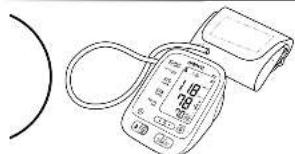
Line drawing of a blood pressure monitor with a cap and cord (no text or symbols)Automatic Blood Pressure Monitor
Model M6W
Instruction Manual
Intelli sense
All for Healthcare
English
Françale
Deutsch
Shillane
telemis
Español
Nederla
Bryvani
العربية
[Unreadable]
Check following components!
text_image
1 2 c d G M K a bContents
Thank you for purchasing the OMRON MW Automatic Blood Pressure Monitor. The OMRON MW is a compact, fully automatic blood pressure monitor, operating on the caseometric principle, it measures your blood pressure and pulse rate simply and quickly. For comfortable controlled inflation without the need of pressure pre-setting or re-inflation the device uses its advanced 'tmellSense' technology.
Intended Use This product is designed to measure the blood pressure and pulse rate of people within the range of the designated arm cuff, following the instructions in this instruction manual. It is mainly designed for general household use. Please read the Important Safety Information in the instruction manual before using the unit.
Important Society Information 1. Overview....3 2. Preparation. 2.1 Trading Forfeering for Seconders....4 2.2 Sailing for Diver and Trim....5 3. Using the Unit....6 3.1 Applying the 4m Court....6 3.2 How to fit Corroly....7 3.3 Tailing a Reading....6 3.4 Using the Varsity - London....11
- Troubleshooting and Maintenance 13 4.1 The terms and Error Messages 15 4.2 Troubleshooting 15 4.3 Maintenance 17 4.4 Storage 18
- Optional Parts 19
- Technical Data 20
- Some Useful Information about Bleed Pressure 23
Please read this instruction manual thoroughly before using the unit. Please keep for future reference. For specific information about your own blood pressure, CONSULT YOUR DOCTOR.
Important Safety Information
Consult your doctor prior to using in pregnancy or if diagnosed with arrhythmia or arteriosclerosis. Please read this section carefully before using the unit.
Warning:
- Indicates a potentially hazardous situation which, if not avoided, could result in death or serious injury.
• Always consult your doctor. Self-diagnosis of measurement results and self-treatment are dangerous. - People with severe blood flow problems, or blood disorders, should consult a doctor before using the unit, as cuff inflation can cause internal bleeding.
(General Usage)
(AC Adapter Usage)
- Never plug in or unplug the power cord from the electric outlet with wet hands.
(Battery Usage)
- If battery fluid should get in your eyes, immediately rinse with plenty of clean water. Consult a doctor immediately.
Caution:
- Indicates a potentially hazardous situation which, if not avoided, may result in minor or moderate injury to the user or patient or damage to the equipment or other property.
(General Usage)
- Do not leave the unit unattended with infants or persons who cannot express their consent.
- Do not use the unit for any purpose other than measuring blood pressure.
- Use only the approved arm cuff for this unit. Use of other arm cuffs may result in incorrect measurement results.
- Make sure that the air tube is not wrapped around other parts of your body when taking measurements. This could result in injury when the air pressure in the air tube is increased.
- Do not leave the cuff wrapped on the arm if taking measurements during the night. This could result in injury.
- Do not use a mobile phone or other devices that emit electromagnetic fields, near the unit. This may result in incorrect operation of the unit.
- Do not operate the unit in a moving vehicle (car, airplane).
- To inflate the cuff manually, refer to Section 3.3. If the cuff is over inflated, it can cause internal bleeding.
Important Safety Information
(AC Adapter Usage)
- Use only the original AC adapter (optional) designed for this unit. Use of unsupported adapters may damage and/or may be hazardous to the unit.
- Plug the AC adapter into the appropriate voltage outlet. Do not use a multiple-tap.
- Do not use the AC adapter if the unit or the power cord is damaged. Turn off the power and unplug the power cord immediately.
(Battery Usage)
- If battery fluid should get on your skin or clothing, immediately rinse with plenty of clean water.
- Use only four "AA" alkaline or manganese batteries with this unit. Do not use other types of batteries.
- Do not insert the batteries with their polarities incorrectly aligned.
- Replace old batteries with new ones immediately. Replace all four batteries at the same time.
- Remove the batteries if the unit will not be used for three months or more.
- Do not use new and used batteries together.
General Precautions
- Do not apply strong shocks and vibrations to or drop the unit and arm cuff.
- Do not take measurements after bathing, drinking alcohol or caffeine, smoking, exercising or eating.
- Do not forcibly bend the arm cuff or bend the air tube excessively.
- When removing the air tube, pull on the air plug at the connection with the main unit not the tube itself.
- Do not inflate the arm cuff when it is not wrapped around your arm.
- Read and follow the “Important information regarding Electro Magnetic Compatibility (EMC)” in the Technical Data Section.
- Read and follow the “Correct Disposal of This Product” in the Technical Data Section when disposing of the device and any used accessories or optional parts.
1.Overview
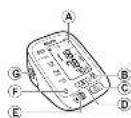
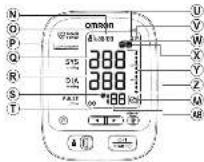
Open the rear cover page to read following:
The alphabet in the rear cover page correspond to those in the body page.
Main unit
Ⓐ Display
⑧ Memory button
© O/I START ( ◇button
D Up/Down (▲buttons
⑤ USER ID Selection Switch (A / B)
⑤ Date/Time setting ( ) button
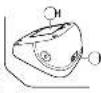
© Air Jack
⑧ Battery compartment
① AC adapter jack (for optional AC adapter)
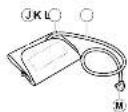
Arm cuff
① Arm cuff (Wide Range Cuff: arm circumference 22-42 cm)
© Marker
⑤ Air tube
M Air plug
Display
NDate/Time display
©USER ID symbol (A / B)
©Dual Check System
@Systolic blood pressure
®Diastolic blood pressure
⑤Heartbeat symbol
(Flashes during measurement)
①Battery low symbol
ⒶAverage value symbol
⑧ Memory symbol
W Irregular heartbeat symbol
☒ Movement error symbol
Y Blood pressure level indicator
②Deflation symbol
AA Cuff wrapping guide
AB Pulse display and Memory number
2.Preparation
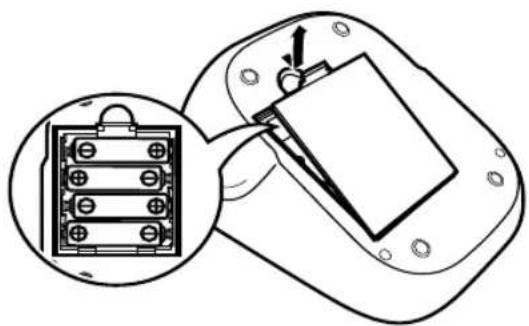
2.1 Installing/Replacing the Batteries
- Remove the battery cover.
- Insert four "AA" batteries as indicated in the battery
compartment and then replace the battery cover.
natural_image
Diagram showing a device with a connector and internal components, no text or symbols presentNotes:
- If the battery low symbol ( ) appears on the display, turn the unit off then replace all batteries at the same time.
- The measurement values continue to be stored in memory even after the batteries are replaced.
Disposal of used batteries should be carried out in accordance with the national regulations for the disposal of batteries.
2. Preparation
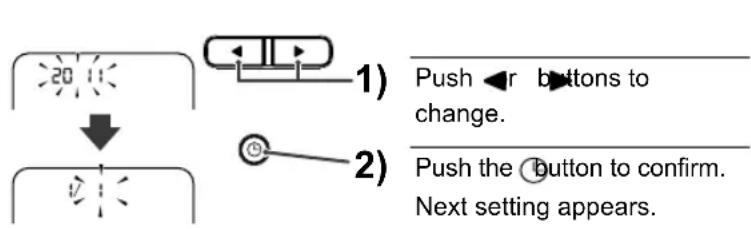
2.2 Setting the Date and Time
- Press the button.
- Set the monitor to the correct date and time before taking a measurement for the first time.
text_image
1) Push ←r buttons to change. 2) Push the button to confirm. Next setting appears.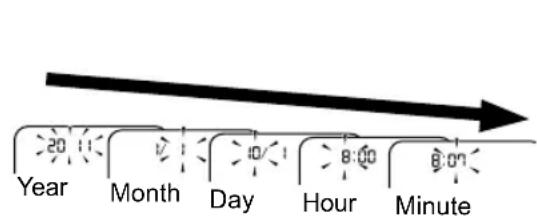
text_image
Year Month Day Hour MinuteEN
3. Press the O/I START button to store the setting.
Notes:
- If the batteries have been removed for 30 seconds or more, the date and time setting will need to be reset.
- If the date and time are not set, “-:-” appears during or after measurement.
3. Using the Unit
Open both the front and rear covers to read following:
The alphabet and number in the cover page correspond to those in the body page.
3.1 Applying the Arm Cuff
Remove tight-fitting clothing or tight rolled up sleeve from your upper arm. Do not place the cuff over thick clothes.
- Insert Ⓜ the air plug into Ⓖ the air jack.
- Put your arm through the cuff loop.
- Position the arm correctly.
The bottom edge of the cuff should be a to 2 cm above the elbow. Marker (arrow under tube) is centred on the middle of your inner arm. Close the fabric fastener FIRMLY.
Notes:
- When you take a measurement on the right arm, air tube will be at the side of your elbow. Be careful not to rest your arm on the air tube. --- b
- The blood pressure can differ between the right arm and the left arm, and therefore also the measured blood pressure values can be different. OMRON recommends to always use the same arm for measurement. If the values between the two arms differ substantially, please check with your physician which arm to use for your measurement.
3. Using the Unit
3.2 How to Sit Correctly
To take a measurement, you need to be relaxed and comfortably seated, under comfortable room temperature. No bathing, drinking alcohol or caffeine, smoking, exercising or eating 30 minutes before taking a measurement.
- Sit on a chair with your feet flat on the floor.
- Sit upright with your back straight. --- c
- The cuff should be at the same level as your heart. --- [d]
3. Using the Unit
3.3 Taking a Reading
Notes:
- To cancel a measurement, press the O/I START button to turn the unit off and to release the air in the arm cuff.
- Remain still while taking a measurement.
The monitor is designed to take measurements and store the measurement values in the memory for two people using USER ID A and USER ID B.
1. Select your USER ID (A or B).
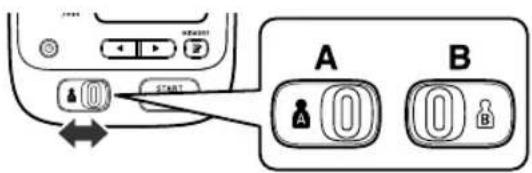
text_image
Diagram showing device connection with labeled buttons and directional arrows, likely from a computer interface or system diagram.2. Press the O/I START button.
The cuff will start to inflate automatically.

flowchart
graph TD
    A["Dual Check System"] --> B["START 8:00"]
    B --> C["INFLATE 78"]
    C --> D["DEFLATE 152"]
    D --> E["END 1.18 78 70"]
    E --> F["COMPLETE 1.18 78 70"]
    F --> G["Cuff Wrapping Guide"]
    G --> H["ONION 250"]
If your systolic pressure is more than 220 mmHg
After the cuff starts to inflate, press and hold the O/I START button until the monitor inflates 30 to 40 mmHg higher than your expected systolic pressure.
Notes:
• The monitor will not inflate above 299 mmHg.
- Do not apply more pressure than necessary.
3. Using the Unit
Dual Check System
Press the O/I START button, then the Dual Check System lamp lights and the unit starts detecting a device error. If the unit is accurate and functioning correctly, the Dual Check System lamp remains lit during the measurement. If an error is detected, the Dual Check System lamp flashes and "Er" will appear on the display.
Cuff Wrapping Guide
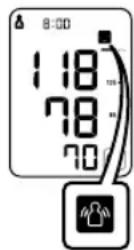
The Cuff Wrapping Guide is a unique feature that indicates if the cuff is not wrapped tightly enough around the arm. Even when the (1) displayed, a blood pressure reading will be taken.
Note: This reading is NOT reliable due to the incorrect wrapping of the cuff. Please wrap the cuff again, taking care to wrap it correctly and take the measurement again.
When the OK is displayed, the cuff is correctly wrapped tightly enough on the arm and the reading is accurate and reliable.
3. Remove the arm cuff.
4. Press the O/I START button to turn the monitor off.
The monitor automatically stores the measurement in its memory. It will automatically turn off after 2 minutes.
Important:
- Recent research suggests that the following values can be used as a guide to high blood pressure for measurements taken at home.
| Systolic Blood Pressure Above 135 mmHg |
| Diastolic Blood Pressure Above 85 mmHg |
This criteria is for home blood pressure measurement.
For professional office blood pressure measurement criteria, please refer to Chapter 7.
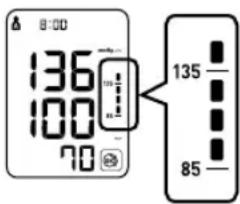
text_image
8:00 136 100 70 135 853. Using the Unit
- Your blood pressure monitor includes an irregular heartbeat feature. Irregular heartbeats can influence the results of the measurement. The irregular heartbeat algorithm automatically determines if the measurement is usable or needs to be repeated. If the measurement results are affected by irregular heartbeats but the result is valid, the result is shown together with the irregular heartbeat symbol ( ) if the irregular heartbeats cause the measurement to be invalid, no result is shown. If the irregular heartbeat symbol ( ) is shown after you have taken a measurement, repeat the measurement. If the irregular heartbeat symbol ( ) shown frequently, please make your doctor aware of it.
- If you move during measurement, the movement error symbol (AB) will appear on the display. Keep still and repeat the measurement.

Note: Wait 2-3 minutes before taking another blood pressure measurement. Waiting between readings allows the arteries to return to the condition prior to taking the blood pressure measurement.
Warning:
Self-diagnosis of measured results and treatment are dangerous. Please follow the instructions of your doctor.
3. Using the Unit
3.4 Using the Memory Function
The monitor automatically stores the result up to 100 sets for each user (A and B). It can also calculate an average reading based on the measurements from the last three readings taken within 10 minutes. If there are only two readings in memory for that period, the average will be based on two readings. If there is one reading in memory for that period, the average will be based on one reading.
Notes:
- If the memory is full, the monitor will delete the oldest readings.
- When viewing the reading taken without setting the date and time, “-:-” is displayed instead of the date and time.
To View the Average Value
- Select your USER ID (A or B).
- Press the Memory button.
Note: If there are no measurements results stored in the memory, the screen to the right is displayed.

text_image
120 77 72 M 52 110 80 8 8 8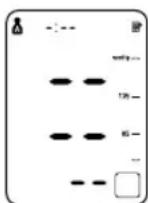
3. Using the Unit
To View the Readings Stored in Memory
1. Press the ◀button, while the average value is displayed.
The Memory number appears for a second before the pulse rate is displayed. The newest set is numbered “1”.
Alternating date/time display

text_image
0:00 129 67 832. Press the ◄or ▶button to view the readings stored in memory.
◀ : To the older readings
▶ : To the more recent readings
To Delete All the Values Stored in Memory
The values stored in the memory are deleted by USER ID.
When the memory symbol ( )appears, first press the Memory button. Then while holding it down, press the O/I START button simultaneously for about 2-3 seconds.
Note: You cannot partially delete values stored in the memory. All values for the user you select will be deleted.

flowchart
graph LR
    A["MEMORY"] --> B["O/I START"]
    B --> C["Output"]
4. Troubleshooting and Maintenance
4.1 The Icons and Error Messages
| Error Display Cause Remedy | ||
 | Irregular heartbeats are detected. | Remove the arm cuff. Wait 2-3 minutes and then take another measurement.Repeat the steps in section 3.3. If this error continues to appear, contact your doctor. |
 | Movement during measurement. | Carefully read and repeat the steps in section 3.3. |
 | Cuff is not applied correctly. | Apply the arm cuff correctly.Refer to section 3.1. |
 Blink Blink | The batteries are low. | You should replace them with new ones ahead of time.Refer to section 2.1. |
 Lit Lit | The batteries are exhausted. | You should replace them with new ones at once.Refer to section 2.1. |
4. Troubleshooting and Maintenance
| Error Display Cause Remedy | ||
| E1 | Air plug disconnected. | Insert the plug securely. Refer to section 3.1. |
| Arm cuff not applied correctly. | Apply the arm cuff correctly. Refer to section 3.1. | |
| Air is leaking from the arm cuff. | Replace the cuff with the new one. Refer to Chapter 5. | |
| E2 | Cuff over inflated. | Repeat measurement. Remain still and do not talk during measurement. Refer to section 3.3. |
| If “E2” appears repeatedly, inflate the cuff manually until it is 30 to 40 mmHg above your previous measurement result. Refer to section 3.3. | ||
| E3 | The arm cuff was inflated above 299 mmHg when inflating the cuff manually. | Do not inflate the cuff above 299 mmHg. Refer to section 3.3. |
| E4 | Movement during measurement. | Repeat measurement. Remain still and do not talk during measurement. Refer to section 3.3. |
| E5 | Clothing is interfering with the arm cuff. | Remove any clothing interfering with the arm cuff. Refer to section 3.1. |
| Er | Device error. Contact your OMRON retail outlet or distributor. | |
Note:
The irregular heartbeat symbol ( ) may also be displayed with error messages.
4. Troubleshooting and Maintenance
4.2 Troubleshooting
| Problem Cause Remedy | ||
| The reading is extremely low (or high). | Arm cuff not applied correctly. | Apply the arm cuff correctly.Refer to section 3.1. |
| Movement or talking during measurement. | Remain still and do not talk during measurement.Refer to section 3.3. | |
| Clothing is interfering with the arm cuff. | Remove any clothing interfering with the arm cuff.Refer to section 3.1. | |
| Arm cuff pressure does not rise. | The air tube is not securely connected into the main unit. | Make sure that the air tube is connected securely.Refer to section 3.1. |
| Air is leaking from the arm cuff. | Replace the arm cuff with a new one.Refer to Chapter 5. | |
| Arm cuff deflates too soon. The arm cuff is loose. | Apply the cuff correctly so that it is firmly wrapped around the arm.Refer to section 3.1. | |
| Cannot measure or readings are too low or too high. | The arm cuff has not been inflated sufficiently. | Inflate the cuff so that it is 30 to 40 mmHg above your previous measurement result.Refer to section 3.3. |
4. Troubleshooting and Maintenance
| Problem Cause Remedy | ||
| Nothing happens when you press the buttons. | The batteries are empty. | Replace the batteries with new ones.Refer to section 2.1. |
| The batteries have been inserted incorrectly. | Insert the batteries with the correct (+/-) polarity.Refer to section 2.1. | |
| Other problems. | • Press the O/I START button and repeat measurement.• If the problem continues, try replacing the batteries with new ones.If this still does not solve the problem, contact your OMRON retail outlet or distributor. | |
4. Troubleshooting and Maintenance
4.3 Maintenance
To protect your unit from damage, please observe the following:
- Do not subject the main unit and the cuff to extreme temperatures, humidity, moisture or direct sunlight.
- Do not fold the cuff or tubing tightly.
- Do not disassemble the unit.
- Do not subject the unit to strong shocks or vibrations (for example, dropping the unit on the floor).
- Do not use volatile liquids to clean the main unit.
- Do not wash the arm cuff or immerse it in water.
- Do not use petrol, thinners or similar solvents to clean the arm cuff.
- Do not carry out repairs of any kind yourself. If a defect occurs, consult your OMRON retail outlet or distributor as mentioned on the packaging.

text_image
Diagram showing six different types of medical devices and tools, including a sun, radiometer, oxygen level meter, bottle, and handheld device.• The unit should be cleaned with a soft, dry cloth.
- Use a soft, moistened cloth and soap to clean the arm cuff.
Calibration and Service
- The accuracy of this blood pressure monitor has been carefully tested and is designed for a long service life.
- It is generally recommended to have the unit inspected every two years to ensure correct functioning and accuracy. Please consult your authorised OMRON dealer or the OMRON Customer Service at the address given on the packaging or attached literature.
4. Troubleshooting and Maintenance
4.4 Storage
Keep the unit in its storage case when not in use.
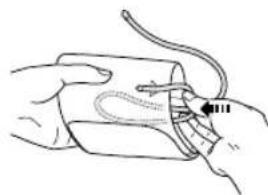
- Unplug the air plug from the air jack.
- Gently fold the air tube into the arm cuff.
Note: Do not bend the air tube excessively.
natural_image
Line drawing of a hand holding a medical device with a catheter inserted (no text or symbols)- Place the arm cuff and main unit in the storage case.

natural_image
Line drawing of a medical or laboratory device with a digital display and attached tubing (no text or symbols)Do not store the unit in the following situations:
- If the unit is wet.
- Locations exposed to extreme temperatures, humidity, direct sunlight, dust or corrosive vapours.
- Locations exposed to vibrations, shocks or where it will be at an angle.
5.Optional Parts
Wide Range Cuff
Arm circumference 22 - 42 cm
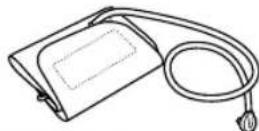
CW-9520534-2
(Model: HEM-RML30)
Medium Arm Cuff
Arm circumference 22 - 32 cm

CM2-9513256-6
(Model: HEM-CR24)
Large Arm Cuff
Arm circumference 32 - 42 cm
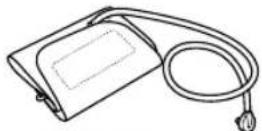
CL2-9513255-8
(Model: HEM-CL24)
Small Arm Cuff
Arm circumference 17 - 22 cm
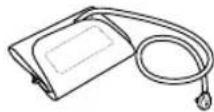
CS2-9515373-3
AC Adapter S

Adapter S-9515336-9
Using the Optional AC Adapter
- Insert the AC adapter plug into the AC adapter jack on the rear side of the main unit.
- Plug the AC adapter into an electrical outlet.
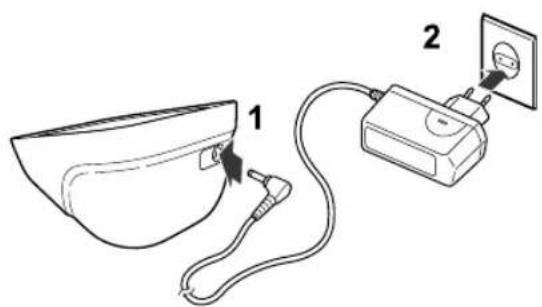
text_image
Diagram showing a medical device connected to a cup and cable, labeled with parts 1 and 2.To disconnect the AC adapter, unplug the AC adapter from the electrical outlet first and then remove the AC adapter plug from the main unit.
6.Technical Data
Product Description Automatic Blood Pressure Monitor
Model OMRON M6W(HEM-7213-E(V))
Display LCD Digital Display
Measurement Method Oscillometric method
Measurement Range Pressure: 0 to 299 mmHg
Pulse: 40 to 180/min.
Accuracy
Pressure: ±3 mmHg
Pulse: ± 5% of display reading
Inflation Fuzzy-logic controlled by electric pump
Deflation Automatic pressure release valve
Memory 100 Measurements with date and time for each user (A and B)
Rating
DC6V = 4W
Power Source
4 "AA" batteries 1.5V or AC adapter
(Adapter S-9515336-9 (optional), INPUT AC100-240V 50/60Hz 0.12A)
Battery Life
Capacity of new alkaline batteries is approx. 900 measurements
Applied Part

= Type B
Protection Against Electric Shock
Internally powered ME equipment (When using only the batteries)

= Class II ME equipment (Optional AC adapter)
Operating temperature/ Humidity
+10°C to +40°C / Maximum: 30 to 85% RH
Storage temperature/ Humidity
-20°C to +60°C / Maximum: 10 to 95% RH / 700-1060hPa
Console Weight
Approximately 380g without batteries
Cuff Weight
Approximately 170g
Outer Dimensions
Approximately 123 (w) mm × 85 (h) mm × 158 (l) mm
Cuff Dimensions
Approximately 151 mm × 563 mm (Wide range cuff: arm circumference 22 to 42 cm)
Cuff Material
Nylon and polyester
Package Content
Main unit, cuff, instruction manual, quick guide, storage case, battery set, guarantee card, blood pressure pass
Note: Subject to technical modification without prior notice.
6. Technical Data
C€0197
- This device fulfils the provisions of EC directive 93/42/EEC (Medical Device Directive).
- This blood pressure monitor is designed according to the European Standard EN1060, Non-invasive sphygmomanometers Part 1: General Requirements and Part 3: Supplementary requirements for electromechanical blood pressure measuring systems.
- This OMRON product is produced under the strict quality system of OMRON HEALTHCARE Co. Ltd., Japan. The Core component for OMRON blood pressure monitors, which is the Pressure Sensor, is produced in Japan.
6. Technical Data
Important information regarding Electro Magnetic Compatibility (EMC)
With the increased number of electronic devices such as PC's and mobile (cellular) telephones, medical devices in use may be susceptible to electromagnetic interference from other devices. Electromagnetic interference may result in incorrect operation of the medical device and create a potentially unsafe situation.
Medical devices should also not interfere with other devices.
In order to regulate the requirements for EMC (Electro Magnetic Compatibility) with the aim to prevent unsafe product situations, the EN60601-1-2:2007 standard has been implemented. This standard defines the levels of immunity to electromagnetic interferences as well as maximum levels of electromagnetic emissions for medical devices.
This medical device manufactured by OMRON HEALTHCARE conforms to this EN60601-1-2:2007 standard for both immunity and emissions.
Nevertheless, special precautions need to be observed:
- Do not use mobile (cellular) telephones and other devices, which generate strong electrical or electromagnetic fields, near the medical device. This may result in incorrect operation of the unit and create a potentially unsafe situation. Recommendation is to keep a minimum distance of 7 m. Verify correct operation of the device in case the distance is shorter.
Further documentation in accordance with EN60601-1-2:2007 is available at OMRON HEALTHCARE EUROPE at the address mentioned in this instruction manual.
Documentation is also available at www.omron-healthcare.com.
Correct Disposal of This Product
(Waste Electrical & Electronic Equipment)
This marking shown on the product or its literature, indicates that it should not be disposed of, with other household wastes at the end of its working life. To prevent possible harm to the environment or human health from uncontrolled waste disposal, please separate this product from other types of wastes and recycle it responsibly to promote the sustainable reuse of material resources.

Household users should contact either the retailer where they purchased this product, or their local government office, for details of where and how they can return this item for environmentally safe recycling.
Business users should contact their supplier and check the terms and conditions of the purchase contract. This product should not be mixed with other commercial wastes for disposal.
7. Some Useful Information about Blood Pressure
What is Blood Pressure?
Blood pressure is a measure of the force of blood flowing against the walls of the arteries. Arterial blood pressure is constantly changing during the course of the heart's cycle.
The highest pressure in the cycle is called the Systolic Blood Pressure; the lowest is the Diastolic Blood Pressure.
Both pressure readings, the Systolic and Diastolic, are necessary to enable a doctor to evaluate the status of a patient's blood pressure.
What is Irregular Heartbeat?
An irregular heartbeat is a heartbeat rhythm that varies by more than 25% from the average heartbeat rhythm detected while the unit is measuring the systolic and diastolic blood pressure.
If such an irregular rhythm is detected more than twice during measurement, the irregular heartbeat symbol ( ) appears on the symbol when the measurement results are displayed.
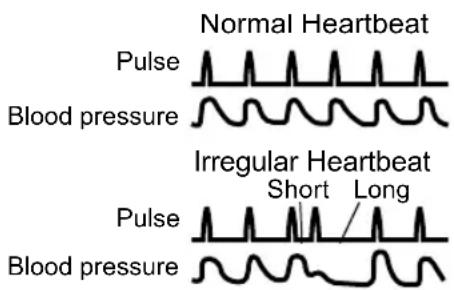
text_image
Normal Heartbeat Pulse Blood pressure Irregular Heartbeat Short Long Pulse Blood pressureWhat is Arrhythmia?
Arrhythmia is a condition where the heartbeat rhythm is abnormal due to flaws in the bio-electrical system that drives the heartbeat. Typical symptoms are skipped heartbeats, premature contraction, an abnormally rapid (tachycardia) or slow (bradycardia) pulse.
7. Some Useful Information about Blood Pressure
Why is it a Good Thing to measure Blood Pressure at Home?
Many factors such as physical activity, anxiety, or the time of day, can influence your blood pressure. A single measurement may not be sufficient for an accurate diagnosis. Thus it is best to try and measure your blood pressure at the same time each day, to get an accurate indication of any changes in blood pressure. Blood pressure is typically low in the morning and increases from afternoon to evening. It is lower in the summer and higher in the winter.
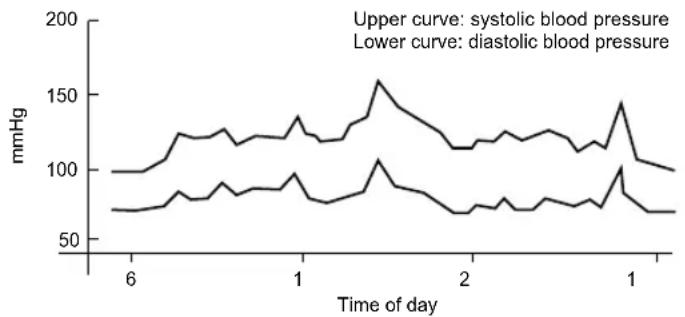
line
| Time of day | systolic blood pressure (mmHg) | diastolic blood pressure (mmHg) | | ----------- | ------------------------------ | ------------------------------- | | 6 | ~100 | ~70 | | 1 | ~130 | ~90 | | 2 | ~110 | ~70 | | 1 | ~140 | ~100 |Example: fluctuation within a day (male, 35 years old)