BDPH400 - Paint gun BLACK & DECKER - Free user manual and instructions
Find the device manual for free BDPH400 BLACK & DECKER in PDF.


User questions about BDPH400 BLACK & DECKER
0 question about this device. Answer the ones you know or ask your own.
Ask a new question about this device
Download the instructions for your Paint gun in PDF format for free! Find your manual BDPH400 - BLACK & DECKER and take your electronic device back in hand. On this page are published all the documents necessary for the use of your device. BDPH400 by BLACK & DECKER.
USER MANUAL BDPH400 BLACK & DECKER
Thank you for choosing Black & Decker! Go to www.BlackandDecker.com/NewOwner to register your new produ
PLEASE READ BEFORE RETURNING THIS PRODUCT FOR ANY RE
If you have a question or experience a problem with your Black & Decker purchase, go WWW.BLACKANDDECKER.COM/INSTANTANSWERS for instant answers 24 hours a If you can't find the answer or do not have access to the internet, call 1-800-544-6986 from 8 a.m. to 5 p.m. EST Mon. - Fri. to speak with an agent. Please have the catalog number available when you call.
SAVE THIS INSTRUCTION MANUAL FOR FUTURE REFERENCE.
VEA EL ESPAÑOL EN LA CONTRAPORTADA.
Important Safety Instructions ....3
General Safety Warnings....4
Grounding Instructions....4
Extension Cords....4
Components......5
Set-Up....6
Aligning Pickup Tube....6
Attaching Air Hose....6
Material Preparation....6
Thinning Table....7
Preparation Tips....7
Filling The Canister....7
Operation 7
On/Off Switch....7
SmartSelect Nozzle....8
Flow Control Knob 8
Spraying Technique....8
Cleaning....9
Maintenance ....10
Storage....10
Accessories....10
Service Information....11
Warranty....11
Troubleshooting ....11
SAFETY GUIDELINES - DEFINITIONS
It is important for you to read and understand this manual. The information it contains relates to protecting YOUR SAFETY and PREVENTING PROBLEMS. The symbols below are used to help you recognize this information.
⚠️DANGER: Indicates an imminently hazardous situation which, if not avoided, will result in death or serious injury.
WARNING: Indicates a potentially hazardous situation which, if not avoided, could result in death or serious injury.
CAUTION: Indicates a potentially hazardous situation which, if not avoided, may result in minor or moderate injury.
NOTICE: Used without the safety alert symbol indicates a potentially hazardous situation which, if not avoided, may result in property damage.
The following are explanations of important safety hazard pictorials in this manual.

- Read and understand the instruction manual.

- Explosion hazard.

- Electric shock hazard.

- Fire hazard.

- Respiratory hazard.
IMPORTANT SAFETY INSTRUCTIONS
SAVE THESE INSTRUCTIONS - To reduce the risks of fire or explosion, electrical shock and the injury to persons, read and understand all instructions included in this manual. Be familiar with the controls and the proper usage of the equipment.
- This product is intended for household use only.

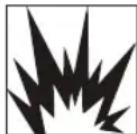
WARNING: FIRE OR EXPLOSION HAZARD. Solvent and spray material fumes can explode or ignite. Severe injury or property damage can occur.
To avoid these risks, take the following preventions:
- Exhaust and fresh air introduction must be provided to keep the air within the spray area free from accumulation of flammable vapors.
- Avoid all ignition sources such as static electricity sparks, open flames, pilot lights, hot objects, lit tobacco products, and sparks from connecting and disconnecting power cords or working light switches.
- Fire extinguishing equipment must be present and in good working order.
- Follow the material and solvent manufacturer's safety precautions and warnings.
- Do not spray flammable or combustible materials near an open flame or sources of ignition such as lit tobacco products, motors, and electrical equipment.
- Know the contents of the spray materials and their cleaning solvents. Read all Material Safety Data Sheets (MSDS) and container labels provided with the spray materials and solvents. Follow the spray material and solvent manufacturer's safety instructions.
- Do not use materials with a flashpoint higher than 60^ (140°F). Flashpoint is the temperature that a fluid can produce enough vapors to ignite (see coating supplier).

⚠ WARNING: EXPLOSION HAZARD DUE TO INCOMPATIBLE MATERIALS. Severe injury or property damage can occur.
To avoid these risks, take the following preventions:
- Do not use bleach.
- Do not use halogenated hydrocarbon solvents such as methylene chloride and 1,1,1 - trichloroethane. They are not compatible with aluminum and may cause an explosion. If you are unsure of a material's compatibility with aluminum, contact your coating supplier.

⚠ WARNING: HAZARDOUS VAPORS. Spray materials, solvents, and other materials can be harmful if inhaled or come in contact with the body. Vapors can cause severe nausea, fainting, or poisoning.
To avoid these risks, take the following preventions:
- Use a respirator or mask if vapors can be inhaled. Read all instructions supplied with the mask to be sure it will provide the necessary protection.
- Wear protective eyewear.
- Wear protective clothing as required by coating manufacturer.
To avoid these risks, take the following preventions
- Keep electrical cord plug and spray gun trigger free from spray material and other liquids. Never hold cord at plug connections to support cord. Failure to observe may result in an electrical shock.
- Never immerse electrical parts in water or any other liquid. Wipe the exterior of the sprayer with a damp cloth for cleaning. Always make sure the sprayer is unplugged before taking it apart for cleaning.
- Do not expose unit to rain or wet conditions.
- Do not abuse the cord. Never use the cord to carry the unit or pull the plug from an outlet. Keep cord away from heat, oil, sharp edges or moving parts. Replace damaged cords immediately.
GENERAL SAFETY WARNINGS
⚠ WARNING: GENERAL. Can cause severe injury or property damage.
To avoid these risks, take the following preventions:
- Do not aim the gun at, or spray any person, including self, or animal.
- Do not spray outdoors on windy days
- Wear protective clothing to keep spray material off skin and hair.
- Hose may become hot and cause skin burn.
- Follow all appropriate local, state, and national codes governing ventilation, fire prevention, and operation.
• Always use appropriate gloves, eye protection and a respirator or mask when spraying, thinning, mixing, pouring, or cleaning. - Do not operate or spray near children. Keep children away from equipment at all times. Keep sprayer out of the reach of children.
- Do not overreach or stand on an unstable support. Keep effective footing and balance at all times.
- Stay alert and watch what you are doing.
- Do not operate the unit when fatigued or under the influence of drugs or alcohol.
- Read all instructions and safety precautions for equipment and spray material before operating any equipment.
• Hearing protection is recommended for extended use.
GROUNDING INSTRUCTIONS
This product must be grounded. In the event of an electrical short circuit, grounding reduces the risk of electric shock by providing an escape wire for the electric current. This product is equipped with a cord having a grounding wire with an appropriate grounding plug. The plug must be plugged into an outlet that is properly installed and grounded in accordance with all local codes and ordinances.

⚠ WARNING: ELECTRIC SHOCK HAZARD. Improper installation of the grounding plug is able to result in a risk of electric shock. When repair or replacement of the cord or plug is required, do not connect the grounding wire to either flat blade terminal. The wire with insulation having an outer surface that is green with or without yellow stripes is the grounding wire.

text_image
Three-Pronged Plug Grounding Prong Properly Grounded Three-Pronged ReceptacleThis product is for use on a nominal 120-V circuit and has a grounding plug similar to the plug illustrated in sketch A. Only connect the product to an outlet having the same configuration as the plug. Do not use an adapter with this product.
Check with a qualified electrician or serviceman when the grounding instructions are not completely understood, or when in doubt as to whether the product is properly grounded. Do not modify the plug provided; if it does not fit the outlet, have the proper outlet installed by a qualified electrician.
EXTENSION CORDS
Use only a 3-wire extension cord that has a 3-blade grounding plug and a 3-slot receptacle that will accept the plug on the product. Make sure your extension cord is in good condition. When using an extension cord, be sure to use one heavy enough to carry the current your product will draw. An undersized cord will cause a drop in line voltage resulting in loss of power and overheating. If an extension cord is to be used outdoors, it must be marked with the suffix W-A after the cord type designation. For example, a designation of SJTW-A would indicate that the cord would be appropriate for outdoor use. For proper size cords see chart below.
| Minimum Gauge for Cord Sets Volts Total Length of Cord in Feet | |||||
| 120V 0-25 26-50 51-100 101-150(0-7,6m) (7,6-15,2m) (15,2-30,4m) (30,4-45,7m) | |||||
| 240V 0-50 51-100 101-200 201-300(0-15,2m) (15,2-30,4m) (30,4-60,9m) (60,9-91,4m) | |||||
| Ampere Rating | |||||
| More Than | Not more Than | American Wire Gauge | |||
| 0 - | 6 | 18 | 16 | 16 | 14 |
| 6 - | 10 | 18 | 16 | 14 | 12 |
| 10 - | 12 | 16 | 16 | 14 | 12 |
| 12 - | 16 | 14 | 12 | Not Recommended | |
⚠ WARNING: Some spray materials contain chemicals known to the State of California to cause cancer, birth defects or other reproductive harm. To reduce your exposure wear appropriate safety equipment such as face masks, gloves, and other appropriate protective equipment. Please review and follow the safety precautions on the paint container.
COMPONENTS
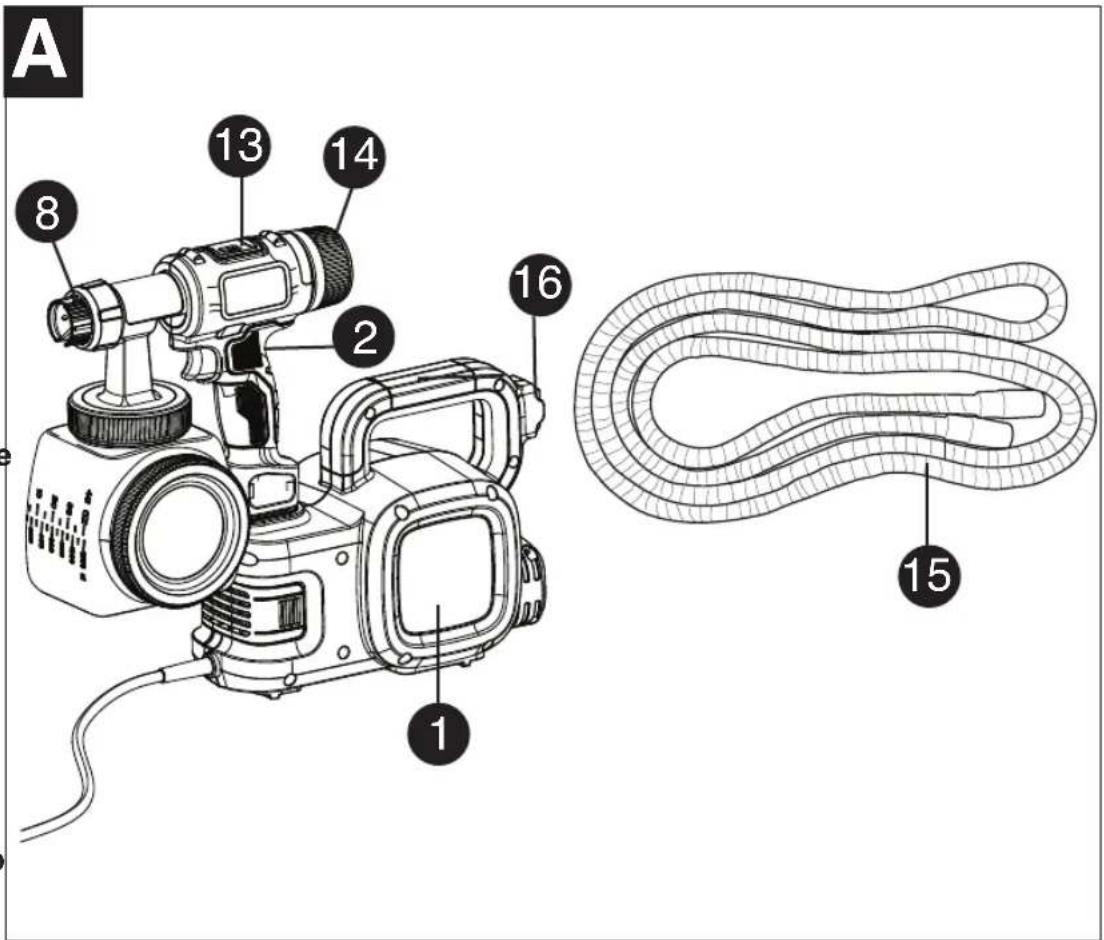
FUNCTIONAL DESCRIPTION
1.) Power unit
2.) Sprayer
3.) Side fill canister
4.) O-ring
5.) Pickup tube
6.) Check valve
7.) Lid
8.) Smart Select nozzle
9.) Tip collar
10.) Spray nozzle
11.) Spray tip
12.) Trigger
13.) Variable flow indicator
14.) Flow control knob
15.) Air hose
16.) On / off switch
17.) Sprayer dock
18.) Filter cover 19.) Filter
20.) 2^3/4 quart mixing bucket
21.) Viscosity cup
22.) Cleaning brush
text_image
A 8 13 14 2 16 1 15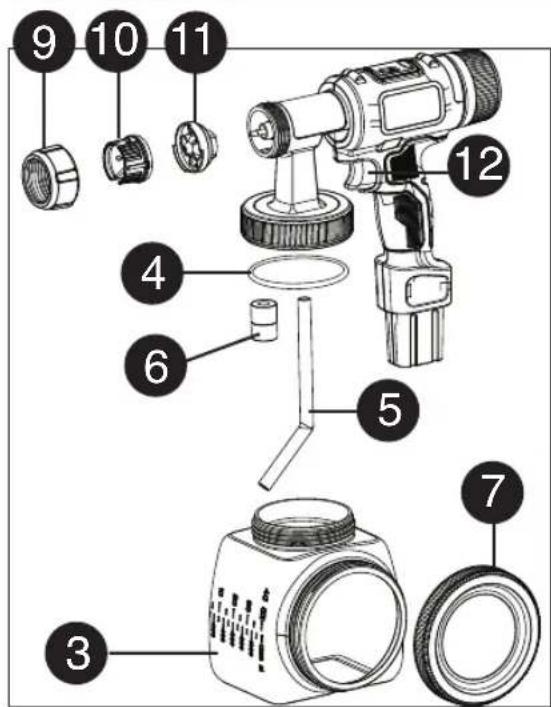
text_image
Exploded view diagram of a camera with numbered parts for identification
text_image
17 19 3
text_image
20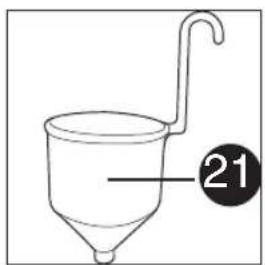
text_image
21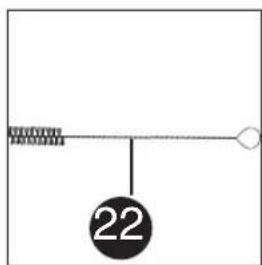
text_image
22SET-UP
⚠ WARNING: Be sure to use appropriate protective gear and unplug unit.
⚠ WARNING: Make sure area is well ventilated and free of flammable vapors.
ALIGNING THE PICKUP TUBE - (FIGURES B AND B1)
The pickup tube can be aligned in the direction that you will be doing the most spraying to help minimize the amount of times that you will have to refill the canister.
- If you are spraying at an upward angle or straight on, position the pickup tube (figure B) toward the back of the canister.
- If you are spraying at a downward angle, position the pickup tube (figure B1) toward the front of the canister.
This will ensure you spray as much material as possible before you need to refill.
ATTACHING THE AIR HOSE - (FIGURES AND C1)
- Insert one end of the air hose into the back of the sprayer. A slight twisting action when inserting the hose will help insure a snug fit.
- Insert the other end of the air hose into the back of the power unit. A slight twisting action when inserting the hose will help insure a snug fit.
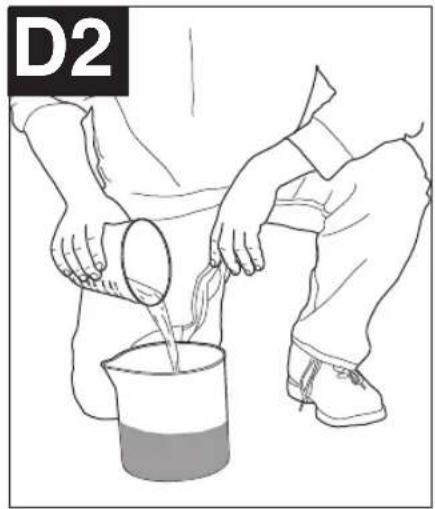
LIQUID MATERIAL PREPARATION - (FIGURES D, D1 AND D2)
TIP: Make sure the type of material you use can be cleaned with either mineral spirits or paint thinner (for oil-based paints) or a warm water and soap solution (for water soluble paints like latex). Use drop cloths during pouring, mixing, and viscosity testing of materials to be sprayed to protect your floors and anything else in the spraying area that you wish to remain untouched.
The liquid being sprayed may need to be thinned (diluted) before starting. When thinning, use the proper liquid thinner recommended on the container by the material manufacturer.
⚠ WARNING: Do not use materials with a flashpoint higher than 60°C (140°F).

natural_image
Line drawing of a hand holding a spray gun with a circular component, no text or symbols present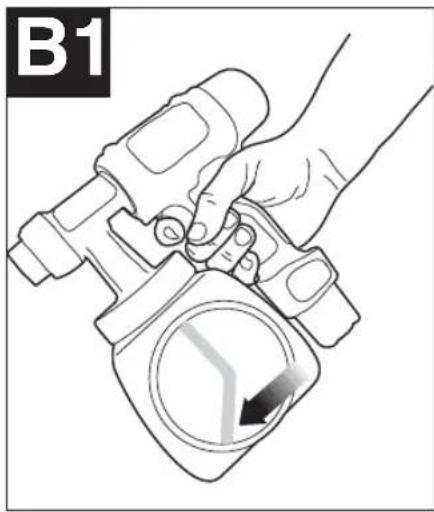
natural_image
Hand holding a spray gun with a circular component, no visible text or symbols
natural_image
Illustration of a hand holding a cable being inserted into a drill bit, with an arrow indicating direction (no text or symbols)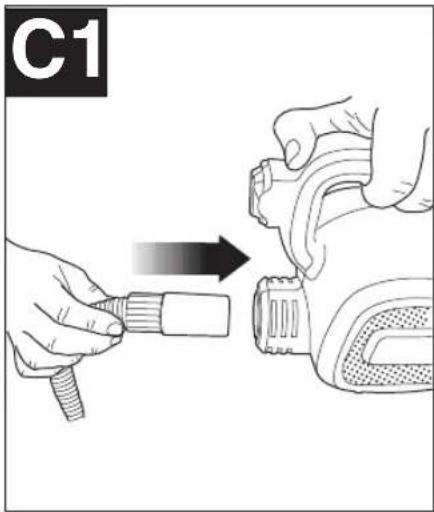
text_image
C1
natural_image
Illustration of hands pouring liquid from a container into a beaker (no text or symbols)
natural_image
Illustration of a hand pouring liquid into a beaker with a funnel (no text or symbols)
A 2-3/4 quart mixing bucket is provided to use when transferring spray material from the original container into the bucket for thinning and measuring purposes (figure D).
A viscosity test cup is provided to determine the "runout time" of the material being used.
- Before measuring for the proper viscosity, stir the material throughly.
- Dip the viscosity cup into the material being sprayed and fill the cup completely.
- With the cup held over the material container, measure the amount of time it takes for the stream of material flowing out to "break" or stop being a constant stream out of the bottom of the cup (2 minutes or less) (figure D1). This is the "runout time" Refer to the thinning table for information on the thinning required for different materials.
- If material needs thinning, add the appropriate liquid thinning material recommended by the manufacturer (figure D2).
- It is possible to spray latex paint with this unit, however, the required thinning may exceed material manufacturer's recommendation. Thin latex paint so that it runs through viscosity cup in under 2 minutes. The operator should consider the type of application and final location of the project when spraying a material that requires more than 2 minutes to run through the viscosity cup,
natural_image
Line drawing of a person pouring liquid from a container into a beaker (no text or symbols)| THINNING TABLE | |
| SPRAY MATERIAL RUNOUT TIME | |
| Clear and semi-transparent stains and sealersOil based primers, varnishes and polyurethane | No thinning required(Less than 2 minute runout) |
| Solid color water based stainsWater based or latex paints | May require thinning(More than 2 minute runout) |
| Note: Not recommended for textured paint | |
PREPARATION TIPS
• Always stir and strain the material throughly before use.
- With any spraying job you should always ensure that you have properly prepared the surface to get the best finish. That is, all surfaces are free from dust, dirt, rust and grease. Lightly pressure wash decks or exterior surfaces and ensure that they are dry before spraying.
• Even though HVLP sprayers have very little overspray, it is recommended that you mask all edges and other areas and use drop cloths to protect your floors and anything else in the spraying area that you wish to remain untouched.
- Skin that forms on the top of paint can clog the sprayer. Remove skin before mixing. Strain with a funnel with a filter attached or through hosiery to remove any impurities that could clog system.
- Before starting have gloves, paper towels, rags etc. available for unexpected spills.
FILLING THE CANISTER - (FIGURE E)
- Check to make sure that the canister is completely screwed onto the sprayer.
- Lay the sprayer on its side with the canister side lid facing up.
- Unscrew the lid on the side of the canister.
- Pour the properly thinned and strained material to be sprayed into the side fill canister (figure E). TIP: Use the mixing bucket provided to pour material from the original material container into the side fill canister.
- Clean any residual liquid from the threads or sides of the canister and sprayer.
- Starting the threads evenly, screw the lid completely onto the side fill canister. Check the lid to make sure it is threaded on squarely and completely before picking up the sprayer.

natural_image
Person pouring liquid from a container into a hose (no text or symbols visible)OPERATION
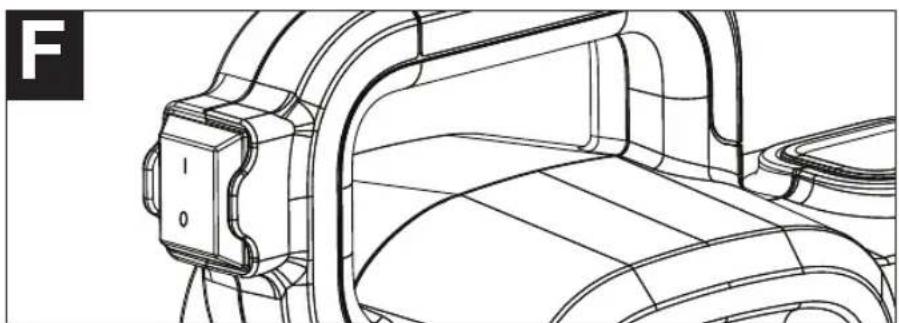
ON / OFF SWITCH - (FIGURE F)
The on/off switch is located on the handle of the power unit.
• To turn the power unit on, press the top of switch (I).
• To turn the power unit off, press the bottom of switch (0).
natural_image
Technical line drawing of a mechanical component with no visible text or symbolsSMART SELECT NOZZLE SELECTION - (FIGURE G)
There are three spray patterns to choose from. They are marked as 1, 2 and 3 on the Smart Select label located on the top of the sprayer (figure G). To select pattern number 1, turn the spray nozzle and align the green indicator on the spray nozzle with the number 1 on the label (figure G1).
NOTE: Spray nozzle can only be assembled one direction. Refer to figure S for proper assembly.

natural_image
Simple line drawing of a circular mechanical component with three symmetrical sections and central hub (no text or symbols)- Pattern number 1 - Horizontal Flat Jet - Apply up and down a surface.

text_image
G in 3 2 L G1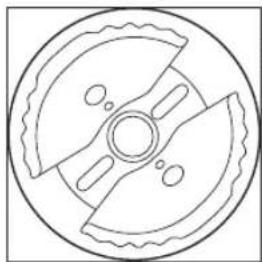
natural_image
Simple line drawing of a circular mechanical component with four blades and central hub (no text or symbols)- Pattern number 2 - Circular Jet - for corners, edges and narrow surfaces.
TIP: Position number 2 has a detent that you can feel when you turn the spray nozzle. Make sure it locates in the detent.

natural_image
Technical line drawing of a mechanical component with symmetrical teeth and central bore (no text or symbols)- Pattern number 3 - Vertical Flat Jet. Apply side to side.
WARNING: Risk of injury. Never point the sprayer at any part of the body. Never pull the trigger while adjusting the spray setting.
FLOW CONTROL KNOB - (FIGURE H, H1)
The flow control knob regulates the amount of liquid that can be sprayed. Turning the flow knob clockwise increases the flow of liquid. Turning the knob counterclockwise decreases the flow of liquid. The flow indicator on the top of the sprayer moves forward (minimal liquid flow) and backward (maximum liquid flow) as the knob is turned.
TIP: Always test the spray pattern on scrap cardboard or similar material first. Begin with flow control knob on the highest flow setting. If less flow is desired, dial the flow control knob in. Heavier, thicker materials should be sprayed with the indicator close to the (+) icon. Thinner materials should be sprayed with the indicator close to the (-) icon.
NOTE: If the flow control setting is set completely to the minimum side, as shown in figure H1, the
trigger will have limited or no travel. Back the flow control knob off (clockwise) to allow for more trigger

text_image
H FLOW COULER/FLUYA FLOW CONTROL 0 H1 w flo cater e y FLOW COOLER/FLUYADEVELOPING THE PROPER SPRAYING TECHNIQUE
- Practice spraying on a piece of scrap material such as cardboard to test your spray pattern and become familiar with the flow control feature of the sprayer.
- Ensure surface to be sprayed is free of dust, dirt, and grease.
- Ensure spray area is clean and free of dust that could be blown onto newly sprayed surfaces.
- Cover any areas not intended to be sprayed.
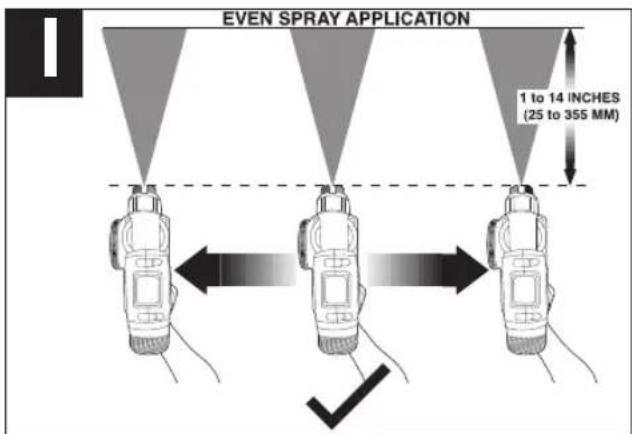
• Always spray from a minimum of 1 inch (25mm) to a maximum of 14 inches (355mm) (figure I). - A commonly used method for spraying a large surface is the "crisscross" pattern. This is done by spraying in horizontal strips and then crossing over these strips with vertical strips.
text_image
EVEN SPRAY APPLICATION 1 to 14 INCHES (25 to 355 MM)• To get an even spray distribution, always keep your arm at the same distance (figure I) from the surface you are spraying and avoid moving your wrist (figure J).
- Maintain smooth and consistent speed which will help avoid inconsistencies. Begin spraying after the pass has begun and release trigger before stopping the pass.
- Avoid spraying too heavily in any one area. Several lighter coats are better than one heavy coat which can lead to running and dripping. Remember that the flow control knob regulates the amount of liquid that can be sprayed. Turning the flow knob clockwise increases the flow of liquid. Turning the knob counterclockwise decreases the flow of liquid. If runs or drips do occur, have a dry paint brush on hand to smooth them out.
- Turn the power unit off and place the sprayer in the built-in dock of the power unit when not spraying for any length of time.

text_image
UNEVEN SPRAY APPLICATION J XCLEANING
⚠ WARNING: Be sure to use appropriate protective gear.
- Do not use materials with a flashpoint higher than 60^ (140°F). Flashpoint is the temperature that a fluid can produce enough vapors to ignite (see coating supplier).
- Make sure clean up area is well ventilated and free of flammable vapors.
• Always spray outdoors when spraying cleaning solution through sprayer. - Do not submerse power unit.
- Use drop cloths during pouring, mixing, and viscosity testing of materials to be sprayed to protect your floors and anything else in the spraying area that you wish to remain untouched.
To begin cleaning:
- Turn the power unit off, unplug the cord and disconnect air hose from sprayer.
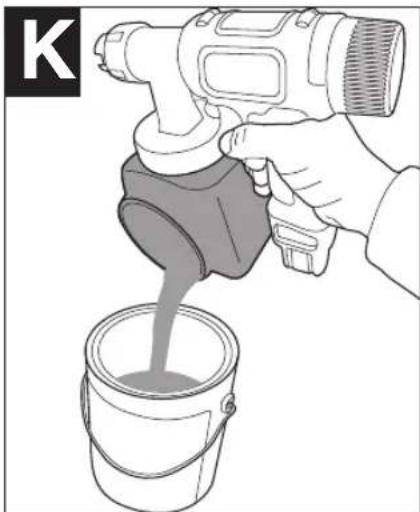
- Unscrew the lid from the side of the canister and pour any remaining liquid back into the original container (figure K).
- Pour a small amount of the appropriate cleaning solution into the canister (figure L).
• Warm soapy water for water based materials
• Manufacturers recommended cleaning solution for oil based materials
- Replace the lid on the canister securely and vigorously shake the sprayer.
- Unscrew the lid from the side of the canister and properly dispose of cleaning solution.
- Refill the canister with a small amount of new cleaning solution (figure L). Screw lid securely on canister.
- Reattach the air hose to the sprayer, plug in the cord and turn on the power unit.
- Spray the cleaning solution through the sprayer onto scrap material for 2 to 3 seconds (figure M).
- Turn the power unit off, unplug the cord and disconnect air hose from sprayer.
- Remove the canister and unscrew the side lid. Remove the check valve, pickup tube and o-ring from the sprayer. Clean the parts with the cleaning brush in the appropriate cleaning solution (figure N).
natural_image
Illustration of a hand pouring liquid from a spray gun into a paint bucket (no text or symbols)
natural_image
Line drawing of a person pouring liquid from a container into a bottle (no text or symbols)
natural_image
Diagram of a handheld device emitting a light beam through a spray bottle, with no visible text or symbols.
natural_image
Technical line drawing of a camera lens assembly with components like lens, lens, and parts (no text or symbols)- Unscrew the tip collar and remove the spray nozzle and spray tip. Clean all parts with the cleaning brush in the appropriate cleaning solution (figure O).
- If using water based material, clean the sprayer by running water through pickup tube inlet as shown in figure P. If using oil based materials, clean pickup tube inlet with the appropriate cleaning solution. Repeat until sprayer is completely clean.
• Dry all parts thoroughly.
• Properly dispose of cleaning solution. - Place a drop of household oil onto the metal ball in the check valve (figure Q).

natural_image
Technical illustration of mechanical components including a threaded fitting and a mounted device (no text or symbols)
natural_image
Illustration of a hand using a tool to interact with a mechanical device (no text or symbols visible)IMPORTANT: Lubricating the ball in check valve, after cleanup, will help to prevent it from sticking which clog the valve and prevent adequate flow of spray material.
NOTE: When reassembling, place metal ball end of check valve into sprayer.
- Reassemble sprayer (figure R). NOTE: The spray tip can only go in one way. The notch on the spray tip, shown in figure S must align with the recess in the threads of the sprayer.

natural_image
Line drawing of a hand holding a pipette above a cylindrical container (no text or symbols)
natural_image
Exploded view diagram of a portable camera with internal components and directional arrows indicating assembly (no text or labels)
natural_image
Illustration of a hand adjusting a threaded pipe fitting (no text or symbols present)MAINTENANCE
Use only mild soap and damp cloth to clean the power unit. Never let any liquid get inside the power unit; never immerse any part of the power unit into a liquid.
IMPORTANT: To assure product SAFETY and RELIABILITY, repairs, maintenance and adjustment (other than those listed in this manual) should be performed by authorized service centers or other qualified service organizations, always using identical replacement parts.
The power unit contains a washable/reusable filter (figure T). Check the filter before and after each use. If dirty, wash with warm water and allow to air dry before re-installing or replace if necessary.
- To check the filter, remove the filter cover by pressing in on the sides of the filter cover and pulling the cover off the power unit. Remove the filter as shown in figure T and inspect. Replace filter and filter cover. Never operate the power unit without the filter in place. Debris could be sucked in and interfere with the function of the power unit.

natural_image
Line drawing of a portable electronic device with attached circuit board and power cord (no text or symbols)STORAGE
Make sure unit is clean and dry before storing. Store unit indoors in a dry location. To prevent damage, wrap the electrical cord so that it is not crimped during storage.
ACCESSORIES
Recommended accessories for use with your product are available from your local dealer or authorized service center. If you need assistance regarding accessories, please call: 1-800-544-6986

WARNING: The use of any accessory not recommended for use with this product could be hazardous.
SERVICE INFORMATION
All Black & Decker Service Centers are staffed with trained personnel to provide customers with efficient and reliable power tool service. Whether you need technical advice, repair, or genuine factory replacement parts, contact the Black & Decker location nearest you. To find your local service location, refer to the yellow page directory under "Tools—Electric" or call: 1-800-544-6986 or visit www.blackanddecker.com
⚠ WARNING: Tool service must be performed only by qualified repair personnel.
⚠ WARNING: When servicing a tool, use only identical replacement parts.
WARRANTY
Full Two-Year Home Use Warranty
Black & Decker (U.S.) Inc. warrants this product for two years against any defects in material or workmanship. The defective product will be replaced or repaired at no charge in either of two ways.
The first, which will result in exchanges only, is to return the product to the retailer from whom it was purchased (provided that the store is a participating retailer). Returns should be made within the time period of the retailer's policy for exchanges (usually 30 to 90 days after the sale). Proof of purchase may be required. Please check with the retailer for their specific return policy regarding returns that are beyond the time set for exchanges.
The second option is to take or send the product (prepaid) to a Black & Decker owned or authorized Service Center for repair or replacement at our option. Proof of purchase may be required. Black & Decker owned and authorized Service Centers are listed under "Tools-Electric" in the yellow pages of the phone directory.
This warranty does not apply to accessories. This warranty gives you specific legal rights and you may have other rights which vary from state to state or province to province. Should you have any questions, contact the manager of your nearest Black & Decker Service Center. This product is not intended for commercial use.
LATIN AMERICA: This warranty does not apply to products sold in Latin America. For products sold in Latin America, check country specific warranty information contained in the packaging, call the local company or see the website for warranty information.
FREE WARNING LABEL REPLACEMENT: If your warning labels become illegible or are missing, call 1-800-544-6986 for a free replacement.
TROUBLESHOOTING
Problem Possible Cause Possible Solution
| • Material runs or drips | • Spraying too much material. | • Reduce air flow by turning flow control knob. |
| • Spraying too slowly. | • Increase speed of application. | |
| • Spraying too close. | • Increase distance from surface. | |
| • Viscosity too thin. | • Check dilution recommendation. | |
| • Too much over spray. | • Sprayer too far from surface. | • Reduce distance to surface. |
| • Too much material being sprayed. | • Reduce air flow by turning flow control knob. | |
| • Little or no material being released. | • Check valve ball stuck. | • Remove check valve. Depress ball to loosen. Add lubricant. See figure Q. |
| • Spray nozzle/tip clogged. | • Clean nozzles. | |
| • Pickup tube loose or clogged. | • Check tube. | |
| • Air hose split or disconnected. | • Check air hose. | |
| • Flow control knob setting too low. | • Increase flow control setting. | |
| • Air inlet blocked. | • Clean or change air filter. | |
| • Material too thick. | • Check viscosity recommendation. | |
| • Material being sprayed is splattering. | • Viscosity of material is too high. | • Thin material per manufacturer recommendation. |
| • Sprayer pulsates. | • Air filter clogged. | • Clean or change filter. |
| • Material in canister almost empty. | • Refill canister. | |
| • Liquid comes out side of canister. | • Lid not on square or tight enough. | • Remove lid and reattach squarely and evenly, then tighten lid securely. |
| • Paint on threads of canister and lid. | • Clean threads on top and sides of canister and lid. | |
| • Cannot depress trigger to start spraying. | • Flow control setting is set completely to the minimum side. | • Back the flow control knob off (clockwise) to allow for more trigger travel. |
For assistance with your product, visit our website www.blackanddecker.com for the location of the service center nearest you or call the BLACK & DECKER help line at 1-800-544-6986.
PULVÉRISATEUR HVLP SMARTSELECT™
MODE D'EMPLOI

Buse Smartselect ....19
text_image
Technical diagram of a digital camera with numbered parts and a corresponding schematic of a coiled tube or mesh structure.
text_image
Exploded diagram of a camera with numbered parts for identification
text_image
17 19 3
natural_image
Simple line drawing of a beaker with a handle and a dotted line indicating depth, labeled with the number 20 (no text or symbols on the beaker itself)
text_image
21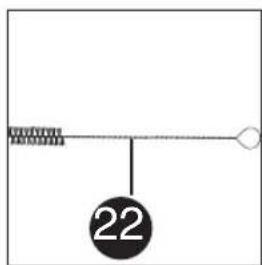
text_image
22PRÉPARATION
natural_image
Line drawing of a hand holding a spray gun with a circular component, no text or symbols present
natural_image
Hand holding a handheld device with a circular component and arrow indicator (no text or symbols)
text_image
C
text_image
C1
text_image
D es u ment té ce
natural_image
Illustration of a hand pouring liquid into a beaker with a funnel (no text or symbols)
natural_image
Line drawing of a person pouring liquid from a beaker into a container (no text or symbols)natural_image
Technical line drawing of a mechanical component with no visible text or symbolsSÉLECTION DE LA BUSE SMARTSELECT (FIGURE G)
natural_image
Simple line drawing of a circular mechanical component with three symmetrical sections and central hub (no text or symbols)natural_image
Pure mechanical diagram of a gear or wheel assembly without any text, numbers, or symbolsnatural_image
Technical line drawing of a mechanical component with symmetrical slots and central bore (no text or symbols)natural_image
Illustration of a hand pouring liquid from a spray gun into a paint bucket (no text or symbols)
natural_image
Line drawing of a person performing a manual cupping operation on a bottle (no text or symbols)natural_image
Diagram of a spray gun spraying through a container with a triangular light source (no text or symbols)
natural_image
Technical line drawing of a camera lens assembly with components like lens, aperture, and handle (no text or symbols)natural_image
Technical illustration of mechanical components including a gear and a base mount (no text or symbols)
natural_image
Illustration of a hand using a camera to interact with a device, no text or symbols present
natural_image
Line drawing of a hand holding a pipette above a cylindrical object (no text or symbols)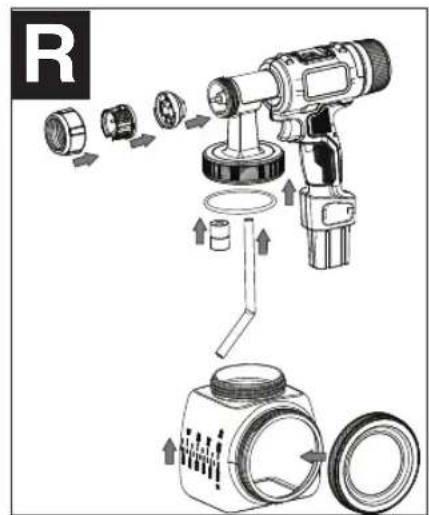
text_image
R
natural_image
Illustration of a hand holding a threaded pipe fitting with a black arrow indicating direction (no text or symbols)ENTRETIEN
natural_image
Line drawing of a portable electronic device with attached circuit board and power outlet (no text or symbols)RANGEMENT
Black & Decker Canada Inc.
100 Central Ave.
Visite www.BlackandDecker.com/NewOwner
Boquilla SmartSelect 31
Perilla de control de flujo....31
text_image
Exploded view diagram of a camera with numbered parts for identification
text_image
17 19 3
text_image
20
text_image
21
text_image
22INSTALACIÓN
natural_image
Line drawing of a hand holding a spray gun with a circular component, no text or symbols present
natural_image
Hand holding a mechanical device with a circular component and directional arrow (no text or symbols)
text_image
C
text_image
C1
natural_image
Illustration of hands pouring liquid from a beaker into a container (no text or symbols)
natural_image
Illustration of a hand pouring liquid into a beaker with liquid, labeled D1 (no text or symbols on the diagram itself)
natural_image
Line drawing of a person pouring liquid from a beaker into a container (no text or symbols)natural_image
Illustration of a person pouring liquid from a container into a hose (no text or symbols)FUNCIONAMIENTO
INTERRUPTOR DE ENCENDIDO/APAGADO (FIGURA F)
natural_image
Technical line drawing of a mechanical component with no visible text or symbolsnatural_image
Circular mechanical component diagram with symmetrical segments and central hub (no text or symbols)natural_image
Technical line drawing of a mechanical gear or wheel assembly (no text or symbols)natural_image
Technical line drawing of a mechanical component with symmetrical slots and central bore (no text or symbols)natural_image
Illustration of a hand pouring liquid from a spray gun into a paint can (no text or symbols)
natural_image
Line drawing of a person pouring liquid from a container into a bottle (no text or symbols)natural_image
Diagram of a spray gun spraying through a container with a triangular light source (no text or symbols)
natural_image
Line drawing of a camera module with components including lens, tire, and plastic parts (no text or symbols)
natural_image
Technical illustration of mechanical components including a cylindrical component, gear-like parts, and a mounted cylindrical device (no text or symbols)
natural_image
Line drawing of a hand using a mechanical tool to interact with a device, no text or symbols present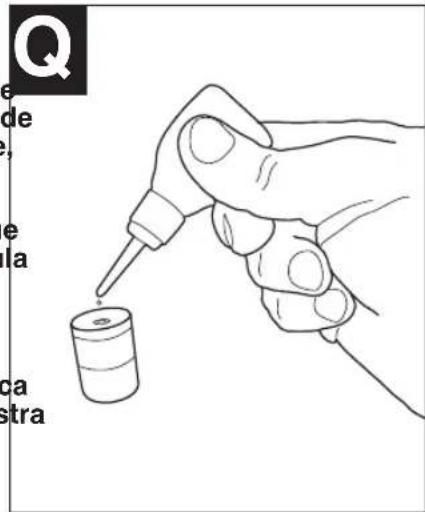
text_image
Q de la ca stra
text_image
R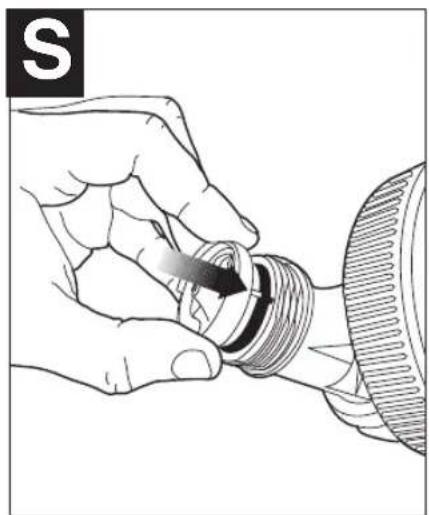
natural_image
Illustration of a hand holding a threaded component with a black arrow indicating direction (no text or symbols)MANTENIMIENTO
natural_image
Line drawing of a portable electronic device with attached circuit board and power cord (no text or symbols)ALMACENAMIENTO
Date of purchase · Fecha de compra Invoice No. · No. de factura