
CAD-375 - Car radio DENVER - Free user manual and instructions
Find the device manual for free CAD-375 DENVER in PDF.


| Product Type | Car Stereo |
| Brand | Denver |
| Model | CAD-375 |
| Power Supply | 12V DC (10.8-15.6V allowable) |
| Output Power | 40W x 4 channels |
| Fuse | 10A |
| Tuner | FM with RDS (87.5-108 MHz) |
| CD/MP3/WMA Player | Yes |
| Detachable Front Panel | Yes |
| Front AUX Input | Yes |
| Display | LCD |
| Audio Controls | Bass, Treble, Balance, Fader, DSP (Classic, Rock, Pop, Flat, None) |
| RDS Functions | AF, TA, PTY, EON, PI |
| Preset Stations | 6 |
| Auto Seek/Scan | Yes |
| Line Output | 1.5V max, 10k ohm |
| Line Input | 20Hz-20kHz, 775mV, 20k ohm |
| Maintenance | Fuse replacement, connector cleaning |
| Installation | ISO connector, mounting angle ≤30° |
| Security | Detachable panel to prevent theft |
Frequently Asked Questions - CAD-375 DENVER
User questions about CAD-375 DENVER
0 question about this device. Answer the ones you know or ask your own.
Ask a new question about this device
Download the instructions for your Car radio in PDF format for free! Find your manual CAD-375 - DENVER and take your electronic device back in hand. On this page are published all the documents necessary for the use of your device. CAD-375 by DENVER.
USER MANUAL CAD-375 DENVER
WITH PLL FM STEREO RADIO
RDS
DETACHABLE FRONT PANEL
LOCATION OF PARTS AND CONTROLS

- POWER ON/OFF ( ⏻ )
- FUNCTION SELECT BUTTON: BASS/TREBLE/BALANCE/FADER/TA SEEK/PI SOUND/RETUNE/MASK DPI/EON/BEEP/TA VOL/ADJ TIME/AUDIO DSP
- VOL UP/VOL DOWN FOR BASS/TREBLE/BALANCE/FADER/ TA SEEK/PI SOUND/RETUNE/MASK DPI/EON/BEEP/TA VOL/ADJ TIME/AUDIO DSP
- PRESET STATIONS (1,2,3,4,5,6)
- 'AF' function (ALTERNATIVE FREQUENCIES)
- 'TA' function (TRAFFIC ANNOUNCEMENT)
- 'PTY' function (PROGRAM TYPE)
- DISPLAY (DISP)
- MODE BUTTON (MODE)
- BAND / LOUDNESS (BD/LD)
- AUTOMATIC OR MANUAL TUNING (FREQ UP ▶▶ OR FREQ DOWN ◀◀ )
- AUTO SEEK SEARCH TUNING (AS/PS)
- 'SCAN' AUTOMATIC TUNING CONTROL (SCAN)
- MUTE BUTTON (MUTE)
- PANEL RELEASE BUTTON ( ↑ )
- LCD DISPLAY
- CD EJECT BUTTON ( ≈ )
- CD SLOT
- PAUSE BUTTON
- REPEAT BUTTON
- INTRO BUTTON (Preview all Tracks)
- RANDOM BUTTON
23, 24. 10 TRACK SEARCH DOWN/UP - FRONT AUX IN
- RESET BUTTON

ISO CONNECTOR
Red (right) White (left) Red (right) White (left)
CONNECTOR A
- MEMORY +12V
- AUTO ANTENNA OUTPUT
- +12V (TO IGNITION KEY)
- GROUND
Note: (connector A no. 7) must be connected by car ignition key in order to avoid that car battery becomes weak when the car will be not used for long period.

CONNECTOR B
- REAR RIGHT SPEAKER (+)
- REAR RIGHT SPEAKER (-)
- FRONT RIGHT SPEAKER (+)
- FRONT RIGHT SPEAKER (-)
- FRONT LEFT SPEAKER (+)
- FRONT LEFT SPEAKER (-)
- REAR LEFT SPEAKER (+)
- REAR LEFT SPEAKER (-)
Maintenance
FUSE REPLACEMENT
If the fuse blows, check the power connection and replace the fuse. If the fuse blows again after the replacement, there may be an internal malfunction. In this case, consult your nearest repairing center.
Warning
Use the specified amperage fuse for each lead. Use of a higher amperage fuse may cause serious damage.
INSTALLATION
PRECAUTIONS
- Choose the mounting location carefully so that the unit will not interfere with the normal driving functions of the driver.
- Avoid installing the unit where it would be subject to high temperatures, such as from direct sunlight or hot air from the heater, or where it would be subject to dust, dirt or excessive vibration.
- Use only the supplied mounting hardware for a safe and secure installation.
- Be sure to remove the front panel before installing the unit.
NOTE: Inclination angle for car radio installation must not exceed 30° otherwise the front panel will not open.


Note: Keep the release key in the safe place as you may need it in future to remove the unit from the car.
TO SUPPORT THE UNIT
- UNIT
- RELEASE CASE
- DASH BOARD
- HEX NUT
- LOCK WASHER
- PLAIN WASHER
- CAR BODY
- REAR SUPPORT STRAP
- TAPPING SCREW
- M5 X 15 HEX BOLT
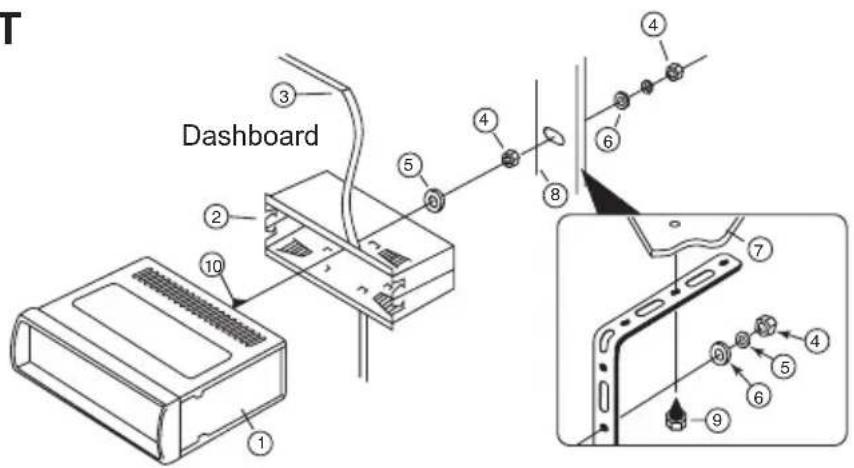
Detaching and attaching the front panel
The front panel of this unit can be detached in order to prevent the unit from being stolen.
DETACHING THE FRONT PANEL
Before detaching the front panel, be sure to press the button to OFF first. Then press the button (15) and detach the panel by pulling it towards you as illustrated.
Note: Be sure not to drop the panel when detaching it from the unit.
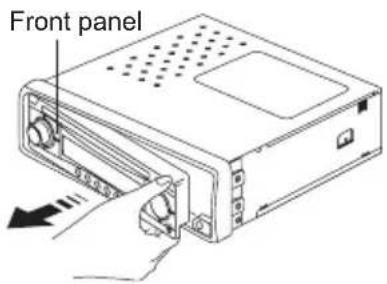

Notes:
- Make sure that the front panel is the right way up when attaching it to the unit as it cannot be attached upside down.
- Do not press the front panel hard against the unit when attaching it. It can be easily attached by pressing it lightly against the unit.
- When you carry the front panel with you, put it in the supplied front panel case.
- Do not press hard or give excessive pressure to the display window of the front panel when attaching it to the unit.
CLEANING THE CONNECTOR
The unit may not function properly if the connectors between the unit and the front panel are contaminated with dirt. In order to prevent this from happening, detach the front panel by pressing the button and clean the connector from time to time.
Clean the connector with a cotton swab together with contact cleaner as illustrated. Be sure to clean them carefully pin by pin and make sure not to damage the connecting points.

OPERATION
1. POWER ON/OFF () ⏻
By pressing this key, the unit is on or off. This unit is turned on by pressing any key.
2,3.FUNCTION SELECT BUTTON: BASS/TREBLE/BALANCE/FADER / TA SEEK/PI SOUND/RETUNE/MASK DPI/EON/BEEP/TA VOL/ADJ TIME/AUDIO DSP
Turning the VOL knob Right or Left (3), you can adjust VOL/BASS/TREB/BAL/FAD. To select other functions, press the VOL knob shortly until the desired functions is shown on the display. Figure 1 shows how control functions are selected using the VOL knob.
![graph LR A["12345"] --> B["SELSELSELSEL"] B --> C[" "] C --> D[" "] D --> E[" "] E --> F[" "] F --> G[" "]](/content/2026/06/1240172/images/a16c449dcc7a2adc17fe9cb0540d1906e94e81b8ee85c896f723ef48574575f4.jpg)
Fig. 1 Selection of sound control functions
-
VOL
-
BAS
-
TRB
-
BAL
-
FAD
Turning the VOL knob Right or Left. Increase or decrease the volume by turning buttons can be used to adjust the BASS, TREBLE, BALANCE and FADER.

or

These
![graph LR A["2 sec."] --> B["SEL"] B --> C["TA"] C --> D["SEL"] D --> E["PI"] E --> F["SEL"] F --> G["RETUNE"] G --> H["MA"] H --> I["SEL"] I --> J["RENT"] J --> K["EON"] K --> L["DSP"] L --> M["SEL"] M --> N["ADJ"] N --> O["SEL"] O --> P["TA VOL"] P --> Q["SEL"] Q --> R["BEEP"] R --> S["SEL"]](/content/2026/06/1240172/images/0e125f274d972b8fa28303890e1a23709152e887c2b47edbd437c577405f91ce.jpg)
Press and hold VOL to adjust TA/PI/RETUNE/MASK/EON/BEEP/TA VOL/ADJ/DSP
TA SEEK/ALARM
TA SEEK mode: When newly turned station does not receive TP information for 5 sec., the radio retunes to next station which has not the same station (PI) as the last station, but has the TP information.
In TA seek mode, the current station can be changed to the completely different station because the unit searches TP station when the field strength of the current station is very weak, or the current station has no TP signal.
TA ALARM mode: Any automatic retune mode is not activated, just can hear Beep sound.
PI SOUND
Action when 2 stations with different programme identification (PI) codes are on the same frequency: SOUND: The radio switches to the new channel for a few seconds and then switches back again MUTE: The radio is muted
RETUNE L/S
RETUNE L: Select 90 seconds as the initial time of automatic TA search.
RETUNE S: Select 30 seconds as initial time.
MASK DPI/ALL
MASK DPI: masked only the AF which has different PI.
MASK ALL: masked the AF which has different PI and NO RDS signal with field strength.
EON
Selected EON condition, ON or OFF.
BEEP
ALL: Button sound is on permanently
2nd: Button sound is triggered by secondary button functions (hold button down for a while)
OFF: Button sound is off
TA VOL
Traffic Announcement Volume
ADJ
Digital Clock. To adjust, turn VOL knob to right for hours and turn VOL knob to left for minutes.
DSP Modes
CLASSIC, ROCK, POP, FLAT, NONE
4. PRESET STATIONS (1,2,3,4,5,6)
(A) RADIO MODE:
When pressed short, these keys select a preset station directly. When pressed longer than 1 sec., current station is stored in preset memory bank.
(B) CD/MP3/WMA PLAYER MODE:
- PAUSE 2. REPEAT 3. INTRO 4. RANDOM
USING THE RDS FUNCTION
What is RDS?
The RDS (Radio Data System) is a digital information system developed by the EBU (European Broadcast Union). Piggy-backed on normal FM broadcasts, RDS offers a variety of information services and automatic retuning functions for RDS-compatible car stereos.
In 1988, RDS became available in the United Kingdom, France, West Germany, Ireland and Sweden. Test transmissions are being conducted in many other european countries. It is expected that RDS will be available in most western european countries in the near future.
5. 'AF' function (ALTERNATIVE FREQUENCIES)
When pressed short, AF switching mode is selected.
When AF switching mode is selected, the radio check the signal strength of the AF all the time. When pressed long, it is activated as regional mode ON/OFF.
- Regional mode ON:
AF switching or PI SEEK is implemented to the station which have all PI codes are same as current station. REG segment is turned on, in LCD display.
- Regional mode OFF
The regional code in the format of PI code is ignored when AF switching or PI SEEK is implemented.
6. 'TA' function (TRAFFIC ANNOUNCEMENT)
When pressed short, it is activated as TA mode on or off
When TA mode is on and traffic announcement is transmitted.
- When the unit is it CD/MP3 mode, it will switch to radiomode temporarily.
- If the volume level was under the threshold point, it will be raised to the threshold point.
- When TP station is received, TP segment is turned on in LCD display.
7. 'PTY' function (PROGRAM TYPE)
Each press of PTY button will toggle between PTY Music, PTY Speech and PTY Off.
When PTY Music is selected, press Buttons (1-6) for desired program types. Unit automatically search for corresponding programs.
1 Pop M, Rock M 2 Easy M, Light M 3 Classics, Other M
4 Jazz, Country 5 Nation M, Oldies 6 Folk M
When PTY Speech is selected, press Buttons (1-6) for desired program types. Unit automatically search for corresponding programs.
1 News, Affairs, Info 2 Sport, Educate, Drama 3 Culture, Science, Varied
4 Weather, Finance, Children 5 Social, Religion, Phone IN 6 Travel, Leisure, Document
Tips: Since each button number can store multiple program types, i.e. Button 1 stores Pop and Rock music, to switch between Pop and Rock music, simply press button 1 repeatedly until the desired program type shows in display.
8. DISPLAY (DISP)
Press DISP button to switch between display informations such as radio frequencies, clock, track and other informations depending on the playing MODE.
9. MODE BUTTON (MODE)
By pressing this key, user can select. RADIO, CD/MP3 PLAYER or AUX IN mode.
Each band is toggled cyclically by pressing this key FM1---FM2---FM3.
LOUDNESS: Press and hold this button, you can select LOUDNESS mode.
11. AUTOMATIC OR MANUAL TUNING (FREQ UP OR FREQ DOWN)
(A) RADIO MODE
When pressed short, these keys are operated as manual tuning mode.
When pressed longer than 1 sec., they are operated as seek tuning mode.
(B) CD/MP3/WMA PLAYER MODE
When pressed short, they are operated as TRACK UP or TRACK DOWN mode.
When pressed longer than 1 sec., they are operated as CUE or REVIEW mode.
12. AUTO SEEK SEARCH TUNING (AS/PS)
By pressing shortly, the radio searches for each preset station.
When field strength level is bigger than the threshold level of stop level, the radio is holding at that preset number for 5 sec. with releasing mute, and then searches again.
By pressing longer than 1 sec, and then 6 strongest stations are preset to the corresponding preset number.
When AS operation is finished, the radio executes the preset scan.
13. 'SCAN' AUTOMATIC TUNING CONTROL (SCAN)
This key is operated as RADIO SCAN
The operation is similar as normal search but different thing is holding 5 seconds on every station detected in RADIO SCAN mode.
14. MUTE BUTTON (MUTE)
Press this button, audio will disappear. Press this button again in order to hear audio newly.
15. PANEL RELEASE BUTTON ( )
Press this button and the right-hand part of the panel will be released.
16. LCD DISPLAY
The Liquid Crystal Display will display the current state of the unit.
CD/MP3/WMA CONTROL LOCATION OF PARTS
TRACK/SEARCH BUTTON (11)
FORWARD AND REVERSE TRACK SEARCH (or changing songs)
Press the SKIP button (dr) during play to go to the desired track(song).
▲ ....REVERSE ▶ NORWARD
Press and hold the SKIP button (or) during play to scan the disc at high speed. When the desired music section of the disc is found, release the button. Normal play will resume.
17. CD EJECT BUTTON
Press the EJECT button to remove the CD.
18. CD SLOT
19. PAUSE BUTTON
During "PLAY", press (19) PAU button to "PAUSE". Press it again to resume play.
20. INTRO BUTTON (Preview all Tracks)
Press this switch less than 1 sec. 'INT' indication is displayed and the 10 first seconds of each track of the disc are played in normal progression. If you wish to cancel INTRO mode on selected track, press 'INT' and play of the selected track starts 'INT ON' disappears from display.
21. REPEAT BUTTON 'RPT'
When you press 'RPT' button 'RPT' indication is displayed. Play of the selected track will be continually repeated until the Track Repeat mode is cancelled by pressing 'RPT' button.
22. RANDOM BUTTON 'RDM'
When you press 'RDM' button 'RDM' indication is displayed and each track of the disc in play are played in a random instead of normal progression. To cancel RANDOM mode, press 'RDM' button again.
23, 24. 10 TRACK DOWN/UP SELECT: (In case of MP3/WMA files)
M5: 10 Track down / M6: 10 Track up
HOW TO SELECT MP3/WMA FILES
Searching by Track:
- Press AS/PS. Digit starts blinking.
- Rotate "VOL / VOL " knob until the desired track number shows then press VOL knob.
- Song number you selected will start to play.
Searching by Folder:
- Press AS/PS twice.
- Rotate "VOL VOL / VOL " knob to select folder name then press VOL knob.
- Rotate "VOL / VOL " knob to select file to play then press VOL knob to start playback.
25. FRONT AUX IN
Convenient easy to use front “AUX IN” input jack, allows easy connection of Portable Media and digital MP3 Players.
Note: Rear side LINE IN and Front AUX IN can not be used at the same time.
26. RESET
Reset button is placed on the housing.
The reset button is to be activated for the following reason:
- Initial installation of the unit when all wiring is completed.
• All the function button do not operate.
• Error symbol on the display.

TECHNICAL SPECIFICATIONS
CD/MP3/WMA PLAYER SECTION
| Signal to Noise Ratio | >60dB |
| Channel Separation | >50 dB (1kHz) |
| Frequency Response | 20Hz - 20 kHz |
TUNER (FM)
| Frequency range | 87.5-108 MHz |
| Sensitivity | 2.8 μV |
| Stereo separation | 30 dB |
| Signal to noise ratio | 50 dB |
| Channel step | 50 kHz |
LINE OUT
| Output | 1.5V (max.) |
| Impedance | 10k Ohm |
LINE IN
| Frequency Response | 20 Hz - 20 kHz |
| Sensitivity | 775 mV |
| Impedance | 20k Ohm |
GENERAL
| Power Supply | 12V DC (10.8-15.6V allowable) |
| Speaker impedance | 4 or 8 ohm |
| Output power | 40W x 4CH |
| Fuse | 10A |
Note: Specification and the design are subject to possible modification without notice due to improvements.

Electric and electronic equipment contains materials, components and substances that can be hazardous to your health and the environment, if the waste material (discarded electric and electronic equipment) is not handled correctly.
Electric and electronic equipment is marked with the crossed out trash can symbol, seen below. This symbol signifies that electric and electronic equipment should not be disposed of with other household waste, but should be disposed of separately.
All cities have established collection points, where electric and electronic equipment can either be submitted free of charge at recycling stations and other collection sites, or be collected from the households. Additional information is available at the technical department of your city.
- LOCATION OF PARTS AND CONTROLS
- ISO CONNECTOR
- CONNECTOR A
- CONNECTOR B
- MAINTENANCE
- FUSE REPLACEMENT
- WARNING
- INSTALLATION
- PRECAUTIONS
- TO SUPPORT THE UNIT
- DETACHING AND ATTACHING THE FRONT PANEL
- DETACHING THE FRONT PANEL
- NOTES
- CLEANING THE CONNECTOR
- OPERATION
- POWER ON/OFF () ⏻
- 2,3.FUNCTION SELECT BUTTON: BASS/TREBLE/BALANCE/FADER / TA SEEK/PI SOUND/RETUNE/MASK DPI/EON/BEEP/TA VOL/ADJ TIME/AUDIO DSP
- TA SEEK/ALARM
- PI SOUND
- RETUNE L/S
- MASK DPI/ALL
- EON
- BEEP
- TA VOL
- ADJ
- DSP MODES
- PRESET STATIONS (1,2,3,4,5,6)
- RADIO MODE
- CD/MP3/WMA PLAYER MODE
- USING THE RDS FUNCTION
- WHAT IS RDS
- AF' FUNCTION (ALTERNATIVE FREQUENCIES)
- REGIONAL MODE ON
- REGIONAL MODE OFF
- TA' FUNCTION (TRAFFIC ANNOUNCEMENT)
- PTY' FUNCTION (PROGRAM TYPE)
- DISPLAY (DISP)
- MODE BUTTON (MODE)
- AUTOMATIC OR MANUAL TUNING (FREQ UP OR FREQ DOWN)
- AUTO SEEK SEARCH TUNING (AS/PS)
- SCAN' AUTOMATIC TUNING CONTROL (SCAN)
- MUTE BUTTON (MUTE)
- PANEL RELEASE BUTTON ( )
- LCD DISPLAY
- CD/MP3/WMA CONTROL LOCATION OF PARTS
- TRACK/SEARCH BUTTON (11)
- CD EJECT BUTTON
- CD SLOT
- PAUSE BUTTON
- INTRO BUTTON (PREVIEW ALL TRACKS)
- REPEAT BUTTON 'RPT
- RANDOM BUTTON 'RDM
- 23, 24. 10 TRACK DOWN/UP SELECT: (IN CASE OF MP3/WMA FILES)
- HOW TO SELECT MP3/WMA FILES
- SEARCHING BY TRACK
- SEARCHING BY FOLDER
- FRONT AUX IN
- RESET
- TECHNICAL SPECIFICATIONS
Brand : DENVER
Model : CAD-375
Category : Car radio