TF20 Classic - Treadmills Vision Fitness - Free user manual and instructions
Find the device manual for free TF20 Classic Vision Fitness in PDF.


User questions about TF20 Classic Vision Fitness
0 question about this device. Answer the ones you know or ask your own.
Ask a new question about this device
Download the instructions for your Treadmills in PDF format for free! Find your manual TF20 Classic - Vision Fitness and take your electronic device back in hand. On this page are published all the documents necessary for the use of your device. TF20 Classic by Vision Fitness.
USER MANUAL TF20 Classic Vision Fitness
natural_image
Three identical black-and-white icons of a standing machine, no text or symbols presentTREADMILL CONSOLE MANUAL

Read the TREADMILL GUIDE before using this CONSOLE MANUAL.
Before proceeding, find your console's serial number located on a white barcode sticker on the back of the console.
ENTER YOUR SERIAL NUMBER AND SELECT CONSOLE MODEL:
Console seRIAI nUMBeR:
MoDel: □CIAssIC
eleGAnT
ToUCH
seRIAI nUMBeR loCATlon

natural_image
Line drawing of a device casing with ventilation grilles and mounting holes (no text or symbols)CONSOLE OPERATION

This section explains how to use your treadmill's console and programming. The BASIC OPERATION section in the TREADMILL GUIDE has instructions for the following:
• LOCATION OF THE TREADMILL
• USING THE SAFETY KEY
• FOLDING THE TREADMILL
• MOVING THE TREADMILL
• LEVELING THE TREADMILL
• TENSIONING THE RUNNING BELT
• CENTERING THE RUNNING BELT
• USING THE HEART RATE FUNCTION
DOWNLOADING A SOFTWARE UPDATE FROM VISIONFITNESS.COM
Occasionally a software update may be available for your console, via the USB port.
Please visit http://www.visionfitness.com/support/software-update/ to see if an update is available and get detailed instructions on how to download the latest software from your PC or Mac.
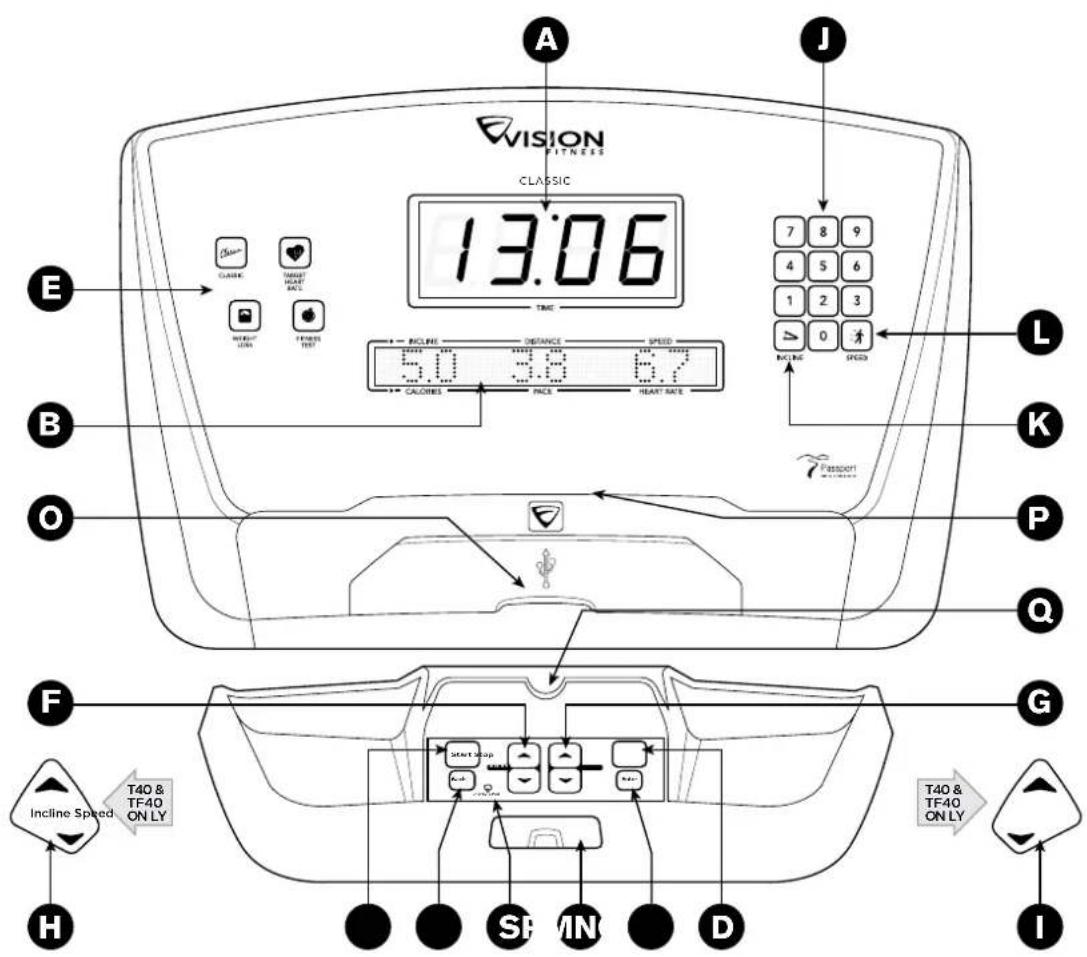
classic console
text_image
VISION FITNESS CLASSIC 13:06 E B O F H I J 7 8 9 4 5 6 1 2 3 0 L K P Q G T40 & TF40 ON LY S F M N D Start Stop Incline Speed T40 & TF40 ON LY T40 & TF40 ON LYCIAssIC Console opeRATION
Note: There is a thin protective sheet of clear plastic on the overlay of the console that should be removed before use.
A) IARGe leD Di splAY wInDow: displays workout time.
B) AlpHAnUMeRIC DlspIAY wInDow: displays incline, distance, speed, calories, pace, workout profile and heart rate.
C) sSTART: press to begin exercising, start your workout, or resume exercising after pause.
D) sTop: press to pause your workout. Press STOP again to end workout.
e) pRoGRAM KeYs: press to select workout.
F) InCllne ▼▲KeYs: used to adjust incline in small increments (0.5% Increments).
G) speeD ▼▲KeYs: used to adjust speed in small increments (0.1 MPH increments).
H) InCllne ToGGles (T40 & TF40 only): used to adjust incline in small increments (0.5% Increments).
I) speeD ToGGles (T40 & TF40 onIY): used to adjust speed in small increments (0.1 MPH increments).
J) QUICK ADJUsT KeYpAD: used to reach desired speed or incline more quickly.
K) set InCllne KeY: used to change incline to level entered into keypad.
I) set speed KeY: used to change speed to level entered into keypad.
M) enTeR / CHAnGe DIsplAY KeY: press to confirm programming selections during workout setup. Press to change display feedback during workout.
n) BACK: press to go back to the previous step during program setup.
o) UsB poRT ACCess poCKeT: USB for software updates or charging devices. *
p) ReADInG RACK: holds reading material.
Q) MeDIA pIAYeR HolDeR: holds your media player or tablet.
R) sAFeTY KeY position: enables treadmill when safety key is inserted.
s) eneRGY sAVeR IIIGHT: indicates if machine is in energy saver mode. Press any key to wake up the machine.
QUICK ADJUST KEYPAD (J)

text_image
7 8 9 4 5 6 1 2 3 0 INCLINE SPEEDQuickly access any speed or incline level by typing the number and pressing SPEED (☐) or INCLINE (☐). Examples:
• To change the speed to 6.5 MPH, press 6–5–SPEED ( ).
- To change the incline to 10% , press 1-0-0-INCLINE (△). (NOTE: If there is no decimal point, you still must enter 0).
* Will not charge USB devices which require more than 1 amp.

CLASSIC CONSOLE

text_image
13:06 TIME INCLINE DISTANCE SPEED 5.0 3.8 6.7 CALORIES PACE HEART RATEwoRkOUT pRoFile: Shows the incline level of selected workout.

text_image
INCLINE DISTANCE SPEED CALORIES PACE HEART RATEThe dot matrix will show the incline profile as you progress through a program.
CIAssIC DlsplAY wInDows
- TIME: Shown as minutes : seconds. View the time remaining or the time elapsed in your workout.
- InCllne: Shown as percent. Indicates the incline of your walking or running surface.
- DIsTAnCe: Shown as miles. Indicates distance traveled or distance remaining during your workout.
- speeD: Shown as MPH. Indicates how fast your walking or running surface is moving.
- CAIoRles: Total calories burned or calories remaining to burn during your workout.
- pACe: Indicates how many minutes it takes to complete a mile while running or walking at your current speed. For example: If at your current speed it will take you 10 minutes to complete a mile, the treadmill will display '10.0' as your pace.
- HeART RATE: Shown as BPM (beats per minute). Used to monitor your heart rate (displayed when contact is made with both pulse grips).
CIAssIC Console GetTInG sTARTeD
1) Check to make sure no objects are placed on the belt that will hinder the movement of the treadmill.
2) Plug in the power cord and turn the treadmill ON.
3) Stand on the side rails of the treadmill.
4) Attach the safety key clip to part of your clothing making sure that it is secure and will not become detached during operation.
5) Insert the safety key into the safety keyhole in the console.
6) You have two options to start your workout:
A) QUICK sTART Up
Simply press the START key to begin working out.
Time, distance, and calories will all count up from zero. OR...
B) seleCT A pRoGRAM
1) Select USER 1, USER 2 or GUEST using ▼▲ and press ENTER to confirm.
2) Set Age & Weight using ▼▲ or keypad and press ENTER to confirm.
3) Select a program using PROGRAM KEYS and press ENTER to confirm.
4) Complete the program setup using ▼▲ and press ENTER to confirm.
5) When setup is complete, press START to begin your workout.
FInIsHInG YoUR woRKoUT
When your workout is complete, the display will flash "WORKOUT COMPLETE" and beep. Your workout information will stay displayed on the console for 30 seconds and then reset.
To CleAR seleCTlon/Reset THe Console
Hold STOP key for 3 seconds.

CLASSIC CONSOLE

CIAssIC Console pRoGRAM InFoRMATION
NOTE: If speed or incline are changed during your workout, the remaining segments will be affected accordingly.
CIAssIC pRoGRAMs: Workout programs include manual and interval training.
MAnUAI: A workout that allows you to manually adjust the machine at any time.
InTeRVAIs: An incline-based workout that automatically adjusts the incline of the machine at regular intervals.
| Intervals - Program Segments Repeat | |||||||
| Incline Warm Up 1 2 Cool Down | |||||||
| Time 4:00 MIN | 90 SEC | 30 SEC | 4:00 MIN | ||||
| Level 1 | 1.0 | 1.5 0.5 | 1.5 1.5 0.0 | ||||
| Level 2 | 1.5 | 2.5 3.0 | 6.5 2.5 1.5 | ||||
| Level 3 | 2.0 | 3.0 4.0 | 7.5 3.0 2.0 | ||||
| Level 4 | 2.0 | 3.0 4.0 | 8 3.0 2.0 | ||||
| Level 5 | 2.5 | 3.5 4.5 | 8.5 3.5 2.5 | ||||
| Level 6 | 2.5 | 3.5 4.5 | 9 3.5 2.5 | ||||
| Level 7 | 2.5 | 4.0 5.5 | 9.5 4.0 3.0 | ||||
| Level 8 | 3.0 | 4.0 5.5 | 9.5 4.0 3.0 | ||||
| Level 9 | 3.0 | 4.5 6.0 | 10.0 | 5.0 | 3.0 | ||
| Level 10 | 3.0 | 4.5 | 6.0 | 10.0 | 5.0 3.0 | ||
HeART RATe TRAInInG
The first step in knowing the right intensity for your training is to find out your maximum heart rate (max HR = 220 - your age). The age-based method provides an average statistical prediction of your max HR and is a good method for the majority of people, especially those new to heart rate training. The most precise and accurate way of determining your individual max HR is to have it clinically tested by a cardiologist or exercise physiologist through the use of a maximal stress test. If you are over the age of 40, overweight, have been sedentary for several years, or have a history of heart disease in your family, clinical testing is recommended. This chart gives examples of the heart rate range for a 30 year old exercising at 5 different heart rate zones. For example, a 30-year-old's max HR is 220 - 30 = 190 BPM and 90% max HR is 190 × 0.9 = 171 BPM.
| Target Heart Rate Zone | Workout Duration | Example THR (age 30) | Your THR Recommended For | |
| VERY HARD90 - 100% | < 5 MIN | 171 - 190 BPM | Fit persons and for athletic training | |
| HARD80 - 90% | 2 - 10 MIN | 152 - 171 BPM | Shorter workouts | |
| MODERATE70 - 80% | 10 - 40 MIN | 133 - 152 BPM | Moderately long workouts | |
| LIGHT60 - 70% | 40 - 80 MIN | 114 - 133 BPM | Longer and frequently repeated shorter exercises | |
| VERY LIGHT50 - 60% | 20 - 40 MIN | 104 - 114 BPM | Weight management and active recovery | |

CLASSIC CONSOLE

TARGeT HeART RATE: Automatically adjusts incline to maintain your target heart rate. Perfect for simulating the intensity of your favorite sport or everyday activity. Time-based goal.
1) Select Target Heart Rate program and press ENTER.
2) Select TIME using ▼▲ and press ENTER.
3) The HEART RATE window will flash showing the default target heart rate of 80 beats per minute. Select your target heart rate (from the chart above) using ▼▲ and press START to begin program.
NOTES:
• Target heart rate is selected in multiples of 5 beats.
- The long LED dot matrix window displays your heart rate during exercise. When incline or speed change, they will be displayed briefly before changing back to heart rate.
• There is a 4-minute warm-up built into this program.
- After 4 minutes, the speed will automatically adjust to bring your heart rate within 5 beats of the target number you selected at the beginning of the program.
- If there is no heart rate detected, the unit will not change speed levels up or down.
- If your heart rate is 25 beats over your target zone the program will shut down.
CIAssIC Console pRoGRAM InFoRMATION
NOTE: If speed or incline are changed during your workout, the remaining segments will be affected accordingly.

weight loss: Promotes weight loss by increasing and decreasing the speed and incline, while keeping you in your fat burning zone. Speed and Incline changes, segments repeat every 30 seconds.
| Weight Loss - Program Segments Repeat | ||||||||||||||
| Segment War | Up 1 | 2 | 3 | 4 | 5 | 6 | 7 | 8 | Cool Down | |||||
| Time 4:00 | MIN | 30 SEC | 30 SEC | 30 SEC | 30 SEC | |||||||||
| Level 1 | Incline 0.0 | 0.5 | 1.5 | 1.5 | 1.0 | 0.5 | 0.5 | 0.5 | 1.0 | 1.5 | 0.5 | 0.0 | ||
| Speed | 1.0 | 1.5 | 2.0 | 2.5 | 3.0 | 3.5 | 4.0 | 3.5 | 3.0 | 2.5 | 2.3 | 1.5 | ||
| Level 2 | Incline 0.0 | 0.5 | 1.5 | 1.5 | 1.0 | 0.5 | 1.0 | 0.5 | 1.0 | 1.5 | 0.5 | 0.0 | ||
| Speed | 1.3 | 1.9 | 2.5 | 3.0 | 3.5 | 4.0 | 4.5 | 4.0 | 3.5 | 3.0 | 2.6 | 1.8 | ||
| Level 3 | Incline 0.5 | 1.0 | 2.0 | 2.0 | 1.5 | 1.0 | 1.0 | 1.0 | 1.0 | 1.5 | 2.0 | 1.0 | 0.5 | |
| Speed | 1.5 | 2.3 | 3.0 | 3.5 | 4.0 | 4.5 | 5.0 | 4.5 | 4.0 | 3.5 | 3.0 | 2.0 | ||
| Level 4 | Incline 0.5 | 1.0 | 2.0 | 2.0 | 1.5 | 1.0 | 1.0 | 1.0 | 1.0 | 1.5 | 2.0 | 1.0 | 0.5 | |
| Speed | 1.8 | 2.6 | 3.5 | 4.0 | 4.5 | 5.0 | 5.5 | 5.0 | 4.5 | 4.0 | 3.4 | 2.3 | ||
| Level 5 | Incline 1.0 | 1.5 | 2.5 | 2.5 | 2.0 | 1.5 | 1.5 | 1.5 | 2.0 | 2.5 | 1.5 | 1.0 | ||
| Speed | 2.0 | 3.0 | 4.0 | 4.5 | 5.0 | 5.5 | 6.0 | 5.5 | 5.0 | 4.5 | 3.8 | 2.5 | ||
| Level 6 | Incline 1.0 | 1.5 | 2.5 | 2.5 | 2.0 | 1.5 | 1.5 | 1.5 | 2.0 | 2.5 | 1.5 | 1.0 | ||
| Speed | 2.3 | 3.4 | 4.5 | 5.0 | 5.5 | 6.0 | 6.5 | 6.0 | 5.5 | 5.0 | 4.1 | 2.8 | ||
| Level 7 | Incline 1.5 | 2.0 | 3.0 | 3.0 | 2.5 | 2.0 | 2.0 | 2.0 | 2.5 | 3.0 | 2.0 | 1.5 | ||
| Speed | 2.5 | 3.8 | 5.0 | 5.5 | 6.0 | 6.5 | 7.0 | 6.5 | ||||||
| Level 8 | Incline 1.5 | 2.0 | 3.0 | 3.0 | 2.5 | 2.0 | 2.0 | 2.0 | 2.5 | 3.0 | 2.0 | 1.5 | ||
| Speed | 2.8 | 4.1 | 5.5 | 6.0 | 6.5 | 7.0 | 7.5 | 7.0 | ||||||
| Level 9 | Incline 2.0 | 2.5 | 3.5 | 3.5 | 3.0 | 2.5 | 2.5 | 2.5 | 3.0 | 3.5 | 2.5 | 2.0 | ||
| Speed | 3.0 | 4.5 | 6.0 | 6.5 | 7.0 | 7.5 | 8.0 | 7.5 | ||||||
| Level 10 | Incline 2.0 | 2.0 | 2.5 | 3.5 | 3.5 | 3.0 | 2.5 | 2.5 | 2.5 | 3.0 | 3.5 | 2.5 | 2.0 | |
| Speed | 3.3 | 4.9 | 6.5 | 7.0 | 7.5 | 8.0 | 8.5 | 8.0 | ||||||

FITness TesT pRoGRAM: A workout based on the Gerkin protocol. This test has various stages increasing treadmill speed and incline until your maximum heart rate is reached. Your score is based on your gender, age and time needed to complete the test.
The Gerkin protocol was developed by Dr. Richard Gerkin of the Phoenix (Arizona) Fire Department. It is a sub-maximal graded treadmill evaluation used by many Fire Departments across the United States to assess the physical condition of the firefighters. The test requires constant monitoring of the user's heart rate so the use of a telemetric chest strap is highly encouraged. The workout operates as follows:
wARM-Up: 3 minutes long at 1.0–3.0 mph (1.6–4.8 kph) and 0% incline.
1) sTAGe 1: 1 minute long at 4.5 mph (7.2 kph) and 0% incline.
2) sTAGe 2: 1 minute long at 4.5 mph (7.2 kph) and 2% incline.
3) sTAGe 3: 1 minute long at 5.0 mph (8.0 kph) and 2% incline.
4) sTAGes 4 THRoUGH 15: After every odd minute, the incline will increase by 2% . After every even minute, the speed will increase by 0.5 mph (0.8 kph). Once the user's heart rate exceeds the target heart rate (85% of maximum as determined by the equation [220 - age] × [0.85] = target heart rate), the evaluation ends and the final evaluation stage is recorded.
5) Cool-Down: The test is completed when user's heart rate exceeds the target or the users completes all 15 stages, whichever occurs first. Then the treadmill will enter cool down for 3 minutes.
FITness Test sCoRes (Estimated V02 MAX (ML/KG/MIN) per age category)
| Men AGe | ||||||
| Percentile | 20-29 | 30-39 | 40-49 | 50-59 | ||
| EXCELLENT | 99 > 5 | 8.8 > 58 | 8.9 > 55 | 4 > 52.5 | ||
| 95 54 | 52.5 | 50.4 | 47.1 | |||
| GOOD | 90 53 | 9 52.4 | 5 0.3 | 47.0 | ||
| 80 48 | 2 46.8 | 4 4.1 | 41.0 | |||
| AVERAGE | 70 48 | 1 46.7 | 4 4.0 | 40.9 | ||
| 60 44 | 2 42.4 | 3 9.9 | 36.7 | |||
| FAIR | 50 44 | 1 42.3 | 3 9.8 | 36.6 | ||
| 40 41 | 0 38.9 | 3 6.7 | 33.8 | |||
| POOR | 30 40 | 9 38.8 | 3 6.6 | 33.7 | ||
| 20 | 37.1 | 35.4 | 33.0 | 30.2 | ||
| VERY POOR | 10 | 37.0 | 35.3 | 32.9 | 30.1 | |
| 5 | 31.6 | 30.9 | 28.3 | 25.1 | ||
| woMen | AGe | ||||||
| Percentile | 20-29 | 30-39 | 40-49 | 49-50 | 59 | ||
| EXCELLENT | 99 | >53.0 | >48.7 | >46.8 | >42 | 0 | |
| 95 46.8 | 43.9 | 41.0 | 36.8 | ||||
| GOOD | 90 46.7 | 43.8 | 40.9 | 36.7 | |||
| 80 41.0 | 38.6 | 36.3 | 32.3 | ||||
| AVERAGE | 70 40.9 | 38.5 | 36.2 | 32.2 | |||
| 60 36.7 | 34.6 | 32.3 | 29.4 | ||||
| FAIR | 50 36.6 | 34.5 | 32.2 | 29.3 | |||
| 40 33.8 | 32.3 | 29.5 | 26.9 | ||||
| POOR | 30 33.7 | 32.2 | 29.4 | 26.8 | |||
| 20 30.6 | 28.7 | 26.5 | 24.3 | ||||
| VERY POOR | 10 30.5 | 28.6 | 26.4 | 24.2 | |||
| 5 | 25.9 | 25.1 | 23.5 | 21.1 | |||
Note: Changing the speed or incline during the test will end the test and enter cool-down. Press stop to end the test at any time and see results.

CLASSIC CONSOLE
elegant console
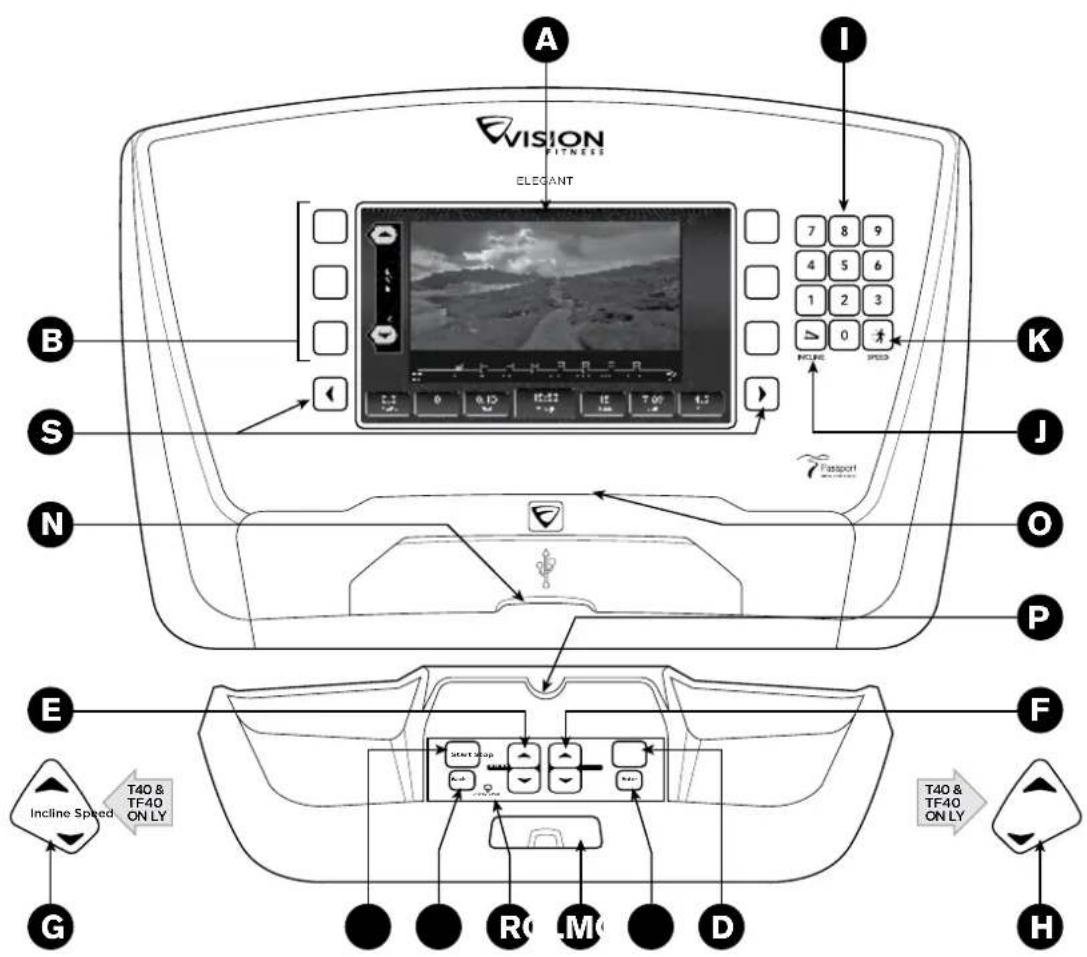
text_image
VISION FITNESS ELEGANT A I 7 8 9 4 5 6 1 2 3 0 HOME SPEED B S N K J O P E F Incline Speed T40 & TF40 ON LY G Start Stop R0 M0 D T40 & TF40 ON LY HeleGAnT Console opeRATlon
Note: There is a thin protective sheet of clear plastic on the overlay of the console that should be removed before use.
A) ICD DlspIAY: see next page for more information.
B) DlspIAY KeYs: this console functions like an ATM machine with function keys next to icons on the display for making selections. To select a function or modify display data, simply press the key next to the icon you wish to choose.
C) sSTART: press to begin exercising, start your workout, or resume exercising after pause.
D) sTop: press to pause your workout. Press STOP again to end workout.
e) InCllne ▼▲KeYs: used to adjust incline in small increments (0.5% Increments).
F) speeD ▼▲KeYs: used to adjust speed in small increments (0.1 MPH increments).
G) InCllne ToGGles (T40 & TF40 only): used to adjust incline in small increments (0.5% Increments).
H) speeD ToGGles (T40 & TF40 only): used to adjust speed in small increments (0.1 MPH increments).
I) QUICK ADJUsT KeYpAD: used to reach desired speed or incline more quickly.
J) set InCllne KeY: used to change incline to level entered into keypad.
K) set speed KeY: used to change speed to level entered into keypad.
I) enTeR / CHAnGe DIsplAY KeY: press to confirm programming selections during workout setup. Press to change main display, choose from 1 of 5 Virtual Active images or program profile.
M) BACK: press to go back to the previous step during program setup.
n) UsB poRT ACCess poCKeT: USB for software updates or charging devices. *
o) ReADInG RACK: holds reading material.
p) MeDIA pIAYeR HolDeR: holds your media player or tablet.
Q) sAFeTY KeY position: enables treadmill when safety key is inserted.
R) eneRGY sAVeR IIGHT: indicates if machine is in energy saver mode. Press any key to wake up the machine.
s) woRKoUT DATA: use the or keys to change the workout data displayed.
QUICK ADJUST KEYPAD (I)

text_image
7 8 9 4 5 6 1 2 3 0 INCLINE SPEEDQuickly access any speed or incline level by typing the number and pressing SPEED (☐) or INCLINE (☐). Examples:
• To change the speed to 6.5 MPH, press 6–5–SPEED ( ).
- To change the incline to 10% , press 1-0-0-INCLINE ( ). (NOTE: If there is no decimal point, you still must enter 0).
ELEGANT CONSOLE
eleGAnT Display operation
This console functions like an ATM machine with 8 function keys next to indicators on the display. To select a function or modify display data, simply press the key next to the selection you wish to choose.
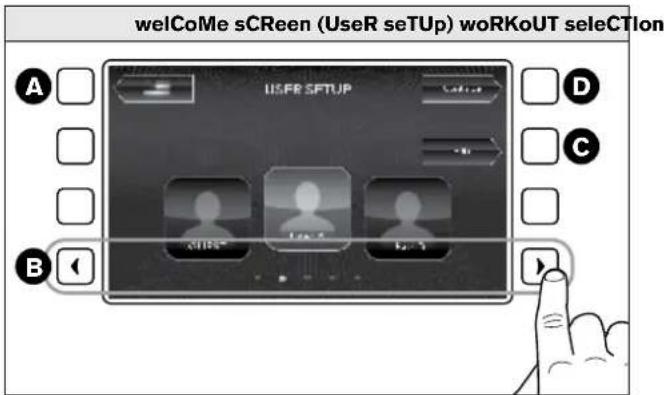
text_image
welCoMe sCREen (UseR setUp) woRKoUT seleCTlon A USFR SFTP B D C B ← L104 L103 L102 L101A) IAnGUAGe seleCTlon: Cycle between language options.
B) ARRow BUTTONs: Use to scroll through data such as the list of users. Select GUEST if you do not wish to save your workout stats.
C) eDIT: Setup, delete or change a user profile.
D) ConTInUe: Press to advance with the selected user.

text_image
E WORKOUT SPICTION H G Fe) BACK: Takes you back to the user setup screen.
F) ARRow BUTTONs: Use to scroll through programs.
G) Help: Press to see program description.
H) ConTInUe: Press to advance with the selected program. Once a program is selected, follow the on screen prompt to complete program setup.
eleGAnT Console GetTInG sTARTeD
1) Check to make sure no objects are placed on the belt that will hinder the movement of the treadmill.
2) Plug in the power cord and turn the treadmill ON.
3) Stand on the side rails of the treadmill.
4) Attach the safety key clip to part of your clothing making sure that it is secure and will not become detached during operation.
5) Insert the safety key into the safety keyhole in the console.
6) Select a USER and press CONTINUE to confirm.
7) You have two options to start your workout:
A) QUICK sTART Up
Simply press the START key to begin working out.
Time, distance, and calories will all count up from zero. OR...
B) seleCT A pRoGRAM
1) Select a PROGRAM and press CONTINUE to confirm.
2) Follow the on-screen prompts to complete the program setup.
3) When setup is complete, press START to begin your workout.
FInIsHInG YoUR woRKoUT
When your workout is complete, your workout information will stay displayed on the console for 2 minutes and then return to the homescreen. All workout information is automatically saved to the user profile.

ELEGANT CONSOLE

eleGAnT Console pRoGRAM InFoRMATION
NOTE: If speed or incline are changed during your workout, the remaining segments will be affected accordingly.
CIAssIC pRoGRAMs: Workout programs include manual, intervals and weight loss.
MAnUAI: A workout that allows you to manually adjust the machine at any time.
InTeRVAIs: A speed-based workout that automatically adjusts the speed of the machine at regular intervals.
| Intervals - Program Segments Repeat | |||||||||||||||||||||||||||
| MPH | 1 | 2 | 3 | 4 | 5 | 6 | 7 | 8 | 9 | 10 | 11 | 12 | 13 | 14 | 15 | 16 | 17 | 18 | 19 | 20 | 21 | 22 | 23 | 24 | |||
| Level 1 | 0.5 | 3.2 | 1.5 | 3.2 | 1.5 | 3.5 | 1.5 | 3.5 | 1.5 | 3.7 | 1.5 | 3.7 | 1.5 | 3.7 | 1.5 | 3.5 | 1.5 | 3.5 | |||||||||
| Level 2 | 0.5 | 3.7 | 2.0 | 3.7 | 2.0 | 4.0 | 2.0 | 4.0 | 2.0 | 4.2 | 2.0 | 4.2 | 2.0 | 4.2 | 2.0 | 4.0 | 2.0 | 4.0 | |||||||||
| Level 3 | 0.5 | 4.2 | 2.2 | 4.2 | 2.2 | 4.4 | 2.4 | 4.4 | 2.2 | 4.6 | 2.2 | 4.6 | 2.2 | 4.6 | 2.2 | 4.4 | 2.2 | 4.4 | |||||||||
| Level 4 | 0.5 | 4.6 | 2.5 | 4.6 | 2.5 | 4.8 | 2.5 | 4.8 | 2.5 | 5.0 | 2.5 | 5.0 | 2.5 | 5.0 | 2.5 | 4.8 | 2.5 | 4.8 | |||||||||
| Level 5 | 0.5 | 4.9 | 3.0 | 4.9 | 3.0 | 5.1 | 3.0 | 5.1 | 3.0 | 5.3 | 3.0 | 5.3 | 3.0 | 5.3 | 3.0 | 5.1 | 3.0 | 5.1 | |||||||||
| Level 6 | 0.5 | 5.0 | 3.5 | 5.0 | 3.5 | 5.2 | 3.5 | 5.2 | 3.5 | 5.5 | 3.5 | 5.5 | 3.5 | 5.5 | 3.5 | 5.2 | 3.5 | 5.2 | |||||||||
| Level 7 | 0.5 | 5.3 | 3.5 | 5.3 | 3.5 | 5.5 | 3.5 | 5.5 | 3.5 | 5.8 | 3.5 | 5.8 | 3.5 | 5.8 | 3.5 | 5.5 | 3.5 | 5.5 | |||||||||
| Level 8 | 0.5 | 5.8 | 3.5 | 5.8 | 3.5 | 6.0 | 3.5 | 6.0 | 3.5 | 6.3 | 3.5 | 6.3 | 3.5 | 6.3 | 3.5 | 6.0 | 3.5 | 6.0 | |||||||||
| Level 9 | 0.5 | 6.0 | 4.0 | 6.0 | 4.0 | 6.3 | 4.0 | 6.3 | 4.0 | 6.5 | 4.0 | 6.5 | 4.0 | 6.5 | 4.0 | 6.3 | 4.0 | 6.3 | |||||||||
| Level 10 | 0.5 | 6.5 | 4.5 | 6.5 | 4.5 | 6.5 | 4.5 | 6.7 | 4.5 | 6.7 | 4.5 | 6.7 | 4.5 | 7.0 | 4.5 | 7.0 | 4.5 | 7.0 | 4.5 | 7.0 | 4.5 | 6.7 | 4.5 | 6.7 | |||
| Level 11 | 0.5 | 7.0 | 5.0 | 7.0 | 5.0 | 7.0 | 5.0 | 7.2 | 5.0 | 7.2 | 5.0 | 7.2 | 5.0 | 7.5 | 5.0 | 7.5 | 5.0 | 7.5 | 5.0 | 7.5 | 5.0 | 7.2 | 5.0 | 7.2 | |||
| Level 12 | 0.5 | 7.5 | 5.5 | 7.5 | 5.5 | 7.5 | 5.5 | 7.7 | 5.5 | 7.7 | 5.5 | 7.7 | 5.5 | 8.0 | 5.5 | 8.0 | 5.5 | 8.0 | 5.5 | 8.0 | 5.5 | 7.7 | 5.5 | 7.7 | |||
| Level 13 | 0.5 | 8.0 | 5.5 | 8.0 | 5.8 | 5.5 | 8.2 | 5.8 | 5.5 | 8.2 | 5.8 | 5.5 | 8.5 | 5.8 | 5.5 | 8.5 | 5.8 | 8.2 | |||||||||
| Level 14 | 0.5 | 8.5 | 6.0 | 8.5 | 6.0 | 8.6 | 8.7 | 6.0 | 8.7 | 6.0 | 9.0 | 6.0 | 9.0 | 6.0 | 9.0 | 6.0 | 8.7 | 6.0 | 8.7 | ||||||||
| Level 15 | 0.5 | 9.0 | 6.0 | 9.0 | 6.0 | 9.0 | 9.2 | 6.0 | 9.2 | 6.0 | 9.5 | 6.0 | 9.5 | 6.0 | 9.5 | 6.0 | 9.2 | 6.0 | 9.2 | ||||||||
| Level 16 | 0.5 | 9.5 | 6.0 | 9.5 | 6.0 | 9.5 | 6.0 | 9.7 | 6.0 | 9.7 | 6.0 | 10.0 | 6.0 | 10.0 | 6.0 | 10.0 | 6.0 | 9.7 | 6.0 | 9.7 | |||||||
| Level 17 | 0.5 | 10.0 | 6.5 | 10.0 | 6.5 | 10.0 | 6.5 | 10.2 | 6.5 | 10.2 | 6.5 | 10.5 | 6.5 | 10.5 | 6.5 | 10.5 | 6.5 | 10.5 | 6.5 | 10.2 | 6.5 | 10.2 | |||||
| Level 18 | 0.5 | 10.5 | 6.5 | 10.5 | 6.5 | 10.5 | 6.5 | 10.7 | 6.5 | 10.7 | 6.5 | 11.0 | 6.5 | 11.0 | 6.5 | 11.0 | 6.5 | 11.0 | 6.5 | 10.7 | 6.5 | 10.7 | |||||
| Level 19 | 0.5 | 11.0 | 7.0 | 11.0 | 7.0 | 11.0 | 7.0 | 11.2 | 7.0 | 11.2 | 7.0 | 11.2 | 7.0 | 11.5 | 7.0 | 11.5 | 7.0 | 11.5 | 7.0 | 11.5 | 7.0 | 11.2 | 7.0 | 11.2 | |||
| Level 20 | 0.5 | 11.5 | 7.0 | 11.5 | 7.0 | 11.5 | 7.0 | 11.7 | 7.0 | 11.7 | 7.0 | 11.7 | 7.0 | 12.0 | 7.0 | 12.0 | 7.0 | 12.0 | 7.0 | 12.0 | 7.0 | 11.7 | 7.0 | 11.7 | |||
weight loss: Promotes weight loss by increasing and decreasing the speed and incline, while keeping you in your fat burning zone. Speed and Incline changes, segments repeat every 30 seconds.
| Weight Loss - Program Segments Repeat | |||||||||||||||||||||||||||||||||
| 1 | 2 | 3 | 4 | 5 | 6 | 7 | 8 | 9 | 10 | 11 | 12 | 13 | 14 | 15 | 16 | 17 | 18 | 19 | 20 | 21 | 22 | 23 | 24 | 25 | |||||||||
| Level 1 | Speed | 1.0 | 1.5 | 2.0 | 1.5 | 1.5 | 1.0 | 1.0 | 2 | 5 | 1.5 | 1.5 | 2.0 | 2.0 | 2 | 5 | 2.0 | 1.5 | 1.0 | 2.0 | 2.0 | 1.5 | 1.0 | 2.0 | 2.0 | 2.0 | 1.5 | 1.5 | |||||
| Incline | 0.0 | 0.0 | 0.0 | 1.0 | 1.5 | 2.0 | 2.0 | 0.0 | 2.0 | 2.0 | 1.0 | 1.5 | 0 | 5 | 1.0 | 2.0 | 2.5 | 1.0 | 1.0 | 2.0 | 2.5 | 1.0 | 1.0 | 0.5 | 0.0 | 0.0 | |||||||
| Level 2 | Speed | 1.0 | 2.0 | 2.5 | 2.0 | 2.0 | 1.5 | 1.5 | 3 | 0 | 2.0 | 2.0 | 2.5 | 2.5 | 3 | 0 | 2.5 | 2.0 | 1.5 | 2.5 | 2.5 | 2.0 | 1.5 | 2.5 | 2.5 | 2.5 | 2.0 | 2.0 | |||||
| Incline | 0.0 | 0.0 | 0.0 | 1.5 | 2.0 | 2.5 | 2.5 | 1 | 0 | 2.5 | 2.5 | 1.5 | 2.0 | 1 | 0 | 2.0 | 2.5 | 3.0 | 1.5 | 1.5 | 2.5 | 3.0 | 1.5 | 1.5 | 1.0 | 0.0 | 0.0 | ||||||
| Level 3 | Speed | 1.0 | 2.5 | 3.0 | 2.5 | 2.5 | 2.0 | 2.0 | 3 | 5 | 2.5 | 2.5 | 3.0 | 3.0 | 3 | 5 | 3.0 | 2.5 | 2.0 | 3.0 | 3.0 | 2.5 | 2.0 | 3.0 | 3.0 | 3.0 | 2.5 | 2.5 | |||||
| Incline | 0.0 | 0.0 | 0.0 | 2.0 | 2.5 | 3.0 | 3.0 | 1 | 5 | 3.0 | 3.0 | 2.0 | 2.5 | 1 | 5 | 2.5 | 3.0 | 3.5 | 2.0 | 2.0 | 3.0 | 3.5 | 2.0 | 2.0 | 1.5 | 0.0 | 0.0 | ||||||
| Level 4 | Speed | 1.0 | 3.0 | 3.5 | 3.0 | 3.0 | 2.5 | 2.5 | 4 | 0 | 3.0 | 3.0 | 3.5 | 3.5 | 4 | 0 | 3.5 | 3.0 | 2.5 | 3.5 | 3.5 | 3.0 | 2.5 | 3.5 | 3.5 | 3.5 | 3.0 | 3.0 | |||||
| Incline | 0.0 | 0.0 | 0.0 | 2.5 | 3.0 | 3.5 | 3.5 | 2 | 0 | 3.5 | 3.0 | 2.0 | 3.0 | 2 | 0 | 3.0 | 3.5 | 4.0 | 2.5 | 2.5 | 3.5 | 4.0 | 2.5 | 2.5 | 2.0 | 0.0 | 0.0 | ||||||
| Level 5 | Speed | 1.0 | 3.5 | 4.0 | 3.5 | 3.5 | 3.0 | 3.0 | 4 | 5 | 3.5 | 3.5 | 4.0 | 4.0 | 4 | 5 | 4.0 | 3.5 | 3.0 | 4.0 | 4.0 | 3.5 | 3.0 | 4.0 | 4.0 | 4.0 | 3.5 | 3.5 | |||||
| Incline | 0.0 | 0.0 | 0.0 | 3.0 | 3.5 | 4.0 | 4.0 | 2 | 5 | 4.0 | 4.0 | 2.5 | 3.5 | 2 | 5 | 3.5 | 4.0 | 4.5 | 3.0 | 3.0 | 4.0 | 4.5 | 3.0 | 3.0 | 2.5 | 0.0 | 0.0 | ||||||
| Level 6 | Speed | 1.0 | 4.0 | 4.5 | 4.0 | 4.0 | 3.5 | 3.5 | 5 | 0 | 4.0 | 4.0 | 4.5 | 4.5 | 5 | 0 | 4.5 | 4.0 | 3.5 | 4.5 | 4.5 | 4.0 | 3.5 | 4.5 | 4.5 | 4.5 | 4.0 | 4.0 | |||||
| Incline | 0.0 | 0.0 | 0.0 | 3.5 | 4.0 | 4.5 | 4.5 | 3 | 0 | 4.5 | 4.5 | 3.0 | 4.0 | 3 | 0 | 4.0 | 4.5 | 5.0 | 3.5 | 3.5 | 4.5 | 5.0 | 3.5 | 3.5 | 3.0 | 0.0 | 0.0 | ||||||
| Level 7 | Speed | 1.0 | 4.5 | 5.0 | 4.5 | 4.5 | 4.0 | 4.0 | 5 | 5 | 4.5 | 4.5 | 5.0 | 5.0 | 5 | 5 | 5.0 | 4.5 | 4.0 | 5.0 | 5.0 | 4.5 | 4.0 | 5.0 | 5.0 | 4.5 | 4.5 | 4.5 | |||||
| Incline | 0.0 | 0.0 | 0.0 | 4.0 | 4.5 | 5.0 | 5.0 | 3 | 5 | 5.0 | 5.0 | 3.5 | 4.5 | 3 | 5 | 4.5 | 5.0 | 5.5 | 4.0 | 4.0 | 5.0 | 5.5 | 4.0 | 4.0 | 3.5 | 0.0 | 0.0 | ||||||
| Level 8 | Speed | 1.0 | 5.0 | 5.5 | 5 | 0 | 4.5 | 4.5 | 6.0 | 5.0 | 5 | 0 | 5.5 | 5.5 | 6.0 | 5.5 | 5 | 0 | 4.5 | 5.5 | 5.5 | 5.0 | 4.5 | 5.5 | 5.5 | 5.0 | 5.0 | 5.0 | |||||
| Incline | 0.0 | 0.0 | 0.0 | 4.5 | 5.0 | 5.5 | 5.5 | 4 | 0 | 5.5 | 5.5 | 4.0 | 5.0 | 4 | 0 | 5.0 | 5.5 | 6.0 | 4.5 | 4.5 | 5.5 | 6.0 | 4.5 | 4.5 | 4.0 | 0.0 | 0.0 | ||||||
| Level 9 | Speed | 1.0 | 5.5 | 6 | 0 | 5.5 | 5.5 | 5.0 | 5.0 | 6 | 5.5 | 5.5 | 6.0 | 6.0 | 6 | 5 | 6.0 | 5.5 | 5.0 | 6.0 | 6.0 | 5.5 | 5.0 | 6.0 | 6.0 | 5.5 | 5.5 | 5.5 | |||||
| Incline | 0.0 | 0.0 | 0.0 | 5.0 | 5.5 | 6.0 | 6.0 | 4 | 5 | 6.0 | 6.0 | 4.5 | 5.5 | 4 | 5 | 5.5 | 6.0 | 6.5 | 5.0 | 5.0 | 6.0 | 6.5 | 5.0 | 5.0 | 4.5 | 0.0 | 0.0 | ||||||
| Level 10 | Speed | 1.0 | 6.0 | 6.5 | 6.0 | 6.0 | 5.5 | 5.5 | 7.0 | 6.0 | 6.0 | 6.5 | 6.5 | 6.5 | 7.0 | 6.5 | 6.0 | 5.5 | 6.5 | 6.5 | 6.0 | 5.5 | 6.5 | 6.5 | 6.0 | 6.0 | 6.0 | ||||||
| Incline | 0.0 | 0.0 | 0.0 | 0.0 | 5.5 | 6.0 | 6.5 | 6.5 | 5.0 | 6.5 | 6.5 | 5.0 | 6.0 | 5.0 | 6.0 | 6.5 | 7.0 | 5.5 | 5.5 | 6.5 | 7.0 | 5.5 | 5.5 | 5.5 | 5.0 | 0.0 | 0.0 | ||||||

ELEGANT CONSOLE
eleGAnT Console pRoGRAM InFoRMATION
58
spRInT 8: The SPRINT 8 program is an anaerobic interval program designed to build muscle, improve speed, and naturally increase the release of Human Growth Hormone (HGH) in your body. Producing HGH through exercise and a proper diet has been shown as an effective way to burn fat and build lean muscle mass according to Phil Campbell, author of Ready, Set, Go! Synergy Fitness. Please go to Mr. Campbell's website, www.readysetgofitness.com, for more details about this radical new approach to fitness.
1) WARM-UP (3:00) should gradually increase your heart rate and increase respiration and blood flow to working muscles. The warm-up is controlled by the user to meet your specific needs.
2) INTERVAL TRAINING (14:30) starts immediately after the warm-up with a 30-second sprint interval; changing both speed and incline. Seven recovery intervals of one minute and 30 seconds will alternate with the eight 30-second sprint intervals. The sprints will increase speed and elevation at the 3rd and 5th interval. The recovery speed is about 2–3 mph slower than your sprint and the recovery elevation is 0. You can alter your speed or incline during your workout.
3) COOL-DOWN (2:30) helps return your body's systems to resting levels. Less demand is placed on your heart during recovery if an appropriate cool-down is used following the exercise.
In order to keep track of each segment/interval, the segment time is counted down in the timer. It takes only 20 minutes to complete the SPRINT 8 workout.
spRInT 8 pRoGRAM CHARTs:
| BeGInneR | |||||||||||
| Level 1 | 2 | 3 | 4 | 5 | |||||||
| Segment | Spd. | Elev. | Spd. | Elev. | Spd. | Elev. | Spd. | Elev. | Spd. | Elev. | |
| Warm Up | 0.5 | 0 | 0.5 | 0 | 0.5 | 0 | 0.5 | ||||
| 1 | 3.2 | 3 | 3.7 | 3 | 4.2 | 3 | 4.6 | 3 | 4.9 | 3 | |
| 2 | 1.5 | 0 | 2.0 | 0 | 2.2 | 0 | 2.5 | 0 | 3.0 | 0 | |
| 3 | 3.2 | 3 | 3.7 | 3 | 4.2 | 3 | 4.6 | 3 | 4.9 | 3 | |
| 4 | 1.5 | 0 | 2.0 | 0 | 2.2 | 0 | 2.5 | 0 | 3.0 | 0 | |
| 5 | 3.5 | 3 | 4.0 | 3 | 4.4 | 3 | 4.8 | 3 | 5.1 | 3 | |
| 6 | 1.5 | 0 | 2.0 | 0 | 2.2 | 0 | 2.5 | 0 | 3.0 | 0 | |
| 7 | 3.5 | 3 | 4.0 | 3 | 4.4 | 3 | 4.8 | 3 | 5.1 | 3 | |
| 8 | 1.5 | 0 | 2.0 | 0 | 2.2 | 0 | 2.5 | 0 | 3.0 | 0 | |
| 9 | 3.7 | 3 | 4.2 | 3 | 4.6 | 3 | 5.0 | 3 | 5.9 | 3 | |
| 10 | 1.5 | 0 | 2.0 | 0 | 2.2 | 0 | 2.5 | 0 | 3.0 | 0 | |
| 11 | 3.7 | 3 | 4.2 | 3 | 4.6 | 3 | 5.0 | 3 | 5.9 | 3 | |
| 12 | 1.5 | 0 | 2.0 | 0 | 2.2 | 0 | 2.5 | 0 | 3.0 | 0 | |
| 13 | 3.7 | 3 | 4.2 | 3 | 4.6 | 3 | 5.0 | 3 | 5.9 | 3 | |
| 14 | 1.5 | 0 | 2.0 | 0 | 2.2 | 0 | 2.5 | 0 | 3.0 | 0 | |
| 15 | 3.7 | 3 | 4.2 | 3 | 4.6 | 3 | 5.0 | 3 | 5.9 | 3 | |
| Cool Down | 1.5 | 0 | 2.0 | 0 | 2.2 | 0 | 2.5 | 0 | 3.0 | 0 | |
| InTeRMeDIATe | ||||||||||
| Level 6 | 8 | 9 | 10 | |||||||
| Segment | Spd. | Elev. | Spd. | Elev. | Spd. | Elev. | Spd. | Elev. | Spd. | Elev. |
| Warm Up | 0.5 | 0 | 0.5 | 0 | 0.5 | 0 | 0.5 | 0 | ||
| 1 | 5.0 | 4 | 5.3 | 4 | 5.8 | 4 | 6.0 | 4 | 6.5 | 4 |
| 2 | 3.5 | 0 | 3.5 | 0 | 3.5 | 0 | 4.0 | 0 | 4.5 | 0 |
| 3 | 5.0 | 4 | 5.3 | 4 | 5.8 | 4 | 6.0 | 4 | 6.5 | 4 |
| 4 | 3.5 | 0 | 3.5 | 0 | 3.5 | 0 | 4.0 | 0 | 4.5 | 0 |
| 5 | 5.2 | 4 | 5.5 | 4 | 6.0 | 4 | 6.3 | 4 | 6.7 | 4 |
| 6 | 3.5 | 0 | 3.5 | 0 | 3.5 | 0 | 4.0 | 0 | 4.5 | 0 |
| 7 | 5.2 | 4 | 5.5 | 4 | 6.0 | 4 | 6.3 | 4 | 6.7 | 4 |
| 8 | 3.5 | 0 | 3.5 | 0 | 3.5 | 0 | 4.0 | 0 | 4.5 | 0 |
| 9 | 5.5 | 4 | 5.8 | 4 | 6.3 | 4 | 6.5 | 4 | 7.0 | 4 |
| 10 | 3.5 | 0 | 3.5 | 0 | 3.5 | 0 | 4.0 | 0 | 4.5 | 0 |
| 11 | 5.5 | 4 | 5.8 | 4 | 6.3 | 4 | 6.5 | 4 | 7.0 | 4 |
| 12 | 3.5 | 0 | 3.5 | 0 | 3.5 | 0 | 4.0 | 0 | 4.5 | 0 |
| 13 | 5.5 | 4 | 5.8 | 4 | 6.3 | 4 | 6.5 | 4 | 7.0 | 4 |
| 14 | 3.5 | 0 | 3.5 | 0 | 3.5 | 0 | 4.0 | 0 | 4.5 | 0 |
| 15 | 5.5 | 4 | 5.8 | 4 | 6.3 | 4 | 6.5 | 4 | 7.0 | 4 |
| Cool Down | 3.5 | 0 | 3.5 | 0 | 3.5 | 0 | 4.0 | 0 | 4.5 | |
| ADVAnCeD | ||||||||||
| Level | 11 | 12 | 13 | 14 | 15 | |||||
| Segment | Spd. | Elev. | Spd. | Elev. | Spd. | Elev. | Spd. | Elev. | Spd. | Elev. |
| Warm Up | 0.5 | 0.5 | 0.5 | 0.5 | 0.5 | 0 | ||||
| 1 | 7.0 | 7.5 | 6.8 | 5.8 | 5.9 | 0.5 | ||||
| 2 5.0 | 5.5 | 0.5 | 0.6 | 0.6 | 0 | |||||
| 3 | 7.0 | 7.5 | 6.8 | 5.8 | 5.9 | 0.5 | ||||
| 4 5.0 | 5.5 | 0.5 | 0.6 | 0.6 | 0 | |||||
| 5 | 7.2 | 7.7 | 5.8 | 2.5 | 5.9 | 2.5 | ||||
| 6 5.0 | 5.5 | 0.5 | 0.6 | 0.6 | 0 | |||||
| 7 | 7.2 | 7.7 | 5.8 | 2.5 | 5.9 | 2.5 | ||||
| 8 5.0 | 5.5 | 0.5 | 0.6 | 0.6 | 0 | |||||
| 9 | 7.5 | 8.0 | 5.8 | 5.9 | 5.9 | 5.5 | ||||
| 10 5.0 | 5.5 | 0.5 | 0.6 | 0.6 | 0 | |||||
| 11 | 7.5 | 8.0 | 5.8 | 5.9 | 5.9 | 5.5 | ||||
| 12 5.0 | 5.5 | 0.5 | 0.6 | 0.6 | 0 | |||||
| 13 | 7.5 | 8.0 | 5.8 | 5.9 | 5.9 | 5.5 | ||||
| 14 5.0 | 5.5 | 0.5 | 0.6 | 0.6 | 0 | |||||
| 15 | 7.5 | 8.0 | 5.8 | 5.9 | 5.9 | 5.5 | ||||
| Cool Down | 5.0 | 5.5 | 5.5 | 0.6 | 0.6 | 0 | ||||
| eITe | ||||||||||
| Level | 16 | 17 | 18 | 19 | 20 | |||||
| Segment | Spd. | Elev. | Spd. | Elev. | Spd. | Elev. | Spd. | Elev. | Spd. | Elev. |
| Warm Up | 0.5 | 0.5 | 0.5 | 0.5 | 0.5 | 0 | ||||
| 1 | 9.5 | 6 | 10.0 | 6 | 10.5 | 6 | 11.0 | 6 | 11.5 | 6 |
| 2 6.0 | 6.5 | 0 6.5 | 0 7.0 | 0 7.0 | 0 | |||||
| 3 | 9.5 | 6 | 10.0 | 6 | 10.5 | 6 | 11.0 | 6 | 11.5 | 6 |
| 4 6.0 | 6.5 | 0 6.5 | 0 7.0 | 0 7.0 | 0 | |||||
| 5 | 9.7 | 6 | 10.2 | 6 | 10.7 | 6 | 11.2 | 6 | 11.7 | 6 |
| 6 6.0 | 6.5 | 0 6.5 | 0 7.0 | 0 7.0 | 0 | |||||
| 7 | 9.7 | 6 | 10.2 | 6 | 10.7 | 6 | 11.2 | 6 | 11.7 | 6 |
| 8 6.0 | 6.5 | 0 6.5 | 0 7.0 | 0 7.0 | 0 | |||||
| 9 | 10.0 | 6 | 10.5 | 6 | 11.0 | 6 | 11.5 | 6 | 12.0 | 6 |
| 10 6.0 | 0 6.5 | 0 6.5 | 0 7.0 | 0 7.0 | 0 | |||||
| 11 | 10.0 | 6 | 10.5 | 6 | 11.0 | 6 | 11.5 | 6 | 12.0 | 6 |
| 12 6.0 | 0 6.5 | 0 6.5 | 0 7.0 | 0 7.0 | 0 | |||||
| 13 | 10.0 | 6 | 10.5 | 6 | 11.0 | 6 | 11.5 | 6 | 12.0 | 6 |
| 14 6.0 | 0 6.5 | 0 6.5 | 0 7.0 | 0 7.0 | 0 | |||||
| 15 | 10.0 | 6 | 10.5 | 6 | 11.0 | 6 | 11.5 | 6 | 12.0 | 6 |
| Cool Down | 6.0 | 0 6.5 | 0 6.5 | 0 7.0 | 0 7.0 | 0 | ||||
eleGAnT Console pRoGRAM InFoRMATION

FITness Test pRoGRAM: A workout based on the Gerkin protocol. This test has various stages increasing treadmill speed and incline until your maximum heart rate is reached. Your score is based on your gender, age and time needed to complete the test.
The Gerkin protocol was developed by Dr. Richard Gerkin of the Phoenix (Arizona) Fire Department. It is a sub-maximal graded treadmill evaluation used by many Fire Departments across the United States to assess the physical condition of the firefighters. The test requires constant monitoring of the user's heart rate so the use of a telemetric chest strap is highly encouraged. The workout operates as follows:
wARM-Up: 3 minutes long at 1.0–3.0 mph (1.6–4.8 kph) and 0% incline.
1) sTAGe 1: 1 minute long at 4.5 mph (7.2 kph) and 0% incline.
2) sTAGe 2: 1 minute long at 4.5 mph (7.2 kph) and 2% incline.
3) sTAGe 3: 1 minute long at 5.0 mph (8.0 kph) and 2% incline.
4) sTAGes 4 THRoUGH 15: After every odd minute, the incline will increase by 2% . After every even minute, the speed will increase by 0.5 mph (0.8 kph). Once the user's heart rate exceeds the target heart rate (85% of maximum as determined by the equation [220 - age] × [0.85] = target heart rate), the evaluation ends and the final evaluation stage is recorded.
5) Cool-Down: The test is completed when user's heart rate exceeds the target or the users completes all 15 stages, whichever occurs first. Then the treadmill will enter cool down for 3 minutes.
FITness Test sCoRes (Estimated V02 MAX (ML/KG/MIN) per age category)
| Men AGE | ||||||
| Percentile | 20-29 | 30-39 | 40- | 49 50-59 | ||
| EXCELLENT | 99 > 5 | 8.8 > 58 | 8.9 > 55.4 | > 52.5 | ||
| 95 54.0 | 52.5 | 50.4 | 47.1 | |||
| GOOD | 90 53.9 | 52.4 | 50.3 | 47.0 | ||
| 80 48.2 | 46.8 | 44.1 | 41.0 | |||
| AVERAGE | 70 | 48.1 | 45.7 | 44.0 | 40.9 | |
| 60 44.2 | 42.4 | 39.9 | 36.7 | |||
| FAIR | 50 44.1 | 42.3 | 39.8 | 36.6 | ||
| 40 41.0 | 38.9 | 36.7 | 33.8 | |||
| POOR | 30 40.9 | 38.8 | 36.6 | 33.7 | ||
| 20 | 37.1 | 35.4 | 33.0 | 30.2 | ||
| VERY POOR | 10 | 37.0 | 35.3 | 32.9 | 30.1 | |
| 5 | 31.6 | 30.9 | 28.3 | 25.1 | ||
| woMen | AGE | |||||
| Percentile | 20-29 | 30-39 | 40-49 | 50-59 | ||
| EXCELLENT | 99 | >53.0 | >48.7 | >46.8 | >42 | 0 |
| 95 46.8 | 43.9 | 41.0 | 36.8 | |||
| GOOD | 90 46.7 | 43.8 | 40.9 | 36.7 | ||
| 80 41.0 | 38.6 | 36.3 | 32.3 | |||
| AVERAGE | 70 | 40.9 | 38.5 | 36.2 | 32.2 | |
| 60 36.7 | 34.6 | 32.3 | 29.4 | |||
| FAIR | 50 36.6 | 34.5 | 32.2 | 29.3 | ||
| 40 33.8 | 32.3 | 29.5 | 26.9 | |||
| POOR | 30 33.7 | 32.2 | 29.4 | 26.8 | ||
| 20 30.6 | 28.7 | 25.5 | 24.3 | |||
| VERY POOR | 10 30.5 | 28.6 | 25.4 | 24.2 | ||
| 5 | 25.9 | 25.1 | 23.5 | 21.1 | ||
Note: Changing the speed or incline during the test will end the test and enter cool-down. Press stop to end the test at any time and see results.

GoAI pRoGRAMs: A series of workouts that allow you to select a specific goal that you would like to achieve.
5K: A workout with a fixed distance of 5 kilometers (3.1 miles). Incline is adjusted automatically throughout the workout. You control the speed.
10K: A workout with a fixed distance of 10 kilometers (6.2 miles). Incline is adjusted automatically throughout the workout. You control the speed.
CAIoRies GoAI: A workout that allows you to select a specific number of calories you would like to burn during your workout. Increasing the calorie goal of the workout will affect the duration of the workout based on your speed and incline. Estimated time to complete shown in bottom right hand corner of the screen.
DIsTAnCe GoAI: A workout that allows you to select a specific distance you would like to travel during your workout. Increasing the distance goal of the workout will affect the duration of the workout based on your speed. Estimated time to complete shown in bottom right hand corner of the screen.

TARGeT HeART RATE pRoGRAMs: A workout designed to keep you in your specified target heart rate zone. This workout requires you to wear a wireless heart rate strap. See next page for calculating your target heart rate.
HR InCIIne: Program adjusts incline to bring to your target heart rate.
HR % InCllne: Program adjusts incline to bring to your desired % maximum heart rate.
eleGAnT Console pRoGRAM InFoRMATION
HR speeD: Program adjusts speed to bring to your target heart rate.
HR % speeD: Program adjusts speed to bring to your desired % maximum heart rate.
The first step in knowing the right intensity for your training is to find out your maximum heart rate (max HR = 220 - your age). The age-based method provides an average statistical prediction of your max HR and is a good method for the majority of people, especially those new to heart rate training. The most precise and accurate way of determining your individual max HR is to have it clinically tested by a cardiologist or exercise physiologist through the use of a maximal stress test. If you are over the age of 40, overweight, have been sedentary for several years, or have a history of heart disease in your family, clinical testing is recommended.
| Target Heart Rate Zone | Workout Duration | Example THR Zone (age 30) | Your THR Zone | Recommended For |
| VERY HARD90 - 100% | < 5 MIN | 171 - 190 BPM | Fit persons and for athletic training | |
| HARD80 - 90% | 2 - 10 MIN | 152 - 171 BPM | Shorter workouts | |
| MODERATE70 - 80% | 10 - 40 MIN | 133 - 152 BPM | Moderately long workouts | |
| LIGHT60 - 70% | 40 - 80 MIN | 114 - 133 BPM | Longer and frequently repeated shorter exercises | |
| VERY LIGHT50 - 60% | 20 - 40 MIN | 104 - 114 BPM | Weight management and active recovery |
This chart gives examples of the heart rate range for a 30 year old exercising at 5 different heart rate zones. For example, a 30-year-old's max HR is 220 - 30 = 190 bpm and 90% max HR is 190 × 0.9 = 171 bpm.
TARGET HEART RATE NOTES:
- Warm-up and cool-down each last 5 minutes.
- After 5 minutes, the speed or incline will automatically adjust to bring you near your specified heart rate.
- The profile window shows your heart rate during exercise. The green line represents your target heart rate (THR) and the red line represents your current heart rate. If you are working out beneath your THR, the treadmill will adjust speed or incline accordingly to bring you near your target.
- If there is no heart rate detected, the unit will not change the speed or incline.
- If your heart rate is 25 beats over your target zone the program will shut down.

VIRTUAL ACTIVE is a high definition experience that uses real destination footage from stunning destinations around the world. The ultimate in workout entertainment, Virtual Active lets you escape the confines of a regular workout routine while enjoying a dynamic experience.
1) Select VIRTUAL ACTIVE and press CONTINUE to confirm.
2) Select one of the destinations and press CONTINUE to confirm.
3) Follow the on-screen prompts to complete the program setup.
4) When setup is complete, press START to begin your workout.
- During the workout, the incline will adjust to reflect the terrain of the destination.
- The incline intensity is based on the level you selected.
• Speed remains constant unless you adjust it.
The console includes two destinations. Additional destinations can be purchased online at www.passportplayer.com
Once you've purchased destinations from the website, you must download the destination media files to your computer, uncompress them and copy them to a USB flash drive (sold separately). With the destination media properly saved on your USB flash drive, you can use your new destinations with the treadmill. Simply insert the USB flash drive into the USB port on the console and the new destinations will be available to use in the VIRTUAL ACTIVE program.
NOTES: Destinations files do not transfer to the treadmill console. They must remain on your USB flash drive while inserted into the console in order to use with the VIRTUAL ACTIVE program.

ELEGANT CONSOLE

touch console

text_image
A VISION TOUCH Start 58 Start K L D E Incline Speed T40 & TF40 ON LY F NI HIE C T40 & TF40 ON LY GToUCH Console opeRATlon
Note: There is a thin protective sheet of clear plastic on the overlay of the console that should be removed before use.
A) ToUCH Di splAY: see next page for more information.
B) sSTART: press to begin exercising, start your workout, or resume exercising after pause.
C) sTop: press to pause/end your workout. Hold for 3 seconds to reset the console.
D) InCllne ▼▲KeYs: used to adjust incline in small increments (0.5% Increments).
e) speeD ▼▲KeYs: used to adjust speed in small increments (0.1 MPH increments).
F) InCllne ToGGles (T40 & TF40 onIY): used to adjust incline in small increments (0.5% Increments).
G) speeD ToGGles (T40 & TF40 onIY): used to adjust speed in small increments (0.1 MPH increments).
H) enTeR: press to confirm programming selections during workout setup.
I) BACK: press to go back to the previous step during program setup.
J) ACCess poCKeT: Contains iPod cable, USB for software updates or charging devices and headphone jack. Use the iPod cable to connect, charge and control your iPod or iPhone. *
K) ReADInG RACK: holds reading material.
I) MeDIA pIAYeR HolDeR: holds your media player or tablet.
M) sAFeTY KeY position: enables treadmill when safety key is inserted.
n) eneRGY sAVeR IIGHT: Indicates if machine is in energy saver mode. Press any key to wake up the machine.
* Will not charge USB devices which require more than 1 amp.

TOUCH CONSOLE
ToUCH Display operation
The Touch console has a fully integrated touchscreen display. All information required for workouts is explained on screen. Exploration of the interface is highly recommended. The information explaining how to program for various workouts will give an explanation about the contents of each screen. The screen uses sliders and arrow buttons to set inputs. To operate a slider, press and drag the blue slider button and release at your desired level or press the slider arrows to adjust up and down incrementally. If prompted, press OK on the slider button to confirm your selection.

text_image
HoMesCReen setUp sCREen User A C A Start B G e 58 D F User A User B User C User D User E User F User G User H User I User J User K User L User M User N User O User P User Q User R User S User T User U User V User W User X User Y User ZA) sSTART: Press for quick start or to start a program.
B) UseR IoGln: Press to login as one of the preset users or as Guest.
C) UseR InFo: Press to add, delete or edit a user.
D) ? BUTTON: Press to see description of program or feature.
e) pRoGRAMs: Press a button to select a workout. You can select a program before or during your workout.
F) IAnGUAGe seleCTlon: Press to change language.
G) nlKe + IpoD: See page 38 for more information.

text_image
H K WEIGHT 150 INCLINE 20 FHN 5.5 TIME 30 I A Start J 19 I 7 D eH) seConDARY pRoGRAMs: Press to select specific workouts, goals or settings within a program category.
I) sllDeR ARRows: Press to adjust slider level up or down incrementally.
J) sllDeR BUTTON: Press and drag to adjust slider level up or down.
K) sllDeR Di splAY wInDow: Shows current level slider is set to.
I) HoMe: Press to return to the homescreen or back up a step.
GeTTInG sTARTeD
1) Check to make sure no objects are placed on the belt that will hinder the movement of the treadmill.
2) Plug in the power cord and turn the treadmill ON.
3) Stand on the side rails of the treadmill.
4) Attach the safety key clip to part of your clothing making sure that it is secure and will not become detached during operation.
5) Insert the safety key into the safety keyhole in the console.
6) Press USER LOGIN button to select a USER or select GUEST if you do not want to save your workout stats.
7) You have two options to start your workout:
A) QUICK sTART Up
Simply press the START button to begin working out.
Time, distance, and calories will all count up from zero. OR...
B) seleCT A pRoGRAM
8) Press desired PROGRAM BUTTON to select workout.
9) Use SLIDER ARROWS to adjust workout settings.
10) Press Start to begin workout.
NOTE: You can adjust the speed and incline during your workout.
FInIsHInG YoUR woRKoUT
When your workout is complete, your workout information will stay displayed on the console for 2 minutes and then return to the homescreen. All workout information is automatically saved to the user profile.

TOUCH CONSOLE
TOUCH CONSOLE

text_image
pRoFile RUnsCREen sIMple RUnsCREen A C e F Finish G H J I K NULIVE 0 0.28 6:50 54 12:00 HEART RATE MILES CALORIES PACSA) woRkOUT TAB: Press to change your workout or level on the go.
B) pRoFile TAB: Above left. The profile runscreen shows your progress from start to finish on a 3D map.
C) sIMple TAB: Above right. The simple runscreen has 3 feedback windows. Press a window to change feedback.
D) IpoD TAB: Press to change audio/video playing on your iPod (while connected). See page 37 for more information.
e) sTAGe MeTeR: Shows progress of current stage of the workout. When meter is full the stage is complete.
F) sTAGe peRCenTAGe: Shows percentage completed.
G) sTAGe TIME: Shows stage time elapsed.
H) pRoGRess InDICAToR: Moves along the path to show your workout progress from start to finish.
I) sllDeR ARRows: Press to adjust speed/incline level up or down incrementally.
J) sllDeR BUTTON: Touch and slide to adjust speed/incline

flowchart
graph TD
    A["Sensor I"] --> B["0.75 MILES"]
    C["Sensor M"] --> B
    D["Sensor C"] --> E["04:43 TIME ELAPSED"]
    F["Sensor n"] --> E
    G["Sensor o"] --> E
    H["Sensor p"] --> E
    I["Sensor Q"] --> E
    J["Sensor 5.0 MPH"] --> E
level up or down. Note: If the speed is adjusted above an increment of 1 mph/kph, you will be required to confirm this speed by pressing the blinking slider button, which will flash "OK." If you do not press "OK" within 5 seconds, the treadmill will continue at the current speed.
K) pReVloUs speeD/InCllne BUTTON: Press to set treadmill to the previous speed/incline setting.
I) HoMe: Press to return to the homescreen; program will stop and workout data will not be saved.
M) Cool Down: Press to enter cool down mode at any time during your workout.
n) pAUse: Press to pause your workout for up to 5 minutes.
o) sTop: Press to stop your workout. Workout data will be displayed for 2 minutes and saved to the user profile.
p) FeeDBACK wInDow: Press any window to change feedback.
Q) TIME ARRows: Press to adjust the workout time up or down.
ToUCH Console pRoGRAM InFoRMATION
NOTE: If speed or incline are changed during your workout, the remaining segments will be affected accordingly.

CIAssIC pRoGRAMs: A series of workout programs including interval training and weight loss. You can also run a manual program, run any of your previous workouts, or design your own custom workout.
MAnUAI: A workout that allows you to manually adjust the machine at any time.
InTeRVAIs: A speed-based workout that automatically adjusts the speed of the machine at regular intervals.
weight loss: A workout designed specifically to target fat.
CUsToM 1, 2, 3: Set your own course with up to 10 stages; setting your time, speed and elevation for each stage.
1) Select CLASSIC and then press CUSTOM 1, CUSTOM 2 or CUSTOM 3.
2) STAGE 1: Set incline, speed and time using SLIDER ARROWS. Press + to save and advance to STAGE 2.
3) STAGE 2: Set incline, speed and time using SLIDER ARROWS. Press + to save and advance to STAGE 3.
4) Repeat steps 2–3 to add and save additional stages to your custom workout.
5) To go back and edit a stage, select the stage number from the map at the bottom of the screen.
6) You can delete a stage at any time by pressing -.
7) Press start at any time to begin using your custom workout. The CUSTOM 1, 2 or 3 workout will be saved automatically.

ToUCH Console pRoGRAM InFoRMAtion
sAVeD woRKoUT: The console automatically saves all your workouts to a calendar for each user. You can run any of your previous workouts again.
1) Select CLASSIC and then press SAVED WORKOUT.
2) Use the ARROWS on the CALENDAR to cycle through months on the calendar.
3) SAVED WORKOUTS will be displayed by a on the day they were saved.
4) Press 16 select that day. A WORKOUT SUMMARY window will appear to the right of the CALENDAR. Press START to begin using the selected SAVED WORKOUT again.

spRInT 8: The SPRINT 8 program is an anaerobic interval program designed to build muscle, improve speed, and naturally increase the release of Human Growth Hormone (HGH) in your body. Producing HGH through exercise and a proper diet has been shown as an effective way to burn fat and build lean muscle mass according to Phil Campbell, author of Ready, Set, Go! Synergy Fitness. Please go to Mr. Campbell's website, www.readysetgofitness.com, for more details about this radical new approach to fitness.
1) WARM-UP (3:00) should gradually increase your heart rate and increase respiration and blood flow to working muscles. The warm-up is controlled by the user to meet your specific needs.
2) INTERVAL TRAINING (14:30) starts immediately after the warm-up with a 30-second sprint interval; changing both speed and incline. Seven recovery intervals of one minute and 30 seconds will alternate with the eight 30-second sprint intervals. The sprints will increase speed and elevation at the 3rd and 5th interval. The recovery speed is about 2–3 mph slower than your sprint and the recovery elevation is 0. You can alter your speed or incline during your workout.
3) COOL-DOWN (2:30) helps return your body's systems to resting levels. Less demand is placed on your heart during recovery if an appropriate cool-down is used following the exercise.
In order to keep track of each segment/interval, the segment time is counted down in the timer. It takes only 20 minutes to complete the SPRINT 8 workout.
spRInT 8 pRoGRAM CHARTs:
| BeGInneR | |||||||||||
| Level 1 | 2 | 3 | 4 | 5 | |||||||
| Segment | Spd. | Elev. | Spd. | Elev. | Spd. | Elev. | Spd. | Elev. | Spd. | Elev. | |
| Warm Up | 0.5 | 0 | 0.5 | 0 | 0.5 | 0 | 0.5 | ||||
| 1 | 3.2 | 3 | 3.7 | 3 | 4.2 | 3 | 4.6 | 3 | 4.9 | 3 | |
| 2 | 1.5 | 0 | 2.0 | 0 | 2.2 | 0 | 2.5 | 0 | 3.0 | 0 | |
| 3 | 3.2 | 3 | 3.7 | 3 | 4.2 | 3 | 4.6 | 3 | 4.9 | 3 | |
| 4 | 1.5 | 0 | 2.0 | 0 | 2.2 | 0 | 2.5 | 0 | 3.0 | 0 | |
| 5 | 3.5 | 3 | 4.0 | 3 | 4.4 | 3 | 4.8 | 3 | 5.1 | 3 | |
| 6 | 1.5 | 0 | 2.0 | 0 | 2.2 | 0 | 2.5 | 0 | 3.0 | 0 | |
| 7 | 3.5 | 3 | 4.0 | 3 | 4.4 | 3 | 4.8 | 3 | 5.1 | 3 | |
| 8 | 1.5 | 0 | 2.0 | 0 | 2.2 | 0 | 2.5 | 0 | 3.0 | 0 | |
| 9 | 3.7 | 3 | 4.2 | 3 | 4.6 | 3 | 5.0 | 3 | 5.9 | 3 | |
| 10 | 1.5 | 0 | 2.0 | 0 | 2.2 | 0 | 2.5 | 0 | 3.0 | 0 | |
| 11 | 3.7 | 3 | 4.2 | 3 | 4.6 | 3 | 5.0 | 3 | 5.9 | 3 | |
| 12 | 1.5 | 0 | 2.0 | 0 | 2.2 | 0 | 2.5 | 0 | 3.0 | 0 | |
| 13 | 3.7 | 3 | 4.2 | 3 | 4.6 | 3 | 5.0 | 3 | 5.9 | 3 | |
| 14 | 1.5 | 0 | 2.0 | 0 | 2.2 | 0 | 2.5 | 0 | 3.0 | 0 | |
| 15 | 3.7 | 3 | 4.2 | 3 | 4.6 | 3 | 5.0 | 3 | 5.9 | 3 | |
| Cool Down | 1.5 | 0 | 2.0 | 0 | 2.2 | 0 | 2.5 | 0 | 3.0 | 0 | |
| InTeRMeDIATe | ||||||||||
| Level 6 | 8 | 9 | 10 | |||||||
| Segment | Spd. | Elev. | Spd. | Elev. | Spd. | Elev. | Spd. | Elev. | Spd. | Elev. |
| Warm Up | 0.5 | 0 | 0.5 | 0 | 0.5 | 0 | 0.5 | 0 | ||
| 1 | 5.0 | 4 | 5.3 | 4 | 5.8 | 4 | 6.0 | 4 | 6.5 | 4 |
| 2 | 3.5 | 0 | 3.5 | 0 | 3.5 | 0 | 4.0 | 0 | 4.5 | 0 |
| 3 | 5.0 | 4 | 5.3 | 4 | 5.8 | 4 | 6.0 | 4 | 6.5 | 4 |
| 4 | 3.5 | 0 | 3.5 | 0 | 3.5 | 0 | 4.0 | 0 | 4.5 | 0 |
| 5 | 5.2 | 4 | 5.5 | 4 | 6.0 | 4 | 6.3 | 4 | 6.7 | 4 |
| 6 | 3.5 | 0 | 3.5 | 0 | 3.5 | 0 | 4.0 | 0 | 4.5 | 0 |
| 7 | 5.2 | 4 | 5.5 | 4 | 6.0 | 4 | 6.3 | 4 | 6.7 | 4 |
| 8 | 3.5 | 0 | 3.5 | 0 | 3.5 | 0 | 4.0 | 0 | 4.5 | 0 |
| 9 | 5.5 | 4 | 5.8 | 4 | 6.3 | 4 | 6.5 | 4 | 7.0 | 4 |
| 10 | 3.5 | 0 | 3.5 | 0 | 3.5 | 0 | 4.0 | 0 | 4.5 | 0 |
| 11 | 5.5 | 4 | 5.8 | 4 | 6.3 | 4 | 6.5 | 4 | 7.0 | 4 |
| 12 | 3.5 | 0 | 3.5 | 0 | 3.5 | 0 | 4.0 | 0 | 4.5 | 0 |
| 13 | 5.5 | 4 | 5.8 | 4 | 6.3 | 4 | 6.5 | 4 | 7.0 | 4 |
| 14 | 3.5 | 0 | 3.5 | 0 | 3.5 | 0 | 4.0 | 0 | 4.5 | 0 |
| 15 | 5.5 | 4 | 5.8 | 4 | 6.3 | 4 | 6.5 | 4 | 7.0 | 4 |
| Cool Down | 3.5 | 0 | 3.5 | 0 | 3.5 | 0 | 4.0 | 0 | 4.5 | |
| ADVAnCeD | ||||||||||
| Level | 11 | 12 | 13 | 14 | 15 | |||||
| Segment | Spd. | Elev. | Spd. | Elev. | Spd. | Elev. | Spd. | Elev. | Spd. | Elev. |
| Warm Up | 0.5 | 0.5 | 0.5 | 0.5 | 0.5 | 0 | ||||
| 1 | 7.0 | 7.5 | 6.8 | 5.8 | 5.9 | 0.5 | ||||
| 2 5.0 | 5.5 | 0.5 | 0.6 | 0.6 | 0 | |||||
| 3 | 7.0 | 7.5 | 6.8 | 5.8 | 5.9 | 0.5 | ||||
| 4 5.0 | 5.5 | 0.5 | 0.6 | 0.6 | 0 | |||||
| 5 | 7.2 | 7.7 | 5.8 | 2.5 | 5.9 | 2.5 | ||||
| 6 5.0 | 5.5 | 0.5 | 0.6 | 0.6 | 0 | |||||
| 7 | 7.2 | 7.7 | 5.8 | 2.5 | 5.9 | 2.5 | ||||
| 8 5.0 | 5.5 | 0.5 | 0.6 | 0.6 | 0 | |||||
| 9 | 7.5 | 8.0 | 5.8 | 5.9 | 5.9 | 5.5 | ||||
| 10 5.0 | 5.5 | 0.5 | 0.6 | 0.6 | 0 | |||||
| 11 | 7.5 | 8.0 | 5.8 | 5.9 | 5.9 | 5.5 | ||||
| 12 5.0 | 5.5 | 0.5 | 0.6 | 0.6 | 0 | |||||
| 13 | 7.5 | 8.0 | 5.8 | 5.9 | 5.9 | 5.5 | ||||
| 14 5.0 | 5.5 | 0.5 | 0.6 | 0.6 | 0 | |||||
| 15 | 7.5 | 8.0 | 5.8 | 5.9 | 5.9 | 5.5 | ||||
| Cool Down | 5.0 | 5.5 | 5.5 | 0.6 | 0.6 | 0 | ||||
| eITe | ||||||||||
| Level | 16 | 17 | 18 | 19 | 20 | |||||
| Segment | Spd. | Elev. | Spd. | Elev. | Spd. | Elev. | Spd. | Elev. | Spd. | Elev. |
| Warm Up | 0.5 | 0.5 | 0.5 | 0.5 | 0.5 | 0 | ||||
| 1 | 9.5 | 6 | 10.0 | 6 | 10.5 | 6 | 11.0 | 6 | 11.5 | 6 |
| 2 6.0 | 6.5 | 0 6.5 | 0 7.0 | 0 7.0 | 0 | |||||
| 3 | 9.5 | 6 | 10.0 | 6 | 10.5 | 6 | 11.0 | 6 | 11.5 | 6 |
| 4 6.0 | 6.5 | 0 6.5 | 0 7.0 | 0 7.0 | 0 | |||||
| 5 | 9.7 | 6 | 10.2 | 6 | 10.7 | 6 | 11.2 | 6 | 11.7 | 6 |
| 6 6.0 | 6.5 | 0 6.5 | 0 7.0 | 0 7.0 | 0 | |||||
| 7 | 9.7 | 6 | 10.2 | 6 | 10.7 | 6 | 11.2 | 6 | 11.7 | 6 |
| 8 6.0 | 6.5 | 0 6.5 | 0 7.0 | 0 7.0 | 0 | |||||
| 9 | 10.0 | 6 | 10.5 | 6 | 11.0 | 6 | 11.5 | 6 | 12.0 | 6 |
| 10 6.0 | 0 6.5 | 0 6.5 | 0 7.0 | 0 7.0 | 0 | |||||
| 11 | 10.0 | 6 | 10.5 | 6 | 11.0 | 6 | 11.5 | 6 | 12.0 | 6 |
| 12 6.0 | 0 6.5 | 0 6.5 | 0 7.0 | 0 7.0 | 0 | |||||
| 13 | 10.0 | 6 | 10.5 | 6 | 11.0 | 6 | 11.5 | 6 | 12.0 | 6 |
| 14 6.0 | 0 6.5 | 0 6.5 | 0 7.0 | 0 7.0 | 0 | |||||
| 15 | 10.0 | 6 | 10.5 | 6 | 11.0 | 6 | 11.5 | 6 | 12.0 | 6 |
| Cool Down | 6.0 | 0 6.5 | 0 6.5 | 0 7.0 | 0 7.0 | 0 | ||||

TOUCH CONSOLE
ToUCH Console pRoGRAM InFoRMATION

FITness TesT pRoGRAM: A workout based on the Gerkin protocol. This test has various stages increasing treadmill speed and incline until your maximum heart rate is reached. Your score is based on your gender, age and time needed to complete the test.
The Gerkin protocol was developed by Dr. Richard Gerkin of the Phoenix (Arizona) Fire Department. It is a sub-maximal graded treadmill evaluation used by many Fire Departments across the United States to assess the physical condition of the firefighters. The test requires constant monitoring of the user's heart rate so the use of a telemetric chest strap is highly encouraged. The workout operates as follows:
wARM-Up: 3 minutes long at 1.0–3.0 mph (1.6–4.8 kph) and 0% incline.
1) sTAGe 1: 1 minute long at 4.5 mph (7.2 kph) and 0% incline.
2) sTAGe 2: 1 minute long at 4.5 mph (7.2 kph) and 2% incline.
3) sTAGe 3: 1 minute long at 5.0 mph (8.0 kph) and 2% incline.
4) sTAGes 4 THRoUGH 15: After every odd minute, the incline will increase by 2% . After every even minute, the speed will increase by 0.5 mph (0.8 kph). Once the user's heart rate exceeds the target heart rate (85% of maximum as determined by the equation [220 - age] × [0.85] = target heart rate), the evaluation ends and the final evaluation stage is recorded.
5) Cool-Down: The test is completed when user's heart rate exceeds the target or the users completes all 15 stages, whichever occurs first. Then the treadmill will enter cool down for 3 minutes.
FITness TesT sCoRes (Estimated V02 MAX (ML/KG/MIN) per age category)
| Men AGe | ||||||
| Percentile | 20-29 | 30-39 | 40-49 | 50-59 | ||
| EXCELLENT | 99 > 5 | 8.8 > 5 | 8.9 > 5 | 5.4 > 52.5 | ||
| 95 54 | 0 52.5 | 50.4 47.1 | ||||
| GOOD | 90 53 | 9 52.4 | 50.3 47.0 | |||
| 80 48 | 2 46.8 | 44.1 41.0 | ||||
| AVERAGE | 70 | 48.1 | 46.7 44.0 | 40.9 | ||
| 60 44 | 2 42.4 | 39.9 36.7 | ||||
| FAIR | 50 44 | 1 42.3 | 39.8 36.6 | |||
| 40 41 | 0 38.9 | 36.7 33.8 | ||||
| POOR | 30 40 | 9 38.8 | 36.6 33.7 | |||
| 20 | 37.1 35 | 43.4 33.0 | 30.2 | |||
| VERY POOR | 10 | 37.0 35 | 53.3 32.9 | 30.1 | ||
| 5 | 31.6 30 | 30.9 28.3 | 25.1 | |||
| woMen | AGe | ||||||
| Percentile | 20-29 | 30-39 | 40-49 | 49 | 50-59 | ||
| EXCELLENT | 99 | >53.0 | >48.7 | >46.8 | >42 | 0 | |
| 95 46 | 8 43.9 | 41.0 | 36.8 | ||||
| GOOD | 90 46 | 7 43.8 | 40.9 | 36.7 | |||
| 80 41 | 0 38.6 | 36.3 | 32.3 | ||||
| AVERAGE | 70 | 40.9 | 38.5 | 36.2 | 32.2 | ||
| 60 36 | 7 34.6 | 32.3 | 29.4 | ||||
| FAIR | 50 36 | 6 34.5 | 32.2 | 29.3 | |||
| 40 33 | 8 32.3 | 29.5 | 26.9 | ||||
| POOR | 30 33 | 7 32.2 | 29.4 | 26.8 | |||
| 20 30 | 6 28.7 | 26.5 | 24.3 | ||||
| VERY POOR | 10 30 | 5 28.6 | 26.4 | 24.2 | |||
| 5 | 25.9 | 25.1 | 23.5 | 21.1 | |||
Note: Changing the speed or incline during the test will end the test and enter cool-down. Press stop to end the test at any time and see results.

GoAI pRoGRAMs: A series of workouts that allow you to select a specific goal that you would like to achieve.
5K: A workout with a fixed distance of 5 kilometers (3.1 miles). Incline is adjusted automatically throughout the workout. You control the speed.
10K: A workout with a fixed distance of 10 kilometers (6.2 miles). Incline is adjusted automatically throughout the workout. You control the speed.
CAloRles GoAI: A workout that allows you to select a specific number of calories you would like to burn during your workout. Increasing the calorie goal of the workout will increase the duration of the workout based on your speed. Estimated time to complete shown in bottom right hand corner of the screen.
DIsTAnCe GoAI: A workout that allows you to select a specific distance you would like to travel during your workout. Increasing the distance goal of the workout will increase the duration of the workout based on your speed. Estimated time to complete shown in bottom right hand corner of the screen.

TARGeT HeART RATE pRoGRAMs: A workout designed to keep you in your specified target heart rate zone. This workout requires you to wear a wireless heart rate strap. See next page for calculating your target heart rate.
HR InCIIne: Program adjusts incline to bring to your target heart rate.
HR % InCllne: Program adjusts incline to bring to your desired % maximum heart rate.

TOUCH CONSOLE
ToUCH Console pRoGRAM InFoRMATION
HR speeD: Program adjusts speed to bring to your target heart rate.
HR % speeD: Program adjusts speed to bring to your desired % maximum heart rate.
The first step in knowing the right intensity for your training is to find out your maximum heart rate (max HR = 220 - your age). The age-based method provides an average statistical prediction of your max HR and is a good method for the majority of people, especially those new to heart rate training. The most precise and accurate way of determining your individual max HR is to have it clinically tested by a cardiologist or exercise physiologist through the use of a maximal stress test. If you are over the age of 40, overweight, have been sedentary for several years, or have a history of heart disease in your family, clinical testing is recommended.
| Target Heart Rate Zone | Workout Duration | Example THR Zone (age 30) | Your THR Zone | Recommended For |
| VERY HARD90 - 100% | < 5 MIN | 171 - 190 BPM | Fit persons and for athletic training | |
| HARD80 - 90% | 2 - 10 MIN | 152 - 171 BPM | Shorter workouts | |
| MODERATE70 - 80% | 10 - 40 MIN | 133 - 152 BPM | Moderately long workouts | |
| LIGHT60 - 70% | 40 - 80 MIN | 114 - 133 BPM | Longer and frequently repeated shorter exercises | |
| VERY LIGHT50 - 60% | 20 - 40 MIN | 104 - 114 BPM | Weight management and active recovery |
This chart gives examples of the heart rate range for a 30 year old exercising at 5 different heart rate zones. For example, a 30-year-old's max HR is 220 - 30 = 190 bpm and 90% max HR is 190 × 0.9 = 171 bpm.
TARGET HEART RATE NOTES:
- Warm-up and cool-down each last 5 minutes.
- After 5 minutes, the speed or incline will automatically adjust to bring you near your specified heart rate.
- The profile window shows your heart rate during exercise. The green line represents your target heart rate (THR) and the red line represents your current heart rate. If you are working out beneath your THR, the treadmill will adjust speed or incline accordingly to bring you near your target.
- If there is no heart rate detected, the unit will not change the speed or incline.
- If your heart rate is 25 beats over your target zone the program will shut down.

VIRTUAL ACTIVE is a high definition experience that uses real destination footage from stunning destinations around the world. The ultimate in workout entertainment, Virtual Active lets you escape the confines of a regular workout routine while enjoying a dynamic experience.
1) Select VIRTUAL ACTIVE and then select one of the destinations.
2) Use SLIDER ARROWS to adjust workout settings.
3) Press START to begin workout.
- During the workout, the incline will adjust to reflect the terrain of the destination.
- The incline intensity is based on the level you selected.
• Speed remains constant unless you adjust it.
The console includes two destinations. Additional destinations can be purchased online at www.passportplayer.com
Once you've purchased destinations from the website, you must download the destination media files to your computer, uncompress them and copy them to a USB flash drive (sold separately). With the destination media properly saved on your USB flash drive, you can use your new destinations with the treadmill. Simply insert the USB flash drive into the USB port on the console and the new destinations will be available to use in the VIRTUAL ACTIVE program.
NOTES: Destinations files do not transfer to the treadmill console. They must remain on your USB flash drive while inserted into the console in order to use with the VIRTUAL ACTIVE program. Because they are HD-quality video, the destination files can be over 2 GB in size. Broadband internet connection is required to purchase and download new files. See website for more information.
Touch the center of the screen to expand the video to full screen and touch again to minimize.

TOUCH CONSOLE

TOUCH CONSOLE
woRKoUT CAlenDAR
The console automatically saves all your workouts to a calendar for each user. You can view any of your previous workouts in the workout calendar.
1) From the homescreen, press USER INFO and select a user from the list on the left.
2) Then press the CALENDAR BUTTON on the right.
3) SAVED WORKOUTS will be displayed by a *on the day they were saved.
4) Press ✗ to select that day. A WORKOUT SUMMARY window will appear to the right of the CALENDAR. Press START to begin using the selected SAVED WORKOUT again.
- Use the arrow keys
- You can view the workout summary for each day and by each week by touching the number of the week shown on the left hand side of the calendar (1, 2, 3, 4, 5).
- If there is more than one workout, this will be indicated by arrow keys and the number of workouts (< 1 of 3>) at the top of the workout summary. Use the arrow keys to scroll between the workouts.
- The WORKOUT SUMMARY shows you the date and time of day of the workout, distance, time, pace and calories burned. To view a detailed summary, simply touch the WORKOUT SUMMARY box. On this screen you will find your workout averages (labeled WORKOUT DATA) and individual STAGE averages.

heatmap
WKS UNSATFRITHUWEDTUEMON | | 1 | 2 | 3 | 4 | 5 | 6 | 7 | |---|---|---|---|---|---|---|---| | 1 | 81431211109 | * | | * | | | | | 2 | 15 | * | | * | | | * | | 3 | 22 | | * | * | | | 2120 | | 4 | 29 | | 3130 | * | | | 2824 | | 5 | | | | | | | | The image contains a grid of numerical values (e.g., 81431211109) and a vertical axis label 'JANUARY' on the left side.ConneCTInG An IpoD ^® oR IpHone ^®
This console includes a built-in iPod cable as an entertainment solution for your workouts. Various iPod and iPhone models with a dock connector will work with the included iPod cable. iPod and iPhone models are sold separately. iPod® compatibility: iPhone® (4, 3GS), iPod touch® (4th, 3rd, 2nd generations, iPod nano® (6th, 5th, 4th, 3rd generations).
To ConneCT YoUR CoMpATIBle DeVICe:
Plug in your device by matching the dock connector pin on the iPod cable with the dock connector on your device. Once you have connected the device to the cable, please allow 10 seconds for it to authenticate the device before it will be fully functional.
text_image
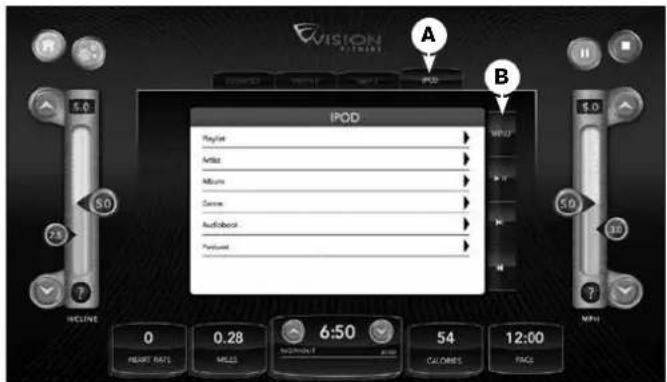
EVISION OUTPUT IPOD Player Artist Albums Cinema Audioback Performance 0 0.28 6:50 54 12:00 MnV HEART RATS MILLS MASCOTTLE PUM CALORIES PAGEDuring your workout, press the IPoD TAB (A) to access the content on your device. Select AUDIO or VIDEO and follow the on-screen prompts to access your content. Use the MEDIA ConTRoLS (B) to control media playback or navigate the menus. When watching video, you can touch the center of the screen to expand the video to full screen and touch again to minimize.
NOTE: If you don't want to use the speakers, you can plug your headphones into the audio out jack at the bottom of the console.
When watching video you can touch the center of the screen to expand the video to full screen and touch again to minimize.
Nike + iPod
ReADY
Connect your Nike Plus-compatible device to the built-in Made for iPod connector on Nike + iPod compatible fitness equipment.
seT
Full console controls and built-in speakers make it easy to exercise to your favorite workout playlist.
Go
Start walking or running. Your pace, distance, time, and calories burned are recorded as you go. It's all automatically saved on your iPod or iPhone.
sYnC
When you're done with your workout, connect your iPod or iPhone to your computer. iTunes syncs your workout data to nikeplus.com. Every workout and every run is there, ready for you to review.
ReQUIReMenTs
Nike Plus-compatible iPod or iPhone (See www.apple.com/nikeplus for more information).
Before syncing your Apple device to your computer, you must first create a free Nike Plus account at www.nikerunning.com and download the latest iTunes software (www.apple.com/itunes).
GetTInG sTARTeD
1) Before connecting your Apple device to the treadmill, you must first turn on Nike Plus on the device.
2) Dock your Apple device and wait for authentication to complete. This may take up to 10 seconds. After authentication is complete, your iPod-specific console controls will be active (see next page).
3) See Console Operation on page 27 and start your workout.
4) If your iPod or iPhone is Nike Plus compatible, your workout will begin recording automatically to your Nike Plus compatible device. The console will display, "RECORDING WORKOUT TO IPOD."
5) When your workout is complete, the display will verify by displaying "CONGRATULATIONS WORKOUT RECORDED. CONNECT YOUR IPOD TO YOUR COMPUTER AND SEE YOUR WORKOUT AT NIKEPLUS.COM." If you happen to stop your workout before your workout is complete, press and hold stop for 5 seconds. This will record your data to your Nike Plus-compatible device.
6) Remove your Nike Plus-compatible device and sync with iTunes.
7) Log into your Nike Running account to review and track your workouts.

text_image
PASS Passport that uses destinati lets you experien A Passp For morePASSPORT PLAYER™
Passport Player, featuring Virtual Active™ technology, is a high definition experience that uses real destination footage and matching ambient sounds from stunning destinations around the world. The ultimate in workout entertainment, Passport lets you escape the confines of a regular workout routine while enjoying a dynamic experience.
A Passport Player is available for purchase separately from your Vision Fitness Dealer.
For more information go to www.passportplayer.com or www.visionfitness.com.
SYNCING CONSOLE WITH PASSPORT™
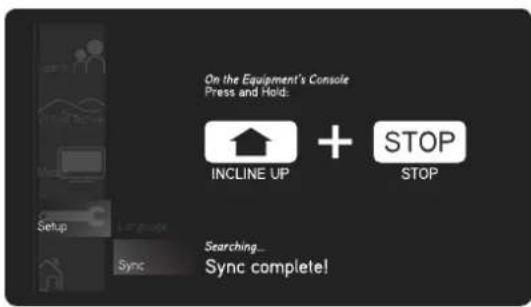
1) Use the arrow keys on the Passport remote to scroll to the setup icon and press select.
2) Follow the on-screen prompt to press and hold the incline up and stop buttons on the console.
3) The message displayed on-screen will notify you if the sync was a success or failure.
NOTE: See Passport Owner's Manual for more information.
text_image
On the Equipment's Console Press and Hold: INCLINE UP + STOP Stop Setup Sync Searching... Sync complete!
go with confidence™
NOTE:
Please contact your authorized Vision Fitness retailer should service be required. If a question or problem arises which cannot be handled by your Vision Fitness retailer, please contact us at:

USA/CANADA:
1-800-335-4348
www.visionfitness.com

OUTSIDE USA/CANADA:
www.visionfitness.com