T1450 - Treadmills Vision Fitness - Free user manual and instructions
Find the device manual for free T1450 Vision Fitness in PDF.


User questions about T1450 Vision Fitness
0 question about this device. Answer the ones you know or ask your own.
Ask a new question about this device
Download the instructions for your Treadmills in PDF format for free! Find your manual T1450 - Vision Fitness and take your electronic device back in hand. On this page are published all the documents necessary for the use of your device. T1450 by Vision Fitness.
USER MANUAL T1450 Vision Fitness
Congratulations on choosing a VISION FITNESS Treadmill. You've taken an important step in developing and sustaining an exercise program! Your Treadmill is a tremendously effective tool for achieving your personal fitness goals. Regular use of your Treadmill can improve the quality of your life in so many ways...
Here are just a few of the health benefits of aerobic exercise:
- Weight Loss
• A Healthier Heart - Improved Muscle Tone
- Increased Daily Energy Levels
- Reduced Stress
• Help In Countering Anxiety and Depression - An Improved Self Image
The key to reaping these benefits is to develop the exercise habit. Your new Treadmill will help you eliminate the obstacles that prevent you from getting in your exercise time. Snow and rain and darkness won't interfere with your workout when you have your Treadmill in the comfort of your home. This Owner's Guide provides you with basic information on starting an exercise program. A more complete knowledge of your new Treadmill will assist you in realizing your goal of a healthy lifestyle.
Service to your Treadmill should only be performed by your VISION FITNESS retailer. Please contact your authorized VISION FITNESS retailer should service be required. If a question or problem arises which cannot be handled by your VISION FITNESS retailer, please contact us:
VISION FITNESS
500 South CP Avenue
P.O. Box 280
Lake Mills, WI 53551
Ph: 1.800.335.4348
Fax: 1.920.648.3373
www.visionfitness.com
Table of Contents
T1450 TREADMILLS
SAFETY INSTRUCTIONS ..... 4
POWER REQUIREMENTS ..... 5
ASSEMBLY & PLACEMENT .....7
POWER & SAFETY KEY 8
QUICK SPEED & ELEVATION KEYS ... 9
CONTACT HEART RATE ..... 10
FOLDING & UNFOLDING ..... 11
MOVING & LEVELING ..... 12
T1450 CONSOLE
PROGRAM DETAILS 13
EASY START 14
FEEDBACK DISPLAY 15
CHOOSING PROGRAM ..... 16
CHOOSING TIME, ENTERING WEIGHT 17
STARTING, FINISHING ..... 18
USING THE PACER PROGRAM ..... 19
EXERCISE INTENSITY ..... 22
RATE OF PERCEIVED EXERTION .... 23
GENERAL
USER ENGINEERING MODE .....24
AUTO-CALIBRATION 26
COMMON QUESTIONS ..... 27
TROUBLESHOOTING:
TREADMILL 28
TENSIONING THE BELT ..... 29
PREVENTIVE MAINTENANCE ..... 30
HOME WARRANTY 32
DEVELOPING A FITNESS PROGRAM . 34
WEEKLY WORKOUT LOGS ..... 40
MONTHLY WORKOUT LOGS ..... 42
text_image
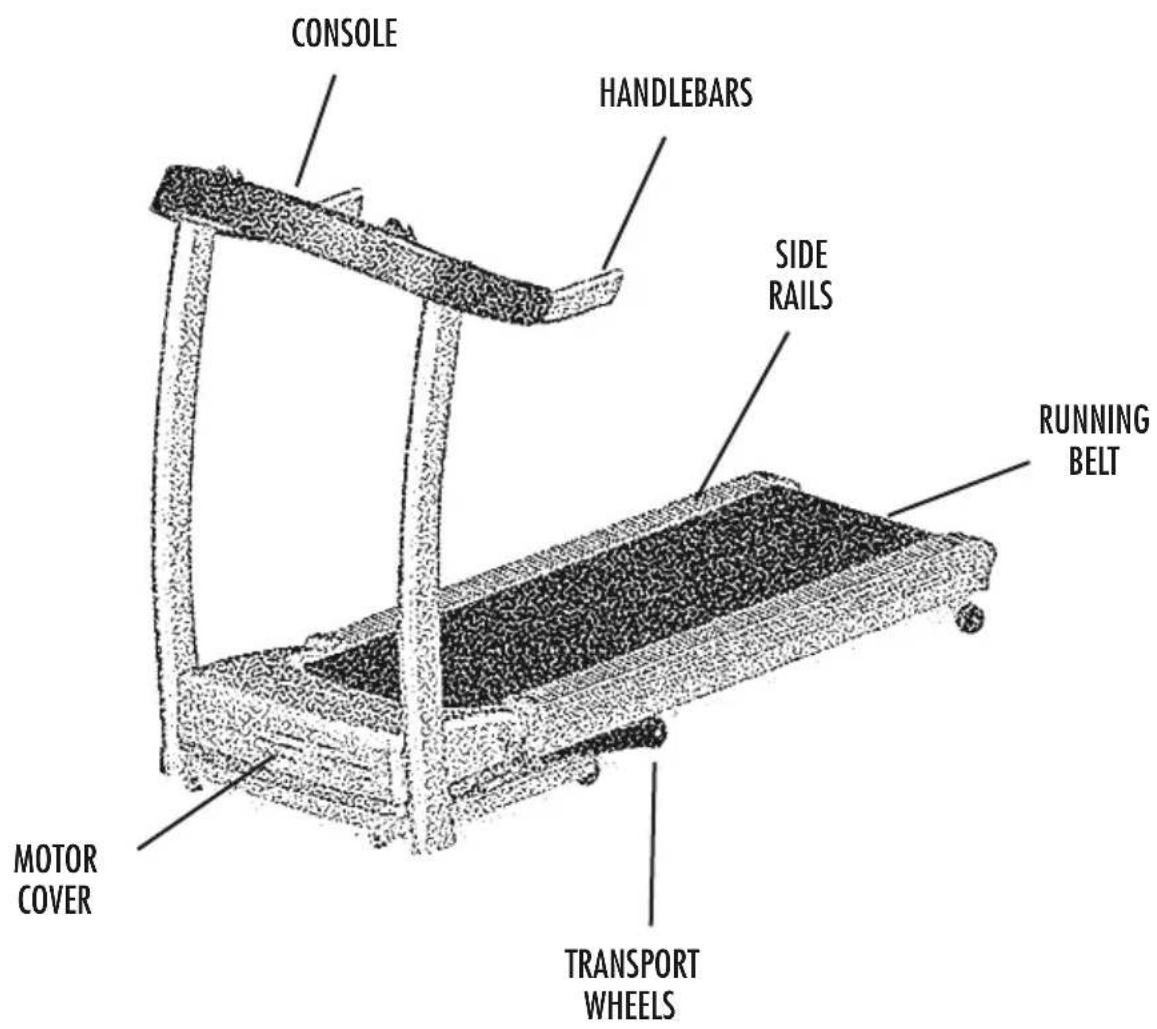
CONSOLE HANDLEBARS SIDE RAILS RUNNING BELT MOTOR COVER TRANSPORT WHEELSIMPORTANT SAFETY INSTRUCTIONS SAVE THESE INSTRUCTIONS
When using an electrical product, basic precautions should always be followed, including the following:
Read all instructions before using this exercise product.
WARNING!
To reduce the risk of burns, fire, electrical shock or injury
to persons:
- Use this exercise product for its intended use as described in this Owner's Guide. Do not use attachments not recommended by the manufacturer.
- Never drop or insert any object into any opening.
- Do not remove the Treadmill motor covers or roller covers. Service should be performed only by an authorized VISION FITNESS retailer.
- Never operate this Treadmill if it has a damaged cord or plug, if it is not working properly, if it has been damaged, or immersed in water. Return the Treadmill to a retailer for examination and repair.
- Keep the cord away from heated surfaces.
- Do not use outdoors.
- To disconnect, turn the switch to the OFF position, then remove plug from outlet.
- Never place the power cord under carpeting or place any object on top of the power cord, which may pinch and damage it.
- Unplug your VISION FITNESS Treadmill before moving it.
CHILDREN
- Keep children off your VISION FITNESS Treadmill at all times.
- When the VISION FITNESS Treadmill is in use, young children and pets should be kept at least 10 feet away.
POWER REQUIREMENTS
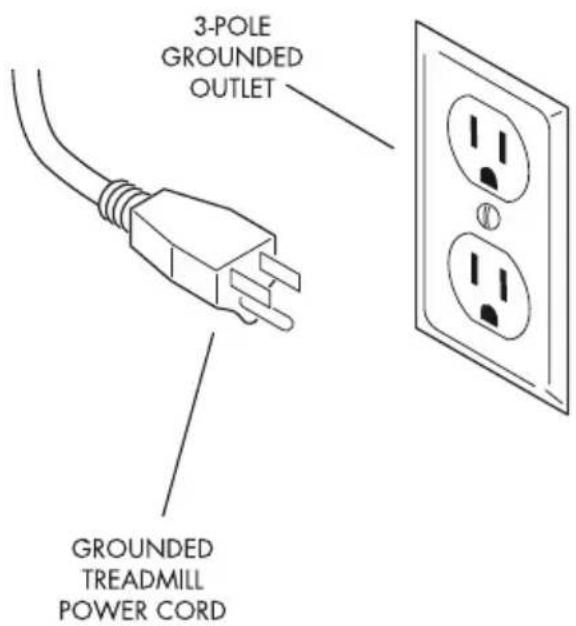
This product is for use on a nominal 120-volt circuit, and has a grounding plug that looks like the plug illustrated below. An improper connection of the equipment grounding conductor can result in a risk of an electrical shock. Do not modify the plug that was provided with this product. If this plug does not fit into your outlet, have a qualified electrician install the proper outlet. Adapters, extension cords and surge protectors should not be used with this product. Also, a GFI protected receptacle should not be used. It is recommended to use a 20 amp dedicated circuit.
text_image
3-POLE GROUNDED OUTLET GROUNDED TREADMILL POWER CORDCAUTION!: If you experience chest pains, nausea, dizziness or shortness of breath, stop exercising immediately and consult your physician before continuing.
- Do not wear clothing that might catch on any part of the Treadmill.
- Read this Owner's Guide before operating this Treadmill.
ASSEMBLY
VISION FITNESS recommends this Treadmill be assembled and delivered by qualified personnel. If you have elected to assemble this product yourself, for your safety please read and follow each of the steps in the enclosed Assembly Guide. It is recommended, when possible, that assembly be performed by an authorized VISION FITNESS retailer. If you have any questions regarding any part or function of your Treadmill, contact your VISION FITNESS retailer.
PLACEMENT IN YOUR HOME
It is important that you place your Treadmill in a comfortable and inviting room. Your Treadmill is designed to use minimal floor space. Many people will place their Treadmills facing the TV or a picture window. If at all possible, avoid putting your Treadmill in an unfinished basement. To make exercise a desirable daily activity for you, the Treadmill should be in an attractive setting.
NOTE: If you place your Treadmill facing out from a wall, you should leave three feet between the wall and the Treadmill to ensure safe operation.
POWER
Ensure that your Treadmill is properly connected to a power outlet, then turn on the Power switch, located at the front of the main frame.

natural_image
Line drawing of a computer monitor with a cable and connector (no text or symbols)SAFETY MAGNET KEY & CLIP
Your VISION FITNESS Treadmill will not start unless the Safety Magnet Key is inserted into the circle in the console overlay. You should attach the clip end to your clothing. If at any time you need to stop the Treadmill quickly, simply pull the Safety Magnet Key off the console. This will cut all power to the Treadmill, and it will come to a complete stop. To resume your workout, place the Safety Magnet Key back in place. This will send you back to the start-up mode.

text_image
1. Shift switch for 40 in reading 2. Lower reading level on page display status CENTRANT S/N AT POINT TO PRINT TO GROUP JUMBOE START TO CLOSE OR LOWER LEFT TRAVELING, MAX FLOW? FOR ALL DRY ITEMS ARE NOT FOR OR ALL DRY ITEMS ARE NOT FOR 9 0 1 2 3 4 5 6 7 8 9 RIGHT RETURN ON LEFT DOWN STOP ENTER LEFT STOP LEFT STOP OFF/RETURN ON OFF/RETURN ON OFF/RETURN ON OFF/RETURN ON OFF/RETURN ON OFF/RETURN ON OFF/RETURN ON OFF/RETURN ON OFF/RETURN ON OFF/RETURN ON OFF/RETURN ON OFF/RETURN ON OFF/RETURN ON OFF/RETURN ON OFF/RETURN ON OFF/RETURN ON OFF/RETURN ON OFF/RETURN ON OFF/RETURN ON OFF/RETURN ON OFF/RETURN OFF OFF/RETURN OFF OFF/RETURN OFF OFF/RETURN OFF OFF/RETURN OFF OFF/RETURN OFF OFF/RETURN OFF OFF/RETURN OFF OFF/RETURN OFF OFF/RETURN OFF OFF/RETURN OFF OFF/RETURN OFF OFF/RETURN OFF OFF/RETURN OFF OFF/RETURN OFF OFF/RETURN OFF OFF/RETURN OFF OFF/RETURN OFF OFF/RETURN OFF OFF/RETURN OFF OFF/RETURN OF THE WORLD OF THE WORLD OF THE WORLD OF THE WORLD OF THE WORLD OF THE WORLD OF THE WORLD OF THE WORLD OF THE WORLD OF THE WORLD OF THE WORLD OF THE WORLD OF THE WORLD OF THE WORLD OF THE WORLD OF THE WORLD OF THE WORLD OF THE WORLD OF THE WORLD OF THE WORLD OF THE WORLD OF THE WORLD OF THE WORLD OF THE WORLD OF THE WORLD OF THE WORLD OF THE WORLD OF THE WORLD OF THE WORLD OF THE WORLD OF THE WORLD OF THE WORLD OF THE WORLD OF THE WORLD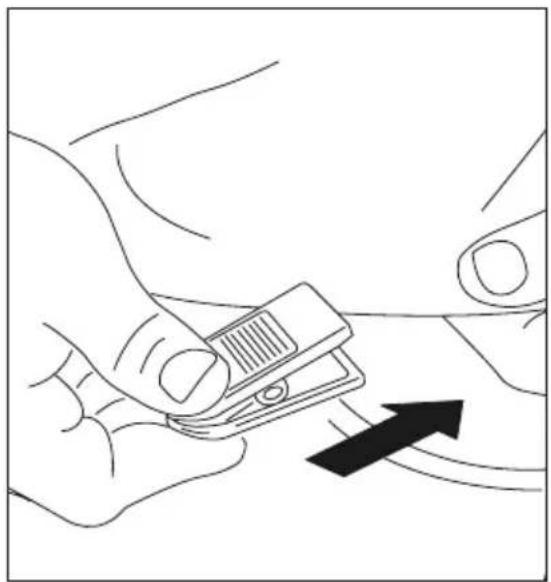
natural_image
Line drawing of a hand holding a small device with an arrow pointing to it (no text or symbols present)QUICK SPEED AND QUICK ELEVATION KEYS
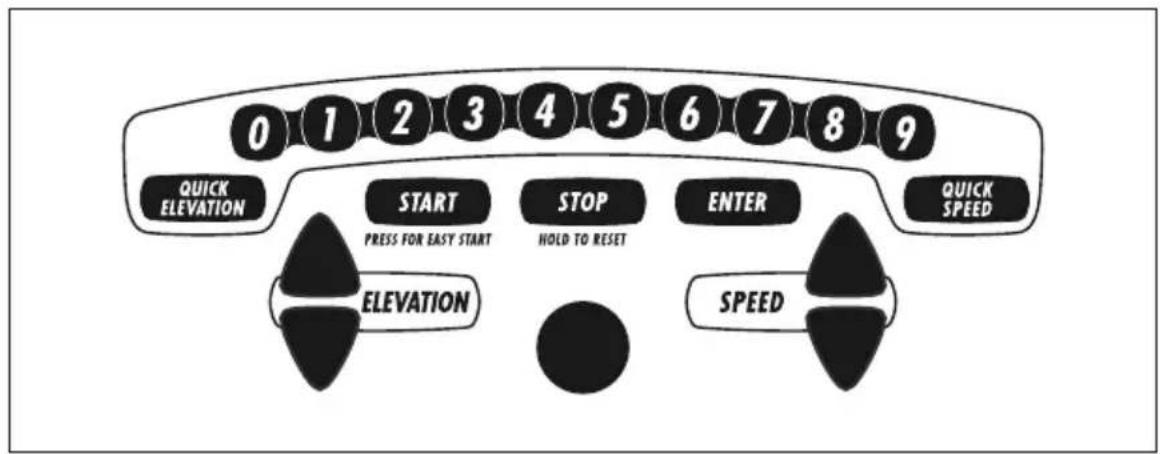
Use the QUICK SPEED and QUICK ELEVATION keys as an option to increase and decrease the speed and elevation to your desired setting. First press the QUICK SPEED or QUICK ELEVATION key, then press the numbered keys (0-9).
text_image
0 1 2 3 4 5 6 7 8 9 QUICK ELEVATION START STOP ENTER QUICK SPEED PRESS FOR EASY START HOLD TO RESET ELEVATION SPEEDQUICK SPEED
Examples of the QUICK SPEED key operation: to change the speed to 4.0 mph/kph, press QUICK SPEED, then 4. To change the speed to 4.5 mph/kph, press QUICK SPEED, then 4, then 5. The Quick Speed keys adjust the speed in 0.1 mph/kph increments. The maximum speed using the Quick Speed keys is 9.9 mph/kph.
QUICK ELEVATION
Examples of the QUICK ELEVATION key operation: to change to 6% elevation, press QUICK ELEVATION, then 6. To go to 10% elevation, press QUICK ELEVATION then 1, then 0. The Quick Elevation keys adjust the elevation in 1% increments.
CONTACT HEART RATE
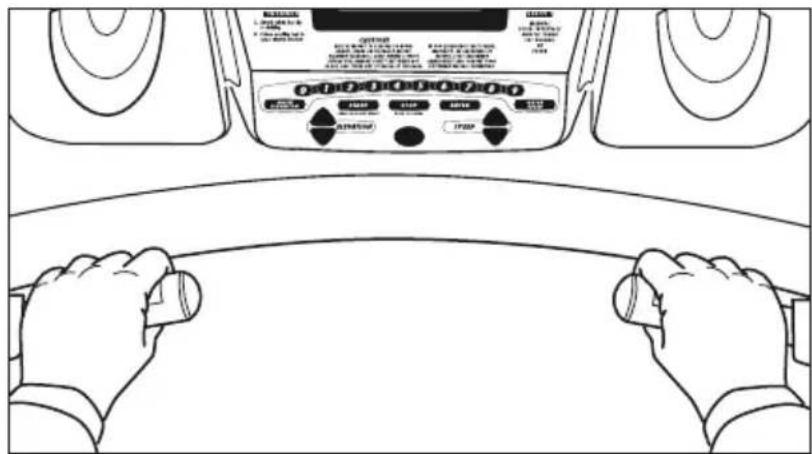
HAND PULSE HEART RATE SENSORS
The Contact Hand Pulse Sensors are included on this product to monitor your heart rate. To use, grasp both of the sensors with a comfortable grip during your workout. The console will display your heart rate. Although your signal will be displayed immediately, it may take the system a few seconds to zero in on your actual heart rate.
text_image
Diagram of a car interior with hands operating controls and a digital display panel, labeled in English.FOLDING
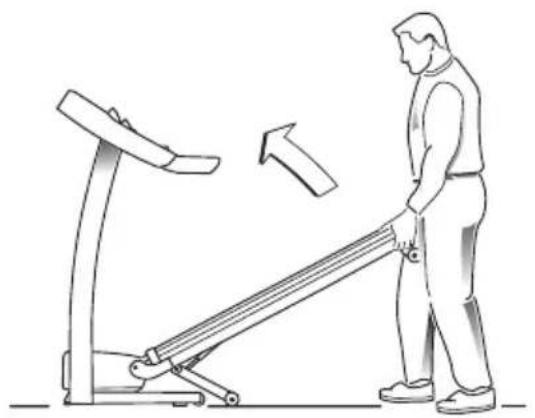
To fold your Treadmill in the upright position, first make sure the Elevation is set to 0; if it is not, lower the Elevation to 0 (if you do not set the Elevation to 0 the Treadmill will not fold and lock). Then, simply lift the back end of the Treadmill with both hands and push it up. The Treadmill has a built-in locking mechanism that will automatically engage and click into place when you reach a vertical point.
UNFOLDING
To unfold your Treadmill from the upright position, simply press the latch on the lower frame with your foot to release the folding lock. Gently guide the treadmill to the floor with both hands.
CAUTION: Our Treadmills are well-built and heavy, weighing up to 300 pounds! Use care and additional help if necessary.
natural_image
Line drawing of a person using a treadmill to lift a machine, with an arrow indicating motion (no text or symbols)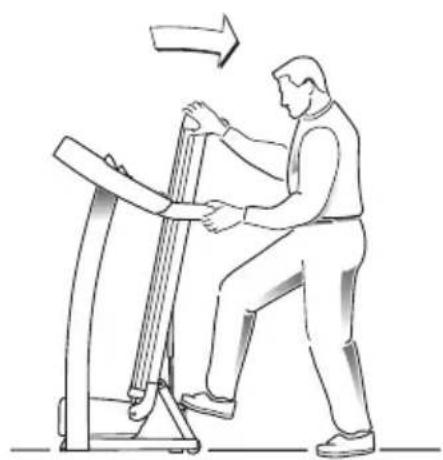
natural_image
Line drawing of a person using a balance scale on a machine, with an arrow indicating motion (no text or symbols)MOVING YOUR VISION FITNESS FOLDING TREADMILL
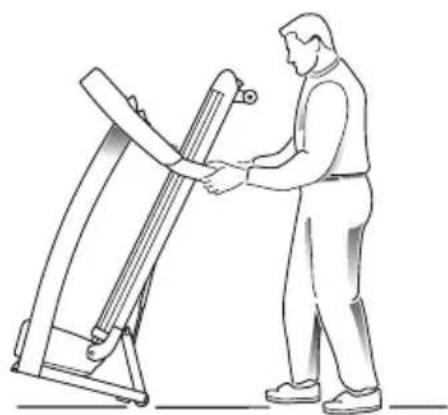
Your VISION FITNESS Treadmill has a pair of wheels built into the rear frame that allows you to move the treadmill. To move, fold the Treadmill into the upright position, firmly grasp the handlebars, then carefully tilt and roll.
natural_image
Line drawing of a person operating a large mechanical device (no text or symbols present)LEVELING
The Treadmill should be level for optimum use. If the Treadmill is on an un-level surface, raise or lower one or both of the adjustable levelers located on the front frame. A carpenter's level is recommended. If your Treadmill is not level, the running belt may not track properly.
T1450 TREADMILL PROGRAM DETAILS
MANUAL
Customized workouts; with no default Time.
SPEED INTERVALS • SPEED CHANGES
Promotes weight loss by raising and lowering your speed level while still keeping you within your fat-burning zone; time defaults to 30 minutes.
MUSCLE TONER • ELEVATION CHANGES
Improves your strength, speed, and endurance by raising and lowering the elevation throughout your workout to involve both your heart and leg muscles; time defaults to 30 minutes.
FAT BURNER • SPEED AND ELEVATION CHANGES
Promotes fat burning by raising and lowering your speed and elevation level while still keeping you within your fat-burning zone; time defaults to 30 minutes.
5K • ELEVATION CHANGES
Improves your cardiovascular training by simulating a 5K run with hills; no preset time with elevation changes.
PACER
You race against the console. Set your race distance and beat the Pacer! See page 19 for pacer program details.
Speed Intervals, Muscle Toner, Fat Burner, and 5K have 9 levels. By having multiple levels to chose from, you can change the intensity of your workout as your fitness level improves. In general, the beginner levels have lower level numbers and the most advanced levels have higher level numbers. For example, L9 will be the most advanced workout and L1 will be the beginner level. If you are not sure what fitness level you are at, you should start out at a lower level and work up to a comfortable level.



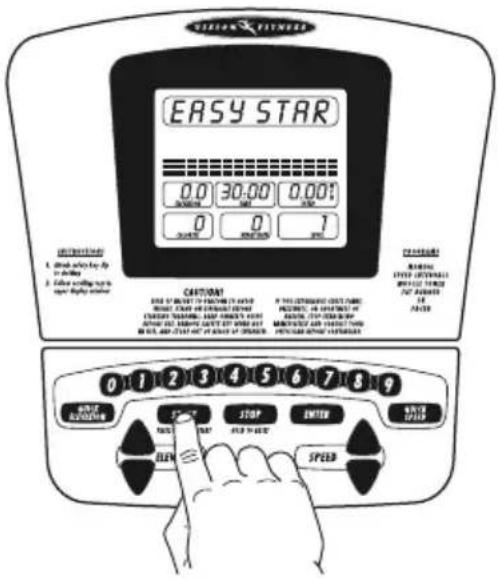
T1450 EASY START
Simply press the START key to begin exercising in the MANUAL program.
text_image
EASY STAR 0.0 30.00 0.001 0 0 1 CONTENTS A. Show calling up to double B. Let's curling up to open display status CAUTION! USE OF INSERT TO CREATE YOUR ORDER MAKE CHECK OR CHANGE OTHER SELECT STARTING, ADDY CORNING YOUR ORDER START IN ORDER ON YOUR ORDER IN THIS ORDER IS NOT USED IN YOUR ORDER POTTER BEANS FROM STARTERS 0 1 2 3 4 5 6 7 8 9 STOP ENTER AUTO SPRING SPEEDPAUSE
Press the STOP key to pause during your workout.
RESET
Press and hold the STOP key to reset the Treadmill.

text_image
MINIMUM FITNESS INTRODUCTION 1. Breaks what lay up in driving 2. Follow rolling back to open display when CERTIFICATION START ELEVATION 1.0 25.50 0.00' 30 0 1 CERTIFICATION WARNING: 1.1.1.1.1.1.1.1.1.1.1.1.1.1.1.1.1.1.1.1.1.1.1.1.1.1.1.1.1.1.1.1.1.1.1.1.1.1.1.1.1.1.1.1.1.1.1.1.1.1.1 ORDER: START ELEVATION 0 1 2 3 4 5 6 7 8 9 MAKE RETURN ON START ELEVATION ENTER ENTER ENTER ENTER ENTER ENTER ENTER ENTER ENTER ENTER ENTER ENTER ENTER ENTER ENTER ENTER ENTER ENTER ENTER ENTER ENTER ENTER ENTER ENTER ENTER ENTER ENTER ENTER ENTER ENTER ENTER ENTER ENTER ENTER ENTER ENTER ENTER ENTER ENTER ENTER ENTER ENTER ENTER ENTER ENTER ENTER ENTER ENTER ENTER ENTER UNDER UNDER UNDER UNDER UNDER UNDER UNDER UNDER UNDER UNDER UNDER UNDER UNDER UNDER UNDER UNDER UNDER UNDER UNDER UNDER UNDER UNDER UNDER UNDER UNDER UNDER UNDER UNDER UNDER UNDER UNDER UNDER UNDER UNDER UNDER UNDER UNDER UNDER UNDER UNDER UNDER UNDER UNDER UNDER UNDER UNDER UNDER UNDER UNDER UNDER Under the following:The following is correct.
The following is incorrect.
The following is false.
The following is true.
The following is false.
The following is false.
The following is false.
The following is false.
The following is false.
The following is false.
The following is false.
The following is false.
The following is false.
The following is false.
The following is false.
The following is false.
The following is false.
The following is false.
The following is false.
The following is false.
The following is false.
The fourth step in the second step of the second step in the third step in the second step in the fourth step in the fifth step in the sixth step in the seventh step in the fourth step in the fifth step in the sixth step in the fourth step in the fifth step in the sixth step in the fourth step in the fifth step in the fourth step in the fifth step in the sixth step in the fourth step in the fifth step in the fourth step in the fifth step in the fifth step in the fifth step in the fifth step in the fifth step in the fifth step in the fifth step in the fifth step in the fifth step in the fifth step in the fifth step in the fifth step in the fifth step in the fifth step in the fifth step in the fifth step in the fifth step in the fifth step in the fifth step in the fifth step in the fifth step in the fifth step in the fifth step in the fifth step in the fifth step in the fourth step in the fourth step, # 0 0 0 0 0 0 0 0 0 0 0 0 0 0 0 0 0 0 0 0 0 0 0 0 0 0 0 0 0 0 0 0 0 0 0 0 0 0 0 0 0 0 0 0 0 0 0 0 0 0 1
T1450 FEEDBACK DISPLAY
TIME Shown as (minutes:seconds). View the time remaining or the Time elapsed in your workout.
DISTANCE Shown as miles or kilometers. View Distance traveled during workout.
CALORIES Shown as estimated accumulated Calories burned during workout.

text_image
MANUAL 1.0 ELEVATION 25:50 TIME 1.0" N SPEED 25 CALORIES 120 NEART RATE 0.25 N DISTANCEHEART RATE Shown as beats-per-minute. You can monitor your heart rate at any time during a workout by gripping the hand pulse heart rate sensors (see page 10).
ELEVATION
Shown as percentage of incline, Elevation is visible in the upper left-hand window. Indicates how steeply inclined the running surface is, to simulate walking/running on a hill.
SPEED
Shown as Miles/Hour or Kilometers/Hour, Speed is visible in the upper right-hand window. Indicates how fast the running surface is moving, to simulate outdoor walking/running.
PROFILE
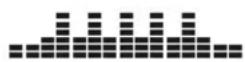
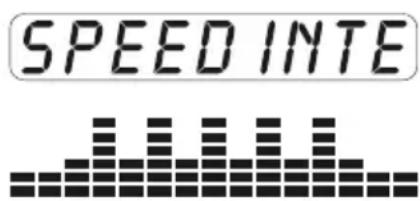
Shown as a graphical representation of the program you have chosen (Muscle Toner, Speed Intervals, etc.). The profile displays speed for the Speed Intervals program and elevation for the Manual, Muscle Toner, Fat Burner, and 5K.
text_image
SPEED INTET1450 FEEDBACK DISPLAY
CHOOSING A PROGRAM
Use either set of arrow keys to choose one of the six programs: (MANUAL, MUSCLE TONER, etc.). Press ENTER.

text_image
MUSCLE TO 0.0 30.00 0.01 0 750 1 CAUTIONS MUSCLE TO 0.0000000000000000000000000000000000000000000000000000000000000000000000000000000000 START STOP ELEVATION GRIEF CAMP CAMP CAMP CAMP CAMP CAMP CAMP CAMP CAMP CAMP CAMP CAMP CAMP CAMP CAMP CAMP CAMP CAMP CAMP CAMP CAMP CAMP CAMP CAMP CAMP CAMP CAMP CAMP CAMP CAMP CAMP CAMP CAMP CAMPCHOOSING A LEVEL (SPEED INTERVALS, MUSCLE TONER, FAT BURNER, AND 5K)
Use the number keys or either set of arrow keys to choose one of the 9 levels. L1 provides the least resistance, L9 the most. Press ENTER.

text_image
VISIONS FUTURES SET LEVEL 0.0 30.00 0.01 ROUTPUT 120 150 6 CONTROL WARNING OPTION INSURANCE INVERTILE TIMER ON FLOWER CUTTING FOR ORDER BY: CUSTEER FOR ORDER ORDER: ORDER OF ORDERING ORDER ORDER: ORDER OF ORDERING ORDER ORDER: ORDER OF ORDERING ORDER ORDER: ORDER OF ORDERING ORDER ORDER: ORDER OF ORDERING ORDER ORDER: ORDER OF ORDERING ORDER ORDER: ORDER OF ORDERING ORDER ORDER: ORDER OF ORDERING ORDER ORDER: ORDER OF ORDERING ORDER ORDER: ORDER OF ORDERING ORDER ORDER: ORDER OF ORDERING ORDER ORDER: ORDER OF ORDERING ORDER ORDER: ORDER OF ORDERING ORDER ORDER: START STOP ENTER CHANGE FLOP ELEVATION SPEEDCHOOSING A TIME (MANUAL, SPEED INTERVALS, MUSCLE TONER, AND FAT BURNER)
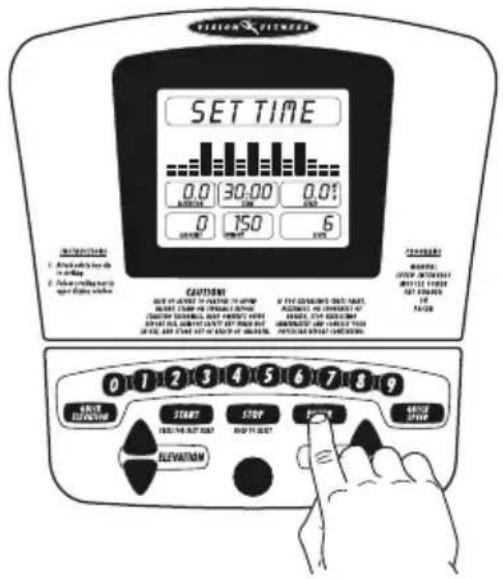
After you have chosen a level, the time will be set to the default time, depending on which program you have chosen, and then flash. You may use this default time or choose another time by using the number keys or either set of arrow keys. Press ENTER.
ENTERING YOUR WEIGHT
After you have chosen your workout time you may now enter your weight. By entering your weight, the totals for calories will be adjusted according to your entered weight. Use the number keys or either set of arrow keys to enter your weight. Press ENTER.
text_image
PILION FITNESS SET TIME 0.0 30.00 0.01 MINIMUM 0 150 6 MINIMUM 0 CAPTINIX SET OF SETTING WITH CAPTINIX FORUM MINIMUM ORDER IS DUCTED WITH TOLERANCE SHEETS, NOOY MOUNTED WITH ORDERING ORDER IS DUCTED WITH ORDERING ORDER IS DUCTED WITH ORDERING ORDER IS DUCTED WITH ORDERING ORDER IS DUCTED WITH ORDERING ORDER IS DUCTED WITH ORDERING ORDER IS DUCTED WITH ORDERING ORDER IS DUCTED WITH ORDERING ORDER IS DUCTED WITH ORDERING ORDER IS DUCTED WITH ORDERING ORDER IS DUCTED WITH ORDERING ORDER IS DUCTED WITH ORDERING ORDER IS DUCT 0 1 2 3 4 5 6 7 8 9 START STOP ELEVATION ELEVATION
text_image
VISION FILLIANCE WEIGHT 0.0 30.00 0.0: 0 150 6 CONTENTS FOR THE EXAMOUNTED WEIGHT BEETLY ON CHEDDER OF BEETLY ON CHEDDER OF BEETLY ON CHEDDER OF BEETLY ON CHEDDER OF BEETLY ON CHEDDER OF BEETLY ON CHEDDER OF BEETLY ON CHEDDER OF BEETLY ON CHEDDER OF BEETLY ON CHEDDER OF BEETLY ON CHEDDER OF BEETLY ON CHEDDER OF BEETLY ON CHEDDER OFSTARTING
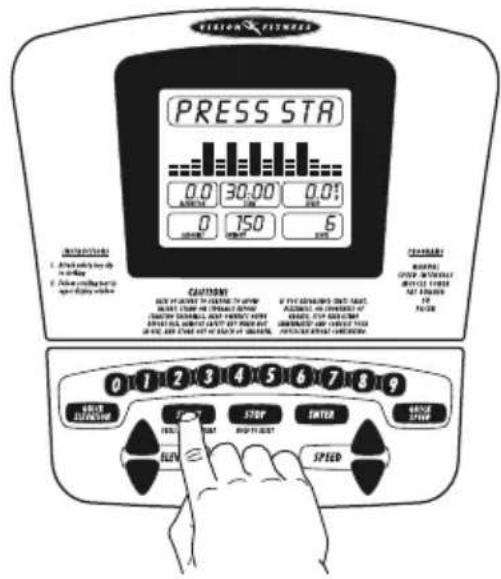
When you are ready to begin exercising, press START.
text_image
TENNION FUTURES PRESS STA 0.0 30.00 0.01 MINIMUM 250 6 0 150 MINIMUM 250 CONTENTS OFF/FLIGHTS OFF/FLIGHTS OFF/FLIGHTS OFF/FLIGHTS OFF/FLIGHTS OFF/FLIGHTS OFF/FLIGHTS OFF/FLIGHTS OFF/FLIGHTS OFF/FLIGHTS OFF/FLIGHTS OFF/FLIGHTS OFF/FLIGHTS OFF/FLIGHTS OFF/FLIGHTS OFF/FLIGHTS OFF/FLIGHTS OFF/ FLIGHTS OFF/FLIGHTS OFF/FLIGHTS OFF/FLIGHTS OFF/FLIGHTS OFF/FLIGHTS OFF/FLIGHTS OFF/FLIGHTS OFF/FLIGHTS OFF/FLIGHTS OFF/FLIGHTS OFF/FLIGHTS OFF/FLIGHTS OFF/FLIGHTS OFF/FLIGHTS OFF/FLIGHTS OFF/FLIGHTS FFRUST STOP ENTER DRIVE SPRING FRUIT SELL STOP ENTER FULL SPRINGFINISHING
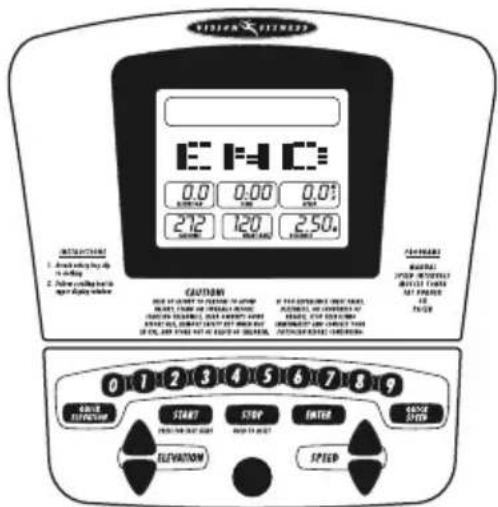
When your workout is complete "END" will appear in the profile window. The Treadmill will return to its starting position and you can view your workout results.
text_image
VISUAL FITNESS E F D 0.0 0.00 0.01 SINCH 212 120 250. CAUTION FOR BEATING THE EIGHT OF CHINA, BEET TUBE OR PEELED WITH CAUTIONS SUSTAINLESS, OVER CAPSIC WMMS, BEET FEET, COCONUTIVE ZONE WMMS, OR FOR ONE OF ONE WMMS, AND IFLE NOT AT OUEST FOR CHINA, FROODERED CABBAGE 0 1 2 3 4 5 6 7 8 9 ORDER FUNCTION START STOP ENTER SIDE SWITCH ELEVATION SPEEDPACER PROGRAM DETAILS
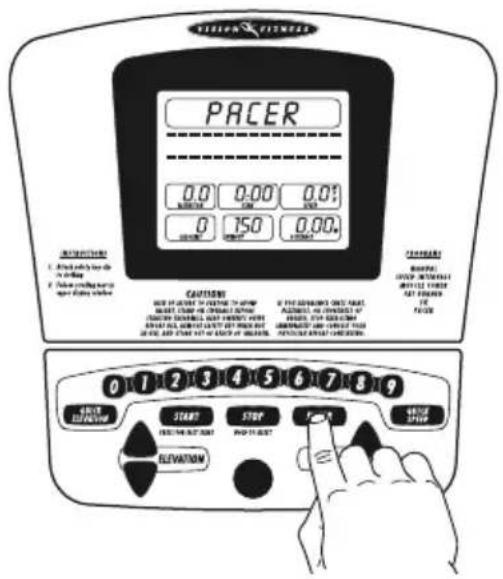
This is a motivational program that allows you to race against the console. You determine the speed of the pacer and the distance of the workout. You control your own speed and elevation throughout the program. The top row of dots is the pacer. You are the blinking dots in the middle row of the dot matrix profile. The dot matrix will keep track of your progress. The dots will move across the profile two times for a total of 30 segments. The time of the program will depend on how long it takes you to complete the distance. The program will not end until you have completed the distance.
CHOOSING PACER SPEED
Use the number keys and/or the arrow keys to select the pacer speed. Press ENTER. This will be a consistent speed throughout the workout.
text_image
PACER 0.0 0.00 0.01 0 150 0.00 CAUTIONS OFF-IN-LOCK IN CHINESE WITH SHORT CHINESE WITH EXTENSIVE WITH SHORT CHINESE WITH FLOWER WITH SHORT CHINESE WITH EXTENSIVE WITH SHORT CHINESE WITH EXTENSIVE WITH START STOP CHANGE SHIFT ELEVATION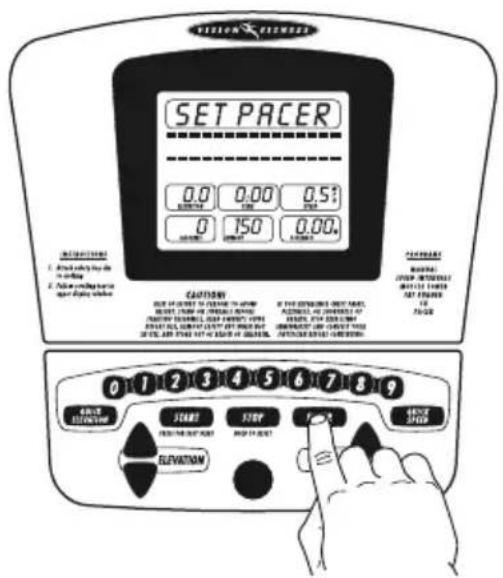
text_image
SET PACER 0.0 0.00 0.51 0 150 0.00 CAUTIONS SET OF CHINESE TO CHANGE THE CABBAGE, 24/08/2016 OR REBEACHING TOLERANCE SHEET, ON THE BENTUS OF STRAWBERRY, ON THE BENTUS OF DRUM STRAWBERRY, ON THE BENTUS OF DRUM STRAWBERRY, ON THE BENTUS OF DRUM STRAWBERRY, ON THE BENTUS OF DRUM STRAWBERRY, ON THE BENTUS OF DRUM STRAWBERRY, ON THE BENTUS OF DRUM STRAWBERRY, ON THE BENTUS OF DRUM STRAWBERRY, ON THE BENTUS OF DRUM STRAW BERRY, ON THE BENTUS OF DRUM STRAW BERRY, ON THE BENTUS OF DRUM STRAW BERRY, ON THE BENTUS OF DRUM STRAW BERRY, ON THE BENTUS OF DRUM STRAW BERRY, ON THE BENTUS OF DRUM STRAW BERRY, ON THE BENTUS OF DRUM STRAW BERRY, ON THE BENTUS OF DRUM STRAW BERRY, OR RUSHED BY: DRUM STRAW BERRY. OR RUSHED BY: DRUM STRAW BERRY. OR RUSHED BY: DRUM STRAW BERRY. OR RUSHED BY: DRUM STRAW BERRY. OR RUSHED BY: DRUM STRAW BERRY. OR RUSHED BY: DRUM STRAW BERRY. OR RUSHED BY: DRUM STRAW BERRY. OR RUSHED BY: DRUM STRAW BERRY. OR RUSHED BY: DRUM STUDY. OR RUSHED BY: DRUM STUDY. OR RUSHED BY: DRUM STUDY. OR RUSHED BY: DRUM STUDY. OR RUSHED BY: DRUM STUDY. OR RUSHED BY: DRUM STUDY. OR RUSHED BY: DRUM STUDY. OR RUSHED BY: DRUM STUDY. OR RUSHED BY: DRUM STUDY. OR RUSHED BY: DRUM STUDY OR RUSHED BY: DRUM STUDY. OR RUSHED BY: DRUM STUDY. OR RUSHED BY: DRUM STUDY. OR RUSHED BY: DRUM STUDY. OR RUSHED BY: DRUM STUDY. OR RUSHED BY: DRUM STUDY. OR RUSHED BY: DRUM STUDY. OR RUSHED BY: DRUM STUDY. OR RUSHED BY: DRUM STUDY. OK 1 2 3 4 5 6 7 8 9 OR RUSHED BEEFMENT START STOP FOR OR RUSHED OR RUSHED OR RUSHED OR RUSHED OR RUSHED OR RUSHED OR RUSHED OR RUSHED OR RUSHED OR RUSHED OR RUSHED OR RUSHED OR RUSHED OR RUSHED OR RUSHED OR RUSHED OR RUSHED OR RUSHED OR RUSHED OR RUSHED OR RUSHES OR RUSHES OR RUSHES OR RUSHES OR RUSHES OR RUSHES OR RUSHES OR RUSHES OR RUSHES OR RUSHES OR RUSHES OR RUSHES OR RUSHES OR RUSHES OR RUSHES OR RUSHES OR RUSHES OR RUSHES OR RUSHES OR RUSHES OR RUSH EYEVE FLOWING IN CHARGE DRYAIC PIPCE OF CHARGE DRYAIC PIPCE OF CHARGE DRYAIC PIPCE OF CHARGE DRYAIC PIPCE OF CHARGE DRYAIC PIPCE OF CHARGE DRYAIC PIPCE OF CHARGE DRYAIC PIPCE OF CHARGE DRYAIC PIPCE OF CHARGE DRYAIC PIPCE OF CHARGE DRYAIC PIPCE OF CHARGE DRYAIC PIPCE OR RUSHES OR RUSHES OR RUSHES OR RUSHES OR RUSHES OR RUSHES OR RUSHES OR RUSHES OR RUSHES OR RUSHES OR RUSHES OR RUSHES OR RUSHES OR RUSHES OR RUSHES OR RUSHES OR RUSHES OR RUSHES OR RUSHES OR RUSHESCHOOSING DISTANCE
Set the goal distance using the number keys or the arrow keys. Press ENTER.

text_image
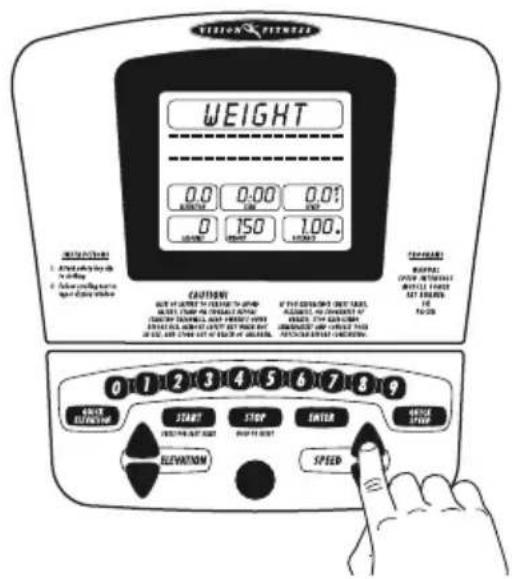
VISION FERMISTRY DISTANCE 0.0 0.00 0.01 RISKY 150 1.00. CONTENTS CAUTIONS OUT OF CHAPES OF CHAPES WITH LEFT CHAP OF CHAPES WITH LEFT CHAP OF CHAPES WITH LEFT CHAP OF CHAPES LEFT CHAP OF CHAPES WITH LEFT CHAP OF CHAPES FOR EACH CHAP OF CHAPES WITH LEFT CHAP OF CHAPES FOR EACH CHAP OF CHAPES WITH LEFT CHAP OF CHAPES START STOP ENTER CHANGE STOP ELEVATION SPED 0 1 2 3 4 5 6 7 8 9 EFFECTIVE ELEVATION START STOP ENTER CHANGE STOP ELEVATION SPEDSET WEIGHT
Set your weight using the number keys or the arrow keys. Press ENTER. By entering your weight, the totals for calories will be adjusted according to your entered weight.
text_image
VISION FUTURES WEIGHT 0.0 0.00 0.01 RATIO 150 1.00. CAUTIONS OUT OF CHAPES IN FACTORY WITH BEET CHAP IN FACTORY WITH BEET CHAP IN FACTORY WITH BEET CHAP IN FACTORY WITH BEET CHAP IN FACTORY WITH BEET CHAP IN FACTORY WITH BEET CHAP IN FACTORY WITH BEET CHAP IN FACTORY WITH BEET CHAP IN FACTORY WITH BEET CHAP IN FACTORY WITH BEET CHAP IN FACTORY WITH BEET CHAP IN FACTORY WITH BEET CHAPIN START STOP ENTER DRIVE STOP ELEVATION SPEEDSTARTING
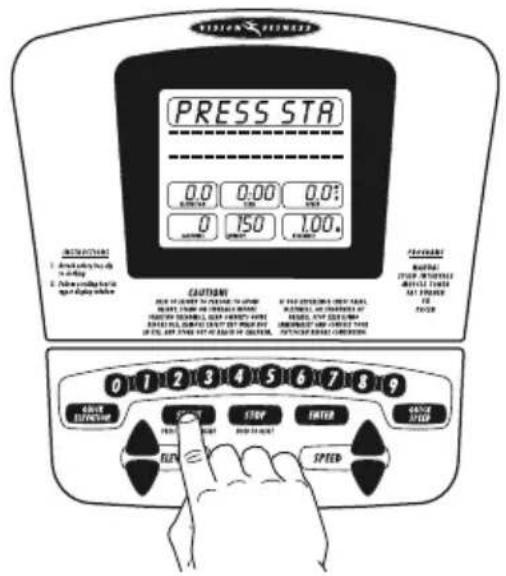
When you are ready to begin, press START.
text_image
PRESS STA 0.0 0.00 0.0: MINIMUM 125 1.00 0 150 1.00 CAUTIONS FOR CURRENT DRY CAPSAL BEET, CABBIE OR BEANSER BAN BEETING SHEETS, BACK CHAPES WITH BEETING SHEETS, BACK CHAPES WITH BEETING SHEETS, BACK CHAPES WITH BEETING SHEETS, BACK CHAPES WITH BEETING SHEETS, BACK CHAPES WITH BEETING SHEETS, BACK CHAPES WITH BEETING SHEETS, BACK CHAPES WITH BEETING SHEETS, BACK CHAPES WITH BEETING SHEETS, BACK CHAPES WITH BEETNING BEET CORNERS 0 1 2 3 4 5 6 7 8 9 SAVE ELEVATION STOP ENTER CHANGE LVED RUN SPEEDEXERCISE INTENSITY
To reap the most cardiovascular benefits from your workout, it is necessary to exercise within a recommended intensity. The two ways to monitor exercise intensity are Target Heart Rate and Perceived Exertion.
TARGET HEART RATE
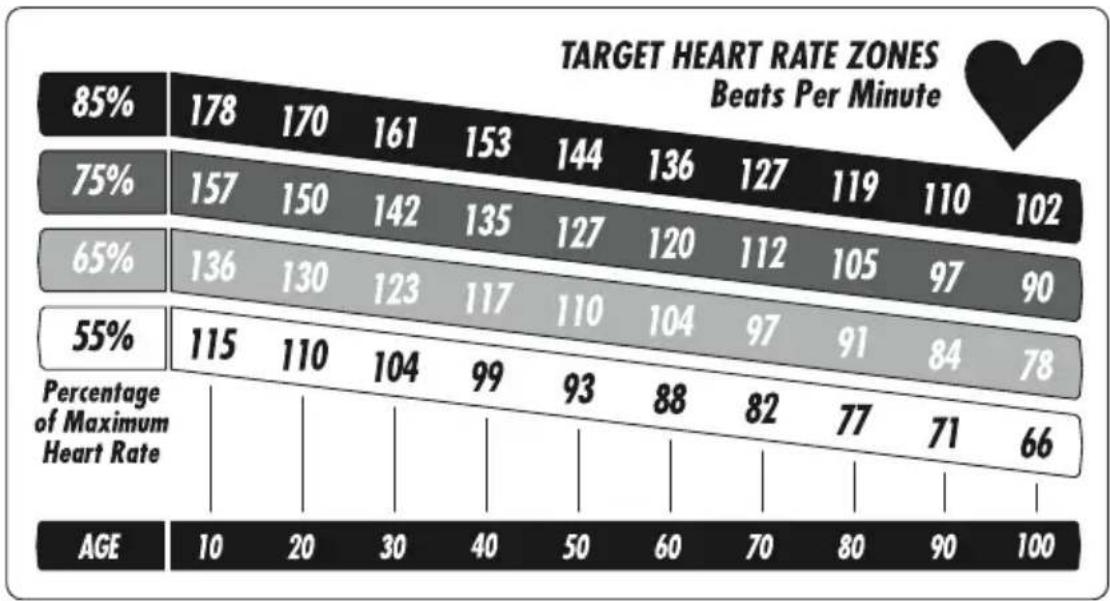
Target Heart Rate is a percentage of your maximum heart rate. Target Heart Rate will vary for each individual, depending on age, current level of conditioning, and personal fitness goals. Exercise heart rate should range from 55% to 85% of your maximum heart rate. As a point of reference, we use the predicted maximum heart rate formula of (220 minus age) to determine your heart rate training zone. Please use the following chart to determine your predicted Target Heart Rate.
bar
TARGET HEART RATE ZONES Beats Per Minute | Age | 10 | 20 | 30 | 40 | 50 | 60 | 70 | 80 | 90 | 100 | |---|---|---|---|---|---|---|---|---|---|---| | 85% | 178 | 170 | 161 | 153 | 144 | 136 | 127 | 119 | 110 | 102 | | 75% | 157 | 150 | 142 | 135 | 127 | 120 | 112 | 105 | 97 | 90 | | 65% | 136 | 130 | 123 | 117 | 110 | 104 | 97 | 91 | 84 | 78 | | 55% | 115 | 110 | 104 | 99 | 93 | 88 | 82 | 77 | 71 | 66 | Percentage of Maximum Heart Rate | | AGE | 10 | 20 | 30 | 40 | 50 | 60 | 70 | 80 | 90 | 100 |EXAMPLE:
If you are a 30-year-old, your predicted maximum heart rate is 190 based on the (220 minus age) formula.
$$ 2 2 0 - 3 0 = 1 9 0 $$
Based on the chart above, your heart rate training zone is 104 to 161, which is 55%–85% of 190.
RATE OF PERCEIVED EXERTION
Rate of Perceived Exertion (RPE) is one of the easiest ways to monitor exercise intensity. By becoming familiar with the RPE scale, you can continually assess your level of intensity and insure a level of exertion that is comfortable. An increase in exercise intensity is directly related to elevation in exercise heart rate. Consequently RPE can be used alone or together with heart rate when monitoring exercise intensity.
RPE SCALE
0 Nothing at all
.5 Very, very weak
1 Very weak
2 Weak
3 Moderate
4 Somewhat strong
5 Strong
6
7 Very strong
8
9
10 Very, very, strong
Maximal
The recommended RPE range for most people is between 3 (moderate) and 5 (strong). The RPE should be independent of your pace; it is dependent on the feelings caused by the exertion.
USER ENGINEERING MODE
Your treadmill offers a User Engineering Mode that can access certain data and help to troubleshoot your treadmill. User Engineering Mode is designed for you to access functions that will not affect important treadmill settings. To access this mode please hold down SPEED DOWN and ENTER for 5 seconds while the treadmill is in any state of setting up a program. The units screen will appear when entering user engineering. If the units are correct, press STOP. To access the data, press the SPEED and ELEVATION keys to scroll through the available data/functions. To select the data/function, press ENTER. To exit, press STOP.
UNITS
P6 represents units, English or Metric. You can select this configuration for your Treadmill.
"MI" or "KM" appears in the profile window. If it is "MI", the Treadmill is configured in English units (miles/mph); "KM" represents a Metric configuration (kilometers/kph). Press the SPEED arrows to toggle between English and Metric.
In order to save the modified value, press and hold ENTER. Note that changing units does affect the stored value of weight and clears any stored user programs. Changing units may also require you to perform auto-calibration.
MAX TIME
P7 represents the maximum time, which is displayed in the upper middle window. This is the maximum amount of time the Treadmill will display. You can modify this time by using the SPEED or ELEVATION arrows. Press and hold ENTER to save the new value.
DEFAULT WEIGHT
P8 represents default weight. Weight appears in the lower middle window. To modify weight, press the SPEED or ELEVATION arrows. To save the new default weight, press and hold ENTER prior to exiting. If Units type (MI or KM) is modified immediately prior, weight defaults to 150 lbs. or 68 kg.
ACCUMULATED TIME
P9 represents accumulated time, in hours. To exit, press STOP. This information cannot be modified.
ACCUMULATED DISTANCE
P10 represents accumulated distance, in either miles or kilometers. To exit, press STOP. This information cannot be modified.
PAUSE TIME
P14 represents the pause time. The default pause time is five minutes. You can modify the pause time from 20 seconds to 10 minutes. You can modify this time by using the SPEED or ELEVATION arrows. Press and hold ENTER to save the new value.
DEFAULT TIME
P15 represents the program default time, which is displayed in the upper middle window. Most programs have a default time of 30 minutes. You can modify this time by using the SPEED or ELEVATION arrows. Press and hold ENTER to save the new value.
AUTO-CALIBRATION
DO NOT STAND ON THE BELT WHEN PERFORMING THE AUTO-CALIBRATION!
Auto-calibration is not represented by a Px designation. "AUTO" appears in the center window. When you enter the function, "Auto" begins flashing. To begin auto-calibration, press START. The Treadmill will run through minimum and maximum speed and maximum incline; this will take three to five minutes. Let the treadmill perform this complete function before exiting the Engineering Mode.
Elevation A/D or Elevation in % appears in the left window. PWM value or Speed appears in the right window. "END" will appear in the center window when the auto-calibration is complete. When auto-calibration is complete, the treadmill will return to the start-up screen.
EXIT USER ENGINEERING MODE
P17 represents exit mode. When you press ENTER to select the function, the console performs a reboot, returning to the start-up screen.
COMMON TREADMILL QUESTIONS
Q: Are the sounds my Treadmill makes normal?
A: All Treadmills make a certain type of thumping noise due to the belt riding over the rollers. This noise will diminish over time, although it might not totally go away. With use, the belt will stretch, causing the belt to ride more smoothly over the rollers. It might appear that one Treadmill is louder than another. There are many reasons for this and may not be due to a defect.
Q: Why is the Treadmill I had delivered louder than the one at the store?
A: All fitness products seem quieter in a large store showroom because there is generally more background noise than in your home. This is due to many acoustic differences. A number of precautions can be taken to reduce noise. For instance, a heavy rubber mat can help reduce reverberation through the floor. And finally, if a fitness product is placed close to a wall, there will be more reflected noise.
Q: When should I be worried about a noise?
A: As long as the sounds your Treadmill makes are no louder than a normal conversational tone of voice, it is considered normal noise. If your Treadmill is louder than this, you may want to call your service technician. Sometimes an initial diagnosis can be made over the phone.
TROUBLESHOOTING YOUR TREADMILL
Our Treadmills are designed to be reliable and easy to use. If, however, you have a problem, these troubleshooting steps may indicate the cause.
PROBLEM: The console does not light up.
SOLUTION: Check to make sure the Treadmill is connected to a functioning outlet and that the Treadmill is turned on.
PROBLEM: The Treadmill's built-in circuit breaker trips repeatedly, shutting off for no apparent reason.
SOLUTION: The lubricating wax coating on the deck is wearing down and needs to be replenished; contact your VISION FITNESS retailer.
PROBLEM: The Treadmill shuts off when elevated.
SOLUTION: Check to make sure that the power cord is not stretched so tight that when the Treadmill is elevated the cord is pulled out of the wall outlet.
PROBLEM: The running belt does not stay in the center of the Treadmill when you are running on it.
SOLUTION: Check to make sure the Treadmill is level.
SOLUTION: The running belt is loose and needs to be properly tensioned (see Page 29 for proper procedure).
PROBLEM: The belt moves within 1/4" of - but does not touch - the side rail.
SOLUTION: There is nothing wrong, this is normal and will not cause any damage.
PROBLEM: An error message appears. An error message is designated by the letter "E" and a number, (ex. "E5").
SOLUTION: Contact your VISION FITNESS retailer.
NOTE: If the above steps do not remedy the problem, discontinue use, turn the power off and contact your VISION FITNESS retailer.
TENSIONING THE BELT
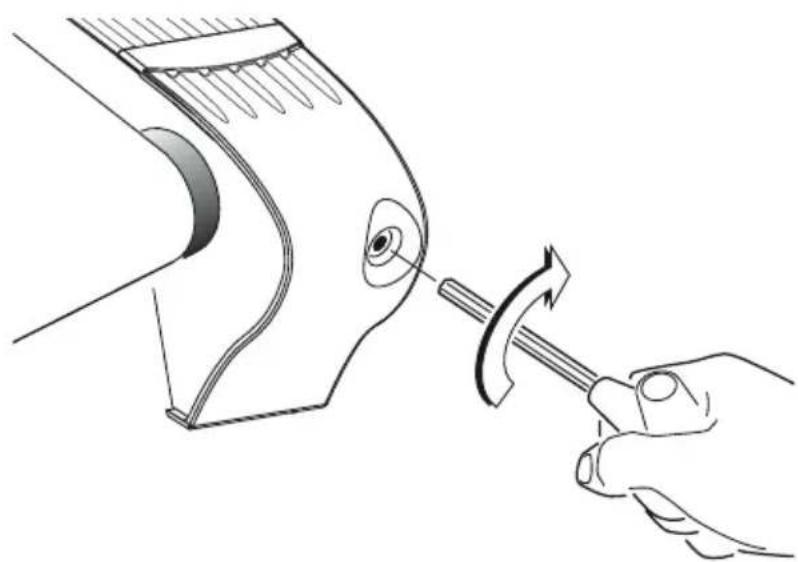
If the running belt slips when used, use the supplied 8mm Allen wrench to turn the left and right tension bolts clockwise 1/4-turn at a time until the belt no longer slips.
natural_image
Line drawing of a hand using a hammer to adjust or install a curved mechanical component (no text or symbols present)CENTERING THE BELT
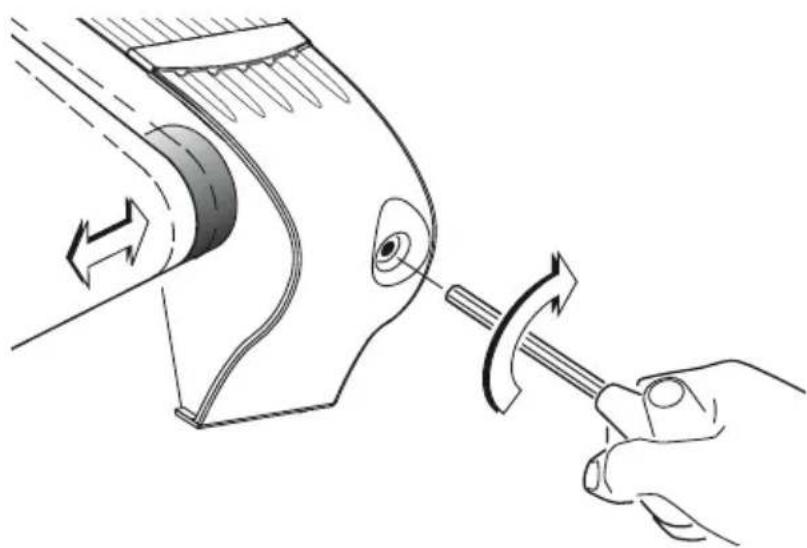
Run the treadmill at 2.0 mph. If the running belt is too far to the right side, use the supplied 8mm Allen wrench to turn the right tension bolt clockwise 1/4-turn at a time until the belt remains centered during use.
If the running belt is too far to the left side, turn the left tension bolt clockwise 1/4-turn at a time until the belt remains centered during use.
natural_image
Diagram of a hand using a tool to adjust or rotate a mechanical component, showing motion arrows (no text or symbols)PREVENTIVE MAINTENANCE
Following are several tips on taking care of your VISION FITNESS Treadmill. The location of your Treadmill is important in maintaining it properly. Find a location that does not accumulate dust and dirt easily. A clean environment can help to prolong the life and improve the performance of your Treadmill.
CLEANING TREADMILL
IMPORTANT: Before cleaning, be sure to turn off and unplug the Treadmill.
- After each use, wipe the perspiration off the console and treadmill surfaces.
- Every week, clean the Treadmill surfaces including the console, motor cover and side rails using a damp cloth. Do not use solvents as they may cause damage to the Treadmill.
• Each week vacuum around and under the Treadmill.
QUARTERLY INSPECTION
- Every three months, check the tightness of the assembly bolts to assure they are properly tightened.
- Every three months, check the power cord.
DECK WAXING
VISION FITNESS treadmills feature a wax lubricated phenolic deck, which may never require any maintenance. However, the deck is a wearable component and, under heavier use, or in some environments, the wax lubricant can wear out. To maximize treadmill life, the decks can easily have wax reapplied.
No waxing is required for the first year of use. After one year, it is recommended to wax the deck once every six months. This will enhance the performance and life of the Treadmill. Weight can have an affect on how the wax wears on the deck. A heavier user (Example: 250 pounds and above) may need to wax more frequently. Also, running wears out wax faster than walking. Ask your VISION FITNESS retailer for information about treadmill maintenance.
LIMITED HOME USE WARRANTY
VISION FITNESS extends the following exclusive, limited warranty, which shall apply only to the use of the device in the home, for residential, non-commercial purposes only. Any other use of the device shall void this warranty.
VISION FITNESS hereby extends the following limited warranties for the following components of the device, for the time period indicated:
FRAME - LIFETIME VISION FITNESS warrants the Frame against defects in workmanship and materials for the life of the product, so long as it remains in the possession of the original owner.
MOTOR - LIFETIME VISION FITNESS warrants the Motor against defects in workmanship and materials for the life of the Product, so long as the device remains in the possession of the original owner.
ELECTRONICS & PARTS - TWO YEARS VISION FITNESS warrants the Electronic components and all original Parts (other than the Motor) against defects in workmanship and materials for a period of two years from the date of original purchase, so long as the device remains in the possession of the original owner.
LABOR - ONE YEAR VISION FITNESS shall cover the Labor cost for the repair of the device for a period of one year from the date of original purchase, so long as the device remains in the possession of the original owner.
LIMITED HOME USE WARRANTY (continued)
EXCLUSIVE REMEDY
The exclusive remedy for any of the above warranties shall be repair or replacement of defective Parts, or the supply of Labor to cure any defect, provided that Labor shall be limited to one year. All Labor shall be supplied by the local Retailer who sold the Product and the Product must be located within that Retailer's service area. Products located outside the Retailer's service area will not be covered by the Labor warranty.
EXCLUSIONS AND LIMITATIONS
This warranty applies only to the original owner and is not transferable. This warranty is expressly limited to the repair or replacement of a defective Frame, Electronic component, or defective Part and is the sole remedy of the warranty. The warranty does not cover normal wear and tear, improper assembly or maintenance, or installation of parts or accessories not originally intended or compatible with the Fitness Product as sold. The warranty does not cover failure to follow instructions and warnings in the Owner's Guide or failure to provide reasonable and necessary maintenance. The warranty does not apply to damage or failure due to accident, abuse, corrosion, discoloration of paint or plastic, or neglect. VISION FITNESS shall not be responsible for incidental or consequential damages. Parts and Electronic components reconditioned to As New Condition by VISION FITNESS or its vendors may sometimes be supplied as warranty replacement parts and constitute fulfillment of warranty terms. Any warranty replacement parts shall be warranted for the remainder of the original warranty term.
VISION FITNESS expressly disclaims all other warranties, express or implied, including but not limited to all warranties of fitness for a particular purpose or of merchantability. This warranty gives you specific legal rights and your rights may vary from state to state.
WARRANTY REGISTRATION
Your warranty card must be completed and sent to VISION FITNESS before a warranty claim can be processed. You may also register via our website at www.visionfitness.com. Inside the enclosed warranty card you will find a customer survey. Your care in completing the survey will be of value to us in serving you in the future. Comments and suggestions are always welcome. We are certain you will enjoy your new Treadmill. Thank you for selecting a VISION FITNESS product.
DEVELOPING A FITNESS PROGRAM
By purchasing this piece of VISION FITNESS exercise equipment, you have made a commitment to exercise and now have the convenience of exercising in your own home. Your new equipment offers the flexibility to exercise at whatever time suits you best. It will be easier to maintain a consistent exercise program that will help you achieve your fitness goals.
ACHIEVING YOUR FITNESS GOALS
An important step in developing a long-term fitness program is to determine your goals. Is your primary goal to lose weight? Improve muscle tone? Relieve stress? Prepare for the spring racing schedule? Knowing what your goals are will help you develop a more successful exercise program. If possible, try to define your personal goals in precise, measurable terms over specific periods of time. Examples of these goals might include:
- Decrease your waistline by two inches over the next two months.
- Run the local 5K race this summer.
- Lose 10 pounds in the next three months.
- Get 30 minutes of cardiovascular exercise at least five days per week.
- Improve your race time by two minutes over the next year.
- Move from walking a mile to jogging a mile within the next three months. The more specific the goal, the easier it will be to track your progress. If your goals are long-term, divide them into monthly and weekly segments. Long-term goals can lose some of the motivational benefits. Short-term goals are easier to achieve and will allow you to see the progress you are making. Every time you reach a goal, it is important to set a new goal. This will lead to a healthier lifestyle and will provide the motivation that you will need to move forward.
TRACK YOUR PROGRESS
Now that you have set your exercise goals, it is time to write them down and make an exercise schedule that will help you achieve them. By keeping a fitness diary, you will stay motivated and know where you are in terms of reaching your goals. As time goes on, you will be able to look back with pride to see how far you've come. See the end of this section for weekly and annual exercise logs. Copy these logs to keep your own fitness diary.
EXERCISE GUIDELINES
WARM-UP
A warm-up activity should be a progressive aerobic activity that utilizes the muscles you will be using during the workout. There is no set warm-up intensity. A typical warm-up will produce a small amount of perspiration, but not leave you feeling fatigued. Intensity and fitness level will affect the duration of your warm-up, but 5-10 minutes is usually recommended.
EXERCISE DURATION
A common question asked is, "how much exercise do I need?" We recommend following the guidelines set up by the American College of Sports Medicine (ACSM) for healthy aerobic activity.
• Exercise three to five days per week.
- Warm up for five to 10 minutes before aerobic activity.
- Maintain your exercise activity for 30 to 45 minutes.
- Gradually decrease the intensity of your workout, then stretch to cool down during the last five to 10 minutes.
If weight loss is a major goal, participate in your aerobic activity at least 30 minutes for five days each week.
EXERCISE INTENSITY
The next question asked is, "how hard do I need to workout?" To reap the most cardiovascular benefits from your workout, it is necessary to exercise within a recommended intensity range. We recommend using one of two methods to measure exercise intensity. These two methods are performed by monitoring your exercise heart rate or by using the Rate of Perceived Exertion (RPE). Please see pages 22 and 23 for the Target Heart Rate Chart and RPE Scale.
BALANCED FITNESS
While cardiovascular exercise has been the primary method of fitness for many programs over the years, it should not be the only method. Strength Training and Flexibility Training have become more popular as exercise has developed. Incorporating Strength and Flexibility Training into your current exercise program will give you the balance you need to improve your athletic performance, reduce susceptibility to injury, increase metabolic rate, increase bone density, and reach your goals faster.
STRENGTH TRAINING
Strength Training was once known as an activity performed by young males only. That has changed with the advances in scientific research on Strength Training over the last 20 years or so. Research has proven that, after age 30, we begin to lose muscle mass if we do not incorporate Strength Training into our exercise program. With this decrease in muscle mass, our ability to burn calories decreases, our physical ability to do work decreases and our susceptibility to injuries increases. The good news is that, with a proper Strength Training program, we can maintain or even build muscle as we age. A proper Strength Training program will work the muscle groups of the upper and lower body. There are now many options available for Strength Training including: yoga, Pilates, selectorized machines, free weights, stability balls or medicine balls, exercise tubing and body weight exercises, just to name a few.
Recommendations for a minimum Strength Training program include:
FREQUENCY: Two to three days per week
VOLUME: One to three sets consisting of eight to 12 repetitions.
STRETCHING
Flexibility Training is not associated with fitness as often as cardiovascular exercise or Strength Training, even though it is just as important. A good stretching program will help to maintain flexibility of the hips and lower back. A flexible person will be less likely to injure themselves in common activities, such as reaching, twisting and turning, or in uncommon activities such as the annual softball tournament.
Before stretching, take a few minutes to warm up the muscles because stretching a cold muscle can cause injury. Start your stretch slowly, exhaling as you gently stretch the muscle. Try to hold each stretch 15 to 30 seconds. Don't bounce when you stretch. Holding a stretch offers less chance of injury. Don't strain or push a muscle too far. If it hurts, ease up. Here are a few stretches you can incorporate into your exercise program:
SEATED TOE TOUCH
Sit on the floor with your legs together and straight out in front of you. Do not lock your knees. Extend your fingers toward your toes, exhaling as you go. Hold for 15 to 30 seconds. Return to the start position, and repeat as necessary.

natural_image
Two sequential line drawings of a person performing seated or stretching exercises (no text or symbols)STANDING QUADRICEPS STRETCH
Using a wall to provide balance, grasp your left ankle with your left hand and hold to stretch. Your knee should be pointing toward the floor. Hold the stretch for 15 to 30 seconds. Repeat with your right leg, and continue to alternate as necessary.

natural_image
Line drawing of a person performing a stretching exercise (no text or symbols)STANDING CALF STRETCH
Standing about three to four feet from the wall, take one step forward with your right foot. Place your hands on the wall in front of you. Bend your right leg slowly, using your movement to control the amount of stretch in the left calf. Your left heel should remain on the ground. Slowly bring yourself back to the starting position and switch legs. Repeat as necessary.

natural_image
Line drawing of a person in a standing pose, possibly performing a martial arts or exercise pose (no text or symbols)Week #
Weekly Goals:
Scheduled Workout Time:
Reward:
| Day | Date | Workload Level | Exercise Time | Distance | Comments |
| Sunday | |||||
| Monday | |||||
| Tuesday | |||||
| Wednesday | |||||
| Thursday | |||||
| Friday | |||||
| Saturday | |||||
| Totals | |||||
Week #
Weekly Goals:
Scheduled Workout Time:
Reward:
| Day | Date | Workload Level | Exercise Time | Distance | Comments |
| Sunday | |||||
| Monday | |||||
| Tuesday | |||||
| Wednesday | |||||
| Thursday | |||||
| Friday | |||||
| Saturday | |||||
| Totals | |||||
Week #
Weekly Goals:
Scheduled Workout Time:
Reward:
| Day | Date | Workload Level | Exercise Time | Distance | Comments |
| Sunday | |||||
| Monday | |||||
| Tuesday | |||||
| Wednesday | |||||
| Thursday | |||||
| Friday | |||||
| Saturday | |||||
| Totals | |||||
Week #
Weekly Goals:
Scheduled Workout Time:
Reward:
| Day | Date | Workload Level | Exercise Time | Distance | Comments |
| Sunday | |||||
| Monday | |||||
| Tuesday | |||||
| Wednesday | |||||
| Thursday | |||||
| Friday | |||||
| Saturday | |||||
| Totals | |||||
January
| Week | Minutes | Distance |
| 1 | ||
| 2 | ||
| 3 | ||
| 4 | ||
| 5 | ||
| Totals | ||
| Reward |
February
| Week | Minutes | Distance |
| 1 | ||
| 2 | ||
| 3 | ||
| 4 | ||
| 5 | ||
| Totals | ||
| Reward |
March
| Week | Minutes | Distance |
| 1 | ||
| 2 | ||
| 3 | ||
| 4 | ||
| 5 | ||
| Totals | ||
| Reward |
April
| Week | Minutes | Distance |
| 1 | ||
| 2 | ||
| 3 | ||
| 4 | ||
| 5 | ||
| Totals | ||
| Reward |
May
| Week | Minutes | Distance |
| 1 | ||
| 2 | ||
| 3 | ||
| 4 | ||
| 5 | ||
| Totals | ||
| Reward |
June
| Week | Minutes | Distance |
| 1 | ||
| 2 | ||
| 3 | ||
| 4 | ||
| 5 | ||
| Totals | ||
| Reward | ||
July
| Week | Minutes | Distance |
| 1 | ||
| 2 | ||
| 3 | ||
| 4 | ||
| 5 | ||
| Totals | ||
| Reward |
August
| Week | Minutes | Distance |
| 1 | ||
| 2 | ||
| 3 | ||
| 4 | ||
| 5 | ||
| Totals | ||
| Reward |
September
| Week | Minutes | Distance |
| 1 | ||
| 2 | ||
| 3 | ||
| 4 | ||
| 5 | ||
| Totals | ||
| Reward |
October
| Week | Minutes | Distance |
| 1 | ||
| 2 | ||
| 3 | ||
| 4 | ||
| 5 | ||
| Totals | ||
| Reward |
November
| Week | Minutes | Distance |
| 1 | ||
| 2 | ||
| 3 | ||
| 4 | ||
| 5 | ||
| Totals | ||
| Reward |
December
| Week | Minutes | Distance |
| 1 | ||
| 2 | ||
| 3 | ||
| 4 | ||
| 5 | ||
| Totals | ||
| Reward |
it all
starts
with a
vision
VISION FITNESS
500 South CP Avenue • P.O. Box 280
Lake Mills, WI 53551
toll free 800.335.4348 • phone 920.648.4090
fax 920.648.3373
www.visionfitness.com
©2006 Vision Fitness. All Rights Reserved.
6.06
OM18.38PRD
REV1