Clavinova CVP-401 - Piano YAMAHA - Free user manual and instructions
Find the device manual for free Clavinova CVP-401 YAMAHA in PDF.


User questions about Clavinova CVP-401 YAMAHA
0 question about this device. Answer the ones you know or ask your own.
Ask a new question about this device
Download the instructions for your Piano in PDF format for free! Find your manual Clavinova CVP-401 - YAMAHA and take your electronic device back in hand. On this page are published all the documents necessary for the use of your device. Clavinova CVP-401 by YAMAHA.
USER MANUAL Clavinova CVP-401 YAMAHA
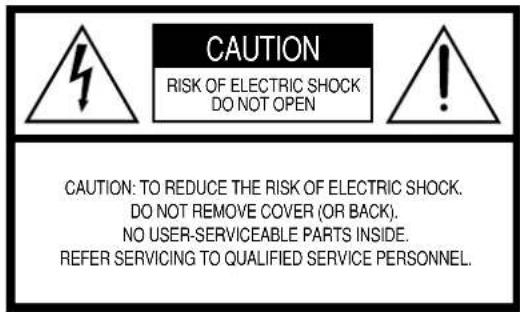
PRODUCT SAFETY MARKINGS: Yamaha electronic products may have either labels similar to the graphics shown below or molded/stamped facsimiles of these graphics on the enclosure. The explanation of these graphics appears on this page. Please observe all cautions indicated on this page and those indicated in the safety instruction section.
text_image
CAUTION RISK OF ELECTRIC SHOCK DO NOT OPEN CAUTION: TO REDUCE THE RISK OF ELECTRIC SHOCK. DO NOT REMOVE COVER (OR BACK). NO USER-SERVICEABLE PARTS INSIDE. REFER SERVICING TO QUALIFIED SERVICE PERSONNEL.See bottom of Keyboard enclosure for graphic symbol markings.

The exclamation point within the equilateral triangle is intended to alert the user to the presence of important operating and maintenance (servicing) instructions in the literature accompanying the product.

The lightning flash with arrowhead symbol, within the equilateral triangle, is intended to alert the user to the presence of uninsulated “dangerous voltage” within the product’s enclosure that may be of sufficient magnitude to constitute a risk of electrical shock.
IMPORTANT NOTICE: All Yamaha electronic products are tested and approved by an independent safety testing laboratory in order that you may be sure that when it is properly installed and used in its normal and customary manner, all foreseeable risks have been eliminated. DO NOT modify this unit or commission others to do so unless specifically authorized by Yamaha. Product performance and/or safety standards may be diminished. Claims filed under the expressed warranty may be denied if the unit is/has been modified. Implied warranties may also be affected.
SPECIFICATIONS SUBJECT TO CHANGE: The information contained in this manual is believed to be correct at the time of printing. However, Yamaha reserves the right to change or modify any of the specifications without notice or obligation to update existing units.
ENVIRONMENTAL ISSUES: Yamaha strives to produce products that are both user safe and environmentally friendly. We sincerely believe that our products and the production methods used to produce them, meet these goals. In keeping with both the letter and the spirit of the law, we want you to be aware of the following:
Battery Notice: This product MAY contain a small non-rechargeable battery which (if applicable) is soldered in place. The average life span of this type of battery is approximately five years. When replacement becomes necessary, contact a qualified service representative to perform the replacement.
Warning: Do not attempt to recharge, disassemble, or incinerate this type of battery. Keep all batteries away from children. Dispose of used batteries promptly and as regulated by applicable laws. Note: In some areas, the servicer is required by law to return the defective parts. However, you do have the option of having the servicer dispose of these parts for you.
Disposal Notice: Should this product become damaged beyond repair, or for some reason its useful life is considered to be at an end, please observe all local, state, and federal regulations that relate to the disposal of products that contain lead, batteries, plastics, etc.
NOTICE: Service charges incurred due to lack of knowledge relating to how a function or effect works (when the unit is operating as designed) are not covered by the manufacturer's warranty, and are therefore the owners responsibility. Please study this manual carefully and consult your dealer before requesting service.
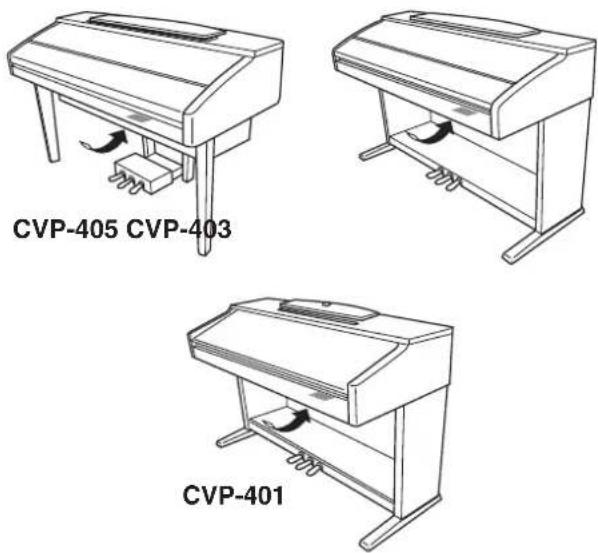
NAME PLATE LOCATION: The graphic below indicates the location of the name plate. The model number, serial number, power requirements, etc., are located on this plate. You should record the model number, serial number, and the date of purchase in the spaces provided below and retain this manual as a permanent record of your purchase.
text_image
CVP-405 CVP-403 CVP-401Model
Serial No.
Purchase Date
PRECAUTIONS D'USAGE
PRIERE DE LIRE ATTENTIVEMENT AVANT DE PROCEDER A TOUTE MANIPULATION
Transpose (Transposition) 83
(3 prises [AUX OUT]) 185
⑤ Touche [ON/OFF] P 30
TRANSPOSE
⑥ Touches [-] [+]....P 56
TEMPO
⑦ Touche [TAP TEMPO] P 47
⑧ Touches [-] [+]....P 31
STYLE CONTROL
⑨ Touches de sélection de la catégorie STYLE ...... P 45
10 Touche [ACMP ON/OFF] P 46
⑪ Touche [AUTO FILL IN] P 48
12 Touches INTRO [I]/[II]/[III] P 47
13 Touches MAIN VARIATION [A]/[B]/[C]/[D] ...... P 48
14 Touche [BREAK]....P 48
15 Touches ENDING/rit. [I]/[II]/[III] P 48
16 Touche [SYNC STOP] P 48
⑰ Touche [SYNC START] P 47
18 Touche [START/STOP] P 47
19 Touche [MUSIC FINDER]....P 52
20 Bouton [LCD CONTRAST]....P 18
21 Touches [A]–[J] P 25
②2 Touche [DIRECT ACCESS].... P 64
23 Touche [MIXING CONSOLE]....P 87
24 Touche [CHANNEL ON/OFF] P 105, 139
25 Touches [▲▼]–[8▲▼] ......P 25
26 Touches TAB◀][▶]....P 26
27 Touche [EXIT]....P 26
28 Cadran [DATA ENTRY]....P 67
29 Touche [ENTER] P 67
③0 Touche [USB] P 67
③1 Touche [USER] P 67
PART ON/OFF
③2 Touche [DUAL (RIGHT2)]....P 80
33 Touche [SPLIT (LEFT)]....P 80
34 Touche [FUNCTION] P 27
35 Touche [INTERNET] P 172
SONG CONTROL
36 Touche [SONG SELECT]....P 35
37 Touche [REC] P 42
38 Touche [STOP] P 35
39 Touche [PLAY/PAUSE] P 35
40 Touches [REW]/[FF].....P 134
41 Touche [EXTRA TRACKS] P 140
42 Touche [TRACK 2 (L)].....P 41
43 Touche [TRACK 1 (R)] P 39
44 Touche [SCORE] P 38
45 Touche [LYRICS/TEXT] (CVP-405)
Touche [LYRICS] (CVP-403/401)....P 55
46 Touche [GUIDE] P 39
47 Touche [REPEAT]....P 41
Réglage PIANO
48 Touche [PIANO RESET] P 29
REGISTRATION MEMORY
49 Touches REGIST BANK [+] [-].....P 128
50 Touche [MEMORY] P 127
⑤ Touches [1]–[8] P 127
text_image
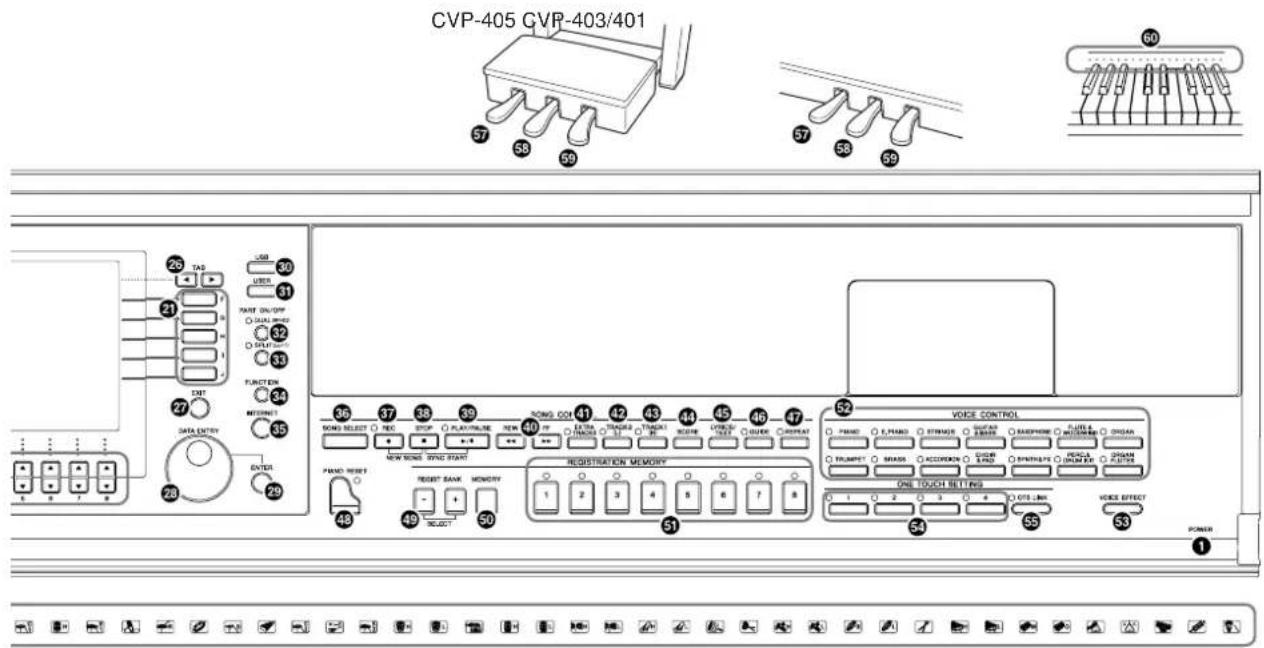
CVP-405 GVP-403/401 26 TAG 27 DATA ENTRY 28 LAB 30 LIFE 31 PART ON/OFF 32 SOLDING 33 FUNCTION 34 CONNECT 35 OUT 36 37 38 39 STOCK OUT 40 STOCK SWITCH 41 STOCK SWITCH 42 STOCK SWITCH 43 STOCK SWITCH 44 STOCK SWITCH 45 STOCK SWITCH 46 STOCK SWITCH 47 STOCK SWITCH 48 STOCK SWITCH 49 STOCK SWITCH 50 PAND RESET 51 RESET BANK MEMORY 52 VOICE CONTROL 53 ONE TOUCH SETTING 54 VOICE EFFECT 55 POWERVOICE CONTROL
(Drum/key Assignment List)
Pédales
natural_image
Diagram showing a computer monitor connected to a cable with a magnified inset highlighting the cable (no text or symbols present)natural_image
Two diagrams showing a mechanical or electrical component with directional arrows indicating motion (no text or symbols present)natural_image
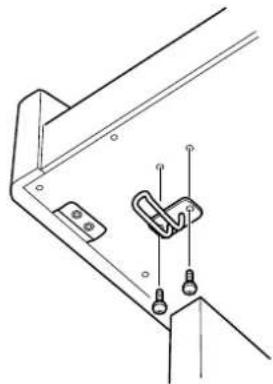
Technical line drawing of a mechanical bracket with mounting holes and clamps (no text or symbols)CVP-405/403
natural_image
Technical line drawing of a mechanical bracket with mounting holes and a clip (no text or symbols)CVP-401
natural_image
Diagram of a floppy disk with a magnified inset showing a square object and a downward arrow (no text or symbols)text_image
DEMO EXITtext_image
DEMO Ultimate Realism Home Studio Sound Showcase Internet Services Style Showcase Functions & Features Interactive Features Play Overview Demo A F B G C H D I E JEcran Function (Fonction) ▶page 27
text_image
Musical notation showing treble clef, key signature, and rhythmic patterns with arrows indicating movementtext_image
Musical notation with treble clef, notes, and a zigzag arrow indicating pitch or rhythmtext_image
TAP TEMPO - TEMPO + + RESET TEMPO = 103text_image
SET UP VOICE PANPOP VOLUMEtext_image
Diagram showing electronic device interface with labeled components including a function button and internal circuit blockNOTE Avant d'utiliser la technologie Performance Assistant
[FUNCTION] → [B] SONG SETTING
text_image
INPUT VOLUME SAMS / LINE IN MCC LINE FLOODS 2, 5 3 4Transpose (Transposition)
flowchart
graph TD
    A["A"] --> MICOUTFF["1"]
    B["B"] --> MICOUTFF
    C["C"] --> MICOUTFF
    D["D"] --> MICOUTFF
    E["E"] --> MICOUTFF
    MICOUTFF --> TALKOFF["1"]
    MICOUTFF --> MIC_EFFECTOFF["1"]
    MICOUTFF --> VOCALHARMONY["1"]
    MICOUTFF --> VOCALHARMONY2["1"]
    MICOUTFF --> VOCALHARMONY3["1"]
    MICOUTFF --> VOCALHARMONY4["1"]
    MICOUTFF --> VOCALHARMONY5["1"]
    MICOUTFF --> VOCALHARMONY6["1"]
    MICOUTFF --> VOCALHARMONY7["1"]
    MICOUTFF --> VOCALHARMONY8["1"]
    MICOUTFF --> VOCALHARMONY9["1"]
    MICOUTFF --> VOCALHARMONY10["1"]
    MICOUTFF --> VOCALHARMONY11["1"]
    MICOUTFF --> VOCALHARMONY12["1"]
    MICOUTFF --> VOCALHARMONY13["1"]
    MICOUTFF --> VOCALHARMONY14["1"]
    MICOUTFF --> VOCALHARMONY15["1"]
    MICOUTFF --> VOCALHARMONY16["1"]
    MICOUTFF --> VOCALHARMONY17["1"]
    MICOUTFF --> VOCALHARMONY18["1"]
    MICOUTFF --> VOCALHARMONY19["1"]
    MICOUTFF --> VOCALHARMONY20["1"]
    MICOUTFF --> VOCALHARMONY21["1"]
    MICOUTFF --> VOCALHARMONY22["1"]
    MICOUTFF --> VOCALHARMONY23["1"]
    MICOUTFF --> VOCALHARMONY24["1"]
    MICOUTFF --> VOCALHARMONY25["1"]
    MICOUTFF --> VOCALHARMONY26["1"]
    MICOUTFF --> VOCALHARMONY27["1"]
    MICOUTFF --> VOCALHARMONY28["1"]
    MICOUTFF --> VOCALHARMONY29["1"]
    MICOUTFF --> VOCALHARMONY30["1"]
    MICOUTFF --> VOCALHARMONY31["1"]
    MICOUTFF --> VOCALHARMONY32["1"]
    MICOUTFF --> VOCALHARMONY33["1"]
    MICOUTFF --> VOCALHARMONY34["1"]
    MICOUTFF --> VOCALHARMONY35["1"]
    MICOUTFF --> VOCALHARMONY36["1"]
    MICOUTFF --> VOCALHARMONY37["1"]
    MICOUTFF --> VOCALHARMONY38["1"]
    MICOUTFF --> VOCALHARMONY39["1"]
    MICOUTFF --> VOCALHARMONY40["1"]
    MICOUTFF --> VOCALHARMONY41["1"]
    MICOUTFF --> VOCALHARMONY42["1"]
    MICOUTFF --> VOCALHARMONY43["1"]
    MICOUTFF --> VOCALHARMONY44["1"]
    MICOUTFF --> VOCALHARMONY45["1"]
    MICOUTFF --> VOCALHARMONY46["1"]
    MICOUTFF --> VOCALHARMONY47["1"]
    MICOUTFF --> VOCALHARMONY48["1"]
    MICOUTFF --> VOCALHARMONY49["1"]
    MICOUTFF --> VOCALHARMONY50["1"]
[FUNCTION] → [] UTILITY → TAB [◀][▶] SCREEN OUT
text_image
USB SONG VOICE (RIGHT1) STYLE USB AUDIO RECOVER PRO- PENTV RECORDING TIME 00:00 REG Do not take out the USB storage device or turn off the instrument during recording. AUDITION 1 2 3 4 5 6 7 8 F G H I J 5 6,7 8[USB] → [E] (USB AUDIO RECORDER).
text_image
UTILITY CONFIG 1 CONFIG 2 SCREEN OUT MEDIA OWNER SYSTEM RESET A B C D E Are you sure you want to format this device (USB1)? ? Make sure there is no important data in the disk before formatting; otherwise all data will be deleted. YES NO SONG AUTO OPEN ON OFF When the media is inserted to the device selected in the device list, the first song in the media will be selected automatically.text_image
MAIN TRANSPOSE 0 J = 103 BAR 001 - 1 Natural! RIGHT1 Pressing a button on the panel or pedal jumps to the relevant setup page of the respective button or pedal. (The button or a pedal works as a shortcut key.) Press [EXIT] to return to the MAIN display. SONG STYLE NIC LEFT RIGHT1 RIGHT2 LYRICS/ TEXT GUIDE REPEAT 2 SONG SETTING Follow Lights GUIDE MODE Any Key Guide lamp indicates the next note to Play. Karao-Key Playback pauses until you play the correct note. Vocal CueTIME GUIDE LAMP ON OFF OFF SINGLE ALL RANDOM REPEAT MODE GUIDE LAMP MEXT AUSI ON OFF PURCHASE MARK REPEAT CHANNEL SETTING TRACK2-TRACK1 AUTO CYCH SET LYRICS QUICK P.R.T. OFF OFF AUTO INTERNATIONAL ON 1 1 ON INTERNATIONAL JAPANESE OFF ON 2 OFF⑦Transpose (Transposition)
text_image
UTILITY CONFIG 1 CONFIG 2 SCREEN OUT MEDIA OWNER SYSTEM RESET DEVICE LIST USB1 PROPERTY Initialize MEDIA. All data will be deleted. FORMAT SONG AUTO OPEN ON OFF When the media is inserted to the device selected in the device list, the first song in the media will be selected automatically.text_image
UTILITY CONFIG 1 CONFIG 2 SCREEN OUT MEDIA OWNER SYSTEM RESET The Factory Reset operation does not reset certain parameters, such as the Language setting and Owner Name. To reset those, load the preset System Setup file. FACTORY RESET EXECUIE FACTORY RESET SYSTEM SETUP HIDI SETUP USER EFFECT MUSIC FINDER FILES&FOLDERS REGIST CAUTION! All User files and folders are lost when 'FILES&FOLDERS' is selected and Factory Reset is executed. 1 2 3 4 5 6 7 8 F G H I J 4 2 3Select files/folders.
ALL
OK
CANCEL
text_image
Diagram showing a piano keyboard with an arrow pointing to the keyframe of the keyframe.text_image
Diagram showing piano keyboard states with arrows indicating movement or change in the keysnatural_image
Diagram of a piano keyboard with a finger pointing to the keyframe (no text or symbols present)[FUNCTION] → [C] STYLE SETTING/SPLIT POINT/CHORD FINGERING → TAB [◀] STYLE SETTING
text_image
STYLE SETTING/SPLIT POINT/CHORD FINGERING STYLE SETTING | SPLIT POINT | CHORD FINGERING 1 STOP ACMP:FIXED OTS LINK TIMING:REAL TIME SYNCHRO STOP WINDOW:OFF STYLE TOUCH:OFF STYLE CHANGE BEHAVIOR SECTION SET:OFF TEMPO:RESET PART ON/OFF:RESET STOP ACMP OIS LINK TIMING SYNCHRO STOP MINDOM OFF STYLE TOUCH SECTION SET INTRO MAIN A MAIN B MAIN C HOLD RESET PART ON/OFF OFF STYLE FIXED REAL TIME NEXT BAR ON OFF HOLD RESET STYLE CHANGE BEHAVIOR PART ON/OFF 1 2 3 4 5 6 7 8[FUNCTION] → [C] STYLE SETTING/SPLIT POINT/CHORD FINGERING → TAB [◀][▶] SPLIT POINT
- REPLACE (Remplacer)
text_image
RHY1 ON RHY2 REC BASS OK CHD1 OK CHD2 OK PAD ON PHR1 OFF PHR2 OFF[FUNCTION] → [F] DIGITAL REC MENU
text_image
STYLE CREATOR: Classic8Beat BASIC ASSEMBLY GROOVE CHANNEL PARAMETER EDIT BAR: 1 SECTION:MAIN A REC PATTERN LENGTH:4 CH 2 TEMPO:103 BEAT:4/4 MEN STYLE EXECUTE SAVE SECTION PATTERN MAIN A LENGTH MAIN B 1 MAIN C 2 MAIN D 3 MAIN D 4 TAB F G H I J 1 2 3 4 5 6 7 8 7-2 D E 6 7-1C = notes d'accord C, R = notes recommandées
SOURCE CHORD (Accord source)
■SOURCE ROOT/CHORD (Note fondamentale/Accord source)
[FUNCTION] → [B] SONG SETTING
text_image
SONG SETTING Follow Lights GUIDE MODE Any Key Guide lamp indicates the next note to play. Karoo-Key Playback pauses until you play Vocal CueTIME the correct note. GUIDE LAMP ON OFF OFF SINGLE ALL RANDOM REPEAT MODE GUIDE LAMP TIMING NEXT JUST ON OFF PHRASE WORK REPEAT CHANNEL SETTING TRACK2-TRACK1 AUTO OFF OFF CH SET 1 1 ON 2 2 OFF LYRICS LANGUAGE AUTO INTERNATIONAL JAPANESE QUICK START ON OFF P.A.T. ON OFFtext_image
3 A SONG CREATOR STYLE CREATOR F G H I Jtext_image
2-5 6-8 10-13 14-16 mp f 1 9text_image
Illustration showing three-step musical keyboard rotation: finger press, key signature, and thumbbell.text_image
3 A B C D E S O N G C R E C T A R O R STYLE C R E C T A R O R F G H I Jtext_image
SONG CREATOR: NewSong REC MODE CHANNEL CHORD 1-10 SYS/EX IYBICS REC START NORMAL RECEND REPLACE ALL Overwrite recording starts when the sons starts. When recording stops, the rest of the previously recorded data on the channel will be lost. REG END PUNCH IN/OUT~ FIRST KEY ON PURCH IN AT ... 001 PUNCH OUT PUNCH OUT AT ... 002 ON OFF TAB SAVE REG START FIRST KEY ON PURCH IN AT ... 001 REG END PUNCH IN/OUT... PUNCH OUT PUNCH OUT AT ... 002Menu SETUP (Configuration)
[FUNCTION] → [F] DIGITAL REC MENU → [A] SONG CREATOR → TAB [◀][▶] CHANNEL → [B] SET UP
http://music.yamaha.com/homekeyboard
text_image
INTERNET DIRECT CONNECTION Keyboard Tips & Tricks <1 Try Auto Accompaniment 2 The Right Tempo Everytime 3 Go Wireless 4 Shortcut To MAIN Screen 5 Performance Assistant Style Tape Reset Use the [Data Entry] dial and [Enter] button to select an item from the list. BARRE de défilement RETURN TO HELP Web page has been displayed. DATA ENTRYSélection de liens
text_image
INTERNET DIRECT CONNECTION Welcome to Internet Direct Connection Access thousands of downloadable songs, online music lessons, and bonus material. LEARN MUSIC A GET MUSIC A F G H I J MY ACCOUNT A Free Songs from Yamaha HUSE/ASSA A Web page has been displayed. BACK FOR WORD NONE BOOK WORK REFRESH STOP ENTER 1 2 3 4 5 6 7 8 TABtext_image
Web page has been displayed. BACK FOR- WARD HOME DOOR MARK REFRESH SETTING STOP ▲ ENTER ▼ ▲ 2 3 4 5 6 7 8text_image
Message Web page has been displayed. BACK FOR HARD NONE BOOK MARK REFRESH STOP SETTING ENTER ① ② ③ ④text_image
INTERNET SETTING BROWSER LOW NIDLESS OTHERS Encode Western European Home page Yamaha Website 1 Set current page as Home Register Restore default Home Initialize Show images On Time zone U.K. time(GMT) CONTROL MENU EDIT SAVE CANCEL3 4
text_image
INTERNET SETTING BROWSER LAN RIBELESS OTHERS Encode Western European Home page Yamaha Website 1 Set current page as Home Register Restore default Home Initialize Show images On Time zone U.K. time(GMT) Japanese(EUC) Japanese(Shift-JIS) Western European CONTROL MENU ENTER CANCEL 1 2 3 4 5 6 7 85 6
text_image
INTERNET SETTING BROWSER LOM WIRELESS OTHERS Encode Western European Home page Yamaha Website 1 Set current page as Home Register Restore default Home Initialize Show images On Time zone U.K. time(GMT) CONTROL MENU ▲ EDIT SAVE CANCELtext_image
INTERNET SETTING BOHNSER LAN HIDELSS OTHERS Proxy server Proxy port 8080 Non-proxy server Delete cookies Delete Delete all bookmarks Delete Initialize setup Initialize Connect information Display Information CONTROL MENU EDIT SAVE CANCEL①Proxy server/Proxy port/Non-proxy server
(Serveur proxy/Port proxy/Serveur non proxy)
②Delete cookies (Supprimer les cookies)
④ Initialize setup (Initialiser configuration)
text_image
INTERNET SETTING BROJSER LAN WIRELESS OTHERS Encode Western European Home page Yamaha Website 1 Set current page as Home Register Restore default Home Initialize Show images On Time zone U.K. time(GMT) CONTROL MENU EDIT SAVE CANCEL 1 2 3 4 5 6 7 8 3 TAB F G H I J 4 5 6text_image
INTERNET SETTING DOORSEAN LAW WIDELLESS OTHERS Proxy server Proxy port 8080 Non-proxy server Delete cookies Delete Delete all bookmarks Delete Initialize setup Initialize Connect information Display Information CONTROL MENU EDIT SAVE CANCEL 1 2 3 4 5 6 7 8 3 4text_image
INPUT VOLUME LINE IN MIC. LINE PHONES MR MAX ② ① PHONESnatural_image
Illustration of an acoustic guitar with motion lines indicating vibration or sound waves (no text or symbols)flowchart
graph TD
    L["Input L"] -->|Amplification/Interno| G["Output G"]
    G -->|Amplification/Interno| P["Output P"]
    P -->|Reproduction au rather| G
    G -->|Reproduction au rather| P
text_image
Diagram illustrating piano recording and sound recording process with labeled components and directional arrowsTechnologie Performance Assistant
natural_image
Line drawing of a portable heater with label 'A' and an arrow pointing to its side (no text or symbols on the device itself)natural_image
Mechanical assembly diagram showing two labeled parts A and B connected by rods (no text or symbols present)natural_image
Line drawing showing a table and a mechanical device with labeled components (no text or symbols)natural_image
Simple line drawing of an electrical component with wires and a labeled 'E' (no text or symbols beyond label)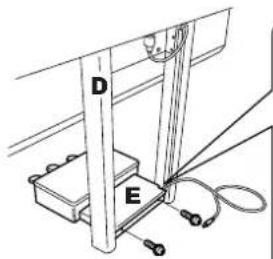
text_image
D E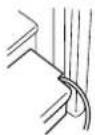
natural_image
Technical line drawing of a mechanical assembly with no visible text or symbols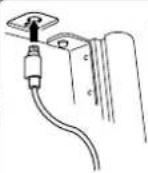
text_image
Correct Incorrectnatural_image
Simple line drawing of a three-pronged door handle with a curved arrow indicating rotation (no text or symbols)text_image
Technical diagram of a mechanical assembly with labeled components and directional arrows indicating motion or force4 Montez A.
ATTENTION
text_image
Diagram showing a device with labeled components and an inset dial indicator showing 127, 200, and 400 units.natural_image
Simple line drawing of a three-pronged door handle mechanism with a curved arrow indicating rotation (no text or symbols)text_image
E ② C D ③ ①text_image
Technical diagram of a mechanical device with labeled components and directional arrows indicating motion or assembly.text_image
Diagram showing a device with labeled components and a circular dial indicator showing 127, 240, and 111 units.natural_image
Simple line drawing of a mechanical component with three curved arms and a central knob (no text or symbols)natural_image
Diagram of a device with an open circuit board and cable, showing internal components and a tool (no text or symbols)natural_image
Line drawing of a device with a cable and connector, no text or symbols presentnatural_image
Technical line drawing of a mechanical assembly with screws and a USB connector (no text or symbols)ASSEMBLY (Style) 118
CONFIG 2 ......17, 19, 200
Configuration de l'écran File Selection ....66
Contraste 18
Sons de percussion 34
SOUND 98
Sound Creator 96
SPLIT 80
SPLIT POINT 107
Stop ACMP 106
Structure des styles ....113
Style 44,106
Style Change Behavior 106
Style Creator 113
Style File 195
STYLE PART 88
STYLE SETTING/SPLIT POINT 105
Style Touch 106
Supports de partition 16
Sweet! 79
Synchro Start (morceau) 133
Synchro Start (Style) 47
Synchro Stop 48
Synchro Stop Window 106
SYS/EX. 154
SYSTEM 198
SYSTEM RESET 76
T
TALK 59
TALK SETTING 170
Technologie Performance Assistant 43
Témoin 39
Texte 55
Top 134
TRANSMIT 198
Transpose 56, 58, 83
TUNE 89
Type d'effet 91
U
UP 68
USB Audio Recorder 60
[USB TO DEVICE], borne ....191
USER 26
V
Vibrato 99
VIDEO OUT 56
Vocal CueTIME 138
VOCAL HARMONY EDIT 164, 165
VOCAL HARMONY TYPE 163
VOICE EFFECT 85
VOICE SET 102
Voix 28,32,79
VOL/ATTACK 101
VOL/VOICE 89
W
WERCKMEISTER 84
Wireless LAN 181
X
XF 195
XG 195
The followings are the titles, credits and copyright notices for fifty seven (57) of the songs pre-installed in this instrument:
Alfie
Theme from the Paramount Picture ALFIE
Words by Hal David
Music by Burt Bacharach
Copyright © 1966 (Renewed 1994) by Famous Music Corporation
International Copyright Secured All Rights Reserved
All Shook Up
Words and Music by Otis Blackwell and Elvis Presley
Copyright © 1957 by Shalimar Music Corporation
Copyright Renewed and Assigned to Elvis Presley Music
All Rights Administered by Cherry River Music Co. and Chrysalis
Songs
International Copyright Secured All Rights Reserved
Beauty And The Beast
from Walt Disney's BEAUTY AND THE BEAST
Lyrics by Howard Ashman
Music by Alan Menken
© 1991 Walt Disney Music Company and Wonderland Music Com-
pany, Inc.
All Rights Reserved Used by Permission
Bésame Mucho (Kiss Me Much)
Music and Spanish Words by Consuelo Velazquez
English Words by Sunny Skylar
Copyright © 1941, 1943 by Promotora Hispano Americana de Musica,
S.A.
Copyrights Renewed
All Rights Administered by Peer International Corporation
International Copyright Secured All Rights Reserved
Blue Hawaii
from the Paramount Picture WAIKIKI WEDDING
Words and Music by Leo Robin and Ralph Rainger
Copyright © 1936, 1937 (Renewed 1963, 1964) by Famous Music
Corporation
International Copyright Secured All Rights Reserved
Blue Moon
Words by Lorenz Hart
Music by Richard Rodgers
© 1934 (Renewed 1962) METRO-GOLDWYN-MAYER INC.
All Rights Controlled by EMI ROBBINS CATALOG INC. (Publishing)
and WARNER BROS. PUBLICATIONS U.S. INC. (Print)
All Rights Reserved Used by Permission
Brazil
Words and Music by Ray Barroso
English lyrics by S. K. Russell
Copyright © 1941 by Peer International Corporation
Copyright Renewed
International Copyright Secured All Rights Reserved
California Girls
Words and Music by Brian Wilson and Mike Love
Copyright © 1965 IRVING MUSIC, INC.
Copyright Renewed
All Rights Reserved Used by Permission
Can You Feel The Love Tonight
from Walt Disney Pictures' THE LION KING
Music by Elton John
Lyrics by Tim Rice
© 1994 Wonderland Music Company, Inc.
All Rights Reserved Used by Permission
Can't Help Falling In Love
from the Paramount Picture BLUE HAWAII
Words and Music by George David Weiss, Hugo Peretti and Luigi Cre-
alore
Copyright © 1961 by Gladys Music, Inc.
Copyright Renewed and Assigned to Gladys Music
All Rights Administered by Cherry Lane Music Publishing Company,
Inc. and Chrysalis Music
International Copyright Secured All Rights Reserved
Chim Chim Cher-ee
from Walt Disney's MARY POPPINS
Words and Music by Richard M. Sherman and Robert B. Sherman
© 1963 Wonderland Music Company, Inc.
Copyright Renewed
All Rights Reserved Used by Permission
Do-Re-Mi
from THE SOUND OF MUSIC
Lyrics by Oscar Hammerstein II
Music by Richard Rodgers
Copyright © 1959 by Richard Rodgers and Oscar Hammerstein II
Copyright Renewed
WILLIAMSON MUSIC owner of publication and allied rights through-
out the world
International Copyright Secured All Rights Reserved
Don't Be Cruel (To A Heart That's True)
Words and Music by Otis Blackwell and Elvis Presley
Copyright © 1956 by Unart Music Corporation and Elvis Presley
Music, Inc.
Copyright Renewed and Assigned to Elvis Presley Music
All Rights Administered by Cherry River Music Co. and Chrysalis
Songs
International Copyright Secured All Rights Reserved
Edelweiss
from THE SOUND OF MUSIC
Lyrics by Oscar Hammerstein II
Music by Richard Rodgers
Copyright © 1959 by Richard Rodgers and Oscar Hammerstein II
Copyright Renewed
WILLIAMSON MUSIC owner of publication and allied rights through-
out the world
International Copyright Secured All Rights Reserved
Fly Me To The Moon (In Other Words)
featured in the Motion Picture ONCE AROUND
Words and Music by Bart Howard
TRO - © Copyright 1954 (Renewed) Hampshire House Publishing
Corp., New York, NY
International Copyright Secured
All Rights Reserved Including Public Performance For Profit
Used by Permission
Hey Jude
Words and Music by John Lennon and Paul McCartney
Copyright © 1968 Sony/ATV Songs LLC
Copyright Renewed
All Rights Administered by Sony/ATV Music Publishing, 8 Music
Square West, Nashville, TN 37203
International Copyright Secured All Rights Reserved
Hound Dog
Words and Music by Jerry Leiber and Mike Stoller
Copyright © 1956 by Elvis Presley Music, Inc. and Lion Publishing
Co., Inc.
Copyright Renewed, Assigned to Gladys Music and Universal - MCA
Music Publishing, A Division of Universal Studios, Inc.
All Rights Administered by Cherry Lane Music Publishing Company,
Inc. and Chrysalis Music
International Copyright Secured All Rights Reserved
I Just Called To Say I Love You
Words and Music by Stevie Wonder
© 1984 JOBETE MUSIC CO., INC. and BLACK BULL MUSIC
All Rights Reserved International Copyright Secured Used by Per-
mission
I Left My Heart In San Francisco
Words by Douglass Cross
Music by George Cory
© 1954 (Renewed 1982) COLGEMS-EMI MUSIC INC.
All Rights Reserved International Copyright Secured Used by Per-
mission
In The Mood
By Joe Garland
Copyright © 1939, 1960 Shapiro, Bernstein & Co., Inc., New York
Copyright Renewed
International Copyright Secured All Rights Reserved
Used by Permission
Isn't She Lovely
Words and Music by Stevie Wonder
© 1976 JOBETE MUSIC CO., INC. and BLACK BULL MUSIC
All Rights Reserved International Copyright Secured Used by Permission
Let It Be
Words and Music by John Lennon and Paul McCartney
Copyright © 1970 Sony/ATV Songs LLC
Copyright Renewed
All Rights Administered by Sony/ATV Music Publishing, 8 Music
Square West, Nashville, TN 37203
International Copyright Secured All Rights Reserved
Let's Twist Again
Words by Kal Mann
Music by Dave Appell and Kal Mann
Copyright © 1961 Kalmann Music, Inc.
Copyright Renewed
All Rights Controlled and Administered by Spirit Two Music, Inc.
(ASCAP)
International Copyright Secured All Rights Reserved
Linus And Lucy
By Vince Guaraldi
Copyright © 1965 LEE MENDELSON FILM PRODUCTIONS, INC.
Copyright Renewed
International Copyright Secured All Rights Reserved
Love Story
Theme from the Paramount Picture LOVE STORY
Music by Francis Lai
Copyright © 1970, 1971 (Renewed 1998, 1999) by Famous Music
Corporation
International Copyright Secured All Rights Reserved
Lullaby Of Birdland
Words by George David Weiss
Music by George Shearing
© 1952, 1954 (Renewed 1980, 1982) EMI LONGITUDE MUSIC
All Rights Reserved International Copyright Secured Used by Permission
Michelle
Words and Music by John Lennon and Paul McCartney
Copyright © 1965 Sony/ATV Songs LLC
Copyright Renewed
All Rights Administered by Sony/ATV Music Publishing, 8 Music
Square West, Nashville, TN 37203
International Copyright Secured All Rights Reserved
Mickey Mouse March
from Walt Disney's THE MICKEY MOUSE CLUB
Words and Music by Jimmie Dodd
© 1955 Walt Disney Music Company
Copyright Renewed
All Rights Reserved Used by Permission
Mission: Impossible Theme
from the Paramount Television Series MISSION: IMPOSSIBLE
By Lalo Schifrin
Copyright © 1966, 1967 (Renewed 1994, 1995) by Bruin Music Com-
pany
International Copyright Secured All Rights Reserved
Mona Lisa
from the Paramount Picture CAPTAIN CAREY, U.S.A.
Words and Music by Jay Livingston and Ray Evans
Copyright © 1949 (Renewed 1976) by Famous Music Corporation
International Copyright Secured All Rights Reserved
Moon River
from the Paramount Picture BREAKFAST AT TIFFANY'S
Words by Johnny Mercer
Music by Henry Mancini
Copyright © 1961 (Renewed 1989) by Famous Music Corporation
International Copyright Secured All Rights Reserved
Moonlight Serenade
Words by Mitchell Parish
Music by Glen Miller
Copyright © 1939 (Renewed 1967) by ROBBINS MUSIC CORPORATION
All Rights Controlled and Administered by EMI ROBBINS CATALOG INC.
International Copyright Secured All Rights Reserved
My Favorite Things
from THE SOUND OF MUSIC
Lyrics by Oscar Hammerstein II
Music by Richard Rodgers
Copyright © 1959 by Richard Rodgers and Oscar Hammerstein II
Copyright Renewed
WILLIAMSON MUSIC owner of publication and allied rights through-
out the world
International Copyright Secured All Rights Reserved
My Way
By Paul Anka, Jacques Revaux, Claude Francois and Giles Thibault
© 1997 by Chrysalis Standards, Inc.
Used by Permission. All Rights Reserved.
The Nearness Of You
from the Paramount Picture ROMANCE IN THE DARK
Words by Ned Washington
Music by Hoagy Carmichael
Copyright © 1937, 1940 (Renewed 1964, 1967) by Famous Music
Corporation
International Copyright Secured All Rights Reserved
Theme From "New York, New York"
Music by John Kander
Words by Fred Ebb
© 1977 UNITED ARTISTS CORPORATION
All Rights Controlled by EMI UNART CATALOG INC. (Publishing) and
WARNER BROS. PUBLICATIONS U.S. INC. (Print)
All Rights Reserved Used by Permission
Ob-La-Di, Ob-La-Da
Words and Music by John Lennon and Paul McCartney
Copyright © 1968 Sony/ATV Songs LLC
Copyright Renewed
All Rights Administered by Sony/ATV Music Publishing, 8 Music
Square West, Nashville, TN 37203
International Copyright Secured All Rights Reserved
Proud Mary
Words and Music by J.C. Fogerty
© 1968 (Renewed) JONDORA MUSIC
All Rights Reserved Used by Permission
Return To Sender
Words and Music by Otis Blackwell and Winfield Scott
Copyright © 1962 by Elvis Presley Music, Inc.
Copyright Renewed and Assigned to Elvis Presley Music
All Rights Administered by Cherry River Music Co. and Chrysalis
Songs
International Copyright Secured All Rights Reserved
The Shoop Shoop Song (It's In His Kiss)
Words and Music by Rudy Clark
Copyright © 1963, 1964 by Trio Music Company, Inc. and Top Of The
Charts
Copyright Renewed
All Rights for the United States Controlled and Administered by Trio
Music Company, Inc.
All Rights for the World excluding the United States Controlled and
Administered by Trio Music Company, Inc. and Alley Music Corp.
International Copyright Secured All Rights Reserved
Used by Permission
(Sittin' On) The Dock Of The Bay
Words and Music by Steve Cropper and Otis Redding Copyright © 1968, 1975 IRVING MUSIC, INC.
Copyright Renewed
All Rights Reserved Used by Permission
Smoke Gets In Your Eyes
from ROBERTA
Words by Otto Harbach
Music by Jerome Kern
© 1933 UNIVERSAL - POLYGRAM INTERNATIONAL PUBLISHING, INC.
Copyright Renewed
All Rights Reserved
International Rights Secured. Not for broadcast transmission. DO NOT DUPLICATE. NOT FOR RENTAL.
WARNING: It is a violation of Federal Copyright Law to synchronize this Multimedia Disc with video tape or film, or to print the Composition(s) embodied on this Multimedia Disc in the form of standard music notation, without the express written permission of the copyright owner.
Somewhere, My Love
Lara's Theme from DOCTOR ZHIVAGO
Lyric by Paul Francis Webster
Music by Maurice Jarre
Copyright © 1965, 1966 (Renewed 1993, 1994) Webster Music Co. and EMI Robbins Catalog Inc.
International Copyright Secured All Rights Reserved
Spanish Eyes
Words by Charles Singleton and Eddie Snyder
Music by Bert Kaempfert
© 1965, 1966 (Renewed 1993, 1994) EDITION DOMA BERT
KAEMPFERT
All Rights for the world, excluding Germany, Austria and Switzerland,
Controlled and Administered by SCREEN GEMS-EMI MUSIC INC.
All Rights Reserved International Copyright Secured Used by Permission
Speak Softly, Love (Love Theme)
from the Paramount Picture THE GODFATHER
Words by Larry Kusik
Music by Nino Rota
Copyright © 1972 (Renewed 2000) by Famous Music Corporation
International Copyright Secured All Rights Reserved
Stella By Starlight
from the Paramount Picture THE UNINVITED
Words by Ned Washington
Music by Victor Young
Copyright © 1946 (Renewed 1973, 1974) by Famous Music Corporation
International Copyright Secured All Rights Reserved
Take The "A" Train
Words and Music by Billy Strayhorn
Copyright © 1941; Renewed 1969 DreamWorks Songs (ASCAP) and Billy Strayhorn Songs, Inc. (ASCAP) for the U.S.A.
Rights for DreamWorks Songs and Billy Strayhorn Songs, Inc. Administered by Cherry Lane Music Publishing Company, Inc.
International Copyright Secured All Rights Reserved
Tears In Heaven
Words and Music by Eric Clapton and Will Jennings
Copyright © 1992 by E.C. Music Ltd. and Blue Sky Rider Songs
All Rights for E.C. Music Ltd. Administered by Unichappell Music Inc.
All Rights for Blue Sky Rider Songs Administered by Irving Music, Inc.
International Copyright Secured All Rights Reserved
That Old Black Magic
from the Paramount Picture STAR SPANGLED RHYTHM
Words by Johnny Mercer
Music by Harold Arlen
Copyright © 1942 (Renewed 1969) by Famous Music Corporation
International Copyright Secured All Rights Reserved
That's Amore (That's Love)
from the Paramount Picture THE CADDY
Words by Jack Brooks
Music by Harry Warren
Copyright © 1953 (Renewed 1981) by Paramount Music Corporation and Four Jays Music
International Copyright Secured All Rights Reserved
Up Where We Belong
from the Paramount Picture AN OFFICER AND A GENTLEMAN
Words by Will Jennings
Music by Buffy Sainte-Marie and Jack Nitzsche
Copyright © 1982 by Famous Music Corporation and Ensign Music Corporation
International Copyright Secured All Rights Reserved
Waltz For Debby
Lyric by Gene Lees
Music by Bill Evans
TRO - © Copyright 1964 (Renewed), 1965 (Renewed), 1966
(Renewed) Folkways Music Publishers, Inc., New York, NY
International Copyright Secured
All Rights Reserved Including Public Performance For Profit
Used by Permission
White Christmas
from the Motion Picture Irving Berlin's HOLIDAY INN
Words and Music by Irving Berlin
© Copyright 1940, 1942 by Irving Berlin
Copyright Renewed
International Copyright Secured All Rights Reserved
A Whole New World
from Walt Disney's ALADDIN
Music by Alan Menken
Lyrics by Tim Rice
© 1992 Wonderland Music Company, Inc. and Walt Disney Music
Company
All Rights Reserved Used by Permission
Yesterday
Words and Music by John Lennon and Paul McCartney
Copyright © 1965 Sony/ATV Songs LLC
Copyright Renewed
All Rights Administered by Sony/ATV Music Publishing, 8 Music
Square West, Nashville, TN 37203
International Copyright Secured All Rights Reserved
You Are The Sunshine Of My Life
Words and Music by Stevie Wonder
© 1972 (Renewed 2000) JOBETE MUSIC CO., INC. and BLACK BULL
MUSIC
All Rights Reserved International Copyright Secured Used by Permission
You Sexy Thing
Words and Music by E. Brown
Copyright © 1975 by Finchley Music Corp.
Administered in the USA and Canada by Music & Media International, Inc.
Administered for the World excluding the USA and Canada by RAK Music Publishing Ltd.
International Copyright Secured All Rights Reserved
MEMO
IMPORTANT SAFETY INSTRUCTIONS
INFORMATION RELATING TO PERSONAL INJURY, ELECTRICAL SHOCK, AND FIRE HAZARD POSSIBILITIES HAS BEEN INCLUDED IN THIS LIST.
WARNING- When using any electrical or electronic product, basic precautions should always be followed. These precautions include, but are not limited to, the following:
- Read all Safety Instructions, Installation Instructions, Special Message Section items, and any Assembly Instructions found in this manual BEFORE making any connections, including connection to the main supply.
- Main Power Supply Verification: Yamaha products are manufactured specifically for the supply voltage in the area where they are to be sold. If you should move, or if any doubt exists about the supply voltage in your area, please contact your dealer for supply voltage verification and (if applicable) instructions. The required supply voltage is printed on the name plate. For name plate location, please refer to the graphic found in the Special Message Section of this manual.
- This product may be equipped with a polarized plug (one blade wider than the other). If you are unable to insert the plug into the outlet, turn the plug over and try again. If the problem persists, contact an electrician to have the obsolete outlet replaced. Do NOT defeat the safety purpose of the plug.
- Some electronic products utilize external power supplies or adapters. Do NOT connect this type of product to any power supply or adapter other than one described in the owners manual, on the name plate, or specifically recommended by Yamaha.
- WARNING: Do not place this product or any other objects on the power cord or place it in a position where anyone could walk on, trip over, or roll anything over power or connecting cords of any kind. The use of an extension cord is not recommended! If you must use an extension cord, the minimum wire size for a 25' cord (or less) is 18 AWG. NOTE: The smaller the AWG number, the larger the current handling capacity. For longer extension cords, consult a local electrician.
- Ventilation: Electronic products, unless specifically designed for enclosed installations, should be placed in locations that do not interfere with proper ventilation. If instructions for enclosed installations are not provided, it must be assumed that unobstructed ventilation is required.
-
Temperature considerations: Electronic products should be installed in locations that do not significantly contribute to their operating temperature. Placement of this product close to heat sources such as; radiators, heat registers and other devices that produce heat should be avoided.
-
This product was NOT designed for use in wet/damp locations and should not be used near water or exposed to rain. Examples of wet/damp locations are; near a swimming pool, spa, tub, sink, or wet basement.
- This product should be used only with the components supplied or; a cart, rack, or stand that is recommended by the manufacturer. If a cart, rack, or stand is used, please observe all safety markings and instructions that accompany the accessory product.
- The power supply cord (plug) should be disconnected from the outlet when electronic products are to be left unused for extended periods of time. Cords should also be disconnected when there is a high probability of lightning and/or electrical storm activity.
- Care should be taken that objects do not fall and liquids are not spilled into the enclosure through any openings that may exist.
- Electrical/electronic products should be serviced by a qualified service person when:
a. The power supply cord has been damaged; or
b. Objects have fallen, been inserted, or liquids have been spilled into the enclosure through openings; or
c. The product has been exposed to rain: or
d. The product dose not operate, exhibits a marked change in performance; or
e. The product has been dropped, or the enclosure of the product has been damaged.
- Do not attempt to service this product beyond that described in the user-maintenance instructions. All other servicing should be referred to qualified service personnel.
- This product, either alone or in combination with an amplifier and headphones or speaker/s, may be capable of producing sound levels that could cause permanent hearing loss. DO NOT operate for a long period of time at a high volume level or at a level that is uncomfortable. If you experience any hearing loss or ringing in the ears, you should consult an audiologist. IMPORTANT: The louder the sound, the shorter the time period before damage occurs.
- Some Yamaha products may have benches and/or accessory mounting fixtures that are either supplied as a part of the product or as optional accessories. Some of these items are designed to be dealer assembled or installed. Please make sure that benches are stable and any optional fixtures (where applicable) are well secured BEFORE using. Benches supplied by Yamaha are designed for seating only. No other uses are recommended.
PLEASE KEEP THIS MANUAL
FCC INFORMATION (U.S.A.)
- IMPORTANT NOTICE: DO NOT MODIFY THIS UNIT! This product, when installed as indicated in the instructions contained in this manual, meets FCC requirements. Modifications not expressly approved by Yamaha may void your authority, granted by the FCC, to use the product.
- IMPORTANT: When connecting this product to accessories and/or another product use only high quality shielded cables. Cable/s supplied with this product MUST be used. Follow all installation instructions. Failure to follow instructions could void your FCC authorization to use this product in the USA.
- NOTE: This product has been tested and found to comply with the requirements listed in FCC Regulations, Part 15 for Class "B" digital devices. Compliance with these requirements provides a reasonable level of assurance that your use of this product in a residential environment will not result in harmful interference with other electronic devices. This equipment generates/uses radio frequencies and, if not installed and used according to the instructions found in the users manual, may cause interference harmful to the operation of
other electronic devices. Compliance with FCC regulations does not guarantee that interference will not occur in all installations. If this product is found to be the source of interference, which can be determined by turning the unit "OFF" and "ON", please try to eliminate the problem by using one of the following measures: Relocate either this product or the device that is being affected by the interference.
Utilize power outlets that are on different branch (circuit breaker or fuse) circuits or install AC line filter/s.
In the case of radio or TV interference, relocate/reorient the antenna. If the antenna lead-in is 300 ohm ribbon lead, change the lead-in to co-axial type cable.
If these corrective measures do not produce satisfactory results, please contact the local retailer authorized to distribute this type of product. If you can not locate the appropriate retailer, please contact Yamaha Corporation of America, Electronic Service Division, 6600 Orangethorpe Ave, Buena Park, CA90620
The above statements apply ONLY to those products distributed by Yamaha Corporation of America or its subsidiaries.
* This applies only to products distributed by YAMAHA CORPORATION OF AMERICA. (class B)
IMPORTANT NOTICE FOR THE UNITED KINGDOM
Connecting the Plug and Cord
IMPORTANT. The wires in this mains lead are coloured in accordance with the following code:
BLUE : NEUTRAL
BROWN : LIVE
As the colours of the wires in the mains lead of this apparatus may not correspond with the coloured makings identifying the terminals in your plug proceed as follows:
The wire which is coloured BLUE must be connected to the terminal which is marked with the letter N or coloured BLACK.
The wire which is coloured BROWN must be connected to the terminal which is marked with the letter L or coloured RED.
Making sure that neither core is connected to the earth terminal of the three pin plug.
(2 wires)
- This applies only to products distributed by Yamaha-Kemble Music (U.K.) Ltd.
COMPLIANCE INFORMATION STATEMENT (DECLARATION OF CONFORMITY PROCEDURE)
Responsible Party : Yamaha Corporation of America
Address : 6600 Orangethorpe Ave., Buena Park, Calif. 90620
Telephone : 714-522-9011
Type of Equipment : Electronic Piano
Model Name : CVP-405/403/401
This device complies with Part 15 of the FCC Rules.
Operation is subject to the following two conditions:
1) this device may not cause harmful interference, and
2) this device must accept any interference received including interference that may cause undesired operation.
See user manual instructions if interference to radio reception is suspected.
* This applies only to products distributed by
YAMAHA CORPORATION OF AMERICA.
(FCC DoC)
CAUTION: TO PREVENT ELECTRIC SHOCK, MATCH WIDE BLADE OF PLUG TO WIDE SLOT, FULLY INSERT.
ATTENTION: POUR ÉVITER LES CHOCS ÉLEC- TRIQUES, INTRODUIRE LA LAME LA PLUS LARGE DE LA FICHE DANS LA BORNE CORRESPONDANTE DE LA PRISE ET POUSSER JUSQU'AU FOND.
(polarity)
This product contains a high intensity lamp that contains a small amount of mercury. Disposal of this material may be regulated due to environmental considerations.
For disposal information in the United States, refer to the Electronic Industries Alliance web site: www.eiae.org
YAMAHA CORPORATION OF AMERICA.
(mercury) ^* This applies only
For details of products, please contact your nearest Yamaha representative or the authorized distributor listed below.
Yamaha Canada Music Ltd.
135 Milner Avenue, Scarborough, Ontario,
M1S 3R1. Canada
Tel: 416-298-1311
U.S.A.
Yamaha Corporation of America
6600 Orangethorpe Ave., Buena Park, Calif. 90620,
U.S.A.
Tel: 714-522-9011
CENTRAL & SOUTH AMERICA
MEXICO
PANAMA AND OTHER LATIN
AMERICAN COUNTRIES/
CARIBBEAN COUNTRIES
Yamaha Music Latin America, S.A.
Sherbourne Drive, Tilbrook, Milton Keynes,
MK7 8BL, England
Tel: 01908-366700
IRELAND
Danfay Ltd.
61D, Sallynoggin Road, Dun Laoghaire, Co. Dublin
Tel: 01-2859177
GERMANY
Yamaha Music Central Europe GmbH
Siemensstraße 22-34, 25462 Rellingen, Germany
Tel: 04101-3030
Branch Austria, CEE Department
Schleiergasse 20, A-1100 Wien, Austria
Tel: 01-602039025
POLAND
Yamaha Music Central Europe GmbH
147 Skiathou Street, 112-55 Athens, Greece
Tel: 01-228 2160
SWEDEN
Yamaha Scandinavia AB
J. A. Wettergrens Gata 1
Box 30053
S-400 43 Göteborg, Sweden
Tel: 031 89 34 00
DENMARK
YS Copenhagen Liaison Office
Generatorvej 6A
DK-2730 Herlev, Denmark
Tel: 44 92 49 00
FINLAND
F-Musiikki Oy
Kluuvikatu 6, P.O. Box 260,
SF-00101 Helsinki, Finland
Tel: 09 618511
NORWAY
OTHER EUROPEAN COUNTRIES
Yamaha Music Central Europe GmbH
Siemensstraße 22-34, 25462 Rellingen, Germany
Tel: +49-4101-3030
AFRICA
Yamaha Corporation,
Asia-Pacific Music Marketing Group
Nakazawa-cho 10-1, Hamamatsu, Japan 430-8650
Tel: +81-53-460-2312
MIDDLE EAST
TURKEY/CYPRUS
Yamaha Music Central Europe GmbH
Siemensstraße 22-34, 25462 Rellingen, Germany
Tel: 04101-3030
OTHER COUNTRIES
Yamaha Music Gulf FZE
LB21-128 Jebel Ali Freezone
P.O.Box 17328, Dubai, U.A.E.
Tel: +971-4-881-5868
ASIA
THE PEOPLE'S REPUBLIC OF CHINA
Yamaha Music & Electronics (China) Co., Ltd.
25/F., United Plaza, 1468 Nanjing Road (West),
Jingan, Shanghai, China
Tel: 021-6247-2211
HONG KONG
Tom Lee Music Co., Ltd.
11/F., Silvercord Tower 1, 30 Canton Road,
Tsimshatsui, Kowloon, Hong Kong
Tel: 2737-7688
INDONESIA
PT. Yamaha Music Indonesia (Distributor)
PT. Nusantik
Gedung Yamaha Music Center, Jalan Jend. Gatot
Subroto Kav. 4, Jakarta 12930, Indonesia
Tel: 21-520-2577
KOREA
Yamaha Music Korea Ltd.
Tong-Yang Securities Bldg. 16F 23-8 Yoido-dong,
Youngdungpo-ku, Seoul, Korea
Tel: 02-3770-0660
MALAYSIA
Yamaha Music Malaysia, Sdn., Bhd.
Lot 8, Jalan Perbandaran, 47301 Kelana Jaya,
Petaling Jaya, Selangor, Malaysia
Tel: 3-78030900
PHILIPPINES
Yupangco Music Corporation
339 Gil J. Puyat Avenue, P.O. Box 885 MCPO,
Makati, Metro Manila, Philippines
Tel: 819-7551
SINGAPORE
Yamaha Music Asia Pte., Ltd.
03-11 A-Z Building
140 Paya Lebor Road, Singapore 409015
Tel: 747-4374
TAIWAN
Yamaha KHS Music Co., Ltd.
3F, #6, Sec.2, Nan Jing E. Rd. Taipei.
Taiwan 104, R.O.C.
Tel: 02-2511-8688
THAILAND
Siam Music Yamaha Co., Ltd.
891/1 Siam Motors Building, 15-16 floor
Rama 1 road, Wangmai, Pathumwan
Bangkok 10330, Thailand
Tel: 02-215-2626
OTHER ASIAN COUNTRIES
Yamaha Corporation,
Asia-Pacific Music Marketing Group
Nakazawa-cho 10-1, Hamamatsu, Japan 430-8650
Tel: +81-53-460-2317
OCEANIA
AUSTRALIA
Yamaha Music Australia Pty. Ltd.
Level 1, 99 Queensbridge Street, Southbank,
Victoria 3006, Australia
Tel: 3-9693-5111
NEW ZEALAND
Music Houses of N.Z. Ltd.
146/148 Captain Springs Road, Te Papapa,
Auckland, New Zealand
Tel: 9-634-0099
COUNTRIES AND TRUST
TERRITORIES IN PACIFIC OCEAN
Yamaha Corporation,
Asia-Pacific Music Marketing Group
Nakazawa-cho 10-1, Hamamatsu, Japan 430-8650
Tel: +81-53-460-2312

YAMAHA
Clavinova Web site
http://music.yamaha.com/homekeyboard/
Yamaha Manual Library