MW73E - Microwave Oven SAMSUNG - Free user manual and instructions
Find the device manual for free MW73E SAMSUNG in PDF.


User questions about MW73E SAMSUNG
0 question about this device. Answer the ones you know or ask your own.
Ask a new question about this device
Download the instructions for your Microwave Oven in PDF format for free! Find your manual MW73E - SAMSUNG and take your electronic device back in hand. On this page are published all the documents necessary for the use of your device. MW73E by SAMSUNG.
USER MANUAL MW73E SAMSUNG
MW73R_XSG-03484M-01_EN.In Page 1 Friday, May 14, 2010 3:32 PM
MICROWAVE OVEN
Owner's Instructions
MW73E
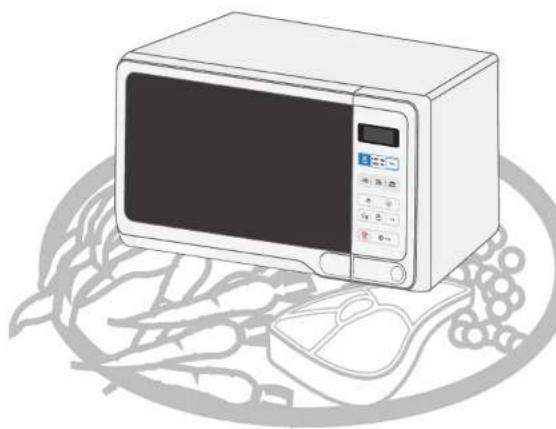
natural_image
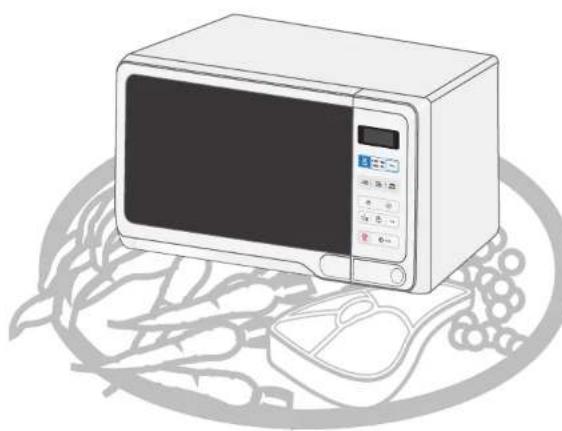
Illustration of a microwave oven with control panel and keyboard, placed on a circular plate with leafy greens (no text or symbols)Oven....2
Accessories 2
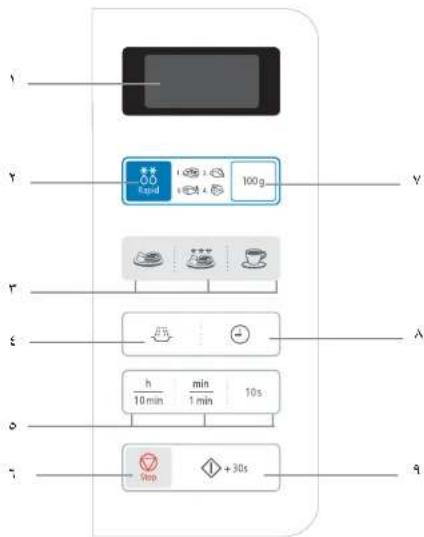
Control Panel 2
Using this Instruction Booklet....3
Safety Precautions ....3
Installing Your Microwave oven 4
Setting the Time ....5
What to Do if You are in Doubt or Have a Problem ....5
Cooking / Reheating....6
Power Levels....6
Stopping the Cooking....6
Adjusting the Cooking Time ....7
Using the Instant Reheat Feature 7
Instant Reheat Settings....7
Using the Auto Rapid Defrost Feature 8
Auto Rapid Defrost Settings....8
Multistage Cooking....9
Cookware Guide 10
Cleaning Your Microwave Oven 11
Technical Specifications....11
Code No.: DE68-03484M-01


MW73R_XSG-03484M-01_EN.In Page 2 Friday, May 14, 2010 3:32 PM
Oven


text_image
VENTILATION HOLES DOOR DISPLAY LIGHT CONTROL PANEL TURNTABLE ROLLER RING OPEN DOOR PUSH BUTTON DOOR LATCHES COUPLER SAFETY INTERLOCK HOLESAccessories
Depending on the model that you have purchased, you are supplied with several accessories that can be used in a variety of ways.
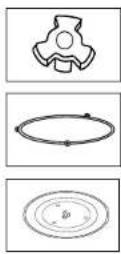
- Coupler, already placed over the motor shaft in the base of the oven. Purpose: The coupler rotates the turntable.
- Roller ring, to be placed in the centre of the oven. Purpose: The roller ring supports the turntable.
- Turntable, to be placed on the roller ring with the centre fitting to the coupler. Purpose: The turntable serves as the main cooking surface; it can be easily removed for cleaning.

DO NOT operate the microwave oven without the roller ring and turntable.
Control Panel
flowchart
graph TD
    A["1"] --> B["2"]
    B --> C["3"]
    C --> D["4"]
    D --> E["5"]
    E --> F["6"]
    B --> G["7"]
    G --> H["8"]
    H --> I["9"]

    subgraph State_1
        J["Black rectangle"] --> K["Blue square icon: 100g"]
    end

    subgraph State_2
        L["Light blue square icon: 100g"] --> M["Green bowl icon: 100g"]
        M --> N["Tea cup icon: 100g"]
        N --> O["Tea cup icon: 100g"]
        O --> P["Tea cup icon: 100g"]
        P --> Q["Tea cup icon: 100g"]
        Q --> R["Tea cup icon: 100g"]
        R --> S["Tea cup icon: 100g"]
        S --> T["Tea cup icon: 100g"]
        T --> U["Tea cup icon: 100g"]
        U --> V["Tea cup icon: 100g"]
        V --> W["Tea cup icon: 100g"]
        W --> X["Tea cup icon: 100g"]
        X --> Y["Tea cup icon: 100g"]
        Y --> Z["Tea cup icon: 100g"]
        Z --> AA["Tea cup icon: 100g"]
        AA --> AB["Tea cup icon: 100g"]
        AB --> AC["Tea cup icon: 100g"]
        AC --> AD["Tea cup icon: 100g"]
        AD --> AE["Tea cup icon: 100g"]
        AE --> AF["Tea cup icon: 100g"]
        AF --> AG["Tea cup icon: 100g"]
        AG --> AH["Tea cup icon: 100g"]
        AH --> AI["Tea cup icon: 100g"]
        AI --> AJ["Tea cup icon: 100g"]
        AJ --> AK["Tea cup icon: 100g"]
        AK --> AL["Tea cup icon: 100g"]
        AL --> AM["Tea cup icon: 100g"]
        AM --> AN["Tea cup icon: 100g"]
        AN --> AO["Tea cup icon: 100g"]
        AO --> AP["Tea cup icon: 100g"]
        AP --> AQ["Tea cup icon: 100g"]
        AQ --> AR["Tea cup icon: 100g"]
        AR --> AS["Tea cup icon: 100g"]
        AS --> AT["Tea cup icon: 100g"]
        AT --> AU["Tea cup icon: 100g"]
        AU --> AV["Tea cup icon: 100g"]
        AV --> AW["Tea cup icon: 100g"]
        AW --> AX["Tea cup icon: 100g"]
        AX --> AY["Tea cup icon: 100g"]
        AY --> AZ["Tea cup icon: 100g"]
        AZ --> BA["Tea cup icon: 100g"]
        BA --> BB["Tea cup icon: 100g"]
        BB --> BC["Tea cup icon: 100g"]
        BC --> BD["Tea cup icon: 100g"]
        BD --> BE["Tea cup icon: 100g"]
        BE --> BF["Tea cup icon: 100g"]
        BF --> BG["Tea cup icon: 100g"]
        BG --> BH["Tea cup icon: 100g"]
        BH --> BI["Tea cup icon: 100g"]
        BI --> BJ["Tea cup icon: 100g"]
        BJ --> BK["Tea cup icon: 100g"]
        BK --> BL["Tea cup icon: 100g"]
        BL --> BM["Tea cup icon: 100g"]
        BM --> BN["Tea cup icon: 100g"]
        BN --> BO["Tea cup icon: 100g"]
        BO --> BP["Tea cup icon: 100g"]
        BP --> BQ["Tea cup icon: 100g"]
        BQ --> BR["Tea cup icon: 100g"]
        BR --> BS["Tea cup icon: 100g"]
        BS --> BT["Tea cup icon: 100g"]
        BT --> BU["Tea cup icon: 100g"]
        BU --> BV["Tea cup icon: 100g"]
        BV --> BW["Tea cup icon: 100g"]
        BW --> BX["Tea cup icon: 100g"]
        BX --> BY["Tea cup icon: 100g"]
        BY --> BZ["Tea cup icon: 100g"]
        BZ --> CA["Tea cup icon: 100g"]
        CA --> CB["Tea cup icon: 100g"]
        CB --> CC["Tea cup icon: 100g"]
        CC --> CD["Tea cup icon: 100g"]
        CD --> CE["Tea cup icon: 100g"]
        CE --> CF["Tea cup icon: 100g"]
        CF --> CG["Tea cup icon: 100g"]
        CG --> CH["Tea cup icon: 100g"]
        CH --> CI["Tea cup icon: 100g"]
        CI --> CJ["Tea cup icon: 100g"]
        CJ --> CK["Tea cup icon: 100g"]
        CK --> CL["Tea cup icon: 100g"]
        CL --> CM["Tea cup icon: 100g"]
        CM --> CN["Tea cup icon: 100g"]
        CN --> CO["Tea cup icon: 100g"]
        CO --> CP["Tea cup icon: 100g"]
        CP --> CQ["Tea cup icon: 100g"]
        CQ --> CR["Tea cup icon: 100g"]
        CR --> CS["Tea cup icon: 100g"]
        CS --> CT["Tea cup icon: 100g"]
        CT --> CU["Tea cup icon: 100g"]
        CU --> CV["Tea cup icon: 100g"]
        CV --> CW["Tea cup icon: 100g"]
        CW --> CX["Tea cup icon: 100g"]
        CX --> CY["Tea cup icon: 100g"]
    end
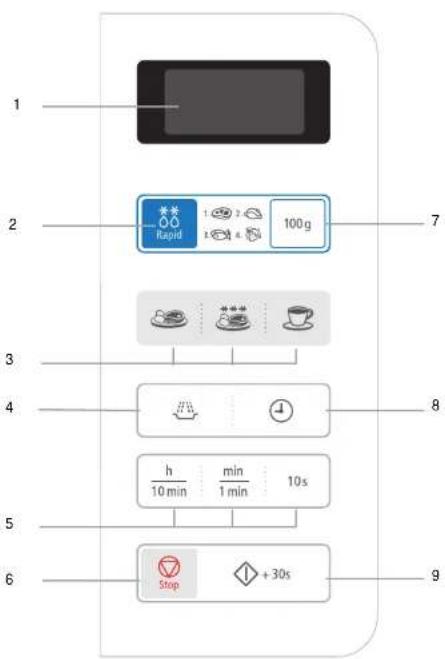
- DISPLAY
- AUTO RAPID DEFROST FEATURE SELECTION
- AUTO REHEAT/COOK SELECTION
-
MICROWAVE MODE SELECTION
-
TIME SETTING
- STOP/CANCEL BUTTON
- WEIGHT SELECTION
- CLOCK SETTING
- START BUTTON
2



Using this Instruction Booklet
You have just purchased a SAMSUNG microwave oven. Your Owner's Instructions contain much valuable information on cooking with your microwave oven:
• Safety precautions
• Suitable accessories and cookware
- Useful cooking tips
At the front of the booklet you will find illustrations of the oven, and more importantly the control panel, so that you can find the buttons more easily.
The step-by-step procedures use two different symbols.


Important Note
PRECAUTIONS TO AVOID POSSIBLE EXPOSURE TO EXCESSIVE MICROWAVE ENERGY
Failure to observe the following safety precautions may result in harmful exposure to microwave energy.
(a) Under no circumstances should any attempt be made to operate the oven with the door open or to tamper with the safety interlocks (door latches) or to insert anything into the safety interlock holes.
(b) Do not place any object between the oven door and front face or allow food or cleaner residues to accumulate on sealing surfaces. Ensure that the door and door sealing surfaces are kept clean by wiping after use first with a damp cloth and then with a soft dry cloth.
(c) Do not operate the oven if it is damaged until it has been repaired by a qualified microwave service technician trained by the manufacturer. It is particularly important that the oven door closes properly and that there is no damage to the:
(1) Door (bent)
(2) Door hinges (broken or loose)
(3) door seals and sealing surfaces
(d) The oven should not be adjusted or repaired by anyone other than a properly qualified microwave service technician trained by the manufacturer.
Safety Precautions
IMPORTANT SAFETY INSTRUCTIONS. READ CAREFULLY AND KEEP FOR FUTURE REFERENCE.
Before cooking food or liquids in your microwave oven, please check that the following safety precautions are taken.
- Only use utensils that are suitable for use in microwave ovens; DO NOT use any metallic containers, Dinnerware with gold or silver trimmings, Skewers, forks, etc.
Remove wire twist ties from paper or plastic bags.
Reason: Electric arcing or sparking may occur and may damage the oven. - When heating food in plastic or paper containers, keep an eye on the oven due to the possibility of ignition;
Do not use your microwave oven to dry papers or clothes.
- Small amounts of food require shorter cooking or heating time.
If normal times are allowed they may overheat and burr
- If smoke is observed, switch off or unplug the appliance and keep the door closed in order to stifle any flames;
- Microwave heating of beverages can result in delayed eruptive boiling, therefore care must be taken when handling the container; To prevent this situation
ALWAYS allow a standing time of at least 20 seconds after the oven has been switched off so that the temperature can equalize.
Stir during heating, if necessary, and ALWAYS stir after heating.
In the event of scalding, follow these FIRST AID instructions: * Improve the scalded area in cold water for at least 10 m
- Immense the scalded area in cold water for at least 10 minutes.
* Cover with a clean, dry dressing.
• DO not apply any creams, oils or lotions. - NEVER fill the container to the top and choose a container that is wider at the top than at the bottom to prevent the liquid from boiling over. Bottles with narrow necks may also explode if overhealed.
NEVER heat a babys bottle with the teat on, as the bottle may explode if overheated.
• The contents of feeding bottles and baby food jars shall be stirred or shaken and the temperature checked before consumption, in order to avoid burns:
- Eggs in their shell and whole hard-boiled eggs should not be heated in microwave ovens since they may explode, even after microwave heating has ended;
Also do not heat airtight or vacuum-sealed bottles, jars, containers, nuts in shells, tomatoes etc.
• The oven should be cleaned regularly and any food deposits removed;
- Failure to maintain the oven in a clean condition could lead to deterioration of the surface that could adversely affect the life of the appliance and possibly result in a hazardous situation;
- DO NOT cover the ventilation slots with cloths or paper. They may catch fire as hot air is evacuated from the oven. The oven may overheat and automatically switch itself off. It will remain inoperable until it has cooled sufficiently.
- ALWAYS use oven gloves when removing a dish from the oven to avoid unintentional burn.
MW73R_XSG-03484M-01_EN.In Page 4 Friday, May 14, 2010 3:32 PM
Safety Precautions (continued)
EN
• DO NOT touch heating elements or interior oven walls until the oven be cooled down.
- Do not immerse the power cable or plug in water and keep the power cable away from heated surfaces.
Do not operate this appliance if it has a damaged power cable or plug.
- Stand at arms length from the oven when opening the door.
Reason: The hot air or steam released may cause scalding.
- You may notice a Clicking sound during operation(especially when the oven is defrosting).
Reason: This sound is normal when the electrical power output is changing.
- DO NOT operate the microwave oven when it is empty. The power will be cut off automatically for safety. You can operate normally after letting it stand for over 30 minutes.
It is best to leave a glass of water inside the oven at all times. The water will absorb the microwaves energy if the oven accidentally started.
• The microwave oven shall not be placed in a cabinet.
IMPORTANT
- Young children should NEVER be allowed to use or play with the microwave oven. Nor should they be left unattended near the microwave oven when it is in use. Items of interest to children should not be stored or hidden just above the oven.
- This appliance is not intended for use by persons (including children) with reduced physical, sensory or mental capabilities, or lack of experience and knowledge, unless they have been given supervision or instruction concerning use of the appliance by a person responsible for their safety.
- Children should be supervised to ensure that they do not play with the appliance.
WARNING:
If the door or door seals are damaged, the oven must not be operated until it has been repaired by a competent person.
WARNING:
It is hazardous for anyone other than a compereent person to carry out any service or repair operation which involves the removal of a cover which gives protection against exposure to microwave energy.
WARNING:
Liquids and other foods must not be heated in sealed containers since they are liable to explode.
WARNING:
Only allow children to use the oven without supervision when adequate instructions have been given so that the child is able to use the oven in a safe way and understands the hazards of improper use.
Installing Your Microwave oven
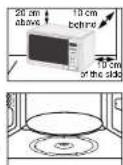
Place the oven on a flat level surface 85cm above the floor. The surface should be strong enough to safety bear the weight of the oven.
-
When you install your oven, make sure there is adequate ventilation for your oven by leaving at least 10 cm (4 inches) of space behind and, on the sides of the oven and 20 cm (8 inches) of space above.
-
Remove all packing materials inside the oven. Install the roller ring and turntable. Check that the turntable rotates freely.
-
This microwave oven has to be positioned so that plug is accessible.
If the supply cord is damaged, it must be replaced by a special cord or assembly available from the manufacturer or its service agent.
For your personal safety, plug the cable into a 3-pin, 230 Volt, 50Hz, AC earthed socket. If the power cable of this appliance is damaged, it must be replaced by a special cable.
Do not install the microwave oven in hot or damp surroundings like next to a traditional oven or radiator. The power supply specifications of the oven must be respected and any extension cable used must be of the same standard as the power cable supplied with the oven. Wipe the interior and the door seal with a damp cloth before using your microwave oven for the first time.

4




MW73R_XSG-03484M-01_EN.In Page 5 Friday, May 14, 2010 3:32 PM
Setting the Time
Your microwave oven has an inbuilt clock. When power is supplied, :0, 88:88 or 12:00 is automatically displayed on the display. Please set the current time. The time can be displayed in either the 24-hour or 12-hour notation. You must set the clock:
- When you first install your microwave oven
• After a power failure
Do not forget to reset the clock when you switch to and from summer and winter time.
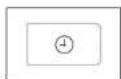
- To display the time Then press the in the... Clock() button... 24-hour notation Once 12-hour notation Twice

- Set the hour with the h button and the minutes with the min button.

- When the right time is displayed, press the Clock(①) button again to start the clock. Result: The time is displayed whenever you are not using the microwave oven
What to Do if You are in Doubt or Have a Problem
If you have any of the problems listed below try the solutions given.
◆ This is normal.
- Condensation inside the oven
• Air flow around the door and outer casing
• Light reflection around the door and outer casing
• Steam escaping from around the door or vents
◆ The oven does not start when you press the Start(◇) button.
• Is the door completely closed?
◆ The food is not cooked at all
- Have you set the timer correctly and/or pressed the Start(◇) button?
- Is the door closed?
- Have you overloaded the electric circuit and caused a fuse to blow or a breaker to be triggered?
◆ The food is either overcooked or undercooked
- Was the appropriate cooking length set for the type of food?
- Was an appropriate power level chosen?
◆ Sparking and cracking occur inside the oven (arcing)
• Have you used a dish with metal trimmings?
- Have you left a fork or other metal utensil inside the oven?
• Is aluminium foil too close to the inside walls?
◆ The oven causes interference with radios or televisions
- Slight interference may be observed on televisions or radios when the oven is operating. This is normal. To solve this problem, install the oven away from televisions, radios and aerials.
- If interference is detected by the oven's microprocessor, the display may be reset. To solve this problem, disconnect the power plug and reconnect it. Reset the time.
If the above guidelines do not enable you to solve the problem, contact your local dealer or SAMSUNG after-sales service.
EN

5




MW73R_XSG-03484M-01_EN.In Page 6 Friday, May 14, 2010 3:32 PM
Cooking / Reheating
EN
The following procedure explains how to cook or reheat food. ALWAYS check your cooking settings before leaving the oven unattended.
First, place the food in the centre of the turntable and close the door.
- Press the Result :
button. The 800W (maximum cooking power) indications are displayed: Select the appropriate power level by pressing the button again until the corresponding wattage is displayed. Refer to the power level table on the next page.
- Set the cooking time by pressing the 10 min, 1min and 10s button.
- Press the Start(◇) button. Result: The oven light comes on and the turntable starts rotating. Cooking starts and when it has finished the oven beeps four times.
Never switch the microwave oven on when it is empty.
If you wish to heat a dish for a short period of time at maximum power (800W), simply press the +30 s button once for each 30 seconds of cooking time. The oven starts immediately.
Power Levels
You can choose among the power levels below.
| Power Level | Output |
| HIGH | 800 W |
| MEDIUM HIGH | 600 W |
| MEDIUM | 450 W |
| MEDIUM LOW | 300 W |
| DEFROST(%) | 180 W |
| LOW | 100 W |
If you select higher power level, the cooking time must be decreased.
If you select lower power level, the cooking time must be increased.
Stopping the Cooking
You can stop cooking at any time to check the food.

- To stop temporarily;
Open the door.
Result: Cooking stops. To resume cooking, close the door and press Start(◇) again.

- To stop Completely;
Press the Stop(○) button.
Result: The cooking stops.
If you wish to cancel the cooking settings, press the Stop button.
You can cancel any setting before starting cooking by simply pressing Stop(💡) button.
6


MW73R_XSG-03484M-01_EN,in Page 7 Friday, May 14, 2010 3:32 PM
Adjusting the Cooking Time
You can increase the cooking time by pressing the +30 s button once for each 30 seconds to be added.

Press the +30 s button once for each 30 seconds to be added.
Using the Instant Reheat Feature
With the Instant Reheat feature, the cooking time is set automatically and you do not have to press the Start button. You can adjust the number of servings by pressing the appropriate Instant Reheat button the required number of times.
First, place the food in the centre of the turntable and close the door.
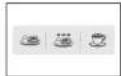
Press the Instant Reheat button which you want the required number of times.
Result: Cooking starts after about two seconds.
When it has finished
1) The oven beeps four times.
2) The end reminder signal will be 3 times
(once every minute).
3) The current time is displayed again.
Example: Press the Drinks button one times to reheat one cups of coffee. Refer to the table on the next page.
Use only recipients that are microwave-safe.
Instant Reheat Settings
The following table presents the various Instant Reheat Programmes, quantities, standing times and appropriate recommendations.
| Button Food Serving Size Standing | Recommendations | |
| Time | ||
| Ready Meals | 300-350 g400-450 g | 3 min. Put on a ceramic plate andcover it with microwave clingfilm. This programme is suitablefor meals consisting of 3components (e.g. meat withsauce, vegetables and side dishlike potatoes, rice or pasta). |
| Frozen ReadyMeals | 300 - 350 g400 - 450 g | 4 min. Take frozen ready meal andcheck if dish is suitable formicrowave. Pierce film of readymeal. Put the frozen ready mealin the centre. This programme issuitable for frozen ready mealsconsisting of 3 components(e.g. meat with sauce,vegetables and a side dish likepotatoes, rice or pasta). |
| Drinks(coffee, milk,tea, water withroomtemperature) | 150 ml(1 cup)250 ml(1 mug) | 1- 2 min. Pour into a ceramic cup andreheat uncovered.Place cup(150 ml) or mug(250ml) in the centre of turntable.Stir carefully before and afterstanding time. |
EN


MW73R_XSG-03484M-01_EN.In Page 8 Friday, May 14, 2010 3:32 PM
Using the Auto Rapid Defrost Feature
EN
The Auto Rapid Defrost feature enables you to defrost meat, poultry, fish or fruit/Berry.
The defrost time and power level are set automatically. You simply select the programme and the weight.
Use only dishes that are microwave-safe.
First, place the frozen food in the centre of the turntable and close the door.
- Press the
Rapid(3)button.
Result :
The following indication is displayed:

Press the Rapid(1)button one or more times according to the type of food to be defrosted. Refer to the table on the next page for further details.
- Select the food weight by pressing the 100g button. It is possible to set up to a maximum of 2000g.
- Press Start(♦) button.
Result:
◆ Defrosting begins.
◆ The oven beeps halfway through
defrosting to remind you to turn the food
over
◆ Press Start again to finish defrosting.
You can also defrost food manually. To do so, select the microwave cooking/reheating function with a power level of 180W. Refer to the section entitled "Cooking/Reheating" on page 6 for further details.
Auto Rapid Defrost Settings
The following table presents the various Auto Rapid Defrost programmes, quantities, standing times and appropriate recommendations.
Remove all kinds of package material before defrosting. Place meat, poultry, fish and fruit/Berry on a ceramic plate.
| Code / Food Portion Standing Time | Recommendations | |
| 1. Meat | 100 - 2000 g 20-90 min.Shield the edges with aluminium foil.Turn the meat over, when the oven beeps.This programme is suitable for beef,lamb, pork, steaks, chops, minced meat. | |
| 2. Poultry | 100 - 2000 g 20-90 min.Shield the leg and wing tips with aluminium foil. Tum the poultry over,when the oven beeps. This programme is suitable for whole chicken as well as for chicken portions. | |
| 3. Fish | 100 - 2000 g 20-80 min.Shield the tail of a whole fish with aluminium foil. Tum the fish over, when the oven beeps. This programme is suitable for whole fishes as well as for fish fillets. | |
| 4. Fruit/Berry | 100 - 600 g 5-20 min.Spread fruits evenly into a flat glass dish.This programme is suitable for all kind of fruits. | |


8




MW73R_XSG-03484M-01_EN.In Page 9 Friday, May 14, 2010 3:32 PM


Multistage Cooking
Your microwave oven can be programmed to cook food in up to three stages.
Example: You wish to defrost food and cook it without having to reset the oven after each stage. You can thus defrost and cook a 500g fish in three stages:
• Defrosting
• Cook 1
• Cook I
You can set between two and three stages in multistage cooking.
If you set three stage, the first stage must be defrosting.
Don't press Start button until you've set the final stage.



- Press the Rapid (button once or more times.
- Set the weight by pressing the 100g buttons the appropriate number of times(500g in the example).
- Press the button. The microwave mode(I): ; if necessary, set the power level by pressing the button again one or more times. (600W in the example)
- Set the cooking time by pressing the 10 min, 1min and 10s buttons the appropriate number of times (4 minutes in the example).
- Press the button. The microwave mode(II): ; if necessary, set the power level by pressing the button again one or more times. (450W in the example)
- Set the cooking time by pressing the 10 min, 1min and 10s buttons the appropriate number of times (5 minutes in the example).
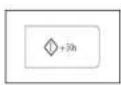
- Press the Result:
Start(①) button.
The three modes [defrosting and cooking(I,II)] are selected on after. According to the defrosting mode that you have chosen, the oven may beep half way through defrosting to remind you to turn the food over.
When cooking is over, the oven beeps four times.
EN


Cookware Guide
EN
To cook food in the microwave oven, the microwaves must be able to penetrate the food, without being reflected or absorbed by the dish used.
Care must therefore be taken when choosing the cookware. If the cookware is marked microwave-safe, you do not need to worry.
The following table lists various types of cookware and indicates whether and how they should be used in a microwave oven.
| Cookware Microwave- | Safe | Comments |
| Aluminium foil | X | Can be used in small quantities to protect areas against overcooking. Arcing can occur if the foil is too close to the oven wall or if too much foil is used. |
| Browning plate | Do not preheat for more than eight minutes. | |
| China and earthenware | Porcelain, pottery, glazed earthenware and bone china are usually suitable, unless decorated with a metal trim. | |
| Disposable polyester cardboard dishes | Some frozen foods are packaged in these dishes. | |
| Fast-food packaging | ||
| • Polystyrene cups containers | Can be used to warm food. Overheating may cause the polystyrene to melt. | |
| • Paper bags or newspaper | X | May catch fire. |
| • Recycled paper or metal trims Glassware | X | May cause arcing. |
| Glassware | ||
| • Oven-to-table ware | Can be used, unless decorated with a metal trim. | |
| • Fine glassware | Can be used to warm foods or liquids. Delicate glass may break or crack if heated suddenly. | |
| • Glass jars | Must remove the lid. Suitable for warming only. | |
| Metal | ||
| • Dishes | X | May cause arcing or fire. |
| • Freezer bag twist ties | X | |
| Paper | ||
| • Plates, cups, napkins and Kitchen paper | √ | For short cooking times and warming.Also to absorb excess moisture.May cause arcing. |
| • Recycled paper | ✗ | |
| Plastic | ||
| • Containers | √ | Particularly if heat-resistant thermoplastic. Some other plastics may warp or discolour at high temperatures.Do not use Melamine plastic. |
| • Cling film | √ | Can be used to retain moisture. Should not touch the food. Take care when removing the film as hot steam will escape. |
| • Freezer bags | √ ✗ | Only if boilable or oven-proof. Should not be airtight. Prick with a fork, if necessary. |
| Wax or grease-proof paper | √ | Can be used to retain moisture and prevent spattering. |
√:Recommended
√X:Use Caution
X : Unsafe

MW73R_XSG-03484M-01_EN.In Page 11 Friday, May 14, 2010 3:32 PM
Cleaning Your Microwave Oven
The following parts of your microwave oven should be cleaned regularly to prevent grease and food particles from building up:
• Inside and outside surfaces
• Door and door seals
• Turntable and Roller rings
ALWAYS ensure that the door seals are clean and the door closes properly.
Failure to maintain the oven in a clean condition could lead to deterioration of the surface that could adversely affect the of the appliance and possibly result in a hazardous situation.
- Clean the outside surfaces with a soft cloth and warm, soapy water. Rinse and dry.
- Remove any splashes or stains on the inside surfaces or on the roller ring with a soapy cloth. Rinse and dry.
- To loosen hardened food particles and remove smells, place a cup of diluted lemon juice on the turntable and heat for ten minutes at maximum power.
- Wash the dishwasher-safe plate whenever necessary.
DO NOT spill water in the vents. NEVER use any abrasive products or chemical solvents. Take particular care when cleaning the door seals to ensure that no particles:
- Accumulate
• Prevent the door from closing correctly
Technical Specifications
SAMSUNG strives to improve its products at all times. Both the design specifications and these user instructions are thus subject to change without notice.
EN
| Model MW73E | |
| Power source | 230V ~ 50 Hz |
| Power consumptionMicrowave | 1150 W |
| Output power | 100 W / 800 W (IEC-705) |
| Operating frequency | 2450 MHz |
| Magnetron | OM75S(31) |
| Cooling method | Cooling fan motor |
| Dimensions (W x H x D)OutsideOven cavity | 489 x 275 x 365 mm306 x 211 x 320 mm |
| Volume | 20 liter |
| WeightNet | 12.5 kg approx |

11


WR73R_XSG-03484M-01_EN.In Page 12 Friday, May 14, 2010 3:32 PM
ELECTRONICS

QUESTIONS OR COMMENTS
| COUNTRY | CALL | OR VISIT US ONLINE AT |
| TURKEY | 444-77-11 | www.samsung.com |
| SOUTLAFRICA | 0860-SAMSUNG (726-7854) | |
| U.A.E | 900-SAMSUNG (726-7854) | |
| BAHRAIN | 8000-1725 | - |
| JORDAN | 800-22273 | - |

natural_image
Pure geometric lines and symbols without any text, numbers, or labels
natural_image
Pure technical drawing lines without any text, numbers, or symbolsMW73E.qxp 01/04/2008 01:00 p Page 1
SAMSUNG
فرن الميكرووف
إرشادات الملك
MW73E
natural_image
Illustration of a microwave oven with control panel and keyboard, placed on a circular surface with leafy greens (no text or symbols)MW73E.qxp 01/04/2008 01:00 p Fago 2
لوحةن التّكيم
القرن
text_image
1 2 3 4 5 6 7 8 9 10 11 12 13 14 15 16 17 18 19 20 21 22 23 24 25 26 27 28 29 30 31 32 33 34 35 36 37 38 39 40 41 42 43 44 45 46 47 48 49 50 51 52 53 54 55 56 57 58 59 60 61 62 63 64 65 66 67 68 69 70 71 72 73 74 75 76 77 78 79 80 81 82 83 84 85 86 87 88 89 90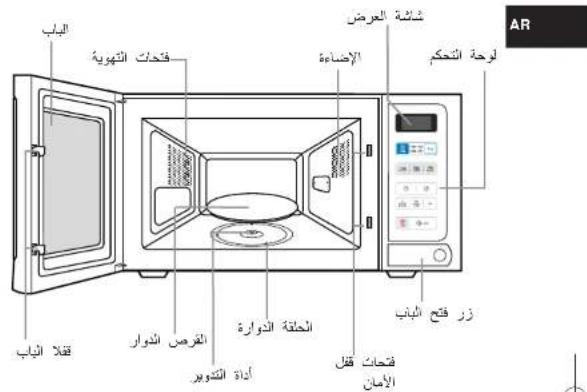
| (Instant Reheat) "الإستعمال (Instant Reheat) " | |
| 3 | (Instant Reheat) "الإستعمال (Instant Reheat) " |
| 2 | (Instant Reheat) "الإستعمال (Instant Reheat) " |
| 1 | (Instant Reheat) "الإستعمال (Instant Reheat) " |
MW73R_XSG-03484M-01_FR.lm Page 1 Friday, May 14, 2010 3:34 PM

FOUR À MICRO-ONDES
Mode d'emploi
MW73E
natural_image
Illustration of a microwave oven with control panel and keyboard, placed on a circular surface with food items (no text or symbols)Four 2
Accessoires....2
MW73R_XSG-03484M-01_FR,in Page 2 Friday, May 14, 2010 3:34 PM
Four
FR

text_image
ORIFICES DE VENTILATION PORTE AFFICHAGE ÉCLAIRAGE TABLEAUDE COMMANDE PLATEAU TOURNANT ANNEAU DE GUIDAGE BOUTON-POUSSOIR D'OUVERTURE DE LA PORTE LOQUETS DE LA PORTE COUPLEUR ORIFICES DU SYSTÈME DE VERROUILLAGE DE SECURITÉAccessoires
MW73R_XSG-03484M-01_FR.in Page 4 Friday, May 14, 2010 3:34 PM
MW73R_XSG-03484M-01_FR,in Page 5 Friday, May 14, 2010 3:34 PM
MW73R_XSG-03484M-01_FR,in Page 7 Friday, May 14, 2010 3:34 PM
MW73R_XSG-03484M-01_FR.fm Page 12 Friday, May 14, 2010 3:34 PM

ELECTRONICS

DES QUESTIONS OU DES COMMENTAIRES?
| PAYS | TÉLÉPHONE | OU SUR INTERNET |
| TURKEY | 444-77-11 | www.samsung.com |
| SOUTH AFRICA | 0860 SAMSUNG (725 7854) | |
| U.A.E | 500 SAMSUNG (725 7854) | |
| BAHRAN | 8000-4725 | - |
| JORDAN | 800-22273 | - |


