QNAP

TS-EC1679U-RP-E10G 32TB - Server QNAP - Free user manual and instructions

Find the device manual for free TS-EC1679U-RP-E10G 32TB QNAP in PDF.

📄 739 pages English EN Download 💬 AI Question
Notice QNAP TS-EC1679U-RP-E10G 32TB - page 730
View the manual : Deutsch DE English EN
Pick your language and provide your email: we'll send you a specifically translated version.

User questions about TS-EC1679U-RP-E10G 32TB QNAP

0 question about this device. Answer the ones you know or ask your own.

Ask a new question about this device

The email remains private: it is only used to notify you if someone responds to your question.

No questions yet. Be the first to ask one.

Download the instructions for your Server in PDF format for free! Find your manual TS-EC1679U-RP-E10G 32TB - QNAP and take your electronic device back in hand. On this page are published all the documents necessary for the use of your device. TS-EC1679U-RP-E10G 32TB by QNAP.

USER MANUAL TS-EC1679U-RP-E10G 32TB QNAP

© 2012 QNAP Systems, Inc. All Rights Reserved.

Inhaltsverzeichnis

1. Hinweise....5

7.4 Music Station.... 436

7.5 Download Station.... 456

7.6 Überwachungsanlage (Surveillance Station)...... 477

7.7 iTunes Server 485

7.8 UPnP-Medienserver 488

text_image TSCD_V3.2.8 (E:) File Edit View Favorites Tools Help Back Search Folders Address Go Picture Tasks File and Folder Tasks Other Places Details TSCD_V3.2.8 (E:) CD Drive File System: CDFS Free Space: 0 bytes Total Size: 506 MB Name Size Type AutoRun File Folder Finder File Folder Firmware File Folder Mac File Folder Manual File Folder QGet File Folder QSG File Folder Replicator File Folder AUTORUN.ICO IrfanView ICO AUTORUN.INF Setup Informat 1 KB 1 KB 10 objects 821 bytes My Computer
text_image Run Type the name of a program, folder, document, or Internet resource, and Windows will open it for you. Open: \\NAS8B57E7\ OK Cancel Browse...

QNAP TS-EC1679U-RP-E10G 32TB - Hinweise....5 - 1

text_image Run Type the name of a program, folder, document, or Internet resource, and Windows will open it for you. Open: \\169.254.100.100 OK Cancel Browse...
text_image System Work Server Workman Workset Email on user Direct multiplexes Direct as User Group Create a Direct File FTP Service Remote Exploration ASP.NET Applications ADMINISTRATION
text_image Network TCP/IP WI-FI DDNS IPV6 IP Address Interface VLAN (Virtual LAN) DHCP IP Address Subnet Mask Gateway MAC Address Speed MTU Link Edit Ethernet 1+2 None Yes 10.8.12.93 255.255.254.0 10.8.12.1 00:08:9B:C3:C8:06 100Mbps 1500 Default Gateway Use the settings from: Ethernet 1+2 Port Trunking Select the port trunking membership and mode by clicking "Settings" button. Please note that incompatible mode settings might cause the network interface to hang or affect the overall performance. For more information, please click here SETTINGS DNS Server Obtain DNS server address automatically: DNS information Use the following DNS server address: Primary DNS Server: 0 . 0 . 0 . 0

QNAP TS-EC1679U-RP-E10G 32TB - Hinweise....5 - 2

text_image TCP/IP - Property Network Parameters Advanced Options DHCP server Network Speed Auto-negotiation Obtain IP address settings automatically via DHCP Use static IP address Fixed IP Address: 169 254 100 100 Subnet Mask: 255 255 0 0 Default Gateway: 169 254 100 100 Select Jumbo Frame setting: 1500 APPLY CANCEL

Sta tisc he IP- A d re sse v e r w e n d e n

Select the port trunking membership and mode by clicking "Settings" button. Please note that incompatible mode settings might cause the network interface to hang or affect the overall performance. For more information, please click here

SETTINGS

text_image TCP/IP - Port Trunking Interface Standalone Trunking Group 1 Trunking Group 2 Trunking Group 3 Trunking Group 4 Active Backup Active Backup Active Backup Active Backup Ethernet 1 \\u Ethernet 2 C Ethernet 3 ○ ○ ○ ○ C Ethernet 4 ○ ○ ○ C Ethernet 5 (10 Gbps) ○ ○ C Ethernet 6 (10 Gbps) ○ ○ C Ethernet 7 (10 Gbps) ○ ○ C Ethernet 8 (10 Gbps) ○ ○ C Use the settings from: Ethernet 1 Ethernet 1 Ethernet 2 Ethernet 3 Ethernet 4 Ethernet 5 Ethernet 6 Ethernet 7 Ethernet 8 APPLY CANCEL

Sta tisc he IP- A dre s se

text_image Hardware Hardware Enable configuration reset switch Enable hard disk standby mode (if no access within 30 minutes Status LED will be off) Enable light signal alert when the free size of disk is less than the value: 3072 MB Enable alarm buzzer (beep sound for error and warning alert) Enable Redundant Power Supply Mode

Sicherheitsstufe

After enabling Network Recycle Bin, all the deleted files on the network folders of the NAS are moved to the "Network Recycle Bin" network folder.

Enable Network Recycle Bin

File retention time: 180 day(s)
Exclude these file extensions: (case insensitive, separated by comma *,)

tmp, temp, wtmp, blk, dat

Empty Network Recycle Bin

Click [EMPTY NETWORK RECYCLE BIN] to delete all the files in network recycle bin.

EMPTY NETWORK RECYCLE BIN

APPLY

Sy ste m e in s te llunge n s ic he rn

text_image RAID Management This function enables capacity expansion, RAID configuration migration or spare drive configuration with the original drive data reserved. Note: Make sure you have read the instructions carefully and you fully understand the correct operation procedure before using this function. Current Disk Volume Configuration Volume Total Size Bitmap Status Description RAID 5 Disk Volume: Drive 12345 931.56 GB Yes Ready The operation(s) you can execute: - Expand capacity - Add hard drive - Migrate - Configure spare drive EXPAND CAPACITY ADD HARD DRIVE MIGRATE CONFIGURE SPARE DRIVE DISABLE BITMAP RECOVER For detailed instructions, please click here.
text_image RAID Management - Expand capacity Select the drive to add Expand capacity Disk Model Capacity Status Description Drive 1 WDC WD2500AAKS-00VYA12.0 232.89 GB Ready Cancel Please remove the drive Drive 2 WDC WD2500AAKS-00VYA12.0 232.89 GB Ready No operation can be executed on this drive or the drive is busy Drive 3 WDC WD2500AAKS-00VYA12.0 232.89 GB Ready No operation can be executed on this drive or the drive is busy Drive 4 WDC WD2500AAKS-00VYA12.0 232.89 GB Ready No operation can be executed on this drive or the drive is busy Drive 5 WDC WD2500AAKS-00VYA12.0 232.89 GB Ready No operation can be executed on this drive or the drive is busy Target Disk Volume: RAID 5 Disk Volume: Drive 1 2 3 4 5 EXPAND CAPACITY BACK
text_image RAID Management - Expand capacity Select the drive to add Expand capacity Disk Model Capacity Status Description Drive 1 -- -- No Disk Please insert the new drive Drive 2 WDC WD2500AAKS-00VYA12.0 232.89 GB Ready No operation can be executed on this drive or the drive is busy Drive 3 WDC WD2500AAKS-00VYA12.0 232.89 GB Ready No operation can be executed on this drive or the drive is busy Drive 4 WDC WD2500AAKS-00VYA12.0 232.89 GB Ready No operation can be executed on this drive or the drive is busy Drive 5 WDC WD2500AAKS-00VYA12.0 232.89 GB Ready No operation can be executed on this drive or the drive is busy Target Disk Volume: RAID 5 Disk Volume: Drive 2 3 4 5 EXPAND CAPACITY BACK
StatusDescription
Rebuilding... (0%)No operation can be executed on this drive or the drive is busy
text_image RAID Management This function enables capacity expansion, RAID configuration migration or spare drive configuration with the original drive data reserved. Note: Make sure you have read the instructions carefully and you fully understand the correct operation procedure before using this function. Current Disk Volume Configuration Volume Total Size Bitmap Status Description RAID 5 Disk Volume: Drive 12345 913.96 GB Yes Ready The operation(s) you can execute: - Expand capacity EXPAND CAPACITY ADD HARD DRIVE MIGRATE CONFIGURE SPARE DRIVE BITMAP RECOVER For detailed instructions, please click here.
text_image RAID Management This function enables capacity expansion, RAID configuration migration or spare drive configuration with the original drive data reserved. Note: Make sure you have read the instructions carefully and you fully understand the correct operation procedure before using this function. Current Disk Volume Configuration Volume Total Size Bitmap Status Description RAID 5 Disk Volume: Drive 1 2 3 4 5 3726.04 GB Yes Ready The operation(s) you can execute: - Expand capacity EXPAND CAPACITY ADD HARD DRIVE MIGRATE CONFIGURE SPARE DRIVE BITMAP RECOVER For detailed instructions, please click here.
text_image ONAP TURBO NAS Home >> Disk Management >> RAID Management Welcome admin | Logout English RAID Management This function enables capacity expansion, RAID configuration migration or spare drive configuration with the original drive data reserved. Note: Make sure you have read the instructions carefully and you fully understand the correct operation procedure before using this function. Current Disk Volume Configuration Volume Total Size Bitmap Status Description Single Disk: Drive 1 915.42 GB - Ready The operation(s) you can execute: - Migrate Single Disk: Drive 2 - - Unmounted No operation can be executed for this drive configuration. Single Disk: Drive 3 - - Unmounted No operation can be executed for this drive configuration. Single Disk: Drive 4 - - Unmounted No operation can be executed for this drive configuration. Single Disk: Drive 5 - - Unmounted No operation can be executed for this drive configuration. EXPAND CAPACITY ADD HARD DRIVE MIGRATE CONFIGURE SPARE DRIVE BITMAP RECOVER For detailed instructions, please click here. © QNAP, All Rights Reserved Sky Blue
text_image RAID Management - Migrate Select the drive to add Migrate Available drive(s) Disk Model Capacity Status ✓ Drive 2 WD1000FYPS-01ZKB02.0 931.51 GB Ready ✓ Drive 3 WD1000FYPS-01ZKB02.0 931.51 GB Ready ✓ Drive 4 WD1000FYPS-01ZKB02.0 931.51 GB Ready ✓ Drive 5 WD1000FYPS-01ZKB02.0 931.51 GB Ready Select the migration method: ○ Single Disk Volume -> RAID 1 Mirroring Disk Volume ● Single Disk Volume -> RAID 5 Disk Volume ○ Single Disk Volume -> RAID 6 Disk Volume Target Disk Volume: Single Disk: Drive 4 The drive configuration is about to be configured as RAID 5 Disk Volume, The capacity is approximately 3726 GB MIGRATE BACK
text_image RAID Management This function enables capacity expansion, RAID configuration migration or spare drive configuration with the original drive data reserved. Note: Make sure you have read the instructions carefully and you fully understand the correct operation procedure before using this function. Current Disk Volume Configuration Volume Total Size Bitmap Status Description Single Disk: Drive 1 915.42 GB -- Migrating... (2%) No operation can be executed for this drive configuration EXPAND CAPACITY ADD HARD DRIVE MIGRATE CONFIGURE SPARE DRIVE BITMAP RECOVER For detailed instructions, please click here.

4.3 Festplatten-SMART

text_image Step 6 Step 6/6: Select the disk configuration Note: All drive data will be cleared unless you select not to initialize the hard drives. Please select the disk configuration for the initialization. Disk configuration: Single Disk File System: EXT4 Total available storage capacity: 464.26 GB You may select to use the hard drives as single disk volumes. However, when a drive failure occurs, all data will be lost. Encrypt disk volume: Yes Input Encryption Password: Verify Encryption Password: Use Default Value Save Encryption Key

Single Disk Volume Create single disk volume(s).

QNAP TS-EC1679U-RP-E10G 32TB - Festplatten-SMART - 1

RAID 1 Mirroring Disk Volume Create mirroring disk volume(s).

QNAP TS-EC1679U-RP-E10G 32TB - Festplatten-SMART - 2

RAID 0 Striping Disk Volume Create one striping disk volume.

QNAP TS-EC1679U-RP-E10G 32TB - Festplatten-SMART - 3

Linear Disk Volume Create one linear disk volume.

QNAP TS-EC1679U-RP-E10G 32TB - Festplatten-SMART - 4

RAID 5 Disk Volume Combine 3 or more disks to create a disk volume with data protection (1 disk crash is allowed).

QNAP TS-EC1679U-RP-E10G 32TB - Festplatten-SMART - 5

RAID 6 Disk Volume Combine 4 or more disks to create a disk volume with data protection (2 disk crash is allowed).

text_image All the data and network shares on the disk(s) you selected will be cleared. The connections to the disk (s) will be disconnected. Are you sure to continue? OK CANCEL
text_image Current Disk Volume Configuration: Logical Volumes Volume File System Total Size Free Size Status Single Disk: Drive 2 EXT4 456.98 GB 456.78 GB Ready C S B C C NOW CHECK NOW CHECK NOW CHECK NOW CHECK NOW CHECK NOW CHECK NOW CHECK NOW CHECK NOW CHECK NOW CHECK NOW CHECK NOW CHECK NOW CHECK NOW CHECK NOW CHECK NOW CHECK NOW CHECK NOW CHECK NOW CHECK NOW CHECK NOW CHECK NOW CHECK NOW CHECK NOW CHECK NOW CHECK NOW CHECKNOW CHECKNOW CHECKNOW CHECKNOW CHECKNOW CHECKNOW CHECKNOW CHECKNOW CHECKNOW CHECKNOW CHECKNOW CHECKNOW CHECKNOW CHECKNOW CHECKNOW CHECKNOW CHECKNOW CHECKNOW CHECKNOW CHECKNOW CHECKNOW CHECKNOW CHECKNOW CHECKNOW CHECKNOW CHECKNOW CHECKNOW CHECKNOW CHECKNOW CHECKNOW CHECKNOW CHECKNOW CHECKNOW CHECKNOW CHECKNOW CHECKNOW CHECKNOW CHECKNOW CHECKNOW CHECKNOW CHECKNOW CHECKNOW CHECKNOW CHECKNOW CHECKNOW CHECKNOW CHECKNOW CHECKNOW CHECKNOW CHECKNOW CHECKNOW CHECKNOW CHECKNOW CHECKNOW CHECKNOW CHECKNOW CHECKNOW CHECKNOW CHECKNOW CHECKNOW CHECKNOW CHECKNOW CHECKNOW CHECKNOW CHECKNOW CHECKNOW CHECKNOW CHECKNOW CHECKNOW CHECKNOW CHECKN S B C S B C S B C S B C S B C S B C S B C S B C S B C S B C S B C S B C S B C S B C S B C S B C S B C S B C S B C S B C S B C S B C S B C S B C S B C S B C S B C S B C S B C S B C S B C S B C S B C S B C\S T R T T T T T T T T T T T T T T T T T T T T T T T T T T T T T T T T T T T T T T T T T T T T T T T T T T T T T T T T T T T T T T T T T T T T T T T T T T T T T T T T T T T T T T T T T T T T T T T T T T T T>T S BxC BxC BxC BxC BxC BxC BxC BxC BxC BxC BxC BxC BxC BxC BxC BxC BxC BxC BxC BxC BxC BxC BxC BxC BxC BxC BxC BxC BxC BxC BxC BxC BxC BxC BxC BxC BxC BxC BxC BxC BxC BxC BxC BxC BxC BxC BxC BxC BxC BxC BxE N W N N N N N N N N N N N N N N N N N N N N N N N N N N N N N N N N N N N N N N N N N N N N N N N N N N N N N N N N N N N N N N N N N N N N N N N N N N N N N N N N N N N N N N N N N N N N N N N N N N N N,N S BxC BxC BxC BxC BxC BxC BxC BxC BxC BxC BxC BxC BxC BxC BxC BxC BxC BxC BxC BxC BxC BxC BxC BxC BxC BxC BxC BxC BxC BxC BxC BxC BxC BxC BxC BxC BxC BxC BxC BxC BxC BxC BxC BxC BxC BxC BxC BxC BxE S BxC BxC BxC BxC BxC BxC BxC BxC BxC BxC BxC BxC BxC BxC BxC BxC BxC BxC BxC BxC BxC BxC BxC BxC BxC BxC BxC BxC BxC BxC BxC BxC BxC BxC BEX N W N N N N N N N N N N N N N N N N N N N N N N N N N N N N N N N N N N N N N N N N N N N N N N N N N N N N N N N N N N N N N N N N N N N N N N N N N N N N N N N N N N N N N N N N N N N N N N N:N S A L H L H L H L H L H L H L H L H L H L H L H L H L H L H L H L H L H L H L H L H L H L H L H L H L H L H L H L H L H L H L H L H L H L H L H L H L H L H L H L H L H L H L H L H L H L H L H L H L H L H L'H S A L H L H L H L H L H L H L H L H L H L H L H L H L H L H L H L H L H L H L H L H L H L H L H L H L H L H L H L H L H L H L H L H L H L H L H L H L H L H L H L H L H L H L H L H L H L H L H L'H S:A>L>H>L>H>L>H>L>H>L>H>L>H>L>H>L>H>L>H>L>H>L>H>L>H>L>H>L>H>L>H>L>H>L>H>L>H>L>H>L>H>L>H>L>H>L>H>L>H>L>H>L>H>L>H>L>H>L>H>L>H>L>H>L>H>L>H>L>H>L>H>L>H>L>H>L>H>L>H>L>H>L>H>L>H>L>H>L>H>L>H>L>H>L>H>L>H>L>H>L>H>L:H S:A>L>H>L>H>L>H>L>H>L>H>L>H>L>H>L>H>L>H>L>H>L>H>L>H>L>H>L>H>L>H>L>H>L>H>L>H>L>H>L>H>L>H>L>H>L>H>L>H>L>H>L>H>L:H S:A>L>H>L>H>L>H>L>H>L>H>L>H>L>H>L>H>L>H>L>H>L>H>L>H>L>H>L>H>L>H>L>H>L>H>L>H>L>H>L>H>L:H S:A>L>H>L>H>L>H>L>H>L>H>L>H>L>H>L>H>L>H>L>H>L>H>L>H>L>H>L:H S:A>L>H>L>H>L>H>L>H>L>H>L>H>L>H>L:H D E S:A>L>H>L:H>D D E S:A)LH:H>D D E S:A)LH:H>D D E S:A)LH:H>D D E S:A)LH:H>D D E S:A)LH:H>D D E S:A)LH:H>D D E S:A)LH:H>D D E S:A)LH:H>D D E S:A)LH:H>D D E S:A)LH:H>D D E S:A)LLH:H>D D E S:A)LH:H>D D E S:A)LH:H>D D E S:A)LH:H>D D E S:A)LH:H>D D E S:A)LH:H>D D E S:A)LH:H>D D E S:A)LH:H>D D E S:A)LH:H>D D E S:A)LH:H>D D E S:A)LH:H>D D E S:A)LH:H>D D E S:A)LH:H>D D E S:A)LH:H>D D E S:A)LH:H>D D E S:A)LH:H>D D E S:A)LH:H>D D E S:A)LH:H>D D E S:A)LH:H>D D E S:A)LH:H>D D E S:S A)LH:H>D D E S:A)LH:H>D D E S:A)LH:H>D D E S:A)LH:H>D D E S:A)LH:H>D D E S:A)LH:H>D D E S:A)LH:H>D D E S:A)LH:H>D D E S:A)LH:H>D D E S:A)LH:H>D D E S:S 10000000000000000000000000000000000000000000000000000000000000000000000000000000000000000000000000000

Ve rha lte n v e rschlüss e lte r Disk v o lum e n na ch de m Ne us ta rt de s S y ste m s

text_image Current Disk Volume Configuration: Logical Volumes Volume File System Total Size Free Size Status Single Disk: Drive 2 EXT4 456.98 GB 456.78 GB Ready S S S S S S S S S S S S S S S S S S S S S S S S S S S S S S S S S S S S S S S S S S S S S S S S S S S S S S S S S S S S S S S S S S S S S S S S S S S S S S S S S S S S S S S S S S S S S S S S S S S S S

Encryption Key Management

QNAP TS-EC1679U-RP-E10G 32TB - Encryption Key Management - 1

QNAP TS-EC1679U-RP-E10G 32TB - Encryption Key Management - 2

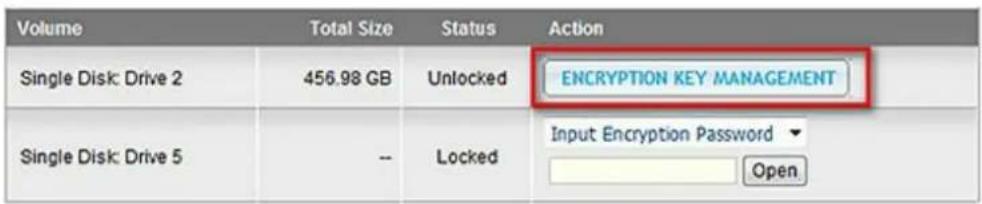
text_image Volume Total Size Status Action Single Disk: Drive 2 456.98 GB Unlocked ENCRYPTION KEY MANAGEMENT Single Disk: Drive 5 -- Locked Input Encryption Password Open
text_image ONAP TURBO NAS Encryption Key Management Volume: [Single Disk Volume: Drive 2] Change Encryption Key Save Encryption Key Download Encryption Key File APPLY CANCEL

Encryption Key Management

QNAP TS-EC1679U-RP-E10G 32TB - Encryption Key Management - 1

QNAP TS-EC1679U-RP-E10G 32TB - Encryption Key Management - 2

text_image Volume Total Size Status Action Single Disk: Drive 2 456.98 GB Unlocked ENCRYPTION KEY MANAGEMENT Single Disk: Drive 5 -- Locked Input Encryption Password ▼ Open
text_image TSCSI Initiator Properties Targets: Discovery Favorite Targets Volumes and Devices RADIUS Configuration Target portals The system will look for Targets on following portals: Refresh Address Port Adapter IP address To add a target portal, click Discover Portal. Discover Portal... To remove a target portal, select the address above and then click Remove. Remove Discover Target Portal Enter the IP address or DNS name and port number of the portal you want to add. To change the default settings of the discovery of the target portal, click the Advanced button. IP address or DNS name: Port: (Default is 3260.) 192.168.0.10 3260 Advanced... OK Cancel
text_image iSCSI Initiator Properties Targets Discovery Favorite Targets Volumes and Devices RADIUS Configuration Quick Connect To discover and log on to a target using a basic connection, type the IP address or DNS name of the target and then click Quick Connect. Target: Quick Connect... Discovered targets Refresh Name Status ign.2004-04.com:NAS:iSCSI.lun1.B927AD Connected ign.2004-04.com:NAS:iSCSI.mytarget.B927AD Inactive To connect using advanced options, select a target and then click Connect. To completely disconnect a target, select the target and then click Disconnect. For target properties, including configuration of sessions, select the target and click Properties. For configuration of devices associated with a target, select the target and then click Devices. More about basic iSCSI connections and targets Connect Disconnect Properties... Devices...
text_image Connect To Target Target name: iqn.2004-04.com:NAS:iSCSI.mytarget.B927AD Add this connection to the list of Favorite Targets. This will make the system automatically attempt to restore the connection every time this computer restarts. Enable multi-path Advanced... OK Cancel
text_image Computer Management File Action View Help Volume Layout Type File System Status (C:) Simple Basic NTFS Healthy (System, Boot, Page File, Active, C) 250G-0 (D:) Simple Basic NTFS Healthy (Primary Partition) 250G-1 (E:) Simple Basic NTFS Healthy (Logical Drive) SCSI_LUN1 (G:) Simple Basic NTFS Healthy (Primary Partition) Initialize Disk You must initialize a disk before Logical Disk Manager can access it. Select disks: Disk 3 Use the following partition style for the selected disks: MBR (Master Boot Record) GPT (GUID Partition Table) Note: The GPT partition style is not recognized by all previous versions of Windows. It is recommended for disks larger than 2TB, or disks used on Itanium-based computers. OK Cancel
text_image Computer Management File Action View Help Volume Layout Type File System Status (C:) Simple Basic NTFS Healthy (System, Boot, Page File, Activ 250G-0 (D:) Simple Basic NTFS Healthy (Primary Partition) 250G-1 (E:) Simple Basic NTFS Healthy (Logical Drive) iSCSI LUN1 (G:) Simple Basic NTFS Healthy (Primary Partition) My iSCSI Target (F:) Simple Basic NTFS Healthy (Primary Partition) Disk 0 Basic 232.89 GB Online 250G-0 (D:) 250G-1 (E:) 182.88 GB NTFS Healthy (Logical Drive) 50.00 GB NTFS Healthy (Primary Partition) Disk 1 Basic 465.76 GB Online (C:) 465.76 GB NTFS Healthy (System, Boot, Page File, Active, Crash Dump, Primary iSCSI_LUN1 (G:) 2048.00 GB Online Healthy (Primary Partition) Disk 2 Basic 2048.00 GB Online Disk 3 Basic 10.00 GB Online My iSCSI Target (F:) 10.00 GB NTFS Healthy (Primary Partition) Unallocated Primary partition Extended partition Free space Logical drive
text_image ATTO iSCSI Mac Initiator--Xtend SAN Hosts IW-MacBook-Pro.local Initiator Discover Targets Discover by DNS/IP Discover by iSNS Discovered Targets Add Clear ATTO
text_image ATTO iSCSI Mac Initiator--Xtend SAN Hosts JW-MacBook-Pro.local Initiator Discover Targets Discover Targets Configure the static discovery. Address: 10.8.12.111 Port: 3260 CHAP Target User Name: james Target Secret: ************ Mutual Authentication: Initiator User Name: Initiator Secret: Finish Cancel ATTO
text_image Disk Insertion The disk you inserted was not readable by this computer. Initialize... Ignore Eject
text_image (Charged) Thu Jun 3 3:28 PM Macintosh HD AT10 iSCSI MyiSCSI1
text_image PuTTY Configuration Category: Session Logging Terminal Keyboard Bell Features Window Appearance Behaviour Translation Selection Colours Connection Data Proxy Telnet Rlogin SSH Serial Basic options for your PuTTY session Specify the destination you want to connect to Host Name (or IP address) Port 22 Connection type: Raw Telnet Rlogin SSH Serial Load, save or delete a stored session Saved Sessions Default Settings Load Save Delete Close window on exit: Always Never Only on clean exit About Open Cancel
text_image [~] # lunbackup Usage: lunbackup -j[ob] JOB_NAME -status lunbackup -j[ob] JOB_NAME -start lunbackup -j[ob] JOB_NAME -stop [~] #
text_image [~] # lunbackup -j Snap_shotSource -start Snapshot is now enabled. [~] #
text_image System Properties Computer Name | Hardware | Advanced | Remote | a "Accounting Server". Full computer name: node1 qnap-test.com Domain: qnap-test.com To rename this computer or change its done workgroup, click Change. OK Cancel Apply
text_image System File Edit View Tools Help Control Panel - System Search Tasks Device Manager Remote settings Advanced system settings View basic information about your computer Windows edition Windows Server® Datacenter Copyright © 2007 Microsoft Corporation. All rights reserved. Service Pack 1 System Processor: Intel(R) Core(TM)2 Quad CPU Q6600 @ 2.40GHz 2.49 GHz Memory (RAM): 1.00 GB System type: 64-bit Operating System a Computer name, domain, and workgroup settings b Computer name: node1 Full computer name: node1.qnap-test.com Computer description: Domain: qnap-test.com Change settings Windows activation 53 day(s) to activate. Activate Windows now See also Windows Update
text_image Control Panel ▶ All Control Panel Items ▶ Adjust your computer's settings Action Center BitLocker Drive Encryption Administrative Tools Color Management
text_image Local Security Policy File Action View Help Security Settings Account Policies Local Policies Audit Policy User Rights Assignment Security Options Windows Firewall with Advanced Sec Network List Manager Policies Public Key Policies Software Restriction Policies Application Control Policies IP Security Policies on Local Compute Advanced Audit Policy Configuration Policy Security Setting Network security: Configure encryption types allowed for Ke... Not Defined Network security: Do not store LAN Manager hash value on ... Enabled Network security: Force logoff when logon hours expire Disabled Network security: LAN Manager authentication level Not Defined Network security: LDAP client signing requirements Negotiate signing Network security: Minimum session security for NTLM SSP ... Require 128-bit encrypti... Network security: Minimum session security for NTLM SSP ... Require 128-bit encrypti... Network security: Restrict NTLM: Add remote server excepti... Not Defined Network security: Restrict NTLM: Add server exceptions in t... Not Defined Network security: Restrict NTLM: Audit Incoming NTLM Tra... Not Defined Network security: Restrict NTLM: Audit NTLM authenticatio... Not Defined
text_image Network security: LAN Manager authentication level Properties Local Security Setting Explain Network security: LAN Manager authentication level Send LM & NTLM - use NTLMv2 session security if negotiated Modifying this setting may affect compatibility with clients, services, and applications. For more information, see Network security: LAN Manager authentication level. (Q823659) OK Cancel Apply
include /etc/ldap/schema/samba.schema
include /etc/ldap/schema/cosine.schema
include /etc/ldap/schema/inetorgperson.schema
include /etc/ldap/schema/nis.schema 

Be ispie le fü r e ine Ko nfiguration:

text_image Users Local Users Create a User Create Multiple Users Import/Export Users Home Folders User Name Description Quota Action admin administrators -- Delete Total: 1 | Display 10 entries per page. 1 / 1

Benutzer erstellen

text_image Users Local Users Create a User Create Multiple Users Import/Export Users Home Folders User Name Description Quota Action admin administrators -- Delete Total: 1 | Display 10 entries per page. 1 / 1
text_image Users Local Users Create a User Create Multiple Users Import/Export Users Home Folders
text_image Users Local Users Create a User Create Multiple Users Import/Export Users Home Folders User Name Description Quota Action admin administrators -- user01 1000 MB user02 1000 MB user03 1000 MB user04 1000 MB user05 1000 MB Delete totals: 6 | Display 10 entries per page. 1 / 1
text_image Home Folders QNAP TURBO NAS Home Folders Enable home folder for all users Disk Volume: Single Disk: Drive 1 Step 1 / 1 FINISH
text_image shares on 172.17.23.107 File Edit View Favorites Tools Help Back Search Folders Address \\172.17.23.107\shares Go File and Folder Tasks Other Places Details Name Media on 172.17.27.249 Public on 10.8.12.103 2 objects 0 bytes Internet

Erweiterte Optionen

text_image Share Folders SHARE FOLDERS ISO SHARE FOLDERS FOLDER AGGREGATION ADVANCED OPTIONS Advanced Options When this option is enabled, you can assign the folder and subfolder permission to individual users and user groups. ✓ Enable Advanced Folder Permissions ✓ Enable Windows ACL Support APPLY
text_image My Documents Open Explore Search... Manage My Compt Scan for viruses Map Network Drive... Disconnect Network Drive... Create Shortcut Delete Rename Properties Recycle Bin
text_image Map Network Drive Windows can help you connect to a shared network folder and assign a drive letter to the connection so that you can access the folder using My Computer. Specify the drive letter for the connection and the folder that you want to connect to: Drive: Y: Folder: Browse... Example: \\server\share Reconnect at logon Connect using a different user name. Sign up for online storage or connect to a network server. < Back Finish Cancel
text_image Add Network Place Wizard Where do you want to create this network place? Select a service provider. If you do not have a membership with the provider you select, the wizard will help you create an account. To just create a shortcut, click "Choose another network location." Service providers: MSN Communities Share your files with others, or store them for your personal use. Choose another network location Specify the address of a Web site, network location, or FTP site. < Back Next > Cancel
text_image Add Network Place Wizard What is the address of this network place? Type the address of the Web site, FTP site, or network location that this shortcut will open. Internet or network address: http://192.168.1.39/MyWebDAV/# Browse... View some examples. < Back Next > Cancel
text_image Add Network Place Wizard What do you want to name this place? Create a name for this shortcut that will help you easily identify this network place: http://192.168.1.39/MyWebDAV/#. Type a name for this network place: MyWebDAV on 192.168.1.39 < Back Next > Cancel
text_image Add Network Place Wizard Completing the Add Network Place Wizard You have successfully created this network place: MyWebDAV on 192.168.1.3S A shortcut for this place will appear in My Network Places. ✓ Open this network place when I click Finish. To close this wizard, click Finish. < Back Finish Cancel
text_image Open Explore Manage Map Network Drive... Disconnect Network Drive... Create Shortcut Delete Rename Properties
text_image Map Network Drive What network folder would you like to map? Specify the drive letter for the connection and the folder that you want to connect to: Drive: X: Folder: Browse... Example: \\server\share ✓ Reconnect at logon Connect using a different user name. Connect to a Web site that you can use to store your documents and pictures. Finish Cancel
text_image Add Network Location Where do you want to create this network location? Choose a custom network location Specify the address of a website, network location, or FTP site. Next Cancel
text_image Add Network Location Specify the location of your website Type the address of the website, FTP site, or network location that this shortcut will open. Internet or network address: http://10.8.12.111/MyWebDAV Browse... View examples Next Cancel
text_image What do you want to name this location? Create a name for this shortcut that will help you easily identify this network location: http://10.8.12.111/MyWebDAV. Type a name for this network location: MyWebDAV@TS-509 Next Cancel
text_image Add Network Location Completing the Add Network Location Wizard You have successfully created this network location: MyWebDAV@TS-509 A shortcut for this location will appear in Computer. ✓ Open this network location when I click Finish.
text_image Organize Views System properties Uninstall or change a program Map network drive Favorite Links Documents Pictures Music Recently Changed Searches Public Name Type Total Size Free Space Devices with Removable Storage (6) DVD RW Drive (E:) CD Drive (J:) Removable Disk (F:) Removable Disk (G:) Removable Disk (H:) Removable Disk (I:) Network Location (3) Qmultimedia (\10.8.12.119) QBackup-James (\10.8.12.139) (Z:) Y:) (Y:) MyWebDAV@TS-509 JW-PC Workgroup: WORKGROUP Processor: Intel(R) Pentium(R) D CPU 2.80GHz Memory: 3.00 GB
text_image Enter your name and password for the server "10.8.12.111". Connect as: Guest Registered User Name: James Password: ••••••• Remember this password in my keychain Cancel Connect
text_image Applications Places System Home Folder Desktop Documents Music Pictures Videos Downloads Computer Floppy Drive Network Connect to Server... Search for Files... Recent Documents Mon Nov 2, 9:25 PM james Connect to a remote computer or shared disk [Update Manager]

Multimedia Station 347

Download Station 456

text_image Mount ISO Share Name: download_20100813 OK Abbrechen
text_image Systemmeldung The ISO share [download_20100813] has been mounted successfully. OK
text_image Web File Manager NASBB958A Download Multimedia Network Recycle Bin 1 Public Recordings Usb Web download_20100813 dotne images support valueadd Unmount

☐ Den/die Link(s) in SSL erstellen (https://)

Ablauf:

Ablauf in:

07 Tag(e) 00 Stunde(n)

Gültig bis:

2012/03/16 23 : 59

© Immer gültig

Kennwortschutz (optional):

Zufällig

7.2 Multimedia Station

Welcome to Multimedia Station v2. Please enter the new password for the "admin" account and select the option "Keep existing user accounts" to reserve the user accounts and the access right settings of the previous version of Multimedia Station.

Note that the user accounts (including "admin") of Multimedia Station are different from the system user accounts. For security concern, it is suggested to set a different password for "admin".

New password :

Verify password :

QNAP TS-EC1679U-RP-E10G 32TB - Multimedia Station - 1

Submit

Media C enter (Me diencenter)

natural_image River scene with city buildings and a decorative railing, captured in an image editing interface (no readable text or symbols on the scene itself)
natural_image Nighttime exterior view of a modern illuminated building with illuminated windows, captured in an image editing interface (no readable text or symbols on the building itself)
text_image QNAP_MSV2_English_1280x720.mov QNAP_MSV2_English_1280x720.mov View Slideshow 00:01:03 / 00:03:13 playing Lautstärke:

Video transkodieren

C ontrol Pane I (Bedie nfeld)

text_image Media Center My Jukebox Control Panel User Management Username Description Disabled Is Admin admin Systems Administrator N Edit User User Management Change Password Playlist Editor Photo Frame Settings Set Folder Public Add User Refresh
text_image Wiedergabelisten Editor Wiedergabeliste playlist01 Hinzufügen Löschen Hoch 01 - A Hard Day's Night.mp3 02 - I Should Have Known Better.mp3 03 - If I Fell.mp3 04 - I'm Happy Just To Dance With You.m 05 - And I Love Her.mp3 06 - Tell Me Why.mp3 08 - Ant Time At All.mp3 09 - I'll Cry Instead.mp3 10 - Things We Said Today.mp3 11 - When I Get Home.mp3 12 - You Can't Do That.mp3 13 - I'll Be Back.mp3 13 - I'll Be Back.mp3 12 - You Can't Do That.mp3 11 - When I Get Home.mp3 10 - Things We Said Today.mp3 09 - I'll Cry Instead.mp3 08 - Ant Time At All.mp3 06 - Tell Me Why.mp3 05 - And I Love Her.mp3 04 - I'm Happy Just To Dance With You.mp3 03 - If I Fell.mp3 02 - I Should Have Known Better.mp3 01 - A Hard Day's Night.mp3 Speichern Abbrechen Schließen
text_image Q Mobile for iPhone Mobile for Android New store Download from Home earth. 1 Download Perry
text_image QMobile for Android You are your Android Market 手机注册 11:00 QMobile QNAP 我的评测 ★★★★★ 我的评分 發発評論 下载 1,000-5,000 件 31 KB/16 QMobile is designed for users who own a QNAP NAS and it further adds mobility to the contents stored on NAS. It allows you to enjoy your entire media collections on the move, and you 支持
text_image Back Q Mobile Done Name A-439.local. Host/IP A-439.local. User Name Your user name Password Your password Q W E R T Y U I O P A S D F G H J K L Z X C V B N M 123 space Next
text_image i Q Mobile Edit Connect to Server My 439 QNAP Demo Delete Add Server Automatic Discovery Add Server Manually

QMobile zur Verwa ltung Ihre s Med ie nce nter s a uf d e m NA S nutze n

1. Media Center (Mediencenter)

text_image /Media Breathless Shayne Ward - Shayne Ward Melt The Snow Shayne Ward - Shayne Ward Someone To Love Shayne Ward - Shayne Ward Stand By Me Shayne Ward - Shayne Ward That's My Goal Shayne Ward - Shayne Ward You're Not Alone Shayne Ward - Shayne Ward 6 songs. All

QNAP TS-EC1679U-RP-E10G 32TB - Media Center (Mediencenter) - 1

text_image iPod 下午3:27 Shayne Ward Melt The Snow Shayne Ward 2/6 00:00 0%

Videoansicht
QNAP TS-EC1679U-RP-E10G 32TB - Media Center (Mediencenter) - 2

text_image /Media Palau.mp4 Last modified: 2010/6/22 下午6:42 1 video clip.

QNAP TS-EC1679U-RP-E10G 32TB - Media Center (Mediencenter) - 3

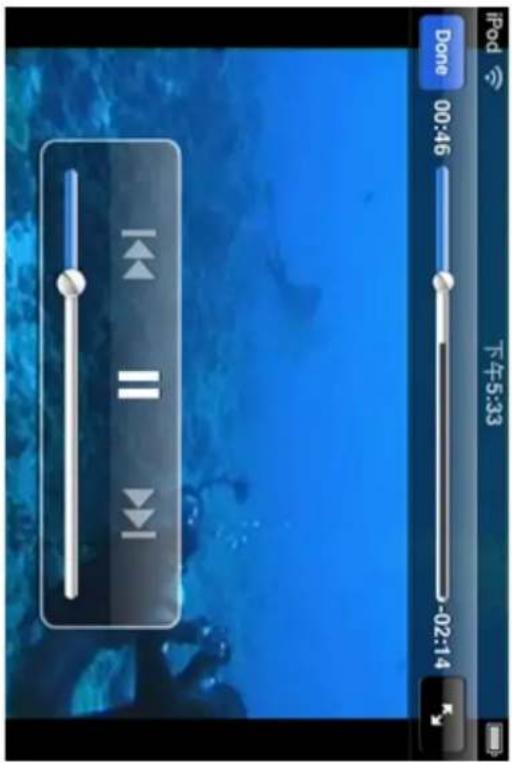
text_image IPOd Done 00:46 下午5:33 -02:14
text_image iPod 下午7:54 Back Upload Photos ? No Photo to Upload You can upload photos from your photo roll. + Upload
text_image Playlist Editor Playlist 來福的List Add Delete Up Shayne Ward - Breathless.mp3 Shayne Ward - Melt The Snow.mp3 Shayne Ward - Someone To Love.mp3 Shayne Ward - Stand By Me.mp3 Shayne Ward - That's My Goal.mp3 Shayne Ward - You're Not Alone.mp3 Save Cancel Close
text_image Playlist Editor Playlist 來福的List Add Delete Up Shayne Ward - Breathless.mp3 Shayne Ward - Melt The Snow.mp3 Shayne Ward - Someone To Love.mp3 Shayne Ward - Stand By Me.mp3 Shayne Ward - That's My Goal.mp3 Shayne Ward - You're Not Alone.mp3 Shayne Ward - Someone To Love.mp3 Shayne Ward - Melt The Snow.mp3 Shayne Ward - Stand By Me.mp3 Save Cancel Close
text_image iPod 下午5:29 Logout My 439 Settings Media Center My Jukebox Upload Photos My Favorites iPod 上午11:39 My Jukebox 來福的List Someone To Love Shayne Ward - Shayne Ward Melt The Snow Shayne Ward - Shayne Ward Stand By Me Shayne Ward - Shayne Ward 3 songs.
text_image Back Recently Played Melt The Snow Shayne Ward - Shayne Ward That's My Goal Shayne Ward - Shayne Ward Stand By Me Shayne Ward - Shayne Ward 3 songs.
text_image Back Settings Global Settings Auto-Lock OFF If you turn this off, Wifi will always be on, but battery might drain faster. Opening media files when under cellular network might exceed your data plan's limits. My Jukebox Cache Settings Maximum (songs) 500 > Downloaded 3

QNAP TS-EC1679U-RP-E10G 32TB - Media Center (Mediencenter) - 4

text_image Settings Cache Settings Maximum number of songs to cache 100 200 500 ✓ 1000 2000 Delete All Cached Songs
natural_image Sequence of five rectangular panels showing abstract digital and light blue patterns, no text or symbols present

Click the images you want to publish

Selected Images

Subject:

My Name:

admin

My Email:

Friend's Email:

Message:

You can post your personal message here.

Note: Separate the email addresses by comma (,) or a semi-colon (;).

QNAP TS-EC1679U-RP-E10G 32TB - Selected Images - 1

Attach slideshow link

Send

text_image Home / Photo / Sort | Slideshow | Share | Manage Album Change to Public Album Enable/Disable Slideshow Link
text_image Slideshow Link for Private Album Enable the slideshow link Please enter the password for access protection * Password: abcdefg OK Cancel
text_image Home / Photo / Sort | Slideshow | Share | Manage Album

3.1 File upload (Date i-Up load)

text_image Home Link Code | Slideshow | Download | EXIF | Edit (Pixr Editor) 8 / 18 IMAG0154.jpg Click here to edit the description Add Comment- admin Comment Submit Comment- Large Map Geotag this photo
text_image Home Download Video_2012_02 00:00:11 00:00:34 / 00:01:36 playing

7. Settings (Eins te llunge n)

Change Pass word (Ä nde rn e ine s Ke nnworts)

QNAP TS-EC1679U-RP-E10G 32TB - Settings (Eins te llunge n) - 1

7.5 Download Station

1. General (Allgemeines):

1. General (Allgemeines):

text_image Download Station HTTP/FTP/RapidShare
text_image QGet 0.7.6.0 Build 1213 Setup Welcome to the QGet Setup Wizard This wizard will guide you through the installation of QGet. It is recommended that you close all other applications before starting Setup. This will make it possible to update relevant system files without having to reboot your computer. Click Next to continue. Next > Cancel
natural_image Interior view of an office or service center with cubicles and workstations (no visible text or signage)

Test

text_image Camera Number: 2: Camera 2 Video Compression: Motion JPEG Resolution: QVGA Frame Rate: 20 Quality: Normal Enable audio recording on this camera Estimated Storage Space for Recording: 6760 GB Apply
text_image Camera Number: 1: Camera 1 Camera Model: iPUX ICS 1003/1013 Camera Name: Camera 1 IP Address: 192.168.1.10 ✓ Port 81 WAN IP: (for monitoring from public network) myNAS.dyndns.org (If your IP camera is installed behind NAT router, you may input the public IP address (or URL) and the corresponding forwarded port of the router.) ✓ Port 81 User Name : administrator Password : ••••••• Apply Remove Note: All the camera configuration will not take effect until you click the "Apply" button.

The best open-source media server for the Roku SoundBridge and iTunes

(2)

server status

smart playlists

configuration

about firefly

thanks

Version syn-1696

Configuration

Show advanced config

Server

Config File Location /mnt/HDA_ROOT/.config/mt-daapd.conf

Server Name KenTest659(iTunes) The name iTunes and other daap clients should see

Logfile

Admin password admin The password for this administration interface.

Music Password The password clients need to access this server.

Music Files

Music Folder /share/Multimedia

Remove

Music Folder /share/Public

Remove

Add music folder

Extensions .mp3,.m4a,.m4p,.aif,.wav,.

Playlist File

Database

Scan Type0 - Normal
Rescan Interval180How often should Firefly look for new files? In seconds.
Always ScanNo

Save

Cancel

text_image File Edit Controls View Store Advanced Help iTunes View Search Library Music Movies TV Shows Podcasts Radio STORE iTunes Store SHARED NASAC6865 PLAYLISTS Party Shuffle 90's Music Music Videos My Top Rated Recently Added Recently Played Top 25 Most Played Name Time Artist Album Genre Rating Winter Wonderland 2:59 Lisa Ono Boas Festas Jazz Depois Do Natal 2:58 Lisa Ono Boas Festas Jazz Let It Snow! Let It Snow! Let It S... 3:48 Lisa Ono Boas Festas Jazz Caroling Caroling 3:56 Lisa Ono Boas Festas Jazz Jingle Bell Rock 2:20 Lisa Ono Boas Festas Jazz White Christmas (Note de Natal) 3:48 Lisa Ono Boas Festas Jazz Paz Azul (Brahms Lullaby) 3:39 Lisa Ono Boas Festas Jazz Ave Maria 3:56 Lisa Ono Boas Festas Jazz The Christmas Song 3:41 Lisa Ono Boas Festas Jazz Boos Festas 4:44 Lisa Ono Boas Festas Jazz Un Anjo Do Céu 5:28 Lisa Ono Boas Festas Jazz In the Wee Small Hours of the Mo... 4:37 Lisa Ono Boas Festas Jazz Silent Night 1:01 Lisa Ono Boas Festas Jazz 01 Beautiful woman.mp3 0:07 Color your soul Other 02 Salesman.mp3 3:44 03 Fill This Night.mp3 4:17 04 Cry Out Loud.mp3 4:19 05 I Will Give You Everything.mp3 4:00 06 Come Alive.mp3 4:50 07 남자변경선.mp3 3:45 08 Be My Love (English Ver.), (Ho... 4:33) 09 📄.mp3 4:43 10 Color Your Soul.mp3 4:50 11 Speechless.mp3 3:13 The iTunes MiniStore helps you discover new music and video right from your iTunes Library. As you select tracks or videos in your Library, information about your selections are sent to Apple and the MiniStore will display related songs, artists, or videos. Apple does not keep any information related to the contents of your iTunes Library. Would you like to turn on the MiniStore now? Turn on MiniStore If you don't want to turn the MiniStore on now, click Not Now. You can always access this page again and turn the MiniStore on at any time by selecting Show MiniStore from the View menu. More from COILLAZ Feel Good Inc... Goriaz Rebated 2001

The log file(s) will be saved in the selected folder. If the size of a log file exceeds 1MB, the file will be archived automatically.

Save log files in :

/Log

Access Right: Read only

Allow TFTP access from :

Anywhere

Certain IP range only

Start IP Address :

End IP Address : ____ ____ ____ ____

APPLY

text_image View your basic network information and set up connections View your active networks Connect or disconnect Network Public network Access type: Internet Connections: Local Area Connection Change your networking settings Set up a new connection or network Set up a wireless, broadband, dial-up, ad hoc, or VPN connection; or set up a router or access point. Connect to a network Connect or reconnect to a wireless, wired, dial-up, or VPN network connection. Choose homegroup and sharing options Access files and printers located on other network computers, or change sharing settings. Troubleshoot problems Diagnose and repair network problems, or get troubleshooting information.
text_image Set Up a Connection or Network Choose a connection option Connect to the Internet Set up a wireless, broadband, or dial-up connection to the Internet. Set up a new network Configure a new router or access point. Connect to a workplace Set up a dial-up or VPN connection to your workplace. Set up a dial-up connection Connect to the Internet using a dial-up connection. Next Cancel
text_image Connect to a Workplace How do you want to connect? → Use my Internet connection (VPN) Connect using a virtual private network (VPN) connection through the Internet. Dial directly Connect directly to a phone number without going through the Internet. What is a VPN connection? Cancel
text_image Connect to a Workplace Type the Internet address to connect to Your network administrator can give you this address. Internet address: [Example:Contoso.com or 157.54.0.1 or 3ffe:1234:1111] Destination name: VPN Connection Use a smart card Allow other people to use this connection This option allows anyone with access to this computer to use this connection. Don't connect now; just set it up so I can connect later Next Cancel
text_image Connect to a Workplace Type your user name and password User name: Password: Show characters Remember this password Domain (optional): Connect Cancel
text_image Network Select the interface and enter a name for the new service. Interface ✓ Wi-Fi Bluetooth DUN VPN PPPoE 6 to 4 Wi-Fi Connected Service Name Wi-Fi Off has the IP Bluetooth PAI Not Connected Network Name: Q_PMZ ✓ Ask to join new networks Known networks will be joined automatically. If no known networks are available, you will be asked before joining a new network. ✓ Show Wi-Fi status in menu bar Advanced... Click the lock to prevent further changes. Assist me... Revert Apply
text_image Network Select the interface and enter a name for the new service. Interface: VPN VPN Type: PPTP Service Name: VPN (PPTP) Cancel Create Wi-Fi Off has the IP Bluetooth PA Not Connected ✓ Ask to join new networks Known networks will be joined automatically. If no known networks are available, you will be asked before joining a new network. ✓ Show Wi-Fi status in menu bar Advanced... Click the lock to prevent further changes. Assist me... Revert Apply
text_image Network Show All Location: Automatic Wi-Fi Connected Bluetooth PAN Not Connected VPN (PPTP) Not Configured Status: Not Configured Configuration: Default Server Address: Account Name: Encryption: Automatic (128 bit or 40 bit) Authentication Settings... Connect Show VPN status in menu bar Advanced... Click the lock to prevent further changes. Assist me... Revert Apply
text_image Network push notifications. Cellular Data Network > Data Roaming OFF Turn off data roaming when traveling to disable email, MMS, web browsing, and other data services. Personal Hotspot > VPN Not Connected > Wi-Fi Off >
text_image Add Configuration L2TP PPTP IPSec Description Required Server Required Account Required RSA SecurlD OFF Password Ask Every Time Encryption Level Auto > Send All Traffic ON Proxy
text_image Scanned text image showing a black horizontal bar and three rows of dots, likely from a form or interface.

Kennwort prüfen:

Already a User Login here English (US)

PROTECT YOUR TURBO NAS FILES WITH ONLINE BACKUP
QNAP TS-EC1679U-RP-E10G 32TB - PROTECT YOUR TURBO NAS FILES WITH ONLINE BACKUP - 1

natural_image Illustration of a CNAP server with global map and folder, no text or symbols present

ElephantDrive: Optimized for Turbo NAS

QNAP TS-EC1679U-RP-E10G 32TB - ElephantDrive: Optimized for Turbo NAS - 1

Continuous Data Protection

ElephantDrive watches for changes in real-time and provides immediate protection for new or modified files.

QNAP TS-EC1679U-RP-E10G 32TB - Continuous Data Protection - 1

Web-based Management

Check transfer history, modify configurations, change scheduling and select backup sources from any browser-based location in real-time.

QNAP TS-EC1679U-RP-E10G 32TB - Web-based Management - 1

Device-integrated Cloud Backup

You can run ElephantDrive directly on your storage device.

QNAP TS-EC1679U-RP-E10G 32TB - Device-integrated Cloud Backup - 1

Quick and easy data recovery and restore

Sign on and browse to the files you need and restore them to your Turbo NAS with a click.

Plans start from \$9.95

FREE TRIAL

30-Day FREE trial just for QNAP users!

“...a simple, enterprise-class solution for internet- or cloud-based data protection...

QNAP TS-EC1679U-RP-E10G 32TB - 30-Day FREE trial just for QNAP users! - 1

To learn more about ElephantDrive, click here

To compare the different ElephantDrive account types, click here

Copyright © 2011 ElephantDrive. All rights reserved.

Sym form

Welcome to Symform, the world's safest and most cost-effective cloud storage.

Let's get started. Enter your email below and we'll take you step-by-step to get your data protected in Symform's Storage Cloud.

If you need help at any point during the short installation, please visit the Symform support forums.

Please enter your Email:

Sign-In

© 2011 Symform, Inc. All Rights Reserved.

Welcome to Symform, the world's safest and most cost-effective cloud storage.

Let's get started. Enter your email below and we'll take you step-by-step to get your data protected in Symform's Storage Cloud.

If you need help at any point during the short installation, please visit the Symform support forums.

Please enter your Email:

QNAP TS-EC1679U-RP-E10G 32TB - Sym form - 1

Let's get you setup. We just sent you a code to the above email address. Check your spam folder, just in case!

Activation Code:*
First Name:*
Last Name:
Password:*
Confirm Password:*

Sign-In

text_image symform Device Manager Cloud Dashboard Home General Environment Folders Contribution Bandwidth Logout Getting Started Complete the steps below to configure Symform on this device. You can configure this device to both sync data with and contribute excess local disk space to the Symform cloud. Step 1: Name your Device Step 2: Enter network speed and business hours Step 3: Configure folder synchronization Step 4: Configure local disk space contribution Step 5: Configure bandwidth limits
text_image Time Machine Show All Select Backup Disk... Time Machine keeps copies of everything on your Mac, including system files, applications, and settings, as well as your music, pictures, and other important files. Since Time Machine keeps daily backups, you can revisit your Mac as it appeared in the past. Show Time Machine status in the menu bar Click the lock to prevent further changes.
text_image TMBackup on "NASAABB0E" Set Up Time Capsule Cancel Use for Backup

Enter your name and password for the server "NASAABB18" so that Time Machine can access it.

Connect as:

○ Guest

Registered User

Name: TimeMachine

Password:

QNAP TS-EC1679U-RP-E10G 32TB - Sym form - 2

Cancel

Connect

text_image Time Machine Show All Show All Name: TMBackup NASA8B18 Available: 168.09 GB of 311.9 GB Oldest Backup: -- Latest Backup: -- Options... Next Backup: 103 seconds... Time Machine keeps: • Hourly backups for the past 24 hours • Daily backups for the past month • Weekly backups for all previous months The oldest backups are deleted when your disk becomes full. Show Time Machine status in the menu bar Click the lock to prevent further changes.

Configure the behavior of the USB one touch copy button to back up the data from the front USB drive to the NAS or vice versa.

√ Enable one touch copy button

Backup direction: The front USB drive -> NAS ▼ Backup method: Synchronize ▼

WARNING! Files are copied from the source to the destination. Extra files on the destination will be deleted, files of the same names will be overwritten by the source. Source data will remain unchanged.

√ Handle sparse files efficiently

Source folder. Destination folder.

/Download /Download ADD

Options

Source folderDestination folderAction
/FrontUSB/Docs/Multimedia/temp

√ Unmount the front USB drive manually

√ Enable alarm buzzer

Ve rsc hlüs s e lungsv e rwa ltung

Ve rsc hlüs s e lungsschlüss e l v e rwa lte n

text_image Getting Started Windows Media Center Calculator Sticky Notes Snipping Tool Paint Remote Desktop Connection Magnifier Solitaire All Programs Search programs and files jason Documents Pictures Music Games Computer Control Panel Devices and Printers Default Programs Help and Support Windows Security Log off
text_image Control Panel > Hardware and Sound > Devices and Printers Add a device Add a printer Devices (1) W7CLEAN-PC Printers and Faxes (2) Fax Microsoft XPS Document Writer
text_image Add Printer What type of printer do you want to install? → Add a local printer Use this option only if you don't have a USB printer. (Windows automatically installs USB printers when you plug them in.) → Add a network, wireless or Bluetooth printer Make sure that your computer is connected to the network, or that your Bluetooth or wireless printer is turned on. Next Cancel
text_image Add Printer Searching for available printers... Printer Name Address Stop → The printer that I want isn't listed Next Cancel
text_image Add Printer Find a printer by name or TCP/IP address Browse for a printer Select a shared printer by name http://10.8.13.59:631/printers/NASPR3 Browse... Example: \computername\printername or http://computername/printers/printername/.printer Add a printer using a TCP/IP address or hostname Next Cancel
text_image Add Printer Wizard Select the manufacturer and model of your printer. If your printer came with an installation disk, click Have Disk. If your printer is not listed, consult your printer documentation for a compatible printer. Manufacturer Gestetner HP infotec KONICA MINOLTA Kuocera Printers hp digital copier 410 HP LaserJet 2200 Series PCL 5 HP LaserJet 2300 Series PS HP LaserJet 2300L PS HP LaserJet 3050 PCL 5 This driver is digitally signed. Tell me why driver signing is important Have Disk... OK Cancel
text_image Add Printer You've successfully added NASPR3 on http://10.8.13.59:631 Printer name: NASPR3 on http://10.8.13.59:631 This printer has been installed with the HP LaserJet 2300 Series PS driver. Next Cancel
text_image You've successfully added NASPR3 on http://10.8.13.59:631 To check if your printer is working properly, or to see troubleshooting information for the printer, print a test page. Print a test page Finish Cancel
text_image Run Type the name of a program, folder, document, or Internet resource, and Windows will open it for you. Open: \192.168.0.169 This task will be created with administrative privileges. OK Cancel Browse...
text_image Network 192.168.0.169 Organize Views Network and Sharing Center Favorite Links Documents Pictures Music Recently Changed Searches Public Name Type Comments Network Recycle Bin 1 Public Qdownload Qmultimedia Qusb Qweb ts-509pr5 Printers
text_image Add Printer Wizard Select the manufacturer and model of your printer. If your printer came with an installation disk, click Have Disk. If your printer is not listed, consult your printer documentation for a compatible printer. Manufacturer HP IBM infotec Konica KONICA MINOL TA Printers HP 2500C Series Printer hp business inkjet 1000 hp business inkjet 1200 HP Business Inkjet 2200/2250 This driver is digitally signed. Tell me why driver signing is important Have Disk... OK Cancel
text_image Add Printer Wizard If your printer came with is not listed, consult your Manufacturer Agfa Alps Apollo Apple APS-PS AST Printers AGFA-AccuSet v52.3 AGFA-AccuSetSF v52.3 AGFA-AccuSet 800 AGFA-AccuSet 800SF v52.3 AGFA-AccuSet 800SF v2013.108 This driver is digitally signed. Tell me why driver signing is important Have Disk... OK Cancel
text_image Add Printer Default Fax IP Windows Search Printer Name ▲ Kind AL-C1100-3F12C0 Bonjour Brother MFC-7440N Bonjour HP LaserJet M1120n MFP Bonjour NASPR3 Bonjour Name: NASPR3 Location: HewLett Packard HP LaserJet 2200 Print Using: Generic PostScript Printer The selected printer software isn't from the manufacturer and may not let you use all the features of your printer. Add
text_image Installable Options NASPR3 Make sure your printer's options are accurately shown here so you can take full advantage of them. For information on your printer and its optional hardware, check the documentation that came with it. □ Duplex Printing Unit Cancel Continue
text_image NASPR3 Open Print Queue... Options & Supplies... Location: HewLett Packard HP LaserJet 2200 Kind: Generic PostScript Printer Status: Idle Share this printer on the network Sharing Preferences...
text_image Print & Fax Show All Click + to add a printer or fax No Printer Selected + - Default Printer: Last Printer Used Default Paper Size in Page Setup: A4 Click the lock to prevent further changes.
text_image Enter your user name and password to access the print server "pm-509". Connect as: Guest Registered User Name: admin Password: ............. Remember this password in my keychain Cancel Connect
text_image Default Fax IP Windows Bluetooth AppleTalk More Printers Search alanhuang mshome nas nvr qatest qnap qnapcluster qnapnet workgroup meiji-macbook pm-509 qadmin-laptop qnap-pc qnap-peace-test stevehuang that ubuntu vicky-pc PM-509PR Name: PM-509PR Location: Print Using: Please select a driver or printer model Add ✓ Please select a driver or printer model Auto Select Generic PostScript Printer Select a driver to use... Other...
text_image Print & Fax Show All Printers PM-509PR Idle, Default PM-509PR Share this printer Location: Kind: HP LaserJet 2200 Status: Idle, Default Open Print Queue... Options & Supplies... + - Default Printer: PM-509PR Default Paper Size in Page Setup: A4 Click the lock to prevent further changes.
text_image Finder File Edit View Go Window Help Back Forward Enclosing Folder Computer Home Network iDisk Applications Utilities Recent Folders Go to Folder... Connect to Server... ✓⌘G ⌘K
text_image iDisk Network Macintosh HD Firefox Desktop telecomkid Applications Documents Movies Music Pictures Grapher Installer Java Keychain Access Migration Assistant NetInfo Manager Network Utility ODBC Administrator Printer Setup Utility System Profiler Terminal VoiceOver Utility 1 of 24 selected, 12.53 GB available
text_image Printer List Make Default Add Delete Utility ColorSync Show Info Name Status Kind

QNAP TS-EC1679U-RP-E10G 32TB - Ve rsc hlüs s e lungsv e rwa ltung - 1

text_image Printer Browser Default Browser IP Printer Search Printer Name Connection AL-C1100-CCB65A Bonjour Name: Location: Print Using: Please select a driver or printer model More Printers... Add
text_image Printer Browser Advanced Device: Windows Printer via SAMBA Device Name: myprinter Device URI: smb://192.168.2.11/nastestPR Printer Model: Generic Cancel Add Name: No Selection Location: No Selection Print Using: More Printers... Add
text_image System Preferences Administration Help and Support About GNOME About Ubuntu Additional Drivers Computer Janitor Disk Utility Language Support Log File Viewer Login Screen Network Tools Printing
text_image Printing - localhost Server Printer Group View Help Add Filter: Connected to localhost
text_image New Printer Select Device Devices Other Network Printer Epson AL-C1100 (10.8.12.180) Brother MFC-7440N (BRN001 Canon iR3235/iR3245 (10.8.12 HP LaserJet M1120n (NPI1D5 HP LaserJet 2200 (NAS, 10.8. Brother MFC-7440N (BRN001 Find Network Printer AppSocket/HP JetDirect Internet Printing Protocol (ip LPD/LPR Host or Printer Windows Printer via SAMBA IPP Printer Host: 10.8.13.59 Queue: /printers/NASPR3 URI: ipp://10.8.13.59/printers/NASPR3 Verify...
text_image IPP Printer Host: 10.8.13.59 Queue: /printers/NASPR3 URI: ipp://10.8.13.59/printers/NASPR3 Verify... Print Share Verified This print share is accessible. OK
text_image Searching Searching driver for Internet Printing Protocol... Cancel
text_image New Printer Choose Driver Select printer from database Provide PPD file Search for a printer driver to download The foomatic printer database contains various manufacturer provided PostScript Printer Description (PPD) files and also can generate PPD files for a large number of (non PostScript) printers. But in general manufacturer provided PPD files provide better access to the specific features of the printer. Makes Heidelberg Hitachi HP IBM Imagen Imagistics InfoPrint Infotec Kodak Back Cancel Forward
text_image New Printer Describe Printer Printer Name Short name for this printer such as "laserjet" HP-LaserJet-2200 Description (optional) Human-readable description such as "HP LaserJet with Duplexer" NASPR3 Location (optional) Human-readable location such as "Lab 1"
text_image Printing - localhost Server Printer Group View Help Add Filter: HP-LaserJet-2200 Connected to localhost
text_image MyCloudNAS Service MyCloudNAS Name: test123 , MyCloudNAS.COM Go | Home | Privacy Policy | Terms of Use | What's MyCloudNAS Service? | Copyright ©2010; MyCloudNAS.COM. AI Rights Reserved. This site is best viewed in 1024 x 768 true color with IE7.0+ or Firefox 3.0+
text_image MyCloudNAS Service User Name: MyCloudNAS Access Code: Login Applications and Services Web Administration Multimedia Station Web File Manager Web Server | Home | Privacy Policy | Terms of Use | What's MyCloudNAS Service? | Copyright ©2010; MyCloudNAS.COM. All Rights Reserved. This site is best viewed in 1024 x 768 true color with IE7.0+ or Firefox 3.0+
text_image MyCloudNAS Service User Name: admin MyCloudNAS Access Code: passed Logout Applications and Services Web Administration Secure Web Administration Multimedia Station Secure Multimedia Station Web File Manager Secure Web File Manager Web Server Secure Web Server
  1. LAN IP Address
  2. LAN Subnet Mask
  3. LAN Gateway
  4. LAN PRI. DNS
  5. LAN SEC. DNS
  6. Enter Network Settings

• Network Settings – DHCP
• Network Settings – Static IP*
• Network Settings - BACK

  1. Back to Main Menu
text_image DynDNS.com by Dynamic Network Services Inc. DNS & Domains Email Services Performance & Security What are you looking for? Search Why DynDNS com? Services & Pricing Support Have an account? Sign In Rock solid, scalable DNS that just WORKS We offer DNS services on every level from home user to enterprise Whether you are a home user, a small & medium business, or all the way up to enterprise... we understand you are busy! Our tools are easy, yet Robust. Let us simplify your to do list with our proven services. Get Started Username Password Login Forgot Your Password? Create an Account
text_image DynDNS.com by Dynamic Network Services Inc. CHS & Domains Email Services Performance & Security What are you looking for? Search Why DynDNS.com? Services & Pricing Support Create an account or log in to continue Username: QNAP Password: ••••••••• Confirm password: ••••••••• Email: qnap@qnap.com Confirm Email: qnap@qnap.com Security Image: Enter the numbers from the above image: 44220 Already Registered? Username Password Log in Forgot your password? We'RE HIRING Powered by Dyn TRUSTe CERTIFIED PRIVACY Subscribe to: DynDNS.com newsletter (1 or 2 per month) Dyn Inc. press releases I agree with the acceptable use policy (AUP) and privacy policy. Create Account If you're having difficulty creating your account, for any reason, feel free to contact us.
text_image DynDNS.com by Dynamic Network Services Inc. DNS & Domains Email Services Performance & Security What are you looking for? Search Why DynDNS.com? Services & Pricing Support Have an account? Join NOW Sign In One more step to go... We've sent an email to qnap@qnap.com, to verify your account. Please check your inbox and click on the confirmation link. If you do not receive the email in the next few minutes you can try resending it. Thanks for choosing DynDNS.com!
text_image Your DynDNS.com Account Information Inbox | X DynDNS.com Donotreply to show details 11:30 (5 minutes ago) Reply Your DynDNS.com Account ' QNAP ' has been created. You need to visit the confirmation address below within 48 hours to complete the account creation process: https://www.dyndns.com/confirm/create/eAJw3CfY3FFklHdh2_gi0A Our basic service offerings are free, but they are supported by our paid services. See http://www.dyndns.com/services/ for a full listing of all of our available services. If you did not sign up for this account, this will be the only communication you will receive. All non-confirmed accounts are automatically deleted after 48 hours, and no addresses are kept on file. We apologize for any inconvenience this correspondence may have caused, and we assure you that it was only sent at the request of someone visiting our site requesting an account. Sincerely, The DynDNS.com Team Dynamic Network Services Inc.
text_image DynDNS® by Dynamic Network Services Inc. DNS & Domains Email Services Performance & Security What are you looking for? Search Why DynDNS.com? Services & Pricing Support Please Confirm Your Password Please log in to finalize account activation. Username qnap Password ●●●●●●●●● Confirm Account Forgot your password?
text_image Why DynDNS.com? Services & Pricing Support Welcome qnap FREE My Account My Cart Log Out Rock solid, scalable DNS that just WORKS We offer DNS services on every level from home user to enterprise Whether you are a home user, a small & medium business, or all the way up to enterprise... we understand you are busy! Our tools are easy, yet Robust. Let us simplify your to do list with our proven services. Get Started dyndns-at-home.com dyndns-at-work.com dyndns-blog.com dyndns-free.com dyndns-home.com dyndns-ip.com dyndns-mail.com dyndns-office.com dyndns-pics.com dyndns-remote.com dyndns-server.com dyndns-web.com dyndns-wiki.com dyndns-work.com dyndns.biz dyndns.info dyndns.org dyndns.tv dyndns-office.com Add Free Domain Nam Dynamic DNS service allows you to address or URL. ✓ Host your own website at home for your website. ✓ Connect to your workstation. DVR. QNAP Start Your Company & Domain Enter your new or current domain name to build a customized suite of world class DNS, Mail, Performance, and Security services. ✓ Easy-to-use web interface with powerful expert tools. ✓ DNS servers in five datacenters around the globe! example.com Add
text_image Host Services gnap.dyndns-office.com successfully activated. Hostname Service Details Last Updated gnap.dyndns-office.com Host 219. Jan. 12, 2011 11:01 PM = Host Update Logs Add New Host
text_image Home >> System Administration >> Network Welcome Network TCP/IP WI-FI DDNS IPV6 DDNS Service After enabling DDNS Service, you can connect to this server by domain name. ✓ Enable Dynamic DNS Service Select DDNS server: www.dyndns.com Enter the account information you registered with the DDNS provider User Name: gnap Password: **** Host Name: gnap.dyndns-office.com □ Check the External IP Address Automatically 10 minutes Current WAN IP: 219.85.63.13
text_image New Customers If you do not already have an account, take a moment to create one. You will benefit from: • A user-friendly administration interface • Free registration and no license fees • 24/7 Service & Support • Web based account accessible from anywhere • Multiple payment options Product Selection: Please Select Product Please Select Product Clickatell Central (API) Communicator Messenger-Pro Clickatell Affiliates Clickatell Wholesale
text_image % Complete our simple registrations process below to test our gateway and obtain your free test credits. * Indicates all fields that are required. Step 1 of 4 - Select Product Select one of the products below which you would like to register for: Clickatell Central ? Communicator ? Step 2 of 4 - Account Setup Select a country specific or international account type, based on your requirements for SMS traffic delivery destinations. International Coverage Account: ? Local Coverage Account: ? INTERNATIONAL USA UK SA * Create Username : 468UH * Create Password: ************ Security Code: 468UH *Enter Security Code: 468UH Step 3 of 4 - Personal Information *First Name: SMS * Country: Taiwan * Last Name: Tester * Mobile Number: 886 * Email Address: Personal Use Only ✓ (e.g. sample@domain.com) * Company: Personal Use Emails sent to me must be in Text format or HTML format I would like to receive: Clickatell News, Balance Notifications, Promotions * I accept Clickatell's Terms and Conditions CONTINUE Security & Privacy
text_image My Account Login Customer Login Existing Clickatell account holders can select their product and login below. Note, username & password are CASE sensitive. Select Product: Clickatell Central (API) Username: ClientID: Password: Login Lost password?
text_image Verify your Mobile Number For security reasons you are required to verify your mobile number in order to make your first credit purchase and send non-test SMS messages. Your activation code will be sent to SEND ACTIVATION CODE If this is not your number, please retype your mobile number in the box above and click the "Send Activation Code" button. Enter your activation code here: VERIFY NOW
text_image Central Home My Settings Manage my Products Billing Message Reports Help Manage my Products My Connections Converters Two-Way Messaging Application Forms Two-Way Messaging SA Shortcode MO Namibia Shortcode USA Shortcode USA Shortcode MFS UK Shortcode Canada Shortcode Clickatell ICM Test Message in Message Box Please Note that Clickatell pre-populates all test credits with a standard test message. Once you have purchased Clickatell credits, the test message will be removed and you will be able to send personalized text messages. Buy SMS Credits My Connections: Add Connection Add Connection HTTP SMTP FTP XML COM SMPP SOAP a quick overview of each connection type. Also take a look at a comparison of Clickatell and supported message types popular connection, HTTP is one of the simpler forms of communicating to the Clickatell API. It is a HTTP/Internet Post. Add connection
text_image HTTP API This product provides an interface between your applications and the Messaging Gateway. It is a lower level connectivity option, but offers the most functionality and flexibility for the Developer and Systems Integrator. With the API you can set up alert-based SMS delivery from your server, deliver information to your mobile sales staff and keep in contact with your customers. This product is intended for machine-generated to User messaging. Add HTTP API - Bold Items Required Name: IP Lock Down: Dial Prefix: Callback Type: HTTP GET Callback Url: Callback Username: Callback Password: NOTE: submission of this form will delete any session_id currently valid for this api_id. Any application using this session_id will have to re-authenticate. Submit
text_image Name Type API ID Dialing Code HTTP 886 Taiwan 1 to 1 of 1
text_image Home >> System Administration >> Notification Welcome admin | Logout CONFIGURE SMTP SERVER CONFIGURE IM CONFIGURE SMSC SERVER ALERT NOTIFICATION Alert Notification When a system event occurs, do the following immediately: Send system error alert by: □ Email ✓ SMS □ Instant Messaging Send system warning alert by: □ Email □ Instant Messaging E-mail Notification Settings E-mail address 1: E-mail address 2: SEND A TEST E-MAIL Note: The SMTP server must be configured first for alert mail delivery. Instant Messaging Settings Authorized Contacts: Add SMS Notification Settings Country Code: Taiwan (+886) Cell Phone No. 1: +886 Cell Phone No. 2: +886 SEND A TEST SMS MESSAGE Note: You must configure the SMSC server to be able to send SMS notification properly.
text_image Home >> System Administration >> Notification Welcome admin | Logout Notification CONFIGURE SMTP SERVER CONFIGURE IM CONFIGURE SMSC SERVER ALERT NOTIFICATION Alert Notification When a system event occurs, do the following immediately: Send system error alert by: ✓ Email □ SMS □ Instant Messaging Send system warning alert by: ✓ Email □ Instant Messaging E-mail Notification Settings E-mail address 1: E-mail address 2: SEND A TEST E-MAIL Note: The SMTP server must be configured first for alert mail delivery.

Instant Messaging- (IM) Alarm einrichten

text_image When a system event occurs, an alert email/SMS will be sent automatically. Send system error alert by: □ Email □ SMS ✓ Instant Messaging Send system warning alert by: □ Email ✓ Instant Messaging

E-mail Notification Settings

E-mail address 1:

Email

□ SMS

√ Instant Messaging

E-mail address 2:

Email

√ Instant Messaging

SEND A TEST E-MAIL

Note: The SMTP server must be configured first for alert mail delivery.

Instant Messaging Settings

Authorized Contacts:

QNAP TS-EC1679U-RP-E10G 32TB - Instant Messaging Settings - 1

natural_image Two parallel cylindrical objects with circular markings, placed horizontally on a plain background (no text or symbols)

QNAP TS-EC1679U-RP-E10G 32TB - Instant Messaging Settings - 2

QNAP TS-EC1679U-RP-E10G 32TB - Instant Messaging Settings - 3

QNAP TS-EC1679U-RP-E10G 32TB - Instant Messaging Settings - 4

text_image MediaServer TwonkyMedia Confi Version 4.4.2 Save Changes Cancel Rescan content directories Basic Setup First steps Sharing Clients/Security Internet Radio Advanced Setup External applications Naming Music free Picture free Video free Miscellaneous Support: Troubleshooting FAQ TwonkyVision GmbH (2003,2006) All rights reserved Content Locations: IQmultimedia All content types Browse IQdownload All content types Browse All content types Music-only Pictures-only Video-only Add new content directory Directories where the server shall scan for content. Each directory can be limited to a specific type. The default all content types. Sharing can be temporarily disabled by unchecking the directory. Rescan in minutes: 1 This option specifies the rescan behavior of the server. If set to 0, automatic rescans are disabled. A positive value between rescans of content directories in minutes. -1 enables the server to watch content directories automatically without the need for rescans.
text_image MediaServer TwonkyMedia Conf Version 4.4.2 Save Changes Cancel Restart server Basic Setup First steps Sharing Clients/Security Internet Radio Advanced Setup External applications Naming Music tree Picture tree Video tree Miscellaneous Support Troubleshooting FAQ TwonkyVision GmbH (2003,2006) All rights reserved Picture node 1: Album Picture node 2: Date Picture node 3: Folder Picture node 4: Add node An individual picture navigation tree with up to 5 nodes may be specified navigation tree and the node type have to be specified. Navigation Tree Setup: Custom There is the choice of selecting different pre-configured navigation trees or defining a customized tree struct Picture node 1: Album Picture node 2: Date Picture node 3: Folder Picture node 4: Type ABC Year - Month - Folder Date Day Month Year Keyword Personal rating Description Resolution Back to the na
natural_image Interior view of a room with electronic devices and a monitor, no visible text or symbols
natural_image Close-up of a hand holding a white USB connector (no text or symbols visible)

QNAP TS-EC1679U-RP-E10G 32TB - Instant Messaging Settings - 5

natural_image Close-up of a hand holding a black USB connector against a yellow background (no text or symbols visible)
natural_image Close-up of a white electronic device rear panel with multiple audio/video cables and connectors (no visible text or symbols)

QNAP TS-EC1679U-RP-E10G 32TB - Instant Messaging Settings - 6

natural_image Close-up of a wall-mounted electrical socket with wires and a yellow connector (no visible text or symbols)
natural_image Exterior view of a beige electronic device with a network switch and tower, placed on a white rack (no visible text or symbols)
natural_image Close-up of a hand holding a white USB port connected to an electronic device via cables (no visible text or symbols)
natural_image Close-up of a computer interface panel showing ports, connectors, and cables (no visible text or symbols)
text_image phpBB Installation Panel OVERVIEW INSTALL CONVERT Select language: British English Change Introduction Welcome to phpBB3! License Support phpBB™ is the most widely used open source bulletin board solution in the world. phpBB3 is the latest installment in a package line started in 2000. Like its predecessors, phpBB3 is feature-rich, user-friendly, and fully supported by the phpBB Team. phpBB3 greatly improves on what made phpBB2 popular, and adds commonly requested features that were not present in previous versions. We hope it exceeds your expectations. This installation system will guide you through installing phpBB3, updating to the latest version of phpBB3 from past releases, as well as converting to phpBB3 from a different discussion board system (including phpBB2). For more information, we encourage you to read the installation guide. To read the phpBB3 license or learn about obtaining support and our stance on it, please select the respective options from the side menu. To continue, please select the appropriate tab above.
text_image phpBB Installation Panel Select languages: British English ▼ Change OVERVIEW INSTALL CONVERT Introduction Requirements Database settings Administrator details Configuration file Advanced settings Create database tables Final stage Welcome to Installation With this option, it is possible to install phpBB3 onto your server. In order to proceed, you will need your database settings. If you do not know your database settings, please contact your host and ask for them. You will not be able to continue without them. You need: • The Database Type - the database you will be using. • The Database server hostname or DSN - the address of the database server. • The Database server port - the port of the database server (most of the time this is not needed). • The Database name - the name of the database on the server. • The Database username and Database password - the login data to access the database. Note: if you are installing using SQLite, you should enter the full path to your database file in the DSN field and leave the username and password fields blank. For security reasons, you should make sure that the database file is not stored in a location accessible from the web. phpBB3 supports the following databases: • MySQL 3.23 or above (MySQL supported) • PostgreSQL 7.3+ • SQLite 2.8.2+ • Firebird 2.0+ • MS SQL Server 2000 or above (directly or via ODBC) • Oracle Only those databases supported on your server will be displayed. Proceed to next step
text_image phpBB Installation Panel OVERVIEW INSTALL CONVERT Introduction Requirements > Database settings Administrator details Configuration file Advanced settings Create database tables Final stage Database configuration Database type: MySQL Database server hostname or DSN: DSN stands for Data Source Name and is relevant only for ODBC installs. Database server port: Leave this blank unless you know the server operates on a non-standard port. Database name: phpbb3 Database username: root Database password: ******** Prefix for tables in database: phpbb_ Proceed to next step
text_image phpBB Installation Panel OVERVIEW INSTALL CONVERT Introduction Requirements Database settings Administrator details Configuration file Advanced settings Create database tables Final stage Database connection Test connection: Successful connection Proceed to next step
text_image phpBB Installation Panel OVERVIEW INSTALL CONVERT Introduction Requirements Database settings Administrator details Configuration file Advanced settings Create database tables Final stage Administrator configuration Default board language: British English ▼ Administrator username: admin Please enter a username between 3 and 20 characters in length. Administrator password: ********** Please enter a password between 6 and 30 characters in length. Confirm administrator password: ********** Contact e-mail address: admin@myforum.com Confirm contact e-mail: admin@myforum.com Proceed to next step
text_image phpBB Installation Panel OVERVIEW INSTALL CONVERT Introduction Requirements Database settings Administrator details Configuration file Advanced settings Create database tables Final stage Administrator details Check administrator settings: Tests passed Proceed to next step
text_image phpBB Installation Panel OVERVIEW INSTALL CONVERT Introduction Requirements Database settings Administrator details Configuration file Advanced settings Create database tables Final stage The configuration file has been written. You may now proceed to the next step of the installation. Proceed to next step
text_image phpBB Installation Panel OVERVIEW INSTALL COVEY Introduction Requirements Database settings Administrator details Configuration file Advanced settings Create databases tables Final stage The settings on this page are only necessary to set if you know that you require something different from the default. If you are unsure, just proceed to the next page, as these settings can be altered from the Administration Control Panel later. E-mail settings Enable board-wide e-mails: If this is set to disabled no e-mails will be sent by the board at all. Use SMTP server for e-mail: Select "Yes" if you want or have to send e-mail via a named server instead of the local mail function. Enabled Enabled Yes No SNTP server address: Authentication method for SMTP: Only used if a username/password is set, ask your provider if you are unsure which method to use. PLA/N SMTP username: Only enter a username if your SMTP server requires it. SMTP password: Only enter a password if your SMTP server requires it. Server URL settings Cookie secure: If your server is running via SSL set this to enabled else leave as disabled. Having this enabled and not running via SSL will result in server errors during redirects. Enabled Disabled Yes No Server protocol: This is used as the server protocol if these settings are forced. If empty or not forced the protocol is determined by the cookie secure settings (http:// or https://). Http:// Domain name: The domain name this board runs from (for example: www.example.sse). 192.168.1.3 Server port: The port your server is running on, usually 80, only change if different. 80 Script path: The path where phpBB is located relative to the domain name, e.g. /phpBB. /phpBB3 Proceed to next step Powered by phpBB © 2005, 2003, 2005, 2007 phpBB Group
text_image phpBB Installation Panel OVERVIEW INSTALL CONVERT Introduction Requirements Database settings Administrator details Configuration file Advanced settings Create database tables Final stage The database tables used by phpBB 3.0 have been created and populated with some initial data. Proceed to the next screen to finish installing phpBB. Proceed to next step
text_image phpBB Installation Panel OVERVIEW INSTALL CONVERT ✓ Introduction ✓ Requirements ✓ Database settings ✓ Administrator details ✓ Configuration file ✓ Advanced settings ✓ Create database tables > Final stage Congratulations! You have now successfully installed phpBB 3.0.5. From here, you have two options as to what to do with your newly installed phpBB3: Convert an existing board to phpBB3 The phpBB Unified Converter Framework supports the conversion of phpBB 2.0.x and other board systems to phpBB3. If you have an existing board that you wish to convert, please proceed on to the converter. Go live with your phpBB3! Clicking the button below will take you to your Administration Control Panel (ACP). Take some time to examine the options available to you. Remember that help is available online via the Documentation and the support forums, see the README for further information. Please now delete, move or rename the install directory before you use your board. If this directory is still present, only the Administration Control Panel (ACP) will be accessible. Login Powered by phpBB © 2000, 2002, 2005, 2007 phpBB Group
text_image phpBB Administration Control Panel Admin index • Board Index GENERAL FORSNS POSTING USERS AND GROUPS PERMISSIONS STYLES MAINTENANCE SYSTEM You are logged in an admin [ Logout ] [ ACP Logout ] QUICK ACCESS Manage users Manage groups Manage forums Moderator log Systems/Robots PHP information BOARD CONFIGURATION Attachment settings Board settings Board features Avatar settings Private message settings Post settings Signature settings User registration settings Visual confirmation settings CLIENT COMMUNICATION Authentication E-mail settings Jaliber settings SERVER CONFIGURATION Cookie settings Server settings Security settings Load settings Search settings Welcome to phpBB Thank you for choosing phpBB as your board solution. This screen will give you a quick overview of all the various statistics of your board. The links on the left hand side of this screen allow you to control every aspect of your board experience. Each page will have instructions on how to use the tools. Board statistics STATISTIC VALUE STATISTIC VALUE Number of posts: 1 Posts per day: 1 Number of topics: 1 Topics per day: 1 Number of users: 1 Users per day: 1 Number of attachments: 0 Attachments per day: 0.00 Board started: Tue Jun 30, 2009 4:14 pm Avatar directory size: 0 Bytes Database size: 262.62 KB Size of posted attachments: 0 Bytes Database server: MySQL 5.0.67-log GZip compression: Off Board version: 3.0.5 Orphan attachments: 0 Resynchronise or reset statistics Reset most users ever online Run now Reset board's start date Run now Rexynchronise statistics Run now Resynchronise post counts Run now Only existing posts will be taken into consideration. Pruned posts will not be counted. Rexynchronise dotted topics Run now First unmarks all topics and then correctly mark topics that have seen any activity during the past six months. Purge the cache Run now Purge all cache related items, this includes any cached template files or queries. LOGGED ADMINistrator actions This gives an overview of the last five actions carried out by board administrators. A full copy of the log can be viewed from the appropriate menu item or following the link below. → View administrator log USENAME USER IP TIME ACTION admin 192.168.1.2 Tue Jun 30, 2009 4:14 pm Installed phpBB 3.0.5 Inactive users This is a list of the last 10 registered users who have inactive accounts. A full list is available from the appropriate menu item or by following the link below from where you can activate, delete or remind by sending an e-mail these users if you wish.
text_image phpBB yourdomain.com creating communities A short text to describe your forum Search... Search Advanced search Board index User Control Panel (0 new messages) • View your posts FAQ Members Logout [ admin ] It is currently Tue Jun 30, 2009 4:17 pm Last visit was: Tue Jun 30, 2009 4:14 pm [ Moderator Control Panel ] View unanswered posts • View new posts • View active topics Mark forums read YOUR FIRST CATEGORY TOPICS POSTS LAST POST Your first forum Description of your first forum. 1 1 by admin Tue Jun 30, 2009 4:14 pm WHO IS ONLINE In total there are 2 users online :: 1 registered, 0 hidden and 1 guest (based on users active over the past 5 minutes) Most users ever online was 2 on Tue Jun 30, 2009 4:17 pm Registered users: admin Legend: Administrators, Global moderators STATISTICS Total posts 1 • Total topics 1 • Total members 1 • Our newest member admin Board index The team • Delete all board cookies • All times are UTC Powered by phpBB © 2000, 2002, 2005, 2007 phpBB Group Administration Control Panel

17. NAS Wartung

Version 3, 29 June 2007

Copyright © 2007 Free Software Foundation, Inc. http://fsf.org/

Everyone is permitted to copy and distribute verbatim copies of this license document, but changing it is not allowed.

Preamble

The GNU General Public License is a free, copyleft license for software and other kinds of works.

The licenses for most software and other practical works are designed to take away your freedom to share and change the works. By contrast, the GNU General Public License is intended to guarantee your freedom to share and change all versions of a program--to make sure it remains free software for all its users. We, the Free Software Foundation, use the GNU General Public License for most of our software; it applies also to any other work released this way by its authors. You can apply it to your programs, too.

When we speak of free software, we are referring to freedom, not price. Our General Public Licenses are designed to make sure that you have the freedom to distribute copies of free software (and charge for them if you wish), that you receive source code or can get it if you want it, that you can change the software or use pieces of it in new free programs, and that you know you can do these things.

To protect your rights, we need to prevent others from denying you these rights or asking you to surrender the rights. Therefore, you have certain responsibilities if you distribute copies of the software, or if you modify it: responsibilities to respect the freedom of others.

For example, if you distribute copies of such a program, whether gratis or for a fee, you must pass on to the recipients the same freedoms that you received. You must make sure that they, too, receive or can get the source code. And you must show them these terms so they know their rights.

Developers that use the GNU GPL protect your rights with two steps: (1) assert copyright on the software, and (2) offer you this License giving you legal permission to copy, distribute and/or modify it.

For the developers' and authors' protection, the GPL clearly explains that there is no warranty for this free software. For both users' and authors' sake, the GPL requires that modified versions be marked as changed, so that their problems will not be attributed erroneously to authors of previous versions.

Some devices are designed to deny users access to install or run modified versions of the software inside them, although the manufacturer can do so. This is fundamentally incompatible with the aim of protecting users' freedom to change the software. The systematic pattern of such abuse occurs in the area of products for individuals to use, which is precisely where it is most unacceptable. Therefore, we have designed this version of the GPL to prohibit the practice for those products. If such problems arise substantially in other domains, we stand ready to extend this provision to those domains in future

versions of the GPL, as needed to protect the freedom of users.

Finally, every program is threatened constantly by software patents. States should not allow patents to restrict development and use of software on general-purpose computers, but in those that do, we wish to avoid the special danger that patents applied to a free program could make it effectively proprietary. To prevent this, the GPL assures that patents cannot be used to render the program non-free.

The precise terms and conditions for copying, distribution and modification follow.

TERMS AND CONDITIONS

0. Definitions.

'This License' refers to version 3 of the GNU General Public License.

'Copyright' also means copyright-like laws that apply to other kinds of works, such as semiconductor masks.

'The Program' refers to any copyrightable work licensed under this License. Each licensee is addressed as 'you'. 'Licensees' and 'recipients' may be individuals or organizations.

To 'modify' a work means to copy from or adapt all or part of the work in a fashion requiring copyright permission, other than the making of an exact copy. The resulting work is called a 'modified version' of the earlier work or a work 'based on' the earlier work.

A 'covered work' means either the unmodified Program or a work based on the Program.

To 'propagate' a work means to do anything with it that, without permission, would make you directly or secondarily liable for infringement under applicable copyright law, except executing it on a computer or modifying a private copy. Propagation includes copying, distribution (with or without modification), making available to the public, and in some countries other activities as well.

To 'convey' a work means any kind of propagation that enables other parties to make or receive copies. Mere interaction with a user through a computer network, with no transfer of a copy, is not conveying.

An interactive user interface displays 'Appropriate Legal Notices' to the extent that it includes a convenient and prominently visible feature that (1) displays an appropriate copyright notice, and (2) tells the user that there is no warranty for the work (except to the extent that warranties are provided), that licensees may convey the work under this License, and how to view a copy of this License. If the interface presents a list of user commands or options, such as a menu, a prominent item in the list meets this criterion.

1. Source Code.

The 'source code' for a work means the preferred form of the work for making modifications to it. 'Object code' means any non-source form of a work.

A 'Standard Interface' means an interface that either is an official standard defined by a recognized standards body, or, in the case of interfaces specified for a particular programming language, one that is widely used among developers working in that language.

The 'System Libraries' of an executable work include anything, other than the work as a whole, that (a) is included in the normal form of packaging a Major Component, but which is not part of that Major Component, and (b) serves only to enable use of the work with that Major Component, or to implement a Standard Interface for which an implementation is available to the public in source code form. A 'Major Component', in this context, means a major essential component (kernel, window system, and so on) of the specific operating system (if any) on which the executable work runs, or a compiler used to produce the work, or an object code interpreter used to run it.

The 'Corresponding Source' for a work in object code form means all the source code needed to generate, install, and (for an executable work) run the object code and to modify the work, including scripts to control those activities. However, it does not include the work's System Libraries, or general-purpose tools or generally available free programs which are used unmodified in performing those activities but which are not part of the work. For example, Corresponding Source includes interface definition files associated with source files for the work, and the source code for shared libraries and dynamically linked subprograms that the work is specifically designed to require, such as by intimate data communication or control flow between those subprograms and other parts of the work.

The Corresponding Source need not include anything that users can regenerate automatically from other parts of the Corresponding Source.

The Corresponding Source for a work in source code form is that same work.

2. Basic Permissions.

All rights granted under this License are granted for the term of copyright on the Program, and are irrevocable provided the stated conditions are met. This License explicitly affirms your unlimited permission to run the unmodified Program. The output from running a covered work is covered by this License only if the output, given its content, constitutes a covered work. This License acknowledges your rights of fair use or other equivalent, as provided by copyright law.

You may make, run and propagate covered works that you do not convey, without conditions so long as your license otherwise remains in force. You may convey covered works to others for the sole purpose of having them make modifications exclusively for you, or provide you with facilities for running those works, provided that you comply with the terms of this License in conveying all material for which you do not control copyright. Those thus making or running the covered works for you must do so exclusively on your behalf, under your direction and control, on terms that prohibit them from making any copies of your copyrighted material outside their relationship with you.

Conveying under any other circumstances is permitted solely under the conditions stated below. Sublicensing is not allowed; section 10 makes it unnecessary.

No covered work shall be deemed part of an effective technological measure under any applicable law fulfilling obligations under article 11 of the WIPO copyright treaty adopted on 20 December 1996, or similar laws prohibiting or restricting circumvention of such measures.

When you convey a covered work, you waive any legal power to forbid circumvention of technological measures to the extent such circumvention is effected by exercising rights under this License with

respect to the covered work, and you disclaim any intention to limit operation or modification of the work as a means of enforcing, against the work's users, your or third parties' legal rights to forbid circumvention of technological measures.

4. Conveying Verbatim Copies.

You may convey verbatim copies of the Program's source code as you receive it, in any medium, provided that you conspicuously and appropriately publish on each copy an appropriate copyright notice; keep intact all notices stating that this License and any non-permissive terms added in accord with section 7 apply to the code; keep intact all notices of the absence of any warranty; and give all recipients a copy of this License along with the Program.

You may charge any price or no price for each copy that you convey, and you may offer support or warranty protection for a fee.

5. Conveying Modified Source Versions.

You may convey a work based on the Program, or the modifications to produce it from the Program, in the form of source code under the terms of section 4, provided that you also meet all of these conditions:

a) The work must carry prominent notices stating that you modified it, and giving a relevant date.
b) The work must carry prominent notices stating that it is released under this License and any conditions added under section 7. This requirement modifies the requirement in section 4 to 'keep intact all notices'.
c) You must license the entire work, as a whole, under this License to anyone who comes into possession of a copy. This License will therefore apply, along with any applicable section 7 additional terms, to the whole of the work, and all its parts, regardless of how they are packaged. This License gives no permission to license the work in any other way, but it does not invalidate such permission if you have separately received it.
d) If the work has interactive user interfaces, each must display Appropriate Legal Notices; however, if the Program has interactive interfaces that do not display Appropriate Legal Notices, your work need not make them do so.

A compilation of a covered work with other separate and independent works, which are not by their nature extensions of the covered work, and which are not combined with it such as to form a larger program, in or on a volume of a storage or distribution medium, is called an 'aggregate' if the compilation and its resulting copyright are not used to limit the access or legal rights of the compilation's users beyond what the individual works permit. Inclusion of a covered work in an aggregate does not cause this License to apply to the other parts of the aggregate.

6. Conveying Non-Source Forms.

You may convey a covered work in object code form under the terms of sections 4 and 5, provided that you also convey the machine-readable Corresponding Source under the terms of this License, in one of these ways:

a) Convey the object code in, or embodied in, a physical product (including a physical distribution medium), accompanied by the Corresponding Source fixed on a durable physical medium customarily used for software interchange.
b) Convey the object code in, or embodied in, a physical product (including a physical distribution medium), accompanied by a written offer, valid for at least three years and valid for as long as you

offer spare parts or customer support for that product model, to give anyone who possesses the object code either (1) a copy of the Corresponding Source for all the software in the product that is covered by this License, on a durable physical medium customarily used for software interchange, for a price no more than your reasonable cost of physically performing this conveying of source, or (2) access to copy the Corresponding Source from a network server at no charge.

c) Convey individual copies of the object code with a copy of the written offer to provide the Corresponding Source. This alternative is allowed only occasionally and noncommercially, and only if you received the object code with such an offer, in accord with subsection 6b.
d) Convey the object code by offering access from a designated place (gratis or for a charge), and offer equivalent access to the Corresponding Source in the same way through the same place at no further charge. You need not require recipients to copy the Corresponding Source along with the object code. If the place to copy the object code is a network server, the Corresponding Source may be on a different server (operated by you or a third party) that supports equivalent copying facilities, provided you maintain clear directions next to the object code saying where to find the Corresponding Source. Regardless of what server hosts the Corresponding Source, you remain obligated to ensure that it is available for as long as needed to satisfy these requirements.
e) Convey the object code using peer-to-peer transmission, provided you inform other peers where the object code and Corresponding Source of the work are being offered to the general public at no charge under subsection 6d.

A separable portion of the object code, whose source code is excluded from the Corresponding Source as a System Library, need not be included in conveying the object code work.

A 'User Product' is either (1) a 'consumer product', which means any tangible personal property which is normally used for personal, family, or household purposes, or (2) anything designed or sold for incorporation into a dwelling. In determining whether a product is a consumer product, doubtful cases shall be resolved in favor of coverage. For a particular product received by a particular user, 'normally used' refers to a typical or common use of that class of product, regardless of the status of the particular user or of the way in which the particular user actually uses, or expects or is expected to use, the product. A product is a consumer product regardless of whether the product has substantial commercial, industrial or non-consumer uses, unless such uses represent the only significant mode of use of the product.

'Installation Information' for a User Product means any methods, procedures, authorization keys, or other information required to install and execute modified versions of a covered work in that User Product from a modified version of its Corresponding Source. The information must suffice to ensure that the continued functioning of the modified object code is in no case prevented or interfered with solely because modification has been made.

If you convey an object code work under this section in, or with, or specifically for use in, a User Product, and the conveying occurs as part of a transaction in which the right of possession and use of the User Product is transferred to the recipient in perpetuity or for a fixed term (regardless of how the transaction is characterized), the Corresponding Source conveyed under this section must be accompanied by the Installation Information. But this requirement does not apply if neither you nor any third party retains the ability to install modified object code on the User Product (for example, the work has been installed in ROM).

The requirement to provide Installation Information does not include a requirement to continue to provide support service, warranty, or updates for a work that has been modified or installed by the

recipient, or for the User Product in which it has been modified or installed. Access to a network may be denied when the modification itself materially and adversely affects the operation of the network or violates the rules and protocols for communication across the network.

Corresponding Source conveyed, and Installation Information provided, in accord with this section must be in a format that is publicly documented (and with an implementation available to the public in source code form), and must require no special password or key for unpacking, reading or copying.

7. Additional Terms.

'Additional permissions' are terms that supplement the terms of this License by making exceptions from one or more of its conditions. Additional permissions that are applicable to the entire Program shall be treated as though they were included in this License, to the extent that they are valid under applicable law. If additional permissions apply only to part of the Program, that part may be used separately under those permissions, but the entire Program remains governed by this License without regard to the additional permissions.

When you convey a copy of a covered work, you may at your option remove any additional permissions from that copy, or from any part of it. (Additional permissions may be written to require their own removal in certain cases when you modify the work.) You may place additional permissions on material, added by you to a covered work, for which you have or can give appropriate copyright permission.

Notwithstanding any other provision of this License, for material you add to a covered work, you may (if authorized by the copyright holders of that material) supplement the terms of this License with terms:

a) Disclaiming warranty or limiting liability differently from the terms of sections 15 and 16 of this License; or
b) Requiring preservation of specified reasonable legal notices or author attributions in that material or in the Appropriate Legal Notices displayed by works containing it; or
c) Prohibiting misrepresentation of the origin of that material, or requiring that modified versions of such material be marked in reasonable ways as different from the original version; or
d) Limiting the use for publicity purposes of names of licensors or authors of the material; or
e) Declining to grant rights under trademark law for use of some trade names, trademarks, or service marks; or
f) Requiring indemnification of licensors and authors of that material by anyone who conveys the material (or modified versions of it) with contractual assumptions of liability to the recipient, for any liability that these contractual assumptions directly impose on those licensors and authors.
All other non-permissive additional terms are considered 'further restrictions' within the meaning of section 10. If the Program as you received it, or any part of it, contains a notice stating that it is governed by this License along with a term that is a further restriction, you may remove that term. If a license document contains a further restriction but permits relicensing or conveying under this License, you may add to a covered work material governed by the terms of that license document, provided that the further restriction does not survive such relicensing or conveying.

If you add terms to a covered work in accord with this section, you must place, in the relevant source files, a statement of the additional terms that apply to those files, or a notice indicating where to find the applicable terms.

Additional terms, permissive or non-permissive, may be stated in the form of a separately written license, or stated as exceptions; the above requirements apply either way.

8. Termination.

You may not propagate or modify a covered work except as expressly provided under this License. Any attempt otherwise to propagate or modify it is void, and will automatically terminate your rights under this License (including any patent licenses granted under the third paragraph of section 11).

However, if you cease all violation of this License, then your license from a particular copyright holder is reinstated (a) provisionally, unless and until the copyright holder explicitly and finally terminates your license, and (b) permanently, if the copyright holder fails to notify you of the violation by some reasonable means prior to 60 days after the cessation.

Moreover, your license from a particular copyright holder is reinstated permanently if the copyright holder notifies you of the violation by some reasonable means, this is the first time you have received notice of violation of this License (for any work) from that copyright holder, and you cure the violation prior to 30 days after your receipt of the notice.

Termination of your rights under this section does not terminate the licenses of parties who have received copies or rights from you under this License. If your rights have been terminated and not permanently reinstated, you do not qualify to receive new licenses for the same material under section 10.

9. Acceptance Not Required for Having Copies.

You are not required to accept this License in order to receive or run a copy of the Program. Ancillary propagation of a covered work occurring solely as a consequence of using peer-to-peer transmission to receive a copy likewise does not require acceptance. However, nothing other than this License grants you permission to propagate or modify any covered work. These actions infringe copyright if you do not accept this License. Therefore, by modifying or propagating a covered work, you indicate your acceptance of this License to do so.

10. Automatic Licensing of Downstream Recipients.

Each time you convey a covered work, the recipient automatically receives a license from the original licensors, to run, modify and propagate that work, subject to this License. You are not responsible for enforcing compliance by third parties with this License.

An 'entity transaction' is a transaction transferring control of an organization, or substantially all assets of one, or subdividing an organization, or merging organizations. If propagation of a covered work results from an entity transaction, each party to that transaction who receives a copy of the work also receives whatever licenses to the work the party's predecessor in interest had or could give under the previous paragraph, plus a right to possession of the Corresponding Source of the work from the predecessor in interest, if the predecessor has it or can get it with reasonable efforts.

You may not impose any further restrictions on the exercise of the rights granted or affirmed under this License. For example, you may not impose a license fee, royalty, or other charge for exercise of rights granted under this License, and you may not initiate litigation (including a cross-claim or counterclaim in a lawsuit) alleging that any patent claim is infringed by making, using, selling, offering for sale, or

importing the Program or any portion of it.

11. Patents.

A 'contributor' is a copyright holder who authorizes use under this License of the Program or a work on which the Program is based. The work thus licensed is called the contributor's 'contributor version'.

A contributor's 'essential patent claims' are all patent claims owned or controlled by the contributor, whether already acquired or hereafter acquired, that would be infringed by some manner, permitted by this License, of making, using, or selling its contributor version, but do not include claims that would be infringed only as a consequence of further modification of the contributor version. For purposes of this definition, 'control' includes the right to grant patent sublicenses in a manner consistent with the requirements of this License.

Each contributor grants you a non-exclusive, worldwide, royalty-free patent license under the contributor's essential patent claims, to make, use, sell, offer for sale, import and otherwise run, modify and propagate the contents of its contributor version.

In the following three paragraphs, a 'patent license' is any express agreement or commitment, however denominated, not to enforce a patent (such as an express permission to practice a patent or covenant not to sue for patent infringement). To 'grant' such a patent license to a party means to make such an agreement or commitment not to enforce a patent against the party.

If you convey a covered work, knowingly relying on a patent license, and the Corresponding Source of the work is not available for anyone to copy, free of charge and under the terms of this License, through a publicly available network server or other readily accessible means, then you must either (1) cause the Corresponding Source to be so available, or (2) arrange to deprive yourself of the benefit of the patent license for this particular work, or (3) arrange, in a manner consistent with the requirements of this License, to extend the patent license to downstream recipients. 'Knowingly relying' means you have actual knowledge that, but for the patent license, your conveying the covered work in a country, or your recipient's use of the covered work in a country, would infringe one or more identifiable patents in that country that you have reason to believe are valid.

If, pursuant to or in connection with a single transaction or arrangement, you convey, or propagate by procuring conveyance of, a covered work, and grant a patent license to some of the parties receiving the covered work authorizing them to use, propagate, modify or convey a specific copy of the covered work, then the patent license you grant is automatically extended to all recipients of the covered work and works based on it.

A patent license is 'discriminatory' if it does not include within the scope of its coverage, prohibits the exercise of, or is conditioned on the non-exercise of one or more of the rights that are specifically granted under this License. You may not convey a covered work if you are a party to an arrangement with a third party that is in the business of distributing software, under which you make payment to the third party based on the extent of your activity of conveying the work, and under which the third party grants, to any of the parties who would receive the covered work from you, a discriminatory patent license (a) in connection with copies of the covered work conveyed by you (or copies made from those copies), or (b) primarily for and in connection with specific products or compilations that contain the covered work, unless you entered into that arrangement, or that patent license was granted, prior to 28 March 2007.

Nothing in this License shall be construed as excluding or limiting any implied license or other defenses to infringement that may otherwise be available to you under applicable patent law.

12. No Surrender of Others' Freedom.

If conditions are imposed on you (whether by court order, agreement or otherwise) that contradict the conditions of this License, they do not excuse you from the conditions of this License. If you cannot convey a covered work so as to satisfy simultaneously your obligations under this License and any other pertinent obligations, then as a consequence you may not convey it at all. For example, if you agree to terms that obligate you to collect a royalty for further conveying from those to whom you convey the Program, the only way you could satisfy both those terms and this License would be to refrain entirely from conveying the Program.

13. Use with the GNU Affero General Public License.

Notwithstanding any other provision of this License, you have permission to link or combine any covered work with a work licensed under version 3 of the GNU Affero General Public License into a single combined work, and to convey the resulting work. The terms of this License will continue to apply to the part which is the covered work, but the special requirements of the GNU Affero General Public License, section 13, concerning interaction through a network will apply to the combination as such.

14. Revised Versions of this License.

The Free Software Foundation may publish revised and/or new versions of the GNU General Public License from time to time. Such new versions will be similar in spirit to the present version, but may differ in detail to address new problems or concerns.

Each version is given a distinguishing version number. If the Program specifies that a certain numbered version of the GNU General Public License 'or any later version' applies to it, you have the option of following the terms and conditions either of that numbered version or of any later version published by the Free Software Foundation. If the Program does not specify a version number of the GNU General Public License, you may choose any version ever published by the Free Software Foundation.

If the Program specifies that a proxy can decide which future versions of the GNU General Public License can be used, that proxy's public statement of acceptance of a version permanently authorizes you to choose that version for the Program.

Later license versions may give you additional or different permissions. However, no additional obligations are imposed on any author or copyright holder as a result of your choosing to follow a later version.

15. Disclaimer of Warranty.

THERE IS NO WARRANTY FOR THE PROGRAM, TO THE EXTENT PERMITTED BY APPLICABLE LAW. EXCEPT WHEN OTHERWISE STATED IN WRITING THE COPYRIGHT HOLDERS AND/OR OTHER PARTIES PROVIDE THE PROGRAM 'AS IS' WITHOUT WARRANTY OF ANY KIND, EITHER EXPRESSED OR IMPLIED, INCLUDING, BUT NOT LIMITED TO, THE IMPLIED WARRANTIES OF MERCHANTABILITY AND FITNESS FOR A PARTICULAR PURPOSE. THE ENTIRE RISK AS TO THE QUALITY AND PERFORMANCE OF THE PROGRAM IS WITH YOU. SHOULD THE PROGRAM PROVE DEFECTIVE, YOU ASSUME THE COST OF ALL NECESSARY SERVICING, REPAIR OR CORRECTION.

  1. Limitation of Liability.

IN NO EVENT UNLESS REQUIRED BY APPLICABLE LAW OR AGREED TO IN WRITING WILL ANY COPYRIGHT HOLDER, OR ANY OTHER PARTY WHO MODIFIES AND/OR CONVEYS THE PROGRAM AS PERMITTED ABOVE, BE LIABLE TO YOU FOR DAMAGES, INCLUDING ANY GENERAL, SPECIAL, INCIDENTAL OR CONSEQUENTIAL DAMAGES ARISING OUT OF THE USE OR INABILITY TO USE THE PROGRAM (INCLUDING BUT NOT LIMITED TO LOSS OF DATA OR DATA BEING RENDERED INACCURATE OR LOSSES SUSTAINED BY YOU OR THIRD PARTIES OR A FAILURE OF THE PROGRAM TO OPERATE WITH ANY OTHER PROGRAMS), EVEN IF SUCH HOLDER OR OTHER PARTY HAS BEEN ADVISED OF THE POSSIBILITY OF SUCH DAMAGES.

  1. Interpretation of Sections 15 and 16.

If the disclaimer of warranty and limitation of liability provided above cannot be given local legal effect according to their terms, reviewing courts shall apply local law that most closely approximates an absolute waiver of all civil liability in connection with the Program, unless a warranty or assumption of liability accompanies a copy of the Program in return for a fee.

END OF TERMS AND CONDITIONS
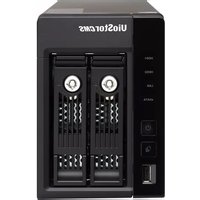
Table of contents Click a title to access it
Manual assistant
Powered by Anthropic
Waiting for your message
Product information

Brand : QNAP

Model : TS-EC1679U-RP-E10G 32TB

Category : Server