32LED8115CDW - TV SALORA - Free user manual and instructions
Find the device manual for free 32LED8115CDW SALORA in PDF.


User questions about 32LED8115CDW SALORA
0 question about this device. Answer the ones you know or ask your own.
Ask a new question about this device
Download the instructions for your TV in PDF format for free! Find your manual 32LED8115CDW - SALORA and take your electronic device back in hand. On this page are published all the documents necessary for the use of your device. 32LED8115CDW by SALORA.
USER MANUAL 32LED8115CDW SALORA
CLASS 1 LASER PRODUCT

text_image
Diagram showing a device with labeled components and directional arrows, including numbered parts 1, 2, and 3.1.Omhoog
text_image
Diagram showing a monitor with labeled parts and a close-up of the internal structure, marked with numbers 1, 2, and 3.natural_image
Close-up of a cylindrical electronic component with two connectors and a label, no readable text or symbols present.Stroom aansluiten
text_image
Diagram of a mobile phone control panel with numbered labels and function buttons for navigation, display, and control signals.natural_image
Illustration of a hand holding a CD with an arrow pointing to it, next to a blank document (no text or symbols present)Safety Information....23
Getting Started 24
Notifications & Features & Accessories......24
DVD - Control buttons 25
Remote Control 27
Remote Control - DVD 28
Connections.... 29
First Time Installation - USB Connections....30
TV Menu Features and Functions 32
General TV Operation 35
Software Upgrade.... 35
Troubleshooting & Tips...... 35
PC Input Typical Display Modes ....37
Supported File Formats for USB Mode 37
AV and HDMI Signal Compatibility 37
DVD Mode 38
General Operation 40

CAUTION
RISK OF ELECTRIC SHOCK DO NOT OPEN

CAUTION: TO REDUCE THE RISK OF ELECTRIC SHOCK DO NOT REMOVE COVER (OR BACK).
NO USER-SERVICEABLE PARTS INSIDE. REFER SERVICING TO QUALIFIED SERVICE PERSONNEL.
To operate your TV in extreme ambient conditions may cause the damage of the device.

If there is lightning or storms, or if the TV is not going to be used for a while (e.g. if going away on holiday), disconnect the TV set from the mains. The mains plug is used to disconnect TV set from the mains and therefore it must remain readily operable.

The exclamation point within an equilateral triangle is intended to alert the user to the presence of important operating and maintenance (servicing) instructions in the literature accompanying the appliance.
Note : Follow the on screen instructions for operating the related features.

IMPORTANT - Please read these instructions fully before installing or operating

WARNING: Never let people (including children) with reduced physical, sensory or tal capabilities or lack of experience and / or knowledge use electrical devices unsupervised.
- For ventilation purposes, leave a free space of at least 10 cm all around the set.
- Do not block ventilation holes.
- Do not place the TV on sloping or unstable surfaces, the TV may tip over.
- Use this device in moderate climates.
- The power cord plug should be easily accessible. Do not place the TV, furniture, etc. on the power cord. A damaged power cord/plug can cause fire or give you an electric shock. Handle the power cord by the plug, do not unplug the TV by pulling the power cord. Never touch the power cord/plug with wet hands as this could cause a short circuit or electric shock. Never make a knot in the power cord or tie it with other cords. When damaged it must be replaced, this should only be done by qualified personnel.
- Do not use this TV in a humid or damp place. Do not expose the TV to liquids. If any liquid falls into the cabinet unplug the TV and have it checked by qualified personnel before operating it any further.
- Do not expose the TV to direct sunlight or other heat sources.
- The TV should not be placed near to open flames or sources of intense heat such as an electric heater.
- Excessive sound pressure from earphones and headphones can cause hearing loss.
- Ensure that no open flame sources, such as lit candles, are placed on top of the TV.
- To prevent injury, this TV must be securely attached to the wall in accordance with the installation instructions (if the option is available).
- Occasionally, a few non-active pixels may appear on the screen as a fixed blue, green or red point. Please note that this does not affect the performance
of your product. Take care not to scratch the screen with fingernails or other hard objects.

- Before cleaning, unplug the TV from the wall socket. Only use a soft, dry cloth while cleaning.
 Warning Warning | Serious injury or death risk |  |
 Risk of electric shock Risk of electric shock | Dangerous voltage risk | |
 Caution Caution | Injury or property damage risk | |
 Important Important | Operating the system correctly | |
 Notice Notice | Additional notes marked | |
Servicing
- Warning: Risk of exposure to radiation from class 1/class 3b visible and invisible laser beams. Do not open the TV and stare directly into beam.
CLASS 1 LASER PRODUCT
- Warning: Risk of electric shock, do not attempt to repair, service or modify this TV yourself. Contact the manufacturer, their approved service agent
Getting Started
Notifications & Features & Accessories
Environmental Information
This television is designed to consume less energy to help save the environment. To reduce energy consumption, you should take the following steps: If you set the Power Save Mode as Eco, the TV will switch to energy-saving mode. The Power Save Mode settings can be found in the 'Picture' section of the Main Menu. Note that some picture settings will be unavailable to be changed.
If Picture Off is selected, "Screen will be off in 3 seconds." message will be displayed. Select PROCEED and press OK to continue. The screen will be off immediately.
When the TV is not in use, please switch off disconnect the TV from the mains plug. This will also reduce energy consumption.
Standby Notifications
1) If the TV does not receive any input signal (e.g. from an aerial or HDMI source) for 5 minutes, the TV will go into standby. When you next switch-on, the following message will be displayed: "Standby Cause No Signal". Press OK to continue.
2) If the TV has been left on and not been operated for a while, the TV will go into standby. When you next switch-on, the following message will be displayed.
"Standby Cause No Operation" Press OK to continue.
Features
- Remote controlled colour LED TV.
• Fully integrated digital/cable TV (DVB-T/C) - HDMI inputs are for connecting a device that has a HDMI socket.
- USB input.
- OSD menu system.
- Scart socket for external devices (such as DVD Players, PVR, video games, etc.)
- Stereo sound system.
- Teletext.
• Headphone connection.
• Automatic programming system. - Manual tuning.
• Automatic power down after up to six hours. - Sleep timer.
- Child lock.
• Automatic sound mute when no transmission. - NTSC playback.
• AVL (Automatic Volume Limiting).
- PLL (Frequency Search).
- PC input.
- Plug&Play for Windows 98, ME, 2000, XP, Vista, Windows 7.
• Game Mode (Optional).
Accessories Included
- Remote Control
- Batteries: 2 × AAA
- Instruction Book
- Side AV Connection Cable
TV Control Switch & Operation

text_image
Diagram showing a device interior with labeled parts and directional arrows, including numbered annotations ①, ②, and ③.- Up direction
- Down direction
- Programme/Volume / AV / Standby-On selection switch
The Control button allows you to control the Volume/Programme/ Source and Standby-On functions of the TV.
To change volume: Increase the volume by pushing the button up. Decrease the volume by pushing the button down.
To change channel: Press the middle of the button, the channel information banner will appear on screen. Scroll through the stored channels by pushing the button up or down
To change source: Press the middle of the button twice, the source list will appear on screen. Scroll through the available sources by pushing the button up or down.
To turn the TV off: Press the middle of the button down and hold it down for a few seconds, the TV will turn into standby mode.
DVD - Control buttons
- Play / Pause (▶) button
Plays / pauses the disc. When DVD menu (root menu) is active, this button functions as "button select" (selects the highlighted item in menu) if this is not prohibited by the disc).
- Stop / Eject ( ■ ) button
Stops the disc playing / Ejects or Loads the disc.
- Disc loader

NOTE: You cannot eject the disc via the remote control.
To eject while playing a file; you should press the STOP button
“■”(on the TV) three times.

text_image
Diagram showing a monitor with labeled parts: 1, 2, and 3, likely illustrating a technical or educational view.Inserting the Batteries into the Remote
Lift the cover on the back of the remote upward gently. Install two AAA batteries. Make sure to match the + and - ends of the batteries in the battery compartment (observe the correct polarity) Replace the cover.

natural_image
Close-up of a cylindrical battery with two charging leads and a warning symbol (no readable text or symbols)Connect Power
IMPORTANT: The TV set is designed to operate on 220-240V AC, 50 Hz socket. After unpacking, allow the TV set to reach the ambient room temperature before you connect the set to the mains. Plug the power cable to the mains socket outlet.
Antenna/Cable Connection
Connect the "aerial" or "cable TV" plug to AERIAL INPUT (ANT) socket located on the back of the TV.

Notification
Manufactured under license from Dolby Laboratories.
TRADEMARK ACKNOWLEDGMENT
"Dolby" and the double-D symbol are trademarks of Dolby Laboratories.

DOLBY. DIGITAL PLUS
"HDMI, the HDMI logo and High-Definition Multimedia Interface are trademarks or registered trademarks of HDMI Licensing LLC."

HIGH-DEFINITION MULTIMEDIA INTERFACE
This product incorporates copyright protection technology that is protected by U.S. patents and other intellectual property rights. Use of this copyright protection technology must be authorized by Rovi Corporation, and is intended for home and other limited viewing uses only unless otherwise authorized by Rovi Corporation. Reverse engineering and disassembly are prohibited.
Information for Users on Disposal of Old Equipment and Batteries
[European Union only]
These symbols indicate that equipment with these symbols should not be disposed of as general household waste. If you want to dispose of the product or battery, please consider the collection systems or facilities for appropriate recycling.
Notice: The sign Pb below the symbol for batteries indicates that this battery contains lead.
![SALORA 32LED8115CDW - [European Union only] - 1](/content/2026/06/1237088/images/c208375dc4f19a58a195548f9bc403df8677f829217cecc15493082877c17c33.jpg)
text_image
BatteryProducts
Specification
| TV Broadcasting PAL B/G D/K K | |
| Receiving Channels | VHF (BAND I/III) - UHF (BAND U) - HYPERBAND |
| Number of Preset Channels | 1000 |
| Channel Indicator On Screen Display | |
| RF Aerial Input 75 Ohm (unbalanced) | |
| Operating Voltage 220-240V AC, 50Hz. | |
| Audio German+Nicam | |
| Audio Output Power (WRMS.) (10% THD) | 2 x 6 |
| Power Consumption | 65W |
| Weight | 7,60 |
| TV Dimensions DxLxH (with foot) | 185 x 743 x 494 |
| TV Dimensions DxLxH (without foot) | 88 x 743 x 451 |
| Display | 16/9 32"inch |
| Operation temperature and operation humidity: | 5°C up to 45°C, 85% humidity max |
Remote Control

text_image
Diagram of a mobile phone control panel with labeled buttons, function keys, and status indicators for navigation and exit.Teletext
Press 📄 button to enter. Press again to activate mix mode. Press once more to exit. Follow the instructions displayed on digital teletext screen.
Digital Teletext (for UK only)
Press 📄 button to view digital teletext information. Operate it with the coloured buttons, cursor buttons and the OK button. The operation method may differ depending on the contents of the digital teletext. Follow the instructions displayed on the digital teletext screen. When the 📄 button is pressed again, the TV returns to television broadcast.
- Standby / On
- Play (in media browser mode)
- No function
- Mono-Stereo Dual I-II / Current language
- Fast rewind (in media browser mode)
- Colored buttons
- Numeric buttons
- Channel list
- Navigational buttons
- Ok / Confirm
- Menu on / off
- Return / back
- No function
- Media browser
- Electronic programme guide
- Teletext - Mix
- Volume up / down
- Mute
- Programme up / down
- Image size
- Info / Reveal (in TXT mode)
- My button 1
- My button 2
- Exit
- Quick menu
- Previous programme / Now ( in EPG mode)
- Fast forward (in media browser mode)
- Subtitle on-off / Subtitle (in media browser mode)
- Stop (in media browser mode)
- Pause (in media browser mode)
- AV / Source
Using My button 1
Press MY BUTTON 1 for five seconds when on a desired source, channel or link, until the "MY BUTTON IS SET" message is displayed on the screen. This confirms that the selected MY BUTTON is now associated with the selected function. Using My button 2
Press MY BUTTON 2 for five seconds when on a desired source, channel or link, until the "MY BUTTON IS SET" message is displayed on the screen. This confirms that the selected MY BUTTON is now associated with the selected function.
Remote Control - DVD

text_image
1 2 3 4 5 6 7 8 9 10 11 12 13 14 25 24 23 22 21 20 19 1 2 3 4 5 6 7 8 9 0 OK MENU BACK EXIT QMenu V+ P+ i V- P-- Standby
- Play
- No function
- Language selection (Set language)
- Zoom
- Repeat
- Numeric buttons
- Navigation buttons
- OK
- Menu
- Return
- Angle
- volume up / down
- Mute
- Info
- My button 1 / Display time / DVD menu
- My button 2 / Search mode
- Exit
- Root
- Title
- Rapid advance
- Subtitle
- Stop
- Pause
- AV / Source selection

NOTE: Remote Control buttons that are not cated with a number cannot be used in DVD mode.
| Connector Type Cables Device | |||
 | ScartConnection(back) |  |  |
 | VGACconnection(back) |  |  |
SIDE AV | PC/YPbPrAudioConnection(side) | 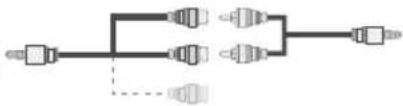 Side Audio/VideoConnection Cable (Supplied) PC Audio Cable(Not supplied) Side Audio/VideoConnection Cable (Supplied) PC Audio Cable(Not supplied) |  |
 | HDMIConnection(back) |  |  |
 SPDIF SPDIF | SPDIFFConnection(back) |  |  |
SIDE AV | Side AVConnection(side) |  AV Connection Cable(supplied) AV Connection Cable(supplied) |  |
HEADPHONE | HeadphoneConnection(side) |  | |
 YPBPR YPBPR | YPbPr VideoConnection(side) | 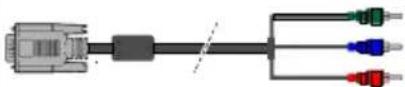 YPbPr ConnectionCable YPbPr ConnectionCable |  |
| [4STW] | USBConnection(side) |  | [T36W] |
 | CIConnection(side) |  |  |

NOTE: When connecting a device via the YPbPr or Side AV input, you must use a connection cables to enable
connection. See the illustrations above. | To enable PC audio, you will need to use the SIDE AV CONNECTION cable's WHITE & RED inputs. | If an external device is connected via the SCART socket, the TV will automatically switch to AV mode. | When receiving DTV channels (Mpeg4 H.264) or while in Media Browser mode, output will not be available via the scart socket. | When using the wall mounting kit (optional), we recommend that you plug all your cables into the back of the TV before mounting on the wall. | Insert or remove the CI module only when the TV is SWITCHED OFF. You should refer to the module instruction manual for details of the settings.
First Time Installation - USB Connections
Switching On/Off
To Switch the TV On
Connect the power cord to the 220-240V AC, 50 Hz.
To switch on the TV from standby mode either:
Press the "O" button, P+ P- or a numeric button on the remote control.
Press the side function switch until the TV comes on from standby.
To Switch the TV Off
Press the "button" on the remote control or press the side function switch until the TV switches into standby mode.
To power down the TV completely, unplug the power cord from the mains socket.
Note: When the TV is switched to standby mode, the standby LED can blink to indicate that features such as Standby Search Over Air Download or Timer is active. The LED can also blink when you switch on the TV from standby mode.
First Time Installation
When turned on for the first time, the language selection screen is displayed. Select the desired language and press OK.
The First Time Installation (FTI) screen will be displayed next. Set your preferences using the navigation buttons and when finished, press OK to continue.
You can activate Store mode option to be available in “Other settings” menu and your TV’s features will be illustrated on the top of the screen. a confirmation screen will be displayed. Select YES to proceed.
If Home Mode is selected, Store mode will not be available after the First Time Installation. Press OK button to continue.
Aerial Installation
If you select AERIAL option from the Search Type screen, the television will search for digital terrestrial TV broadcasts

NOTE: You can press MENU button to cancel.
After all the available stations are stored, the Channel List will be displayed on the screen. If you like how the channels are sorted according to the LCN (*), please select "Yes" and then press OK.
Press MENU button to quit channel list and watch TV. (*) LCN is the Logical Channel Number system that organizes available broadcasts in accordance with a recognizable channel sequence (if available).
Cable Installation
If you select CABLE option and press OK button on the remote control. To continue, please select YES and press OK. To cancel operation, select NO and press OK. You can select frequency ranges from this screen.
Enter the frequency range manually by using the numeric button.
Note: Searching duration will change depending on the selected search step.
Media Playback via USB Input
You can connect a 2.5" and 3.5" inch (hdd with external power supply) external hard disk drives or USB memory stick to your TV by using the USB inputs of the TV.
IMPORTANT! Back up your files before making any connections to the TV. Manufacturer will not be responsible for any file damage or data loss. Certain types of USB devices (e.g. MP3 Players) or USB hard disk drives/memory sticks may not be compatible with this TV. The TV supports FAT32 and NTFS disk formatting but recording will not be available with NTFS formatted disks.
While formatting a USB hard disk that has 1TB (Tera Byte) or more file capacity, you can experience problems with the formatting process. Do not repeatedly quickly plug and unplug the drive. This may cause physical damage to the USB player and USB device itself. Do not pull out USB module while playing a file.
Quick Menu
Quick Settings menu allows you to access some options quickly. This menu includes Power Save Mode, Picture Mode, Equalizer Settings, Favourites and Sleep Timer options. Press Q.MENU button on the remote control to view quick menu. See the following chapters for the details of the listed features.
Media Browser Menu
You can play photo, music, and movie files stored on a USB disk by connecting it to your TV. Connect a USB disk to one of the USB inputs located on the side of the TV. Pressing the MENU button while in the Media Browser mode will access the Picture, Sound and Settings menu options. Pressing the MENU button again will exit from this screen. You can set your Media Browser preferences by using the Settings Menu.
| Loop/Shuffle Mode Operation | |
| Start playback with and activate | [1000] TV plays next file and loop the list. |
| Start playback with OK and activate |  the same file will be played in a loop (repeat) the same file will be played in a loop (repeat) |
| Start playback with OK/ and activate | [1470] the file will be played in a shuffle. |
| TV Menu Features and Functions | |
| Picture Menu Contents | |
| Mode | You can change the picture mode to suit your preference or requirements. Picture mode can be set to one of these options: Cinema, Game, Sport, Dynamic and Natural. |
| Contrast Sets the | lightness and darkness values of the screen. |
| Brightness Sets | the brightness value for the screen. |
| Sharpness Sets | the sharpness value for the objects displayed on the screen. |
| Colour Sets the colour value, adjusting the colors. | |
| Power Save Mode | To set the Power Save Mode as Eco, Picture Off and Disabled.(When the Mode is Dynamic, Power Save mode is automatically set as disabled.) |
| Backlight(Optional) | This setting controls the backlight level. The backlight function will be inactive if the Power Save Mode is set to Eco. The backlight cannot be activated in VGA, Media Browser mode or while the picture mode is set to Game. |
| NoiseReduction | If the broadcast signal is weak and the picture is noisy, use the Noise Reduction setting to reduce the amount of noise. |
| Advanced Settings | |
| DyanmicContrast | You can change the Dynamic Contrast ratio to desired value. |
| Colour Temp Sets the desired colour tone. | |
| Picture Zoom | Sets the desired picture size from picture zoom menu.Note: Auto (Only available in Scart mode with SCART PIN8 high voltage/low voltage switching) |
| HDMI TrueBlack | While watching from HDMI source, this feature will be visible in the Picture Settings menuYou can use this feature to enhance blackness in the picture. |
| Film Mode | Films are recorded at a different number of frames per second to normal television programmes. Turn this feature on when you are watching films to see the fast motion scenes clearly. |
| Skin Tone | Skin tone can be changed between -5 and 5. |
| Colour Shift Adjust the desired colour tone. | |
| RGB Gain | You can configure the colour temperature values using the RGB Gain feature. |
| Reset Resets the | picture settings to factory default settings.(Except Game Mode) |
| Autoposition(in PC mode) | Automatically optimizes the display. Press OK to optimize. |
| H Position (inPC mode) | This item shifts the image horizontally to the right hand side or left hand side of the screen. |
| V Position (in PC mode) | This item shifts the image vertically towards the top or bottom of the screen. |
| Dot Clock (in PC mode) | Dot Clock adjustments correct the interference that appear as vertical banding in dot intensive presentations like spreadsheets or paragraphs or text in smaller fonts. |
| Phase (in PC mode) | Depending on the resolution and scan frequency that you input to the TV set, you may see a hazy or noisy picture on the screen. In such a case you can use this item to get a clear picture by trial and error method. |
| While in VGA (PC) mode, some items in Picture menu will be unavailable. Instead, VGA mode settings will be added to the Picture Settings while in PC mode. | |
| Sound Menu Contents | |
| Volume Adjusts the volume level. | |
| Equalizer | Selects the equalizer mode. Custom settings can be made only whe in user mode. |
| Balance This setting is used for emphasizing left or right speaker balance. | |
| Headphone Sets headphone volume. | |
| Sound Mode You can select a sound mode. (If the selected channel supports). | |
| AVL (Automatic Volume Limiting) | Function sets the sound to obtain fixed output level between programmes. |
| Headphone/Lineout | When you connect an external amplifier to your TV using the headphone jack, you can select this option as Lineout. If you have connected headphones to the TV, set this option as Headphone. |
| Dynamic Bass Enables or disables the Dynamic Bass. | |
| Surround Sound (optional) | Surround sound mode can be changed as On or Off. |
| Digital Out Sets digital out audio type. | |
| Settings Menu Contents | |
| Conditional Access Controls conditional access modules when available. | |
| Language | Configures language settings (may change depending on the country selected) Preferred and current settings will be available. Current settings can be changed only if the broadcaster supports. |
| Parental | Enter correct password to change parental settings. You can easily adjust menu lock, maturity lock(may change depending on the country selected) and child lock in this menu. You can also set new pin number. |
| Timers | Sets sleep timer to turn off the TV after a certain time. Sets timers for selected programmes. |
| Date/Time | Sets date and time. |
| Sources | Enables or disables selected source options. |
| Other Settings: Displays other setting options of the TV set: | |
| Menu Timeout Changes | timeout duration for menu screens. |
| Scan Encrypted Channels | When this setting is on, the search process will locate the encrypted channels as well. |
| Blue Background | Activates or deactivates the blue background system when the signal is weak or absent. |
| Software Upgrade To ensure that your TV always has the most up to date firmware. | |
| Application Version Displays application version. | |
| Hard of Hearing Enables any special feature sent from the broadcaster. | |
| Audio Description | Audio description refers to an additional narration track for blind and visually impaired viewers of visual media, including television and movies. You can use this feature, only if the broadcaster supports that additional narration track. |
| Auto TV Off | You can set the timeout value of auto off feature. When the timeout value is reached and the TV has not been operated for a selected time, the TV will go into standby mode. |
| Standby Search (Optional) | If the Standby Search is set to On, when the TV is in standby mode, available broadcasts will be searched. If the TV locates any new or missing broadcasts, a menu screen will be displayed, asking you whether or not to execute these changes. The Channel list will be updated and changed after this process. |
| Store Mode | If you are displaying the TV in a store, you can activate this mode. Whilst Store Mode is enabled, some items in the TV menu may not be available. |
| Power Up Mode This setting configures the power up mode preference. | |
| Install and Retune Menu Contents | |
| Automatic Channel Scan (Retune) (If available) | Displays automatic tuning options. Digital Aerial: Searches and stores aerial DVB stations. Digital Cable: Searches and stores cable DVB stations. Analogue: Searches and stores analogue stations. Digital Aerial & Analogue: Searches and stores aerial DVB and analogue stations. Digital Cable & Analogue: Searches and stores cable DVB and analogue stations. |
| Manual Channel Scan This feature can be used for direct broadcast entry. | |
| Network Channel Scan S Searches for the linked channels in the broadcast system. | |
| Analogue Fine Tune | You can use this setting for fine tuning analogue channels. This feature is not available if no analogue channels are stored. |
| First Time Installation | Deletes all stored channels and settings, resets TV to factory settings. |
General TV Operation
Using the Channel List
The TV sorts all stored stations in the Channel List. You can edit this channel list, set favourites or set active stations to be listed by using the Channel List options.
Configuring Parental Settings
To prohibit viewing of certain programmes, channels and menus can be locked by using the parental control system.
To display parental lock menu options, the PIN number should be entered. The factory default PIN number is 0000. After coding the correct PIN number, parental settings menu will be displayed.
Menu Lock: Menu lock setting enables or disables the menu access.
Maturity Lock: When set, this option gets the maturity information from the broadcast and if this maturity level is disabled, disables access to the broadcast.
Child Lock: When Child Lock is set, the TV can only be controlled by the remote control. In this case the control panel buttons will not work.
Set PIN: Defines a new PIN number.
Note: If the Country option is set to France, you can use 4725 as the default code.
Electronic Programme Guide (EPG)
Some, but not all channels send information about the current and next programmes. Press the Button to view the EPG menu.
Up/Down/Left/Right: Navigate EPG.
OK: Displays programme options.
INFO: Displays, in detailed, information on the programme selected
GREEN: Switches to List Schedule EPG.
YELLOW: Switches to Timeline Schedule EPG.
BLUE: Displays filtering options.
Programme Options
In EPG menu, press the OK button to enter the Event Options menu.
Select Channel
In EPG menu, using this option, you can switch to the selected channel.
Set Timer / Delete Timer
After you have selected a programme in the EPG menu, press the OK button. Select the Set Timer on Event option and press the OK button. You can set a timer for future programmes. To cancel an already set timer, highlight that programme and press the OK button. Then select "Delete Timer" option. The timer will be cancelled.
Note: It is not possible to record two channels at the same time.
Software Upgrade
Your TV is capable of finding and updating automatically via the Aerial/Cable signal or over the Internet.
Software upgrade search via user interface
Simply navigate on your main menu. Choose Settings and select Other Settings menu. In Other Settings menu navigate on to the Software for Upgrade item and press OK button to check for a new software upgrade.
Note : Internet connection is needed. If an internet connection is not available, try to upgrade via broadcast. If a new upgrade is found, it starts to download the upgrade. Press OK to continue with the reboot operation.
3 AM search and upgrade mode
While the TV is connected to an aerial signal. If Automatic scanning in the Upgrade Options menu is enabled, the TV wakes up at 03:00 and searches broadcast channels for new software upgrades. If new software is found and downloaded successfully, the next time the TV powers up, it will have the new software version.
Note: If the TV fails to come on after the upgrade unplug the TV for 2 minutes and plug in again.
Troubleshooting & Tips
Tv will not turn on
Make sure the power cord is plugged in securely to wall outlet. The batteries in the remote control may be exhausted. Press the Power button on the TV.
Poor picture
• Have you selected the correct TV system?
- Low signal level can cause picture distortion. Please check antenna access.
- Check if you have entered the correct channel frequency if you have done manual tuning.
- The picture quality may degrade when two devices are connected to the TV at the same time. In such a case, disconnect one of the devices.
No picture
- No Picture means that your TV is not receiving a transmission. Have you selected the correct button on the remote control? Try once more. Also make sure the correct input source has been selected.
• Is the antenna connected properly?
• Is the antenna cable damaged? - Are suitable plugs used to connect the antenna?
• If you are in doubt, consult your dealer.
No sound
- Has the TV been set to mute? To cancel mute, press the “” button, or increase the volume level.
- Sound is coming from only one speaker. Is the balance set to one extreme? See Sound Menu section.
Remote control - does not operate
- The batteries may be exhausted. Replace the batteries.
Input sources - can not be selected
- If you cannot select an input source, it is possible that no device is connected. if not
- Check the AV cables and connections if you have tried to connect a device.
The DVD picture quality is poor
- Make sure the DVD disc surface is not damaged (no scratches, fingerprints etc.).
- Clean the DVD disc and try again. See instructions in "Cleaning Discs" to clean your disc properly.
- Ensure that the DVD disc is in the loader with the label facing you when looking at the TV screen.
- A damp DVD disc or condensation may effect the equipment. Wait for 1 to 2 hours in Stand-by mode to dry the equipment.
The Disc does not play
- No disc in the machine - Place a disc into the loader
- Disc is incorrectly loaded - Ensure that the DVD disc is in the loader with the label facing you when looking at the TV screen.
- Wrong type of disc. The DVD player cannot play CD-ROMS etc.
- The region code of the DVD disc must match the player.
Ensure that the DVD disc is in the loader with the labe facing to the front.
Wrong type of disc. The machine cannot play CD-ROMS with PC-Data.
Wrong OSD language
- Select the language in the setup menu.
- The language for the sound or subtitles on a DVD disc cannot be changed.
- Multilingual sound and/or subtitles are not recorded on the DVD disc.
- Try to change the sound or subtitles using DVD's title menu. Some DVD's do not allow the user to change these settings without using the disc's menu.
Angle, Zoom etc. functions do not work
- These functions are not available on the DVD.
- Angle can only be changed when the angle symbol is displayed.
If nothing works..
If you have tried the above solutions and none seem to work, try switching your TV-DVD off and on again. If this does not work, contact your supplier or TV-DVD repair technician. Never attempt to repair a defective TV-DVD yourself.
PC Input Typical Display Modes
The following table is an illustration of some of the typical video display modes. Your TV may not support all resolutions. Your TV supports up to 1920x1080.
| Index | Resolution | Frequency |
| 1 | 640x350p | 60 Hz |
| 2 | 640x400p | 60 Hz |
| 3 | 1024x768 | 60 Hz |
| 4 | 1280x768 | 60 Hz |
| 5 | 1360x768 | 60 Hz |
| 6 | 720x400 | 60 Hz |
| 7 | 800x600 | 56 Hz |
| 8 | 800x600 | 60 Hz |
| 9 | 1024x768 | 60 Hz |
| 10 | 1024x768 | 66 Hz |
| 11 | 1280x768 | 60 Hz |
| 12 | 1360x768 | 60 Hz |
| 13 | 1280x1024 | 60 Hz |
| 14 | 1280x960 | 60 Hz |
| 15 | 1280x1024 | 60 Hz |
| 16 | 1400x1050 | 60 Hz |
| 17 | 1600x1200 | 60 Hz |
| 18 | 1920x1080 | 60 Hz |
AV and HDMI Signal Compatibility
| Source | Supported Signals | Available | |
| EXT(SCART) | PAL 50/60 O | ||
| NTSC 60 O | |||
| RGB 50 O | |||
| RGB 60 O | |||
| Side AV | PAL 50/60 O | ||
| NTSC 60 O | |||
| PC/YPbPr | 480I, 480P | 60Hz O | |
| 576I, 576P | 50Hz O | ||
| 720P 50Hz | z,60Hz O | ||
| 1080I | 50Hz,60Hz O | ||
| 1080P | 50Hz,60Hz O | ||
| HDMI1HDMI2 | 480I | 60Hz O | |
| 480P | 60Hz O | ||
| 576I, 576P | 50Hz O | ||
| 720P 50Hz | z,60Hz O | ||
| 1080I | 50Hz,60Hz O | ||
| 1080P | 24Hz, 25Hz30Hz, 50Hz,60Hz | O | |
(X: Not Available, O: Available)
In some cases a signal on the LCD TV may not be displayed properly. The problem may be an inconsistency with standards from the source equipment (DVD, Set-top box, etc.). If you do experience such a problem please contact your dealer and also the manufacturer of the source equipment.
Supported File Formats for USB Mode
| Media File | Extension | Format | Remarks | |
| Video | Audio | (Maximum resolution/Bit rate etc.) | ||
| Movie | .mpg .mpeg MPEG1,2 | MPEG Layer 1/2/3 | MAX 1920x1080 @ 30P 20Mbit/sec | |
| .dat MPEG1,2 | MPEG2 | |||
| .vob | MPEG2 | |||
| .mkv H.264, MPEG1,2,4 EAC3/ AC3 | ||||
| .mp4 | MPEG4, Xvid 1.00, Xvid 1.01, Xvid 1.02, Xvid 1.03, Xvid 1.10-beta1/2, H.264 | PCM/MP3 | ||
| .avi | MPEG2, MPEG4 | |||
| Xvid 1.00, Xvid 1.01, Xvid 1.02, Xvid 1.03, Xvid 1.10-beta1/2, H.264 | PCM | |||
| Music | .mp3 - | MPEG 1 Layer 1 / 2 (MP3) | 32Kbps ~ 320Kbps(Bit rate)32KHz ~ 48KHz(Sampling rate) | |
| Photo | .jpg .jpeg | Baseline JPEG | - | max WxH = 15360x8640 4147200bytes |
| . | Progressive JPEG | - | max WxH = 9600x6400 3840000bytes | |
| .bmp - - max WxH = 5760x4096 3840000bytes | ||||
| Subtitle | .sub .srt | - | - | - |
DVD Mode
Handling Discs
- To keep the disc clean, only handle the disc by its edge. Do not touch the surface.
- Do not stick paper or tape on the disc.
- If the disc is contaminated with any substance like glue, remove before using it.
- Do not expose the disc to direct sunlight or heat sources such as hot air ducts, or leave it in a car parked in direct sunlight as the temperature can rise quickly and damage the disc.
• After playing, store the disc in its case.
Cleaning Discs
- Before playing, clean the disc with a cleaning cloth. Wipe the disc from the centre out.
- Do not use solvents such as benzine, thinner, commercially available cleaners or anti-static spray intended for vinyl LPs.
DVD - Features
- DVD / CD / CD-R / CD-RW / MP3 / JPEG / MPEG playback.
- NTSC / PAL playback (according to disc content).
- LPCM audio via coaxial and optical digital audio outputs (optional).
- Multi-Audio (up to 8) support (according to disc content).
- Multi-Subtitle (up to 32) support (according to disc content).
- Multi-Angle (up to 9) support (according to disc content).
- 8 level parental control.
- Fast forward and rewind - 5 different speeds: 2x, 4x, 8x, 16x, 32x.
- Slow motion playback - 4 different speeds: 1/2x , 1/4x , 1/8x , 1/16x forward.
• Frame by frame forward playback. - Search Mode
- Repeat
- Coaxial audio output (optional).
- Copied disks may be incompatible.
How to watch a DVD

NOTE: DVD mode cannot be accessed unless a DVD is inserted or a DVD control button is pressed.
If you switch to another source by pressing SOURCE, SWAP or CH ^/ v buttons on the remote control, DVD playback will be paused automatically. You should press PLAY and resume the playback manually when you switch to DVD mode.
- Switch on the TV.
- Switch to DVD source using the "SOURCE" button on the remote control.
- Insert a disc into the loader.
The disc MUST be facing you when looking at the TV screen.

natural_image
Illustration of a hand holding a CD with an arrow pointing to it, next to a blank document (no text or symbols present)Most discs will be automatically loaded and play will start automatically if the disc does not have any menus recorded on it.
If play does not start automatically, press the play button "▶ on the remote control, or the play button "▶" Un the right side of the TV.
A menu may appear on the TV screen after a few moments or the film may start immediately after the Film/TV Company introduction. This will depend on the disc content and may differ on each disc.

NOTE: Steps 4 and 5 are only available when a menu is recorded on the disc.
-
Press the navigation buttons “^”, “√”, “<” or “>” or the number button/s to select the required title.
-
Press the OK button. The selected item starts to play.
Notes on DVD Playback
a. No sound will be heard during Rapid advance or Rapid reverse.
b. No sound will be heard during Slow motion play.
c. Reverse Slow motion play is not available.
d. In some cases, the subtitle language will not be changed immediately to the selected one.
e. When the preferred language will not select, even after pressing the button several times, it means the language is not available on the disc.
f. When the DVD player is restarted or the disc is changed, the subtitle selection is automatically changed back to the initial settings.
g. If a language is selected that is not supported by the disc, the subtitle language will automatically be set to the disc's priority (default) language.
h. Usually a ‘circulation’ will happen while switching to another language, this means you can cancel the subtitle by pressing the same button a number of times until “Subtitle Off” appears on the screen.
i. When the power is turned on or the disc is removed, the language heard will be the one selected at the initial settings.
j. Some DVDs may not contain root and/or title menus. k. Reverse stepping is not available.
I. For reference: If you attempt to enter a number greater than the total time of the current title, the time search box disappears and "Input Invalid message appears on top-left corner of screen.
m. The slide show is disabled when the ZOOM mode is on.
DVD Mode Configuration
- While in DVD source, press DISP. button to access DVD Setup menu. This is only possible if there is no playback.

text_image
Video Language Preference Video Setup Page Iv Type- This menu is operated using “<or“” and “^” or “” buttons.
TV Type
TV Type is only available as 'PAL'. The TV set also supports NTSC signal; however, the signal will be converted to PAL when it appears on the screen.
Language Setup
This menu is used for setting language preferences in DVD mode. Language menu contents are detailed below:
OSD LANG
You can select the default OSD language of the player menus
AUDIO
You can select the default audio language if supported by the DVD disc.
DISC MENU
You can select the DVD's disc menu language among these languages. Disc menu appears in the selected language, if supported by the DVD disc.
SUBTITLE
You can select the default subtitle language if supported by the DVD disc.
Preferences: These are the DVD mode preferences. Menu contents are detailed below:
DEFAULT
If you choose RESET and press OK, the factory-presets are loaded. Parental level and parental password does not change.
DOWNMIX
This mode can be selected when the digital audio output of the TV is used.
SURROUND
Surround sound output.
STEREO
Two channels stereo.
PARENTAL
Playing some DVDs can be limited depending on the age of users. The "Parental Control" function allows playback limitation level to be set by the parent. Parental Level can be adjusted to one of the eight levels. Level "8 ADULT" adjustment let you watch all of the DVD titles ignoring the DVD disc's parental level. You can watch the DVD discs, which has the same or lower parental level than the player's level only. Menu contents are detailed below:
PASSWORD
Using this item you can change the current password. To change the password you will be prompted to enter your old password. After you have entered your old password, you can now enter the new 4-digit password. You can use C key to delete the incorrect entry.

NOTE: Factory preset of the password is "0000".
You have to enter XXXX digital password every time you want to change the parental level. If you forget your password please contact technical service.
SPDIF OUTPUT
You can set Spdif Output as PCM or RAW. If you select PCM from SPDIF Output in DVD menu and play DVD with Dolby audio, you can get audio output with two channels via the speakers and the SPDIF Out. If you select RAW from SPDIF Output in DVD menu and play DVD with Dolby audio, speakers will be muted and you can get 5+1 Dolby audio via the SPDIF Out.
General Operation
You can operate DVD, movie CD, music or picture CD's content by using the proper buttons on your remote control. Below are main functions of commonly used remote control buttons.
| Buttons on the Remote Control | DVD Playback | Movie Playback | Picture Playback | Music Playback |
| ▶ | Play Play Play | Play | ||
| II | Pause Pause Pause Pause | |||
| ■ | Stop Stop Stop Stop | |||
| ◀/▶ | Skip backward/forward | Skip backward/forward | Rotate Skip backward/forward | |
| ▲/▼ | Highlights a menu item / Shifts the zoomed picture up or down (if available). | |||
| ◀◀/▶▶ | Fast reverse / Fast forward | |||
 | Views the scene from different angles (if available) | Changes slide effect (depends on the content) | X | |
| MY BUTTON1 | Displays time / Views main setup menu | |||
| INFO | Time counter mode selection (during playback). Press repeatedly to switch between modes. | |||
| LANG. | Audio language. X X | |||
| MENU | Displays TV menu. | |||
| OK / SELECT | Enter / View / Play | |||
| GREEN | Displays repeat options. | |||
| RETURN | Returns back to the previous menu (if available). | |||
| YELLOW | Goes back to the root folder (if available). | |||
| MY BUTTON2 | Direct selection of scenes or time. | Selects the desired file. | Selects the desired file. | |
| SUBTITLE | Subtitle on-off. Press repeatedly to switch between subtitle options. | X | X | |
| SWAP | Media source selection. | |||
| BLUE | Displays disc menu (if available). | Displays disc menu (if available). | X | X |
| RED | Zooms picture. Press repeatedly to switch between zoom options. | |||
| Other Functions – Button Combinations (During playback) | |
| || ▶▶ | Slow forward. |
| [|| ]▶▶ ◀◀ ▶▶ | Sets slow forward speed. |
| ▶▶ ▶▶ | Sets fast forward speed. |
| ◀◀ ◀◀ | Sets fast reverse speed. |
| ■ + ■ | Confirms stop command. |
(*) You can switch to title by pressing numeric keys directly. You need to press 0 and then digit key to switch one digit titles (example: to select 5, press 0 and 5).
| Media | File Extension | Format | Supported(Maximum resolution/Bit rate etc.) | |
| Video Audio | ||||
| Movie | .mpg/.dat/.vob | MPEG1 MPEG | Layer 1/2/3 | |
| MPEG2 MPEG2 | ||||
| .avi | XviD/3ivx PCM/M | MP3 XviD Version up to:1.1.2 | ||
| MPEG4 PCM/MP3 | ||||
| MS ISO MPEG4 | PCM/MP3 Support SP and ASP | |||
| Music | -- PCM Sample Rate: 8K ~ 48KHz | |||
| .mp3 | - | MPEG 1/2 Layer 1/2/3 MP3 | Sample Rate: 8K ~ 48KHz, Bit Rate: 64K ~ 320Kbps | |
| Photo | .jpg | Baseline JPEG | W x H = 8902 x 8902 up to 77 Mega-pixel Support format: 444/ 440/ 422/ 420/ Grayscale | |
| Progressive JPEG Up to 4 Mega-pixel Support format: 444/ 440/ 422/ 420/ Grayscale | ||||
| External Subtitles | .srt Support Text File Format, but do | not support Picture File Format | ||
| .smi | ||||
| .sub | ||||
| .ssa | ||||
| .ass | ||||
Compatible disc types
| Disc Types (Logos) | Recording Types | Disc Size | Max. Playing Time | Characteristics |
 | Audio + Video | 12cm Single sided; 240 min.Double sided; 480 min. | DVD contains excellent sound and video due to Dolby Digital and MPEG-2 System. Various screen and audio functions can be easily selected through the on screen menu. | |
 | Audio | 12cm | 74 min. | An LP is recorded as an analogue signal with more distortion. CD is recorded as a digital signal with better audio quality, less distortion and less deterioration of audio quality over time. |
 | Audio (xxxx.mp3) | 12cm Depends on MP3 quality | MP3 is recorded as a digital signal with better audio quality, less distortion and less deterioration of audio quality over time. | |
 | Video (still picture) | 12cm | Depends on JPG quality | JPEG is recorded as a digital signal with better picture quality over time. |
For proper operation, only 12 cm discs must be used.
Table des matières
RISQUE D'ELECTROCUTION NE PAS OUVRIR

ATTENTION: POUR EVITER TOUT RISQUE D'ELECTROCUTION, NE RETIREZ PAS LE COUVERCLE. (OU LE ARRIÈRE).L'ENTRETIEN DES PIÈCES INTERNES EST INTERDIT AUX UTILISATEURS. VEUILLEZ CONFIER L'ENTRETIEN A UN PERSONNEL QUALIFIE.
CLASS 1 LASER PRODUCT

text_image
Diagram showing a device interior with labeled components and directional arrows, including numbered parts ①, ②, and ③.text_image
Diagram showing a computer monitor with labeled parts: 1, 2, and 3, illustrating internal components.natural_image
Close-up of a cylindrical battery with two charging leads and three negative charges, no visible text or symbolstext_image
Diagram of a remote control panel with numbered labels and function buttons for navigation, exit, and display.Connexions (Connections)
natural_image
Illustration of a hand holding a CD with an arrow pointing to it, next to a blank computer monitor (no text or symbols)| A | Product Fiche | ||
| B | Comercial Brand: SALORA | ||
| C | Product No. 10084886 | ||
| D | Model No. 32LED8115CDW | ||
| E | Energy efficiency class A | ||
| F | Visible screen size (diagonal, approx.) (inch/cm) | 32 inches 81 cm | |
| G | On mode average power consumption (Watt) | 41 | |
| H | Annual energy consumption (kWh/annum) | 59 | |
| I | Standby power consumption (Watt) | 0,5 | |
| J | Off mode power consumption (Watt) | 0 | |
| K | Display resolution (px) 1366 x 768 | ||
| A | B | C | D | E | F | ||
| English | Product Fiche Commercial Brand Product No. Model No. Energy efficiency class | Visible screen size (diagonal, approx.) (inch/cm) | |||||
| Deutsch | Produkt-Datenblatt | Markenzeichen | Produkt-Nr. | Modell-Nr. | Energieeffizienzklasse | Sichtbare Bildschirmgroße (diagonal,ca.) (Zoll /cm) | |
| عربي | قابسメント | تلمامة التجارية ثيووكن | رقمメント | رقم الموديل | تمة قعلية الطاقة | (ججم اشئاشة المربئие (قطروي) (موصه/سم) | |
| Български | Справочен лист с техническите данни | Търговска марка | Продукт No | Модел No | Клас на енергийна ефективност | Видим размер на екрана (диагонал,прибл.) (инча /см ) | |
| čeština | Produktový list | Značka výrobce | Číslo produktu | Model č. | Energetická třída | Viditelná velikost obrazovk (ühlopříčka,poibl.)(palcú /cm) | |
| Dansk | Produktoplysningsskema | Varemærke | Produktnr. | Model nr. | Energieffektivitetsklasse | Synlig skærmstørrelse (diagonalt,ca.) (HK/cm) | |
| Suomi | Tuote fiche | Kaupallinen merkki | Tuote nro. | Malli nro. | Viran tehokkuusluokka | Näkyván kuvaruudun kokc (diagonaalinen,n.) (tuumaa/cm) | |
| Français | Fiche du produit | Marque commerciale | Produit N° | Modèle N° | Classe d'efficacité énergétique | I aille d ecran visibie (diagonale,approx (pouces/cm) | |
| Hrvatski | SAŽETAK PROIZVODA | Trgovačka marka | Br. proizvoda | Br. modela | Klasa energetske učinkovitosti | Vidljiva veličina ekran (dijagonalna,priviližno) (inča/cm) | |
| Nederlands | Productfiche | Commercieel merk. | Productnr. | Modelnr. | Energie eficiëntie klasse | Zichtbare schemgroote (diagonaal,ca.) (inches/cm) | |
| Español | Ficha del Producto | Marca Comercial | No de Producto | No de Modelo | Clasificación Energética | Tamaño de pantalla visible (diagonal,aprox.) (pulgadas/cm) | |
| Svenska | Produktspecifikation | Varumärke | Produktnr. | Modellnr. | Energiklass | Synlig skärmstorlek (diagonal,ungefärlig) (tum/cm) | |
| Italiano | Scheda prodotto | Marchio commerciale | Numero prodotto | Numero modello | Classe di efficienza energetica | Dimensioni visibii delio schermo (diagonale,circa)(pollici/cm) | |
| Polski | KARTA PRODUKTU | Marka produktu | Nr produktu | Nr modelu | Klasa efektywności energetycznej | Widoczny obraz ekranu (przekątna,okolo)(cali/cm) | |
| Magyar | Termékismertető adatlap | Kereskedelmi marka | Termékszám | Modellszám | Energiahatékonysági osztály | Látható képtartomány (diagonális,kb.) (inches/cm) | |
| Norsk | Produktinformasjon | Kommersiell merkevare | Produkt nr. | Modell nr. | Energieffektivitet klasse | Synlig skierstmørrelse (diagonal, ca.) (tommer/cm) | |
| Português | Ficha do produto | Marca Comercial | Produto N° | Modelo N° | Classificação eficiência energética | Tamanho ecrã visivel (diagonal, aprox.) (polegadas/cm) | |
| Română | Fişă produs | Marcă comercială | Nr. Produs | Nr. Model | Clasa de eficiență energetică | Dimensiunea ecranului vizibil (diagonală, aprox.) (inch/cm) | |
| Русский | Справочный листок технических данных изделия | Торговая марка | Номер изделия | Номер модели | Класс энергопотребления | Видимый размер экрана (по диагонали. Около) (дюймов/см) | |
| беларуская | Справочный листок технических данных изделия | Торговая марка | Номер изделия | Номер модели | Класс энергопотребления | Видимый размер экрана (по диагонали,Около)(дюймов/см ) | |
| македонски | Технички податоци | Комерцијална марка | Производ бр. | Модел бр. | Класа на енергетска ефикасност | Големина на видлив екран (дијагонала, околу) (инчи/см) | |
| український | Технічнідані | Кормеційна марка | Артикул | Модель | Клас енергоспоживання | Видимий розмір екрана (диагональ, Приблизно) (дюймів/см) | |
| Srpski | Tehničke odlike | Komercijalna marka | Proizvod br. | Model br. | Klasa energetske efikasnosti | veicina viajjyov okrana (oijagonala tokom) (inča/cm) | |
| Slovenčina | Produktový list | Značka výrobcu | Číslo produktu | Model č. | Energetická trieda | Viditefná velkost'obrazovky (uhlopriečka, zhruba) (palcov/cm) | |
| Slovenščina | Opis izdelka | Komercialna znamka | Št. Izdelka | Št. Modela | Razred energetske učinkovitosti | Vidna velikost zaslona (diagonala pribl.) (palcev/cm) | |
| Еллянік | Делтіо проϊόντος | Емпорікó σήμα | Ар. Проϊόντος | Ар. Movtélου | Катнýоріа енергеиакніς απόδοσης | Орato мегевос ововніς (ойадунвіюς, тпер.) (ivotєс/см) | |
| Bosanski | Tehnički podaci | Komercijalna marka | Produkt br. | Model br. | Klasa energetske efikasnosti | Vidljiva veličina ekran (diagonala, približno.) (inča/cm) | |
| لاوي | لاوي علاب | لاوي علاب | لاوي علاب | لاوي علاب | لاوي علاب علاب علاب | (ολγικη κατα προσία και) (ωρεία κατα προσία και) | |
| Türkçe | Ürün fişi | Ticari Marka | Ürün No. | Model No. | Enerji verimiliği sınıfı | Görülen ekran boyutu (çapraz, yakışk.) (inch/cm) | |
| Shqip | Tê dhēnat e produktit | Marka tregtare | Nr. i produktit. | Nr. i modelit. | Klasa e eficiencês sê energjisê | Madnesia e ekranı te duksnem (diagonal, afërsisht) (inch/cm) | |
| Lietuvių | Gaminio etiketė | Gamintojas | Gaminio Nr. | Modelio Nr. | Energetinio elektyvumo klasė | Matomas ekrano dycis (istrižainė, approx.) (colių/cm) | |
| Latviešu | Produkta apraksts | Marka | Produkta nr. | Modelja nr. | Energoefektivitätes klase | Ekrána izměrs (pa diognāli, apmçram) (collas/cm) | |
| Eesti | TOOTEKIRJELDUS | Toolja firma | Toote nr. | Mudeli nr. | Energiaklass | Vaadatava ekraani suurus (diagonaal, umbes) (tolli/cm) | |
| فارسی | مشخصات محصول | مارک تجاری | 朦اءه محصول | 朦اءه مدل | گروه کارایی انتزی | النذاره صفحه لceil مشاهده (أدنسي، تقربیا) (لبنج /انلىتى متر) | |
| GHIJ | K | ||||
| English | On mode average power consumption (Watt) | Annual energy consumption (kWh/annum) | Standby power consumption (Watt) | Off mode power consumption (Watt) | Display resolution (px) |
| Deutsch | Durchschnittlicher Stromverbrauch im eingeschaltetem Zustand (Watt) | Jährlicher Energieverbrauch (kWh/Jahr) Standby-Stromverbrauch | (Watt) | Stromverbrauch im ausgeschaltetem Zustand (Watt) Display-Auflösung (px) | |
| عربية | متوسط استهيك الطاقة عن التنشoffs (والمط) | (الاستهيك السنوي لقط lượngة) (كير وطلا) | (استهيك الطاقة في وXPSS ASSENTADA) (والمط) | (منهاك الطاقة في وXPSS (فولت) | |
| Български | Средна консумация на електроенергия във включено състояние(Watt) | Годишна консумация на електроенергия (kWh/Годишна) | Консумация на електроенергия в режим на готовности (Watt) | Консумация на електроенергия в изключено състояние (Watt) | Разделителна способност на дисплея(пиксела) |
| čeština | Prüměrná spotřeba elektrické energie v zapnutém režimu (Wattú) | Roční spotřeba energie (kWh/Roční) | Spotřeba elektrické energie v pohotovstním režimu (Wattú) | Spotřeba elektrické energie ve vypnutém režimu (Wattú) Rozlišení disploje (px) | |
| Dansk | Gennemsnitligt stromforbrug i taëndt tlistand (Watt) | Ärligt energiforbrug (kWh/Ärligt) | Stromforbrug (standby)(Watt) | Stromforbrug i slukket tilstand (Watt) | Skærmoplesning (px) |
| Suomi | Pălălla-tilan keskimâäräinen virrankulutus (Wattia) | Vuosittainen sähkönkulutu (kWh/Vuosittainen) | Vakiovirran kulutus (Wattia) | Pois-tilan virrankulutus (Wattia) | Näytön erottelukyky (pikselia) |
| Français | Consommation énergétique moyenne en mode "marche" (Watt) | Consommation énergétique annuelle (kWh/annuel) | Consommation d'énergie en veille (Watt) | Consommation d'énergie en mode "arrêt" (Watt) | Résolution de l'écran (px) |
| Hrvatski | Prosječna potrošnja el. energije kada je proizvod uključen (Watta) | Godišnja potrošnja el. Energije (kWh/Godišnja) | Potrošnja el. energije u modu pripravnosti (Watta) | Potrošnja el. energije kada je proizvod isključen (Watta) | Rezolucija zasiona (piksela) |
| Nederlands | Aan-modus gemiddeld stroomverbruik (Watt) | Jaarlijks energieverbruik(kWh/Jaarlijks ) | Stand-by stroomverbruik (Watt) | Uit-modus stroomverbruik (Watt) | Schemresolutie (px) |
| Español | Consumo eléctrico medio, en funcionamiento (Vatio) | Consumo eléctrico anual (kWh/anual) | Consumo en modo en espera (Vatio) | Consumo eléctrico modo apagado (Vatio) | Resolución de pantalla (px) |
| Svenska | Strömkonsumtion i PÅ-läge (Watt) | Energikonsumtion per år (kWh/Ärlig) | Strömkonsumtion i viloläge (Watt) | Strömkonsumtion i AV-läge (Watt) | Skärmupplösning (pixlar) |
| Italiano | Consumo di corrente medio da accesa (Watt) | Consumo annuale di energia (kWh/annuo) | Consumo di corrente in modalità standby (Watt) | Consumo di corrente da spenta (Watt) | Risoluzione del display (px) |
| Polski | Średnie zuzycie energii w trybie włączonym (Watów) | Roczne zuzycie energii (kWh/Roczne) | Średnie zuzycie energii w trybie oczekiwania (Watów) | Zuzycie energii w trybie włączonym (Watów) | Rozdzielczość obrazu (pikseli) |
| Magyar | Energiafogyasztás bekapcsolva hagyott üzemmódban (Watt) Éves energiafogyasztás | (kWh/Éves) | Energiafogyasztás standby üzemmódban (Watt) | Energiafogyasztás kikapcsolt üzemmódban (Watt) | Képernyőfelbontás (px) |
| Norsk | Pámodus gjennomsnittlig stromforbruk (Watt) | Ärlig stromforbruk (kWh/Ärlig) | Hvilemodus stromforbruk (Watt) | Av-modus stromforbruk (Watt) | Skjermopplösning (piksel) |
| Português | Consumo energia em modo médio (Watt) | Consumo annual energia (kWh/anual) | Consumo energia em stand-by (Watt) | Consumo energia em modo alimentação (Watt) | Resolução do visor (pixel) |
| Română | Consum electric mediu in modul pornit (Watj) | Consum anual de energie (kWh/anual) | Consum electric in stare de repaus (Watj) | Consum electric in modul oprit (Watj) | Rezoluția ecranului (pixeli) |
| Русский | Средний расход энергии в режиме включения (ватт) | Ежегодный расход энергии (кВтч/Годовое) | Расход энергии в режиме ожидания (ватт) | Расход энергии в режиме выключения (ватт) | Разрешение экрана (пикселей) |
| беларуская | Средний расход энергии в режиме включения (ватт) | Ежегодный расход энергии (kWh/гадавое) | Расход энергии в режиме ожидания (ватт) | Расход энергии в режиме выключения (ватт) | Разрешение экрана (пикселей) |
| македонски | Просечна потрошувачка кога е вклучен | Годишна потрошувачка на енергија (kWh/Годишна) | Потрошувачка во мируване (вати) | Потрошувачка кога е исклучен (вати) | Резолуција на екран (пиксели) |
| український | Середня спокивана потужність у собочому режимі (Вт) | Середньорічна спокивана потужність (kWh/Річне) | Споживана потужність у режимі очікування (Вт) | Споживана потужність у вимкненому стані (Вт) | Роздільна здатність екрана (пикселів) |
| Srpski | Prosečna potrošnja kada je uključeni (Vati) | Godišnja potrošnja energije (kWh/Godišnja) | Potrošnja tokom mirovanja (Vati) | Potrošnja kada je isključeni (Vati) | Rezolucija displeja (piks.) |
| Slovenčina | Priemerná spotreba elektrickej energie v zapnutom režime (Wattov) | Ročná spotreba energie (kWh/Ročná) | Spotreba elektrickej energie v pohotovostnom režime (Wattov) | Spotreba elektrickej energie vo vypnutom režime (Wattov) | Rozlíšenie displeja (pixl.) |
| Slovenščina | Poraba elektricne energije v povprečnem načinu (Wattov) | Letna poraba energije (kWh/Letna) | Poraba energije v stanju pripravljenosti (Wattov) | Poraba energije načinu izklopa (Wattov) | Resolucija zaslona (piks.) |
| Еллэнvik | Μέση κατανάλωση ρεύματος λειτουργίος (Watt) | Ετήσια κατανάλωση ενέργειας (kWh/Eτήσια) | Κατανάλωση ρεύματος στην αναμονή (Watt) | Κατανάλωση ρεύματος στανεργοτοιοιη (Watt) | Ανάλυση οθόνης (Піёєл) |
| Bosanski | Prosječna potrošnja kada je uključen (Watt) | Godišnja potrošnja energije (kWh/Godišnja) | Potrošnja tokom mirovanja (Watt) | Potrošnja kada je isključen (Watt) | Rezolucija ekrana (piks.) |
| Түйкçe | (ूक) निम्ब स्वास निम्ब निम्ब निम्ब निम्ब निम्ब निम्ब निम्ब निम्ब निम्ब निम्ब निम्ब निम्ब निम्ब निम्ब निम्ब निम्ब निम्ब निप्त निम्ब निम्ब निम्ब निम्ब निम्ब निम्ब निम्ब निम्ब निम्ब निम्ब निम्ब निम्ब निम्ब निम्ब निम्ब निम्ब निफ निम्ब निम्ब निम्ब निम्ब निम्ब निम्ब निम्ब निम्ब निम्ब निम्ब निम्ब निम्ब निम्ब निम्ब निम्ब निम्ब नियम निम्ब निम्ब निम्ब निम्ब निम्ब निम्ब निम्ब निम्ब निम्ब निम्ब निम्ब निम्ब निम्ब निम्ब निम्ब निम्ब निवर्ष निम्ब निम्ब निम्ब निम्ब निम्ब निम्ब निम्ब निम्ब निम्ब निम्ब निम्ब निम्ब निम्ब निम्ब निम्ब निम्ब निर्ष निम्ब निम्ब निम्ब निम्ब निम्ब निम्ब निम्ब निम्ब निम्ब निम्ब निम्ब निम्ब निम्ब निम्ब निम्ब निम्ब तिक निम्ब निम्ब निम्ब निम्ब निम्ब निम्ब निम्ब निम्ब निम्ब निम्ब निम्ब निम्ब निम्ब निम्ब निम्ब निम्ब निश्ण निम्ब निम्ब निम्ब निम्ब निम्ब निम्ब निम्ब निम्ब निम्ब निम्ब निम्ब निम्ब निम्ब निम्ब निम्ब निम्ब निअपी (Watt) | (जोन जोन जोन जोन जोन जोन जोन जोन जोन जोन जोन जोन जोन जोन जोन जोन जोन जोन जोन जोन जोन जोन जोन जोन जोन जोन अपी (Watt) | (जोन जोन जोन जोन जोन जोन जोन जोन जोन जोन जोन जोन जोन जोन जोन जोन जोन जोन जोन जोन जोन जोन जो� जोन जोन जोन जोन जोन जोन जोन जोन जोन जोन जोन जोन जोन जोन जोन जोन जोन जोन जोन जोन जोन जोन जोन जोन जो� जोन जोन ड़िूर्ह (Watt) | (जोन जोन जोन ड़िूर्ह (Watt) | (जोन जोन ड़िूर्ह (Watt) |
| Eesti | Keskmine energiakulu töörežimil (Watt) | Aastane energiakulu (kWh/aastane) | Energiakulu ooterežimil (Watt) | Energiakulu väljalülltatud olekus (Watt) | Ekraani resolutsion (pikslit) |
| فارaksi | (مYZAN) مYZAN مYZAN مYZAN مYZAN مYZAN مYZAN مYZAN مYZAN مYZAN مYZAN مYZAN مYZAN مYZAN مYZAN مYZAN مYZAN مYZAN مYZAN مYZAN مYZAN مYZAN مYZAN مYZAN مYZAN مYZAN مYZAN مYZAN مYZAN مYZAN مYZAN مYZAN مYZAN مYZAN مYZAN мYZAN مYZAN مYZAN مYZAN مYZAN مYZAN مYZAN مYZAN مYZAN مYZAN مYZAN مYZAN مYZAN مYZAN مYZAN مYZAN مYZAN مYZAN مYZAN مYZAN مYZAN مYZAN مYZAN مYZAN مYZAN مYZAN مYZAN مYZAN مYZAN مYZAN مYZAN مYZAN مYZAN مIZAN MIZAN MIZAN MIZAN MIZAN MIZAN MIZAN MIZAN MIZAN MIZAN MIZAN MIZAN MIZAN MIZAN MIZAN MIZAN MIZAN MIZAN MIZAN MIZAN MIZAN MIZAN MIZAN MIZAN MIZAN MIZAN MIZAN MIZAN MIZAN MIZAN MIZAN MIZAN MIZAN MIZAN MIBAN MIZAN MIZAN MIZAN MIZAN MIZAN MIZAN MIZAN MIZAN MIZAN MIZAN MIZAN MIZAN MIZAN MIZAN MIZAN MIZAN MIZAN MIZAN MIZAN MIZAN MIZAN MIZAN MIZAN MIZAN MIZAN MIZAN MIZAN MIZAN MIZAN MIZAN MIZAN MIZAN MIZA NIKAKI NIKAKI NIKAKI NIKAKI NIKAKI NIKAKI NIKAKI NIKAKI NIKAKI NIKAKI NIKAKI NIKAKI NIKAKI NIKAKI NIKAKI NIKAKI NIKAKI NIKAKI NIKAKI NIKAKI NIKAKI NIKAKI NIKAKI NIKAKI NIKAKI NIKAKII NIKAKI NIKAKI NIKAKI NIKAKI NIKAKI NIKAKI NIKAKI NIKAKI NIKAKI NIKAKI NIKAKI NIKAKI NIKAKI NIKAKI NIKAKI NIKAKI NIKAKI NIKAKI NIKAKI NIKAKI NIKAKI NIKAKI NIKAKI NIKAKI NIKAK I NIKAKI NIKAKI NIKAKI NIKAKI NIKAKI NIKAKI NIKAKI NIKAKI NIKAKI NIKAKI NIKAKI NIKAKI NIKAKI NIKAKI NIKAKI NIKAKI NIKAKI NIKAKI NIKAKI NIKAKI NIKAKI NIKAKI NIKAKI NIKAKI NIKAK1 NIKAKI NIKAKI NIKAKI NIKAKI NIKAKI NIKAKI NIKAKI NIKAKI NIKAKI NIKAKI NIKAKI NIKAKI NIKAKI NIKAKI NIKAKI NIKAKI NIKAKI NIKAKI NIKAKI NIKAKI NIKAKI NIKAKI NIKAKI NIKAKI NIKAKIA NIKAKI NIKAKI NIKAKI NIKAKI NIKAKI NIKAKI NIKAKI NIKAKI NIKAKI NIKAKI NIKAKI NIKAKI NIKAKI NIKAKI NIKAKI NIKAKI NIKAKI NIKAKI NIKAKI NIKAKI NIKAKI NIKAKI NIKAKI NIKAKI NIKAKJ NIKAKI NIKAKI NIKAKI NIKAKI NIKAKI NIKAKI NIKAKI NIKAKI NIKAKI NIKAKI NIKAKI NIKAKI NIKAKI NIKAKI NIKAKI NIKAKI NIKAKI NIKAKI NIKAKI NIKAKI NIKAKI NIKAKI NIKAKI NIKAKI NIKAKL NIKAKI NIKAKI NIKAKI NIKAKI NIKAKI NIKAKI NIKAKI NIKAKI NIKAKI NIKAKI NIKAKI NIKAKI NIKAKI NIKAKI NIKAKI NIKAKI NIKAKI NIKAKI NIKAKI NIKAKI NIKAKI NIKAKI NIKAKI NIKAKI NIKAKIJ NIKAKI NIKAKI NIKAKI NIKAKI NIKAKI NIKAKI NIKAKI NIKAKI NIKAKI NIKAKI NIKAKI NIKAKI NIKAKI NIKAKI NIKAKI NIKAKI NIKAKI NIKAKI NIKAKI NIKAKI NIKAKI NIKAKI NIKAKI NIKAKI NIKAKIII NIKAKI NIKAKI NIKAKI NIKAKI NIKAKI NIKAKI NIKAKI NIKAKI NIKAKI NIKAKI NIKAKI NIKAKI NIKAKI NIKAKI NIKAKI NIKAKI NIKAKI NIKAKI NIKAKI NIKAKI NIKAKI NIKAKI NIKAKI NIKAKI NIKAKÍ NIKAKÍ NIKAKÍ NIKAKÍ NIKAKÍ NIKAKÍ NIKAKÍ NIKAKÍ NIKAKÍ NIKAKÍ NIKAKÍ NIKAKÍ NIKAKÍ NIKAKÍ NIKAKÍ NIKAKÍ NIKAKÍ NIKAKÍ NIKAKÍ NIKAKÍ NIKAKÍ NIKAKÍ NIKAKÍ NIKAKÍ NIKAKÍ NIKAKII NIKAKÍ NIKAKÍ NIKAKÍ NIKAKÍ NIKAKÍ NIKAKÍ NIKAKÍ NIKAKÍ NIKAKÍ NIKAKÍ NIKAKÍ NIKAKÍ NIKAKÍ NIKAKÍ NIKAKÍ NIKAKÍ NIKAKÍ NIKAKÍ NIKAKÍ NIKAKÍ NIKAKÍ NIKAKÍ NIKAKÍ NIKAKÍ NIKAKI NIKAKÍ NIKAKÍ NIKAKÍ NIKAKÍ NIKAKÍ NIKAKÍ NIKAKÍ NIKAKÍ NIKAKÍ NIKAKÍ NIKAKÍ NIKAKÍ NIKAKÍ NIKAKÍ NIKAKÍ NIKAKÍ NIKAKÍ NIKAKÍ NIKAKÍ NIKAKÍ NIKAKÍ NIKAKÍ NIKAKÍ NIKAKI NIKAKI NIKAKÍ NIKAKÍ NIKAKÍ NIKAKÍ NIKAKÍ NIKAKÍ NIKAKÍ NIKAKÍ NIKAKÍ NIKAKÍ NIKAKÍ NIKAKÍ NIKAKÍ NIKAKÍ NIKAKÍ NIKAKÍ NIKAKÍ NIKAKÍ NIKAKÍ NIKAKÍ NIKAKÍ NIKAKÍ NIKAKI NIKAKÍ NIKAKI NIKAKÍ NIKAKÍ NIKAKÍ NIKAKÍ NIKAKÍ NIKAKÍ NIKAKÍ NIKAKÍ NIKAKÍ NIKAKÍ NIKAKÍ NIKAKÍ NIKAKÍ NIKAKÍ NIKAKÍ NIKAKÍ NIKAKÍ NIKAKÍ NIKAKÍ NIKAKÍ NIKAKÍ NIKAKÍ NIKAKI NIKAKI NIKAKI NIKAKÍ NIKAKÍ NIKAKÍ NIKAKÍ NIKAKÍ NIKAKÍ NIKAKÍ NIKAKÍ NIKAKÍ NIKAKÍ NIKAKÍ NIKAKÍ NIKAKÍ NIKAKÍ NIKAKÍ NIKAKÍ NIKAKÍ NIKAKÍ NIKAKÍ NIKAKÍ NIKAKÍ NIKAKI NIKAKÍ NIKAKÍ NIKAKI NIKAKÍ NIKAKÍ NIKAKÍ NIKAKÍ NIKAKÍ NIKAKÍ NIKAKÍ NIKAKÍ NIKAKÍ NIKAKÍ NIKAKÍ NIKAKÍ NIKAKÍ NIKAKÍ NIKAKÍ NIKAKÍ NIKAKÍ NIKAKÍ NIKAKÍ NIKAKÍ NIKAKÍ NIKAKI NIKAKÍ NIKAKI NIKAKI NIKAKÍ NIKAKÍ NIKAKÍ NIKAKÍ NIKAKÍ NIKAKÍ NIKAKÍ NIKAKÍ NIKAKÍ NIKAKÍ NIKAKÍ NIKAKÍ NIKAKÍ NIKAKÍ NIKAKÍ NIKAKÍ NIKAKÍ NIKAKÍ NIKAKÍ NIKAKÍ NIKAKÍ NIKAKI NIKAKI NIKAKÍ NIKAKI NIKAKÍ NIKAKÍ NIKAKÍ NIKAKÍ NIKAKÍ NIKAKÍ NIKAKÍ NIKAKÍ NIKAKÍ NIKAKÍ NIKAKÍ NIKAKÍ NIKAKÍ NIKAKÍ NIKAKÍ NIKAKÍ NIKAKÍ NIKAKÍ NIKAKÍ NIKAKÍ NIKAKÍ NIKAKI NIKAKI NIKAKI NIKAKI NIKAKÍ NIKAKÍ NIKAKÍ NIKAKÍ NIKAKÍ NIKAKÍ NIKAKÍ NIKAKÍ NIKAKÍ NIKAKÍ NIKAKÍ NIKAKÍ NIKAKÍ NIKAKÍ NIKAKÍ NIKAKÍ NIKAKÍ NIKAKÍ NIKAKÍ N |