LED1938DVX - TV SALORA - Free user manual and instructions
Find the device manual for free LED1938DVX SALORA in PDF.


User questions about LED1938DVX SALORA
0 question about this device. Answer the ones you know or ask your own.
Ask a new question about this device
Download the instructions for your TV in PDF format for free! Find your manual LED1938DVX - SALORA and take your electronic device back in hand. On this page are published all the documents necessary for the use of your device. LED1938DVX by SALORA.
USER MANUAL LED1938DVX SALORA
natural_image
Line drawing of a modern computer monitor labeled 'SALORA' with a stand at the bottom (no additional text or symbols)USER GUIDE
Please read this manual carefully before operating your set.
Nederlands
Inhoud
| Verwittigingen | 1 |
| Veiligheidsinformatie | 2 |
| Accessoires | 3 |
| Technische specificaties | 3 |
| Productintroductie | 4 |
| Vooraanzicht | 4 |
| Achteraanzicht | 4 |
| Aansluitingen | 5 |
| Afstandsbediening | 6-7 |
| Basisbediening | 8 |
| OSD Menu | 9-16 |
| 1. ZENDER menu | 9-10 |
| 2. BEELD menu | 11 |
| 3. GELUID menu | 12 |
| 4. INSTELLINGEN menu | 13 |
| 5. FUNCTIE menu | 14-15 |
| 6. PC INSTEL menu | 15 |
| DVD bediening | 16-23 |
| 1. Algemene instellingen | 16-18 |
| 2. AUDIO instellingen | 18-19 |
| 3. Dolby Digital instellingen | 20 |
| 4. Voorkeuren | 20-23 |
| In geval van problemen | 24 |
Verwittigingen

natural_image
Stack of three blank white sheets with no text or symbolsGebruiksaanwijzing
text_image
SALORAAfstandsbediening
-TV systeem PAL, SECAM, NTSC
-Grootte scherm
19 inch (diagonaal)
-Resolutie
1366 × 768
-Antenne-ingang
natural_image
Line drawing of a computer monitor with a red dashed oval on top and a downward arrow pointing to the base (no text or symbols)
text_image
Insert disc with label side towards back VOL- VOL+ CH- CH+ INPUT MENUtext_image
COAX Y PB PR USB Earphone RFtext_image
CHANNEL AUTO SEARCH MANUAL PROGRAM PROGRAM EDITBeschrijving
natural_image
A plain gray rectangular shape with rounded corners, no text or symbols present.TV Scherm
4:3 Pan Scan
text_image
-- General Setup Page -- TV Display 16:9 OSD Lang ENG English Screen Saver On French Last Memory Off DutchScreen Saver
natural_image
A plain gray rectangular shape with a rounded border, no text or symbols present.text_image
-- Preference Page -- TV Type PAL Audio ENG English Subtitle ENG French Disc Menu ENG Dutch Parental Password DefaultOndertitels
text_image
-- Preference Page -- TV Type PAL Audio ENG Subtitle ENG English Disc Menu ENG French Parental Dutch Password Off DefaultDisk menu
text_image
-- Preference Page -- TV Type PAL Audio ENG Subtitle ENG Disc Menu ENG English Parental French Password Dutch DefaultDVD bediening
Ouderlijke controle
text_image
Old Password New Password Confirm PWD OKStandaard
The lightning flash with arrowhead symbol, within an equilateral triangle is intended to alert the user to the presence of un-insulated “dangerous voltage” within the products enclosure that may be of sufficient magnitude to constitute a risk of electric shock to the persons.

The exclamation point within an equilateral triangle is intend to alert the user to the presence of important operating and maintenance (servicing) instructions in the literature accompanying the appliance.

Correct disposal of this Product
(Waste Electrical & Electronic Equipment (WEEE)
Your product is designed and manufactured with high quality materials and components which can be recycled and reused.
This symbol means that electrical and electronic equipment, at their end-of-life should be disposed of separately from your household waste.
Please dispose of this equipment at your local community waste collection/recycling center.
In the USA there are separate collection systems for used electrical and electronic products. Please help us to conserve the environment we live in!

This unit complies with European safety and electrical interference directives.

text_image
LASER RADIATIONThis unit is a "CLASS 1" laser product. This product uses a visible laser beam which could cause hazardous radiation exposure. Ensure the recorder is operated as instructed. Do not remove any covers or look into the DVD drawer opening whilst power is applied. Do NOT modify or adjust any controls that may affect laser emissions. Should the appliance become faulty consult a qualified technician.
Safety Information
To ensure reliable and safe operation of this equipment, please read carefully all the instructions in this user guide, especially the safety information below.
Electrical safety
- The TV set should only be connected to a mains supply which matches that stated on the label on the mains adaptor. - To prevent overload, don't share the same mains supply socket with too many other items of equipment.
- Do not place any connecting wires where they may be stepped on or tripped over.
- Do not place heavy items on the leads, which may damage them.
- Hold the Mains plug, not the wires, when removing from a socket.
- During a thunderstorm or while leaving the TV for long periods, disconnect the aerial (if outdoor) and mains adaptor from the supply.
- Do not allow water or moisture to enter the TV or mains adaptor. Do NOT use in wet or moist areas such as Bathrooms, steamy kitchens or near swimming pools.
- Pull the plug out immediately, and seek professional help if:
- the mains plug or cable is damaged.
- liquid is spilt onto the set, or if it is accidentally exposed to water or moisture.
- anything accidentally penetrates the ventilation slots.
- the set does not work normally.
- Do NOT remove the safety covers. There are no user serviceable parts inside. You may invalidate the warranty. Qualified personnel only are permitted to service this apparatus.
- To avoid battery leakage, remove exhausted batteries from the remote control handset, or when not using for along period.
- Do NOT break open or throw exhausted batteries on a fire.
Physical safety
- Do NOT block ventilation slots in the back cover. You may place the TV in a cabinet, but ensure at least 5cm (2") clearance all around the unit.
- Do NOT tap or shake the TV screen, you may damage the internal circuitry. Take good care of the remote control, do not drop it or allow it to come into contact with liquids.
- To clean the TV use a soft dry cloth. Do NOT use solvents or petrol based fluids. For stubborn stains, you may use a damp soft cloth with diluted detergent.
Accessories

natural_image
Stack of three blank white sheets with no text or symbolsUser's Manual
text_image
SALORARemote control
* Note: The configuration of the components may look different from the following illustration
Technical Specification
- TV System PAL, SECAM, NTSC
- Screen Size 19 inch(diagonal)
- Resolution 1366x768
- Aerial input 75 Ω (unbalanced)
- Audio output power 2x3W
- Power Consumption DC 12V---3A 36W
Remote Control
| Type | infrared |
| Control distance | 5m |
| Control angle | 30°(horizontal) |
| Batteries | 2 x 1.5V, size AAA |
Product Introduction
Front View
natural_image
Line drawing of a computer monitor with an arrow pointing downward (no text or symbols)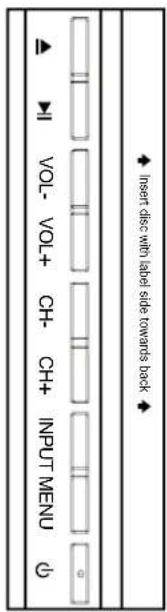
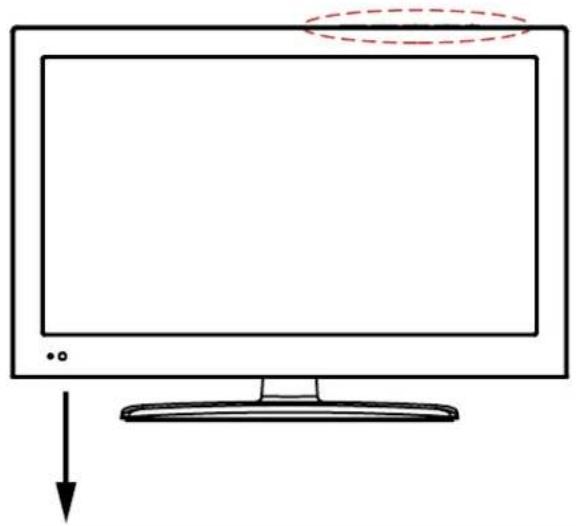
▶II Play/pause the disc playing.(PLAY):
VOL+/-: Adjust the volume.
CH+/-: Scan through channels.
INPUT: Display the input source menu.
MENU: Display/exit the OSD menu.
(POWER): Turn on/standby the TV set.
DVD: Insert a 12cm disc according to the silk.
○ Remote Control window(keep clear)LED indicator
(IR) Infrared Receiver: Receives IR signals from the remote control.
(Power on/Standby) LED indicator: Press POWER to turn on and off.
Indicator on(Red)
Standby mode
Indicator on(Green)
Power on mode
The effective receiving range for the signal is 5-8 metres from the front of the remote control window, and 30^ to the left or right side and 20^ above or below the control window.
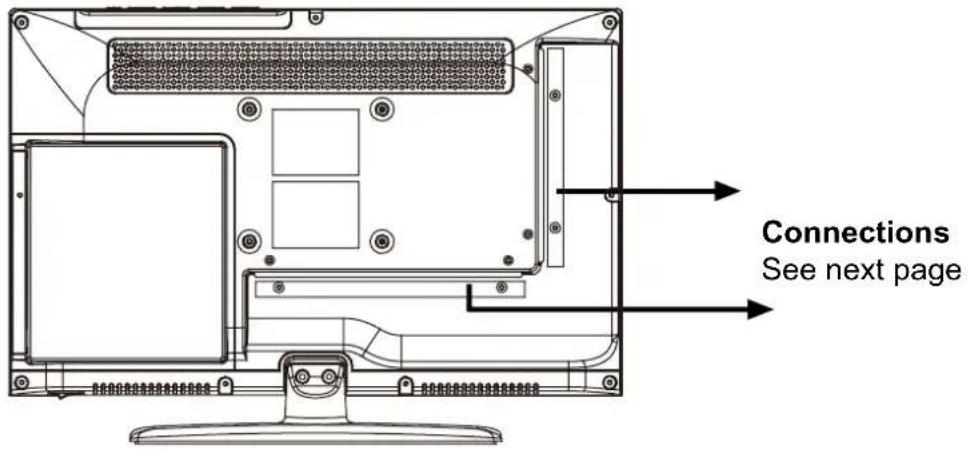
Rear View
text_image
Connections See next pageWall Mounting
The TV is provided with mounting holes for a VESA approved wallmounting bracket (NOT SUPPLIED). Remove the Posi screws holding the base to the base bracket and lift the base away (do not remove the basemounting bracket). Mount the VESA bracket using 4xM4x10mm ISO metric threaded screws (not supplied). Do not use screws longer than 10mm, it will occur damage to the internal parts. Fit the wall bracket securely following themanufacturers instructions.
Connections
text_image
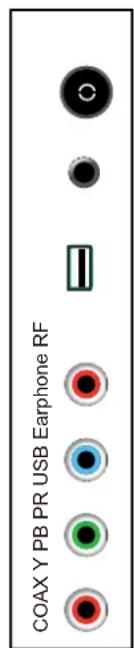
COAX Y PB PR USB Earphone RFRF: Connect antenna or cable 75 Ohm coaxial to receive TV signal.
Headphone out: Connect it to your headphone or other audio equipment.
USB: USB jack.
YPbPr: Connect them to the YPbPr video output terminal of DVD.
Coax: Digital coaxial output.

text_image
POWER VIDEO R L HDMI VGA SCART PC AudioPOWER: Connect the power cord with DC 12V to this input.
VIDEO: Connect it to video output terminal of DVD.
R/L in: Connect them to the audio output terminal of DVD.(shared with YPbPr)
HDMI: Connect it to the HDMI of DVD or other equipment.
VGA: For PC display. Connect it to the D-Sub 15 pins analog output connector of the PC.
SCART: Connect them to the SCART video output terminal of DVD.
Connect it to the audio output terminal of PC.PC Audio:
Remote Control
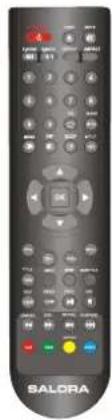
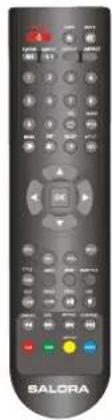
The remote control is using Infra-Red(IR). Point it towards the front of the LED TV. The remote control may not work correctly if it is operated out of range or out of angle.
Buttons for TV functions
text_image
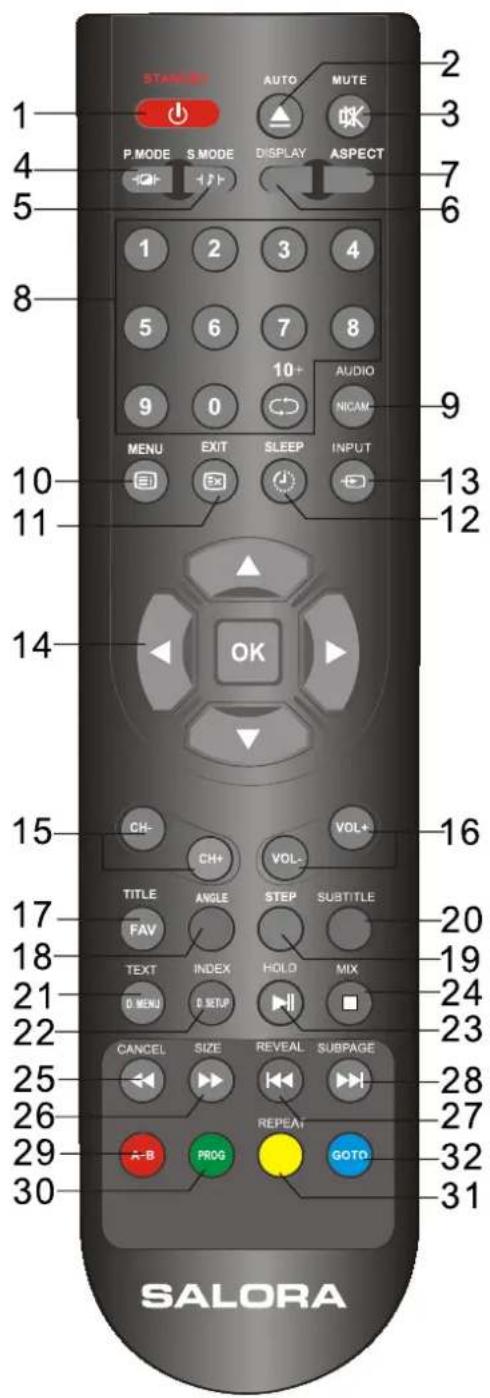
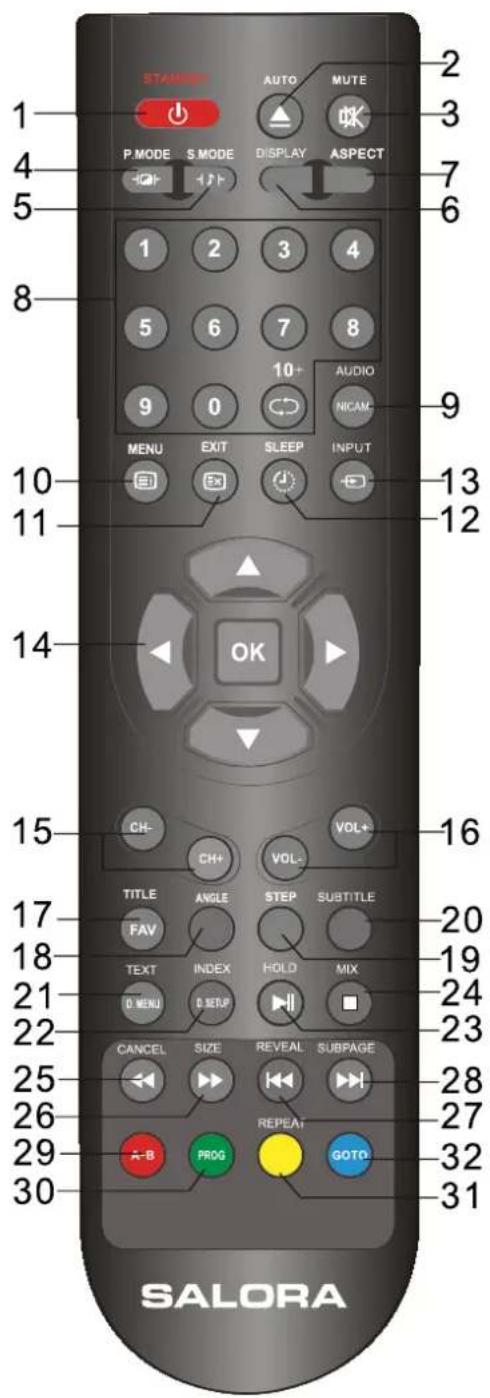
STANCE AUTO MUTE P.MODE S MODE DISPLAY ASPECT 1 2 3 4 5 6 7 8 9 0 10+ AUDIO MENU EXIT SLEEP INPUT 10 11 12 14 OK 15 CH- CH+ VOL- VOL+ TITLE ANGLE STEP SUBTITLE FAV TEXT INDEX HOLO MIX D MENU D SETUP 21 22 CANCEL SIZE REVEAL SUBPAGE 25 26 27 29 A-B PROG REPEAT GOTO 30 SALORA 2 3 7 6 13 121 STANDBY: turn the TV on.
2 AUTO: Auto adjust the picture screen on the TV in PC mode.
3 MUTE: press to go into the silence status or cancel.
4 P.MODE: Press this button to select the desired picture mode.
5 S.MODE: Press this button to select the desired sound mode.
6 DISPLAY: display the current mode.
7 ASPECT: Adjust picture size.
8 0\~9,10+: press 0 to 9 for the first ten channel, press 10+ for 10 to 99, and again for 100 to 199.
9 NICAM: Press to select TV sound.
10 MENU: TV system menu(see page 9)
11 EXIT: Exit from the current menu.
12 SLEEP: press to set a sleep time, the TV will go standby after the time you setting.
13 INPUT: select the input source.
14 ▲▼ ◀▶: direction buttons for OSD menu.
OK: CONFIRM BUTTON for OSD menu.
15 CH+/-: channel up/down
16 VOL+/-: volume up/down.
17 FAV: Dispaly the favorite program list.
19 STEP: Play program frame by frame in media mode.
20 SUBTITLE: To show the Electronic Program Guide during no-menu state only.
21 TEXT: Switch the teletext on or Off.
22 INDEX: direct recall of page 100.
23 HOLD: hold or carry on the current subpage.
24 MIX: Switch the teletext on or Off.
25 CANCEL: turn off the Teletext display.
26 SIZE: press to see top half of page double size. press again to see the bottom half of page double size. Press again for normal size.
27 REVEAL: reveal any hidden text, for example quiz answers
28 SUBPAGE: for example, to go directly to subpage 4:
press SUBPAGE, then 0, 0, 0, 4;
press SUBPAGE again to cancel subpage mode.
RemoteControl
text_image
STAMSET AUTO MUTE P.MODE S MODE DISPLAY ASPECT 1 2 3 4 5 6 7 8 9 0 10+ AUDIO MENU EXIT SLEEP INPUT 10 13 11 12 14 OK 15 CH- CH+ VOL- VOL+ TITLE ANGLE STEP SUBTITLE FAV TEXT INDEX HOLD MIX D MENU D SETUP 21 24 22 CANCEL SIZE REVEAL SUBPAGE 25 28 26 REPEAT 29 A-B PROG GOTO 30 SALORA 2 3 7 6 9 9 16 16 20 19 24 23 27 32 31Buttons for DVD functions
2 ▲ : load/eject DVD disc.
9 AUDIO: Change the DVD audio mode:left,right,mono,stereo.
17TITLE: DVD title.
18 ANGLE: select DVD picture angle.
21 D.MENU: Dispaly the DVD MENU.
22 D. SETUP: Dispaly the DVD SETUP menu.
23 ▶ : play/pause DVD program.
24 ■ : stop DVD program.
25 ◀ : DVD fast reverse.
26 ▶ : DVD fast forward.
27 : DVD previous chapter.
28 : DVD next chapter.
29A-B: select and play the preferable paragraph of DVD program by pressing this key twice at the beginning and end of it.
30 PROG: To select the DVD program playback.
31REPEAT: Repeat playback the DVD play.
32 GOTO: DVD start palying from the desired time. Press time and enter time. The unit starts playing from you selected.
Basic Operation
Power on/off
- Connect to the power supply with the power cord and turn on the switch.
- -To turn on the TV
Press POWER button on the TV or remote control.
-To turn off the TV
Press POWER button on the TV or remote control.
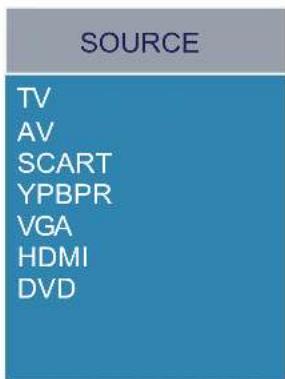
Input Source select
Press INPUT button on the TV set or remote control to display input source menu, and use CH+/- button on the TV set or remote control to select the input source, press OK button on the remote control to enter.
Note: Before you select the input source, make sure the connections are prepared.
text_image
SOURCE TV AV SCART YPBPR VGA HDMI DVDFirst Time Installation
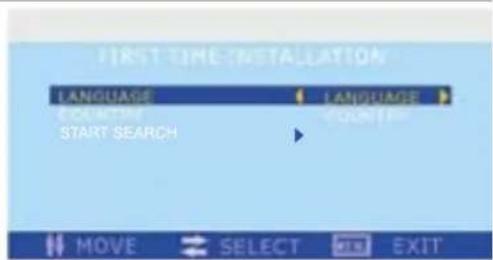
When you initially turn on the TV you will see the first time Installation menu, and you could search the progeams immediately according to the hints.
text_image
FIRST TIME INSTALLATION LANGUAGE LANGUAGE COUNTUM START SEARCH MOVE SELECT EXIT EXITBasic OSD Menu operation
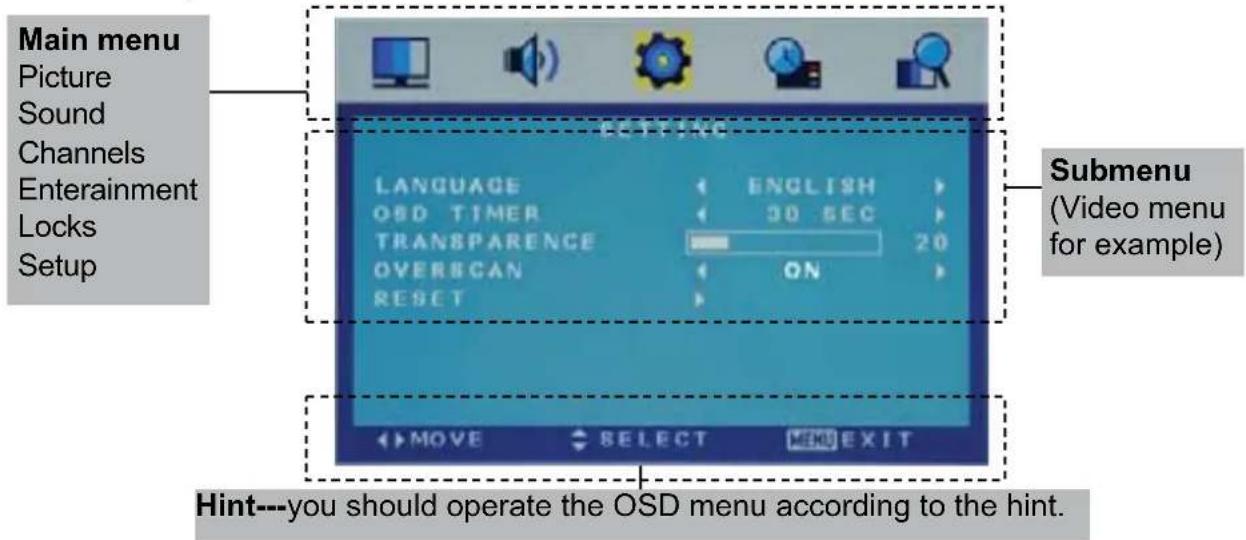
Press MENU(SYS-MENU) button to display the OSD menu as below:
text_image
Main menu Picture Sound Channels Entertainment Locks Setup ECTRAGE LANGUAGE ENGLISH OSD TIMER 30 SEC TRANSPARENCE 20 OVERSCAN ON RESET Submenu (Video menu for example) MOVE SELECT MENU EXIT Hint---you should operate the OSD menu according to the hint.Use /◀ ▶ button to select the main menu, and press ▼CH-) button to enter the submenu.
In the submenu, use ▲CN+/-) button to select the function item, press ◀ / ▶ button to select/adjust, or press button to enter the option menu.
* (Press MENU(SYS-MENU) button to return to the upper menu.)
* (Press SYS-EXIT button to exit the menu display.)
Note1: Only when you input the suitable signal or on the suitable mode, the relevant items can be activated
Note2: Please operating the OSD menu according to hint on the bottom of the banner.
OSD Menu
1. CHANNEL menu
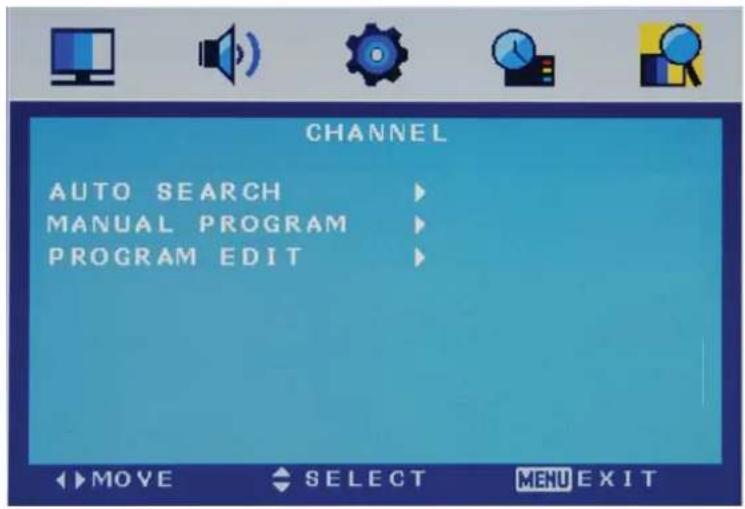
text_image
CHANNEL AUTO SEARCH MANUAL PROGRAM PROGRAM EDIT MOVE SELECT MENU EXITDescription
Auto Search
Press button to start auto search.
Auto Search menu for TV
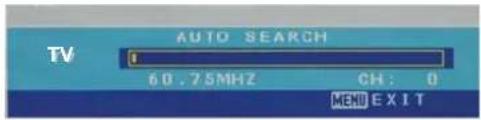
text_image
TV AUTO SEARCH 60.75MHz CH: 0 MENU EXITManual Program
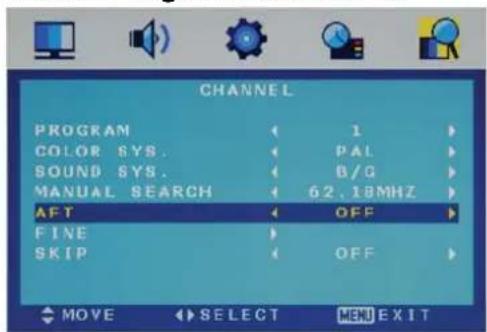
Press ▶ button to enter the submenu.
Manual Program menu for TV
text_image
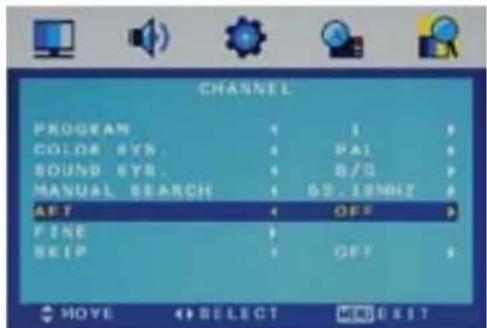
CHANNEL PROGRAM 1 COLOR SYS. PAL SOUND SYS. B/Q MANUAL SEARCH 62.18MHz AFT OFF FINE SKIP OFF MOVE SELECT MENU EXITProgram Select the program you want to edit.
Color Sys. Select the color system for the program you want to edit.
Sound Sys. Select the sound system for the program you want to edit.
Manual Search Use ◀ and ▶ button to manual search.
AFT Turn on/off the Auto Frequency Tuning function for Manual Search.
Fine Use ◀ and ▶ button to fine-tune.
Skip Select "Yes" to skip the program when you scan the programs by CH+/-.
OSD Menu
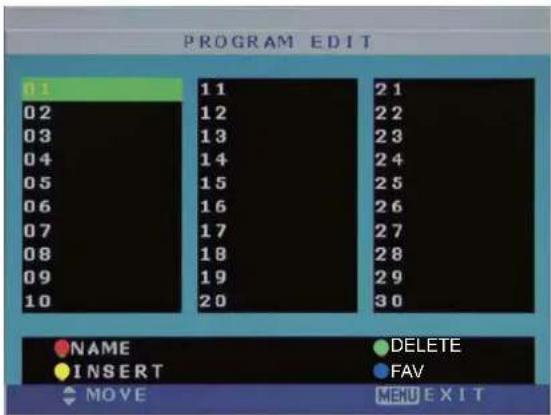
Program Edit: Press ▶ button to enter the submenu as the following picture.
Program Edit menu for TV
text_image
PROGRAM EDIT 01 02 03 04 05 06 07 08 09 10 11 12 13 14 15 16 17 18 19 20 21 22 23 24 25 26 27 28 29 30 NAME INSERT DELETE FAV MOVE MENU EXITNAME: Select the channel, press RED button on the remote control to change the name of the channel.
(Use ◀ ▶ ▼ ▲button to name, and press OK button to confirm)
DELETE: Press GREEN key to delete current channel.
INSERT: Select a channel you want to insert, press YELLOW button, then select the position, press GREEN button to insert, or you could press RED button to cancel the option.
FAV: Press FAV key to set your favorable channel.
OSD Menu
2. PICTURE menu
text_image
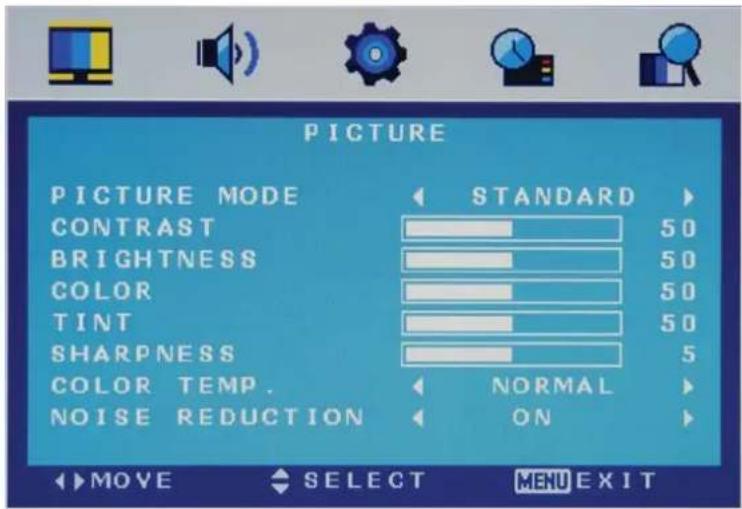
PICTURE PICTURE MODE STANDARD CONTRAST 50 BRIGHTNESS 50 COLOR 50 TINT 50 SHARPNESS 5 COLOR TEMP. NORMAL NOISE REDUCTION ON MOVE SELECT MENU EXITThe PICTURE menu includes the following options :
| Picture Mode | Choose from Standard, Movie, Vivid and Personal. |
| Note: Contrast, Brightness, Color and Sharpness can only be adjusted in the Personal mode option in the Picture Mode Settings. | |
| Contrast | Controls the difference between the brightest and darkest regions of the picture. |
| Brightness Controls the overall brightness of the picture | |
| Color Control the color. | |
| Sharpness | Increase this setting to see crisp edges in the picture; decrease it for soft edges . |
| Tint Controls the tint ( NTSC mode only). | |
| Color Temp. | Choose from Normal, Cool, and Warm. |
| Noise Reduction | Reduce any interference noise by selecting “ON”. (Can be selected in ATV mode). |
OSD Menu
3. SOUND menu
text_image
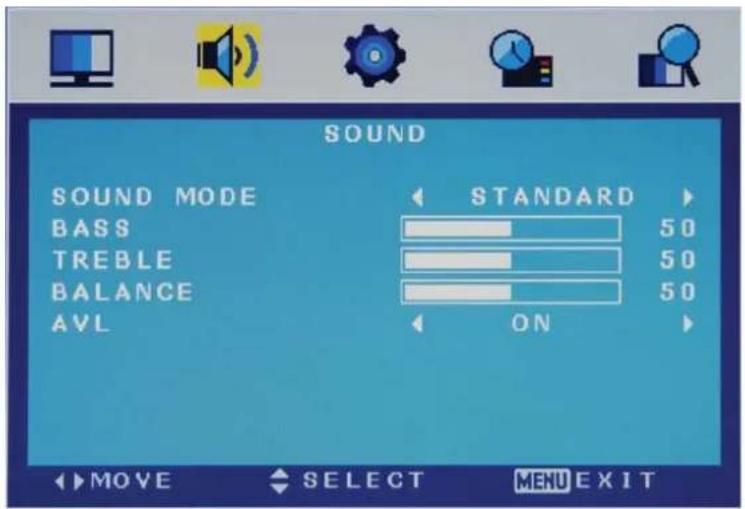
SOUND SOUND MODE BASS TREBLE BALANCE AVL STANDARD 50 50 50 ON MOVE SELECT MENU EXITThe SOUND menu includes the following options :
| Sound Mode | Allows you to select among: Standard, Music, Movie and Personal. |
| Bass (Can be adjusted when the sound mode is set to User)Controls the relative intensity of lower pitched sounds. | |
| Treble (Can be adjusted when the sound mode is set to User)Controls the relative intensity of higher pitched sounds. | |
| Balance To adjust the balance of the left and right sound track, or turn off the volume of the left and right sound track. | |
| AVL | Control the volume of the program automatically when you turn on the function by selecting “On”. |
OSD Menu
4. SETTING menu
text_image
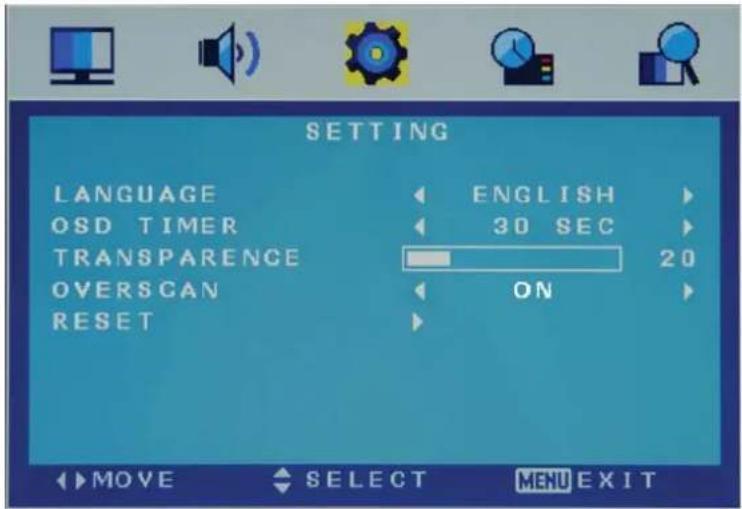
SETTING LANGUAGE ENGLISH OSD TIMER 30 SEC TRANSPARENCE 20 OVERSCAN ON RESET MOVE SELECT MENU EXITThe SETTING menu includes the following options:
| Language | Allows you to select menu language. |
| OSD Timer | Allows you to select the time for OSD menu displays on the screen. |
| Transparence | Allows you to select the transparence for OSD menu displays on the screen. |
| Overscan | Turn on/off the overscan funciton.(Can be selected in HDMI mode) |
| Reset | Press ▶ button to restore factory default. |
OSD Menu
5. FUNCTION menu

text_image
FUNCTION SLEEP TIMER OFF AUTO SLEEP 4H ASPECT FULL TT LANGUAGE WEST BLUE SCREEN ON DLC OFF MOVE SELECT MENU EXITThe FUNCTION menu includes the following options :
| Sleep Timer | Allows you to setup the sleep timer to : 15min, 30min, 45min, 60min, 75min, 90min, 105min, 120min and off. |
| Auto Sleep Turn on/off the auto standby function when where's no signal. | |
| Aspect Allows you to select the screen display mode.(Can be selected in TV mode) | |
| TT Language Allows you to select the Teletext language.(Can be selected in TV mode) | |
| Blue Screen Turn on the blue screen display in no signal state by selecting “ON”(Can be selected in TV mode) | |
| DLC | Dynamic Luminance control ON/OFF. |
OSD Menu
- PC SETUP menu

text_image
PC SETUP H-POSITION 50 V-POSITION 100 CLOCK 100 PHASE 97 AUTO ADJUST MOVE SELECT MENU EXITThe PC SETUP menu includes the following options :
| H-Position | Adjust the transverse position of the screen. |
| V-Position Adjust the vertical position of the screen. | |
| Clock Adjust the pixel clock frequency, until the image size is maximized for the screen. | |
| Phase Adjust the phase of the ADC sampling clock relative to the sync signal, until a stable image is obtained. | |
| Auto Adjust Press | button ▶ setup the parameter of the screen automatically. |
DVD Operation
Basic Operation
Press the Power button on the TV or the remote control, then press the INPUT button to select DVD mode. If there is no disc in the DVD player the screen will show "NO DISC".
Insert Disc according to picture next to disc slot.
Do not touch the playing surface.
Hold the disc around the outside with your fingers and place the disc into the slot. The player will automatically draw the disc into the player.
To "Eject" the disc, press the EJECT button on the TV or the "▲" button on the remote control.
DVD Setup Mode
- Setup Mode provides the menu for the configuration of General Setup Page, Audio Setup Page, Dolby Digital, Setup, Preference Page.
- Item selection in the Setup Menu is done by using the Navigation Arrows, SETUP button and the OK button.
- Press the SETUP button first, enter into SETUP menu, then press the DIRECTION RIGHT button, you can enter into the next Sub-menu.
- Press the SETUP button again to exit the Setup Menu.
General Setup
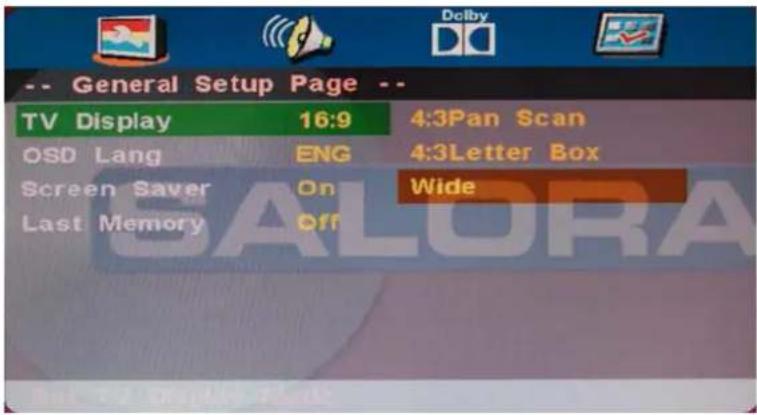
TV Display
4:3 Pan Scan
This is selected when the DVD player is connected to a normal TV. Wide-screen images are shown on the screen, but with some parts cut automatically.
4:3 Letter Box
This is selected when the player is connected to a normal TV. Wide-screen images are shown on the screen, with black belt on the top and bottom.
Wide
This is selected when the player is connected to a wide-screen TV.
text_image
-- General Setup Page -- TV Display 16:9 4:3Pan Scan OSD Lang ENG 4:3Letter Box Screen Saver On Wide Last Memory OffDVD Operation
OSD Language
This is used to select the OSD language.
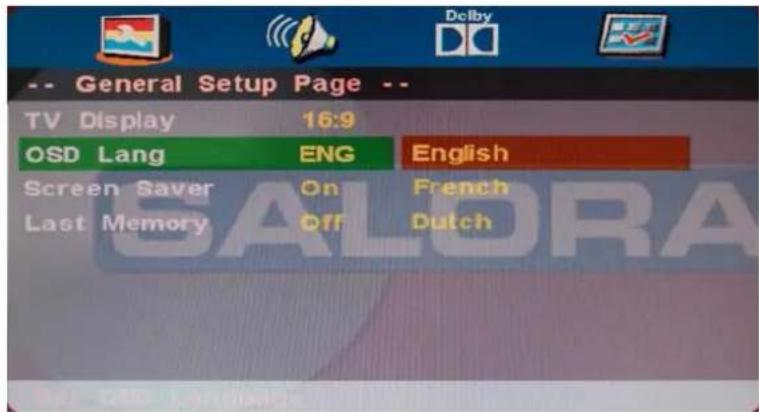
text_image
-- General Setup Page -- TV Display 16:9 OSD Lang ENG English Screen Saver On French Last Memory Off DutchScreen Saver
Start the screen saver, the screen saver image will appear when the player stops or the picture is frozen for a few minutes. This saver can keep the screen from being damaged.
- On (Start the screen saver)
- Off (Remove the screen saver).
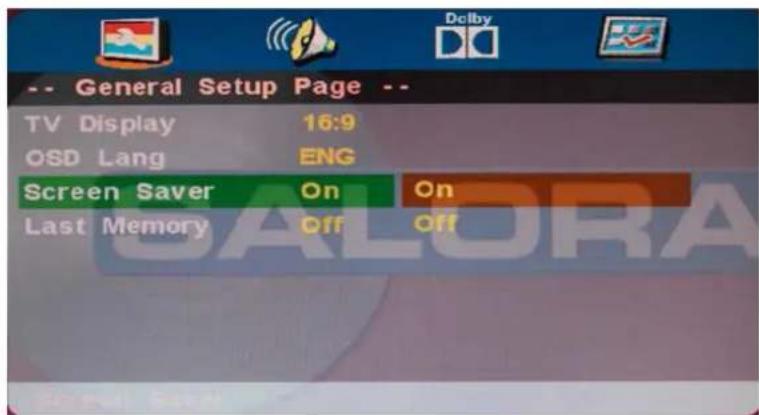
text_image
-- General Setup Page -- TV Display 16:9 OSD Lang ENG Screen Saver On On Last Memory Off OffLast Memory
Can set the items on the last memory, "on" and "off" option.
Select "On", the shutdown will shutdown the machine before the settings for memory, re-boot the machine settings. Set near the same time.
Select "Off", every time the machine automatically switched back to the default settings
- On (Start the memory)
- Off (Remove the memory).
DVD Operation
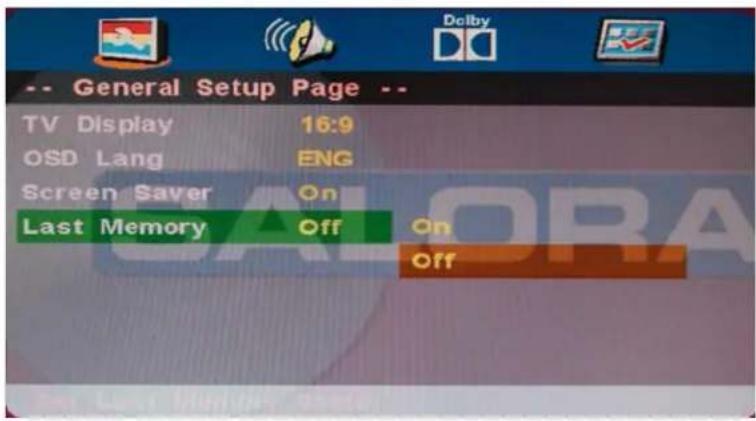
text_image
-- General Setup Page -- TV Display 16:9 OSD Lang ENG Screen Saver On Last Memory Off On OffAUDIO Setup
- Speaker Setup
In the "Audio Setup page" press "▼" button to select "Speaker Setup" item, press the "OK ENTER" or "►" button (play) into the "Speaker Setup Page".
DVD Operation

text_image
Audio Setup Page -- Speaker Setup Spdif Setup SALORADownmix
• LT/RT
A disc recorded multi channel soundtrack, the output signal will be incorporated to left and right channel.
- Stereo
A disc recorded multi channel soundtrack, The output signal will be incorporated to stereo.
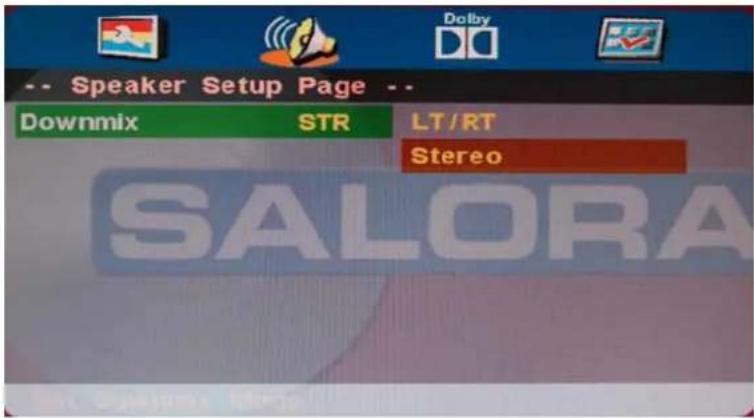
text_image
-- Speaker Setup Page -- Downmix STR LT/RT Stereo SALORASpdif Output
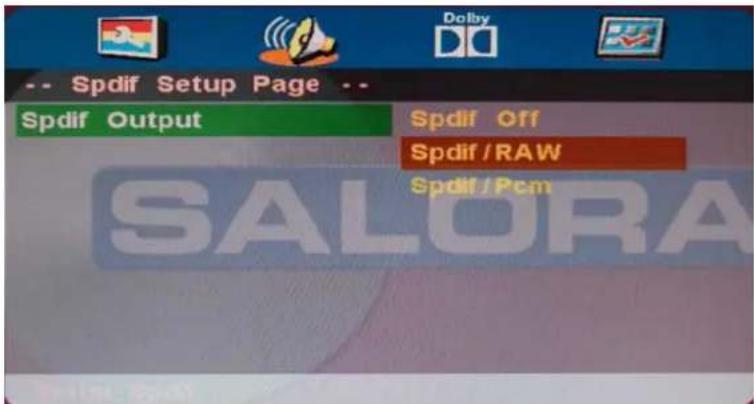
There are 3 optional audio output modes: SPDIF OFF, SPDIF / RAW, and SPDIF / PCM, SPDIF / RAW is for amplifiers with a built in digital decoder SPDIF / PCM is selected for amplifiers with no built in digital decoder.
text_image
Spdif Setup Page Spdif Output Spdif Off Spdif / RAW Spdif / Pcm SALORADVD Operation
Dolby Digital Setup
Dynamic
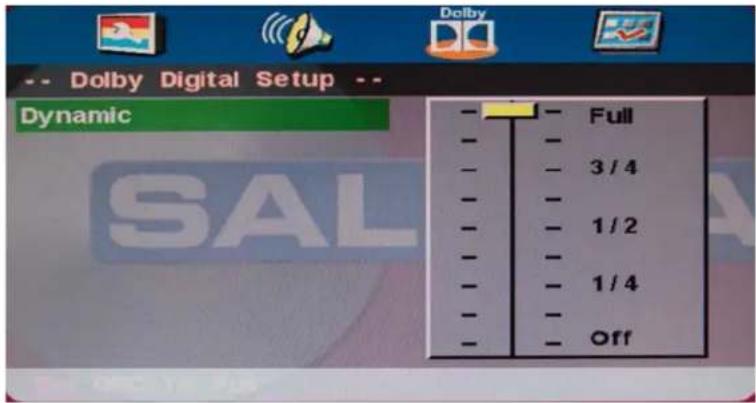
This option is used to set the compression ratio in order to control the sound (Volume) contrast.
text_image
-- Dolby Digital Setup -- Dynamic - - - - - - - - - - - - - - - - - - - - - - - - - - - - - - - - - - - - - - - - - - - - - - - - - - - - - - - - - - - - - - - - - - - - - - - - - - - - - - - - - - - - - - - - - - - - - - Full 3 / 4 1 / 2 1 / 4 OffYou must press STOP twice to enter Preference Page or NO disc
TV Type
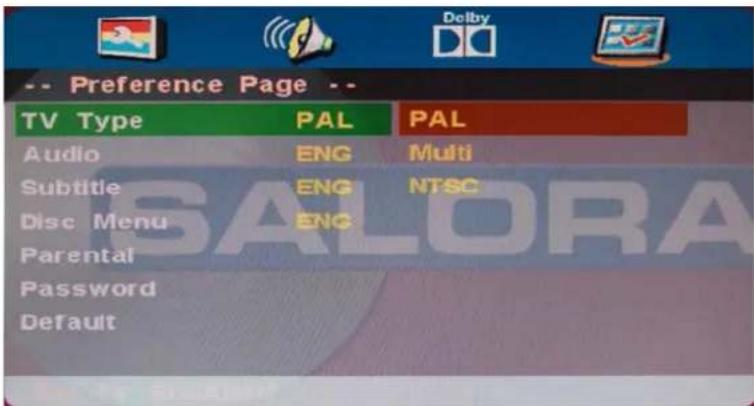
· PAL
This is selected when the player is connected to an PAL System TV.
· MULTI
The player will set the TV system according to the disc in the tray.
• NTSC
This is selected when the player is connected to a NTSC System TV.
Preference Setup
text_image
-- Preference Page -- TV Type PAL PAL Audio ENG Multi Subtitle ENG NTSC Disc Menu ENG Parental Password DefaultAudio
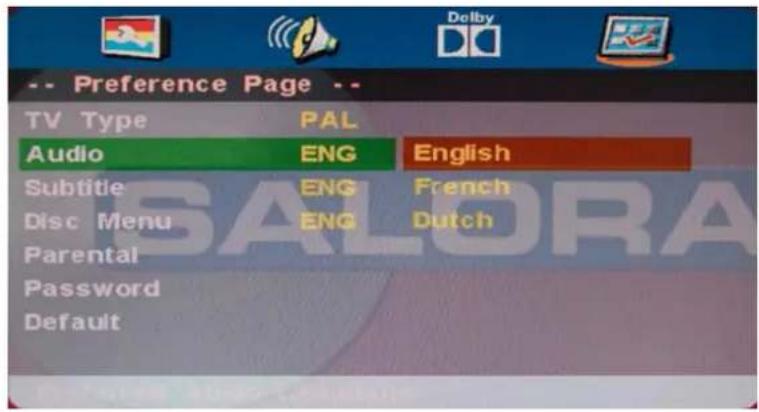
If a language listed below is recorded on the disc, you can play the sound in such language. If not, the language recorded will be used.
DVD Operation
text_image
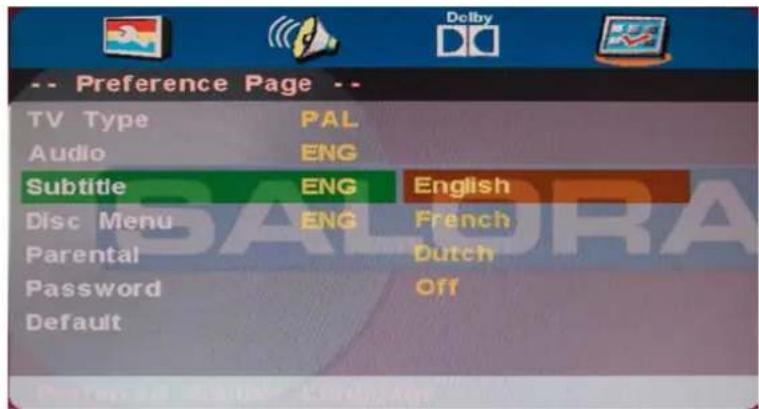
-- Preference Page -- TV Type PAL Audio ENG English Subtitle ENG French Disc Menu ENG Dutch Parental Password DefaultSubtitle
If a language listed below is recorded on the disc, you set the subtitle to be displayed in such language. If not, the language recorded will be used.
text_image
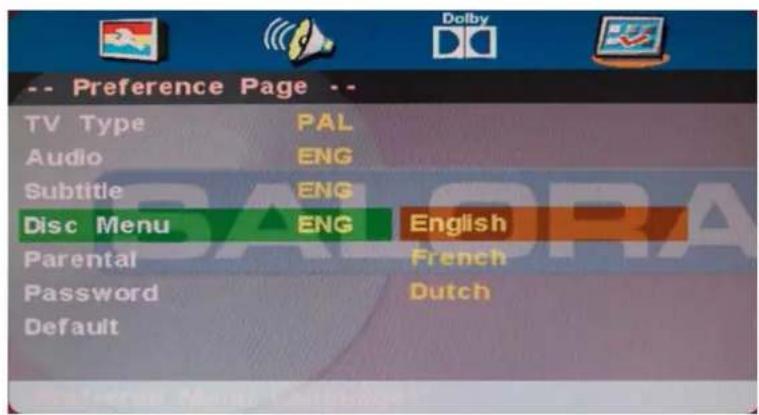
-- Preference Page -- TV Type PAL Audio ENG Subtitle ENG English Disc Menu ENG French Parental Dutch Password Off DefaultDisc Menu
If a language listed below is record on the disc, you can set the Menu to be displayed in such language. If not, the language recorded will be used.
text_image
-- Preference Page -- TV Type PAL Audio ENG Subtitle ENG Disc Menu ENG English Parental French Password Dutch DefaultDVD Operation
Parental
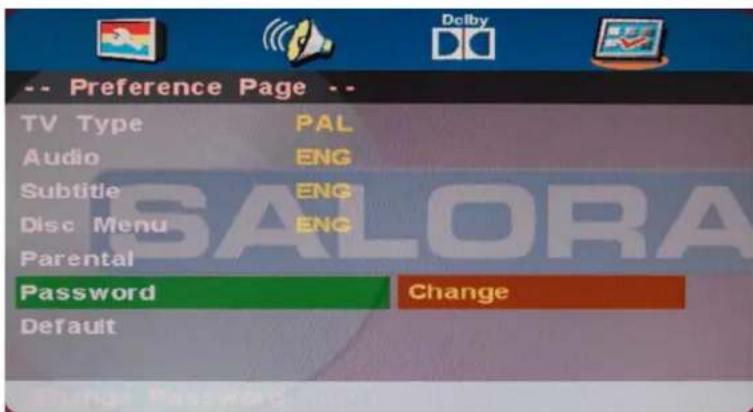
When playing disc with parental lock function, you may select an Age Control Grade according to grade of disc and your own preference. For example, if PG is selected, DVD Video disc rated higher than the PG grade cannot be played.
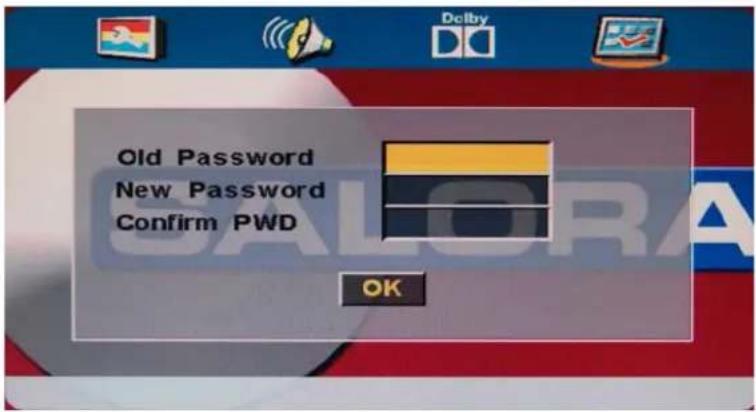
User can change the password that is required when the user wants to change the Age Control Grade in the Parental Lock function.
NOTE:(Default password is 123456)
text_image
-- Preference Page -- TV Type PAL Audio ENG Subtitle ENG Disc Menu ENG Parental Password Change DefaultDVD Operation
text_image
Old Password New Password Confirm PWD OKDefault
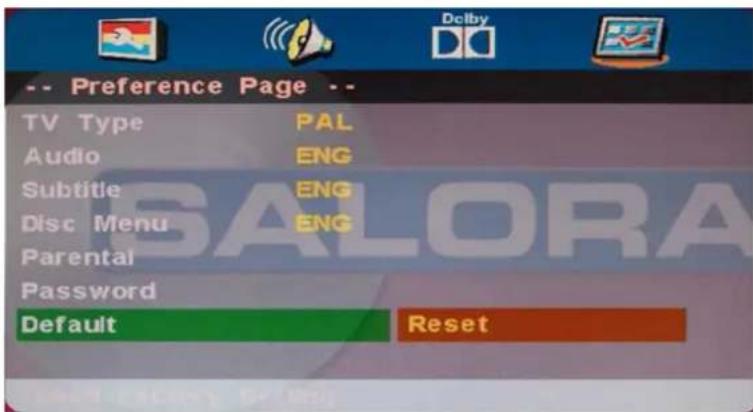
User can load the original factory setting by choose RESET and press OK button.
text_image
-- Preference Page -- TV Type PAL Audio ENG Subtitle ENG Disc Menu ENG Parental Password Default ResetSimple Troubleshooting
If the display fails or performance dramatically deteriorates check the Display in accordance with the following instructions. Remember to check the peripherals to point the source of the failure.
If the display still fails to perform as expected, connect your helpline for assistance.
No power
- Check all connections to the TV.
- Press either the power button or the Standby button on the Remote control.
No picture or sound
- Ensure that the TV is plugged in and the power is on.
- Ensure that the aerial is connected.
- Try a different program.
Poor picture quality
- Check the aerial connections.
- Check that the channel is tuned in properly.
- Adjust the picture settings: brightness, color, sharpness, contrast, hue.
- Make sure that the TV is not located close to electrical appliances that may emit radio frequency interference.
No colour
- Adjust the color setting.
- Check that the programme is broadcast in color.
- Check that the channel is tuned properly.
TV does not respond to remote control
- Check that there are no obstructions between the remote control and the unit.
- Check that the remote control is within range of the unit.
- Check that the batteries in the remote control and not weak or exhausted.
This LED TV is for household use and registered as harmless on electromagnetic waves.
Therefor, you can use it in every location as well as residential areas.
Française
Sommaire
natural_image
Stack of three blank white sheets with no text or symbols
text_image
SALORAnatural_image
Line drawing of a computer monitor with a red dashed oval on top and a downward arrow pointing to the base (no text or symbols)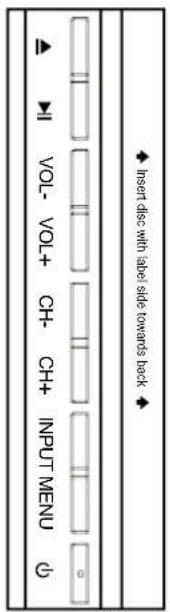
text_image
Insert disc with label side towards back VOL- VOL+ CH- CH+ INPUT MENUtext_image
COAX Y PB PR USB Earphone RFButtons for TV functions
text_image
CHANNEL AUTO SEARCH > MANUAL PROGRAM > PROGRAM EDIT >Description
Manual Program menu for TV