WP-250 - Earphones CREATIVE - Free user manual and instructions
Find the device manual for free WP-250 CREATIVE in PDF.


User questions about WP-250 CREATIVE
0 question about this device. Answer the ones you know or ask your own.
Ask a new question about this device
Download the instructions for your Earphones in PDF format for free! Find your manual WP-250 - CREATIVE and take your electronic device back in hand. On this page are published all the documents necessary for the use of your device. WP-250 by CREATIVE.
USER MANUAL WP-250 CREATIVE
Reviewer's Reference for Creative WP-250
Bluetooth Wireless Headphones with "Invisible Mic"

natural_image
Person riding a bicycle outdoors with green field and blue sky background (no text or symbols visible)Version 1.0
September 2011
Corporate Headquarters
Creative Technology Ltd.
31 International Business Park
Creative Resource
Singapore 609921
Tel: +(65) 6895 4000
Fax: +(65) 6895 4999
Creative website: www.creative.com
For more details on Creative headphones and headsets,
visit www.creative.com/headphones
or www.creative-aurvana.com
© 2011 Creative Technology Ltd. All rights reserved. Creative and the Creative logo are trademarks or registered trademarks of Creative Technology Ltd. in the United States and/or other countries. All other logos, brand or product names are trademarks or registered trademarks of their respective holders and are hereby recognised as such. All specifications are subject to change without notice.
CREATIVE®
An Overview
Active lifestyle wireless music and chats
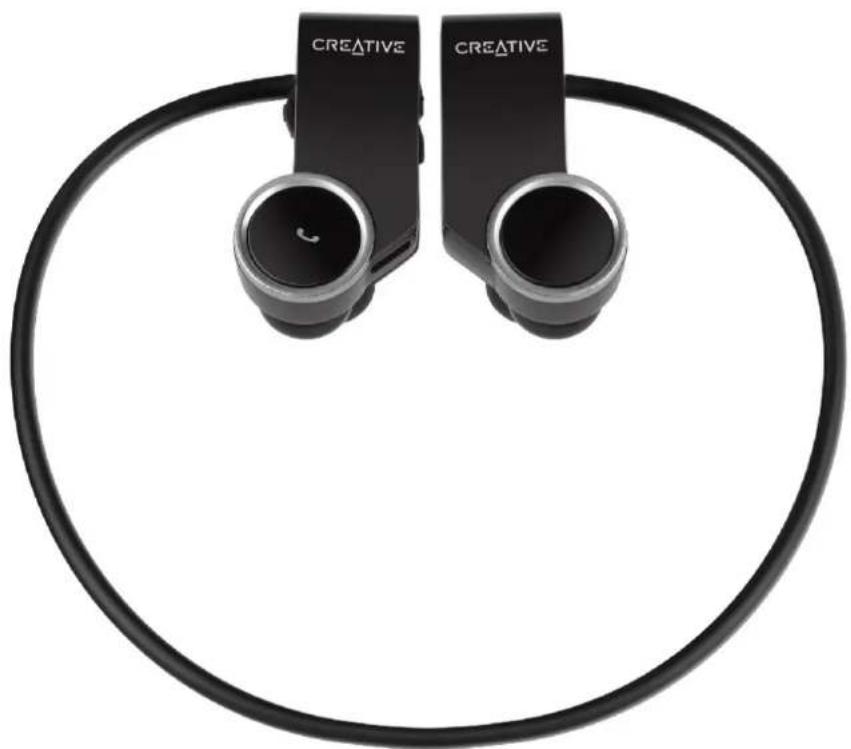
With the Creative WP-250 Bluetooth® headphones with “invisible mic”, not only can you make and receive phone calls wirelessly, you can enjoy your favorite tracks on the move. Designed for today's active lifestyles, the WP-250 has an in-ear, behind-the-neck design that offers a secure fit during any physical activity. It also features an invisible microphone for pristine-clear, hands-free phone conversations.
With Bluetooth connectivity, nothing gets in your way - including tangled wires! - so you can stay focused on your workout while immersed in clear wireless music. Adding to the WP-250's superior audio qualities are acoustically tuned Neodymium micro drivers. Ideal for use with compatible stereo Bluetooth-enabled mobile phones or MP3 players, you'll also enjoy basic remote control operations like play, pause and skip track.
That's not all. A flexi-memory neckband provides a secure fit when worn and can be neatly coiled for travel. A fully charged battery offers hours of uninterrupted music listening and talk time - more than enough for that gym workout or hitting the streets!
CREATIVE®

natural_image
Black creative Bluetooth earbuds with attached cable, no visible text or symbols on device bodyCREATIVE®
natural_image
Two black creative wireless earchairs connected by a circular cable, no visible text or symbols on the devices themselves.CREATIVE®
Key Highlights
Flexi-memory neckband is rigid enough to support a sturdy wearable frame while at the same time, supple enough to flex according to the head size of the listener. It can also be coiled into an ultra-compact package for travel purpose

natural_image
Diagram of a mechanical linkage or clamping device with two arms and two blue components, no text or symbols present.CREATIVE®
Key Highlights

natural_image
Black Creative mobile phone with earbuds and a circular headband (no visible text or symbols)
Bluetooth®
Works with ALL compatible Bluetooth mobile audio devices such as music phones, iPhone, iPod, iPad or computers. Stream high quality content wirelessly from up to 10 meters or 33 feet
A concealed microphone lets you pause your music and pick up a voice call seamlessly, without an interfering microphone boom jutting across your face. A sensitive microphone pickup with an effective noise shield deliver clear voice calls, even under noisy and windy conditions
text_image
INVISIBLE MICCREATIVE®
Key Highlights
text_image
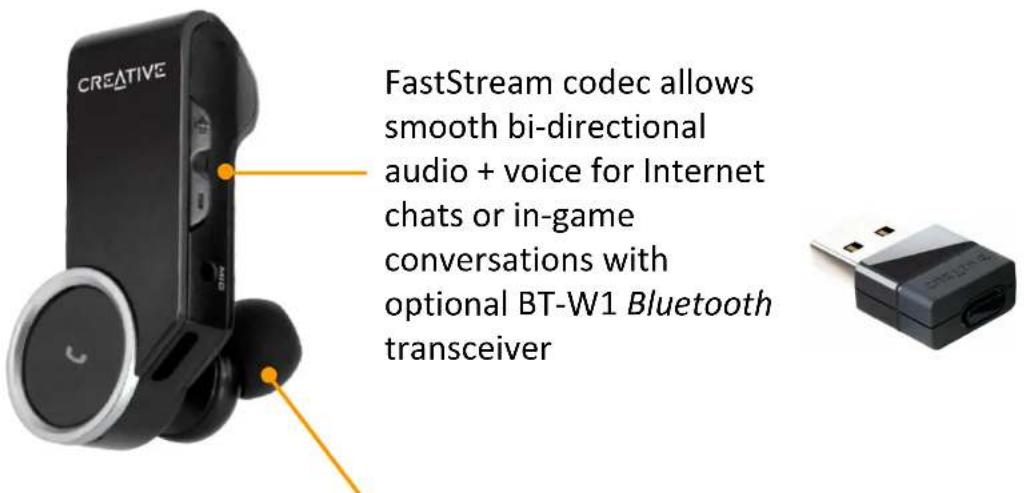
CREATIVE FastStream codec allows smooth bi-directional audio + voice for Internet chats or in-game conversations with optional BT-W1 Bluetooth transceiverIn-ear earphone design with powerful Neodymium drivers significantly block out ambient noise while allowing an accurate reproduction of music, movie or gaming audio.
Comes with 3 sizes of in-ear eartips too for a personalized fit
CREATIVE®
Key Highlights

text_image
CREATIVEIntuitive call, playback and volume controls on the right earpiece that are easily accessible for making adjustments on-the-fly
Featherweight in-ear design with a frame that can be coiled for ease of portability and storage.
Easily charge from computers with an USB port. It comes with a micro-USB cable for your charging needs as well
CREATIVE®
Key Highlights
natural_image
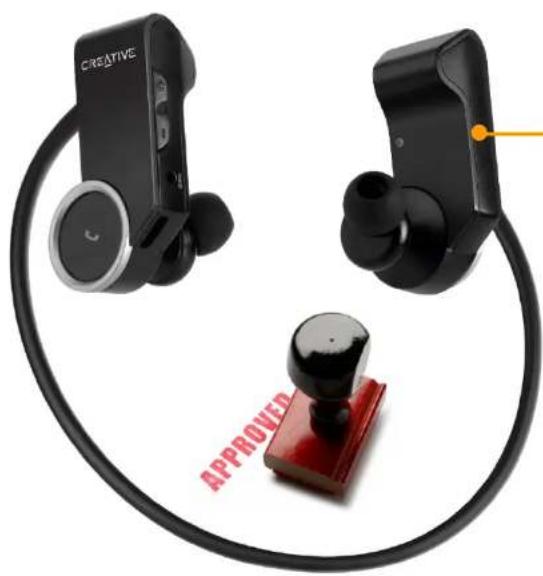
Two black wireless earchairs connected by a coiled cable, one with a red 'APPROVED' stamp and the other with a yellow dot (no text or symbols on devices)A perfect usage experience from its ergonomically placed call and playback controls, choice of high quality built material or right down to the ideal control timings, the WP-250 left nothing to chance. Every single detail was perfected through a broad and intensive regime of stringent tests for durability, compatibility, usability and of course, for the pure joy of just listening to these headphones
CREATIVE®
Operational Details
Charging headset
- Connect the Right earpiece to your laptop or computer using the supplied USB cable
- The indicator lights up in Red. It will be fully charged in about 2 hours
- You can listen and operate the headset while charging
Pairing new Bluetooth devices
- Press and hold the Multifunction button for more than 5 seconds on the Right earpiece until the indicator lights up in Blue and blinking rapidly
- Turn on Bluetooth search function on your audio or mobile device
- Select "Creative WP-250 Headset" and if prompted for a Passcode, key in "0000"
- Once paired, the Blue indicator on the Right earpiece blinks slowly
- Note that when pairing with a computer, connect the headset as a Hands-free Audio or Headset device instead of a Stereo Audio device in order to make use of the microphone function. If microphone function is not needed, it is recommended to connect as a Stereo Audio device for better playback performance. Certain Bluetooth solution detects the application that you are using and configures the microphone automatically. You are recommended to update your computer's Bluetooth drivers to the latest.
CREATIVE®
Operational Details
Playback from audio devices
- Turn on Bluetooth function on your paired audio device
- Press and hold the Multifunction button on the Right earpiece until the indicator lights up in Blue and blinks slowly. Press the Play button to establish connection
- You can now Play or Pause music playback, skip forward or reverse tracks, and make volume adjustments
Call functions with mobile phones
- Turn on Bluetooth function on your paired mobile device
- Press and hold the Multifunction button on the Right earpiece until the indicator lights up in Blue and blinks slowly. Press the Multifunction button to establish connection
- To activate voice dialling when no call is in progress, press the Multifunction button for about 1 second until the mobile phone starts voice dialling, and proceed as described in your mobile phone's user guide.
- To redial the number you last called when no call is in progress, press the Multifunction button for 2 seconds and release
- To answer or end a call, press and release the Multifunction button. To reject a call, press the Multifunction button for 2 seconds and release
CREATIVE®
Operational Details
- To accept a call waiting and drop the ongoing call, press and release the Multifunction button. To accept a call waiting and put on hold to the ongoing call, press the Multifunction button twice. To accept a call waiting and join to the ongoing call (three-way call), press and release both the Multifunction and Volume Up “+” buttons.
- To transfer an ongoing call between the WP-250 and your mobile phone, press and hold the Multifunction button for 2 seconds and release.
- Note that features such as voice dial, last number redial or three-way call are phone dependent
Clear or reset headset
- Press and hold the Volume Down "-" and Multifunction buttons for more than 6 seconds to clear the paired Bluetooth devices
- If the headset malfunctions, reset it by supplying USB power, then press the Volume Up "+" and Multifunction buttons for about 1 second
Automatic shutdown
- Once the headset is powered on, if it is unable to connect to the last paired device or failed to pair with a new device within 5 minutes, the headset will automatically shut down.
CREATIVE®
Operational Details
text_image
3 2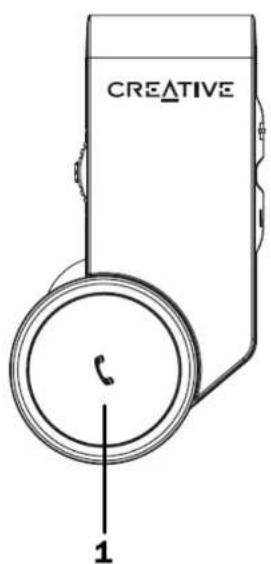
text_image
CREATIVE 1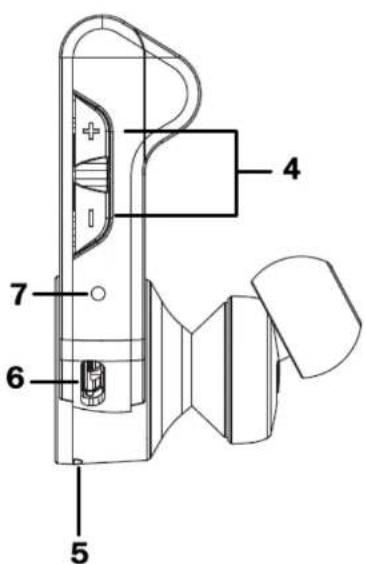
text_image
Technical diagram of a device with numbered parts labeled 4, 5, 6, and 7CREATIVE®
Operational Details
List of button, indicator and connector / port functions
| Button | Function |
| 1 Multifunction (Power / Pair / Call) | Power: Press and hold for 2 seconds to power on the headset. Press and hold for 3 seconds to power off the headset.Pair: In off mode, press and hold for more than 5 seconds to activate Pairing mode.Call: Press and hold for 1 second to activate voice dial. Press and hold for 2 seconds to redial the last called number when no call is in progress. Press and release to answer or end an incoming call. Press and hold for 2 seconds to reject a call during an incoming call. Press twice to accept a call waiting and put on hold the ongoing call. Press together with ‘+’ button and release to initiate a three-way call. |
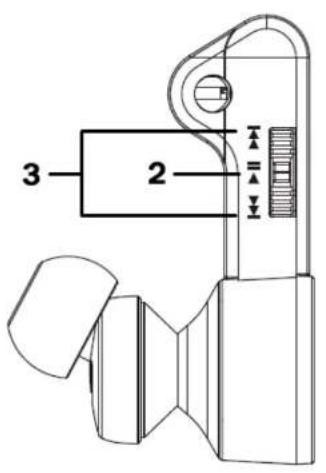
| 2 Play / Pause | Press to play. Press again to pause playback. |
| 3 Next, Forward / Previous, Backward | Press to change to the next or previous track. Press and hold to scroll forward or backward a track (device dependent). |
| 4 +/—Volume Up / Volume Down | Press ‘+’ to increase or press ‘-’ to decrease volume. A beep tone is emitted at maximum volume level. |
CREATIVE®
Operational Details
| Light Indicator | Function |
| 5 Light indicator | Blue and blinks slowly: connected to a paired device.Blue and blinks rapidly: in pairing mode and is ready to pair with a new device.Red and blinks slowly: low battery level, charge the headset soonest. This is accompanied by a beep tone every 2 minutes.Red: charging headset. |
| Connector / Port | Function |
| 6 Micro-USB charging connector | Use the supplied USB cable for charging the headset via a laptop or computer. |
| 7 Invisible Microphone | Noise suppression microphone for crystal clear communications |
CREATIVE®
Suggested Review Steps with a Notebook PC
- Prepare a notebook computer with installed media player and Skype for Internet communications. It should come with built-in Bluetooth connectivity; else, it is recommended to obtain a Creative BT-W1 Bluetooth transceiver which comes with microphone support
- Pair and connect WP-250 with the notebook computer as outlined in previous sections
- Play and listen to a media file on the notebook computer
- Now launch Skype to review voice communications. Call a contact that you know or just initiate Skype's "Echo/Sound Test Service"
- You will notice that the media playback has been paused for your voice communication
- Once you are done with the Skype call, you will notice that the media playback resumes
- For a better audio/voice quality calls, you may obtain a separate Creative BT-W1 USB transceiver. In the Skype voice call above, you will notice that the Creative BT-W1's light indicator turns to red, highlighting that the microphone/voice function is activated using the bi-directional FastStream codec that allows smoother Internet voice calls
CREATIVE®
Suggested Review Steps with a Mobile Phone
- Prepare a mobile phone capable of media playback and ability to support three-way conferencing (if you wish to audition this function)
- Pair and connect WP-250 with the mobile phone as outlined in previous sections
- Play and listen to a media file on the mobile phone
- Now from another phone, place a call to the mobile phone
- You will hear an audible tone in your WP-250 indicating an incoming call. Press the multifunction button to accept the call
- You will notice that the media playback is paused for your voice call
- Once you are done with the call, the media playback resumes
- Repeat above steps for a conference call as outlined in the user guide
CREATIVE®
Troubleshooting
If you cannot connect the headphones to your Bluetooth audio device or mobile phone, do as follows:
- Ensure that the headphones are charged, switched on, paired with, and connected to your Bluetooth device.
- Ensure that the Bluetooth feature is activated on your device.
- Check that the headphones are within 10 meters / 33 feet of your device and that there are no obstructions between the headphones and the device, such as walls or other electronic devices.
- To reset the headphones if it stops functioning (although it is charged), supply the headphones with USB power, then simultaneously press and hold both the Volume Up “+” and Multifunction buttons for more than 6 seconds (Note however, this reset does not clear your paired device settings).
CREATIVE®
Troubleshooting
Poor or choppy audio quality when listening to music on the headphones with a computer:
- Ensure that you are within 10 meters / 33 feet from your computer
- Connect as a Bluetooth Stereo Audio device if you do not need to use the microphone
- Update your computer's Bluetooth drivers to the latest. For example, this link:
http://www.broadcom.com/support/bluetooth/update.php for a computer with Broadcom's embedded Bluetooth solution
CREATIVE®
Troubleshooting
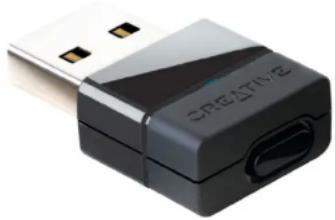
- If the audio + voice quality from Notebook PC's built-in Bluetooth connectivity is poor, you can separately obtain a Creative BT-W1 USB Bluetooth transceiver. This comes with smooth bi-directional support for audio + voice from FastStream codec.
natural_image
Close-up of a black Creative USB device with a port and connector (no visible text or symbols)Exclusively designed for Creative's range of wireless headphones with "invisible microphone" such as Creative WP-250, the Creative BT-W1 USB transceiver wirelessly streams high fidelity stereo music to and delivers crystal clear voice calls from your PC or Mac. You will experience smooth bi-directional FastStream audio with voice for Internet chats and in-game verbal commands. Installation is totally fuss-free and requires no software - just plug in and enjoy a new level of enhanced Bluetooth audio capability.
CREATIVE®
Specifications
- Driver: 13.5mm Neodymium magnet
●Frequency Response: 20Hz \~ 20kHz - Impedance: 32ohms
• Wireless Technology: Bluetooth 2.1 + EDR (Enhanced Data Rate) - Bluetooth Profiles: A2DP (Wireless stereo Bluetooth), AVRCP (Bluetooth remote control), HSP (Headset profile), HFP (Hands-free profile)
•Audio Codec: SBC, FastStream - Operating Range: Up to 10m / 33ft
- Microphone: Built-in omni-directional microphone
●Power Supply: Rechargeable Lithium Ion battery, 3.7V, 180mAh - Charging time: 2 hours
-Playback time: 6 hours - Talk time: 7 hours
●Net Weight: 32g / 1.1oz
Specifications subject to change without prior notice
CREATIVE®