
Cybershot DSC-H100 - Camera SONY - Free user manual and instructions
Find the device manual for free Cybershot DSC-H100 SONY in PDF.


| Product Type | Digital compact camera |
| Brand | Sony |
| Model | Cybershot DSC-H100 |
| Image Sensor | 7.75 mm (1/2.3 type) CCD, 16.4 total megapixels, 16.1 effective megapixels |
| Lens | 21x optical zoom, f=4.5–94.5 mm (25–525 mm equivalent), F3.1–F5.8 |
| Image Stabilization | Optical SteadyShot |
| LCD Screen | 7.5 cm (3.0 type) TFT, 460,800 dots |
| Dimensions (W x H x D) | 122.9 x 83.2 x 81.3 mm |
| Weight (with battery and media) | Approx. 515 g |
| Power Source | 4 x AA alkaline (supplied) or NiMH batteries (sold separately), 6 V / 4.8 V |
| Power Consumption (shooting) | 1.4 W |
| Battery Life (still images) | Approx. 175 min / 350 images (alkaline, CIPA standard) |
| Battery Life (movies) | Approx. 150 min (alkaline) |
| Recording Media | Internal memory (~55 MB), Memory Stick Duo, SD/SDHC, microSD/microSDHC |
| Still Image Format | JPEG (DCF, Exif, MPF Baseline), DPOF compatible |
| Movie Format | MPEG-4 AVC/H.264 (up to 1280x720 Fine/Standard, VGA) |
| Flash Range | 0.5–6.8 m (W), 0.5–3.7 m (T) |
| Continuous Shooting Speed | Approx. 1.0 sec interval (Burst mode) |
| Exposure Control | Auto, Program Auto, Manual Exposure, Scene Selection (11 modes) |
| White Balance | Auto, Daylight, Cloudy, Fluorescent 1/2/3, Incandescent, Flash, One Push |
| Operating Temperature | 0°C to 40°C |
| Storage Temperature | -20°C to +60°C |
| Interface | USB 2.0 High-Speed, A/V OUT (combined) |
| Microphone / Speaker | Monaural microphone and speaker |
| Special Features | Intelligent Auto, Sweep Panorama, Smile Shutter, Face Detection, In-Camera Guide |
Frequently Asked Questions - Cybershot DSC-H100 SONY
User questions about Cybershot DSC-H100 SONY
0 question about this device. Answer the ones you know or ask your own.
Ask a new question about this device
Download the instructions for your Camera in PDF format for free! Find your manual Cybershot DSC-H100 - SONY and take your electronic device back in hand. On this page are published all the documents necessary for the use of your device. Cybershot DSC-H100 by SONY.
USER MANUAL Cybershot DSC-H100 SONY
Cyber-shot \_\_\_\_ Cyber-shot


©2012 Sony Corporation
Printed in China
DSC-H100
DSC-H100
English
Learning more about the camera (“Cyber-shot User Guide”)

“Cyber-shot User Guide” is an on-line manual. Refer to it for in-depth instructions on the many functions of the camera.
①Access the Sony support page.
http://www.sony.net/SonyInfo/Support/
②Select your country or region.
③Search for the model name of your camera within the support page.
- Check the model name on the bottom of your camera.
Checking the supplied items
The number in parentheses indicates the number of pieces.
- Camera (1)
• LR6 (size AA) alkaline batteries (4)
• Dedicated USB cable (1) (Sony Corporation 1-837-783-) - Shoulder strap (1)
- Lens cap (1)/Lens cap strap (1)
• Instruction Manual (this manual) (1)
WARNING
To reduce fire or shock hazard, do not expose the unit to rain or moisture.
For Customers in Europe
Notice for the customers in the countries applying EU Directives
GB
The manufacturer of this product is Sony Corporation, 1-7-1 Konan Minato-ku Tokyo, 108-0075 Japan. The Authorized Representative for EMC and product safety is Sony Deutschland GmbH, Hedelfinger Strasse 61, 70327 Stuttgart, Germany. For any service or guarantee matters please refer to the addresses given in separate service or guarantee documents.
This product has been tested and found compliant with the limits set out in the EMC Directive for using connection cables shorter than 3 meters (9.8 feet).
Attention
The electromagnetic fields at the specific frequencies may influence the picture and sound of this unit.
Notice
If static electricity or electromagnetism causes data transfer to discontinue midway (fail), restart the application or disconnect and connect the communication cable (USB, etc.) again.
Disposal of Old Electrical & Electronic Equipment (Applicable in the European Union and other European countries with separate collection systems)

natural_image
Symbol of a trash bin crossed with no text or numbers, representing waste sorting or disposal (no text present)This symbol on the product or on its packaging indicates that this product shall not be treated as household waste. Instead it shall be handed over to the applicable collection point for the recycling of electrical and electronic equipment. By ensuring this product is disposed of correctly, you will help prevent potential negative consequences for the environment and human health, which could otherwise be caused by inappropriate waste handling of this product. The recycling of materials will help to conserve natural resources. For more detailed information about recycling of this product, please contact your local Civic Office, your household waste disposal service or the shop where you purchased the product.
Disposal of waste batteries (applicable in the European Union and other European countries with separate collection systems)

natural_image
Simple line drawing of a trash bin with two crossed x-axes (no text or symbols)This symbol on the battery or on the packaging indicates that the battery provided with this product shall not be treated as household waste. On certain batteries this symbol might be used in combination with a chemical symbol. The chemical symbols for mercury (Hg) or lead (Pb) are added if the battery contains more than 0.0005% mercury or 0.004% lead. By ensuring these batteries are disposed of correctly, you will help prevent potentially negative consequences for the environment and human health which could otherwise be caused by inappropriate waste handling of the battery. The recycling of the materials will help to conserve natural resources.
In case of products that for safety, performance or data integrity reasons require a permanent connection with an incorporated battery, this battery should be replaced by qualified service staff only.
To ensure that the battery will be treated properly, hand over the product at end-of-life to the applicable collection point for the recycling of electrical and electronic equipment. For all other batteries, please view the section on how to remove the battery from the product safely. Hand the battery over to the applicable collection point for the recycling of waste batteries.
For more detailed information about recycling of this product or battery, please contact your local Civic Office, your household waste disposal service or the shop where you purchased the product.
Identifying parts

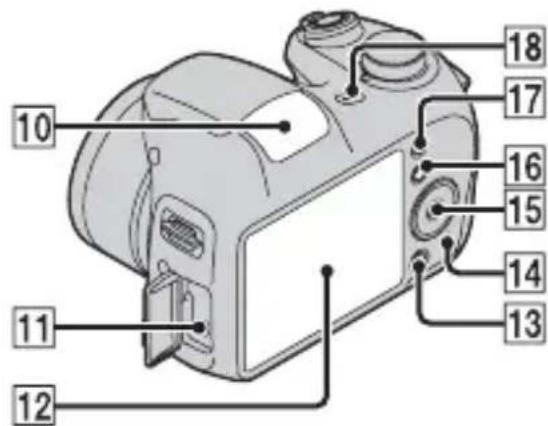

1 Mode dial: (Scene Selection)/(Intelligent Auto)/(Program Auto)/M(Manual Exposure Shooting)/☐(Sweep Panorama)/☑(Movie Mode)
2 Shutter button
③ For shooting: W/T (Zoom) lever
For viewing: (Playback zoom) lever/ ( index) lever
4 Self-timer lamp/Smile Shutter lamp/AF illuminator
5 Lens
6Speaker
7 Hook for shoulder strap
8 (flash pop-up) button
- When you do not want to fire the flash, push the flash unit down by hand to retract it.
9Flash
10 Microphone
11 USB / A/V OUT jack
12LCD screen
13/?(I Camera Guide/Delete) button
14 Access lamp
15 Control button
MENU on: ▲/▼/◄/►/●
MENU off: DISP/\~/😊
Tracking focus
16 MENU button
17 (Playback) button
18 ON/OFF (Power) button/ON/OFF (Power) lamp
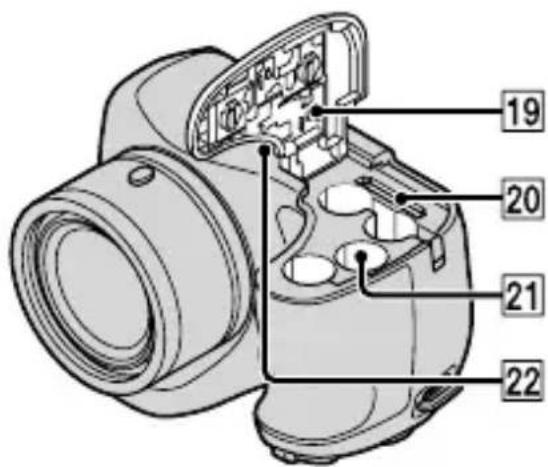
19Battery/memory card cover
20 Memory card slot
21Battery insertion slot
22Tripod receptacle
- Use a tripod with a screw less than 5.5 mm (7/32 inches) long. Otherwise, you cannot firmly secure the camera, and damage to the camera may occur.
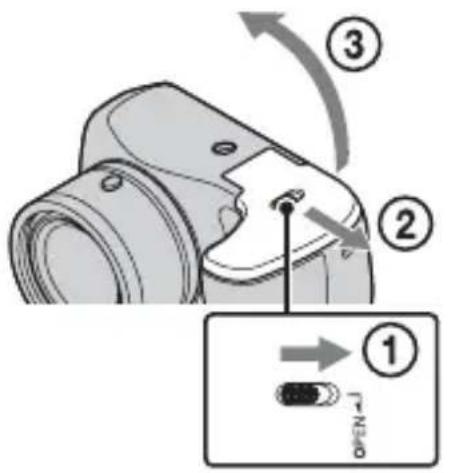
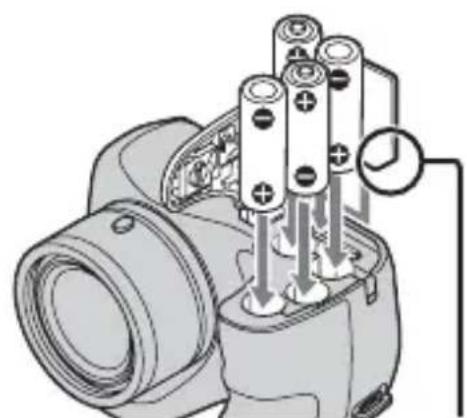
Inserting the batteries/a memory card (sold separately)
natural_image
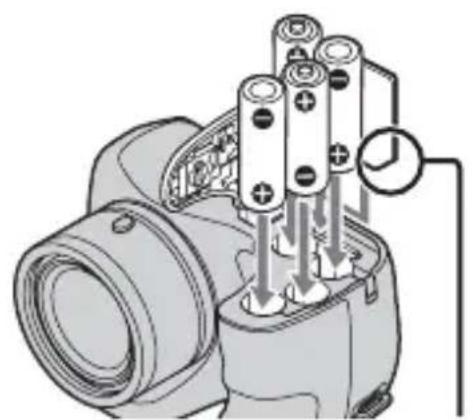
Diagram of a mechanical device with multiple cylindrical components and internal connections (no text or symbols)Ensure the notched corner faces correctly.
1 Open the cover.
2 Insert the memory card (sold separately).
- With the notched corner facing as illustrated, insert the memory card until it clicks into place.
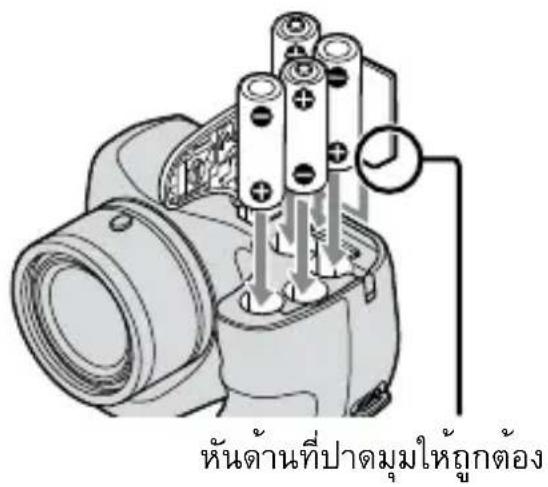
3 Match +/- and insert the batteries.
4 Close the cover.
■ Memory cards that you can use
| Memory Card For still images For movies | |||
| A | Memory Stick PRO Duo ○ | ○ | (Mark2 only) |
| Memory Stick PRO-HG Duo ○ | ○ | ||
| Memory Stick Duo ○— | |||
| B | Memory Stick Micro (M2) | ○ | ○ (Mark2 only) |
| C | SD memory card ○ ○ | (Class 4 or faster) | |
| SDHC memory card ○ | ○ (Class 4 or faster) | ||
| D | microSD memory card ○ | ○ (Class 4 or faster) | |
| microSDHC memory card | ○ | ○ (Class 4 or faster) | |
In this manual, the products in the table are collectively referred to as followings:
A: "Memory Stick Duo" media
B: "Memory Stick Micro" media
C: SD card
D: microSD memory card
Note
- When using “Memory Stick Micro” media or microSD memory cards with this camera, make sure to use with the appropriate adaptor.
GB
To remove the memory card/batteries
Memory card: Push the memory card in once.
Batteries: Be sure not to drop the batteries.
Note
- Never open the battery/memory card cover or remove the batteries/memory card when the access lamp (page 5) is lit. This may cause damage to data in the memory card/internal memory.
Batteries you can and cannot use with your camera
In the table below, indicates the battery can be used, while — indicates the one cannot be used.
| Battery type | Supplied | Supported | Rechargeable |
| LR6 (size AA) alkaline batteries | ○ | ○ | — |
| HR15/51: HR6 (size AA) Nickel-Metal Hydride batteries | — ○ | ○ | |
| Lithium batteries* — — — | |||
| Manganese batteries* — — — | — | ||
| Ni-Cd batteries* — — — |
* Operating performance cannot be ensured if voltage drops or other problems are caused by the nature of the battery.
Notes
- The performance of your camera differs depending on the manufacturer and the type of battery you use. Also, battery-performance may decline dramatically under low temperatures. Especially, at temperatures below 5 °C (41 °F), your camera may get turned off unexpectedly as you turn it on or switch the playback mode to the shooting mode.
For more details on batteries, see “Batteries” in “Cyber-shot User Guide”. - Please note that we cannot guarantee full performance of your camera when using the batteries not indicated as “supported” in the above table.
Battery life and number of images you can record/view
| Battery life (min.) Number of Images | |
| Shooting still images Approx. 175 | Approx. 350 |
| Viewing still images Approx. 400 | Approx. 8000 |
| Shooting movies Approx. 150 — |
Notes
- The number of images that can be recorded is an approximate number when shooting with new batteries. The number may be less depending on the circumstances.
- The number of images that can be recorded is when shooting under the following conditions:
- Using Sony “Memory Stick PRO Duo” (Mark2) media (sold separately).
- New batteries are used at an ambient temperature of 25^ (77°F).
- The number of still images that can be recorded is based on the CIPA standard, and is for shooting under the following conditions.
(CIPA: Camera & Imaging Products Association)
- [Panel Brightness] is set to [3].
- Shooting once every 30 seconds.
- The zoom is switched alternately between the W and T ends.
– The flash strobes once every two times.
- The power turns on and off once every ten times.
- The battery life for movies is when shooting under the following conditions:
– Recording mode: 720 FINE
- When continuous shooting ends because of set limits (page 17), press the shutter button down again and continue shooting. Shooting functions such as the zoom do not operate.
- The values shown for alkaline battery are based on commercial norms, and do not apply to all alkaline batteries in all conditions. The values may vary, depending on the battery manufacturer/type, environmental conditions, product setting, etc.
Setting the clock
ON/OFF (Power)

Select items: ▲/▼/◄/►
Set: ●
GB
1 Press the ON/OFF (Power) button.
Date & Time setting is displayed when you press the ON/OFF (Power) button for the first time.
- It may take time for the power to turn on and allow operation.
2 Select a desired language.
3 Select a desired geographic location by following the on-screen instructions, then press ●.
4 Set [Date & Time Format], [Summer Time] and [Date & Time], then press [OK].
- Midnight is indicated as 12:00 AM, and noon as 12:00 PM.
5 Operate following the instructions on the screen.
Shooting still images/movies

Mode dial
i: Intelligent Auto
□: Sweep Panorama
Movie

Shooting still images
1 Press the shutter button halfway down to focus.
When the image is in focus, a beep sounds and the ● indicator lights.
2 Press the shutter button fully down.
Shooting movies
1 Press the shutter button fully down to start recording.
- Use the W/T (zoom) lever to change the zoom scale.
2 Press the shutter button fully down again to stop recording.
Notes
- The operating sound of the lens is recorded when the zoom function operates while shooting a movie.
- The panoramic shooting range may be reduced, depending on the subject or the way it is shot. Therefore even when [360^] is set for panoramic shooting, the recorded image may be less than 360 degrees.
Viewing images

GB
1 Press the ▶(Playback) button.
When images on a memory card recorded with other cameras are played back on this camera, the registration screen for the data file appears.
Selecting next/previous image
Select an image with ▶ (next)/◀ (previous) on the control button. Press ● in the center of the control button to view movies.
■ Deleting an image
①Press /?(Delete) button.
② Select [This Image] with ▲ on the control button, then press ●.
■ Returning to shooting images
Press the shutter button halfway down.
In-Camera Guide
This camera contains an internal function guide. This allows you to search the camera's functions according to your needs.

1 Press the MENU button.
2 Select an item whose description you want to view, then press the ? (in-Camera Guide) button.
The operation guide for the selected function is displayed.
- You can search for a function by key word(s) or icon, by pressing the ?/In-Camera Guide) button when MENU is not displayed.
Introduction of other functions
Other functions used when shooting or playing back can be operated using the control button or MENU button on the camera. This camera is equipped with a Function Guide that allows you to easily select from the functions. While displaying the guide, try the other functions.


Function Guide
GB
Control button
DISP (Display Setting): Allows you to change the screen display.
(Self-Timer): Allows you to use the self-timer.
(Smile Shutter): Allows you to use the Smile Shutter mode.
(Flash): Allows you to select a flash mode for still images.
● (Tracking focus): Allows you to continue to focus on a subject even if the subject moves.
Menu Items
Shooting
| Scene Selection Select pre-set settings to match various scene conditions. | |
| Picture Effect | Shoot still images with an original texture according to the desired effect. |
| Easy Mode Shoot still images using minimal functions. | |
| Still Image Size/ Panorama Image Size/Movie Size | Select the image size for still images, panoramic images or movie files. |
| Color hue | Set the color hue when [Toy camera] is selected in Picture Effect. |
| Extracted Color | Select the color to extract when [Partial Color] is selected in Picture Effect. |
| Cont. Shooting Settings | Select single-image mode or burst mode. |
| EV Adjust the exposure | manually. |
| ISO Adjust the luminous sensitivity. | |
| White Balance Adjust color tones of an image. | |
| Focus Select the focus method. | |
| Metering Mode | Select the metering mode that sets which part of the subject to measure to determine the exposure. |
| Scene Recognition | Set to automatically detect shooting conditions in Intelligent Auto mode. |
| Soft Skin Effect Set the Soft Skin Effect and the effect level. | |
| Smile Detection Sensitivity | Set the Smile Shutter function sensitivity for detecting smiles. |
| Face Detection | Select to detect faces and adjust various settings automatically. |
| DRO | Set DRO function to correct the brightness and contrast and improve the image quality. |
| Anti Blink | Set to automatically shoot two images and select image in which the eyes are not blinking. |
| In-Camera Guide Search the camera's functions according to your needs. | |
Viewing
| Slideshow Select a method of continuous playback. | |
| View Mode Select the display format for images. | |
| Retouch Retouch an image using various effects. | |
| Delete Delete an image. | |
| Protect Protect the images. | |
| Print (DPOF) Add a print order mark to a still image. | |
| Rotate Rotate a still image to the left or right. | |
| In-Camera Guide Search the camera's functions according to your needs. |
GB

Setting items
If you press the MENU button while shooting or during playback,

(Settings) is provided as a final selection. You can change the default
settings on the (Settings) screen.
 Shooting Settings Shooting Settings | AF Illuminator/Grid Line/Disp. Resolution/Digital Zoom/Red Eye Reduction/Blink Alert/Write Date |
 Main Settings Main Settings | Beep/Panel Brightness/Language Setting/Display color/ Initialize/Function Guide/Video Out/USB Connect Setting/LUN Setting/Download Music/Empty Music/ Eye-Fi*1/Power Save |
 Memory Card Tool*2 Memory Card Tool*2 | Format/Create REC.Folder/Change REC.Folder/Delete REC.Folder/Copy/File Number |
 Clock Settings Clock Settings | Area Setting/Date & Time Setting |
*1 [Eye-Fi] is displayed only when a compatible memory cards is inserted to the camera.
*2 If a memory card is not inserted, □(Internal Memory Tool) will be displayed and only [Format] can be selected.
Install PC application (Windows)
Using the embedded software “PlayMemories Home” allows you to import recorded images to a computer, and edit or process them.
You can record/play back on your camera without installing the software "PlayMemories Home".
1 Connect the camera to a computer.
2 [Computer] (in Windows XP, [My Computer]) → [PMHOME] → double-click [PMHOME.EXE].
3 Follow the instructions on the screen to complete the installation.
Note
- “PlayMemories Home” is not compatible with Mac OS. If you play back images on a Mac, use the applications that are installed on your Mac.
For details, see http://www.sony.co.jp/imsoft/Mac/
Useful functions in "PlayMemories Home"
“PlayMemories Home” provides the below useful features, while enabling a variety of other functions by connecting to the Internet and installing the “Expanded Feature”.
- Import and display images recorded with this camera.
- View images in a computer by organizing them by shooting date on a calendar.
- Correct still images (Red Eye Correction, etc.), print, send images by e-mail, and change shooting date/time.
- Save and print images with the shooting date inserted.
Number of still images and recordable time of movies
The number of still images and recordable time may vary depending on the shooting conditions and the memory card.
Still images
(Units: Images)
GB
| Size\Capacity | Internal memory Memory card |
| Approx. 55 MB 2 GB | |
| 16M 8 265 | |
| VGA 350 11500 | |
| 16:9(12M) 9 330 |
Movies
The table below shows the approximate maximum recording times. These are the total times for all movie files. The maximum size of a movie file is up to approximately 2 GB.
(h (hour), m (minute))
| Size\Capacity | Internal memory Memory card |
| Approx. 55 MB 2 GB | |
| 1280 × 720 (Fine) — 25m (20m) | |
| 1280 × 720 (Standard) — 35m (30m) | |
| VGA 2m (2m) 1h 5m (1h 5m) |
The number in ( ) is the minimum recordable time.
- The recordable time of movies varies because the camera is equipped with VBR (Variable Bit Rate), which automatically adjusts image quality depending on the shooting scene. When you record a fast-moving subject, the image is clearer but the recordable time is shorter because more memory is required for recording. The recordable time also varies depending on the shooting conditions, the subject or the image size setting.
Notes on using the camera
On use and care
Avoid rough handling, disassembling, modifying, physical shock, or impact such as hammering, dropping or stepping on the product. Be particularly careful of the lens.
Notes on recording/playback
- Before you start recording, make a trial recording to make sure that the camera is working correctly.
- The camera is neither dust-proof, nor splash-proof, nor water-proof.
- Avoid exposing the camera to water. If water enters inside the camera, a malfunction may occur. In some cases, the camera cannot be repaired.
- Do not aim the camera at the sun or other bright light. It may cause the malfunction of the camera.
- If moisture condensation occurs, remove it before using the camera.
- Do not shake or strike the camera. It may cause a malfunction and you may not be able to record images. Furthermore, the recording media may become unusable or image data may be damaged.
Do not use/store the camera in the following places
• In an extremely hot, cold or humid place
In places such as in a car parked in the sun, the camera body may become deformed and this may cause a malfunction.
• Under direct sunlight or near a heater
The camera body may become discolored or deformed, and this may cause a malfunction.
- In a location subject to rocking vibration
- Near a location that generates strong radio waves, emits radiation or is strongly magnetic place. Otherwise, the camera may not properly record or play back images.
• In sandy or dusty places
Be careful not to let sand or dust get into the camera. This may cause the camera to malfunction, and in some cases this malfunction cannot be repaired.
On the battery
- Avoid rough handling, disassembling, modifying, physical shock, or impact such as hammering, dropping or stepping on the battery.
- Do not use a deformed or damaged battery.
- Do not mix a used battery together with a new battery or different types of batteries.
- Remove the batteries from the camera when you do not operate the camera for long periods, or when the batteries are dead.
Notes on the screen and lens
The screen is manufactured using extremely high-precision technology so over 99.99% of the pixels are operational for effective use. However, some tiny black and/or bright dots (white, red, blue or green) may appear on the screen. These dots are a normal result of the manufacturing process, and do not affect the recording.
On camera's temperature
Your camera and battery may get hot due to continuous use, but it is not a malfunction.
Warning on copyright
Television programs, films, videotapes, and other materials may be copyrighted. Unauthorized recording of such materials may be contrary to the provisions of the copyright laws.
No compensation for damaged content or recording failure
Sony cannot compensate for failure to record or loss or damage of recorded content due to a malfunction of the camera or recording media, etc.
Cleaning the camera surface
Clean the camera surface with a soft cloth slightly moistened with water, then wipe the surface with a dry cloth. To prevent damage to the finish or casing:
- Do not expose the camera to chemical products such as thinner, benzine, alcohol, disposable cloths, insect repellent, sunscreen or insecticide.
Specifications
Camera
[System]
Image device: 7.75 mm (1/2.3 type) color CCD, Primary color filter
Total pixel number of camera: Approx. 16.4 Megapixels
Effective pixel number of camera: Approx. 16.1 Megapixels
Lens: 21× zoom lens f = 4.5 mm - 94.5 mm (25 mm - 525 mm (35 mm film equivalent)) F3.1 (W) - F5.8 (T)
SteadyShot: Optical
Exposure control: Automatic exposure, Manual Exposure, Scene Selection (11 modes)
White balance: Automatic, Daylight, Cloudy, Fluorescent 1/2/3, Incandescent, Flash, One Push
Recording interval for Burst mode: Approx. 1.0 second
File format: Still images: JPEG (DCF, Exif, MPF Baseline) compliant, DPOF compatible Movies: MPEG-4 AVC/H.264
Recording media: Internal Memory (Approx. 55 MB), “Memory Stick Duo” media, “Memory Stick Micro” media, SD cards, microSD memory cards
Flash: Flash range (ISO sensitivity (Recommended Exposure Index) set to Auto): Approx. 0.5 m to 6.8 m (W) (1 ft. 7 3/4 inches to 22 ft. 3 3/4 inches) Approx. 0.5 m to 3.7 m (T) (1 ft. 7 3/4 inches to 12 ft. 1 3/4 inches)
[Input and Output connectors]
USB / A/V OUT jack: Video output Audio output USB communication
USB communication: Hi-Speed USB (USB 2.0)
[Screen]
LCD screen: 7.5 cm (3.0 type) TFT drive
Total number of dots: 460 800 dots
[Power, general]
Power: LR6 (size AA) alkaline batteries (4), 6 V HR15/51: HR6 (size AA) Nickel-Metal Hydride batteries (4) (sold separately), 4.8 V ZR6 (size AA)
Power consumption (during shooting): 1.4 W
Operating temperature: 0°C to 40°C (32°F to 104°F)
Storage temperature: -20^ to +60^ ( -4^ to +140^ )
Dimensions (CIPA compliant):
122.9 mm × 83.2 mm × 81.3 mm
(4 7/8 inches × 3 3/8 inches ×
3 1/4 inches)
(W/H/D)
Mass (CIPA compliant) (including four batteries and “Memory Stick Duo” media):
Approx. 515 g (1 lb 2.2 oz)
Microphone: Monaural
Speaker: Monaural
Exif Print: Compatible
PRINT Image Matching III:
Compatible
Design and specifications are subject to change without notice.
Trademarks
• The following marks are trademarks of Sony Corporation.
Cyber-shot, "Cyber-shot,"
"Memory Stick PRO Duo,"
"Memory Stick PRO-HG Duo,"
"Memory Stick Duo"
- Windows is registered trademark of Microsoft Corporation in the United States and/or other countries.
• Mac is registered trademark of Apple Inc. - SDHC logo is a trademark of SD-3C, LLC.
- In addition, system and product names used in this manual are, in general, trademarks or registered trademarks of their respective developers or manufacturers. However, the ^TM or ^® marks are not used in all cases in this manual.
Additional information on this product and answers to frequently asked questions can be found at our Customer Support Website.
http://www.sony.net/
Printed on 70% or more recycled paper using VOC (Volatile Organic
Compound)-free vegetable oil based ink.
natural_image
Symbol of a trash bin crossed with no text or numbers, representing waste sorting or disposal (no text present)natural_image
Simple line drawing of a trash bin with two crossed x-axes (no text or symbols)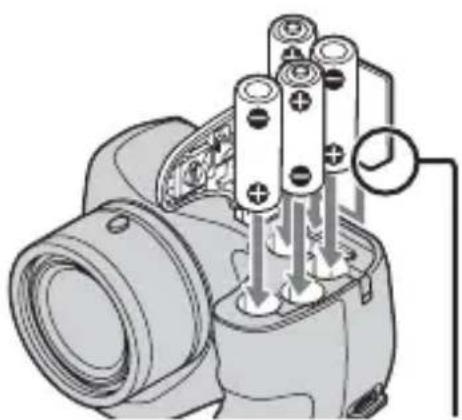
natural_image
Diagram of a camera lens assembly with multiple cylindrical components and a dial indicator (no text or labels)(CIPA: Camera & Imaging Products Association)
Mod kadrani

: Akıllı otomatik

Panorama Taraması

Film

HR15/51: HR6 (AA boyutu)
Nikel Metal Hidrit pil (4) (ayrı
Cyber-shot, “Cyber-shot”, “Memory Stick PRO Duo”, “Memory Stick PRO-HG Duo”, “Memory Stick Duo”
1-7-1 Konan, Minato-ku, Tokyo, 108-0075 Japan
Türkiye İrtibat Numaraları: Tel: 0216-633 98 00 Faks: 0216-632 70 30 e-mail: bilgi@eu.sony.com

natural_image
Diagram of a camera module with multiple cylindrical batteries and a connector, showing internal wiring (no text or labels)確定斜角插入方向正確。
CT
(CIPA: Camera & Imaging Products Association)
HR15/51: HR6 (AA尺寸) 鎳氫
電池 (4) (另售), 4.8 V
ZR6 (AA尺寸)
功率消耗 (拍攝時):1.4 W
Cyber-shot, "Cyber-shot", "Memory Stick PRO Duo", "Memory Stick PRO-HG Duo", "Memory Stick Duo"

①模式拨盘:SCN(场景选择)/

natural_image
Diagram of a mechanical device with multiple cylindrical components and a labeled connection point (no text or symbols present)确保缺口角方向正确。
CS
(CIPA: Camera & Imaging Products Association)
模式拨盘
Cyber-shot, "Cyber-shot", "Memory Stick PRO Duo", "Memory Stick PRO-HG Duo", "Memory Stick Duo"
1 Mod dial: (Pemilihan Adegan)/(Auto pintar)/ P (Auto program)/(Ambil Gbr Pendedahan Manual)/ (Panorama)/Mod Wayang)
② Butang pengatup
A: "Memory Stick Duo"
B: "Memory Stick Micro"
C: Kad SD
D: Kad memori microSD
Nota
(CIPA: Camera & Imaging Products Association)
natural_image
Illustration of a camera with a dial indicator showing 12/15 (no text or symbols on the dial itself)Mod dial
i: Auto pintar
□: Panorama
: Wayang gambar

(h (jam), m (minit))
| Saiz\Kapasiti | Memori dalaman Kad memori | |
| Lebih kurang 55 MB 2 GB | ||
| 1280×720(Halus) — 25m (20m) | ||
| 1280×720(Biasa) — 35m (30m) | ||
| VGA 2m (2m) 1h 5m (1h 5m) | ||
Cyber-shot, “Cyber-shot”, “Memory Stick PRO Duo”, “Memory Stick PRO-HG Duo”, “Memory Stick Duo”
- Windows merupakan tanda dagang berdaftar Microsoft Corporation di Amerika Syarikat dan/atau negara-negara lain.
• Mac merupakan tanda dagang berdaftar Apple Inc. - Logo SDHC merupakan tanda dagang SD-3C, LLC.
- Tambahan, nama-nama sistem dan produk yang digunakan dalam manual ini, pada amnya, tanda-tanda dagang atau tanda-tanda dagang berdaftar pencipta atau pekilang masing-masing. Walau bagaimanapun, tanda-tanda ^TM atau ^® tidak digunakan pada setiap kes di dalam manual ini.
natural_image
Diagram of a cylindrical battery assembly with internal components and a dial indicator (no text or symbols)(CIPA: Camera & Imaging Products Association)
Cyber-shot, "Cyber-shot", "Memory Stick PRO Duo", "Memory Stick PRO-HG Duo", "Memory Stick Duo"

Cyber-shot, "Cyber-shot",
"Memory Stick PRO Duo",
"Memory Stick PRO-HG Duo",
"Memory Stick Duo"
"Cyber-shot", Cyber-shot
"Memory Stick PRO Duo"
"Memory Stick PRO-HG Duo"
"Memory Stick Duo"
:"Memory Stick Duo" 9
تقریبا 515 گرم
ميكروفون: مونورال
بلندگو: مونورال
قابل ان tabاق : Exif Print
: قابل ان tabاق PRINT Image Matching III
درجه وضعیت
خودکار هوشمند: i
: پیمايش پانوراما
فيلم :
گرفتن تصاوير ساكن
(CIPA: Camera & Imaging Products Association)
natural_image
Diagram of a camera lens assembly with multiple cylindrical components and a connector (no text or symbols)

"Memory Stick PRO-HG Duo"
"Memory Stick Duo"
قرص الوضع
: تلقائي ذكي

: تحrijk البانوراما

صور مitrكة

تصوير صور ثابتة
natural_image
Diagram of a camera lens assembly with multiple cylindrical components and a dial indicator (no text or labels)
- Cyber-shot \_\_\_\_ Cyber-shot
- English
- Learning more about the camera (“Cyber-shot User Guide”)
- Checking the supplied items
- WARNING
- For Customers in Europe
- Notice for the customers in the countries applying EU Directives
- Attention
- Notice
- Disposal of Old Electrical & Electronic Equipment (Applicable in the European Union and other European countries with separate collection systems)
- Disposal of waste batteries (applicable in the European Union and other European countries with separate collection systems)
- Identifying parts
- Inserting the batteries/a memory card (sold separately)
- Note
- To remove the memory card/batteries
- Batteries you can and cannot use with your camera
- Notes
- Battery life and number of images you can record/view
- Setting the clock
- Shooting still images/movies
- Shooting still images
- Shooting movies
- Viewing images
- Press the ▶(Playback) button.
- Selecting next/previous image
- ■ Deleting an image
- ■ Returning to shooting images
- In-Camera Guide
- Introduction of other functions
- Control button
- Menu Items
- Viewing
- Setting items
- Install PC application (Windows)
- Useful functions in "PlayMemories Home"
- Number of still images and recordable time of movies
- Still images
- Movies
- Notes on using the camera
- On use and care
- Notes on recording/playback
- Do not use/store the camera in the following places
- On the battery
- Notes on the screen and lens
- On camera's temperature
- Warning on copyright
- No compensation for damaged content or recording failure
- Cleaning the camera surface
- Specifications
- Camera
- [System]
- [Input and Output connectors]
- [Screen]
- [Power, general]
- Trademarks
- http://www.sony.net/
- Nota
Brand : SONY
Model : Cybershot DSC-H100
Category : Camera