Ambition 1.5 - Sewing machine PFAFF - Free user manual and instructions
Find the device manual for free Ambition 1.5 PFAFF in PDF.


User questions about Ambition 1.5 PFAFF
0 question about this device. Answer the ones you know or ask your own.
Ask a new question about this device
Download the instructions for your Sewing machine in PDF format for free! Find your manual Ambition 1.5 - PFAFF and take your electronic device back in hand. On this page are published all the documents necessary for the use of your device. Ambition 1.5 by PFAFF.
USER MANUAL Ambition 1.5 PFAFF
text_image
PFAFF Perfection starts here.™ambition™ 1.0
Owner's manual
PFAFF
Perfection starts here. ^TM
This household sewing machine is designed to comply with IEC/EN 60335-2-28 and UL1594.
IMPORTANT SAFETY INSTRUCTIONS
When using an electrical appliance, basic safety precautions should always be followed, including the following:
Read all instructions before using this household sewing machine. Keep the instructions in a suitable place close to the machine. Make sure to hand them over if the machine is given to a third party.
DANGER – To reduce the risk of electric shock:
- A sewing machine should never be left unattended when plugged in. Always unplug this sewing machine from the electric outlet immediately after using and before cleaning, removing covers, lubricating or when making any other user servicing adjustments mentioned in the instruction manual.
WARNING – To reduce the risk of burns, fire, electric shock, or injury to person:
- Do not allow to be used as a toy. Close attention is necessary when this sewing machine is used by or near children.
- Use this sewing machine only for its intended use as described in this manual. Use only attachments recommended by the manufacturer as contained in this manual.
- Never operate this sewing machine if it has a damaged cord or plug, if it is not working properly, if it has been dropped or damaged, or dropped into water. Return the sewing machine to the nearest authorized dealer or service center for examination, repair, electrical or mechanical adjustment.
- Never operate the sewing machine with any air openings blocked. Keep ventilation openings of the sewing machine and foot control free from the accumulation of lint, dust, and loose cloth.
- Keep fingers away from all moving parts. Special care is required around the sewing machine needle.
• Always use the proper needle plate. The wrong plate can cause the needle to break. - Do not use bent needles.
- Do not pull or push fabric while stitching. It may deflect the needle causing it to break.
- Wear safety glasses.
- Switch the sewing machine off ("0") when making any adjustment in the needle area, such as threading needle, changing needle, threading bobbin, or changing presser foot, etc.
- Never drop or insert any object into any opening.
- Do not use outdoors.
- Do not operate where aerosol (spray) products are being used or where oxygen is being administered.
- To disconnect, turn all controls to the off ("0") position, then remove plug from outlet.
- Do not unplug by pulling on cord. To unplug, grasp the plug, not the cord.
- The foot control is used to operate the machine. Avoid placing other objects on the foot control.
-
Do not use the machine if it is wet.
-
If the LED lamp is damaged or broken, it must be replaced by the manufacturer or its service agent or a similarly qualified person, in order to avoid a hazard.
- If the supply cord connected with the foot control is damaged, it must be replaced by the manufacturer or its service agent or a similarly qualified person, in order to avoid a hazard.
- This sewing machine is provided with double insulation. Use only identical replacement parts. See instructions for Servicing of Double-Insulated Appliances.
SAVE THESE INSTRUCTIONS
For Europe only:
This appliance can be used by children aged from 8 years and above and persons with reduced physical, sensory or mental capabilities or lack of experience and knowledge if they have been given supervision or instruction concerning use of the appliance in a safe way and understand the hazards involved. Children shall not play with the appliance. Cleaning and user maintenance shall not be made by children without supervision.
The noise level under normal operating conditions is less than 75dB(A).
The machine must only be used with foot control of type C-9002 manufactured by CHIENHUNG TAIWAN., LTD.
For outside Europe:
This sewing machine is not intended for use by persons (including children) with reduced physical, sensory or mental capabilities, or lack of experience and knowledge, unless they have been given supervision or instruction concerning use of the sewing machine by a person responsible for their safety. Children should be supervised to ensure that they do not play with the sewing machine.
The noise level under normal operating conditions is less than 75dB(A).
The machine must only be used with foot control of type C-9002 manufactured by CHIENHUNG TAIWAN., LTD.
SERVICING OF DOUBLE INSULATED PRODUCTS
In a double-insulated product, two systems of insulation are provided instead of grounding. No ground means is provided on a double-insulated product, nor should a means for grounding be added to the product. Servicing of a double-insulated product requires extreme care and knowledge of the system and should be done only by qualified service personnel. Replacement parts for a double-insulated product must be identical to those parts in the product. A double-insulated product is marked with the words 'DOUBLE INSULATION' or 'DOUBLE INSULATED'.

natural_image
Interior scene with a checkered rug on a black armchair, a large window view, and a decorative vase with floral arrangement (no text or symbols visible)Congratulations!
Congratulations on purchasing your new PFAFF ^® sewing machine. As a sewing enthusiast, you have acquired a machine that features the very latest in both design and technology, enabling you to transform your creative ideas into reality.
Before you start, please spend some time reading this owner's manual. You will soon discover how to maximize the use of your machine. Our authorized PFAFF® dealer will of course also be pleased to advise you as well.
Your PFAFF ^® ambition ^™ 1.0 sewing machine will definitely enable you to experience a totally new dimension of sewing!
Table of contents
Introduction 6
Machine overview 6
Accessories 8
Stitch overview 9
Alphabets....11
Preparations 13
Unpacking 13
Connect to the power supply 13
Pack away after sewing 13
Free arm 14
Leveling the machine base plate ....14
Mounting machine in sewing cabinet ....14
Thread cutter 14
Spool pins 14
Threading the machine 15
Needle threader 16
Threading for twin needle.... 16
Bobbin winding 17
Inserting the bobbin 18
IDT™ system (integrated dual feed) .....18
Presser foot pressure 19
Thread tension 19
Needles....20
Changing the needle 21
Lowering feed dogs....21
Presser foot lift 21
Changing the presser foot 21
Buttons....22
Graphic Display 23
Settings....24
Sewing 25
Sewing mode - overview 25
Select a stitch....25
Stitch information 25
Stitch adjustments 26
Tie-off options 28
Save personal stitch ....29
Load personal stitch 29
Main motor overload 29
Sewing techniques ....30
Three-step zigzag stitch 30
Buttonholes....30
Sew on a button 31
Darning and mending 32
Sewing hems in heavy fabric 32
Quilting....33
Blindhem....34
Sewing in zippers 34
Sequencing 35
Overview....35
Create a sequence....35
Manage your sequences 38
Save sequence 38
Load sequence....38
Sewing a sequence 38
Maintenance 39
Cleaning the machine 39
Replacing the stitch plate ....39
Troubleshooting 40
Intellectual property ....43
Introduction
Machine overview

text_image
1 2 3 4 5 5 17 18 19 PFAFF ambition 1.0 10 16 11 12 6 7 8 13 14 15 9Front side
- Lid with stitch overview
- Threading slots
- Speed control slide
- Thread cutter
- LED lights
- Built-in needle threader
- Buttonhole lever
- Needle bar
- Stitch plate
-
Bobbin cover
-
Lower thread guide
- Presser foot lift
- Needle screw
- Needle thread guide
- Presser foot bar and presser foot holder
- Presser foot
- Free arm
- Buttons and graphic display
- Handwheel
Top parts
- Presser foot pressure dial
- Thread guides
- Spool caps
- Hole for auxiliary spool pin
- Bobbin winder lever and bobbin spindle
- Take-up lever
- Thread tension discs
- Thread tension dial
- Bobbin winder tension disc
- Bobbin thread cutter
text_image
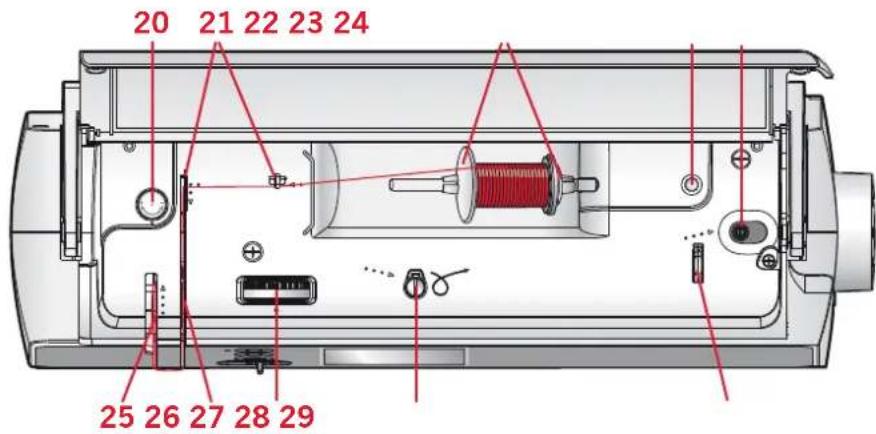
20 21 22 23 24 25 26 27 28 29Rear side
- Main switch, connectors for power cord and foot control
- Handle
- Presser foot lift
- IDT ^™ system
- Slide for lowering the feed dogs

text_image
31 32 33 30 34Accessory tray
The accessory tray features special compartments for presser feet and bobbins, plus space for needles and other accessories. Store the accessories in the tray so they are easily accessible.
- Space for accessories
- Removable tray for presser feet
- Removable bobbin holder

text_image
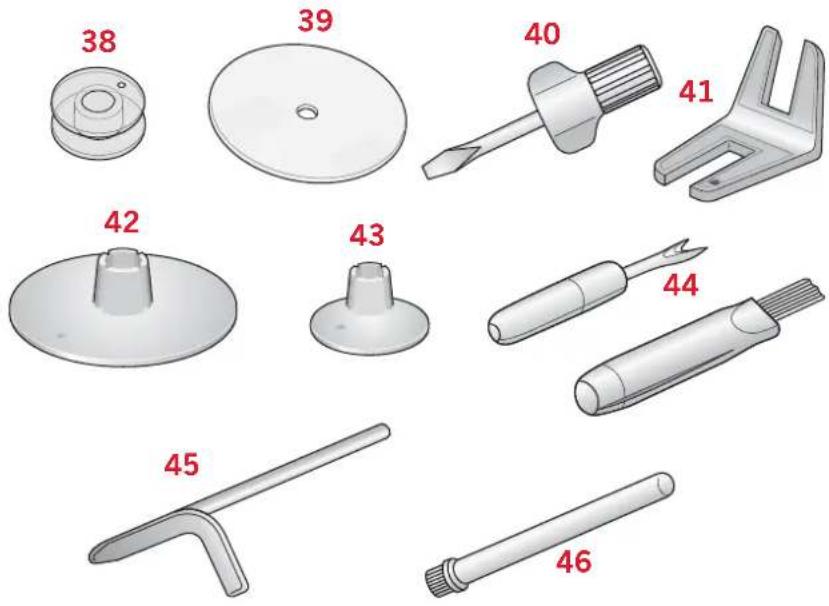
35 36 37Accessories
Included accessories
- Bobbins (5) (#416475801)
- Felt pad
- Screwdriver for needle plate
- Multi-purpose tool
- Spool cap, large (2)
- Spool cap, small
- Seam ripper & brush (as one)
- Edge guide
- Auxiliary spool pin
Included accessories not in picture
- Foot control
- Power cord
- Needles
- Hard cover
text_image
38 39 40 41 42 43 44 45 46Presser feet
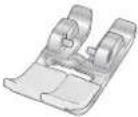 | Standard presser foot 0A with IDT ^TM system (attached on the machine upon delivery)This foot is used mainly for straight stitching and zigzag stitching with a stitch length longer than 1.0 mm. |
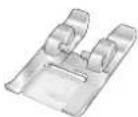 | Fancy stitch foot 1A with IDT ^TM systemThis foot is used for decorative stitches. The groove on the underside of the foot is designed to flow smoothly over the stitches. |
 | Fancy stitch foot 2AWhen sewing decorative stitches or short zigzag stitches and other utility stitches with less than 1.0mm stitch length, use this foot. The groove on the underside of the foot is designed to flow smoothly over the stitches. |
 | Blindhem foot 3 with IDT ^TM systemThis foot is used for blindhem stitches. The toe on the foot guides the fabric. The red guide on the foot is designed to ride along the fold of the hem edge. |
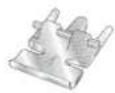 | Zipper foot 4 with IDT ^TM systemThis foot can be snapped on either the right or the left of the needle, making it easy to sew close to both sides of the zipper teeth. Move the needle position to the right or left to sew closer to zipper teeth. |
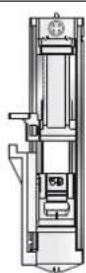 | One step Buttonhole foot 5BThis foot has a space in the back to set the size of the buttonhole. The machine will sew a buttonhole to fit that button size. |
Important: Make sure that the IDT ^™ system is disengaged when using presser foot 2A, 5B.
Stitch overview
Utility stitches
| Stitch | Number Name Description | |
| 1 | Straight stitch For seaming and topstitching. Select from 29 different needle positions. Note: This stitch makes a stronger tie-off than stitch 35. | |
| 2 | Stretch triple straight stitch Reinforced seam. Topstitching. | |
| 3 | Straight stitch reverse Sew continuous reverse. | |
| 4 | Zigzag stitch Reinforce seams, clean finish, stretch sewing, lace insertion. | |
| 5 | Zigzag stitch Reinforce seams, clean finish, stretch sewing. | |
| 6 | Z-zigzag stitch Appliqué, couching, cyclelets. | |
| 7 | Stretch triple zigzag stitch Elastic stitch for decorative hems or topstitching. | |
| 8 | Three-step zigzag stitch Sewing elastic, darning, patching. | |
| 9 | Elastic stitch Sewing elastic, darning, patching. | |
| 10 | Honeycomb stitch Decorative stitch for stretch fabrics and hems. Also used with elastic thread in the bobbin. | |
| 11 | Bridging stitch Joining fabrics and quilt batting, decorative stitch for quilting, hemstitching. | |
| 12 | Foundation elastic stitch Joining stitch for undergarments, terry cloth, leather, bulky fabrics where overlapping the seams. | |
| 13 | Crosshem stitch Elastic decorative hem for stretch fabrics. | |
| 14 | Blindhem stitch Sewing blindhems on woven fabrics. | |
| 15 | Elastic blindhem stitch Sewing blindhems on stretch fabrics. | |
| 16 | Stretch tricot stitch Sewing seams on stretch fabrics. | |
| 17 | Closed overlock Seam and overcast stretch fabrics in one step. | |
| 18 | Closed overlock Seam and overcast in one step with reinforced edge. | |
| 19 | Standard overcast Seam and overcast stretch fabrics in one step with reinforced edge. | |
| 20 | Closed overlock Seam and overcast stretch fabrics in one step. | |
| 21 | Closed overlock blind hem Create decorative overlock blindhem for stretch fabrics. |
| Stitch | Number Name | Description | |
| 22 | Linen buttonhole Buttonhole for blouses, shirts and linen. | ||
| 23 | Standard buttonhole Basic buttonhole for blouses, shirts and jackets. Also for pillowcases. | ||
| 24 | Rounded buttonhole with lengthwise tack | Buttonhole for garments. | |
| 25 | Eyelet buttonhole with pointed tack | Tailors buttonhole or decorative buttonhole. | |
| 26 | Eyelet buttonhole with lengthwise tack | Tailors buttonhole for jackets and trousers. | |
| 27 | Rounded buttonhole Buttonhole for light garments or jackets. | ||
| 28 | Stretch buttonhole Buttonhole for stretch fabrics. | ||
| ⊖ | 29 | Button sewing Sew on buttons or tacking. | |
| ◦ | 30 | Eyelet Heirloom sewing decorative trim. | |
| 31 | Programmable darning stitch | Darning holes or damaged fabric. | |
| 32 | Programmable reinforced darning stitch | Reinforced darning holes or damaged fabric. | |
| 33 | Bartack Automatically reinforce seams and pockets. | ||
| 34 | Denim bartack Automatically reinforce seams and pockets decoratively. | ||
Quilt stitches
| Stitch | ||||||||||||||
| Number | 35 36 | 37 38 | 39 40 | 41 42 | 43 44 | 45 46 | 47 48 |
| Stitch | |||||||||||||
| Number | 49 50 | 51 52 | 53 54 | 55 56 | 57 58 | 59 60 | 61 |
Needle art stitches
| Stitch | ||||||||||||||||
| Number | 62 63 | 64 65 | 66 67 | 68 69 | 70 71 | 72 73 | 74 75 | 76 77 | 78 79 |
Satin stitches
| Stitch | |||||||||||||||
| Number | 80 81 | 82 83 | 84 85 | 86 87 | 88 89 | 90 91 | 92 93 | 94 95 |
Decorative stitches
| Stitch | |||||||||||||||||
| Number | 96 97 | 98 99 | 100 | 101 102 | 103 | 104 105 | 106 | 107 108 | 109 | 110 111 | 112 | 113 | |||||
| Stitch | |||||||||||||||||
| Number | 114 | 15 11 | 6 117 | 118 11 | 9 120 | 121 12 | 2 123 | 124 125 | 126 | 127 128 | 129 | 130 |
Sewing techniques stitches
| Stitch | ||||||
| Number | 131 | 132 133 | 134 | 135 136 |
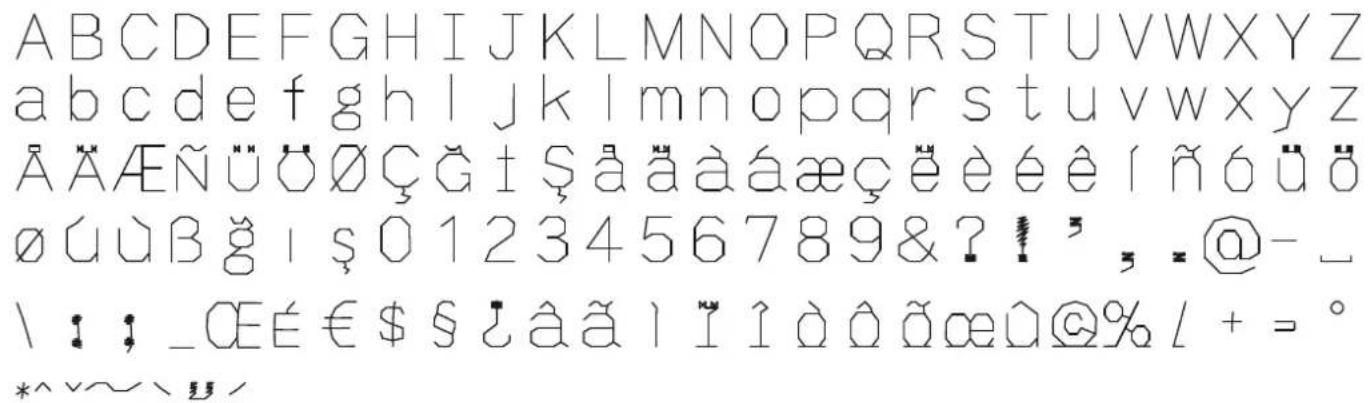
Alphabets
A/a Block letters
text_image
ABCDEFGHIJKLMNOPQRSTUVWXYZ abcdefghijklmnopqrstuvwxyz ÄÄÄENÜÖÖÇĞİŞääääæçëèéêîñóüö øúùBğİŞ0123456789&?!, 。@-_ \ : ; _CEÉ€$S¿âãìlîìòâðœû@%l+ = ° *^y~v,B Cyrillic letters

text_image
АБВГДЕЁЖЗИЙКЛМНОПРСТУФХЦЧ ШЩЬЫЬЭЮЯ1234567890&?!,_V© §$€%::‘’*=-+
natural_image
Black-and-white portrait of a woman in a collared garment, hand on chin, looking upward (no text or symbols visible)Preparations
Unpacking
- Place the box on a steady, flat surface. Lift the machine out of the box, remove the outer packaging and lift off the machine carrying case.
- Remove all outer packing material and the plastic bag.
Note: Your PFAFF® ambition™ 1.0 sewing machine is adjusted to provide the best stitch result at normal room temperature. Extreme hot and cold temperatures can affect the sewn result.
Connect to the power supply
Among the accessories you will find the power cord and the foot control.
Note: Consult a qualified electrician if in doubt as how to connect the machine to the power source. Unplug the power cord when the machine is not in use.
For this sewing machine, foot control model C-9002 manufactured by CHIENHUNG TAIWAN., LTD must be used.
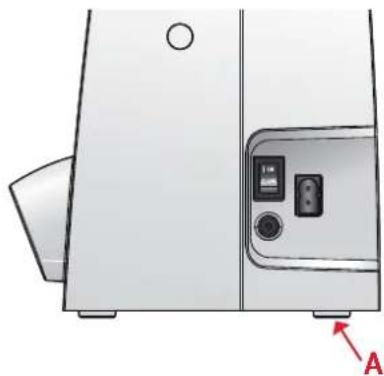
- Connect the foot control cord to the front socket on the bottom right side of the machine (A).
- Connect the power cord to the rear socket on the bottom right side of the machine (B). Plug the cord into the wall socket.
- Press the ON/OFF switch to ON to turn on power and light (C).
Pack away after sewing
- Switch the main switch off.
- Unplug the cord from the wall socket and then from the machine.
- Unplug the foot control cord from the machine. Wind the cord around the foot control for easy storage.
- Place all accessories in the accessory tray. Slide the tray on to the machine around the free arm.
- Place the foot control in the space above the free arm.
- Put on the hard cover.

natural_image
Technical line drawing of a portable appliance with a circular vent and control panel (no text or symbols)
text_image
C ON OFF A B
natural_image
Diagram showing a device connected to a cable with red arrows indicating connection points (no text or symbols present)For the USA and Canada
This sewing machine has a polarized plug (one blade wider than the other). To reduce the risk of electric shock, this plug is intended to fit in a polarized outlet only one way. If the plug does not fit fully in the outlet, reverse the plug. If it still does not fit, contact a qualified electrician to install the proper outlet. Do not modify the plug in any way.
Free arm
To use the free arm, slide off the accessory tray. When attached, a hook keeps the accessory tray securely attached to the machine. Remove the tray by sliding it to the left.
Leveling the machine base plate
To make sure your machine stands steadily on your sewing surface you can adjust the base plate height. Turn the base plate adjusting screw (A) by hand. Turn clockwise to lower and counter-clockwise to raise the base plate.
Mounting machine in sewing cabinet
There are two holes on the underside of the machine designed for mounting the machine into a sewing cabinet. Align the holes (indicated in the picture) with the corresponding holes in the cabinet base. Attach the machine with screws.
Thread cutter
To use the thread cutter, pull the thread from back to front as shown (B).
Spool pins
Your machine has two spool pins, a main spool pin and an auxiliary spool pin. The spool pins are designed for many types of thread. The main spool pin is adjustable and can be used both in a horizontal position (the thread reels off the spool) and a vertical position (the thread spool rotates). The horizontal position can be used for most sewing and embroidery threads, and the vertical position can be used for many specialty threads.
Horizontal position
Place a spool cap and the thread spool on the spool pin. Make sure that the thread reels over the top and slide on the second spool cap.
Use a spool cap slightly larger than the thread spool. For narrow thread spools, use a smaller spool cap in front of the spool. For large thread spools, use a larger spool cap in front of the spool.
The flat side of the spool cap should be pressed firmly against the spool. There should be no space between the spool cap and the thread spool.
natural_image
Diagram of a refrigerator with front panel and side door, showing internal components (no text or symbols)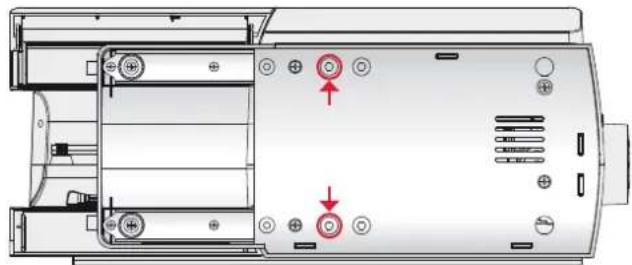
natural_image
Technical diagram of a device rear panel with labeled ports and arrows indicating movement (no text or symbols present)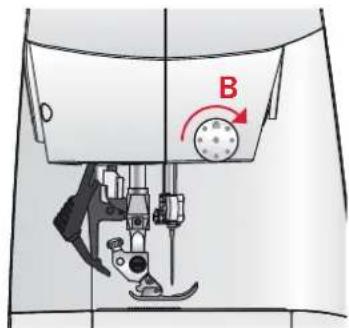
text_image
B
natural_image
Technical illustration of a mechanical assembly with a red spring-like component inserted into a housing (no text or symbols)Small spool cap

natural_image
Diagram of a mechanical assembly with a red coil and shaft (no text or symbols)Large spool cap
Vertical position
Raise the spool pin to the vertical position. Slide on the large spool cap and place a felt pad under the thread spool. This is to prevent the thread from reeling off too fast.
Do not place a spool cap on top of the spool pin as that would prevent the spool from rotating.
Auxiliary spool pin
The auxiliary spool pin is used when winding a bobbin thread from a second spool of thread or for a second spool when sewing with a twin needle.
Insert the auxiliary spool pin into the hole at the top of the machine (A). Slide on a large spool cap and place a felt pad under the thread spool.
Threading the machine
Make sure that the presser foot is raised and the needle is in its highest position.
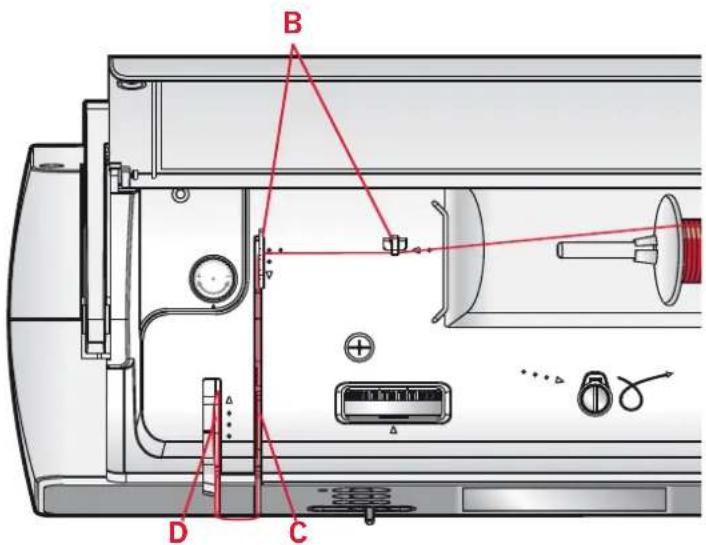
- Place the thread on the spool pin and fit the appropriately sized spool cap.
- Pull the thread into the thread guides (B) from back to front. Pull the thread between the tension discs (C).
- Thread down through the right-hand threading slot and then upwards through the left-hand threading slot.
- Bring the thread from the right into the take-up lever (D) and down in the left-hand threading slot, into the lower thread guide (E) and to the needle thread guide (F).
- Thread the needle.
text_image
Technical diagram of a device interior with labeled components and red annotations indicating connection points.
natural_image
Mechanical assembly diagram showing a red coil mounted on a shaft with a labeled component 'A' (no text or symbols beyond label)Main spool pin in vertical position.

natural_image
Technical illustration of a mechanical assembly with red coiled spring and shaft (no text or symbols)Auxiliary spool pin.

text_image
PFAFF E FNeedle threader
The needle threader allows you to thread the needle automatically. The needle must be in its highest position to use the built-in needle threader. Press the needle up/down button to make sure the needle is fully raised.
We also recommend lowering the presser foot.
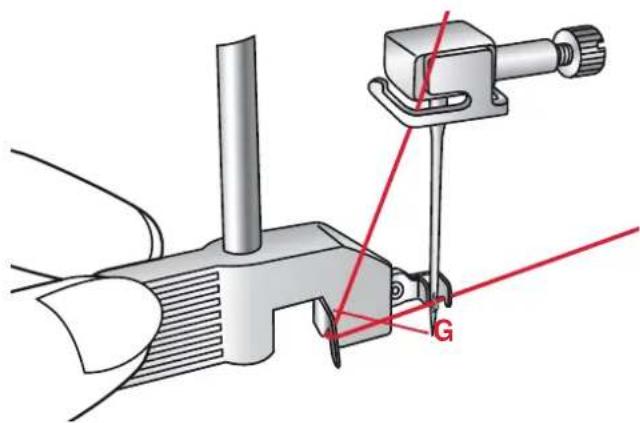
- Use the handle to pull the needle threader all the way down. The threader hook (F) swivels through the needle eye.
- Place the thread from the back over the hook (G) and under the thread hook (F).
- Let the needle threader gently swing back. The hook pulls the thread through the needle eye and forms a loop behind the needle. Pull the thread loop out behind the needle.
Note: The needle threader is designed to be used for size 70-120 needles. You cannot use the needle threader for size 60 needles or smaller, wing needles or twin needles. There are also some optional accessories that require manual threading of the needle.
When threading the needle manually, make sure that the needle is threaded from front to back.
Threading for twin needle
Replace the sewing needle with a twin needle. Make sure that the presser foot is raised and the needle is in its highest position.
- Place the thread on the spool pin and fit the appropriately sized spool cap. Insert the auxiliary spool pin. Slide on a large spool cap and a felt pad. Place the second thread on the spool pin.
- Pull the threads into the thread guides (A) from back to front. Pull both threads between the tension discs (B).
- Thread down through the right-hand threading slot and then upwards through the left-hand threading slot.
-
Bring the threads from the right into the take-up lever (C) and down in the left-hand threading slot. Place the threads into the lower thread guide (D). Place one thread into the slot on the left side of the needle thread guide (E) and the other thread into the slot on the right side of the needle thread guide (F). Make sure that the threads do not become twisted together.
-
Thread the needles.
Note: The weight and irregular surface of specialty threads such as metallic increases the amount of friction on the thread. By reducing the tension, the risk of needle breakage is prevented.
text_image
Technical diagram of a sewing machine with labeled parts G and red measurement lines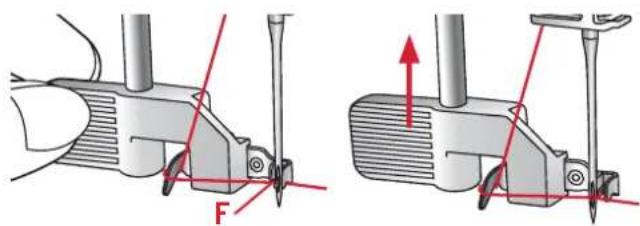
text_image
Technical diagram showing mechanical assembly with labeled force F and directional arrows indicating movement or force direction.
text_image
Technical diagram of a device rear panel with labeled components A, B, C and connection points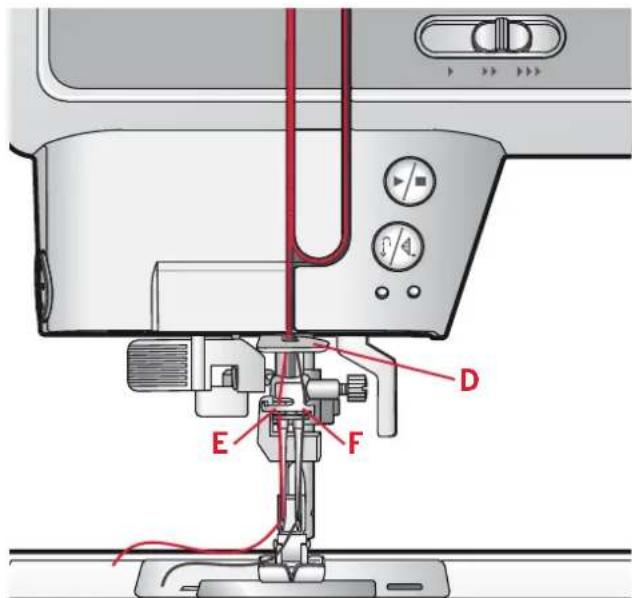
text_image
Technical diagram of a sewing machine with labeled parts E, F, and D indicating different operating modes or components.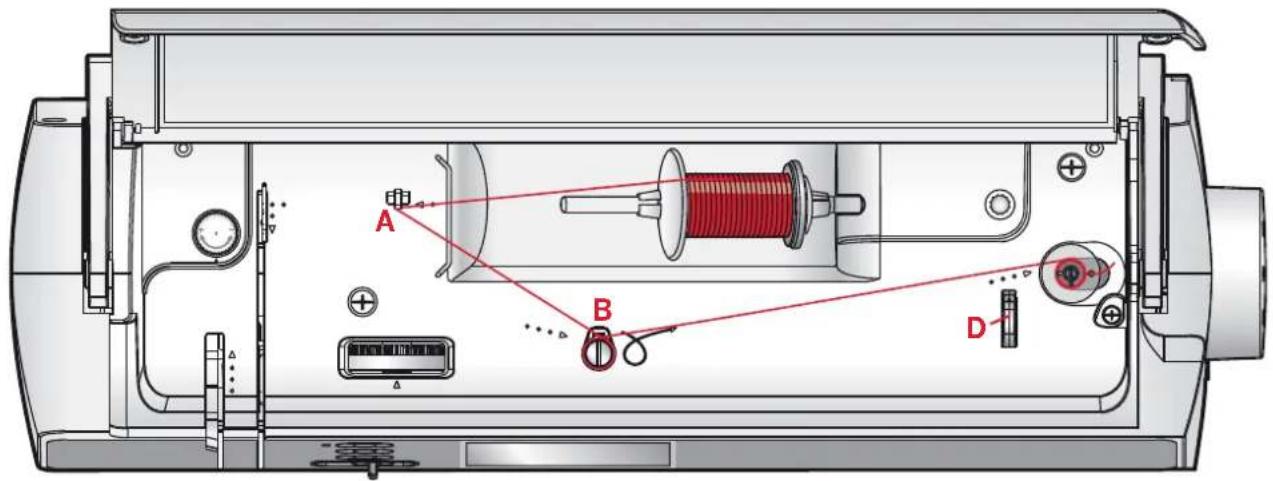
text_image
Technical diagram of a sewing machine internal structure with labeled components A, B, and DBobbin winding
- Place the thread spool on the spool pin in horizontal position. Slide a spool cap tightly against the spool.
- Place the thread into the thread guide (A) from back to front. Pull the thread clockwise around the bobbin winder tension disc (B).
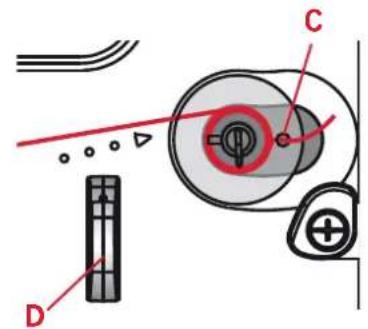
- Thread through the hole in the bobbin (C) from the inside to the outside.
- Place an empty bobbin on the bobbin spindle.
- Push the bobbin lever to the right to wind. A pop-up appears on the screen to inform you that bobbin winding is on. Press the foot control or the start/stop button to start winding the bobbin.
When the bobbin is full, the bobbin winding will slow down and stop automatically. The pop-up closes. Remove the bobbin and cut the thread using the bobbin thread cutter (D).
text_image
Technical diagram showing mechanical components with labeled parts D, C, and a central circular component with a red circle highlighting a feature.Bobbin winding on.
Inserting the bobbin
Make sure that the needle is fully raised and the machine is turned off before inserting or removing the bobbin. Open the bobbin cover by pushing the release button to the right (A). Remove the cover (B).
- Insert the bobbin in the bobbin case with the thread running in a counterclockwise direction.
- Pull the thread through the slit (C).
- With a finger held gently on top of the bobbin, draw the thread at the arrow markings into the stitch plate thread guide from (C) to (D).
- Pull the thread at the arrow markings into the stitch plate thread guide from (D) to (E).
- To cut off excess thread pull thread back over the cutting off blade at point (E).
- Replace the bobbin cover.
1
text_image
7.5g 5.5g 3.5g 2.5g 5.5g 7.5g B A2

text_image
12g 5g 20 10 10 10 10 12g 5g 12g3

text_image
D 20 10 10 20 C E4
text_image
1g 5g 1g 3g 5g 1g ↓ →IDT ^TM system (integrated dual feed)
For sewing any fabric precisely, PFAFF ^® ambition ^™ 1.0 sewing machine provides the ideal solution: the integrated dual feed, IDT ^™ system. As on industrial machines, the IDT ^™ system feeds the fabric from the top and bottom at the same time. The fabrics are fed precisely. On light fabrics such as silk or rayon the dual feed prevents puckering of the seam. The even feeding action also ensures perfect matching of checked and striped fabrics. The IDT ^™ system keeps all layers of quilt projects aligned to prevent shifting of the layers.
Engaging the IDT™ system
Important: For all work with the IDT ^™ system, use presser feet with the center back cut-out (F).
Raise the presser foot. Press the |DT^™ system down until it engages.
Disengaging the IDT™ system
Raise the presser foot. Hold the IDT^™ system with two fingers at the ribbed ankle. Pull the IDT^™ system down, then pull it away from you to release the IDT^™ system slowly upward.

Presser foot pressure
The presser foot pressure has been pre-set to the standard value "N". In most cases, you do not need to adjust the presser foot pressure. When using specialty techniques, or when sewing on very light or heavy fabric, adjusting the pressure can improve the result.
For very light fabrics, loosen the pressure by turning the dial counterclockwise.
Note: If the dial is turned counterclockwise too much, it could come off. If this happens, simply replace the dial and turn it clockwise until it stays in place.
For heavy fabric, tighten the pressure by turning the dial clockwise.
Note: If the dial is turned clockwise until it comes to a stop, it has reached the maximum pressure available. Do not try to turn the dial any further!

natural_image
Hand operating a mechanical knob with red directional arrows indicating rotation (no text or symbols)Thread tension
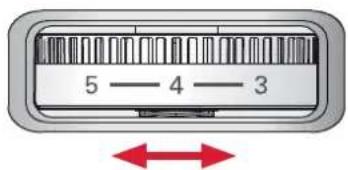
To set the thread tension, turn the dial on top of the machine. Use the recommended thread tension setting given on the screen, see page 27. Depending on the fabric, batting, thread, etc, the tension may need to be adjusted.
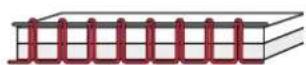
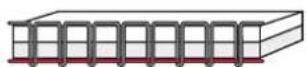
For the best stitch appearance and durability, make sure the needle thread tension is correctly adjusted. For general sewing, the threads evenly meet between the two layers of fabric.
If the bobbin thread is visible on the top side of the fabric, the needle thread tension is too tight. Reduce the needle thread tension.
If top thread is visible on the underside of the fabric, the needle thread tension is too loose. Increase the needle thread tension.
For decorative stitches and buttonholes, the top thread should be visible on the underside of the fabric.
Make a few tests on a scrap piece of the fabric you are going to sew and check the tension.
text_image
5 — 4 — 3
Needles
The sewing machine needle plays an important role in successful sewing. Use only quality needles.
We recommend needles of system 130/705H.
The needle package included with your machine contains needles of the most frequently used sizes.
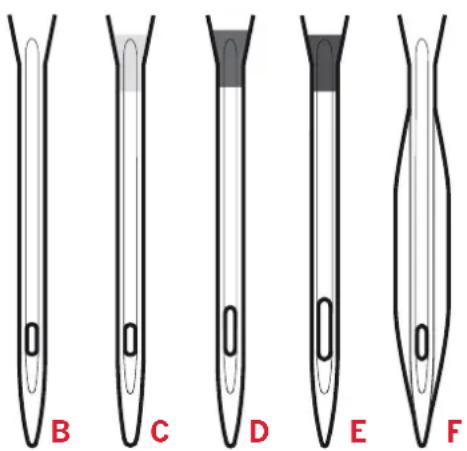
Universal needle (B)
Universal needles have a slightly rounded point and come in a variety of sizes. For general sewing in a variety of fabric types and weights.
Stretch needle (C)
Stretch needles have a special scarf to eliminate skipped stitches when there is a flex in the fabric. For knits, swimwear, fleece, synthetic suedes and leathers. Marked with a yellow band.
Embroidery needle (D)
Embroidery needles have a special scarf, a slightly rounded point and a slightly larger eye to avoid damage to thread and materials. Use with metallic and other specialty threads for embroidery and decorative sewing. Marked with a red band.
Denim needle (E)
Denim needles have a sharp point to penetrate tightly woven fabrics without deflecting the needle. For canvas, denim, microfibers. Marked with a blue band.
Wing needles (F)
The Wing needle has wide wings on the side of the needle to poke holes in the fabric when sewing entredeux and other hemstitches on natural fiber fabrics. Decrease the stitch width for best results.
Note: Change the needle often. Always use a straight needle with a sharp point (G).
A damaged needle (H) can cause skipped stitches, breakage or snapping of the thread. A damaged needle can also damage the stitch plate.
Do not use asymmetrical twin needles (I), since it may damage your sewing machine.
text_image
B C D E F
text_image
G H IChanging the needle
- Use the hole in the multi-purpose tool to hold the needle.
- Loosen the needle screw. Use the screwdriver if necessary.
- Remove the needle.
- Insert the new needle, using the multi-purpose tool. Push the new needle upwards with the flat side away from you until it will go no further.
- Tighten the needle screw as tight as it will go.
Lowering feed dogs
You can lower the feed dogs by moving the switch at the back of the free arm to the left. Move the switch to the right if you wish to raise the feed dogs.
Note: The feed dogs will not raise immediately when the lever is switched. Turn the handwheel one full turn or start sewing to re-engage the feed dogs.
Presser foot lift
The presser foot is lowered or raised with the presser foot lift (A). If you are sewing on heavy fabric or several layers of fabric, the presser foot can be raised higher to make it easier to place the fabric underneath the presser foot.
Changing the presser foot
Remove presser foot
Press the presser foot downwards until it disengages from the presser foot holder.
Attach presser foot
Place the presser foot under the presser foot holder (B), lining up the notch (C) with the pins (D).
Lower the presser foot lift and the presser foot will engage in the presser foot holder.
Note: Check that the presser foot is properly attached by raising the presser foot lift.

natural_image
Illustration of hands using a sewing machine to adjust a metal component (no text or symbols visible)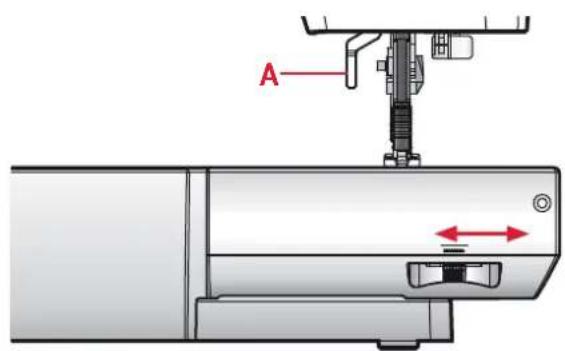
text_image
A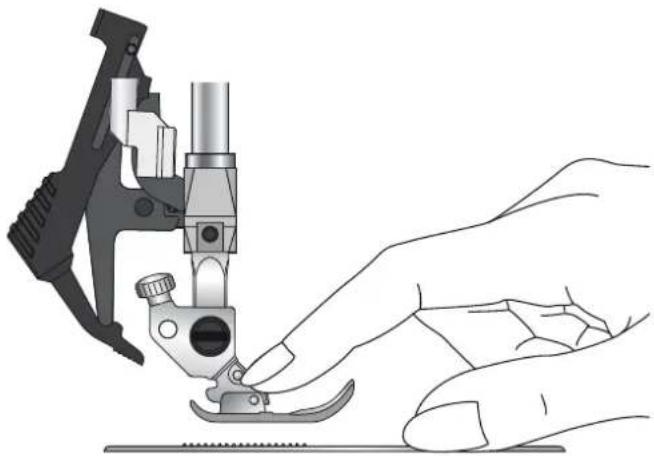
natural_image
Illustration of a hand operating a sewing machine tool (no text or symbols visible)
text_image
Diagram of a sewing machine with labeled parts (A, B, C, D) and an inset showing the sewing process.
text_image
1 2 3 4 5 6 7 8 9 1 0 1 1 1 2 1 3 1 4 - + + - + + - + + 1 2 3 4 5 6 7 8 9 0 16 17 18 19 20 21 A O BButtons
Needle up/down with indicator (1)
Press this button to move the needle up or down. The setting of the needle stop position is changed at the same time. The indicator is lit when needle down is activated.
You can also tap the foot control to raise or lower the needle.
Stitch restart (2)
When having stopped sewing in the middle of a stitch, press stitch restart to start sewing at the beginning of the stitch again without having to reset any special settings you have made.
If pressing the stitch restart button while sewing, the stitch will be finished and the machine will then stop.
Immediate tie-off (3)
Press the tie-off button while sewing and your machine sews a few tie-off stitches and stops automatically.
Speed control lever (4)
The speed control lever sets the maximum sewing speed. To increase sewing speed, slide the lever to the right, to decrease sewing speed, slide the lever to the left.
Start/stop (5)
Press this button to start or stop the machine without using the foot control. Press the button once to start and press it again to stop.
Reverse (6) with indicator (7)
For permanent reverse, press the button before starting to sew. The reverse indicator (7) will be lit and the machine sews in reverse until you press the button again to cancel.
If you press the reverse button while sewing, the machine sews in reverse for as long as you keep the button pressed. The reverse indicator is lit when the reverse button is pressed.
Reverse is also used when sewing programmed tie-off end and darning stitches.
Programmed tie-off (6) with indicator (8)
The programmed tie-off indicator is lit to indicate that one or several tie-off options are activated. The indicator stays lit until the tie-off options are no longer in use.
Stitch length or stitch density (10)
Increase or decrease the stitch length using the "+" and "-" buttons.
For satin stitches, use the "+" and "-" buttons to change the density for the selected stitch.
Stitch width or stitch positioning (11)
Increase or decrease the stitch width using the "+" and "-" buttons.
For straight stitches, use the "+" and "-" buttons to change the stitch position.
Elongation (12)
When a satin stitch is selected, press the "+" and "-" buttons to set the elongation of the stitch.
Wheel (13)
Use these buttons to move around the graphic display. The wheel has up and down arrow buttons, left and right arrow buttons and the wheel center icon is a checkmark for OK (14).
The wheel has several functions, for example press the up or down arrow button to step between stitches, set the size of a buttonhole and move between options in the settings menu. Press down until a tab is selected, and then the left or right arrow button to select mode (22-26).
OK button (14)
The wheel center icon is a checkmark for OK. Use the OK button to confirm your selections.
Direct selection (15)
By pressing one of, or a combination of, the 0 to 9 buttons, you select the stitch represented by that number immediately.
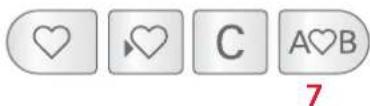
Mirror side to side (16)
For mirroring stitches and sequences side to side.
Mirror end to end (17)
For mirroring stitches and sequences end to end.
Load personal stitch or sequence (18)
Press this button to load a previously saved stitch or sequence.
Save personal stitch or sequence (19)
Press this button to save a stitch or sequence to the machine memory.
Delete (20)
For deleting stitches in a sequence, or sequences saved in the machine memory.
Sequencing (21)
Press this button to enter sequencing.

text_image
1 Straight stitch 0.0 2.5 (3-5) 22 23 24 25 26Graphic Display (9)
The graphic display lets you view all your selections and options. Stitches are shown in real size. The buttons on the wheel are used to move around the graphic display.
Settings & functions tabs
Some of the main functions on your machine are accessible through the tabs at the bottom of the screen. Press the down arrow button until a tab is highlighted, then step between the tabs by pressing the left or right arrow button (13).
To move directly from the far left tab to the far right tab, press the left arrow button one time. To move directly from the far right tab to the far left tab, press the right arrow button one time.
Sewing mode (22)
Sewing mode is the first view on the graphic display after you turn on the machine.
Tie-off options (23)
Select to set the tie-off options.
Alphabet mode (24)
In alphabet mode, you can create text sequences from various characters in two different fonts.
Stitch information (25)
Select to display more detailed information about the currently selected stitch.
Settings menu (26)
Select to open the menu for machine settings.
Settings
In the settings menu, you can adjust the machine settings and screen settings. All settings are stored even when the machine is turned off.
Settings menu
Open by selecting the settings menu tab. Step between the available settings by pressing the up and down arrow buttons on the wheel.
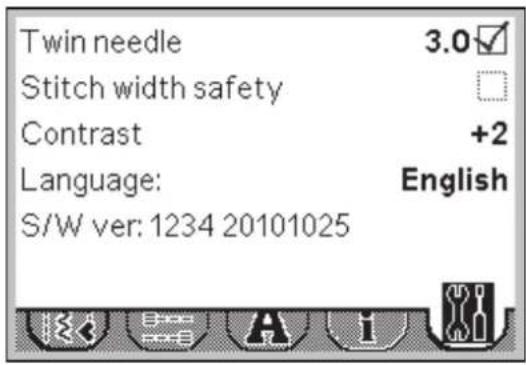
Twin needle
Press OK (B) to activate. A checkmark appears in the box. Use the left and right arrow buttons on the wheel to set the twin needle width. The selected width is shown on the display.
When a twin needle size is selected, the width of all stitches is limited for that needle size to prevent needle breakage.
A warning pop-up will be shown if you select a stitch that is too wide for the set twin needle size.
Note: Some stitches, due to design and functionality, cannot be sewn with a twin needle. Overlock stitches, buttonholes and darning stitches are examples of stitches that are not suitable for twin needle sewing. A warning sound will be heard when trying to activate twin needle when such a stitch is selected.

When activated, the twin needle icon will be shown in sewing mode.
The setting is kept until you deactivate it.
Note: Twin needle and stitch width safety cannot be used at the same time. When stitch width safety is selected, the outlines of the twin needle box will be dashed.
Stitch width safety
Press OK (B) to avtivate.
Select this function when using a straight stitch needle plate or a straight stitch presser foot to lock the center needle position for all stitches to prevent damage to the needle, presser foot or stitch plate.

When activated, the stitch width safety icon will be shown in sewing mode.
The setting is kept until you deactivate it.
Note: When turning on the machine with this setting activated, a pop-up informs you that the machine is set for straight stitch. All stitches are limited to 0 mm stitch width.
Stitch width safety and twin needle cannot be used at the same time. When twin needle is selected, the outlines of the stitch width safety box will be dashed.
text_image
Twin needle 3.0 Stitch width safety Contrast +2 Language: English S/W ver: 1234 20101025
Contrast
Use the left and right arrow buttons to adjust the contrast of the graphic display. The selected value is shown on the display.
Language
Press the left and right arrow buttons to change the language of all text in your machine.
Software version
Check the software version for your sewing machine.
Sewing
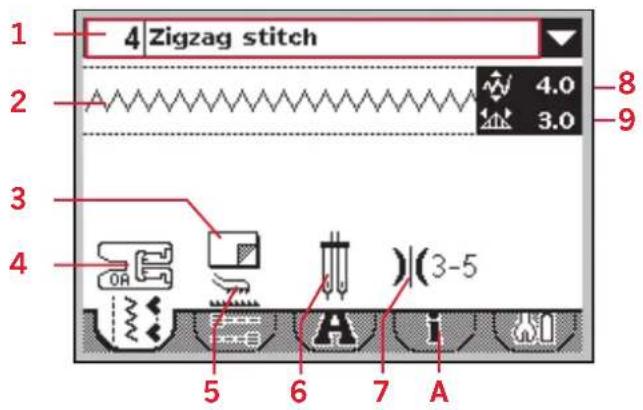
Sewing mode is the first view on the screen after you turn on the machine. Your selected stitch will be shown in real size in the stitch field. Here you will find all the basic information you need to start sewing. Straight stitch is selected by default.
Sewing mode - overview
- Selected stitch number and name
- Stitch field
- Stabilizer recommendation
- Presser foot recommendation
- Feed dog/IDT ^™ system recommendation
- Needle recommendation/setting

Set for twin needle

Ving needle recommended

Set for stitch width safety
- Recommended thread tension
- Stitch width/stitch positioning
- Stitch length/density
Note: All symbols and options will not be shown at the same time.
Select a stitch
By pressing one of the direct selection buttons, you select that stitch number immediately. Press two or three digits in quick succession to select a stitch from 10 and up. If the stitch number does not exist, you will hear a beep and the first entered digit will be selected as a stitch.
You can also press the up and down arrow buttons on the wheel to step between stitches. Press up or down to open a drop down list. Move up and down in the list using the up and down arrows on the wheel. Press OK (B) to select a stitch.
Stitch information
Select the information tab (A) to view more detailed information, tips and hints for the currently selected stitch.
text_image
1 4 Zigzag stitch 2 4.0 3.0 8 9 3 4 OR (3-5) 5 6 7 A
Note: If the presser foot recommendation shows a presser foot with a "+" an optional presser foot is required for the selected stitch. Go to the stitch information tab (A) for details.

text_image
B 1 2 3 4 5 6 7 8 9 0
text_image
136 Joining and edging stitch 132 Beading stitch 133 Candlewicking 134 Candlewicking 135 Joining and edging stitch 136 Joining and edging stitch 1 Straight stitch 2 Triple straight stitch 3 Straight stitch reverse 4 Zigzag stitch 5 Zigzag right or left pos.
text_image
For joining two pieces of fabric. Requires optional Join and Fold Edging Foot w/IDT. (Part number 820931-096.)Stitch adjustments
Your machine will set and recommend the best settings for each selected stitch. You can make your own adjustments on the selected stitch.
All setting changes, except for thread tension, only affect the selected stitch, and will be reset to default when selecting another stitch. The changed settings are not automatically saved when turning your machine off.
The set stitch width and stitch length are shown next to the icons for each adjustment. When trying to exceed minimum or maximum settings a warning sound will be heard.
Note: The numbers are highlighted when the setting is changed.
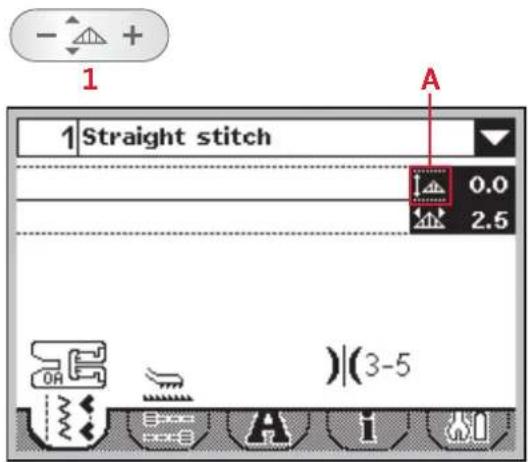
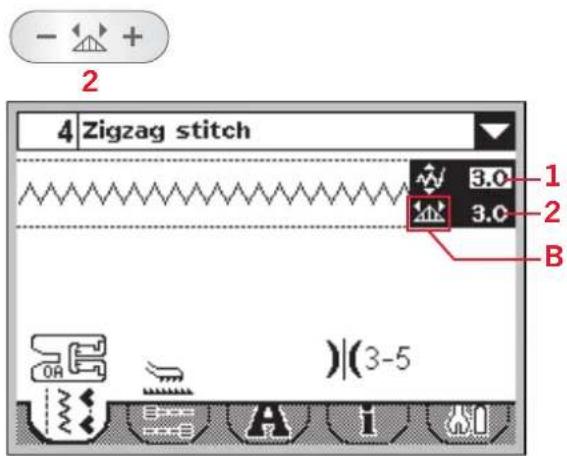
Stitch width/stitch positioning (1)
Use "+" and "-" to increase or decrease the stitch width.
For straight stitches, use "+" and "-" to move the stitch position left or right. When a straight stitch is selected, the icon (A) changes to show that stitch positioning is active instead of stitch width.
text_image
1 Straight stitch 0.0 2.5 A )(3-5)Stitch length/stitch density (2)
Use "+" and "-" to increase or decrease the stitch length.
For satin stitches the stitch density can be adjusted. This is often used with specialty threads and when a less dense satin stitch is desired. The stitch density does not affect the actual length of the entire stitch.
For satin stitches, use "+" and "-" to increase or decrease the stitch density. When a satin stitch is selected, the icon (B) changes to show that stitch density is active instead of stitch length.
text_image
4 Zigzag stitch 3.0 1 3.0 2 B )(3-5)Elongation (3)
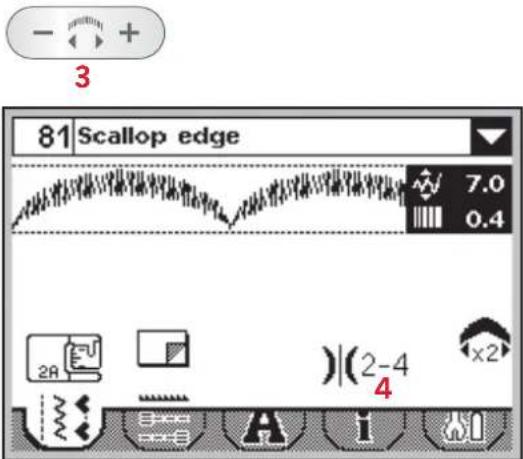
Elongation is used to lengthen satin stitches. The entire stitch will be longer but the density will remain the same.
Press the "+" and "-" on the elongation button to increase or decrease the elongation of the satin stitch.
If elongation is not avalibale for the selected stitch, a warning sound will be heard when pressing the elongation button.
Thread tension (4)
Your machine will show the recommended thread tension setting for the selected stitch. See page 19 on how to set and adjust the thread tension setting.
text_image
81 Scallop edge 7.0 0.4 2A )(2-4) 4 x2Mirroring
For decorative effect, stitches can be mirrored side to side or end to end. Some stitches can be mirrored both side to side and end to end. Some stitches, due to design or functionality, cannot be mirrored. Buttonholes, darning stitches and bartacks are examples of stitches that cannot be mirrored.
To mirror stitches or sequences side to side, press mirror side to side (A). To mirror end to end, press mirror end to end (B).
A warning sound will be heard when trying to mirror a stitch that cannot be mirrored.

text_image
A B 81 Scallop edge 7.0 0.4 2A )(2-4) x2Tie-off options
The tie-off options let you program tie-offs both at the beginning (A) and the end (B) of the stitch.
- Go to tie-off options (1).
- Select the functions you want to use (A and/or B).
- Return to sewing mode by selecting the sewing mode tab (2).
Tie-off mini icons (C) will be shown, indicating which tie-off functions are selected. The selections will remain until you deselect them.
Note: For immediate tie-off, use the tie-off button, found on the front of the machine.
Sewing with tie-off options selected
- The tie-off beginning (A) will be performed as soon as you start to sew.
- Press the reverse button to activate tie-off end (B). The programmed tie-off indicator will be lit. The machine will finish the stitch and do a tie-off.
- To deactivate the tie-off options, go to tie-off options as described above and deselect the checkboxes.
Reverse button functions in tie-off options
- Stop sewing and press the reverse button twice to activate reverse sewing. The reverse indicator will be lit. No tie-off will be performed.
- Press the reverse button when sewing in reverse to activate tie-off end. Both the reverse indicator and the programmed tie-off indicator will be lit.
- To go back to sewing forward, stop sewing in reverse and press the reverse button. No indicators will be lit and no tie-off will be performed.

text_image
81 Scallop edge C 7.0 0.4 B A 2 1Save personal stitch
You can save an adjusted stitch in your machine by pressing the save button. This will open the save sequence menu. Stitches as well as sequences can be saved in these four memories.
Saving a stitch works just like saving a sequence. See page 38.
Adjustments in stitch length, width, density and mirroring will be saved.
Note: Some special stitches, such as buttonholes, cannot be saved. A pop-up will inform you of this when you try to save such a stitch.
Load personal stitch
Loading a stitch works just like loading a sequence. Open the load sequence menu by pressing the load button. Select the stitch you want to load. See page 38 for more information.
Main motor overload
If you are sewing on very heavy fabric or if the machine is blocked when sewing, the main motor can get overloaded and the machine will stop sewing. The pop-up message will close when the main motor and power supply are secure.

Save sequence
text_image
1 2 3 4
Load sequence
text_image
1 2 ambition 3 4
text_image
Motor overloaded. When this message closes, resume sewing.Sewing techniques
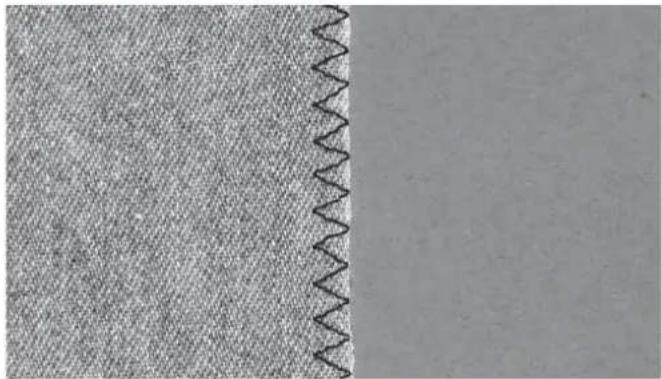
Three-step zigzag stitch
Stich number 8 can be used to overcast raw edges. Make sure the needle pierces the fabric on the left side and overcasts the edge on the right side.
Stitch number 8 can also be used as an elastic stitch to allow seams to stretch when sewing knit fabrics.
natural_image
Close-up of a textured fabric with a wavy seam on the left side (no text or symbols)Buttonholes
Your machine's buttonholes are specially adjusted for different kinds of fabric and garments. Look at the stitch table on page 10 in this book to find descriptions of each buttonhole.
The fabric should be interfaced and/or stabilized where buttonholes are to be sewn.
One step Buttonhole Foot 5B
- Mark the the position of the buttonhole on your garment.
- Attach buttonhole foot 5B and pull out the button holder plate. Insert the button. The button will determine the length of the buttonhole.
- Make sure that the thread is pulled though the hole in the presser foot and placed under the foot.
- Select the buttonhole you want to sew and adjust the width and density as desired.
Note: Always sew a test buttonhole on a scrap piece of fabric.
-
Lower the buttonhole lever all the way down and push it away from you so it fits between the stoppers (A and B).
-
Position your garment under the presser foot so that the marking on the fabric is aligned with the center of the buttonhole foot.
-
Hold the end of the upper thread and start sewing. The buttonholes are sewn from the front of the presser foot to the back.
-
Once the machine has sewn the buttonhole, raise the presser foot.

text_image
A B 5B 22 Linen buttonhole 4.0 0.4 )(2-4)Corded buttonhole (Stretch fabrics)
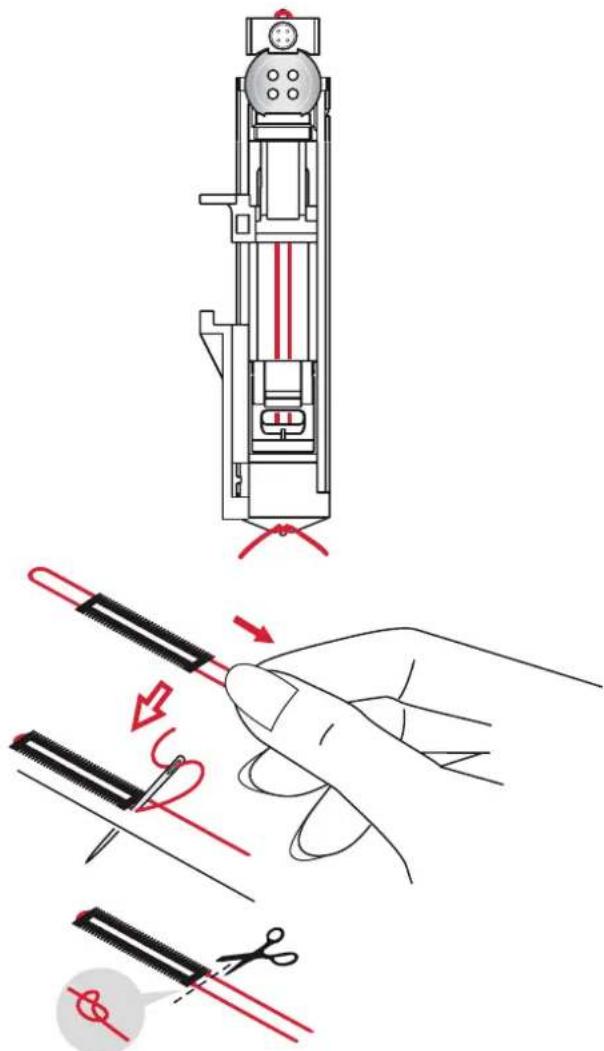
When sewing buttonholes in stretch fabrics we recommend cording the buttonhole to increase the stability and to keep the buttonhole from stretching out.
- Loop a piece of heavy thread or pearl cotton over the finger at the back of the buttonhole foot 5B. Pull the thread tails under the foot, toward the front, then secure around the finger at the front of the foot.
- Stitch a buttonhole. The satin buttonhole columns will stitch over the cord.
- When the buttonhole is finished, lift the cord off the finger and pull out the slack.
- Cross the cord in front of the needle and thread cord ends into a large needle, pull to the wrong side and knot ends before cutting excess.
- Use the seam ripper to carefully open the buttonhole.
text_image
Technical diagram illustrating a sewing process with labeled parts and red arrows indicating direction of cutting or stitching.Sew on a button
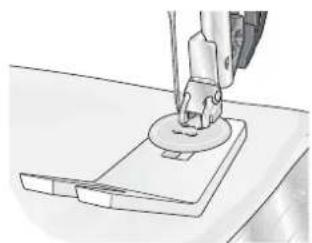
- To sew on a button, remove the presser foot and select the button sewing stitch.
- Lower the feed dogs.
- Place the button under the presser foot holder. Use the mirroring function to make sure the holes in the button are aligned with the swing of the needle and the width is appropriate for the actual button. If necessary, adjust the stitch width to change the width between the holes.
- You can increase or decrease the number of stitches that will fasten the button on the fabric in steps of two, using the left and right arrow buttons on the wheel.
- Start to sew. The machine will sew the program for you and then tie-off and stop.
Note: Use the multi-purpose tool to create a thread shank for your button. You can also use the Sew-on Button Foot #820 473-96, available as an optional accessory.
natural_image
Line drawing of a sewing machine needle stitching a circular component on a base (no text or symbols)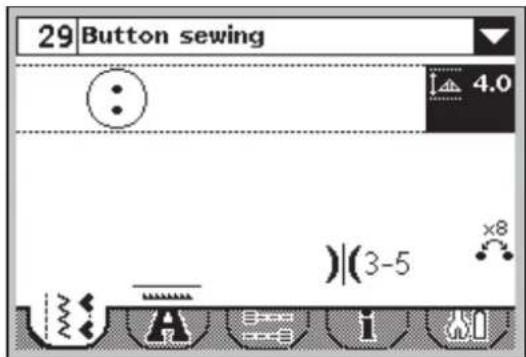
text_image
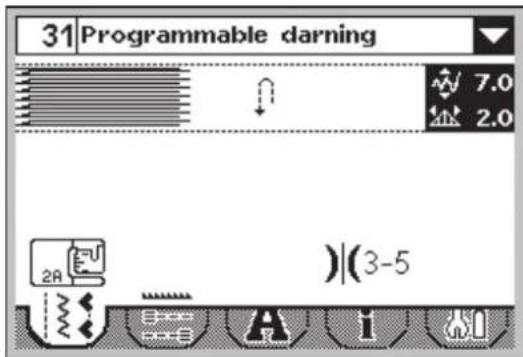
29 Button sewing 4.0 )(3-5 x8Darning and mending
Darning a small hole or a tear before it becomes larger can save a garment. Choose a thread in a color as close to your garment as possible.
- Place fabric or stabilizer in position under the hole or tear in your garment.
- Select a darning stitch.
- Start sewing above the hole and over it.
- Once you have sewn across the hole, press the reverse button to set the length of the stitch.
Your sewing machine will automatically complete the stitch.
- By default, the machine will be set to repeat the same size darning square, just continue sewing.
To set a different length of the darning stitch, select the stitch again and continue with steps 3 and 4 above.
Note: Darning stitches can also be sewn using the buttonhole foot 5B. Set the length of the darning stitch by pulling out the button holder plate and lower the buttonhole lever to sew the stitch.
Sewing hems in heavy fabric
When sewing over seams in extra heavy fabric or a blue jeans hem, the foot can tip as the machine climbs over the seam. Use the multi-purpose tool to balance the height of the presser foot as you sew.
One side of the multi-purpose tool is thicker than the other. Use the side that suits the thickness of the seam best.
text_image
31 Programmable darning 7.0 2.0 2A )|(3-5)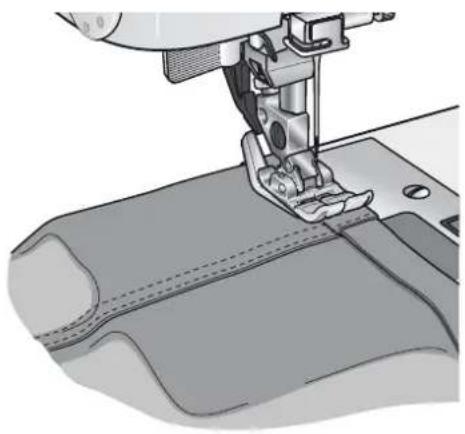
natural_image
Close-up illustration of a sewing machine needle stitching fabric (no text or symbols visible)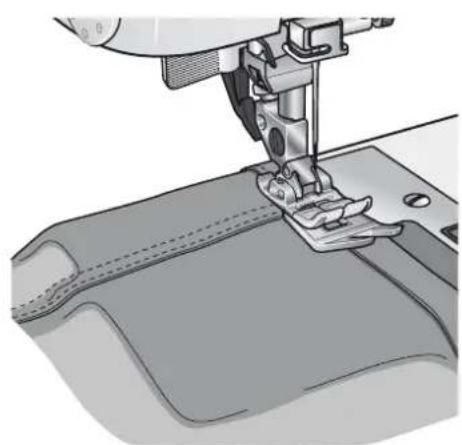
natural_image
Close-up illustration of a sewing machine needle stitching fabric (no text or symbols visible)Quilting
A quilt usually consists of three layers, two layers of fabric with a layer of batting sandwiched between.
To sew three layers together, you have a wide variety of stitches and techniques to choose from.
Stitch-in-the-Ditch
Use the Fancy stitch foot 1A with IDT ^™ system. Stitching in the ditch means using the guide on the presser foot to follow the seams in the quilt blocks. Begin by pin basting your quilt through all layers with safety pins, starting from the center of your quilt and working out. Place a pin every 6-8 inches (15-20 cm).
Note: You can also use the optional Stitch-in-Ditch w IDT™ system presser foot #820 925-096.
Crazy quilt stitching
Embellish your quilt with decorative stitches. The stitches can be sewn in a coordinating or contrasting color. Decorative threads like rayon embroidery or heavy cotton threads are sometimes used.
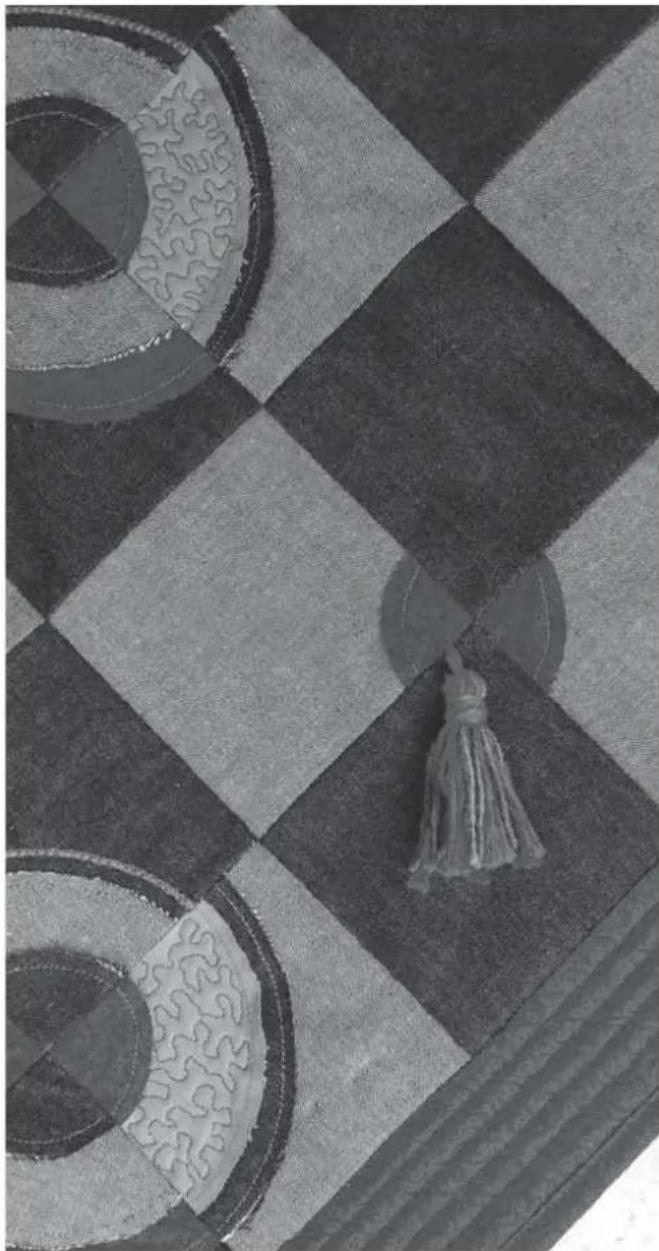
Free-motion stippling
Free-motion stippling not only keeps the top, batting and backing together, but it also adds texture and interest to your quilt.
Free-motion stippling is done with the feed dogs lowered. You move the fabric manually to determine the stitch length.
- Set your sewing machine for stippling by selecting the straight stitch no 1.
- Attach the optional Open Toe Free-Motion foot #820 988-096.
- Lower the feed dogs.
- Pin baste your quilt layers and prepare your quilt as explained under Stitch-in-the-Ditch above.
Tip! Practice stippling on scraps of fabric and batting. Sewing with a constant speed will help to keep the stitches even.
natural_image
Close-up of a chessboard with geometric patterns and a tassel, no visible text or symbols- Begin near the center of your quilt. Take one stitch and pull the bobbin thread to the top of the quilt. Take a few stitches right next to one another to lock the threads.
- Now move the quilt so that your stitching creates swirls. The stitching should not cross over itself, and should travel in a meandering motion.
Blindhem
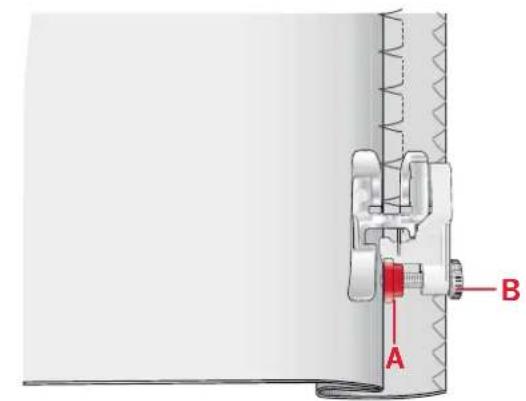
The blindhem stitch number 14 is used to make invisible hems on skirts, trousers and home decorating. Use foot number 3 with IDT™ system.
- Finish the edge of the hem.
- Fold and press the hem allowance to the wrong side.
- Fold the hem back on itself so approximately 3/8" (1 cm) of the finished edge extends beyond the fold. The wrong side of your project should now be facing up.
- Place the fabric under the presser foot so that the fold runs along edge guide A.
- When the needle swings into the fold it should catch a small amount of fabric. If the stitches are visible on the right side, adjust edge guide A by turning adjusting screw B until the stitch that catches the hem just barely shows.
Elastic blindhem stitch
The elastic blindhem stitch number 15 is especially suitable for stretchy fabrics, because the zigzag in the stitch lets the stitch stretch. The hem is finished and sewn at the same time. There is no need to finish the raw edge first on most knits.
text_image
Technical diagram showing a mechanical assembly with labeled parts A and B, likely illustrating a valve or clamp mechanism.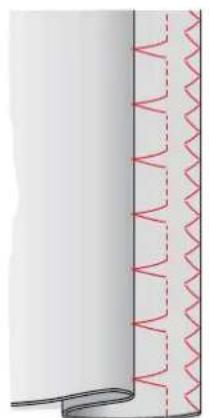
natural_image
Pure diagram of a coiled cable with red wavy lines indicating internal structure (no text or symbols)Blindhem stitch number 14

natural_image
Diagram of a vertical pipe with a wavy bottom edge and red oscillating lines on the right side (no text or symbols)Elastic blindhem stitch number 15
Sewing in zippers
There are different ways to sew in zippers. Follow the directions included with your pattern for best results.
For all types of zippers it is important to sew close to the teeth of the zipper. The zipper foot 4 can be snapped to the presser foot bar on the left or right, depending on how you will insert your zipper.
Set the stitch position so the needle enters close to the edge of the zipper teeth by using one of the 29 needle positions available for the straight stitch. If the presser foot is attached on the right side, the needle must only be moved to the right. If the foot is attached on the left, the needle must only be moved to the left.

natural_image
Roll of paper with dashed lines indicating measurement or alignment points (no text or symbols)
natural_image
Mechanical assembly diagram showing a clamping mechanism with no visible text or symbols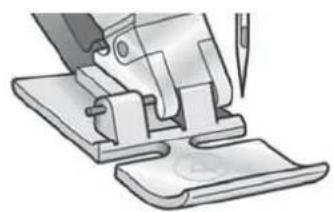
natural_image
Illustration of a sewing machine needle stitching fabric (no text or symbols visible)Sequencing
The sequencing function on your machine makes it possible to combine stitches and letters into sequences. You can add up to 20 stitches and letters in the same sequence. You can also customize your own stitch by making adjustments to an existing stitch. Save your own stitches and sequences on your machine and reload and sew them any time you like.
All stitches in your sewing machine can be used for sequencing except for buttonholes, darning stitches, button sewing and bartacks.
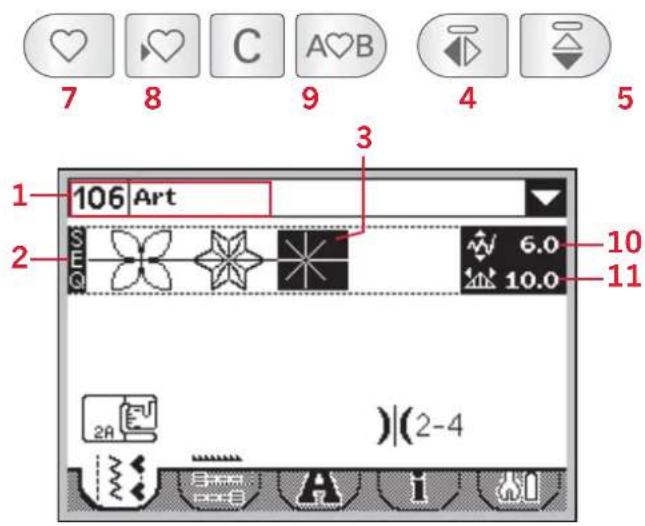
Overview
- Current stitch number and name
- Stitch field
- Cursor
- Enter sequencing
- Mirror stitch side to side
- Mirror stitch end to end
- Load sequence
- Save sequence
- Delete stitch or whole sequence
- Stitch width/positioning
- Stitch length/density
- Move cursor
text_image
7 8 C A>B 9 4 5 106 Art 3 2 6.0 10.0 10 11 2A )(2-4)Create a sequence
- Press sequencing (4) to enter sequencing.
- Select the stitch you wish to use (see page 25 on how to select a stitch). The stitch will appear in the stitch field.
- Select the next stitch and it will appear to the right of the previously entered stitch.
Move cursor (12)
The current position in the stitch field is marked by a cursor (3). Inserted stitches will be placed at the cursor position.
Move the cursor through the sequence using the left and right arrows on the wheel.

text_image
12Using the alphabet
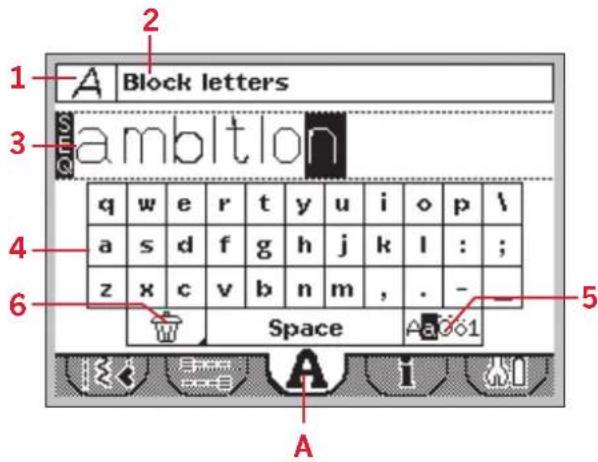
Alphabet mode overview
- Font selection/font preview
- Name of selected font
- Stitch field
- Keyboard
- Change character set (upper case/lower case, normal/special symbols)
- Delete
Create a text sequence
- Press the left or right arrow buttons on the wheel to step to alphabet mode (A).
- Press the up arrow button until the font preview (1) at the top of the display is selected. Press OK (B) to open a list of available fonts. Step to desired font with the arrow buttons and press OK (B) to select it.
- Press the down arrow button twice to step to the keyboard. Move around the keyboard using the arrow buttons and press OK (B) to add a letter or character to the sequence. Each letter will be placed at the cursor position in the stitch field.
Note: The selected letter on the keyboard will be highlighted.
- To move the cursor in the sequence, use the arrow buttons to step to the stitch field (3) and then press the left and right arrow buttons to move the cursor back and forth in the sequence.
Select character set
Press the arrow buttons to step to the character set icons (5). Press OK (B) to step between the available character sets: upper or lower case, normal or special letters and numbers and symbols.
Note: Lower case characters are only available for the Block font.
Important note:
In alphabet mode, sequencing will not be activated until a character is selected. This means that the stitch field will always appear blank when entering alphabet mode. If a sequence is created and you exit alphabet mode then open it again, the stitch field will be blank. The sequence will reappear when another character is selected or if sequencing (7) is pressed. The selected character will be added at the end of the previously created sequence.
text_image
Block letters ambition q w e r t y u i o p \ a s d f g h j k l : ; z x c v b n m , . - Space A3061 A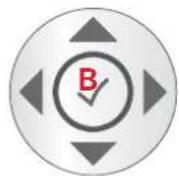
text_image
♥ ♥ C A♥B 7Adjust stitches
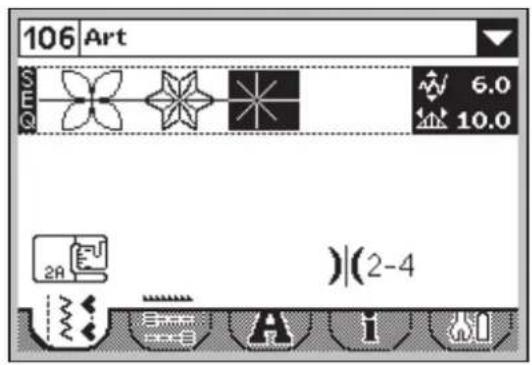
You can mirror, adjust length, width, density and stitch position of the selected stitch.
When you have changed a value, the digits will be highlighted to show that the value is not default.
Use the left and right arrows on the wheel to highlight the stitch you want to adjust. Adjust the stitch as described on pages 26-27.
Note: The adjustments will only affect the highlighted stitch. If you return to sewing mode, all adjustments made there will affect the entire sequence and will not be saved.
text_image
106 Art 6.0 10.0 2A )(2-4)Delete stitches or letters in a sequence
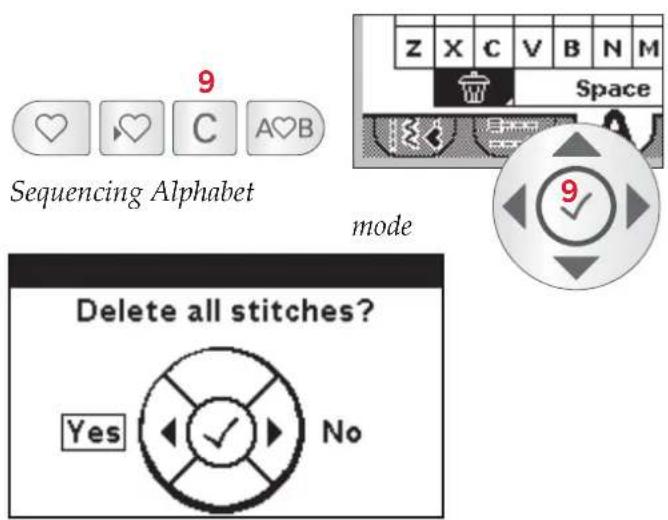
To delete a stitch, move the cursor to that stitch and press delete (9).
To delete the entire sequence from the stitch field, long press delete. A pop-up message will appear asking if you wish to delete all stitches. Select yes/OK. The pop-up message closes and all stitches are deleted from the stitch field.
Combining text with decorative stitches
To combine your text sequence with decorative stitches, return to sequencing by selecting the sewing mode tab (B).
Move the cursor through the text and insert the decorative stitches as desired.
text_image
9 Sequencing Alphabet mode Delete all stitches? Yes No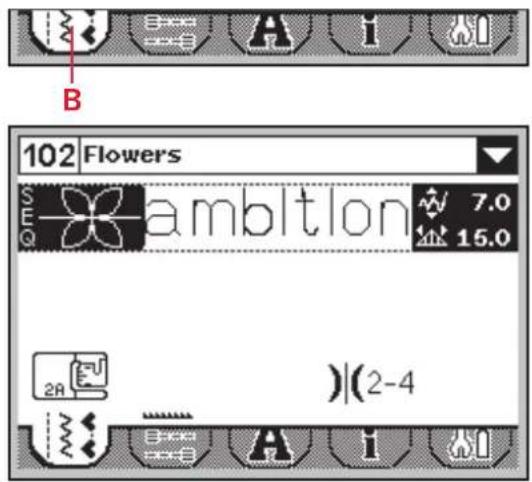
text_image
102 Flowers S E ambition 7.0 15.0 2A )|(2-4)Manage your sequences
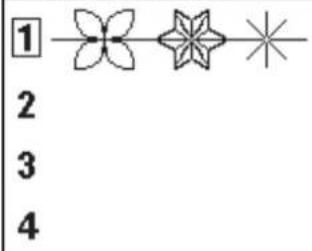
You can save and reload your sequences. There are four memories where you can save your sequences.
Save sequence
Select save (8) to open the save sequence menu. Select one of the four memories. Selected memory number is surrounded by a frame. Confirm your selection by pressing OK (C).
If the memory is occupied, a pop-up message will appear asking if you wish to overwrite the previously saved stitch with the new one. Select OK/yes (C) to overwrite, or cancel/no (D) to close the popup without saving.
To close the save sequence menu press the save button (8).
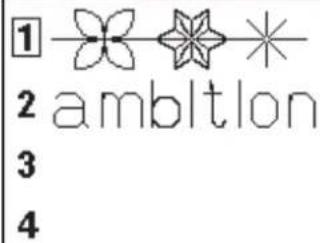
Load sequence
Select load (7) to open the load sequence menu. Select the sequence you want to load. Selected memory number is surrounded by a frame. Confirm your selection by pressing OK (C).
The sequence will appear in sequencing mode to the right of the cursor position.
To exit the load sequence menu without loading, press the load button (7).
Sewing a sequence
To sew the sequence, return to sewing mode by pressing the sequencing button (4) or step on the foot control. Your sequence is ready to be sewn out. The sequence will be sewn continuously.
To sew only one repetition of your sequence, add a tie-off at the end, see page 28.
Note: Adjustments made in sewing mode will affect the whole sequence. However, these adjustments will not be saved if you return to sequencing.

text_image
8 Save sequence 1 2 3 4 Overwrite C Yes No D 7 Load sequence 1 2 ambition 3 4
text_image
♥ ♥ C A♥B 4Maintenance
Cleaning the machine
To keep your sewing machine operating well, clean it often. No lubrication (oiling) is needed. Wipe the exterior surface of your machine with a soft cloth to remove any dust or lint built up. Wipe the screen with a clean, soft and damp cloth.
Cleaning the bobbin area

Note: Raise the needle, lower the feed dogs and turn off the machine.
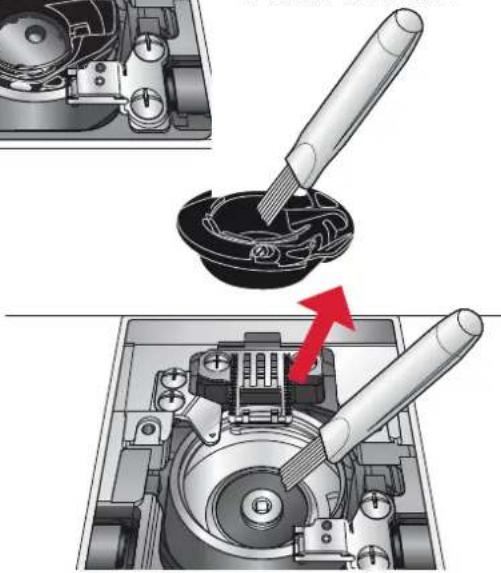
Remove the presser foot. Push the bobbin cover release button (A) to the right and remove the bobbin cover (B) and the bobbin. Use the screwdriver to remove the two screws (C) in the stitch plate. Lift up the stitch plate.
Clean the feed dogs and the bobbin area with the brush found with the accessories.
Cleaning under the bobbin area
Clean the area under the bobbin case after sewing several projects or any time you notice an accumulation of lint in the bobbin case area.
Remove the bobbin case by lifting it up and to the right. Clean the area with the brush or with a dry cloth.
Put the bobbin case back into the hook race so that the tip fits into the stopper (D).
Note: Do not blow air into the bobbin case area. The dust and lint will be blown into your machine.
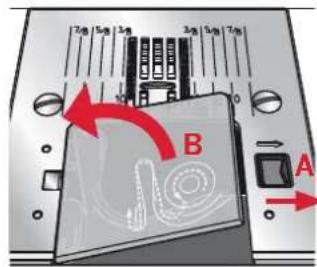
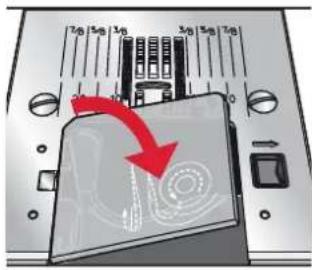
Replacing the stitch plate
With the feed dogs lowered, replace the stitch plate and insert and tighten the two stitch plate screws. Replace the bobbin cover.

text_image
12g 5g 3g 3g 5g 3g 20 10 0 0 0 C B A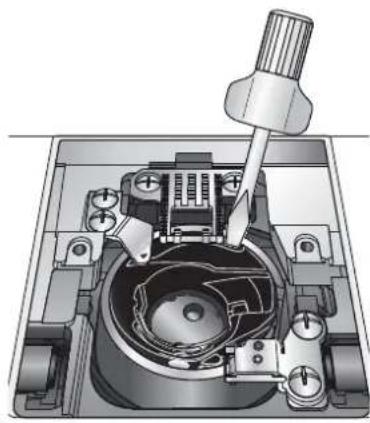
natural_image
Mechanical assembly diagram showing a rotary knob inserted into a housing with internal components (no text or labels)Tip! Inserting the screwdriver at the back of the bobbin case will help lift it up and make it easier to remove.
natural_image
Mechanical assembly diagram showing a disassembled component being inserted into a housing, with no visible text or symbols.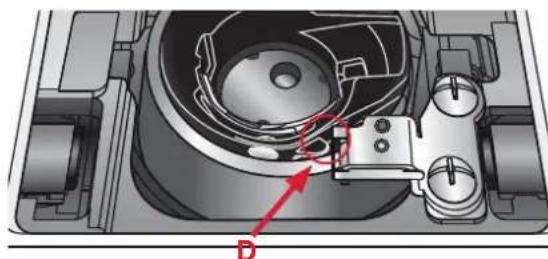
natural_image
Mechanical assembly diagram showing internal components and a red arrow labeled D (no text or symbols present)Troubleshooting
In this troubleshooting guide you will find solutions to the problems you may have with your machine. For further information please contact your local authorized PFAFF ^® dealer.
Problem/cause Remedy
| General problems | |
| Fabric does not move? Make sure that the feed dogs are not lowered. | |
| Wrong stitch, irregular or narrow stitch? Deactivate twin needle or stitch width safety in the settings menu. | |
| The needle breaks? Insert needle correctly, see page 21. Attach correct needle for the fabric. | |
| The machine will not sew? Check that all plugs are securely plugged into the machine and into the wall socket.Push bobbin winder lever to sewing position. | |
| The sewing machine function buttons do not respond to touch? | The sockets and function buttons on the machine can be sensitive to static electricity. If the buttons do not respond to touch, turn the machine OFF and then ON again. If the problem persists, contact your local authorized PFAFF® dealer. |
| The machine skips stitches | |
| Did you insert the needle properly? Insert needle | correctly, see page 21. |
| Did you insert a wrong needle? Use needle system | 130/750 H. |
| Is the needle bent or blunt? Insert a new needle. | |
| Did you thread the machine properly? Check how | the machine is threaded. |
| Is the correct presser foot used? Attach correct presser foot. | |
| Is the needle too small for the thread? Make sure | the needle is correct for the thread and fabric. |
| Needle thread breaks | |
| Did you insert the needle properly? Insert needle | correctly, see page 21. |
| Did you insert a wrong needle? Use needle system | 130/750 H. |
| Is the needle bent or blunt? Insert a new needle. | |
| Did you thread the machine properly? Check how the machine is threaded. | |
| Is the needle too small for the thread? Change the needle to the proper size for the thread. | |
| Are you using poor thread with slubs or thread which has become dry? | Change to a new higher quality thread purchased from an authorized PFAFF® dealer. |
| Is a correct spool cap used? Attach a spool cap of the right size for the actual thread spool. | |
| Is the best spool pin position used? Try a different spool pin position (vertical or horizontal). | |
| Is the stitch plate hole damaged? Change the stitch plate. | |
| Bobbin thread breaks | |
| Did you insert the bobbin properly? Check the bobbin thread. | |
| Is the stitch plate hole damaged? Change the stitch plate. | |
| Is the bobbin area clean? Clean lint from bobbin area. | |
| Is the bobbin wound correctly? Wind a new bobbin. | |
| The seam has uneven stitches | |
| Is the thread tension correct? Check needle thread | tension and the threading. |
| Are you using too thick or slubbed thread? Change the thread. | |
| Is the bobbin thread evenly wound? Check bobbin winding. | |
| Is a correct needle used? Insert a proper needle correctly, see page 21. | |
| The machine does not feed or feeds irregularly | |
| Did you thread the machine properly? Check how the machine is threaded. | |
| Has sewing lint collected between the feed dogs? | Remove the stitch plate and clean the feed dogs with a brush. |
Have your sewing machine serviced regularly by your local authorized PFAFF® dealer!
If you have followed this trouble shooting information and still have problems, take your sewing machine to your dealer. If there is a specific problem, it is a great help to test sew with your thread on a scrap of your sewing fabric and bring it to your dealer. A sewing sample will often provide helpful information.
Non-original parts and accessories
The warranty does not cover any defect or damage caused by use of non-original accessories or parts.
We reserve the right to change the machine equipment and the assortment of accessories without prior notice, or make modifications to the performance or design.
Such modifications, however, will always be to the benefit of the user and the product.
Intellectual property
PFAFF, PERFECTION STARTS HERE, AMBITION and IDT (image) are trademarks of KSIN Luxembourg II, S.ar.l.
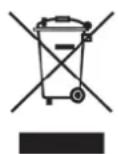
Please note that on disposal, this product must be safely recycled in accordance with relevant National legislation relating to electrical/electronic products. Do not dispose of electrical appliances as unsorted municipal waste, use separate collection facilities. Contact your local government for information regarding the collection systems available. When replacing old appliances with new ones, the retailer may be legally obligated to take back your old appliance for disposal free of charge.
If electrical appliances are disposed of in landfills or dumps, hazardous substances can leak into the groundwater and get into the food chain, damaging your health and well-being.

natural_image
Black-and-white portrait of a woman with long blonde hair wearing a denim jacket and purple shirt, with a UK flag patch on the chest (no text or symbols in the background)www.pfaff.com