KS700PEK - Saw BLACK & DECKER - Free user manual and instructions
Find the device manual for free KS700PEK BLACK & DECKER in PDF.


User questions about KS700PEK BLACK & DECKER
0 question about this device. Answer the ones you know or ask your own.
Ask a new question about this device
Download the instructions for your Saw in PDF format for free! Find your manual KS700PEK - BLACK & DECKER and take your electronic device back in hand. On this page are published all the documents necessary for the use of your device. KS700PEK by BLACK & DECKER.
USER MANUAL KS700PEK BLACK & DECKER
Your Black & Decker jigsaw has been designed for sawing wood, plastics and sheet metal. This tool is intended for consumer use only.
General safety rules
Read all instructions. Failure to follow all instructions listed below may result in electric shock, fire and/or serious injury. The term "power tool" in all of the warnings listed below refers to your mains operated (corded) power tool or battery operated (cordless) power tool.
SAVE THESE INSTRUCTIONS.
1. Work area
a. Keep work area clean and well lit. Cluttered and dark areas invite accidents.
b. Do not operate power tools in explosive atmospheres, such as in the presence of flammable liquids, gases or dust. Power tools create sparks which may ignite the dust or fumes.
c. Keep children and bystanders away while operating a power tool. Distractions can cause you to lose control.
2. Electrical safety
a. Power tool plugs must match the outlet. Never modify the plug in any way. Do not use any adapter plugs with earthed (grounded) power tools. Unmodified plugs and matching outlets will reduce risk of electric shock.
b. Avoid body contact with earthed or grounded surfaces such as pipes, radiators, ranges and refrigerators. There is an increased risk of electric shock if your body is earthed or grounded.
c. Do not expose power tools to rain or wet conditions.
Water entering a power tool will increase the risk of electric shock.
d. Do not abuse the cord. Never use the cord for carrying, pulling or unplugging the power tool. Keep cord away from heat, oil, sharp edges or moving parts. Damaged or entangled cords increase the risk of electric shock.
e. When operating a power tool outdoors, use an extension cord suitable for outdoor use. Use of a cord suitable for outdoor use reduces the risk of electric shock.
3. Personal safety
a. Stay alert, watch what you are doing and use common sense when operating a power tool. Do not use a power tool while you are tired or under the influence of drugs, alcohol or medication. A moment of inattention while operating power tools may result in serious personal injury.
b. Use safety equipment. Always wear eye protection.
Safety equipment such as dust mask, non-skid safety shoes, hard hat, or hearing protection used for appropriate conditions will reduce personal injuries.
c. Avoid accidental starting. Make sure that the switch is in the off position before plugging in. Carrying power tools with your finger on the switch or plugging in power tools that have the switch on invites accidents.
d. Remove any adjusting key or wrench before turning the power tool on. A wrench or a key left attached to a rotating part of the power tool may result in personal injury.
e. Do not overreach. Keep proper footing and balance at all times. This enables better control of the power tool in unexpected situations.
f. Dress properly. Do not wear loose clothing or jewellery. Keep your hair, clothing and gloves away from moving parts. Loose clothes, jewellery or long hair can be caught in moving parts.
Fig. If devices are provided for the connection of dust extraction and co llection facilities, make sure that these are connected and properly used. Use of these devices can reduce dust related hazards.
4. Power tool use and care
a. Do not force the power tool. Use the correct power tool for your application. The correct power tool will do the job better and safer at the rate for which it was designed.
b. Do not use the power tool if the switch does not turn it on and off. Any power tool that cannot be controlled with the switch is dangerous and must be repaired.
c. Disconnect the plug from the power source before making any adjustments, changing accessories, or storing power tools. Such preventive safety measures reduce the risk of starting the power tool accidentally.
d. Store idle power tools out of the reach of children and do not allow persons unfamiliar with the power tool or these instructions to operate the power tool. Power tools are dangerous in the hands of untrained users.
e. Maintain power tools. Check for misalignment or binding of moving parts, breakage of parts and any other condition that may affect the power tools operation. If damaged, have the power tool repaired before use. Many accidents are caused by poorly maintained power tools.
f. Keep cutting tools sharp and clean. Properly maintained cutting tools with sharp cutting edges are less likely to bind and are easier to control.
g. Use the power tool, accessories and tool bits etc., in accordance with these instructions and in the manner intended for the particular type of power tool, taking into account the working condition and the work to be performed. Use of the power tool for operations
different from those intended could result in a hazardous situation.
5. Service
a. Have your power tool se rviced by a qualified repair person using only identical replacement parts. This will make sure that the safety of the power tool is maintained.
Specific safety instructions for jigsaws
- Hold the tool by the in sulated gripping surfaces when performing an operation where the cutting tool may contact hidden wiring or its own cord.
Contact with a "live" wire will make exposed metal parts of the tool "live" and shock the operator.
Use clamps or another practical way to secure and support the workpiece to a stable platform. Holding the work by hand or against your body leaves it unstable and may lead to loss of control. - Keep hands away from cutting area. Never reach underneath the work piece for any reason. Do not insert fingers or thumb into the vicinity of the reciprocating blade and blade clamp. Do not stabilize the saw by gripping the shoe.
- Keep blades sharp. Dull or damaged blades may cause the saw to swerve or stall under pressure. Always use the appropriate type of saw blade for the workpiece material and type of cut.
When cutting pipe or conduit, make sure that they are free from water, electrical wiring, etc.
Do not touch the workpiece or the blade immediately after operating the tool. They can become very hot. - Be aware of hidden hazards, before cutting into walls, floors or ceilings, check for the location of wiring and pipes.
The blade will continue to move after releasing the switch. Always switch the tool off and wait for the saw blade to come to a complete standstill before putting the tool down.
This appliance is not intended for use by young or infirm persons without supervision. Children must be supervised to ensure they do not play with the appliance.
Warning! Contact with, or inhalation of dusts arising from cutting applications may endanger the health of the operator and possible bystanders. Wear a dust mask specifically designed for protection against dust and fumes and ensure that persons within or entering the work area are also protected.
Electrical safety

This tool is double insulated; therefore no earth wire is required. Always check that the power supply corresponds to the voltage on the rating plate.
If the supply cord is damaged, it must be replaced by the manufacturer or an authorised Black & Decker service centre in order to avoid a hazard.
Features
This tool includes some or all of the following features:
- Variable speed On/off switch
- Lock-on button
- Dust extraction outlet
- Shoe plate
- Saw blade support roller
- Pendulum stroke selector
Assembly
Warning! Before attempting any of the following operations, make sure that the tool is switched off and unplugged and that the saw blade has stopped. Used saw blades may be hot.
Fitting and removing the saw blade (fig. C)
◆ Loosen (do not remove) the two screws (11).
◆ Hold the saw blade (8) with the teeth facing forward.
- Insert the shank of the saw blade (8) into the blade holder (10) as far as it will go.
◆ Slightly tighten the two screws (11) alternately to position the blade, then fully tighten the two screws (11).
- To remove the saw blade (8), turn both screws (11) one turn counter-clockwise.
Connecting a vacuum cleaner to the tool (fig. D)
An adaptor (12) is required to connect a vacuum cleaner or dust extractor to the tool. The adaptor can be purchased from your local Black & Decker retailer.
◆ Push the adaptor (12) into the dust extraction outlet (3).
Connect the vacuum cleaner hose (13) to the adaptor (12)
ENGLISH
Cut line blower (fig. E)
To aid visibility when cutting, your jigsaw is equipped with a cut line blower (14) which will keep the work area clear of dust as you saw.
Use
Adjusting the shoe plate for bevel cuts (fig. F)
The shoe plate (4) can be set to make either a straight cut or a left or right bevel cut at an angle of 45^ .
- Loosen the two screws (9).
◆ Pull the shoe plate (4) forward, rotate the shoe plate (4) to the left or right and push it back into the 45^ location.
◆ Tighten the two screws (9).
To reset the shoe plate for straight cuts:
- Loosen the two screws (9).
Pull the shoe plate (4) forward, rotate to the centre and push it back into the 0° location.
◆ Tighten the two screws (9).
Setting the pendulum stroke (fig. G)
- Set the pendulum stroke selector (6) to the required position.
◆ Position 0: metal and aluminium and sheet metal.
◆ Position I: for laminates, hard wood, work tops.
◆ Position II: for plywood and PVC/Plastics.
◆ Position III: for soft wood and fast cutting.
Variable speed control
The tool has a variable speed On/Off switch (1). The operating speed depends on how far you press the switch. Use a high speed for wood, medium speed for aluminium and PVC and low speed for metals other than aluminium.
Switching on and off
◆ To switch the tool on, press the on/off switch (1).
◆ To switch the tool off, release the on/off switch (1).
For continuous operation, press the lock-on button (2) and release the on/off switch (1).
To switch the tool off when in continuous operation, press and release the on/off switch (1).
Sawing
Hold the tool firmly with both hands while cutting.
The shoe should be held firmly against the material being cut. This will help prevent the saw from jumping, reduce vibration and minimise blade breakage.
Let the blade run freely for a few seconds before starting the cut.
- Apply only a gentle pressure to the tool while performing the cut.
Hints for optimum use
Sawing laminates
When cutting laminates splintering may occur which can damage the presentation surface. The most common saw blades cut on the upward stroke, therefore if the shoe plate is sitting on the presentation surface either use a saw blade that cuts on the downward stroke or:
Use a fine-tooth saw blade.
◆ Saw from the back surface of the workpiece.
Clamp a piece of scrap wood or hardboard to both sides of the workpiece to minimise splintering, and saw through this sandwich.
Sawing metal
- Be aware that sawing metal takes much more time than sawing wood.
Use a saw blade suitable for sawing metal.
When cutting thin sheet metal, clamp a piece of scrap wood to the back surface of the workpiece and cut through this sandwich.
◆ Spread a film of oil along the intended line of cut.
Maintenance
Your Black & Decker tool has been designed to operate over a long period of time with a minimum of maintenance.
Continuous satisfactory operation depends upon proper care and regular cleaning.
Warning! Before performing any maintenance or cleaning, make sure that the tool is switched off and unplugged and that the saw blade has stopped.
- Regularly clean the ventilation slots in your tool and charger using a soft brush or dry cloth.
- Regularly clean the motor housing using a damp cloth. Do not use any abrasive or solvent-based cleaner. Never let any liquid get inside the tool and never immerse any part of the tool into liquid
Protecting the environment
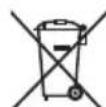
Separate collection. This product must not be disposed of with normal household waste.
Should you find one day that your appliance needs replacement, or if it is of no further use to you, think of the protection of the environment. Black & Decker repair agents will accept old Black & Decker tools and ensure that they are disposed of in an environmentally safe way.
Protecting the environment
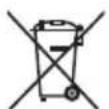
Separate collection. This product must not be disposed of with normal household waste.
Should you find one day that your appliance needs replacement, or if it is of no further use to you, think of the protection of the environment. Black & Decker repair agents will accept old Black & Decker tools and ensure that they are disposed of in an environmentally safe way.

Separate collection of used products and packaging allows materials to be recycled and used again. Re-use of recycled materials helps prevent environmental pollution and reduces the demand for raw materials.
Local regulations may provide for separate collection of electrical products from the household, at municipal waste sites or by the retailer when you purchase a new product.
Technical data
| KS505 | |
| Voltage | |
| AR, B2C, B2 | 220V |
| B3 & BR | 120V/127V |
| Power input | 500W |
| No load speed | 0-3000/min |
| Max depth of cut | |
| Wood | 60mm |
| Steel | 5mm |
| Aluminium | 10mm |
| Weight | 1.9kg |
Service
Black & Decker offers a full network of company-owned and authorized service locations. All Black & Decker Service Centers are staffed with trained personnel to provide customers with efficient and reliable power tool service. Whether you need technical advice, repair, or genuine factory replacement parts, contact the Black & Decker location nearest you.
CNPJ: 53.296.273/0001-91
Insc. Est.: 701.948.711.00-98
S.A.C.: 0800-703-4644