AU-D2 - Audio/video converter CYP - Free user manual and instructions
Find the device manual for free AU-D2 CYP in PDF.


User questions about AU-D2 CYP
0 question about this device. Answer the ones you know or ask your own.
Ask a new question about this device
Download the instructions for your Audio/video converter in PDF format for free! Find your manual AU-D2 - CYP and take your electronic device back in hand. On this page are published all the documents necessary for the use of your device. AU-D2 by CYP.
USER MANUAL AU-D2 CYP
Digital Co-ax to Optical Converter
OPERATION MANUAL
DISCLAIMERS
The information in this manual has been carefully checked and is believed to be accurate. CYP (UK) Ltd assumes no responsibility for any infringements of patents or other rights of third parties which may result from its use.
CYP (UK) Ltd assumes no responsibility for any inaccuracies that may be contained in this document. CYP (UK) Ltd also makes no commitment to update or to keep current the information contained in this document.
CYP (UK) Ltd reserves the right to make improvements to this document and/or product at any time and without notice.
COPYRIGHT NOTICE
No part of this document may be reproduced, transmitted, transcribed, stored in a retrieval system, or any of its part translated into any language or computer file, in any form or by any means—electronic, mechanical, magnetic, optical, chemical, manual, or otherwise—without express written permission and consent from CYP (UK) Ltd.
© Copyright 2019 by CYP (UK) Ltd.
All Rights Reserved.
Version 1.1
TRADEMARK ACKNOWLEDGMENTS
All products or service names mentioned in this document may be trademarks of the companies with which they are associated.
SAFETY PRECAUTIONS
Please read all instructions before attempting to unpack, install or operate this equipment and before connecting the power supply.
Please keep the following in mind as you unpack and install this equipment:
- Always follow basic safety precautions to reduce the risk of fire, electrical shock and injury to persons.
- To prevent fire or shock hazard, do not expose the unit to rain, moisture or install this product near water.
- Never spill liquid of any kind on or into this product.
- Never push an object of any kind into this product through any openings or empty slots in the unit, as you may damage parts inside the unit.
- Do not attach the power supply cabling to building surfaces.
- Use only the supplied power supply unit (PSU). Do not use the PSU if it is damaged.
- Do not allow anything to rest on the power cabling or allow any weight to be placed upon it or any person walk on it.
- To protect the unit from overheating, do not block any vents or openings in the unit housing that provide ventilation and allow for sufficient space for air to circulate around the unit.
REVISION HISTORY
VERSION NO. DATE SUMMARY OF CHANGE
| v2.00 21/06/2019 First release | ||
CONTENTS
- Introduction......6
- Applications ......6
- Package Contents ......6
- System Requirements ......6
5.Features......6 - Operation Controls and Functions......7
6.1 Front Panel 7
6.2 Rear Panel....7
6.3 Left Panel 8
6.4 Top Panel 8
- Connection Diagram ......9
- Specifications....10
- Acronyms......11
1. INTRODUCTION
The Digital Audio Converter with Dual Outputs will convert between Coaxial and Optical digital audio formats. This compact and convenient unit accepts a stereo or surround (up to 5.1 channels) audio signal through either Coaxial cable or Optical cable, and passes the unchanged signal to both its Coaxial and Optical output ports. With its built-in signal enhancement feature, the unit also serves as a repeater of digital audio signals to extend up to double the transmission distance.
2. APPLICATIONS
Convert an Optical digital signal to a Coaxial digital signal
Convert a Coaxial digital signal to an Optical digital signal
- Distribute digital audio to 2 locations
Extend your Optical or Coaxial cable distances
3. PACKAGE CONTENTS
■ Digital Audio Converter with Dual Outputs
5 V/1.2 A Power Adaptor
Operation Manual
4. SYSTEM REQUIREMENTS
Digital audio source device such as DVD or CD player with Optical or Coaxial cables and audio output device such as an amplifier or AV receiver with Optical or Coaxial digital input.
5 FEATURES
Supports two-way conversion: coaxial to optical or optical to coaxial
■ Supports input audio signals from 2 channels to up to 5.1 channels, output signal follows input
■ Supports signal enhancement of S/PDIF audio and extends the transmission distance, through coaxial and/or optical cables
Select one input from coaxial or optical input ports, and send the S/PDIF audio signal to both coaxial and optical output ports simultaneously
Compact and easy to use
6. OPERATION CONTROLS AND FUNCTIONS
6.1 Front Panel
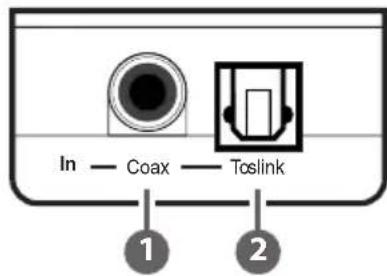
text_image
In — Coax — Toslink 1 21 Coaxial In: Connect to the output of an S/PDIF digital audio source device such as DVD player or set-top box, using Coaxial cable.
2 Toslink In: Connect to the output of an S/PDIF digital audio source device such as CD player or Media Streamer, using Optical cable.
6.2 Rear Panel

text_image
Out — Toslink — Coax 1 21 Toslink Out: Connect to the input of an S/PDIF digital audio equipment such as an amplifier, using Optical cable.
2 Coaxial Out: Connect to the input of your S/PDIF digital audio equipment such as an AV Receiver, using Coaxial cable
6.3 Left Panel
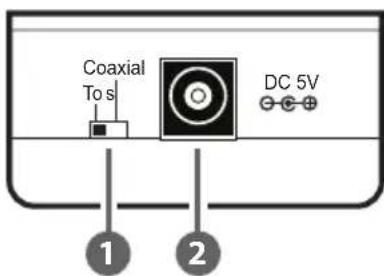
text_image
Coaxial To s DC 5V 1 21 Tos/Coaxial: Selects the current audio source, either optical or coaxial.
2 DC 5V: Connect the 5V DC power supply to the unit and plug the adaptor into an AC wall outlet.
6.4 Top Panel
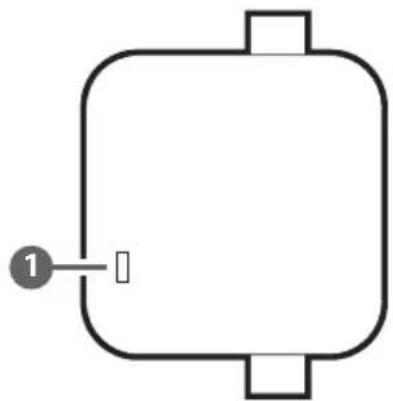
natural_image
Simple line drawing of a rectangular object with a labeled point '1' on the left side (no text or symbols on the object itself)1 POWER LED: The LED will illuminate when the power is connected.
7. CONNECTION DIAGRAM
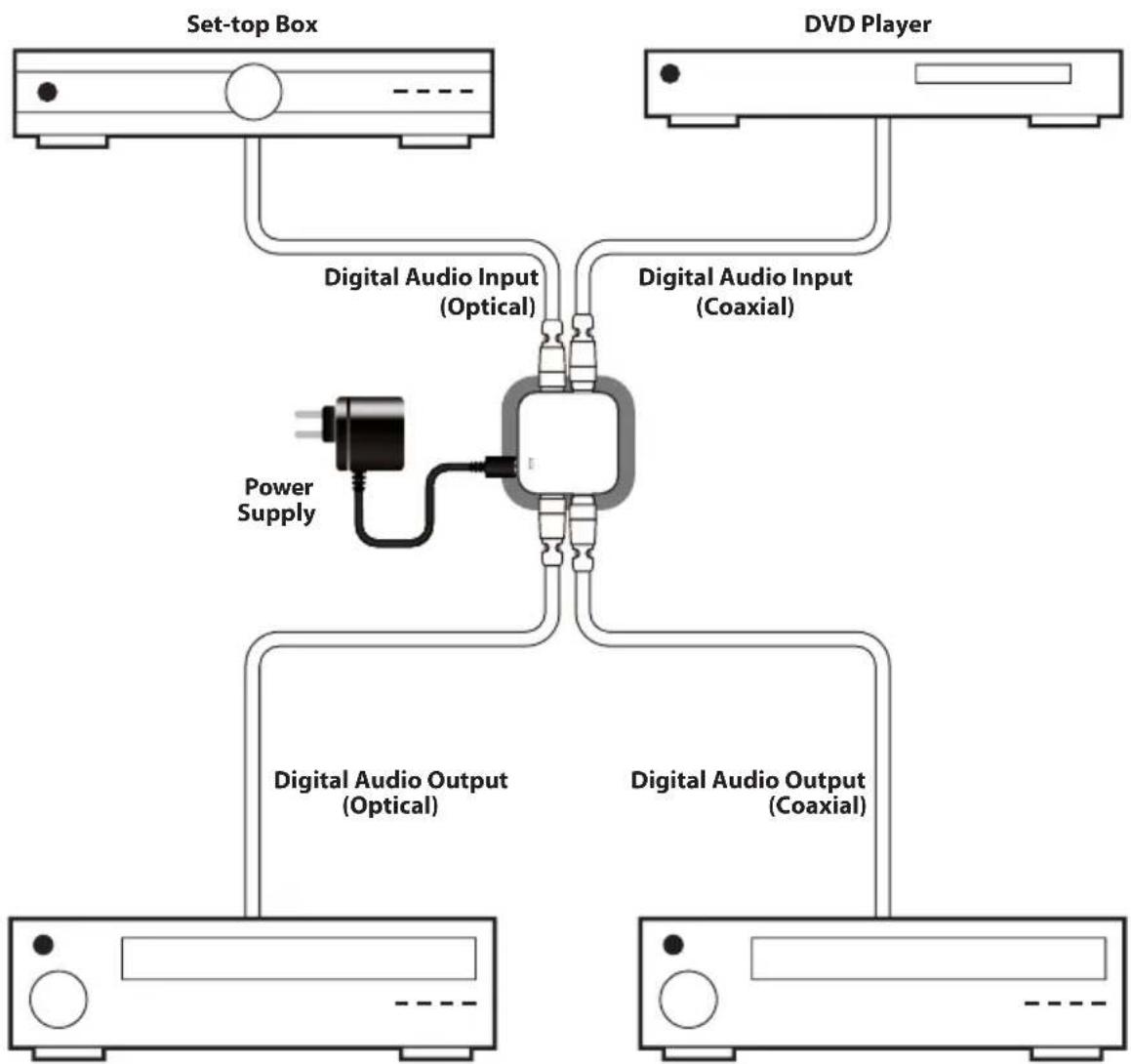
flowchart
graph TD
    A["Set-top Box"] --> B["Digital Audio Input (Optical)"]
    C["DVD Player"] --> D["Digital Audio Input (Coaxial)"]
    B --> E["Power Supply"]
    D --> F["Digital Audio Output (Optical)"]
    D --> G["Digital Audio Output (Coaxial)"]
AV Receiver AV Receiver
8. SPECIFICATIONS
Input Ports 1×Coaxial (RCA connector)
1×Optical Fiber (TOSLINK connector)
Input Format LPCM 2 CH, Compressed audio Dolby
Output Ports 1×Coaxial (RCA connector)
1×Optical Fiber (TOSLINK connector)
Power Supply 5 V/1.2 A switching power adaptor (with
universal plug, CE/FCC/UL certified)
Dimensions 58 mm (W)×46 mm (D)×24 mm (H)
Weight 25 g (Unit only)
Chassis Material Plastic
Silkscreen Colour White
Operating Temperature 0 °C\~ 40 °C
Power Consumption 0.7W
9. ACRONYMS
| ACRONYM COMPLETE TERM | |
| ADC Analogue to Digital Converter | |
| COAX Coaxial | |
| S/PDIF Sony/Philips Digital Interconnect Format | |
| TOSLINK Toshiba Link | |

CYP (UK) Ltd., Unit 7, Shepperton Business Park, Govett Avenue, Shepperton, Middlesex, TW17 8BA
Tel: +44 (0) 20 3137 9180 | Fax: +44 (0) 20 3137 6279
Email: sales@cypeurope.com
www.cypeurope.com
v1.00