Efektor Gainia TD - Audio software Kuassa - Free user manual and instructions
Find the device manual for free Efektor Gainia TD Kuassa in PDF.


User questions about Efektor Gainia TD Kuassa
0 question about this device. Answer the ones you know or ask your own.
Ask a new question about this device
Download the instructions for your Audio software in PDF format for free! Find your manual Efektor Gainia TD - Kuassa and take your electronic device back in hand. On this page are published all the documents necessary for the use of your device. Efektor Gainia TD by Kuassa.
USER MANUAL Efektor Gainia TD Kuassa
text_image
GAIN BIAS LOW E. Q. — HIGH LEVEL EFEKTOR GHiNiATD PREAMP CHANNEL BYPASS 1 2 5 0 10 5 0 10 5 0 10 5 0 10 EFEKTOR GHiNiATD PREAMP AAX ReEFEKTOR GAINIH PREAMP


text_image
Boomer Solo Matchlock GAIN BIAS LOW HIGH LEVEL EFEKTOR GAINiHATD PREAMP CHANNEL BYPASS
text_image
EFEKTOR GAINFD PREAMPTHANK YOU FOR CHOOSING KUASSA PRODUCTS!
Dual channel tube driven preamp with bias control.
The Chandler Tube Driver* VST plugin is a guitar effect plugin developed after a renowned tube driver pedal from the 1980s. This plugin is able to recreate the warm and dynamic sound of the original unit, using advanced algorithms to model the behavior of a vacuum tube to capture the subtleties and nuances of the tube-driven overdrive sound
Upon loading the plugin, you will be presented with an intuitive interface that mimics the physical controls of the original pedal. The Drive knob allows for adjustment of the amount of gain and distortion, while the Low and High knobs adjust the overall EQ of the signal. The Bias control can be used to adjust the bias voltage of the virtual tube, affecting the overall tonal character.
*Disclaimer :
All trademarks are the property of their respective owners which are in no way associated or affiliated with Kuasa. The manufacturer names and model designations are used solely to identify the products whose tonal and sound characteristics were studied during development.

text_image
vST vST Audio Units AAX Re Real ExtensionKEY FEATURES:
- NEW! Resizable window.
- NEW! Updated interface for Efektor series.
• Up to 8x oversampling. - Straightforward single screen interface.
• Available as an Amplification 360 module.
• Also available as a Reason Studios Rack Extension.
SYSTEM REQUIREMENTS
Windows:
Windows Vista or Later (64 bit)
Core2 Duo, or AMD Phenom ii X4 or better (latest Intel i3, AMD A4, or
better is recommended) with 4GB minimum RAM
VST or VST3 compatible host/DAW
Pro Tools 11 or later for AAX format
Propellerhead Reason 10.1 or later for Rack Extension format
Macintosh:
Mac OS 10.11 or later (64 Bit).
Core2 Duo, or better (latest Intel i3 recommended)
with 4GB minimum RAM
Native Apple Silicon support
VST, VST3, or Audio Units compatible host/DAW
Pro Tools 11 or later for AAX format
Propellerhead Reason 10.1 or later for Rack Extension format
MAC OSX 10.11 OR LATER
Note for MacOS X users: you will be asked for your password upon installation.
For Mac installer(.pkg) format, double-click the installer and follow the instructions. The installer automatically point to your Mac's default VST/VST3/AU/AAX plug-ins and Standalone path (see below). Alternatively you can customize the installation target to specific folder.
Here are the default folders installation path for each of our supported platforms in Mac OSX:
• Mac Audio Unit (EfektorGainiaTD.component) : /Library/Audio/Plug-Ins/Components/
• Mac VST (EfektorGainiaTD.vst) : /Library/Audio/Plug-Ins/VST/Kuassa/
• Mac VST3 (EfektorGainiaTD.vst3) : /Library/Audio/Plug-Ins/VST3/
• Mac AAX (EfektorGainiaTD.aaxplugin) : /Library/Application Support/Avid/Audio/Plug-Ins/
WINDOWS VISTA OR LATER
For Windows Installer (.exe), double-click the installer and follow the instructions. The installer automatically points to your system's default plugins path (see below). Alternatively you can point the installation target to specific folder. Most VST host already have a "Plugins" or "VSTplugins" folder inside its installation directory, or you can point the host to read any folder you choose.
Here are the default folders installation path for each of our supported platforms:
- Windows 64-bit VST (EfektorGainiaTD.dll) : C:\Program Files\Steinberg\VstPlugins\Kuassa\
- Windows 64-bit VST3 (EfektorGainiaTD.vst3) : C:\Program Files\Common Files\VST3\
- Windows 64-bit AAX (EfektorGainiaTD.aaxplugin) : C:\Program Files\Common Files\Avid\Audio Plug-Ins\
MAC OSX 10.11 OR LATER
On a Mac, simply delete the plug-in located on the corresponding Plug-ins folder, and delete other folders and file resources located at,
Folders:
- /Library/Application Support/Kuassa/Default Presets/EfektorGainiaTD/
- /Users/[User Name]/Music/Kuassa/Presets/EfektorGainiaTD/
Files:
• /Library/Application Support/Kuassa/Misc/EfektorGainiaTD EULA.txt
• /Library/Application Support/Kuassa/User Manuals/EfektorGainiaTD.pdf
- /Users/[User Name]/Music/Kuassa/Settings/EfektorGainiaTD.setting
WINDOWS VISTA OR LATER
Use "Add/Remove programs" or "Programs and Features" from the Windows Control Panel. If Efektor Gainia TD does not listed, delete the .dll/.vst3/.aaxplugin file from your VST plug-in folder. After Uninstallation, manually delete other Efektor Gainia TD file resources at. Folder:
C:\Users[User Name]\Documents\Kuassa\Presets\EfektorGainiaTD\
Files:
• C:\Users[User Name]\Documents\Kuassa\Settings\EfektorGainiaTD.setting
Authorization

text_image
Effective Gain TB is in remote mode. Note will be generated every minute until advanced. OK CHANNEL BYPRESS123 On evaluation mode, you will see this pop-up window when you first start the plugin.
text_image
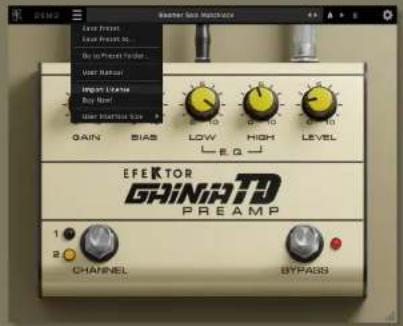
GEM2 GAIN BIAS Low Preset Low Preset no... Buy in Present Signal... View Resour Import Litter Buy Inner Inner Interface Size LOW HIGH LEVEL EFEKTOR GINIATD PREAMP CHANNEL BYPASSTo start the authorization process, click the [File] button on the top-left of the plug-in's interface, there, you will find a selection box titled [import License].

text_image
Select Kappa Home File to authorize This PC - NewBook Organize - New Folder Name Date modified Edit access Earlier this year (1) EnterGoView3D.exe 20/0/2023/23/19 Select a file to primary. File name: Windows Open CancelLocate the License File [ EfektorGainiaTD.kuassa] obtained from the confirmation e-mail sent to you after you purchase EFEKTOR Plug-in(s) from our web store or downloaded from member area. Note that the License File contains your personal information used to authorize the plug-in.
Authorization(Cont'd)

text_image
Audio Sub Options GAIN BAS LOW HIGH LEVEL Administration Successful Enjoy your Elbow Genre 10. Rock in Bolt OK CHANNEL BYPASS4 After you locate the License File, a pop-up box confirming that you are successfully authorize your plug-in will show.

text_image
EFEKTOR GAINIA TD Version: 16.0 Command TD: Your Name: Converted by: A2High versiona Single version Primary Version Power: 50000000000000000000000000000000000000000000000000000000000000000000000000000000000000000000000000000 1 2 3 4 5 6 7 8 9 10 11 12 13 14 15 16 17 18 19 20 21 22 23 24 25 26 27 28 29 30 31 32 33 34 35 36 37 38 39 40 41 42 43 44 45 46 47 48 49 50 51 52 53 54 55 56 57 58 59 60 61 62 63 64 65 66 67 68 69 70 71 72 73 74 75 76 77 78 79 80 81 82 83 84 85 86 87 88 89 90 91 92 93 94 95 96 97 98 99 1005 To check if you have completed the authorization process, just simply load the About Box by clicking the Kuassa logo on the top left corner. If your authorization is successful, either your name or your e-mail address will be shown on the About Box. You will also notice that the generated noise/silence on the Evaluation Version is now gone.
Preset Management

text_image
Summer Sale Hardware File Place Share Views Not to Quick at once Finish Copy Paste Help Save As Save Folder Properties Select Unipponcn Pro... Ebbio... Search WindowMade3D Name Close Out Almost Close MatchboxLgdp 08/05/2021 13:37 KCTEP Almost MatchboxLgdp 08/05/2021 13:37 KCTEP Almost MatchboxLgdp 08/05/2021 13:37 KCTEP Mostly MatchboxLgdp 08/05/2021 13:37 KCTEP Mostly MatchboxLgdp 08/05/2021 13:37 KCTEP Mostly MatchboxLgdp 08/05/2021 13:37 KCTEP Mostly MatchboxLgdp 08/05/19, 13:41 KCTEP Mostly MatchboxLgdp 08/05/2021 13:41 KCTEP Mostly MatchboxLgdp 08/05/2021 13:41 KCTEP Mostly MatchboxLgdp 08/05/2021 13:41 KCTEP1 Presets for EfektorGainiaTD Plug-in(s) are located in the following folders*:
- Mac: /Users/[USERNAME]/Music/Kuassa /Presets/EfektorGainiaTD
- Win: \~\Documents\Kuassa\Presets\EfektorGainiaTD
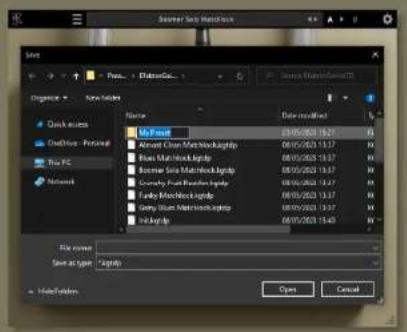
All presets inside these folders will be recognized by the plugin as individual presets, you can also create a folder to group the preset(s). They will thus be shown on the Efektor Gainia TD Plug-in's preset selector.
text_image
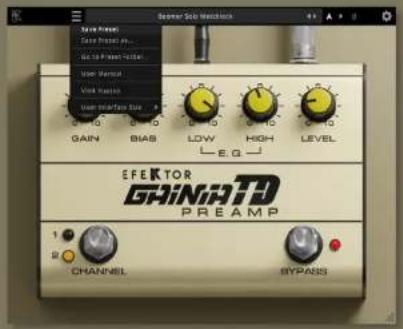
Server Sub Mechanical Save Preset Save Preset v1... Save Preset v2... Save Preset v3... Save Preset v4... Save Preset v5... Save Preset v6... Save Preset v7... Save Preset v8... Save Preset v9... Save Preset v10... Save Preset v11... Save Preset v12... Save Preset v13... Save Preset v14... Save Preset v15... Save Preset v16... Save Preset v17... Save Preset v18... Save Preset v19... Save Preset v20... Save Preset v21... Save Preset v22... Save Preset v23... Save Preset v24... Save Preset v25... Save Preset v26... Save Preset v27... Save Preset v28... Save Preset v29... Save Preset v30... Save Preset v31... Save Preset v32... Save Preset v33... Save Preset v34... Save Preset v35... Save Preset v36... Save Preset v37... Save Preset v38... Save Preset v39... Save Preset v40... Save Preset v41... Save Preset v42... Save Preset v43... Save Preset v44... Save Preset v45... Save Preset v46... Save Preset v47... Save Preset v48... Save Preset v49... Save Preset v50... Save Preset v51... Save Preset v52... Save Preset v53... Save Preset v54... Save Preset v55... Save Preset v56... Save Preset v57... Save Preset v58... Save Preset v59... Save Preset v60... Save Preset v61... Save Preset v62... Save Preset v63... Save Preset v64... Save Preset v65... Save Preset v66... Save Preset v67... Save Preset v68... Save Preset v69... Save Preset v70... Save Preset v71... Save Preset v72... Save Preset v73... Save Preset v74... Save Preset v75... Save Preset v76... Save Preset v77... Save Preset v78... Save Preset v79... Save Preset v80 EFEKTOR GRINIATD PREAMP CHANNEL BYPASS2 To save a preset, set your plugin to the desired parameter settings, then select:
- "Save Preset": Overwrites currently active preset.
- "Save Preset As": Saves current settings into a new preset file (*.kgtdp for Efektor Gainia TD).

text_image
Summer Sale Workbench SAIN POWER SAIN POWER AI... SAIN POWER FLOOR VACI OUTPUT VACI LAYOUT SAIN SOURCE SAIN SOURCE BIAS SAIN SOURCE BIAS SAIN SOURCE COLD SAIN SOURCE DUCT SAIN SOURCE EQUITY SAIN SOURCE FLOWER SAIN SOURCE GROUND SAIN SOURCE HOUND SAIN SOURCE ICA SAIN SOURCE JUAN SAIN SOURCE KUAN SAIN SOURCE LIME SAIN SOURCE MEDIUM SAIN SOURCE NEDIUM SAIN SOURCE OLYC SAIN SOURCE PLETIC SAIN SOURCE QLEMON SAIN SOURCE ROLL SAIN SOURCE SELL SAIN SOURCE TELL SAIN SOURCE UBEET SAIN SOURCE VEGGET SAIN SOURCE WINDER SAIN SOURCE ZUCER SAIN SOURCE UCLA SAIN SOURCE VERA SAIN SOURCE VERA EFEKTOR GRINIATD PREAMP CHANNEL BYPASSI3 When you create a new preset using "Save Preset As...", make sure that you have chosen the correct preset folder as aforementioned on point 1 above to make sure that it will be recognized automatically by Efektor Gainia TD.
Preset Management
text_image
Macromedia Macromedia File name: Macromedia Macromedia Save As Type: Macromedia Open Cancel
text_image
Single Clean Browse... Delete... My Press Search My Press Options New Edition Name Extra modified Save Quick access OneDrive - Personal True PC Network No items match your search. File name: Single Clean light Send any type: Laptop Save Cancel
text_image
Single Close By Front Audio: Heart Matched Deep Matched Impulse/Noise Matched Grating/Noise Matched Racing Matched Grip Sound Matched JPG Audio Sound Condition Lead Sound Condition Blood Sound Condition Beta Sound Condition Step Sound Condition Balance/Blue/Gray Matched Sound Sound Condition Tension Matched Top 91 Channel CHANNEL BYPASS Single Close4 Sub-folders are also recognized to manage presets into groups, useful to manage additional preset bank, or grouping presets based by their use.
Function
text_image
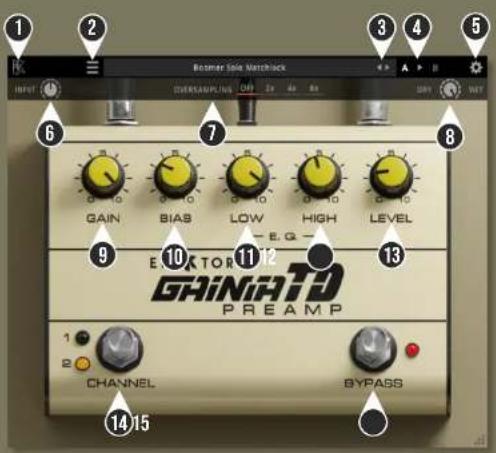
1 2 3 4 5 6 7 8 GAIN BIAS LOW HIGH LEVEL 9 10 11 12 E X K T O R GAINATD PREAMP 1 2 CHANNEL BYPASS 14 151 KUASSA LOGO: Displays the About box
2 FILE MENU: Includes option for following functions : Preset management/option, plug-in license authorization, user manual, window size; and link to our website.
3 LEFT-RIGHT ARROWS: Select next or previous preset.
4 A > B COMPARE: Compares two different settings of the effect. Click the letters to switch settings and click the arrow to copy settings from A to B or vice versa.
5 SETTING ICON: Show or hide the top menu consisting of input level, oversampling, and dry/wet knob.
6 INPUT: Adjusts the signal level going into the plugin.
7 OVERSAMPLING SELECTOR: Select from no oversampling up to 8X oversampling.
8 DRY/WET: Mixes the original with the processed signal.
9 GAIN: Adjusts the amount of saturation.
10 BIAS: Adjusts the tube preamp bias. Turning clockwise will cut the lows and emphasize mid frequency.
11 LOW: Adjust the low frequency range.
12 HIGH: Adjusts the high frequency range.
13 LEVEL: Adjusts the overall output level.
14 CHANNEL SWITCH: Switch between channel 1 (high gain) and 2 (higher gain).
15 BYPASS SWITCH: Turns the effect on or off.
Kuassa Efektor Gainia TD Preamp Created by:
Muhammad Abduh
Abshar Platisza
Muhammad Yusreza Irsyan
Intan Zariska Daniyanti
Iman Firman Amarullah
Juan Prahamma Hartjamt
Dimitar Nalbantov
Arie Ardiansyah
Raden Pratama Kusuma
Adhitya Sulistia Wibisana
Bramantyo Ibrahim
Cil Satriawan
Grahadea Kusuf
Iqbal Ansyori
Rathomi Trinugraha
Bayu Ardianto
Sundawan Sukmaya
Presets and Audio Demos by:
Dimitar Nalbantov (http://www.nalbantov.com)
EFEKTOR
GHiNiHD PREAMP
KUASSA TEKNIKA, PT
Jl. Dipati Ukur No. 71A
Bandung 40132
West Java, INDONESIA
https://www.kuassa.com
General inquiry: info@kuassa.com
TECHNICAL SUPPORT :
support@kuassa.com

Uassa
A Product of KUASSA. Bandung, West Java. Indonesia
© 2010-2023 PT Kuassa Teknika
Kuassa and Efektor Gainia TD Preamp are trademarks of PT Kuassa Teknika, Indonesia.
All other commercial symbols, product and company names are trademarks or registered trademarks of their respective holders.
All rights reserved.