
VIMAD-84M - Vehicle Video Interface CRUX - Free user manual and instructions
Find the device manual for free VIMAD-84M CRUX in PDF.


| Product Type | Vehicle Video Interface |
| Brand | CRUX |
| Model | VIMAD-84M |
| Compatible Vehicles | Audi (A3, A4, A5, A6, A7, Q3, Q5, Q7, R8) 2014-2018; Bentley Bentayga 2017-2018; Volkswagen (Golf, Passat, Tiguan) 2016-2018 with Discover Pro system |
| System Compatibility | MIB/MIB II High Navigation systems with 8" monitor (Audi Navi Plus & VW Discover Pro) |
| Installation Type | Plug and Play using included T-Harness |
| Primary Function | Enable video playback while vehicle is in motion (Video-In-Motion) |
| Factory Navigation Retention | Retains functionality of factory navigation system for passenger use |
| Video-In-Motion Activation | Permanent (DIP #1 ON) or selective via green wire + switch (DIP #1 OFF) |
| DIP Switches | 6 switches: #1 VIM activation, #2-4 no function, #5-6 CAN termination |
| CAN Bus Termination | DIP #5 (vehicle side), DIP #6 (head-unit side) |
| Parts Included | VIMAD-84M module, T-Harness with connectors, wiring harness |
| Wiring - Power | Red: +12V Constant, Brown: Ground |
| Wiring - CAN Bus | Orange/Violet: CAN High, Orange/Brown: CAN Low |
| Wiring - VIM Control | Green: VIM activation (connect to +12V ACC via switch) |
| Power Supply | 12V DC vehicle electrical system |
| Maintenance | Clean with a soft dry cloth; avoid liquids |
| Safety | Disconnect vehicle battery before installation; follow wiring diagram |
| Reparability | No user-serviceable parts; contact Crux Interfacing Solutions for support |
| Contact | www.crxinterfacing.com, (818) 609-9299 |
Frequently Asked Questions - VIMAD-84M CRUX
User questions about VIMAD-84M CRUX
0 question about this device. Answer the ones you know or ask your own.
Ask a new question about this device
Download the instructions for your Vehicle Video Interface in PDF format for free! Find your manual VIMAD-84M - CRUX and take your electronic device back in hand. On this page are published all the documents necessary for the use of your device. VIMAD-84M by CRUX.
USER MANUAL VIMAD-84M CRUX
Vehicle Applications
AUDI 8V – Navi Plus System
| 2014 – 2016 | A3 |
| 2017 – 2018 | A4/S4 |
| 2015 – 2018 | A5/S5 |
| 2015 – 2018 | A6/S6 |
| 2015 – 2018 | A7/S7 |
| 2017 – 2018 | Q3 |
| 2018 | Q5 |
| 2016 – 2018 | Q7 |
| 2016 – 2018 | R8 |
BENTLEY
| 2017 – 2018 | Bentayga |
VOLKSWAGEN – Discover Pro System
| 2016 - 2018 | Golf |
| 2016 – 2018 | Passat |
| 2016 – 2018 | Tiguan |
Features
- Retains functionality of Factory-installed Navigation System for passenger access at any time.
- Plug and Play Installation.
Notes
- Compatible with Audi, Bentley and Volkswagen MIB/MIB II High Navigation systems with 8" monitor (Audi Navi Plus & VW Discover Pro).
- On some vehicles, the navigation will not work while the video-in-motion function is active. This can only be detected by a test drive. Please see notes on page 3.
Parts Included
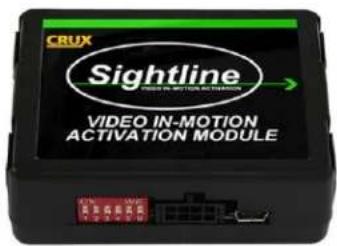
VIMAD-84M Module

natural_image
Two black electrical connectors with various colored wires and connectors, no visible text or symbols.VIMAD-84M T-Harness
1/3
rev.121818
Crux Interfacing Solutions
www.crxinterfacing.com

tel. #: (818) 609-9299
fax #: (818) 996-8188
Wiring Diagram

Installation Instructions
- Remove the factory radio from the dashboard.
- Remove the factory connectors from behind the factory radio.
- Mate the T-Harness connections to the factory harness and radio. (Make sure all connectors are properly seated into the interface and into the radio.)
- Connect the 8-pin Molex connector from the T-harness to the VIMAD-84M module.
- Set the DIP switches according to the table below.
- Test the interface and re-install the radio into the dash.
Setting the DIP Switches of the VIMAD-84M
| Audi and VW | Dip 1 | Dip 2 | Dip 3 | Dip 4 | Dip 5 | Dip 6 |
| Video-in-motion permanent | ON | OFF | OFF | OFF | ON | ON |
| Video-in-motion selective* | OFF | OFF | OFF | OFF | ON | ON |
*With DIP#1 set to OFF the included green wire is used to activate the video-in-motion function.
2/3
rev.121818
Crux Interfacing Solutions
www.cruxinterfacing.com

tel. #: (818) 609-9299
fax #: (818) 996-8188
Note: DIP switch functions of the VIMAD-84M
Dip 1 – Activate Video In Motion
Dip 2 - no function
Dip 3 - no function
Dip 4 - no function
Dip 5 - CAN-bus termination resistor on the vehicle side
Dip 6 - CAN-bus termination resistor on the head-unit side
NOTE: Vehicles with affected navigation performance
On some vehicles, the navigation performance is affected as long as the video-in-motion function is activated. This can only be detected by a test drive and with DIP# 1 set to ON.
If the navigation performance is affected you have to set DIP#1 to OFF. As long as the video-in-motion function is activated, the navigation will NOT work. The green wire on the T-harness can be used to activate the video-in-motion function (Video-in-motion selective) by connecting a switch (not included) between the GREEN wire and +12V ACC.
| Cable colour | Assignment |
| ● Red | +12V Constant Pin 18 |
| ● Brown | Ground Pin 17 |
| ● Orange/Violet | CAN HIGH Pin 6 |
| ● Orange/Brown | CAN LOW Pin 12 |

ACTIVATING AND DEACTIVATING THE VIM FEATURE
The video-in-motion can be activated and deactivated either by setting DIP# 1 to ON (permanent VIM) or by the connecting a switch (not included) between the GREEN wire and +12V (selective VIM).
Video-in-motion permanent
With DIP#1 set to ON, the video-in-motion function is activated permanently without disturbing the navigation performance.
Video-in-motion selective
With DIP#1 set to OFF, the GREEN wire is used to activate the video-in-motion function.
Connect a switch between the GREEN wire and +12V ACC.
• +12V = VIM is activated
• 0V = VIM is deactivated
3/3
rev.121818
Crux Interfacing Solutions
www.crxinterfacing.com

tel. #: (818) 609-9299
fax #: (818) 996-8188


Brand : CRUX
Model : VIMAD-84M
Category : Vehicle Video Interface