
KAACCHWKITA - Dash cam Kogan - Free user manual and instructions
Find the device manual for free KAACCHWKITA Kogan in PDF.


| Product Type | Hardwire Kit for Dash Cameras |
| Brand | Kogan |
| Model | KAACCHWKITA |
| Input Voltage | 12-24V DC (vehicle battery) |
| Output Voltage | 5V DC |
| Output Current | 1.5A (typical) |
| Wire Length | Approx. 3.5 meters |
| Wire Colors | Red (ACC+), Yellow (BAT+ or ACC+), Black (Ground) |
| Power Modes | 24-hour surveillance (yellow to BAT+) or ignition-only (yellow to ACC+) |
| Protection | Short circuit and overcurrent protection (fuse integrated) |
| Compatibility | Most Kogan dash cameras with USB power input |
| Installation | Requires connection to vehicle fuse box, recommended by licensed auto electrician |
| Operating Temperature | -20°C to 70°C |
| Storage Temperature | -30°C to 80°C |
| Material | PVC insulated copper wires, plastic connectors |
| Weight | Approx. 80 grams |
| Dimensions (box) | 15 x 10 x 3 cm |
| Included Accessories | Hardwire kit, fuse taps, installation manual |
| Safety Certification | CE, RoHS |
| Warranty | 1 year limited |
Frequently Asked Questions - KAACCHWKITA Kogan
User questions about KAACCHWKITA Kogan
0 question about this device. Answer the ones you know or ask your own.
Ask a new question about this device
Download the instructions for your Dash cam in PDF format for free! Find your manual KAACCHWKITA - Kogan and take your electronic device back in hand. On this page are published all the documents necessary for the use of your device. KAACCHWKITA by Kogan.
USER MANUAL KAACCHWKITA Kogan
Hardwire Kit for Dash Cameras
KAACCHWKITA
Installation
Note
It is highly recommended to have this hardwire kit installed by a licenced auto electrician.
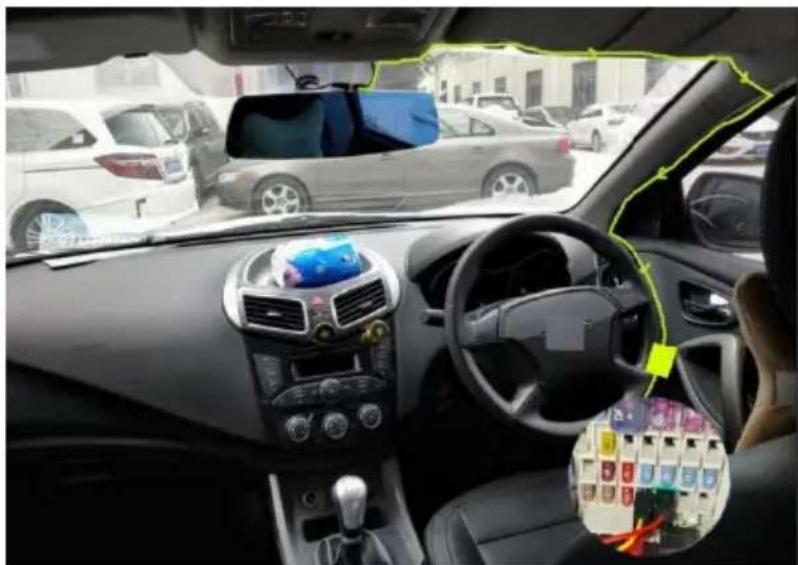
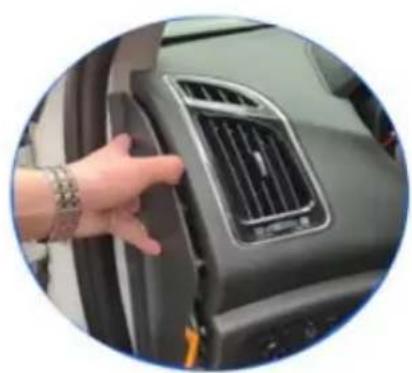
- Open the fuse box. The location of the fuse box will differ depending on the car.
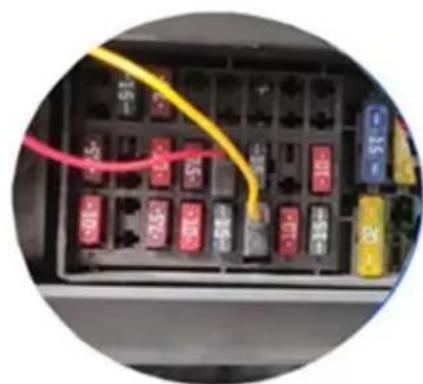
- Locate the ACC+ and BAT+ fuse slots.
- Connect the red wire to the ACC+ fuse slot. For 24-hour surveillance, connect the yellow wire to the BAT+ fuse slot. To only record when the car is on, connect the yellow wire to the ACC+ fuse slot.

-
Connect the black wire to a ground.
-
Connect the hardwire kit to the dash camera and ensure it powers on.
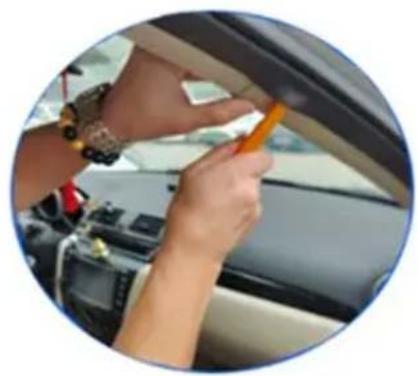
- Route the camera cable through the vehicle's 'A' pillar trim.


ACC Wiring Diagram
![graph TD A["Drive Charger"] --> B["Output 5V"] B --> C["Red connects to the ACC fuse slot"] B --> D["Yellow connects to the ACC fuse slot"] B --> E["Black wire to vehicle ground"] B --> F["Ground"] C --> G["Acc+"] D --> H["Acc+"] E --> I["Ground"] F --> J["Ignition"] G --> K["Power/DC"] H --> L["Pow…](/content/2026/06/1230071/images/051a89ccdd7a23e6ee57d999aefdf368ca554adef21128296cdeaaccdf643911.jpg)
24 Hours Surveillance Wiring Diagram
![graph TD A["Drive Charger"] --> B["Output 5V"] B --> C["Red Connects to the ACC+ fuse slot"] B --> D["Yellow Connects to the Bat+ fuse slot"] B --> E["Black wire to vehicle ground"] B --> F["Ground"] G["Ignition"] --> H["Switch"] H --> I["Acc+"] H --> J["Bat+"] H --> K["Ground"]](/content/2026/06/1230071/images/0050d42443b4f146b4aea5c8e0e06f693536ac8a38b44b79cfabf5fe3888095f.jpg)
Notes
The Ground Truth image displays a single, solid horizontal line, which is a stylistic or background element (like a ruled paper line). According to Rule 2, such lines must be ignored by the OCR result. The provided OCR content is "____", which consists of underscores. Underscores are not equivalent to a solid line and are not permitted under the “Stylistic/Background Lines (Ignore)” rule. Outputting underscores for a stylistic line is incorrect because it misinterprets the line as a placeholder fill-in-the-blank area. Since the OCR output incorrectly rendered a stylistic line as underscores (which should be ignored), this violates the rule. Therefore, the OCR result is inconsistent with the Ground Truth.
[Non-Text]
[Non-Text]
[EMPTY]
[Non-Text]
[Non-Text]
The Ground Truth image displays a single, continuous horizontal line, which is a stylistic or background element (like a ruled paper line). According to Rule 2, such lines must be ignored by the OCR result. The provided OCR content is "____", which consists of underscores. Underscores are not equivalent to a solid line and are not permitted under the “Stylistic/Background Lines (Ignore)” rule. Outputting underscores for a stylistic line is incorrect because it misinterprets the line as a fill-in-the-blank placeholder. Therefore, the OCR result is inconsistent with the Ground Truth.
[Non-Text]
[Non-Text]
[NO TEXT]
[Non-Text]
[Non-Text]
The Ground Truth image displays a single, continuous horizontal line, which is a stylistic or background element (like a ruled paper line). According to Rule 2, such lines must be ignored by the OCR result. The provided OCR content is "____", which consists of underscores. Underscores are not equivalent to a solid line and are not permitted under the “Stylistic/Background Lines (Ignore)” rule. Outputting underscores for a stylistic line is incorrect because it misinterprets the line as a fill-in-the-blank placeholder. Therefore, the OCR result is inconsistent with the Ground Truth.
[Non-Text]
[Non-Text]
The Ground Truth image displays a single, continuous horizontal line, which is a stylistic or background element (like a ruled paper line). According to Rule 2, such lines must be ignored by the OCR result. The provided OCR content is "____", which consists of underscores. Underscores are not equivalent to a solid line and are not permitted under the “Stylistic/Background Lines (Ignore)” rule. Outputting underscores for a stylistic line is incorrect because it misinterprets the line as a fill-in-the-blank placeholder. Therefore, the OCR result is inconsistent with the Ground Truth.
[Non-Text]
[Non-Text]
____
[Non-Text]
[Non-Text]
The Ground Truth image displays a single, continuous horizontal line, which is a stylistic or background element (like a ruled paper line). According to Rule 2, such lines must be ignored by the OCR result. The provided OCR content is "____", which consists of underscores. Underscores are not equivalent to a solid line and are not permitted under the “Stylistic/Background Lines (Ignore)” rule. Outputting underscores for a stylistic line is incorrect because it misinterprets the line as a fill-in-the-blank placeholder. Therefore, the OCR result is inconsistent with the Ground Truth.
[Non-Text]
[Non-Text]
The Ground Truth image displays a single, continuous horizontal line, which is a stylistic or background element (like a ruled paper line). According to Rule 2, such lines must be ignored by the OCR result. The OCR content provided is "", which consists of no characters. Since the OCR output correctly ignores the background/stylistic line and produces no actual text, it complies with the “Stylistic/Background Lines (Ignore)” rule. Therefore, the OCR result is consistent with the Ground Truth.
[Non-Text]
[Non-Text]
The Ground Truth image displays a single, continuous horizontal line, which is a stylistic or background element (like a ruled paper line). According to Rule 2, such lines must be ignored by the OCR result. The provided OCR content is "____", which consists of underscores. Underscores are not equivalent to a solid line and are not permitted under the “Stylistic/Background Lines (Ignore)” rule. Outputting underscores for a stylistic line is incorrect because it misinterprets the line as a fill-in-the-blank placeholder. Therefore, the OCR result is inconsistent with the Ground Truth.
[Non-Text]
[Non-Text]
The Ground Truth image displays a single, solid horizontal line. According to Rule 2 (UNDERSCORE & LINE RULES), this is a stylistic or background line, not a placeholder underscore. Therefore, the OCR result must ignore it and output nothing or only meaningful text. The provided OCR content is "____", which consists of four underscores. This is an incorrect interpretation of the line as a placeholder, violating the rule that stylistic lines must be ignored. The OCR has hallucinated underscores where none should exist based on the GT's visual context. Hence, the OCR result is inconsistent with the Ground Truth.
[Non-Text]
[Non-Text]
The Ground Truth image displays a single, solid horizontal line, which is a stylistic or background element (like a ruled paper line or separator), not a placeholder for text. According to Rule 2, such stylistic/background lines must be ignored by the OCR result. The OCR content provided is "", which consists of no characters. This correctly represents the absence of any textual content in the GT and correctly matches the visual line as a stylistic element. Therefore, the OCR output should have been empty or omitted this line entirely.
[Non-Text]
[Non-Text]
[Non-Text]
The Ground Truth image displays a single, solid horizontal line. According to Rule 2 (UNDERSCORE & LINE RULES), this is a stylistic or background line, not a placeholder underscore. Therefore, the OCR result must ignore it. The provided OCR content is "____", which consists of four underscores. This is an incorrect interpretation of the line as a placeholder and violates the rule that stylistic lines must be ignored. The OCR has hallucinated text (underscores) where none should exist based on the GT's visual context. Hence, the OCR result is inconsistent with the Ground Truth.
[Non-Text]
[Non-Text]
The Ground Truth image displays a single, continuous horizontal line, which is a stylistic or background element (like a ruled paper line). According to Rule 2, such lines must be ignored by the OCR result. The provided OCR content is "____", which consists of underscores. Underscores are not equivalent to a solid line and are not permitted under the “Stylistic/Background Lines (Ignore)” rule. Outputting underscores for a stylistic line is incorrect because it misinterprets the line as a fill-in-the-blank placeholder. Therefore, the OCR result is inconsistent with the Ground Truth.
[Non-Text]
The Ground Truth image displays a single, solid horizontal line. According to Rule 2 (UNDERSCORE & LINE RULES), this is a stylistic or background line, not a placeholder underscore. Therefore, the OCR result must ignore it and output nothing or only meaningful text. The provided OCR content is "____", which consists of four underscores. This is an incorrect interpretation of the line as a placeholder, violating the rule that stylistic lines must be ignored. The OCR has hallucinated placeholder underscores where none should exist in the GT. Hence, the OCR result is inconsistent with the Ground Truth.
The Ground Truth image displays a single, solid horizontal line. According to Rule 2 (UNDERSCORE & LINE RULES), this is a stylistic or background line, not a placeholder underscore. Therefore, the OCR result must ignore it and output nothing or only meaningful text. The provided OCR content is "____", which consists of four underscores. This is an incorrect interpretation of the line as a placeholder, violating the rule that stylistic lines must be ignored. The OCR has hallucinated underscores where none should exist based on the GT's visual context. Hence, the OCR result is inconsistent with the Ground Truth.
[Non-Text]
The Ground Truth image displays a single, solid horizontal line. According to Rule 2 (UNDERSCORE & LINE RULES), if the GT contains lines used for stylistic emphasis or as background elements (like ruled paper), the OCR result must ignore them. The line in the GT is clearly a stylistic/background line, not a placeholder for text. Therefore, the OCR should not have output any underscores. Outputting `____` constitutes an error under Rule 2, as it hallucinates placeholder symbols where none are semantically intended. Hence, the OCR result is inconsistent with the Ground Truth.
[Non-Text]
Need more information?
We hope that this user guide has given you the assistance needed for a simple set-up.
For the most up-to-date guide for your product, as well as any additional assistance you may require, head online to help.Kogan.com.
kogan.com


Brand : Kogan
Model : KAACCHWKITA
Category : Dash cam