
DVN-16Pro - KVM switch Smart-AVI - Free user manual and instructions
Find the device manual for free DVN-16Pro Smart-AVI in PDF.


| Product Type | 16-Port DVI-D KVM Switch with Audio and USB 2.0 Sharing |
| Brand/Model | Smart-AVI DVN-16Pro |
| Video Format | DVI-D Single Link |
| Maximum Resolution | 1920 x 1200 @60Hz |
| Video Input Interfaces | (16) DVI-D 29-pin female |
| Video Output Interface | (1) DVI-D 29-pin female |
| USB Input Interfaces | (16) USB Type B female |
| USB Output Interfaces | (2) USB Type A (keyboard/mouse emulation), (2) USB 2.0 Transparent |
| Audio Input Interfaces | (16) 3.5 mm Stereo Audio |
| Audio Output Interface | (1) 3.5 mm Stereo Audio |
| Control Methods | Front panel buttons with LCD, RS-232, Hotkey commands |
| USB Support | USB 2.0, 1.1, 1.0 with internal hub; USB 2.0 device sharing |
| Audio Features | Balanced stereo audio output, 20Hz-20kHz frequency response |
| Video Features | Zero pixel loss with TMDS signal correction, EDID learning and programming |
| Keyboard/Mouse Emulation | Full USB keyboard and mouse emulation for error-free booting |
| Switching Capability | Independent (asynchronous) switching of KVM and peripheral USB/audio ports |
| Power Supply | External 100-240 VAC / 5VDC4A @20W |
| Dimensions (W x H x D) | 17" x 3.625" x 7.5" (432mm x 92mm x 191mm) |
| Weight | 5.3 lbs (2.4 kg) |
| Operating Temperature | 32-131°F (0-55°C) |
| Storage Temperature | -4-185°F (-20-85°C) |
| Humidity | Up to 95% non-condensing |
| Compatibility | Mac, PC, Linux, Sun DVI |
| Warranty | 1 year limited warranty |
| Included Accessories | Power adapter, mounting brackets, quick start guide |
Frequently Asked Questions - DVN-16Pro Smart-AVI
User questions about DVN-16Pro Smart-AVI
0 question about this device. Answer the ones you know or ask your own.
Ask a new question about this device
Download the instructions for your KVM switch in PDF format for free! Find your manual DVN-16Pro - Smart-AVI and take your electronic device back in hand. On this page are published all the documents necessary for the use of your device. DVN-16Pro by Smart-AVI.
USER MANUAL DVN-16Pro Smart-AVI
16-Port DVI-D KVM Switch with Audio and USB 2.0 Sharing

Access and Control 16 Computers with One USB keyboard, USB Mouse and DVI-D Monitor
Smart-AM
SMART AUDIO VIDEO INNOVATION
| TABLE OF CONTENTS | |
| WHAT'S IN THE BOX? 2 | |
| INTRODUCTION | 3 |
| FEATURES | 3 |
| APPLICATIONS | 3 |
| TECHNICAL SPECIFICATIONS 4 | |
| HARDWARE INSTALLATION 5 | |
| FRONT PANEL CONTROL 6 | |
| RS-232 COMMANDS 7 | |
| HOTPLUG COMMANDS 7 | |
| LIMITED WARRANTY STATEMENT 8 | |
| WHAT'S IN THE BOX? | ||
| PART NO. QTY DESCRIPTION | ||
| DVN-16PROS 1 DVN-16Pro, 16x1 | DVI-D, USB 2.0, Audio Switch | |
| PS5VDC4A 1 Power Supply/Adapter | ||
| EN-DVN16P-EAR-P | 2 Mounting Brackets | |
| 1 Quick Start Guide | ||
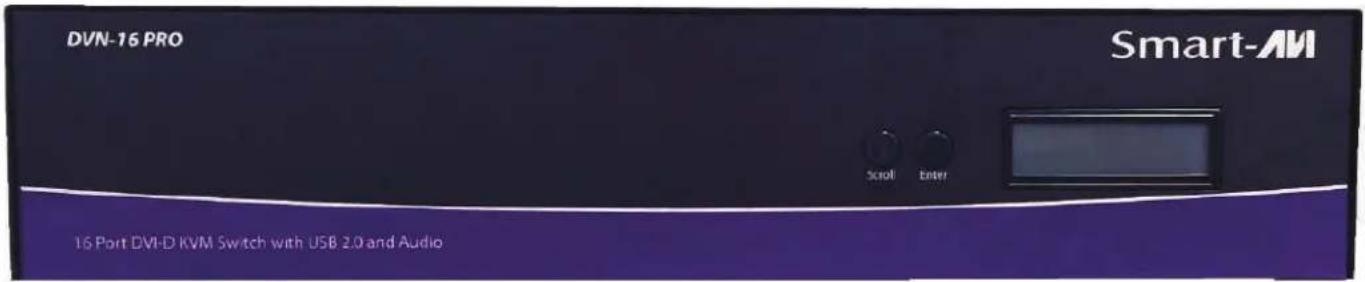
Figure 2-1
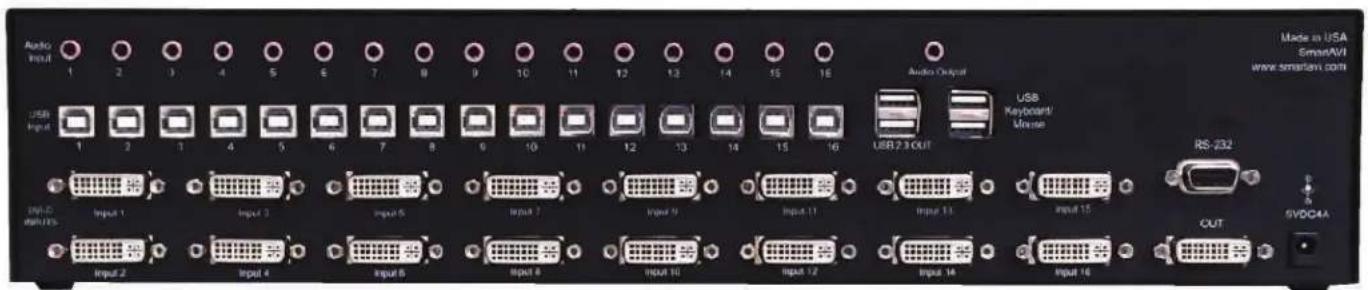
Figure 2-2
INTRODUCTION
The DVN-16Pro is a dedicated multi-platform KVM switch capable of managing up to 16 different computers through a single DVI-D monitor, USB keyboard & mouse and a single set of speakers with USB 2.0 device sharing. The USB emulation technology utilized by the DVN-16Pro enables immediate hotkey source switching through a remote USB keyboard and mouse. The DVN-16Pro provides high resolution, up to 1920x1200 with zero pixel loss from TMDS signal correction.
FEATURES
• Supports Mac, PC, Linux and Sun DVI
• Supports High Resolution1920x1200 60Hz WUXGA
• Uses universal DVI Single Link connectors
• Zero pixel loss with TMDS signal correction
• Supports all USB 2.0 Devices (Flash Drives, Printers, Scanners, etc.)
• Supports USB 2.0 keyboard and mouse
• Balanced stereo audio output
• Front panel buttons with LCD display
• Full RS-232 control
• Hotkey commands for quick channel selection
- Complete keyboard emulation for error free booting
- Independent (asynchronous) switching of KVM and peripheral USB/audio ports. Users can listen to audio from one computer while working on the other or scan a document and save in another computer
SOURCE SWITCHING MADE EASY
The DVN-16Pro provides simplified control of up to 16 computers with DVI-D, audio, and USB 2.0 outputs. This dynamic KVM console can be controlled remotely from easily accessible keyboard hotkeys or RS-232 communication channel commands, as well as directly through the console's easy to read front panel.
EDID LEARNING & PROGRAMMING
Detection of DDC signals for all attached devices is effortless with DVN-16Pro due to its EDID learning and programming. This is vital in optimizing the resolution of the selected graphics card to properly display on the remote monitor. Furthermore, the DDC learning feature continues to replicate the right EDID for the computer to enable the display card to effectively work when unused ports are not selected.
FULL USB KEYBOARD AND MOUSE EMULATION
The USB keyboard and mouse emulation utilized by DVN-16Pro provides accurate and quick source switching by means of keyboard hotkeys. The DVN-16Pro imitates the presence of a keyboard and mouse for every attached computer through its USB cable. This is essential as it simulates the existence of the keyboard and mouse to all the computers when switching out of the circuit.
APPLICATIONS
• Server Collocation
- Digital Signage
- Airports
- Dealer Rooms
- Control Rooms
• Audio/Visual Presentations
- Hotels/Resorts
TECHNICAL SPECIFICATIONS
| VIDEO | |
| Format DVI-D Single Link | |
| Maximum Pixel Clock 165 | MHz |
| Input Interface (16) DVI-D | 29-pin (female) |
| Output Interface (1) DVI-D | 29-pin (female) |
| Resolution Up to 1920 x 1 | 200 @60Hz |
| DDC 5 volts p-p (TTL) | |
| Input Equalization Automatic | |
| Input Cable Length Up to 20 ft. | |
| Output Cable Length Up to 20 ft. | |
| AUDIO | |
| Input Interface (16) 3.5 mm Stereo Audio | |
| Output Interface (1) 3.5 mm Stereo Audio | |
| Impedance | 600 Ohm |
| Frequency Response 20 Hz to 20 kHz | |
| Nominal Level | 0-1.0 V |
| Common Mode Rejection at 60 dB | |
| USB | |
| Signal Type USB 2.0, 1.1, and 1.0 w/ internal hub | |
| Input Interface (16) USB Type B (female) | |
| Output Interface | (2) USB Type A (female) for keyboard and mouse emulation; (2) for USB 2.0 Transparent |
| CONTROL | |
| Front Panel | Buttons and LCD Display |
| RS-232 Via Control @ 115 | 200 bps |
| Hotkeys | Via Keyboard |
| OTHER | |
| Power | External 100-240 VAC/ 5VDC4A @20W |
| Dimensions | 17" W x 3.625" H x 7.5" D |
| Weight | 5.3 lbs. |
| Operating Temp. | 32-131 °F (0-55 °C) |
| Storage Temp. | -4-185 °F (-20-85 °C) |
| Humidity | Up to 95% No Condensation |
| Emulation | Keyboard and Mouse |
HARDWARE INSTALLATION
- Ensure that the power is disconnected from DVN-16Pro.
- Connect the DVI cables, USB cables (male-A to male-B), and audio cables from the computers to the respective ports on the DVN-16Pro.
- Optionally connect RS-232 for control functions.
- Connect the USB keyboard and mouse to the two USB ports labeled keyboard/mouse.
- Optionally connect USB peripherals (flash drives, printers, etc.) to the "USB 2.0 OUT" ports.
- Connect speakers to the Audio Out ports.
- Connect the display monitor to the OUT DVI connector on the DVN-16Pro.
- Power on the DVN-16Pro.

flowchart
graph TD
    A["16 Computers"] --> B["Smart-AM"]
    B --> C["Control Computer"]
    C --> D["RS-232 Control"]
    C --> E["Audio"]
    C --> F["Audio In"]
    C --> G["DVI-D Out"]
    C --> H["USB Out"]
    C --> I["Audi Out"]
    C --> J["USB In"]
    B --> K["Smart-AM DVN-16Pro"]
    K --> L["RS-232 Control"]
    style A fill:#f9f,stroke:#333
    style B fill:#ccf,stroke:#333
    style C fill:#cfc,stroke:#333
    style D fill:#fcc,stroke:#333
    style E fill:#cff,stroke:#333
    style F fill:#ffc,stroke:#333
    style G fill:#ffc,stroke:#333
    style H fill:#ffc,stroke:#333
    style I fill:#ffc,stroke:#333
    style J fill:#ffc,stroke:#333
    style K fill:#cfc,stroke:#333
Figure 5-1
FRONT PANEL CONTROL
To switch ports using the front panel, press either the Enter button for up or the Scroll button for down to select the port you would like to switch to. The selected port number will be indicated on the LED display.
Pressing both the Scroll and Enter buttons simultaneously will display a menu on the LCD. Press the Scroll button to move between the selections and the Enter button to execute the selection. The selections are:
Learn Screen: Learn EDID from connected monitor.
Hot Plug: Resets a pin on the DVI connector causing the DVN-16Pro to re-learn the connected monitor's EDID settings.
Exit: Exits Menu.

Figure 6-1
RS-232 COMMANDS
The DVN-16Pro may also be controlled via RS-232 commands. This feature requires that an RS-232 card is installed in your computer or a USB to RS-232 adapter. Check the RS-232 connections on your computer and the DVN-16Pro to determine if you need a male to male, female to female or male to female cable.
Establish a connection to DVN-16Pro :
- Connect a straight-through RS-232 cable to the RS-232 connector on the PC.
- Connect the other end of the cable to the RS-232 port of the DVN-16Pro.
- Power on the device.
If you need to identify the COM port used by your computer do the following:
- Click on the start button.
- Click on Control Panel.
- Click on Device Manager.
- Click on the arrow next to Ports (COM & LPT).
You should see the name of your adapter and the COM port number in use.
Setting up the Terminal Application:
Run the terminal client of your choice such as HyperTerminal or PuTTY.
Select the correct COM port on the PC.
Use the following connection settings: 9600, N, 8, 1, no flow control.
NOTE: PuTTY and other terminal software may not default to the settings above. If your RS-232 connection seems un-responsive, cycling power to the DVN-16Pro will reset all values and boot up messages will be sent to your terminal display and verify the connection.
HOTKEY COMMANDS
The Hotkey command is a keyboard sequence used to trigger an action on the DVN-16Pro through the use of the keyboard connected on the USB port of the DVN-16Pro. To activate the hotkey sequence, press the CTRL key twice and then enter the desired hotkey command.
| COMMANDS HOTKEYS RS-232 CONTROL | ||
| Switch all devices (KVM, USB 2.0, and Audio) | [CTRL] [CTRL] m [port #] [ENTER] | //m[port #] [ENTER] |
| Switch KVM only [CTRL] [CTRL] c [port #] [ENTER] | //c[port #] [ENTER] | |
| Switch audio only [CTRL] [CTRL] a [port #] [ENTER] | //a[port #] [ENTER] | |
| Reset [CTRL] [CTRL] r //r | ||
| Switch USB 2.0 only [CTRL] [CTRL] u [port #] | [ENTER] //u [port #] [ENTER] | |
| Reload EDID (Toggle Hotplug pin) n/a //h [ENTER] | ||
| Same as front panel up arrow button [CTRL] | [CTRL] ↑ n/a | |
| Same as front panel down arrow button | [CTRL] [CTRL] ↓ | n/a |
Table 7-1
LIMITED WARRANTY STATEMENT
A. Extent of limited warranty
Smart-AVI Technologies, Inc. warrants to the end-user customers that the Smart-AVI product specified above will be free from defects in materials and workmanship for the duration of 1 year, which duration begins on the date of purchase by the customer. Customer is responsible for maintaining proof of date of purchase.
Smart-AVI limited warranty covers only those defects which arise as a result of normal use of the product, and do not apply to any:
a. Improper or inadequate maintenance or modifications
b. Operations outside product specifications
c. Mechanical abuse and exposure to severe conditions
If Smart-AVI receives, during applicable warranty period, a notice of defect, Smart-AVI will at its discretion replace or repair defective product. If Smart-AVI is unable to replace or repair defective product covered by the Smart-AVI warranty within reasonable period of time, Smart-AVI shall refund the cost of the product.
Smart-AVI shall have no obligation to repair, replace or refund unit until customer returns defective product to Smart-AVI.
Any replacement product could be new or like new, provided that it has functionality at least equal to that of the product being replaced.
Smart-AVI limited warranty is valid in any country where the covered product is distributed by Smart-AVI.
B. Limitations of warranty
To the extant allowed by local law, neither Smart-AVI nor its third party suppliers make any other warranty or condition of any kind whether expressed or implied with respect to the Smart-AVI product, and specifically disclaim implied warranties or conditions of merchantability, satisfactory quality, and fitness for a particular purpose.
C. Limitations of liability
To the extent allowed by local law the remedies provided in this warranty statement are the customers sole and exclusive remedies.
To the extant allowed by local law, except for the obligations specifically set forth in this warranty statement, in no event will Smart-AVI or its third party suppliers be liable for direct, indirect, special, incidental, or consequential damages whether based on contract, tort or any other legal theory and whether advised of the possibility of such damages.
D. Local law
To the extent that this warranty statement is inconsistent with local law, this warranty statement shall be considered modified to be consistent with such law.
Smart-AM
SMART AUDIO VIDEO INNOVATION
NOTICE
The information contained in this document is subject to change without notice. SmartAVI makes no warranty of any kind with regard to this material, including but not limited to, implied warranties of merchantability and fitness for particular purpose. SmartAVI will not be liable for errors contained herein or for incidental or consequential damages in connection with the furnishing, performance or use of this material. No part of this document may be photocopied, reproduced, or translated into another language without prior written consent from SmartAVI Technologies, Inc.
20160825

Designed and Manufactured in the USA
800.AVI.2131
Tel: (818) 503-6200 Fax: (818) 503-6208
11651 Vanowen St. North Hollywood, CA 91605
SmartAVI.com


- INTRODUCTION
- FEATURES
- SOURCE SWITCHING MADE EASY
- EDID LEARNING & PROGRAMMING
- FULL USB KEYBOARD AND MOUSE EMULATION
- APPLICATIONS
- HARDWARE INSTALLATION
- FRONT PANEL CONTROL
- RS-232 COMMANDS
- Establish a connection to DVN-16Pro :
- Setting up the Terminal Application:
- HOTKEY COMMANDS
- LIMITED WARRANTY STATEMENT
- Extent of limited warranty
- Limitations of warranty
- Limitations of liability
- Local law
- Smart-AM
- SMART AUDIO VIDEO INNOVATION
- NOTICE
Brand : Smart-AVI
Model : DVN-16Pro
Category : KVM switch