C-VM-2E - Battery charger Watson - Free user manual and instructions
Find the device manual for free C-VM-2E Watson in PDF.


User questions about C-VM-2E Watson
0 question about this device. Answer the ones you know or ask your own.
Ask a new question about this device
Download the instructions for your Battery charger in PDF format for free! Find your manual C-VM-2E - Watson and take your electronic device back in hand. On this page are published all the documents necessary for the use of your device. C-VM-2E by Watson.
USER MANUAL C-VM-2E Watson
Dual Position Li-ion Battery Charger with DC Output
SAFETY INSTRUCTIONS
- Do not store, place, or use the charger where it may come into contact with excess heat, water, or moisture.
• High-voltage internal components present the risk of electrical shock.
• Make sure the XLR cable is securely locked into the port before use. You should hear an audible click. - Charge only at room temperature on a dry, vibration-free surface.
- Should you ever notice smoke or a strange odor coming out of the charger, immediately unplug the AC adapter from the power outlet. Using the charger under these conditions can cause fire and electric shock.
- Do not short-circuit the terminals of your battery or charger.
- Do not attempt to disassemble any part of the charger.
- Use this charger with Watson Pro batteries only.
- The charger, adapters, and batteries may feel warm during the charging process. This is normal.
- Remove any battery after fully charged.
- Unplug the AC cable or 4-pin XLR cable from the power outlet and clean the area around the prongs of the plug when necessary. The presence of dust around the prongs can cause fire.
ATTACHING AND CHARGING A BATTERY
- Deploy the charger stand legs, and place the charger on a flat surface.
- Use the included AC power cable to connect the charger to a power source.
- Align the 3-stud mount (C-AM-2E) or V-Mount (C-VM-2E) on the battery with the appropriate slots in the charger.
- Slide the battery into place to lock. You should hear a click.
- Flip the charger's power switch to the On position.
CONNECTING DEVICES
- Use the included 4-pin XLR cable and plug the male end into the charger's DC output port until it clicks.
- Plug the other end of the 4-pin XLR cable into your device. This can be a video camera or monitor as well as lighting fixture.
RELEASING A BATTERY FROM THE CHARGER
- Press and hold the battery release latch.
- Slide the battery out, and separate it from the charging plate.
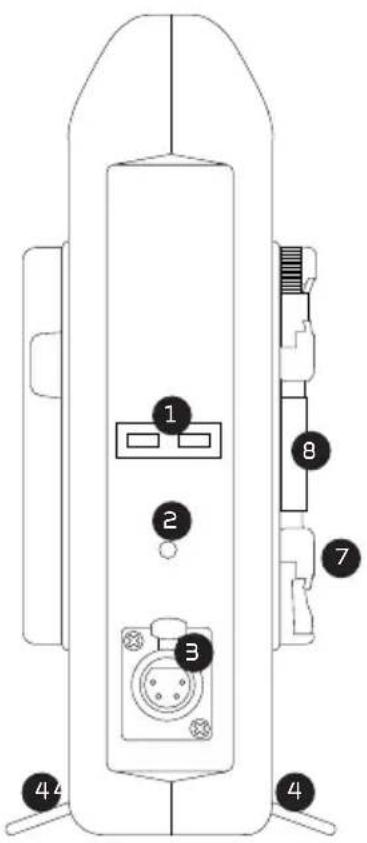
text_image
Technical diagram of a device with numbered components, likely a control panel or connector assembly.
text_image
Technical diagram of a device rear panel with numbered components and labeled portsSTATUS INDICATORS
1 Charging status indicator
2 Power indicator
3 DC output (4-pin XLR)
4 Charger stand (2 × legs)
5 Power switch
6 AC input
7 Battery release latch
8 Battery mount
Included: • AC power cable
- 4-pin XLR cable
STATUS INDICATORS
| Off • Charger is turned on with no batteries connected. (C-VM-2E) | |
| Green • Charger is turned on with no batteries connected. (C-AM-2E)• Battery is fully charged or battery capacity is above 95%. | |
| Red • Battery connected with low or no power.• Battery is charging. | |
| Flashing red and green | The charger has detected some problems with the battery or the charger.For more information, or to arrange service, visit www.poweredbywatson.com or callCustomer Service at 212-594-2120. |
DC OUTPUT: The DC output allows you to connect and power devices with a 4-pin XLR cable. When there are no batteries connected to the charger, the DC output will transfer power at 16.7 V and 4.5 A. When the L or R channel has a battery connected, the DC output is powered from the batteries, even if the charger's power switch is in the On position.
3-STUD MOUNT CHARGER (C-AM-2E) OPERATION
The charger will recognize when a battery is connected to the L or R channel. When two batteries are connected, the charger will output 2.5 A per channel. When one battery is connected, the charger outputs 5 A to the connected battery.
| Battery type (Ah) | Single batteries (hr.) Dual batteries | Charging order with two batteries | |
| 4.4 1.2 2.5 Simultaneous | |||
| 6.6 1.8 3.8 Simultaneous | |||
| 8.8 2.5 5.0 Simultaneous | |||
| 11 3.2 6.5 Simultaneous | |||
| 13.2 | 3.8 7.6 Simultaneous | ||
| 15.6 | 4.2 8.5 Simultaneous | ||
* Charging times are approximate and based on an environment temperature of 77°F (25°C).
V-MOUNT CHARGER (C-VM-2E) OPERATION
The charger will recognize when a battery is connected to the L or R channels. When two batteries are connected, charging is simultaneous at 2.5 A, or sequential (one by one) at 5 A. Simultaneous charging will occur for batteries ≤6.6 A, while sequential charging occurs for batteries ≥8.8 Ah. Sequential charging will charge the left channel first up to 85%, then charge the right channel. After both batteries reach 85%, the charger will switch to simultaneous mode, and charge the batteries to full power.
| Battery type (Ah) Single batteries (hr.) Dual batteries (hr.) Charging order with two batteries | |||
| 4.4 2.5 2.5 Simultaneous | |||
| 6.6 3.8 3.8 Simultaneous | |||
| 8.8 2.5 5.0 | Sequential | ||
| 11 3.2 6.5 | Sequential | ||
| 13.2 | 3.8 7.6 | Sequential | |
| 15.6 | 4.2 8.5 | Sequential | |
* Charging times are approximate and based on an environment temperature of 77°F (25°C).
SPECIFICATIONS
| AC input 100-240 V, 50 -60 Hz, 1.5 A |
| Output charging power 16.8 V, 2.5 A (simultaneous)/5.0 A (sequential) |
| DC output power (4-pin XLR) 16.7 V, 4.5 A |
| Compatible Li-ion battery mounts 3-stud (C-AM-2E), V-Mount (C-VM-2E) |
| Operating temperature 32°F-113°F (0°C-45°C) |
| Dimensions (H × W × D) 9.25" × 2.25" × 5.5" (23.5 × 5.7 × 14 cm) |
| Weight 2.4 lb. (1.08 kg) |