AL2430 - Speaker Atlas Sound - Free user manual and instructions
Find the device manual for free AL2430 Atlas Sound in PDF.


User questions about AL2430 Atlas Sound
0 question about this device. Answer the ones you know or ask your own.
Ask a new question about this device
Download the instructions for your Speaker in PDF format for free! Find your manual AL2430 - Atlas Sound and take your electronic device back in hand. On this page are published all the documents necessary for the use of your device. AL2430 by Atlas Sound.
USER MANUAL AL2430 Atlas Sound
text_image
Atlas Learn AL-2430 - IR Receiver / Amplifier On Mute Power Channel A Channel B Computer TV / VCR CD / DVD AUX AUX Input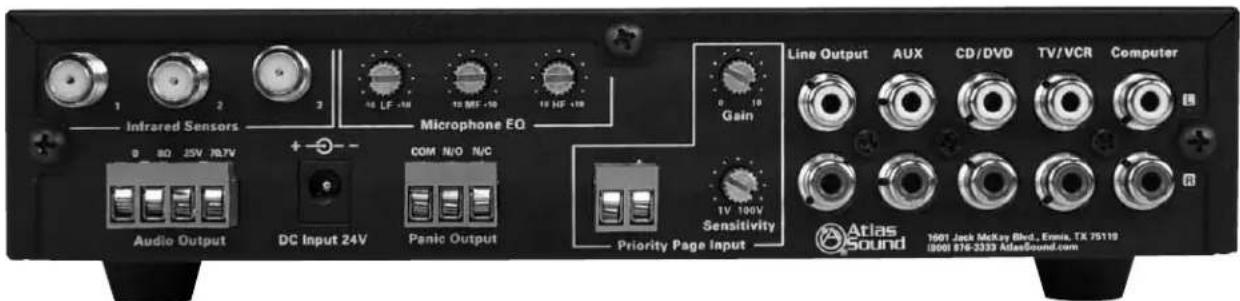
text_image
Infrared Sensors 0 80 25V 10.7V Audio Output DC Input 24V Microphone EQ COM N/O N/C Panic Output Priority Page Input Gain Line Output AUX CD/DVD TV/VCR Computer 1V 100V Sensitivity Atlas Sound 1001 Jack McKay Blvd., Eunia, TX 75110 1000 816-3332 AtlasSound.com
natural_image
Abstract logo design featuring a stylized letter 'A' with a lightbulb inside, enclosed in a circle (no text or symbols)Atlas Learn
AL2430

Atlas Learn
1601 Jack McKay Blvd. • Ennis, Texas 75119 U.S.A.
Telephone: 800.876.3333 • Fax: 800.765.3435
- 1 - AtlasSound.com
Table of Contents
Important Safety Instructions....2
Introduction 4
Features 4
Applications 4
AL2430 Receiver / Amplifier Description....4
Installation....6
Wiring....7
AL2430 Block Diagram 7
Specifications 11
Warranty 12
Important Safety Instructions


WARNING TO REDUCE THE RISK OF FIRE OR ELECTRIC SHOCK DO NOT EXPOSE THIS APPLIANCE TO RAIN OR MOISTURE.
The lightning flash with arrowhead symbol within an equilateral triangle, is intended to alert the user to the presence of uninsulated "dangerous voltage" within the product's enclosure that may be of sufficient magnitude to constitute a risk of electric shock to persons.

The exclamation point within an equilateral triangle is intended to alert the user to the presence of important operating and maintenance (servicing) instructions in the literature accompanying the product.
- Read these instructions.
- Keep these instructions.
- Heed all warnings.
- Follow all instructions.
- Do not use this device near water.
- Clean only with dry cloth.
- Do not block any ventilation openings. Install in accordance with the manufacturer's instructions.
- Do not install near any heat sources such as radiators, heat registers, stoves, or other devices (including amplifiers) that produce heat.
- Do not defeat the safety purpose of the polarized or grounding-type plug. A polarized plug has two blades with one wider than the other. A grounding type plug has two blades and a third grounding prong. The wide blade or the third prong are provided for your safety. If the provided plug does not fit into your outlet, consult an electrician for replacement of the obsolete outlet.
- Protect the power cord from being walked on or pinched particularly at plugs, convenience receptacles, and the point where they exit from the device.
- Only use attachments/accessories specified by the manufacturer.
- Use only with the cart, stand, tripod, bracket, or table specified by the manufacturer, or sold with the device. When a cart is used use caution when moving the cart/device combination to avoid injury from tip-over.
- Unplug this device during lightning storms or when unused for long periods of time.
- Refer all servicing to qualified service personnel. Servicing is required when the device has been damaged in any way, such as power-supply cord or plug is damaged, liquid has been spilled, or objects have fallen into the device, the device has been exposed to rain or moisture, does not operate normally, or has been dropped.
- WARNING: To reduce the risk of fire or electric shock, this device should not be exposed to rain or moisture and objects filled with liquids, such as a vase, should not be placed on this device.

Atlas Learn
1601 Jack McKay Blvd. • Ennis, Texas 75119 U.S.A.
Telephone: 800.876.3333 • Fax: 800.765.3435
AtlasSound.com - 2 -
- To completely disconnect this equipment from the mains, disconnect the power supply cord plug from the receptacle.
- The mains plug of the power supply cord shall remain readily operable.

CAUTION – When Installing the Product
- Plugging in or unplugging the power cord with wet hands may result in electric shock.
- Never move the device with the power cord plugged into the wall, as damage to the power cord may result.
- When unplugging the cord from the wall, grasp the plug, NOT the cord.
- Never install this device in humid or dusty locations, nor in direct sunlight, near sources of heat, or in areas where sooty smoke or steam are present. Fire and electric shock may result.
- Keep all sides of the device at least 3 12 " away from objects that may obstruct air flow to prevent the unit's internal temperature rise.
WARNING – When the Device is in Use
• To prevent electric shock, do not remove the device cover as there are high voltage components inside. Refer all servicing to Atlas Sound.
- Should any of the following irregularities occur during use, immediately switch off the power, disconnect the power cord from the AC outlet and contact Atlas Sound. Do not to attempt to continue operation with the device as this may cause fire or electric shock:
• Smoke or strange smell coming from the unit.
• If the device falls or the case is damaged.
• If water or any metallic objects falls into the device.
• If the power supply cord is damaged in any way.
• If the device is malfunctioning.
- Do not insert or drop metallic objects or flammable materials into the ventilation holes of the device's cover, as this may result in electric shock or fire.
- Do not place any containers with liquid or metallic objects on the top of the device.
If any liquid spills into the unit, fire or electric shock may result.
- Never operate this device or touch the power supply cord during an electrical storm, electric shock may result.
- Never exceed the wattage on the product when connecting equipment. Fire and/or property damage may result.
- Operate the device only with the voltage specified on the unit. Fire and/or electric shock may result if a higher voltage is used.
- Do not modify, kink, or cut the power cord. Do not place the power cord in close proximity to heaters and do not place heavy objects on the power cord, including the device itself, doing so may result in fire or electrical shock.
- Ensure that the safety ground terminal is connected to a proper ground. Never connect the ground to a gas pipe as a catastrophic disaster may result.
- Be sure the installation of the product is stable, avoid slanted surfaces as the product may fall and cause injury or property damage.

CAUTION – When the Device is in Use
- Never place heavy objects on the product, causing it to fall and/or break, resulting in personal injury and property damage. In addition, the product itself may fall and cause injury and property damage.
- Contact Atlas Sound for instructions on cleaning the inside of the unit. Large accumulations of dust inside the unit may result in heat buildup and fire.
- Ensure that the power supply plug is securely plugged into the wall outlet. Never allow dust to accumulate on the power plug or inside the wall outlet.
- When cleaning the unit or the unit is not to be operated for an extended time period, unplug power cord from the wall.

Atlas Learn
1601 Jack McKay Blvd. • Ennis, Texas 75119 U.S.A.
Telephone: 800.876.3333 • Fax: 800.765.3435
- 3 - AtlasSound.com
Introduction
Congratulations and thank you for purchasing the Atlas Sound AL2430 Atlas Learn wireless infrared sound reinforcement receiver/amplifier. This new and innovative professional grade audio system has been designed from the ground up to include unique features required for delivering clear and concise audio to the classroom.
Features
- Works in Conjunction with Secondary Systems to Provide Enhanced Classroom Security
- Provides Excellent Infrared Wireless Sound Reinforcement
- Easily Integrates Into Any Classroom
• 30 Watts Output at 8Ω, 25V, and 70.7V - 6 Input Mixer with Priority Page Override
• Patent Pending Pole Mount Design
Applications
The Atlas Learn AL2430 receiver/amplifier is an in-classroom sound reinforcement solution designed for use in K-12 and higher education facilities or where a room constrained public address system is required. This amplifier/receiver is designed to work with Atlas Learn wireless infrared microphones, AL-MAGPIE and AL-MYNA, to allow teachers and students to walk freely around the room with the infrared microphones / system control units and project their voices through installed speakers.

flowchart
graph TD
    A["On"] --> B["Channel A"]
    B --> C["Channel B"]
    C --> D["Computer"]
    D --> E["TV / VCR"]
    E --> F["CD / DVD"]
    F --> G["AUX"]
    G --> H["Al / Inuit"]
    style A fill:#f9f,stroke:#333
    style H fill:#ccf,stroke:#333
- Power Switch
This toggle switch applies power to the AL2430. - Power LED
This LED will illuminate when the AL2430 is turned on. - Mute LED
This LED will illuminate when the AL2430 source inputs are muted using MODE 2 of the AL-PH microphone. (See page 9 for details) - IR A LED
This LED will illuminate when an active AL-MAGPIE or AL-MYNA microphone is set to Channel A. - IR B LED
This LED will illuminate when an active AL-MAGPIE or AL-MYNA microphone is set to Channel B. - Channel A
The gain for Mic Channel A is controlled by this rotary control. -
Channel B
The gain for Mic Channel B is controlled by this rotary control. -
Computer The gain for the Computer input is controlled by this rotary control.
-
TV/VCR
The gain for the TV / VCR input is controlled by this rotary control.
- CD / DVD
The gain for the CD / DVD input is controlled by this rotary control.
- AUX
The gain for the AUX Input is controlled by this rotary control.
- AUX Input
This 3.5mm input jack provides unbalance stereo summing inputs from iPods ^TM /MP3 players and overrides the input of the rear panel AUX input.
text_image
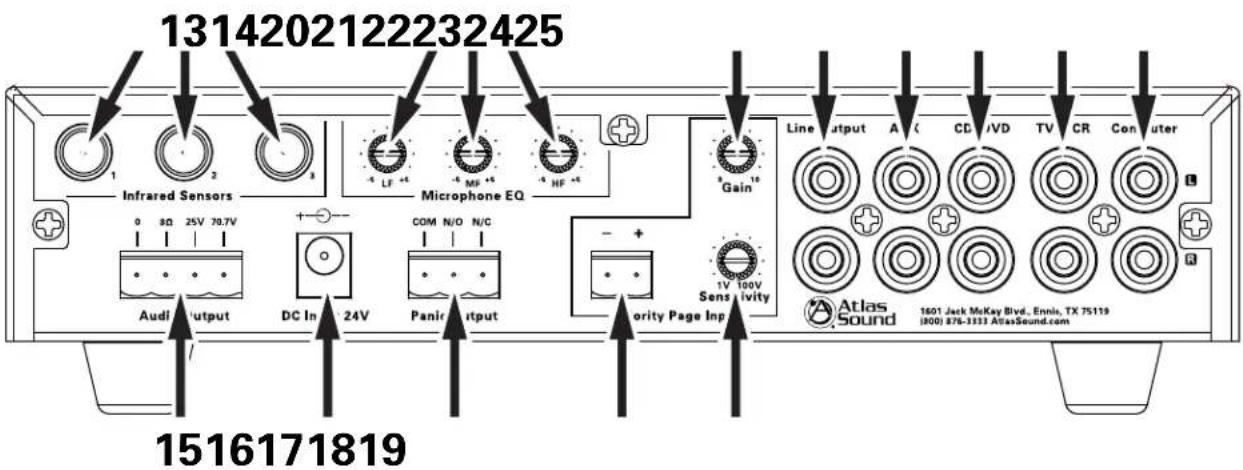
1314202122232425 Infrared Sensors Microphone EQ Gain Line output A V CD /VD TV CR Computer 0 80 25V 70.7V COM N/O N/C Audio output DC in 24V Panic output 1V 100V Sensivity Ourity Page Input Atlas Sound 1601 Jack McKay Blvd., Ennis, TX 75119 (800) 876-3133 AtlasSound.com 151617181913. Infrared Sensors
These three "F" type connectors are for input of the AL-IRDS antennas.
14. Microphone EQ
These three rotary controls provide equalization of the wireless microphones. This 3 band EQ is centered at 100Hz, 3kHz, and 10KHz.
15. Audio Output
For loudspeaker connections, connect using the following information or proceed to the setup section for typical wiring diagrams.
COM - Speaker common or negative connection
8Ω - Connect to direct coupled loudspeakers
25V - Connect to transformer coupled, 25V loudspeakers with a total load impedance of no less than 20.8Ω.
70V - Connect to transformer coupled, 70.7V loudspeakers with a total load impedance of no less than 167Ω.
16. DC Input 24V
AL2430 power supply input.
(NOTE: Use only supplied power supply)
17. Panic Output
This SPDT relay output is controlled via the PANIC button on the wireless microphones (See page 9 for details).
18. Priority Page Input
This input accepts line or speaker level input to allow an external source to override the audio output of the AL2430.
19. Priority Page Sensitivity
This rotary control is used to set the input sensitivity of the Priority Page Input.
20. Priority Page Gain
Sets audio gain for the Priority Page Input.
21. Line Output
This unbalanced output can be used to feed the AL2430 mix bus to additional amplifiers or recording devises.
22. AUX Input
This dual RCA summing input is used for the input of auxiliary audio sources like FM tuners.
23. CD / DVD
This dual RCA summing input is used for the audio input of CD or DVD Players.
24. TV / VCR
This dual RCA summing input is used for the audio input of TVs or VCRs.
25. Computer
This dual RCA summing input is for audio from a computer sound card and is overridden by the front panel 3.5mm input.
AL2430 Installation Description
- Unpack AL2430 and confirm that the unit is undamaged.
- Find suitable location for the AL2430 Receiver / Amplifier within 10' of a 120VAC outlet.
- Route supplied RG-6 coaxial cable from AL-IRDS (sold separately) to AL2430. An appropriate location is high on a wall, on the ceiling, or somewhere it will have a line of site view from the AL-MAGPIE/AL-MYNA (sold separately) transmitters.
- Install appropriate 70.7V speakers and route a 2 conductor unshielded cable from the AL2430 to the speakers. Set the appropriate tap for the speakers being conscious of the 30 Watts maximum output of the AL2430 amplifier.
- Connect the audio output of all the associated multimedia sources to the appropriate input on the rear of the AL2430 Receiver / Amplifier.
- Once all the external wiring is complete and the batteries in the chosen wireless transmitters are changed, turn on the AL2430 Receiver/Amplifier and set all front panel volume controls to the "9 o'clock" position.
- Set one wireless microphone to IR Channel A and the other wireless microphone to Channel B. Power on both wireless microphones by holding each power button for three seconds and confirm that the appropriate IR Channel LEDs on the AL2430 are illuminated.
- Speak into the microphone and press the Up Volume button on the wireless microphone until the desired volume is reached at the speakers. If the appropriate level cannot be attained, increase the front panel Channel A or B volume on the AL2430 until maximum volume without feedback is reached and then adjust the microphone volume on the wireless microphone for proper listening level.
- Walk around the room while speaking into the microphone to confirm there are no signal dropout locations. If a signal dropout location is found, relocate one of the AL-IRDS antennas.
Wiring the AL2430
Speaker Outputs
Use 2 conductor unshielded, twisted pair stranded wire of the appropriate gauge. If you are unsure about this, contact Atlas Sound Tech Support at 1-800-876-3333. Make sure you know how many speakers you need and what tap value you intend to use.
IR Domes
Use RG-6 coaxial cable. Both ends of the cable need to be terminated with "F" type connectors.
Unbalanced Inputs and Outputs
Pre-made RCA cables can be purchased from vendors to simplify interconnection to external devices.
Priority Page Input
Use 2 conductor unshielded wire of the appropriate gauge. If you are unsure about this, contact Atlas Sound Tech Support at 1-800-876-3333.
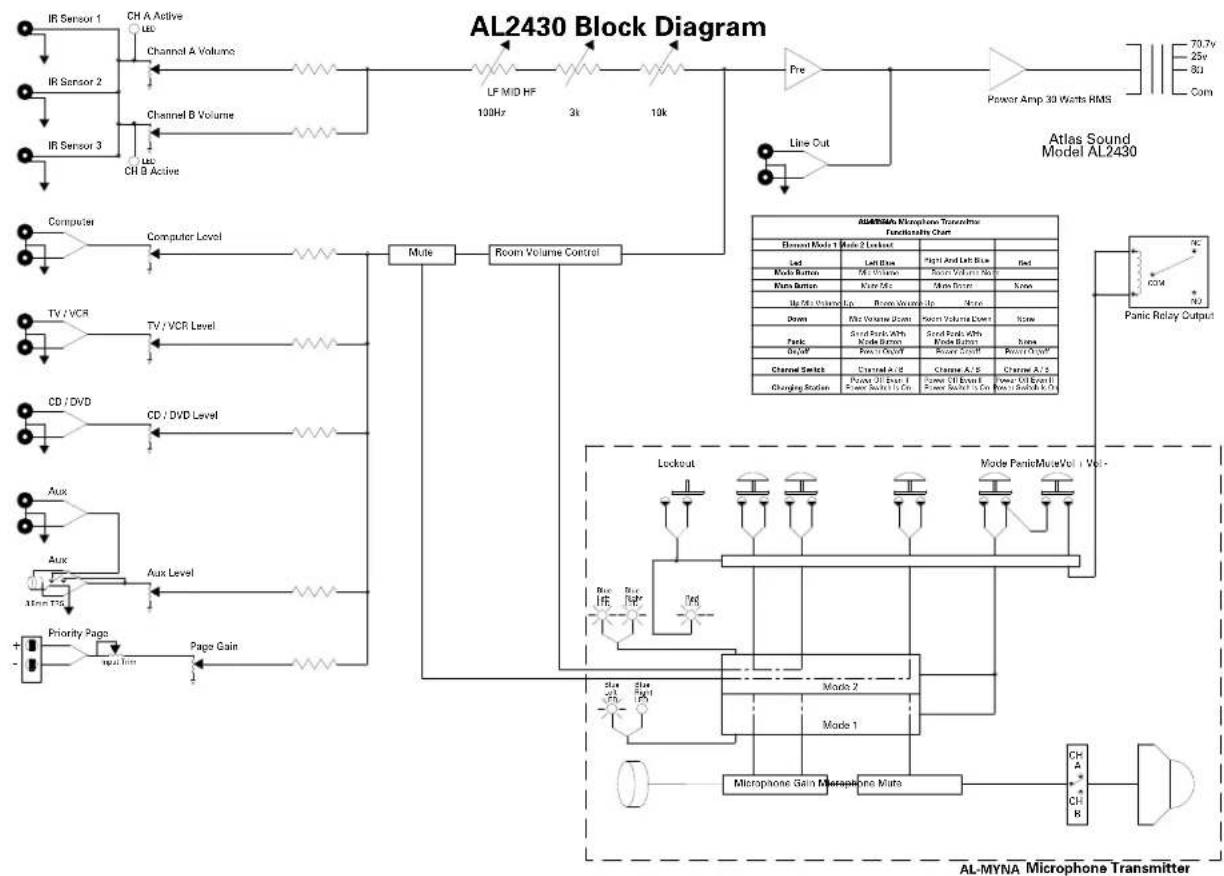
flowchart
graph TD
    A["IR Sensor 1"] --> B["CH A Active"]
    C["IR Sensor 2"] --> D["Channel A Volume"]
    E["IR Sensor 3"] --> F["Channel B Volume"]
    G["Computer"] --> H["Computer Level"]
    I["TV / VCR"] --> J["TV / VCR Level"]
    K["CD / DVD"] --> L["CD / DVD Level"]
    M["Aux"] --> N["Aux Level"]
    O["Priority Page"] --> P["Pago Gain"]
    Q["Line Out"] --> R["Line Mid HF 100Hz"]
    S["Line Out"] --> T["Line Mid HF 3k"]
    U["Line Out"] --> V["Line Mid HF 10k"]
    W["Line Out"] --> X["Line Mid HF 100Hz"]
    Y["Line Out"] --> Z["Line Mid HF 3k"]
    AA["Line Out"] --> AB["Line Mid HF 10k"]
    AC["Line Out"] --> AD["Line Mid HF 100Hz"]
    AE["Line Out"] --> AF["Line Mid HF 3k"]
    AG["Line Out"] --> AH["Line Mid HF 10k"]
    AI["Power Amp 30 Watts RMS"] --> AJ["70.7v"]
    AI --> AK["25v"]
    AI --> AL["8u"]
    AI --> AM["Com"]
    AN["Al-MYNA Microphone Transmitter Functionality Chart"] --> AO["Reset Mode 1: Main 2 Lockout"]
    AO --> AP["Led: Left Bias: Right And Left Blue: Red"]
    AO --> AQ["Mode Button: Main Volume: Room Volume Rate: Low"]
    AO --> AR["Burn Button: Main Size: Inner Drive: Knee"]
    AO --> AS["Up to Mid Volume Up: Room Volume Up: None"]
    AO --> AT["Down: Pie Volume Down: Room Volume Down: Knee"]
    AO --> AU["Fork: Sound Break With Node Event: Sound Break With Node Event: Knee"]
    AO --> AV["Stop/P End: Power On/Off: Power On/Off: Power On/Off: Power On/Off: Power On/Off: Power On/Off: Power On/Off: Power On/Off: Power On/Off: Power On/Off: Power On/Off: Power On/Off: Power On/Off: Power On/Off: Power On/Off: Power On/Off: Power On/Off: Power On/Off: Power On/Off: Power On/Off: Power On/On/Omp"]
    AW["Al-MYNA Microphone Transmitter"] --> AX["Lockout"]
    AX --> AY["Blue Line"]
    AX --> AZ["Blue Line"]
    AX --> BA["Blue Line"]
    AX --> BB["Blue Line"]
    AX --> BC["Blue Line"]
    AX --> BD["Blue Line"]
    AX --> BE["Blue Line"]
    AX --> BF["Blue Line"]
    AX --> BG["Blue Line"]
    AX --> BH["Blue Line"]
    AX --> BI["Blue Line"]
    AX --> BJ["Blue Line"]
    AX --> BK["Blue Line"]
    AX --> BL["Blue Line"]
    AX --> BM["Blue Line"]
    AX --> BN["Blue Line"]
    AX --> BO["Blue Line"]
    AX --> BP["Blue Line"]
    AX --> BQ["Blue Line"]
    AX --> BR["Blue Line"]
    AX --> BS["Blue Line"]
    AX --> BT["Blue Line"]
    AX --> BU["Blue Line"]
    AX --> BV["Blue Line"]
    AX --> BW["Blue Line"]
    AX --> BX["Blue Line"]
    AX --> BY["Blue Line"]
    AX --> BZ["Blue Line"]
    AX --> CA["Blue Line"]
    AX --> CB["Blue Line"]
    AX --> CC["Blue Line"]
    AX --> CD["Blue Line"]
    AX --> CE["Blue Line"]
    AX --> CF["Blue Line"]
    AX --> CG["Blue Line"]
    AX --> CH["Blue Line"]
    AX --> CI["Blue Line"]
    AX --> CJ["Blue Line"]
    AX --> CK["Blue Line"]
    AX --> CL["Blue Line"]
    AX --> CM["Blue Line"]
    AX --> CN["Blue Line"]
    AX --> CO["Blue Line"]
    AX --> CP["Blue Line"]
    AX --> CS["Blue Line"]
    AX --> CT["Blue Line"]
    AX --> CU["Blue Line"]
    AX --> CV["Blue Line"]
    AX --> CW["Blue Line"]
    AX --> CX["Blue Line"]
    AX --> CY["Blue Line"]
    AX --> CZ["Blue Line"]
    AX --> DA["Blue Line"]
    AX --> DB["Blue Line"]
    AX --> DC["Blue Line"]
    AX --> DD["Blue Line"]
    AX --> DE["Blue Line"]
    AX --> DF["Blue Line"]
    AX --> DG["Blue Line"]
    AX --> DH["Blue Line"]
    AX --> DI["Blue Line"]
    AX --> DJ["Blue Line"]
    AX --> DK["Blue Line"]
| AL2430 Receiver / Amplifier Specifications | |||
| Multimedia Input Sensitivity | -10dB | Line Output Connector Type | Dual RCA |
| Priority Page Input Sensitivity | 14dB | Mic EQ (100Hz, 3kHz, & 10kHz) Adjustment | ±10dB |
| Computer Input Impedance | 56K | IR Input Impedance / Connector Type | 75Ω F Connector |
| Multimedia Input Impedance | 22K | Panic Output Contact Rating | 5A@ 36V |
| Multimedia Input Connector Type | Dual RCA | Speaker Output | 30W RMS @ 8Ω, 25V or 70.7V |
| AUX Front Input Connector Type | 3.5mm | In Line PSU Type | 100V–240V In, 24VDC / 2.5A Out |
| Line Output Impedance | 1K | Dimensions | 13⁄4" (45mm) H81⁄2" (216mm) W131⁄2" (343mm) D |
| Line Output Voltage | 1.3V | Weight | 5.75lbs (2.6kg) |
Limited Warranty
All products manufactured by Atlas Sound are warranted to the original dealer/installer, industrial or commercial purchaser to be free from defects in material and workmanship and to be in compliance with our published specifications, if any. This warranty shall extend from the date of purchase for a period of three years on all Atlas Sound products, including SOUNDOLIER brand, and ATLAS SOUND brand products except as follows: one year on electronics and control systems; one year on replacement parts; and one year on Musician Series stands and related accessories. Additionally, fuses and lamps carry no warranty. Atlas Sound will solely at its discretion, replace at no charge or repair free of charge defective parts or products when the product has been applied and used in accordance with our published operation and installation instructions. We will not be responsible for defects caused by improper storage, misuse (including failure to provide reasonable and necessary maintenance), accident, abnormal atmospheres, water immersion, lightning discharge, or malfunctions when products have been modified or operated in excess of rated power, altered, serviced or installed in other than a workman like manner. The original sales invoice should be retained as evidence of purchase under the terms of this warranty. All warranty returns must comply with our returns policy set forth below. When products returned to Atlas Sound do not qualify for repair or replacement under our warranty, repairs may be performed at prevailing costs for material and labor unless there is included with the returned product(s) a written request for an estimate of repair costs before any nonwarranty work is performed. In the event of replacement or upon completion of repairs, return shipment will be made with the transportation charges collect.
EXCEPT TO THE EXTENT THAT APPLICABLE LAW PREVENTS THE LIMITATION OF CONSEQUENTIAL DAMAGES FOR PERSONAL INJURY, ATLAS SOUND SHALL NOT BE LIABLE IN TORT OR CONTRACT FOR ANY DIRECT, CONSEQUENTIAL OR INCIDENTAL LOSS OR DAMAGE ARISING OUT OF THE INSTALLATION, USE OR INABILITY TO USE THE PRODUCTS. THE ABOVE WARRANTY IS IN LIEU OF ALL OTHER WARRANTIES INCLUDING BUT NOT LIMITED TO WARRANTIES OF MERCHANTABILITY AND FITNESS FOR A PARTICULAR PURPOSE.
Atlas Sound does not assume, or does it authorize any other person to assume or extend on its behalf, any other warranty, obligation, or liability. This warranty gives you specific legal rights and you may have other rights which vary from state to state.

Atlas Sound
Should your AL2430 require service, please contact the Atlas Sound warranty department at 1-866-689-8055, ext. 277 to obtain an RA number.
Atlas Sound Tech Support can be reached at 1-800-876-3333.
Visit our website at www.AtlasSound.com to see other Atlas products.
©2012 Atlas Sound L.P. All rights reserved. Atlas Sound and Atlas Learn are trademarks of Atlas Sound L.P. All other trademarks are the property of their respective owners. ATS004263 RevA 3/12

Atlas Learn
1601 Jack McKay Blvd. • Ennis, Texas 75119 U.S.A. Telephone: 800.876.3333 • Fax: 800.765.3435
AtlasSound.com - 8 -