590 Dynamic EQ - Audio Equalizer MIA Laboratories - Free user manual and instructions
Find the device manual for free 590 Dynamic EQ MIA Laboratories in PDF.


User questions about 590 Dynamic EQ MIA Laboratories
0 question about this device. Answer the ones you know or ask your own.
Ask a new question about this device
Download the instructions for your Audio Equalizer in PDF format for free! Find your manual 590 Dynamic EQ - MIA Laboratories and take your electronic device back in hand. On this page are published all the documents necessary for the use of your device. 590 Dynamic EQ by MIA Laboratories.
USER MANUAL 590 Dynamic EQ MIA Laboratories
MIA LABORATORIES © 2022
Greetings and Welcome!
Thank you for choosing MIA Laboratories.
Please take the time to read through this user guide in order to get familiar with the components and the use of the 590 Dynamic EQ.
Overview
The 590 is a 5 band Dynamic EQ, offering dynamic equalisation under MIA Laboratories' envelope detector, based on the analogue envelope detector circuit.
It features parallel band compression or expansion under double precision processing and can be operated in x4 oversampling.
"Colour" and "Distortion" can be applied to each band, delivering a characteristic analogue feel through Tube or Class-A - flavoured equalisation and a fine-tuned Triode distortion algorithm.
Features:
- Detection based on the analogue envelope detector circuit
- Tube & Class A Colour, Triode Distortion
- Double precision processing with x4 Oversampling
- MIA Presets
Compression/Expansion
Each band of the 590 can be operated in compression or expansion mode, with attack and release times reaching up to 200 ms and 2.000 ms, respectively. Under the hood, our custom envelope detector, used in 925 and 409 compressors, utilises the classic feed-back topology, resulting in smoother and more “controllable” dynamic response.
The user is able to select between more subtle or aggressive dynamic response, by switching between "Slope" and "Ratio" modes.
Colour
The "Colour" knob, coming from the Musiqual EQ Series, applies a specific set of filters to enhance the harmonic and subharmonic frequencies, related to the selected main frequency. This creates a more natural and musical result, often accompanied by a profound change in timbre.
Bands 1 and 2 utilise Musiqual Red, emulating the "slower" Tube pre-amps, which tend to push sounds back - in terms of perceived depth of field. Bands 3 to 5 utilise Musiqual Blue, inspired by the "fast" Class A pre-amps, which tend to bring sounds forward. This allows for easier separation between lower (tube) and higher (class A) bands.
Distortion
Another intrinsic characteristic of analog gear is the harmonic distortion, a “defect” that the musical industry eventually embraced over the years, rendering it essential to the sound that we are used to.
"Distortion" knob emulates the corresponding harmonic distortion introduced by a Triode vacuum Tube amp when driven "hot". The user has control over the amount of distortion applied to the signal -without the need of additional gain stages-, easily achieving the characteristic analog feel.
Extra Features
Using the top bar, the user can navigate through presets, undo and redo actions with a click, as well as compare different configurations using the A/B feature. 590 comes with a number of MIA Presets, while it also offers the ability to create custom presets, accessible through the dropdown menu from all instances of the plugin.
Mouse Control Behaviour
Right-click on any knob to input the value by typing.
Ctrl + drag for fine tuning settings
Double-click to reset the control to its default value

text_image
Compression / Expansion Select Compression (counterclockwise) or Expansion (clockwise) amount. From -5 (max compression) to 5 (max expansion) Set the Threshold of Compression or Expansion From 0 to -60 dB Set the desired width (Q) of the band to be processed From 0.1 to 10 Select the desired Center Frequency of the band. From 20 Hz to 20 kHz THRESHOLD COMP/EXP RELEASE ATTACK FREQUENCY GAIN -12 dB +12 SHELF BYPASS SOLO Change from Peak Filter to Shelving Bypass processing of the band Monitor processing of the band Set the Attack Time From 0 to 200 ms Set the Release Time From 25 to 2000 ms Set the desired Gain From -12 to 12 dB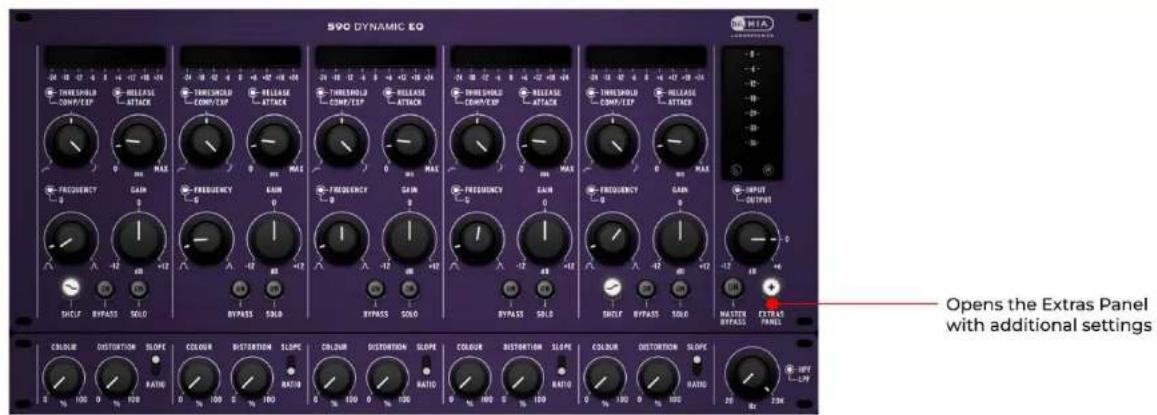
text_image
890 DYNAMIC EQ FREQUENCY GAIN FREQUENCY GAIN FREQUENCY GAIN FREQUENCY GAIN FREQUENCY GAIN OUTPUT SHLF BYPASS SOLD BYPASS SOLD BYPASS SOLD BYPASS SOLD BYPASS SOLD BYPASS SOLD BYPASS SOLD BYPASS SOLD BYPASS SOLD BYPASS SOLD BYPASS SOLD BYPASS SOLD BYPASS SOLD BYPASS SOLD BYPASS SOLD BYPASS SOLD BYPASS SOLD BYPASS SOLD BYPASS SOLD BYPASS SOLD BYPASS SOLD BYPASS SOLD BYPASS SOLD BYPASS SOLD BYPASS SOLD BYPASS SOLC Color: DISTORTION SLOPE RATIO: 100 200 Color: DISTORTION SLOPE RATIO: 100 200 Color: DISTORTION SLOPE RATIO: 100 200 Color: DISTORTION SLOPE RATIO: 100 200 Color: DISTORTION SLOPE RATIO: 100 200 Color: DISTORTION SLOPE RATIO: 1M-1.5M- Color: DISTORTION SLOPE RATIO: 1M-1.5M- Color: DISTORTION SLOPE RATIO: 1M-1.5M- Color: DISTORTION SLOPE RATIO: 1M-1.5M- Color: DISTORTION SLOPE RATIO: 1M-1.5M- Color: DISTORTION SLOPE RATIO: 1M+1.5M- Color: DISTORTION SLOPE RATIO: 1M+1.5M- Color: DISTORTION SLOPE RATIO: 1M+1.5M- Color: DISTORTION SLOPE RATIO: 1M+1.5M- Color: DISTORTION SLOPE RATIO: 1M+1.5M- Color: DISTORTION SLOPE Ratio: 100 200 Color: DISTORTION SLOPE RATIO: 100 200 Color: DISTORTION SLOPE RATIO: 100 200 Color: DISTORTION SLOPE RATIO: 100 200 Color: DISTORTION SLOPE RATIO: 100 200 Color: DISTORTION SLAPE RATIO: 100 200 Color: DISTORTION SLAPE RATIO: 100 200 Color: DISTORTION SLAPE RATIO: 100 200 Color: DISTORTION SLAPE RATIO: 100 200 Color: DISTORTION SLAPE RATIO: 100 200 Color : HPT-LFP Color : HPT-LFP
text_image
COLOUR DISTORTION SLOPE 0 % 100 0 % 100 RATIO Toggle between Slope and Ratio to change the behaviour of the compression or expansion Set the amount of Colour applied to the band. From 0 to 100% Set the amount of Distortion (Triode) applied to the band. From 0 to 100% HPF LPF 20 Hz 20K Set the LowPass cut off frequency. (Input) Set the HighPass cut off frequency. (Input)
text_image
Undo / Redo buttons Preset drop-down menu Toggle between presets Change between state A and B Save or Delete your presets Store current state Turn Oversampling On or Off PRESET init A B A > B OVERSAMPLINGInstallation
Installing 590 Dynamic EQ is easy, just download and run the appropriate installer for your operating system. The licence for this plugin requires the use of iLok licence manager software and an iLok account. The licence can be deposited on a physical iLok (2 ^nd generation or higher) or on iLok Cloud. For further information regarding the activation process, please refer to the activation guide provided. In case that you do not have the iLok Licence Manager, or you have an outdated version, you can download it for free here: Get iLok Licence Manager
Thank you for using MIA Laboratories.
May the sound be with you!

