Musiqual Red MkII - Programme audio MIA Laboratories - Free user manual and instructions
Find the device manual for free Musiqual Red MkII MIA Laboratories in PDF.


User questions about Musiqual Red MkII MIA Laboratories
0 question about this device. Answer the ones you know or ask your own.
Ask a new question about this device
Download the instructions for your Programme audio in PDF format for free! Find your manual Musiqual Red MkII - MIA Laboratories and take your electronic device back in hand. On this page are published all the documents necessary for the use of your device. Musiqual Red MkII by MIA Laboratories.
USER MANUAL Musiqual Red MkII MIA Laboratories
MIA LABORATORIES © 2021
TABLE OF CONTENTS
Overview
EQ....3
Distortion....4
Compressor....4
Use Cases....4
Installation....5
Musiqual Red....6
Musiqal Green....8
Musiqual Blue....10
Technical Specifications
Musiqual Red....12
Musiqual Green....19
Musiqual Blue....26
Greetings and Welcome!
Thank you for choosing MIA Laboratories.
Overview
The Musiqual tools encapsulate all the characteristics and inner workings of their analog counterparts, providing the user with a simple way to achieve the perfect combination of tone and colour.
Each unit consists of a Single Band EQ -with carefully selected and tuned frequency bands-, a Harmonic Distortion component and a Compressor, recreating the sound of the much appraised analog gear.
Red for Tube, Green for Transistor and Blue for Class A; all together creating a unique and powerful set of tools to add a warm, analog flavour to your sound, with precise control over the amount of coloration, harmonic distortion and compression applied.
EQ
Colouration of the sound is one of these characteristics, intrinsic to the analog circuits, that could “make or break” a deal when looking for that new piece of gear. The Musical EQ tries to bring this characteristic to the digital domain, while providing unique control over this “colour”.
Contrary to conventional Equalisers, when boosting or attenuating a certain frequency with the Musical EQ, its harmonic and subharmonic frequencies are also affected, creating a more natural and musical result, often accompanied by a profound change in timbre. Such changes, although subtle when audited in "solo", is what can really make a sound stand out -or blend in- in a mix.
More importantly, the speed or "slewing rate" of an amplifier heavily affects the perception of depth in a mix. The EQ in the Musical Tools conveniently reflects this feature, allowing for easier separation in the depth of field at specific frequencies, without the use of delay.
Distortion
Another intrinsic characteristic of analog gear is the harmonic distortion, a “defect” that the musical industry eventually embraced over the years, rendering it essential to the sound that we are used to.
The Musiqal tools emulate the corresponding harmonic distortion introduced by Tube, Transistor and Class A circuits, when driven "hot". The user has control over the amount of distortion applied to the signal, easily achieving the characteristic analog feel.
Compressor
Hardware equipment also varies greatly in its dynamic or headroom-induced audio character and sound signature. This is affected by the topology and components used in the circuit, as well as the design and specific function or process.
The Compressor present in the Musical Tools is developed using physical modelling principles and its settings are specifically tuned to simulate the response of the corresponding Tube, Transistor and Class A hardware equipment. It allows the user to control the signal's peak and dynamic range, while enhancing the characteristic analog flavor.
Use Cases
The Musiqual tools are suitable for a wide range of applications, when a specific analog flavour is sought after. They can be very useful when applied to individual instruments, as well as on the Master Bus, especially when tuned to the tonality of the program material.
The characteristic EQ can come really handy when a specific instrument needs to be pushed in or out of a mix at a specific frequency. It allows for boosts and cuts that sound more musical and less profound, as well as easier separation in the perceived depth of field.
Installation
Installing the Musiqual Tools is fairly easy, just download and run the appropriate installer for your operating system. The license for this plugin requires the use of iLok license manager software and an iLok account. The license can be deposited on a physical iLok ( 2^nd generation or higher) or on iLok Cloud. For further information regarding the activation process, please refer to the activation guide provided. In case that you do not have the iLok License Manager, or you have an outdated version, you can download it for free here: license-manager
Note for Windows users: The Musical Tools will be installed by default on the following directory - C:\Program Files\Common Files\VST3. (If this directory is not included in the search path list for vst plugins of your DAW, you can add it manually or change the installation location from the Browse menu of the installer to the one you are using).
MUSIQUAL RED

text_image
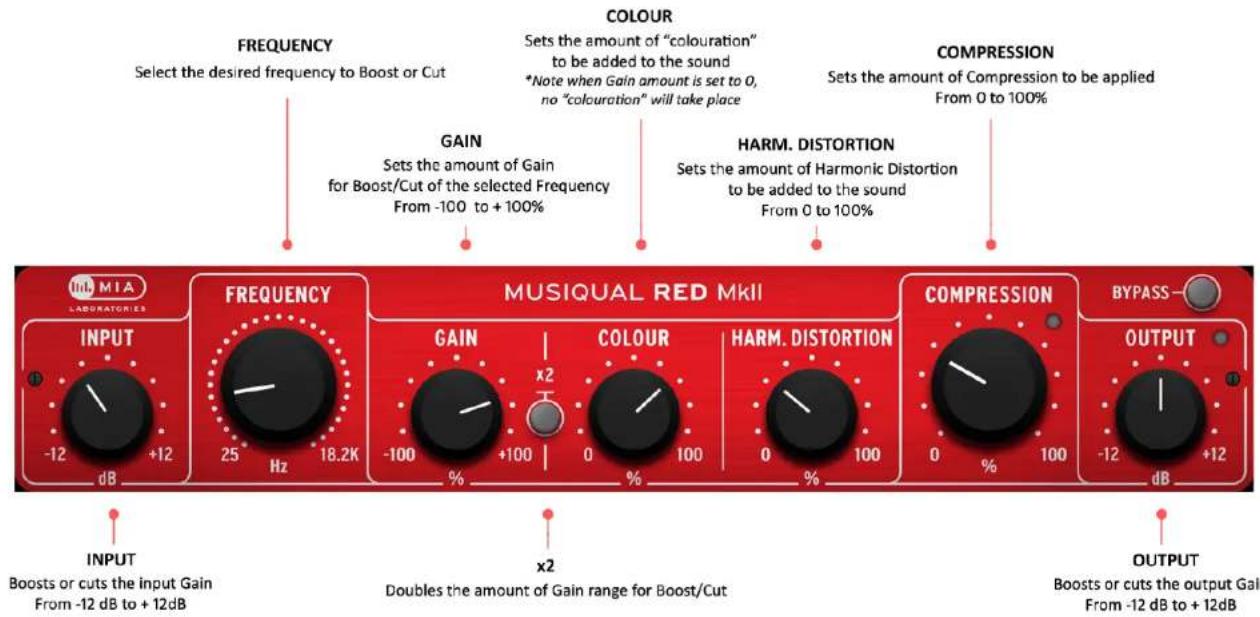
MIA LABORATORIES INPUT -12 dB +12 FREQUENCY 25 Hz 18.2K MUSIQUAL RED MkII GAIN -100 % +100 COLOUR 0 % HARM. DISTORTION 0 % 100 COMPRESSION 0 % 100 BYPASS -12 dB +12 OUTPUTMusigual Red facilitates the sound that the passionate Tube enthusiast lives for.
Musiqual Red's EQ offers 31 carefully selected bands to choose from, representing the "key" frequencies when it comes to Tube gear. Each band comes with a designated "Colour" algorithm, enhancing this unit's character and allowing for more musical and Tube-flavoured equalisation.
Similarly to the slower Tube pre-amps, Musiqal Red also tends to push sounds back, in terms of perceived depth of field.
The Harmonic Distortion component of Musiqal Red was designed to simulate the response that Tube circuits exhibit when driven "hot". It primarily introduces 2nd and 3rd order harmonics, along with some 4th order harmonics and allows for easy control over the amount of distortion added to the signal.
Musiqual Red's Compressor is specifically tuned to complement the Tube character of this unit. It has fixed attack and release settings and allows for easy control of the amount of compression applied to the sound.
Musiqual Red is mostly suited for instruments like bass, guitars (acoustic and electric), vocals and any material that would benefit from that "Tube" essence. Most notably, bass greatly favors harmonic content introduced by Tube circuits. Musiqual Red is particularly relevant, while not limited to, for use in the higher and lower ends of the spectrum.
text_image
FREQUENCY Select the desired frequency to Boost or Cut COLOUR Sets the amount of "colouration" to be added to the sound *Note when Gain amount is set to 0, no "colouration" will take place COMPRESSION Sets the amount of Compression to be applied From 0 to 100% IN M I A LABORATORIES FREQUENCY GAIN Sets the amount of Gain for Boost/Cut of the selected Frequency From -100 to +100% HARM. DISTORTION Sets the amount of Harmonic Distortion to be added to the sound From 0 to 100% MUSIQUAL RED MKII COMPRESSION BYPASS— INPUT -12 dB +12 Hz 18.2K -100 % +100 x2 % 0 % 100 0 % 100 -12 dB +12 dB INPUT Boosts or cuts the input Gain From -12 dB to +12dB x2 Doubles the amount of Gain range for Boost/Cut OUTPUT Boosts or cuts the output Gain From -12 dB to +12dBNOTES:
* RIGHT-CLICK ON ANY KNOB TO TYPE THE VALUE
* CLICK AND DRAG THE BOTTOM-RIGHT CORNER TO RESIZE
MUSIQUAL GREEN

text_image
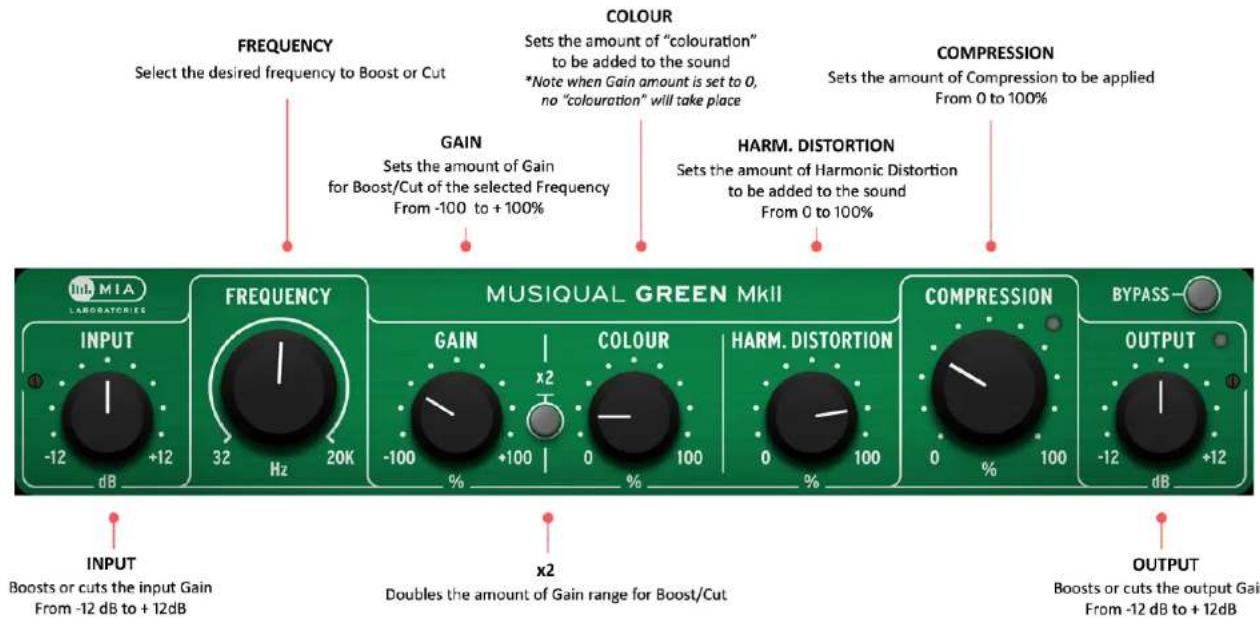
MIA LABORATORIES INPUT -12 dB +12 Hz 20K FREQUENCY 32 Hz MUSIQUAL GREEN MKII GAIN -100 % +100 x2 COLOUR 0 % 100 HARM. DISTORTION 0 % 100 COMPRESSION 0 % 100 BYPASS -12 dB +12 dB OUTPUTMusigval Green exhibits a strong Transistor character, providing that classical 1990's sound.
Musiqual Green's EQ provides a fairly transparent sound with 'Transistor' flavour that is so characteristic of analog technology. The user has complete access in the 20Hz - 20kHz range, since there are no specific, predetermined bands as in the other Musiqual tools. "Colour" is soft and discrete.
Transistor or op-amp circuit amplifiers exhibit a strong component of 3rd order harmonic distortion. The Harmonic Distortion component in the Musiqual Green simulates this characteristic sound, mostly introducing odd harmonics, with the 3rd one being the most prominent. The user can precisely tune the amount of distortion added to the signal.
The Compressor present in Musiqal Green is specifically tuned to complement the Transistor character of this unit. It has fixed attack and release settings and allows for easy control of the amount of compression applied to the sound.
Musiqual Green is mostly suited for synths, guitars (acoustic and electric), percussive instruments and Drums. Most notably, snares typically benefit greatly from “Transistor” colour and distortion. It is particularly relevant, while not limited to, for use in the mid range of the spectrum.
text_image
FREQUENCY Select the desired frequency to Boost or Cut COLOUR Sets the amount of "colouration" to be added to the sound *Note when Gain amount is set to 0, no "colouration" will take place COMPRESSION Sets the amount of Compression to be applied From 0 to 100% FREQUENCY GAIN Sets the amount of Gain for Boost/Cut of the selected Frequency From -100 to +100% HARM. DISTORTION Sets the amount of Harmonic Distortion to be added to the sound From 0 to 100% MUSIQUAL GREEN MKII INNO MIA LABORATORIES INPUT -12 dB +12 dB 32 Hz 20K GAIN -100 % +100 x2 COLOUR 0 % 100 HARM. DISTORTION 0 % 100 COMPRESSION BYPASS -12 dB +12 dB OUTPUT Boosts or cuts the input Gain From -12 dB to +12dB x2 Doubles the amount of Gain range for Boost/Cut OUTPUT Boosts or cuts the output Gain From -12 dB to +12dBNOTES:
* RIGHT-CLICK ON ANY KNOB TO TYPE THE VALUE
* CLICK AND DRAG THE BOTTOM-RIGHT CORNER TO RESIZE
MUSIQUAL BLUE

text_image
MIA LABORATORIES INPUT -12 dB +12 dB FREQUENCY 32 Hz 18.2K MUSIQUAL BLUE MkII GAIN -100 % +100 x2 COLOUR 0 % 100 HARM. DISTORTION 0 % 100 COMPRESSION 0 % 100 BYPASS - -12 dB +12 dB OUTPUTMusiqual Blue delivers a vivid Class A flavour, reminiscent of the warm, fat and smooth sound of classic audio gear.
Musiqual Blue's EQ offers 16 carefully selected bands to choose from, representing the "key" frequencies when it comes to Class A gear. Each band comes with a designated "Colour" algorithm, enhancing this unit's character and allowing for more musical and Class A-flavoured equalisation.
Similarly to the fast Class A pre-amps, Musiqal Blue also tends to bring sounds forward, in terms of perceived depth of field.
The Harmonic Distortion component in Musiqual Blue recreates the asymmetrical clipping, typically found in Class A circuits. It provides the characteristic sound of an overdriven Class A circuit, allowing the user to conveniently control the amount of distortion introduced to the signal.
The Compressor present in Musiqual Blue is specifically tuned to complement the Class A character of this unit. It has fixed attack and release settings and allows for easy control of the amount of compression applied to the sound.
Musiqual Blue is mostly suited for sounds with fast, sharp transients, including percussive instruments and Drums. Most notably, Kick Drums typically benefit greatly from "Class A" colour and distortion. Musiqual Blue's EQ is also particularly useful for instruments with rich harmonic content.

text_image
FREQUENCY Select the desired frequency to Boost or Cut COLOUR Sets the amount of "colouration" to be added to the sound *Note when Gain amount is set to 0, no "colouration" will take place COMPRESSION Sets the amount of Compression to be applied From 0 to 100% FREQUENCY GAIN Sets the amount of Gain for Boost/Cut of the selected Frequency From -100 to +100% HARM. DISTORTION Sets the amount of Harmonic Distortion to be added to the sound From 0 to 100% MUSIQUAL BLUE MKII IN MIA LABORATORIES INPUT -12 dB +12 dB 32 Hz 18.2K MUSIQUAL BLUE MKII GAIN -100 % x2 +100 % 0 % COLOUR HARM. DISTORTION 0 % 100 COMPRESSION 0 % 100 BYPASS— -12 dB +12 dB OUTPUT Boosts or cuts the input Gain From -12 dB to +12dB x2 Doubles the amount of Gain range for Boost/Cut Output Boosts or cuts the output Gain From -12 dB to +12dBNOTES:
* RIGHT-CLICK ON ANY KNOB TO TYPE THE VALUE
* CLICK AND DRAG THE BOTTOM-RIGHT CORNER TO RESIZE
Technical Specifications
MUSIQUAL RED
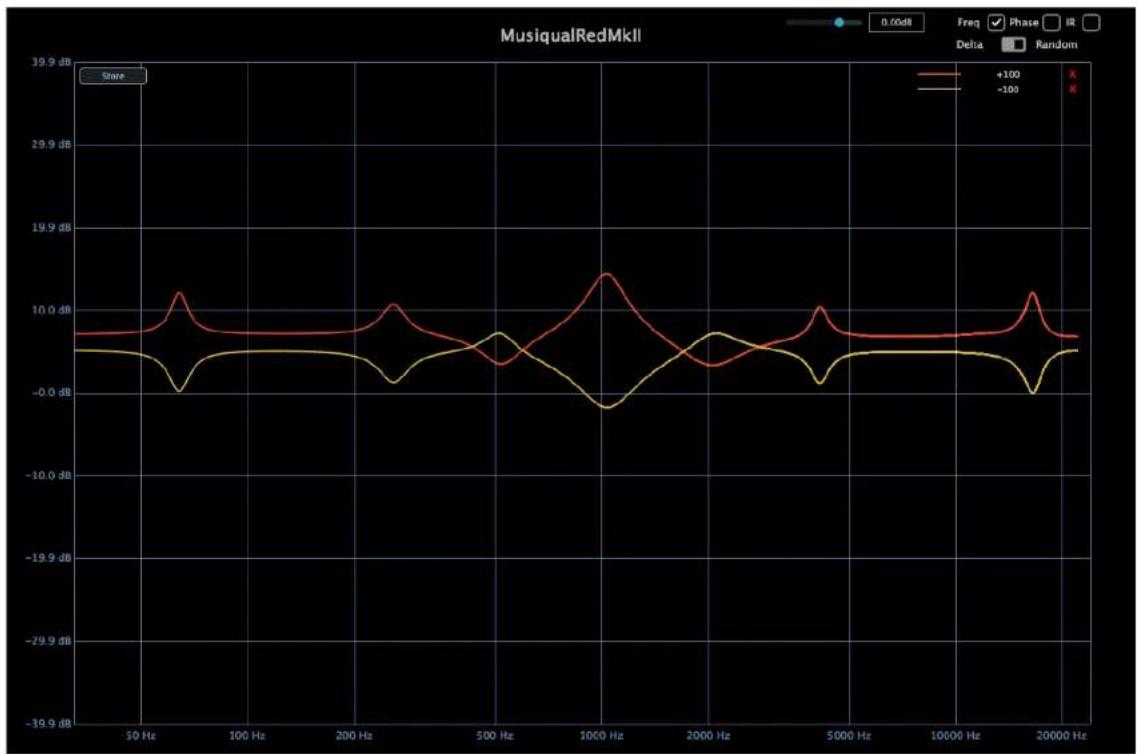
Figure R.1 : Frequency response for +100% and -100% Gain at 1KHz, Colour = 100%
line
| Frequency | +100 dB | -100 dB | | --------- | ------- | ------- | | 50 Hz | ~0.5 dB | ~-0.5 dB | | 100 Hz | ~-0.5 dB | ~-0.5 dB | | 200 Hz | ~-0.5 dB | ~-0.5 dB | | 500 Hz | ~-0.5 dB | ~-0.5 dB | | 1000 Hz | ~12 dB | ~-4 dB | | 2000 Hz | ~-0.5 dB | ~-0.5 dB | | 5000 Hz | ~-0.5 dB | ~-0.5 dB | | 10000 Hz | ~-0.5 dB | ~-0.5 dB | | 20000 Hz | ~-0.5 dB | ~-0.5 dB |Figure R.2 : Frequency response for +100% and -100% Gain at 100Hz, Colour = 100%

line
| Frequency (Hz) | 100Hz Bount (dB) | 100Hz Cut (dB) | | -------------- | ---------------- | -------------- | | 5 | ~0.5 | ~-2.5 | | 10 | ~0.5 | ~-3.0 | | 20 | ~0.5 | ~-3.5 | | 50 | ~2.0 | ~-6.0 | | 100 | ~13.0 | ~-17.0 | | 200 | ~3.0 | ~-5.0 | | 500 | ~3.5 | ~-4.5 | | 1000 | ~4.0 | ~-4.5 | | 2000 | ~10.0 | ~-11.0 | | 5000 | ~2.0 | ~-2.0 | | 10000 | ~0.5 | ~-1.0 | | 20000 | ~0.5 | ~-1.0 |Figure R.3 : Frequency response for +100% and -100% Gain at 10kHz, Colour = 100%

line
| Frequency (Hz) | 10KHz Boost (dB) | 10KHz Cut (dB) | | -------------- | ---------------- | -------------- | | 50 | -0.2 | -0.2 | | 100 | -0.2 | -0.2 | | 200 | -0.2 | -0.2 | | 500 | -0.2 | -0.2 | | 1000 | -0.2 | -0.2 | | 2000 | -0.2 | -0.2 | | 5000 | -9.7 | -9.7 | | 10000 | -29.9 | -29.9 | | 20000 | -9.7 | -9.7 |Figure R.4 : Harmonic Distortion at 100%

line
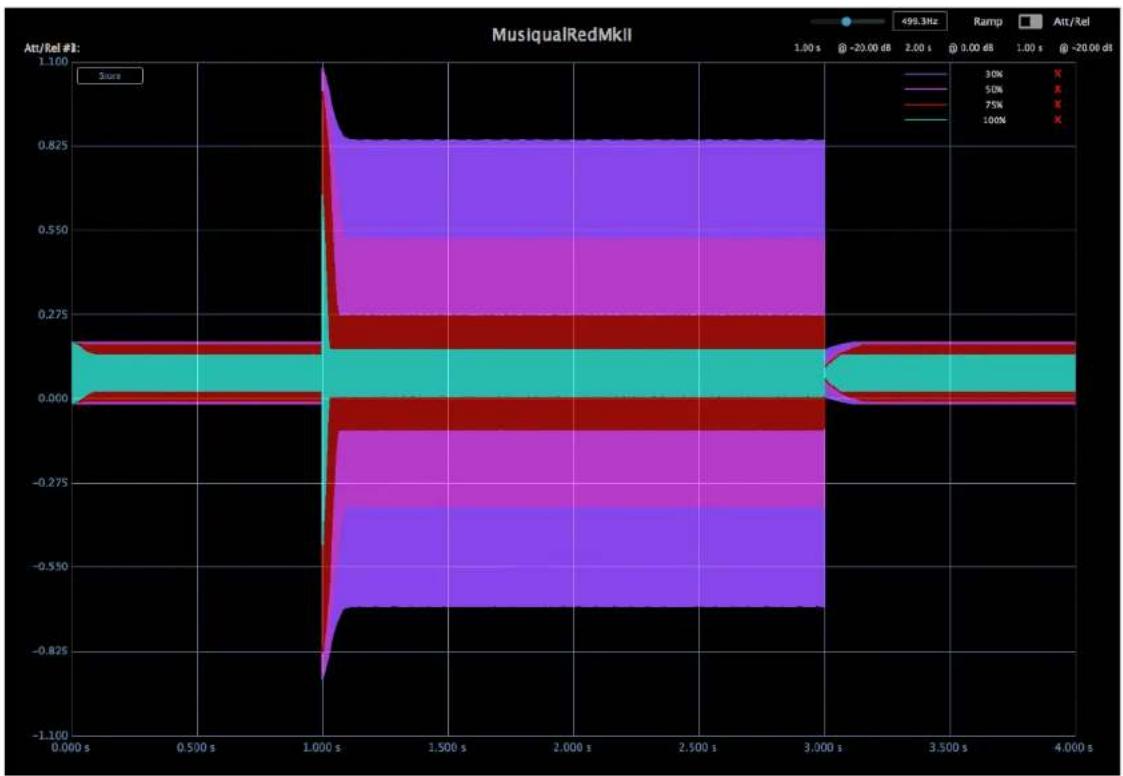
| Frequency (Hz) | Amplitude (dB) | | -------------- | -------------- | | 1000 | -13.1 | | 2000 | -25.5 | | 5000 | -74.9 | | 10000 | -13.1 |Figure R.5 : Compression Dynamic Response for different "Compression" Settings
line
| Time (s) | 30% | 50% | 75% | 100% | |----------|-------|-------|-------|-------| | 0.000 | 0.000 | 0.000 | 0.000 | 0.000 | | 1.000 | 1.100 | 0.825 | 0.275 | -0.825| | 2.000 | 0.825 | 0.825 | 0.275 | -0.825| | 3.000 | 0.825 | 0.825 | 0.275 | -0.825| | 4.000 | 0.825 | 0.825 | 0.275 | -0.825|Figure R.6 : Gain Reduction Knee Response for different "Compression" settings
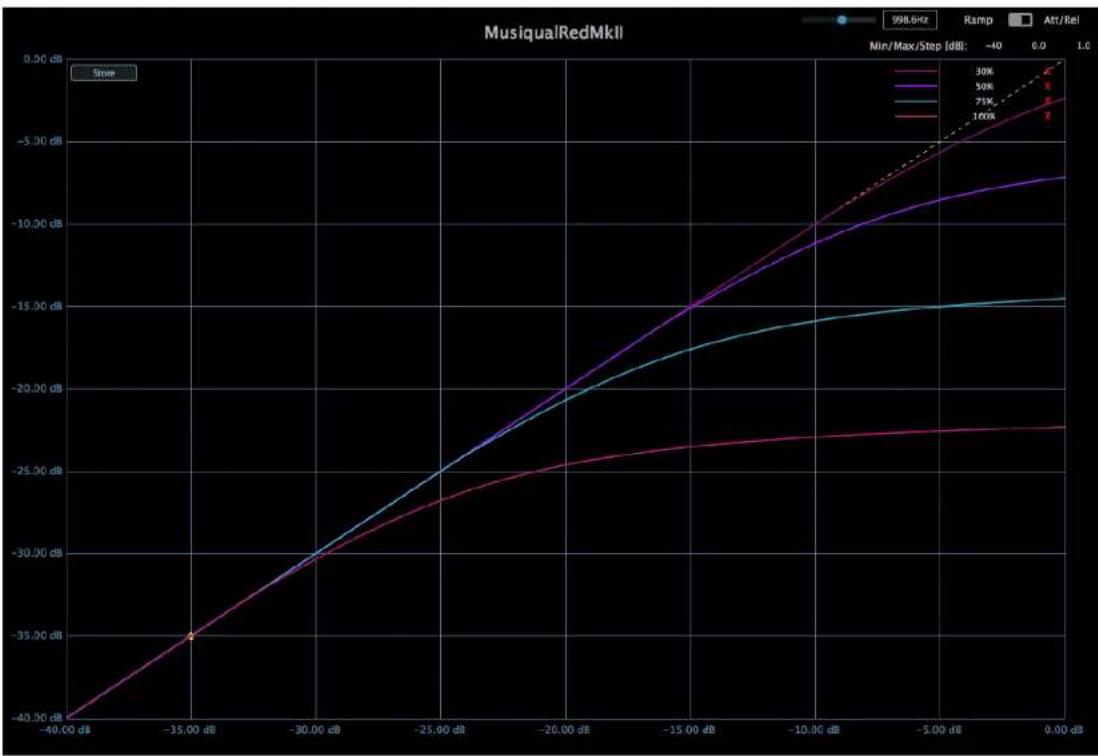
line
| Voltage (dB) | 30% | 50% | 71% | 100% | | ------------ | ----- | ----- | ----- | ----- | | -40.00 | -40.00 | -40.00 | -40.00 | -40.00 | | -35.00 | -35.00 | -35.00 | -35.00 | -35.00 | | -30.00 | -30.00 | -30.00 | -30.00 | -30.00 | | -25.00 | -25.00 | -25.00 | -25.00 | -25.00 | | -20.00 | -20.00 | -20.00 | -20.00 | -20.00 | | -15.00 | -15.00 | -15.00 | -15.00 | -15.00 | | -10.00 | -10.00 | -10.00 | -15.00 | -15.00 | | -5.00 | -5.00 | -5.00 | -15.00 | -15.00 | | 0.00 | 0.00 | 0.00 | -15.00 | -15.00 |Technical Specifications
MUSIQUAL GREEN
Figure G.1 : Frequency response for +100% and -100% Gain at 1KH, Colour = 100%

line
| Frequency (Hz) | +100 (dB) | -100 (dB) | | -------------- | --------- | --------- | | 50 | ~0.0 | ~0.0 | | 100 | ~0.0 | ~0.0 | | 200 | ~-0.5 | ~-0.5 | | 500 | ~-1.0 | ~-0.8 | | 1000 | ~19.4 | ~-11.2 | | 2000 | ~-0.5 | ~-1.0 | | 5000 | ~-0.5 | ~-1.0 | | 10000 | ~-0.5 | ~-1.0 | | 20000 | ~-0.5 | ~-1.0 |Figure G.2 : Frequency response for +100% and -100% Gain at 100Hz, Colour = 100%

line
| Frequency (Hz) | 100Hz Boost (dB) | 100Hz Cut (dB) | | -------------- | ---------------- | -------------- | | 5 | 0.0 | 0.0 | | 10 | 0.0 | 0.0 | | 20 | 0.0 | 0.0 | | 50 | -5.0 | 5.0 | | 100 | 12.0 | -12.0 | | 200 | 5.0 | -5.0 | | 500 | 5.0 | -5.0 | | 1000 | 2.0 | -2.0 | | 2000 | 0.0 | 0.0 |Figure G.3 : Frequency response for +100% and -100% Gain at 10kHz, Colour = 100%
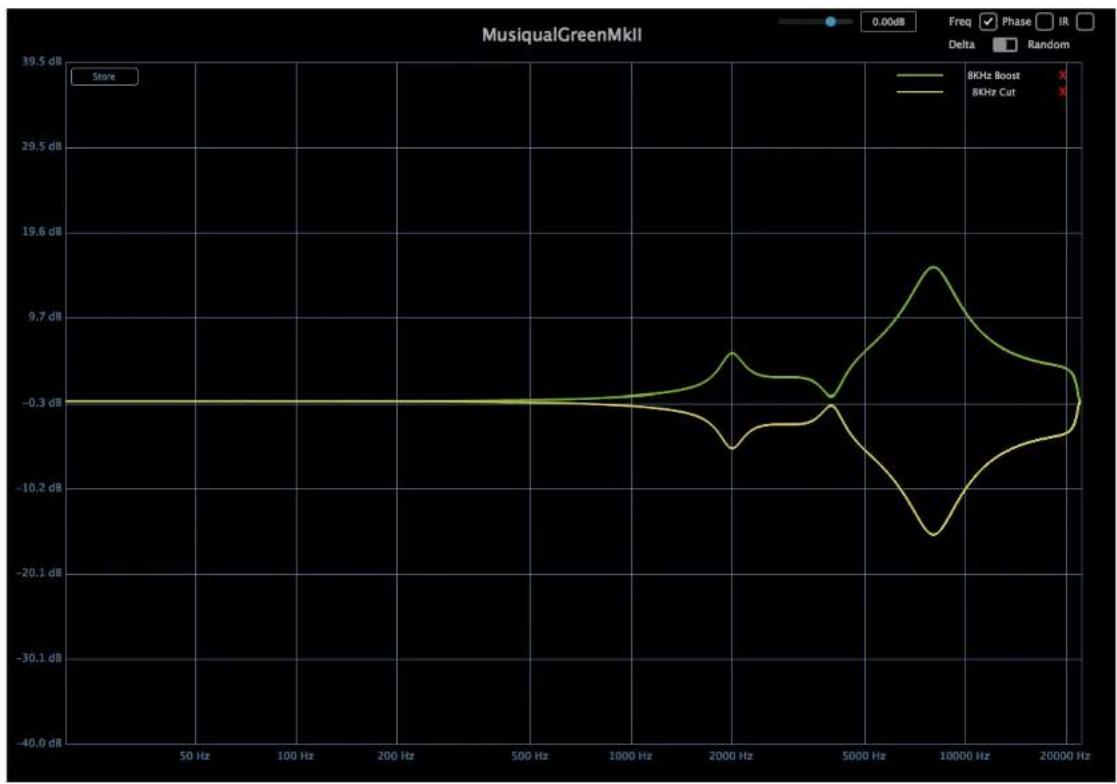
line
| Frequency (Hz) | 8KHz Boost (dB) | 8KHz Cut (dB) | | -------------- | --------------- | ------------- | | 50 | -0.3 | -0.3 | | 100 | -0.3 | -0.3 | | 200 | -0.3 | -0.3 | | 500 | -0.3 | -0.3 | | 1000 | -0.3 | -0.3 | | 2000 | -0.7 | -0.7 | | 5000 | -0.3 | -0.3 | | 10000 | 19.6 | -19.6 | | 20000 | -0.3 | -0.3 |Figure G.4 : Harmonic Distortion at 100%

line
| Frequency (Hz) | Value (dB) | | -------------- | ---------- | | 50 | -99.4 | | 100 | -99.4 | | 200 | -99.4 | | 500 | -99.4 | | 1000 | -74.7 | | 2000 | -37.7 | | 5000 | -87.0 | | 10000 | -13.1 | | 20000 | -13.1 |Figure G.5 : Compression Dynamic Response for different "Compression" Settings

line
| Time (s) | 999.9Hz Ramp Rate | 1.00 s Ramp Rate | |----------|---------------------|------------------| | 0 | 30% | X | | 0 | 50% | X | | 0 | 75% | X | | 0 | 100% | X |Figure G.6 : Gain Reduction Knee Response for different "Compression" settings
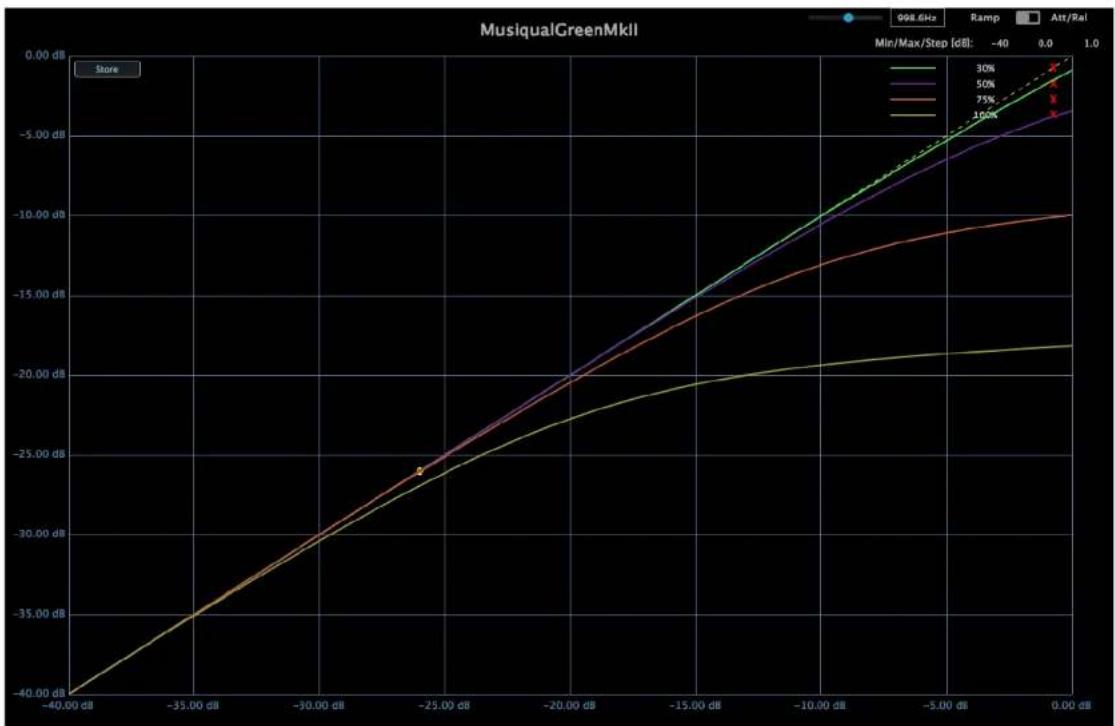
line
| Min/Max/Step [dB] | 30% | 50% | 75% | 100% | | ----------------- | ----- | ----- | ----- | ----- | | -40.00 dB | -40.00 dB | -40.00 dB | -40.00 dB | -40.00 dB | | -35.00 dB | -35.00 dB | -35.00 dB | -35.00 dB | -35.00 dB | | -30.00 dB | -30.00 dB | -30.00 dB | -30.00 dB | -30.00 dB | | -25.00 dB | -25.00 dB | -25.00 dB | -25.00 dB | -25.00 dB | | -20.00 dB | -20.00 dB | -20.00 dB | -20.00 dB | -20.00 dB | | -15.00 dB | -15.00 dB | -15.00 dB | -15.00 dB | -15.00 dB | | -10.00 dB | -10.00 dB | -10.00 dB | -10.00 dB | -10.00 dB | | -5.00 dB | -5.00 dB | -5.00 dB | -5.00 dB | -5.00 dB | | 0.00 dB | 0.00 dB | 0.00 dB | 0.00 dB | 0.00 dB |Technical Specifications
MUSIQUAL BLUE
Figure B.1 : Frequency response for +100% and -100% Gain at 1KH, Colour = 100%
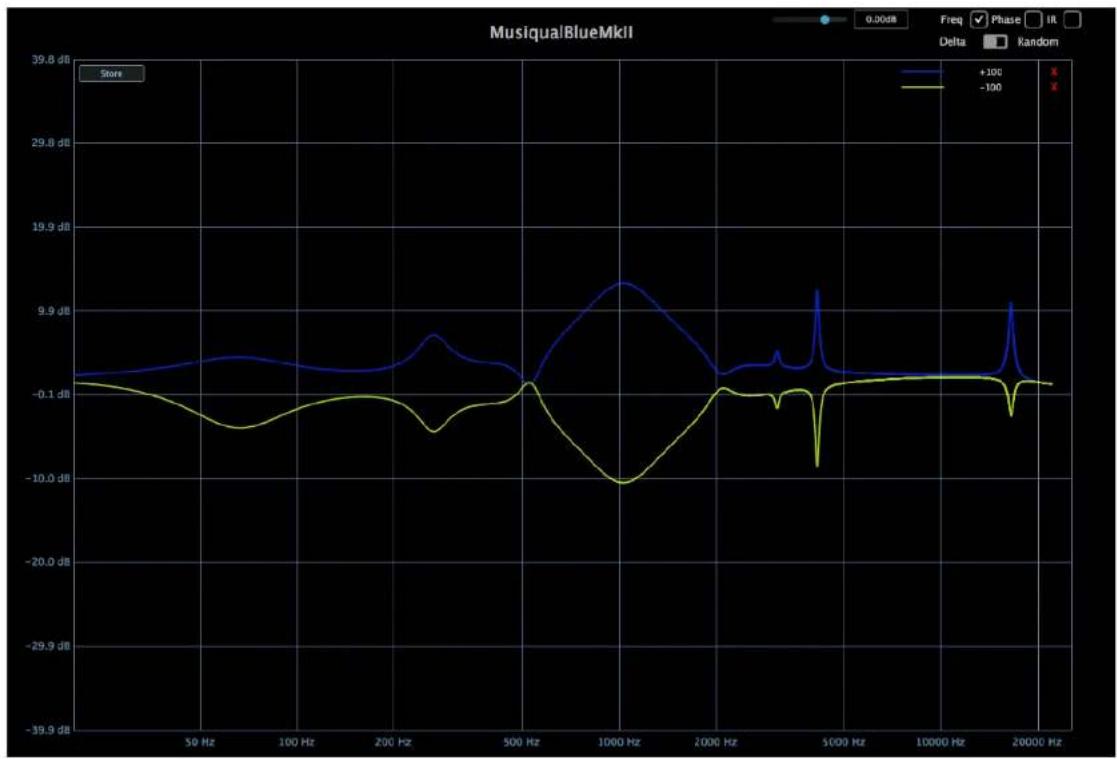
line
| Frequency (Hz) | +100 dB | -100 dB | | -------------- | ------- | ------- | | 50 | ~-0.1 | ~-0.1 | | 100 | ~-0.1 | ~-0.1 | | 200 | ~-0.1 | ~-0.1 | | 500 | ~-0.1 | ~-0.1 | | 1000 | ~9.9 | ~-10.0 | | 2000 | ~-0.1 | ~-0.1 | | 5000 | ~-0.1 | ~-10.0 | | 10000 | ~-0.1 | ~-0.1 | | 20000 | ~-0.1 | ~-0.1 |Figure B.2 : Frequency response for +100% and -100% Gain at 125Hz, Colour = 100%
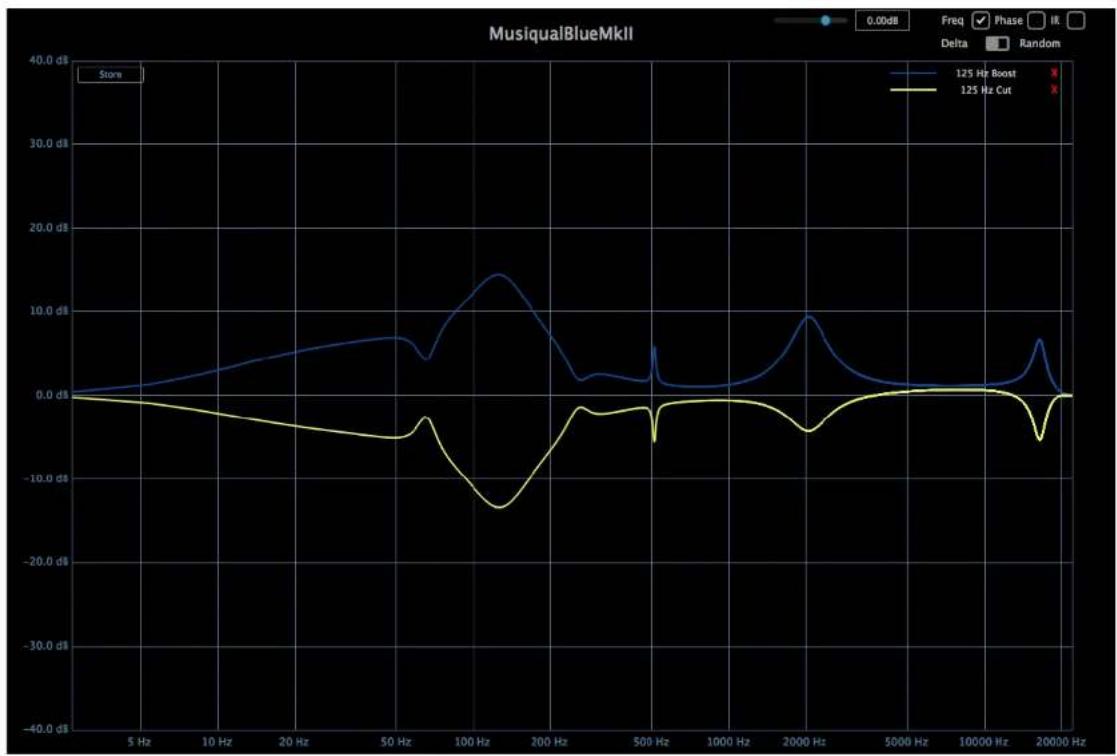
line
| Frequency (Hz) | 125 Hz Boost (dB) | 125 Hz Cut (dB) | | -------------- | ----------------- | --------------- | | 5 | ~0.5 | ~0.0 | | 10 | ~2.0 | ~-1.0 | | 20 | ~4.0 | ~-3.0 | | 50 | ~6.0 | ~-5.0 | | 100 | ~14.0 | ~-15.0 | | 200 | ~8.0 | ~-5.0 | | 500 | ~2.0 | ~-2.0 | | 1000 | ~1.0 | ~-1.0 | | 2000 | ~9.0 | ~-5.0 | | 5000 | ~2.0 | ~-1.0 | | 10000 | ~1.0 | ~-1.0 | | 20000 | ~7.0 | ~-5.0 |Figure B.3 : Frequency response for +100% and -100% Gain at 8kHz, Colour = 100%

line
| Frequency (Hz) | 8KHz Boost (dB) | 8KHz Cut (dB) | | -------------- | --------------- | ------------- | | 30.4 | -0.2 | -0.2 | | 26.6 | -0.2 | -0.2 |Figure B.4 : Harmonic Distortion at 100%

line
| Time (ms) | Amplitude | | --------- | --------- | | 0.00 | 0.1 | | 46.44 | 0.6 | | 92.88 | 0.6 | | 139.32 | 0.6 | | 185.76 | 0.6 | | 232.20 | 0.6 | | 278.64 | 0.6 | | 325.08 | 0.6 | | 371.52 | 0.1 |Figure B.5 : Compression Dynamic Response for different "Compression" Settings

line
| Time (s) | 30% | 50% | 70% | 100% | |----------|-----|-----|-----|------| | 0.000 s | - | - | - | - | | 1.000 s | 1.100 | - | - | - | | 1.500 s | 0.825 | - | - | - | | 2.000 s | 0.825 | - | - | - | | 2.500 s | 0.825 | - | - | - | | 3.000 s | 0.825 | - | - | - | | 3.500 s | 0.825 | - | - | - | | 4.000 s | 0.825 | - | - | - |Figure B.6 : Gain Reduction Knee Response for different "Compression" settings

line
| Frequency | Min/Max/Step [dB] | Ramp (%) | | --------- | ----------------- | -------- | | 30 | -40 | 30 | | 30 | -40 | 50 | | 30 | -40 | 75 | | 30 | -40 | 100 | | 30 | -40 | 1.0 |vST
COMPATIBLE
VST is a registered trademark of Steinberg Media Technologies GmbH
*All diagrams created using plugin Doctor
Thank You!
MIA Laboratories
