
NVS-CB0X - Unspecified ALPINE - Free user manual and instructions
Find the device manual for free NVS-CB0X ALPINE in PDF.


| Product Type | Map CD-ROM Navigation Software |
| Compatible Models | NVE-N055ZP, NVE-N055VP |
| Software Version | Prog. Ver. 3.50 |
| Media Format | CD-ROM |
| Supported Languages | English, Dutch (Benelux disc), Italian (excluded when Benelux disc used) |
| Destination Search Methods | Category, Address, Address Number Input, Recent Destinations |
| Point of Interest Search | Category, Address |
| Route Planning | Today’s Plan function, motorway/ordinary road preference, cross-border point search |
| Display Modes | North Up, Head Up, Front-Wide |
| Remote Control Compatibility | RUE-4105, RUE-4113, RUE-4167 |
| Operating System Rewrite | Automatic when inserting disc, supports version rollback |
| Backup Function | Automatic settings backup (no manual backup needed) |
| Dimensions | 120 mm (CD-ROM standard) |
| Weight | Approx. 20 g |
| Warranty | Limited; does not cover cosmetic errors or misspellings |
| Safety Warning | Do not operate while driving; stop vehicle before use |
| Legal Restrictions | No copying, reverse engineering, commercial use, or network use |
| Maintenance | Handle disc by edges; avoid scratches and fingerprints |
Frequently Asked Questions - NVS-CB0X ALPINE
User questions about NVS-CB0X ALPINE
0 question about this device. Answer the ones you know or ask your own.
Ask a new question about this device
Download the instructions for your Unspecified in PDF format for free! Find your manual NVS-CB0X - ALPINE and take your electronic device back in hand. On this page are published all the documents necessary for the use of your device. NVS-CB0X by ALPINE.
USER MANUAL NVS-CB0X ALPINE
19145 Gramercy Place. Torrance.
California 90501, U.S.A.
Tel: 1-800-ALPINE-1 (1-800-257-4631)
1-888-NAV-HELP (1-888-628-4357)
Ontario L3R 976. Canada
Tel: 1-800-ALPINE-1 (1-800-257-4631)
1-988-NAV-HELD (1-988-628-4357)
ALPINE ELECTRONICS OF AUSTRALIA PTY. LTD.
6-8 Fiveways Boulevarde Keysborough.
Victoria 3173. Australia
Tel.: (03) 9769-0000
ALPINE ELECTRONICS GmbH
Kreuzerkamp 7-11
40878 Ratingen, Germany
Tel.: 02102-45 50
13 Tanners Drive, Blakelands.
Milton Keynes MK14 5BLL UK
Tel.: 01908-61 15 56
ALPINE ELECTRONICS DE ESPAÑA, S.A.
Portal De Gamarra 36, Pabellón 32
01013 Vitoria (Alava)-Ando, 133, Spain
Tel.: 34-45-283588
Yamagata Printing
Co., Ltd.
2-6-34. Takashima.
Niebi-ku Yokohama
Kanagawa, Japan
Designed by ALPINE Japan
Printed in Japan (Y)
68P30540Y71-O
ALPINE®
DIGITAL INFORMATION MAP/CARTE ROUTIERE SUR CD ROM/
DIGITALE STRASSENKARTE/MAPPA AD INFORMAZIONI/DIGITALE WEGENKAART
SMART MAP PRO
Prog. Ver. 3.50
NVE-N055ZP/NVE-N055VP
SUPPLEMENTARY OWN- ER'S MANUAL
Please read before using this disc.
SUPPLEMENT AU MODE D'EMPLOI
In using this CD-ROM "SMART MAP PRO" (hereinafter referred to as "Disk"), as part of the Aisin AW Co., Ltd. ("Aisin AW") and Navigation Technologies Corporation ("Nav Tech") Database (hereinafter referred to as "Database"), you are bound by the terms and conditions set forth below. By breaking the seal on this package, and using your copy of the Database and Disk, you have demonstrated your agreement to the terms and conditions of this Agreement. You should therefore, make sure that you read and understand the following provisions.
- The Disk and Database may not be copied, duplicated, processed, or otherwise modified, in whole or in part, without the express written permission of Aisin AW, Nav Tech and Alpine Electronics, Inc. ("Alpine").
- Neither the Disk nor the Database may be transferred or sublicensed to any third party for profit, rent or loan, or licensed for reuse in any manners.
- The Disk and/or Database may not be decompiled, reverse engineered or otherwise disassembled, in whole or in part.
- The Disk and Database may not be used in a network or by any other manner of simultaneous use in multiple systems.
- The Disk and Database are intended solely for personal use (or internal use where the end-user business), or the consumer. The Disk and Database are not to be used for commercial purposes.
- Neither Aisin AW, Alpine nor Nav Tech guarantees to the customer that the functions included in the Disk and Database meet a specific objective of user.
- Neither Aisin AW, Alpine nor Nav Tech shall be responsible for any damages caused by the use of the Disk and/or Database to the actual user and to any third party.
- The Warranty on the Disk and Database shall not extend to an exchange or refund due to misspelling, omission of letters, or any other cosmetic discrepancy in layout found in Disk and/or Database.
- The right to use the Disk and Database shall expire either when the user destroys this software, or when any of the terms for use is violated and Aisin AW, Alpine and/or Nav Tech exercises the option to revoke the license to use this software.
- The terms and conditions hereof apply to all subsequent users and owners as well as to the actual purchaser.

WARNING
- Operation of the system while driving is dangerous. Users should stop vehicle before operating the software.
- Road conditions and regulations take precedence over information contained on the map display: observe actual traffic restrictions and circumstances while driving.
- This software is designed for use exclusively in the NVE-N055ZP/NVE-N055VP series. It cannot and may not be used in conjunction with other hardware.
Before Using The Disc
Only for the users of SMART MAP PRO Prog. Ver. 3.10 or later versions.
This Supplementary Owner's Manual explains about the new-version of the map disc. Please thoroughly read this Manual before starting operation.
- Operating-System Programme Rewriting
a) To use the new-version of the map disc:
Just insert the new-version of the map disc into your navigation system NVE-N055ZP or NVE-N055VP. The system will automatically rewrite its operating-system programme and read the new-version of the map disc.
b) To use the earlier version of the map disc after using the new-version of the map disc:
1 Insert the earlier version of the map disc into the system.
2 Confirmation message appears on the display. Select "YES" by tilting the joystick and press the ENTER button.
3 The system will automatically rewrite the operating-system programme and read the earlier version of the map disc.
Only for the users of SMART MAP PRO Prog. Ver. 3.10 or earlier versions.
The Owner's Manual supplied with your Prog. Ver. 3.10 SMART MAP PRO disc is prepared to be used with Alpine NVE-N055PS. When this new-version map disc is used with Alpine NVE-N055VP or NVE-N055ZP, some functions and menu displays differ. This addendum explains you these differences, so please be sure to read this addendum before operating.
- Operating-System Programme Rewriting
a) To use the new version of the map disc (Prog. Ver. 3.50):
Insert the new version of the map disc into your navigation system (NVE-N055VP or NVE-N055ZP). The navigation system will automatically rewrite the operating-system programme and read the new version of the map disc.
b) To use the earlier version of the map disc after using the new-version disc:

Insert the earlier version of the map disc.

Confirmation message appears on the display. Select "YES" by tilting the joystick and pressing the ENTER button.

The navigation system will rewrite the operating-system programme to read the earlier version of the map disc.
- Unusable functions
a) Manual backup (See page 14.)
With NVE-N055ZP and NVE-N055VP, the system backs up (saves) your own settings automatically. Therefore, you do not need to manually back up your settings.
b) The second street searching function cannot be performed using the French CD ROM (NVS-CF05). (See pages 20 and 24.)
• An outline of key differences in functions and menu displays between the earlier version and new version discs
a) Dutch can be used for guidance and menu displays (only when the new-version map disc for the Benelux area (NVS-CX05) is used).
Note: When the map disc for the Benelux area is used, Italian cannot be used for guidance and menu displays.
b) Destination searching menu is divided into "Category" and "Address." (See pages 15 to 20 of the Owner's Manual.)
c) Point of interest searching menu is divided into "Category" and "Address." (See pages 21 to 24.)
d) "All Categories" menu is added for the searching from the category. (See pages 15 to 17.)
When "All Categories" menu is selected, your destination can be directly searched by selecting the desired category from the list displayed.
e) "Search All Cities" menu is added for the searching from the address. (See pages 18 to 20.)
When "Search All Cities" menu is selected, your destination can be directly searched from the street address.
f) The address number inputting menu is added to the searching procedure from address.
Your desired location can be searched for more precisely by inputting the address number after selecting the city/street names.
See pages 6 and 7 of this Owner's Manual for operating methods.
g) Searching from the recently-traveled destinations. (See page 27.)
You can select your destination from 5 previous destinations including the current destination.
h) Automatic searching for a cross-boarder point. (See pages 30 to 32.)
When your destination located in the covering area of another map disc is searched, the navigation system will automatically search for the cross-boarder point as well.
i) Today's Plan function. (See pages 50 and 51.) The travel order for your multiple destinations and waypoints can be changed as you like.
j) Viewing CD ROM information. (See page 5 of this Owner's Manual.)
You can look at the information about the CD ROM.
•The functions that can be used in the same manner as for the earlier version of map disc are:
a) The function for controlling music discs.
b) The remote control (RUE-4105) operation.
Note: See pages 8 and 9 of this Owner's Manual for remote controls that can be used.
- There are some other minor changes in the menu displays on the new-version disc, please refer to the supplied Owner's Manual if necessary.
Viewing CD ROM in- formation
You can look at the information about the CD ROM.
1 Press the MENU button to display the main menu. Select "Inform" from the main menu, then select "CD-ROM INFO" from the sub-menu and press ENTER.

2 The CD ROM information is displayed.
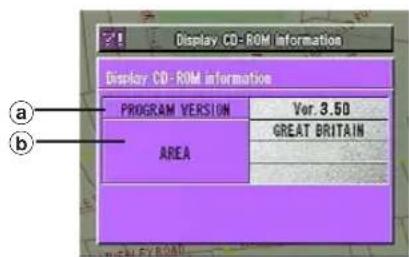
a PROGRAM VERSION Shows the Map CD ROM Version in use. b AREA Shows the map area contained in the CD ROM in use.
3 Press the POS. button The display returns to the map screen showing the present vehicle position.
Using New Functions
A) How to input the address number in the searching for destination from address (name of city/street) procedure (Easy mode)
1 Select the desired street name by following steps 1 to 8 shown on pages 18 to 20 of the Owner's Manual.
![Input destination by Address LONDON LONDON L. LONDON BRIDGE[EC4] LONDON BRIDGE[SE1] LONDON BRIDGE ST. LONDON BRIDGE WALK LONDON DIOCESAN HOUSE](/content/2026/06/1229372/images/36b37f44e3368adaad02d7114712c2f15f21f3ab39b7f47e10ba6d12bbf3c1b5.jpg)
2 The Detailed Information screen appears. Select "address number" from the menu and press ENTER.

3 The address number inputting pallet is displayed. Select the numerals for the address number and press EN-TER.

Range of Searchable Address Numbers
Note: In the searchable range, there may be some address numbers that are not searchable.
4 When the desired address number has been input, select "OK" and press ENTER.

5 The system starts to calculate the route. When the calculation has been completed, the system automatically displays the present vehicle position screen.
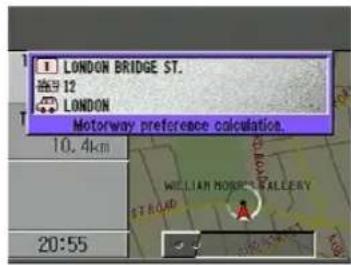
B) How to input the address number in the searching for point of interest from address procedure (Expert mode)
1 Select the desired street name by following steps 1 to 3 shown on page 23 of the Owner's Manual.
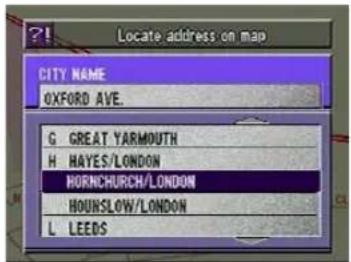
2 The Detailed Information screen appears. Select "address number" from the menu and press ENTER.
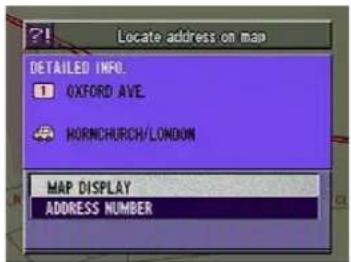
3 The address number inputting pallet is displayed. Select the numerals for the address number and press EN-TER. Range of Searchable Address Numbers
Range of Searchable Address Numbers

Note: In the searchable range, there may be some address numbers that are not searchable.
4 When the desired address number has been input, select "OK" and press ENTER.

5 The "Point may be set on map" menu with the map showing the area of the point of interest appears. Select the desired menu item and press ENTER to set the point as a destination, waypoint, etc.

Buttons and functions of remote controls
RUE-4113 RUE-4167

RUE-4105
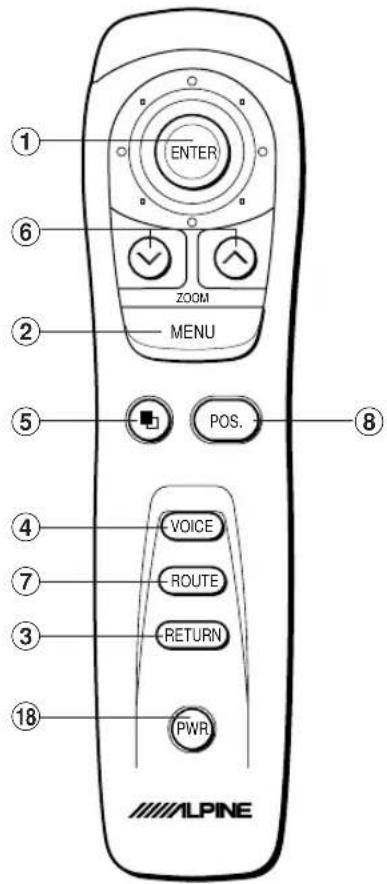
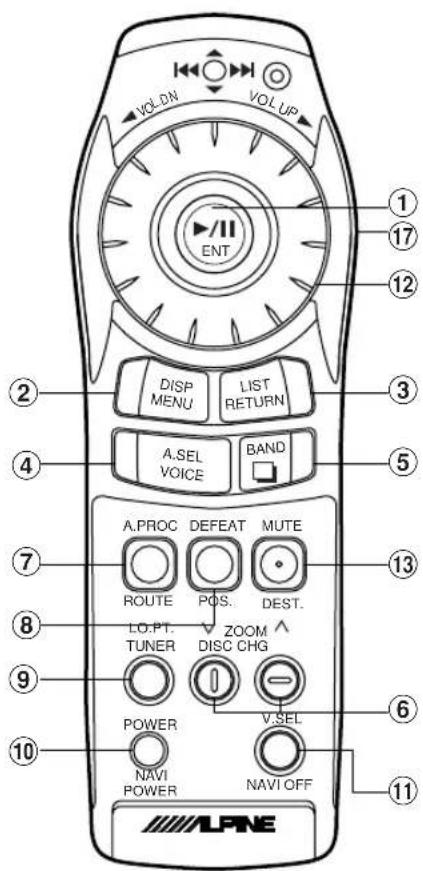
(with flap lid opened)
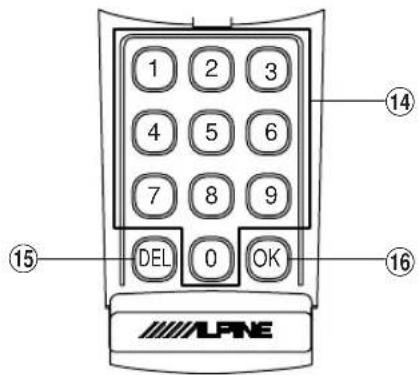
| Button No. | RUE-4113 | RUE-4105 | RUE-4167D | |
| 1 |  |  | Tilting the joystick selects items from menus and moves the map in eight directions. Pressing the ENTER button selects a highlighted item in the menu when the button is pressed. |  |
| 2 |  |  | Displays the menu screen. |  |
| 3 |  |  | Returns the navigation system to the previous searching. |  |
| 4 |  |  | Press this button for voice guidance. Press to switch between the map and guide (with arrow) modes. |  |
| 5 |  | [GSBT] | Pressing this button between the map and guide (with arrow) modes. |  |
| 6 |  | [3AB2] | Changes the map magnification ratio downward/ upward. |  |
| 7 |  |  | Pressing this button searches for the route again and switches between motorway preference and ordinary road preference for route searching. |  |
| 8 | POS. |  | Returns to the current position of your vehicle or displays the latitude/longitude. Press and hold to switch display screens. (NOR.UP → HEAD UP → FRONT-WIDE) | DEFEAT |
| 9 |  | — | Pressing this button displays the current position of the vehicle or local interest points in the vicinity. When this button is pressed, the selection menu for the displayed local points will appear in the display. |  |
| 10 |  | — | Turns the pictorial display on. |  |
| 11 | OFF | — | Turns the pictorial display off. |  |
| 12 | — | — | This has multiple functions. In map displays, zooms in or out; in list displays, scrolls list pages; in coordinate inputting, moves cursor; in alphabet inputting, moves alphabetical characters. |  |
| 13 | — | — | Pressing this button displays street name inputting screen. |  |
| 14 | — | — | Inputs numerals. |  |
| 15 | — | — | Erases the previous numeral in number inputtings. | [c2T2] |
| 16 | — | — | Executes numeral inputtings and starts searching. |  |
| 17 | — | — | Switches between Audio and Navigation for remote controlling. |  |
| 18 | — | PWR | Turns the pictorial display on or off. | — |
- ALPINE ELECTRONICS GMBH
- ALPINE®
- SMART MAP PRO
- NVE-N055ZP/NVE-N055VP
- SUPPLEMENTARY OWN- ER'S MANUAL
- SUPPLEMENT AU MODE D'EMPLOI
- WARNING
- BEFORE USING THE DISC
- OPERATING-SYSTEM PROGRAMME REWRITING
- TO USE THE NEW-VERSION OF THE MAP DISC
- TO USE THE EARLIER VERSION OF THE MAP DISC AFTER USING THE NEW-VERSION OF THE MAP DISC
- ONLY FOR THE USERS OF SMART MAP PRO PROG. VER. 3.10 OR EARLIER VERSIONS
- UNUSABLE FUNCTIONS
- AN OUTLINE OF KEY DIFFERENCES IN FUNCTIONS AND MENU DISPLAYS BETWEEN THE EARLIER VERSION AND NEW VERSION DISCS
- VIEWING CD ROM IN- FORMATION
- USING NEW FUNCTIONS
- HOW TO INPUT THE ADDRESS NUMBER IN THE SEARCHING FOR POINT OF INTEREST FROM ADDRESS PROCEDURE (EXPERT MODE)
- BUTTONS AND FUNCTIONS OF REMOTE CONTROLS
Brand : ALPINE
Model : NVS-CB0X
Category : Unspecified