
95-7642 - Car Installation Kit Metra - Free user manual and instructions
Find the device manual for free 95-7642 Metra in PDF.


| Product Type | Car Installation Kit (Dash Kit) |
| Brand | Metra |
| Model | 95-7642 |
| Application | Nissan Leaf (Non-Nav models) 2011-2017 |
| Radio Provision | ISO DIN (Double DIN) |
| Kit Components | Radio Trim Panel, Radio Brackets (2 pcs) |
| Material | High-grade ABS Plastic, Metal Brackets |
| Color | Black (typical trim panel) |
| Dimensions (Approx.) | 7 x 4 x 2 inches (Trim Panel) |
| Weight (Approx.) | 0.5 lbs (0.23 kg) |
| Power Requirements | None (Passive Kit) |
| Wiring Harness Required | Sold separately (Metra/Axxess interface suggested) |
| Antenna Adapter Required | Not required |
| Tools Required | Panel Removal Tool, Phillips Screwdriver |
| Installation Difficulty | Moderate (DIY: 30-60 minutes) |
| Maintenance & Cleaning | Wipe with dry soft cloth; avoid solvents |
| Safety Precautions | Disconnect negative battery terminal before installation |
| Spare Parts Availability | Contact Metra Customer Support |
| Repairability | Non-repairable; replacement kit available |
| Compliance | OEM fitment, ISO standards |
| Warranty | 1-year limited warranty (Metra) |
| Tech Support | 386-257-1187 / techsupport@metra-autosound.com |
| Manufacturer | Metra Electronics |
Frequently Asked Questions - 95-7642 Metra
User questions about 95-7642 Metra
0 question about this device. Answer the ones you know or ask your own.
Ask a new question about this device
Download the instructions for your Car Installation Kit in PDF format for free! Find your manual 95-7642 - Metra and take your electronic device back in hand. On this page are published all the documents necessary for the use of your device. 95-7642 by Metra.
USER MANUAL 95-7642 Metra
Nissan Leaf (Non Nav models) 2011-2017
*Visit NetraOnline.com for more detailed information about the product and up-to-date vehicle specific applications
KIT FEATURES
- ISO DDIN radio provision
KIT COMPONENTS
• A) Radio trim panel • B) Radio brackets

natural_image
Technical line drawing of a rectangular frame with two side extensions (no text or symbols)
natural_image
Two isometric views of metal bracket panels with holes and circular cutouts, no text or symbols presentTABLE OF CONTENTS
Dash Disassembly....2
Kit Assembly 3
WIRING & ANTENNA CONNECTIONS (sold separately)
Wiring Harness: Visit metraonline.com for audio/video and steering wheel control interface options. Antenna Adapter: Not required
TOOLS REQUIRED
- Panel removal tool
• Phillips screwdriver
Attention: With the key out of the ignition, disconnect the negative battery terminal before installing this product. Ensure that all installation connections are secure before cycling the ignition to test this product.
DASH DISASSEMBLY
- Unclip and remove the trim panel surrounding the radio including the climate controls. (Figure A)
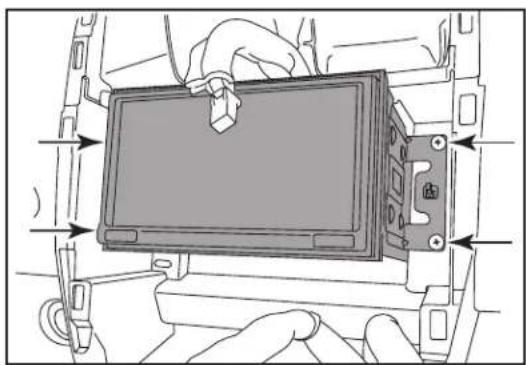
- Remove (4) Phillips screws securing the radio chassis then unplug and remove the chassis. (Figure B)
Continue to Kit Assembly

natural_image
Interior view of a car dashboard with air vent and control buttons (no text or symbols visible)(Figure A)
natural_image
Diagram of hands installing or adjusting a device panel on a vehicle chassis (no text or symbols visible)(Figure B)
KITASSEMBLY
-
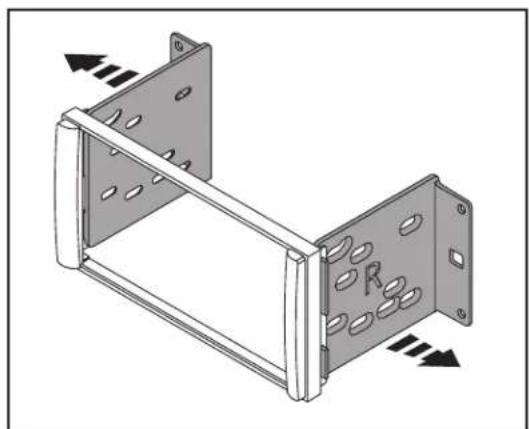
Attach the radio brackets to the radio trim panel. (Figure A)
-
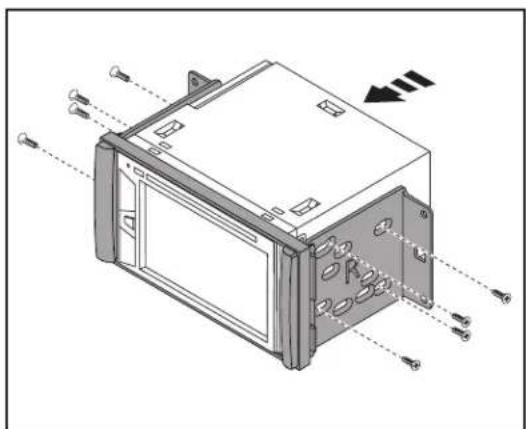
Slide the radio into the completed assembly, and then secure it to the assembly using screws supplied with the radio. (Figure B)
-
Locate the factory wiring harness and antenna connector in the dash, and complete all necessary connections to the radio. Metra recommends using the proper mating adapter from Metra and/or AXXESS.
-
Reconnect the negative battery terminal and test the radio for proper operation.
-
Reassemble the dash in reverse order of disassembly.
natural_image
Technical illustration of a metal frame structure with mounting holes and directional arrows indicating force or movement (no text or symbols)(Figure A)
natural_image
Technical line drawing of a device housing with mounting holes and wiring (no text or symbols)(Figure B)
Having difficulties? We're here to help.

Contact our Tech Support line at:
386-257-1187

Or via email at:
techsupport@metra-autosound.com
Tech Support Hours (Eastern Standard Time)
Monday - Friday: 9:00 AM - 7:00 PM
Saturday: 10:00 AM - 5:00 PM
Sunday: 10:00 AM - 4:00 PM

Metra recommends MECP certified technicians


Brand : Metra
Model : 95-7642
Category : Car Installation Kit