RETDD20MG - Microwaves Cookology - Free user manual and instructions
Find the device manual for free RETDD20MG Cookology in PDF.


User questions about RETDD20MG Cookology
0 question about this device. Answer the ones you know or ask your own.
Ask a new question about this device
Download the instructions for your Microwaves in PDF format for free! Find your manual RETDD20MG - Cookology and take your electronic device back in hand. On this page are published all the documents necessary for the use of your device. RETDD20MG by Cookology.
USER MANUAL RETDD20MG Cookology
IMPORTANT SAFETY INSTRUCTIONS READ CAREFULLY AND KEEP FOR FUTURE REFERENCE
Household use only SAVE THESE INSTRUCTIONS
IMPORTANT SAFEGUARDS
WARNING: If the door or door seals are damaged, the oven must not be operated until it has been repaired by a trained person.
WARNING: It is hazardous for anyone other than a trained person to carry out any service or repair operation, which involves the removal of any cover, which gives protection against exposure to microwave energy. WARNING: Liquids or other food must not be heated in sealed containers since they are liable to explode.
- Only use utensils that are suitable for use in microwave ovens.
- M etallic containers for food and beverages are not allowed during microwave cooking.
- When heating food in plastic or paper containers, keep an eye on the oven due to the possibility of ignition.
- The microwave oven is only intended for heating food and beverages. It is not recommended to dry food or clothing or warming pads, slippers, sponges, damp cloth and similar which may lead to the risk of injury, ignition or fire.
- If smoke is observed, switch off or unplug the appliance immediately and keep the door closed in order to suppress any flames. Microwave heating of beverages can result in a delay for the liquid to boil, therefore take care when handling the container.
- The contents of feeding bottles and baby food jars are to be stirred or shaken and the temperature is to be checked before consumption, in order to avoid burns.
- Eggs in their shell and whole hard-boiled eggs shall not be heated in microwave ovens since they may explode, even after microwave heating has ended.
- Failure to maintain the oven in a clean condition could lead to deterioration of the surface that could adversely affect the life of the appliance and possibly result in a hazardous situation.
-
The appliance must not be placed in a cabinet.
-
Care should be taken not to displace the turntable when removing containers from the appliance.
- The appliance shall not be cleaned with a steam cleaner.
- It is not recommended to install the appliance higher than 900mm above the floor. We recommend to sit the Microwave on a worktop securely fitted at the same level as a built-in cooking hob. Minimum height of free space necessary above the top surface of the oven: 100mm.
Warning: When the appliance is operated in the combination mode, children should only use the oven under adult supervision due to the temperatures generated.

CAUTION: HOT SURFACE
- If the supply cord is damaged, it must be replaced by the manufacturer or its service agent or a similarly qualified person in order to avoid a hazard.
- This appliance should not be used by children.
- In order to avoid the internal glass plate from cracking, do not place it into cold water after use. We suggest allowing the glass plate to cool for 20 minutes before washing.
- Group 2 Class B appliance Class B equipment is suitable for use in domestic establishments and in establishments directly connected to a low voltage power supply network.
- This product internal light source LED light on <60lm.
- After the Microwave has finished its cycle it will enter standby mode.
Standby power< 0.8W.
INSTALLATION
- Remove all the transit packaging. Remove any film that may be covering the Microwave. . Check carefully for damage. If any, immediately notify the manufacturer.
- Microwave ovens must be placed under dry and non-corrosive environments, keep away from heat and humidity as well as cooking hobs or ovens.
- To ensure sufficient ventilation, the distance at the back of microwave to the wall should be at least 10 cm, the side to the wall should be at least 5 cm, the free distance above the top of the Microwave should be at least 10 cm.
- The appliance must be positioned so that the plug is accessible and easy to disconnect if necessary.
- The microwave oven must be operated with the door closed.
- The microwave oven must not be placed in a cabinet. The microwave oven is intended to be used as freestanding appliance.
- The first time the Microwave is used, It is recommended to place a cup of water in the Microwave and operating at high power for 2 minutes to clear any odours that may be present. Please repeat a few times to ensure the Microwave cavity is fresh.
MICROWAVE OVEN CARE

CAUTION
The oven should be cleaned regularly and any food deposits removed.

WARNING
a. Remove the power cord from the wall outlet before cleaning. After cooling products. Don't immerse the appliance in water or other fluids when cleaning.
b. Failure to maintain the oven in a clean condition could lead to deterioration of the surface that could adversely affect the life of the appliance and possibly result in a hazardous situation.
c. Never use hard detergent, gasoline, abrasive powder or metal brush to clean any part of the appliance.
d. Do not remove the waveguide cover.
e. e. When the Microwave oven has been used for a long time, there may be some strange odours in oven, to clear please follow these two methods:
1) Place several lemon slices in a cup, then heat with high micro power for 2-3 min.
2) Put some orange peel into oven, and then heat with high micro power for 1 minute.
change ‘dampened’ to ‘damp’ in all cases
f. If the product is not being used, place it in a dry and well ventilated area.

WARNING
Details how to clean surfaces in contact with food:
After use wipe the waveguide cover with a damp cloth, followed by dry cloth to remove any food splashes and grease. Built -up grease may overheat and begin to cause smoke or catch fire.
TIPS FOR CLEANING
Details for cleaning door seals, cavity and adjacent parts:
Exterior:
Wipe the enclosure with a damp soft cloth
Door:
Using a damp soft cloth, wipe clean the door and window
Wipe the door seals and adjacent parts to remove any spill or spatter
Wipe the control panel with a slightly damp soft cloth Interior walls:
Wipe clean the interior surfaces with a damp soft cloth Wipe clean the waveguide cover to remove any food splashed
Turntable / Rotation ring / Rotation axis:
Wash with mild soap water
Rinse with clean water and allow drying thoroughly
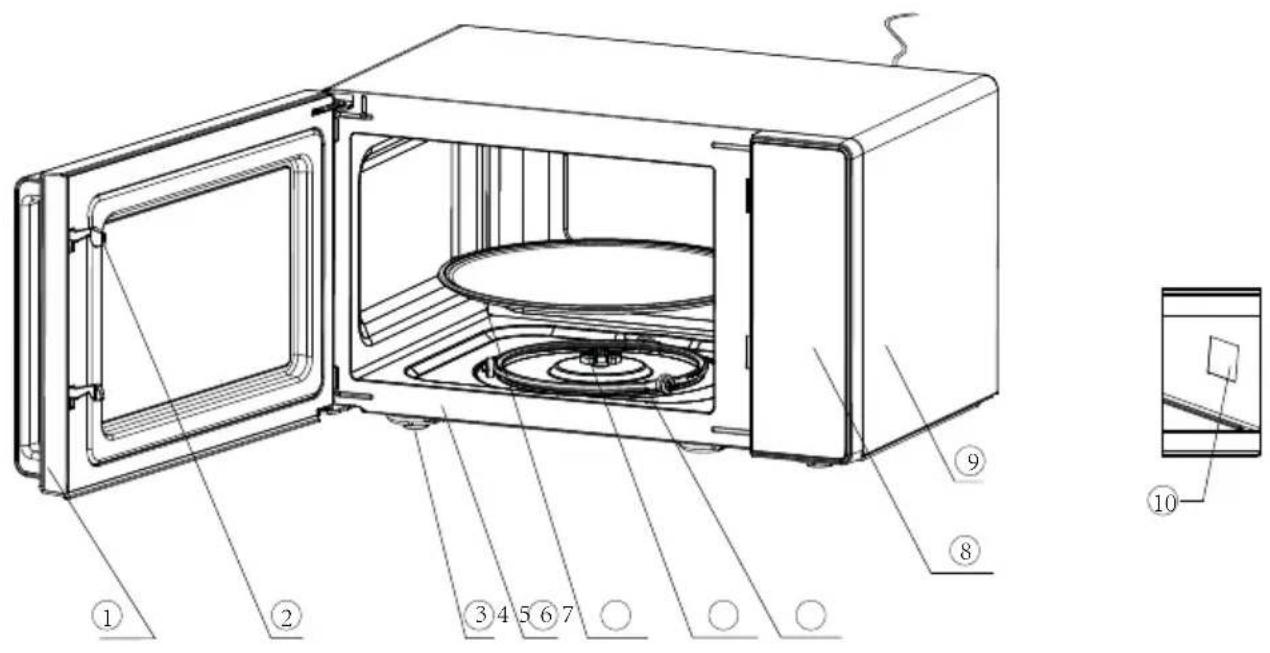
text_image
Technical diagram of a microwave oven with numbered components and a close-up inset showing internal structure.1) Door seal
2) Door lock
Microwave oven door must be properly closed in order for it to operate.
The food sits on the turntable, its rotation during operation helps to cook food evenly
6) Rotating axis
The glass turntable sits on the axis; the motor underneath it drives the turntable to rotate
7) Rotating ring
The glass turntable sits on its wheels; it supports the turntable and helps it to balance when rotating
CAUTION
- Place the rotating ring first
- Fit the turntable onto the rotating axis and make sure that it is geared in properly
8) Control panel
See below in details (the control panel is subject to change without prior notice)
9) Housing
10) Waveguide cover
It is inside the Microwave oven, next to the wall of control panel.
WARNING
Never remove the waveguide cover.
text_image
Micro. Def./clock Menu STOP/lock START/ +30s Time • Weight - +9
Please register the warranty for this product on www.Cookology.com Cookology Limited Ground floor, 71 Lower Baggot Street, Dublin 2, D02 P593 The Wright Buy Ltd Unit 2 Piperell Way, Haverhill, Suffolk, CB9 8QW, United Kingdom
1. BEFORE COOKING
When the Microwave is first plugged into the power supply, the display will light up in standby mode and the display shows 1:00.
2. MICROWAVE FUNCTION
There are five microwave power levels, 100P, 80P, 50P, 30P and 10P, respectively. Press the “Micro.” button continuously to select the desired microwave power. Turn the knob to select cooking time, and the time range that can be regulated is from 0:10 to 60:00. After selecting the cooking time, press “START/+30s” button to start work. A buzzing sound to notify completion of the operation.
| HIGH 100% power output | (Applicable for quick and thorough cooking) | |
| M.High 80% power output | (Applicable for medium express cooking) | |
| Med | 50% power output | (Applicable for steaming food) |
| M.Low | 30% power output | (Applicable for defrosting food) |
| LOW | 10% power output | (Applicable for keeping warm) |

CAUTION
a. The max time which can be set is 60 minutes.
b. Never use the grill rack during microwave cooking.
c. Never operate the oven empty.
d. At the maximum microwave power, the oven will
automatically lower the power after a certain time of cooking to lengthen the service life.
e. If you turn the food during operation, press the Start/+30s button once and the preset cooking procedure will continue.
f. If you intend to remove the food before the preset time, you must press Stop/Lock button once to clear the preset procedure to avoid unintended operation of next time use.
3. DEFROST/CLOCK
3.1 DEFROST
There are two defrost mode, dEF1 and dEF2, respectively. dEF1 for defrost by weight and dEF2 for defrost by time. Press this button to select defrost by weight or by time, and the display screen will display "dEF1" or "dEF2". Turn the knob to select food weight or defrost time. The weight range of dEF1 is from 100 to 1500g, and the optional time range of dEF2 is from 0:10 to 60:00. After selecting the defrost weight or time, press the "START/+30s" button start to work. A buzzing sound will be heard to notify completion of the operation. The dEF1 defrost mode by weight will have a beeping sound to prompt the food to be turned over during defrosting.
Below is some food defrosting time advice:
| dEF1 | For defrosting, the weight range from 100 to 1500g. |
| dEF2 | For defrosting, the time range from 0:10 to 60:00. |

CAUTION
a. It is necessary to turn over the food during operation to obtain
uniform effect.
b. Usually defrosting will need longer time than that of cooking the food.
c. If the food can be cut by knife, the defrosting process can be considered completed.
d. The Microwave defrost functions aims to penetrate approximately 4cm into most food items. Larger items than 4cm may not be successfully defrosted by the Microwave and should be defrosted by leaving at room temperature.
e. Defrosted food should be consumed as soon as possible, it is not advised to put back to fridge and freeze again.
3.2 CLOCK (24-hour clock)
In standby mode, press and hold down the "DEFROST/CLOCK" button for more than 3 seconds to enter the clock setting interface. At the same time, the display screen blinks in hours. The hour time can be set by turning the knob. After setting the hour, press the "START/+30s" button for a short time to confirm and switch to the setting minute mode. The minutes can be set by turning the knob. After setting minutes, press the "START/+30s" button again to confirm and exit the setting mode.
4. AUTO COOKING
There are eight automatic menus A.1\~A.8, potato, pasta, pizza, popcorn, vegetable, beverage, meat and fish respectively. Press the “Menu” button continuously to select the desired menu, the display screen corresponds to A.1 \~ A.8, then turn the knob to select the weight of the menu. After selecting the cooking weight, press “START/+30s” button to start work. A buzzing sound to notify completion of the operation.
| Display Kind Method | ||
| A.1 | Potato | The optional weights are 250g, 500g and 750g |
| A.2 | Pasta | The optional weights are 50g, 100g and 150g |
| A.3 | Pizza | The optional weights are 200g and 400g |
| A.4 | Popcorn | The optional weight is 100g |
| A.5 | Vegetable | The optional weights are 200g, 400g and 600g |
| A.6 Beverage | The optional weights are 1 cup, 2 cups or 3 cups, each one about 250ml. | |
| A.7 | Meat | The optional weights are 200g, 400g and 600g |
| A.8 | Fish | The optional weights are 200g, 400g and 600g |

CAUTION
a. The temperature of food before cooking would be 20-25°C. Higher or lower temperature of the food before cooking would require increase or decrease of cooking time.
b. The temperature, weight and shape of the food will influence the cooking process. It may be necessary to adjust the cooking time instead of using the auto-functions to achieve the best results.
5. STOP
The stop function can be used as follows:
- whilst selecting the cooking settings if the “STOP” button is used the Microwave will return to standby mode.
- If the Microwave is operating, pressing the “STOP” button will pause cooking.
- In this pause mode, pressing "STOP" button again will cancel the function and return to standby mode.
6. START/+30s
After setting the cooking time or food weight, press “START/+30s” button to start microwave oven immediately. In working state, can press “START/+30s” button to increase time, press one time to increase 30 seconds, but the menu mode and weight defrosting mode cannot adjust time. In pause state, can press “START/+30s” button to continue the microwave oven before cooking mode.
7. EXPRESS
In standby mode, after the food is put in and the door is closed, press the "START/+30s" button to quickly start the microwave. The default working time is 30 seconds. In the process of working, press the "START/+30s" button once for 30 seconds. A buzzing sound to notify completion of the operation.
8. CHILD LOCK FUNCTION
Use this feature to lock the control panel when you are cleaning or so that children cannot use the oven unsupervised. All the buttons are rendered inoperable in this mode.
1) Set lock: In standby mode, press and hold down the "STOP" button for more than 3 seconds, the child lock function is locked, and all buttons of the microwave oven cannot be operated.
2) Cancel lock: In the child lock state, press and hold down the "STOP" button for more than 3 seconds to cancel the child lock function.
UTENSILS GUIDELINE
It is strongly recommended to use utensils which are suitable and safe for microwave cooking. Generally, the utensils which are made of heat-resistant ceramic, glass or plastic are suitable for microwave cooking. Never use metal utensils for microwave cooking and combination cooking as sparker likely to occur. Please refer to the table below.
| Material of container | Microwave Notes | |
| Heat-resistant ceramic | Yes | Never use the ceramics which are decorated with metal rim or glazed |
| Heat-resistant plastic | Yes | Can not be used for long time microwave cooking |
| Heat-resistant glass | Yes | |
| Grill rack No | ||
| Plastic film | Yes | It should not be used when cooking meat or chops as the over-temperature may do damage to the film |
COOKING TIPS
The following factors may affect the cooking result:
Food arrangement
Place thicker areas towards outside of dish, the thinner part towards the centre and spread it evenly. Do not overlap if possible.
Cooking time length
It is recommended to select shorter time settings in order to be able to evaluate the progress of the cooking process. Further cooking may be necessary to ensure the food has been properly cooked. Initial, longer settings, may over cook or burn the food resulting in smoke within the Microwave.
Cooking food evenly
Food such as chicken, hamburger or steak should be turned once during cooking.
Depending on the type of food, if applicable, stir it from outside to centre of dish once or twice during cooking
Allow standing time
After cooking times out, leave the food in the oven for an adequate length of time, this allows it to complete its cooking cycle and cooling it down in a gradual manner
How to tell if the food is done
The colour and texture of food will help to determine if it is cooked. Factors to help will include:
- Steam coming out from all parts of food, not just the edge
- Joints of poultry can be moved easily
- Pork or poultry shows no signs of blood
- Fish is opaque and can be sliced easily with a fork
Browning dish
When using a browning dish or self-heating container, always place a heat-resistant insulator such as a porcelain plate under it to prevent damage to the turntable and rotating ring.
Microwave safe plastic wrap
When cooking food with high fat content, do not allow the plastic wrap come into contact with food as it may melt
Microwave safe plastic cookware
Some microwave safe plastic cookware might not be suitable for cooking foods with high fat and sugar content. Also, the preheating time specified in the dish instruction manual must not be exceeded.
MAINTENANCE
SERVICING
Please check the following before calling for services.
-
Place one cup of water (approx. 150ml) in a glass measure in the oven and close the door securely. Oven lamp should go off if the door is closed properly. Let the oven work for 1 min.
-
Does the oven lamp light?
- Does the cooling fan work?
(Put your hand over the rear ventilation openings.)
- Does the turntable rotate?
(The turntable can rotate clockwise or counter clockwise. This is quite normal.)
5. Is the water inside the oven hot?
If “NO” is the answer to any of the above questions, please check your wall socket and the fuse in your meter box.
If both the wall socket and the fuse are functioning properly, CONTACT YOUR NEAREST SERVICE CENTER APPROVED.
SERVICING SAFEGUARDS- IMPORTANT TRAINED PERSONNEL ONLY
The following are notes to assist Service engineers
Caution: MICROWAVE RADIATION
- The high voltage capacitor remains charge after disconnection; short the negative terminal of H. V capacitor to the oven chassis (use a screwdriver) to discharge before touching.
-
During servicing below listed parts are liable to be removed and give access to potentials above 250V to earth.
-
Magnetron
• High voltage transformer
• High voltage capacitor
• High voltage diode -
High voltage fuse
-
The following conditions may cause undue microwave exposure during servicing.
-
Improper fitting of magnetron;
- Improper matching of door interlock, door hinge and door;
- Improper fitting of switch support;
● Door, door seal or enclosure has been damaged.
| Correct disposal of this product | |
| This marking indicates that this product should not be disposed with other household wastes throughout the EU. To prevent possible harm to the environment or human health from uncontrolled waste disposal, recycle it responsibly to promote the sustainable reuse of material resources. To return your used device, please use the return and collection systems or contact the retailer where the product was purchased. They can take this product for environmental safe recycling. | |