
Irwin 60 - Headphones Audibax - Free user manual and instructions
Find the device manual for free Irwin 60 Audibax in PDF.


| Product Type | LED Lighting Fixture (Par Can) |
| Brand | Audibax |
| Model | Irwin 60 |
| Dimensions | 268 x 246 x 137 mm |
| Net Weight | 1.84 kg |
| Power Supply | AC 100V-240V / 50-60Hz |
| Power Consumption | 45 W |
| Light Source | 6 x 10W RGBW 4-in-1 Ultra Bright LEDs |
| Beam Angle | 25 degrees |
| DMX Modes | 4 or 8 channels |
| Control Modes | Auto, Sound Active, DMX512, Master/Slave, IR Remote |
| Display | 4-button LED display |
| USB Port | 5V, 200 mA |
| Power Connectors | Seetronic Powercon In/Out |
| Data Connectors | Seetronic 5-pin XLR (In/Out) |
| IP Rating | IP20 (indoor use only) |
| Package Contents | Fixture, power cable, IR remote, user manual |
| Safety Features | Safety cable required; mounting bracket with screw holes |
| Cleaning | Soft cloth with glass cleaner; internal optics every 30-60 days |
| Disposal | WEEE directive; do not dispose with household waste |
Frequently Asked Questions - Irwin 60 Audibax
User questions about Irwin 60 Audibax
0 question about this device. Answer the ones you know or ask your own.
Ask a new question about this device
Download the instructions for your Headphones in PDF format for free! Find your manual Irwin 60 - Audibax and take your electronic device back in hand. On this page are published all the documents necessary for the use of your device. Irwin 60 by Audibax.
USER MANUAL Irwin 60 Audibax
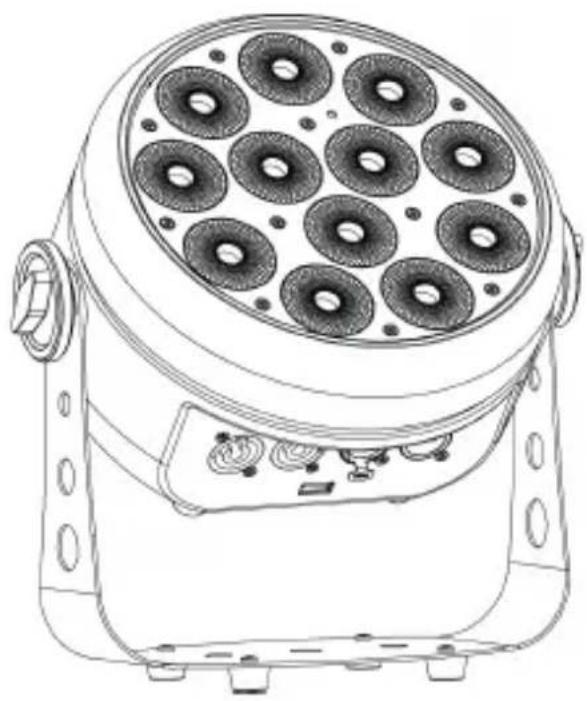
IRWIN 60 / IRWIN 120
6x10W RGBW 4in1 / 12x10W RGBW 4in1 6x10W RGBW 4en1 / 12x10W RGBW 4en1
INDEX / ÍNDICE
ENGLISH
WELCOME TO AUDIBAX....1
SAFETY INSTRUCTIONS....1
IMPORTANT INFORMATION......2
PACKAGE CONTENT....3
TECHNICAL SPECIFICATION....3
INSTALLATION....4
HOW TO USE THE UNIT....4
HOW TO CONTROL THE FIXTURE....5
DMX512 CONNECTIONS......6
TROUBLESHOOTING......6
FIXTURE CLEANING....7
DISPOSAL....7
ESPAÑOL
BIENVENIDOS A AUDIBAX....8
Thank you very much for choosing Audibax. We hope you enjoy your new product.
It has been developed and designed paying attention to the smallest details, with quality control with European standards supervised by our great team of professional technicians, who work every day to offer our customers the best quality.
We make sure that every Audibax product is built to last long. All our references are made with long lasting materials and our specialists are dedicated to constantly doing quality controls to guarantee the best result.
Please read carefully this manual in order to use your Audibax product in the best way. Do not hesitate to visit our website for further information: www.audibax.com
SAFETY INSTRUCTIONS
GENERAL INFORMATION
- It is important to read and follow the instructions carefully.
- Keep all information and instructions in a secure location.
- Always follow the instructions provided.
- Take note of all safety warnings and never remove them from the equipment.
- Use the equipment only as intended and for its intended purpose.
- Ensure that the stands and/or mounts used are sufficiently stable and compatible for fixed installations. Wall mounts should be properly installed and secured, and the equipment should be installed securely to prevent falls.
- When installing the equipment, be sure to observe the relevant safety regulations in your country.
- Do not install or operate the equipment near sources of heat, such as radiators, heat registers, or ovens, and ensure that it is always cooled sufficiently and cannot overheat.
- Do not place sources of ignition, such as burning candles, on the equipment.
- Keep ventilation slits unobstructed.
- For equipment designed for indoor use only should not be used near water, flammable materials, fluids, or gases. Special outdoor equipment should be used in accordance with the manufacturer's instructions.
- Ensure that no dripping or splashed water can enter the equipment and do not place containers filled with liquids on the equipment.
- Prevent objects from falling into the equipment.
- Use the equipment only with recommended accessories intended by the manufacturer.
- Do not attempt to open or modify the equipment.
- Check all cables after connecting the equipment to prevent accidents or damage due to tripping hazards.
- During transport, take steps to prevent the equipment from falling and causing damage or injury.
- If the equipment is not functioning properly, fluids or objects have gotten inside, or is otherwise damaged, switch it off immediately and unplug it from the power outlet (if applicable). Only authorized, qualified personnel should repair the equipment.
- Clean the equipment with a dry cloth.
- Comply with all applicable disposal laws and separate plastic and paper/cardboard during packaging disposal.
- Keep plastic bags out of the reach of children.
FOR DEVICES DESIGNED TO BE CONNECTED TO THE MAIN POWER SUPPLY:
- ATTENTION: If your equipment has a power cord with a grounding plug, it must be connected to a wall outlet with a ground connection. Never remove the grounding plug from the power cord.
- If your equipment has been exposed to extreme temperature changes, allow it to reach room temperature before turning it on. Otherwise, moisture and condensation may damage the equipment.
- Before plugging in the equipment, make sure that the voltage and frequency of the power outlet match the specifications of the equipment. If the equipment has a voltage selector, only connect it to the power outlet if the values match. If the power cord or adapter does not fit your outlet, contact an electrician.
- Do not step on the power cord. Make sure it is not pinched at the outlet, adapter, or equipment connection.
- Keep the power cord or adapter within reach and disconnect the equipment from the power supply when not in use or when cleaning it. Always unplug the cord or adapter by pulling the plug or adapter, not the cord. Never touch the cord or adapter with wet hands.
- Avoid frequently turning the equipment on and off, as this can reduce its useful life.
- IMPORTANT: Only replace fuses with those of the same type and rating. If a fuse repeatedly blows, contact an authorized service center.
- To completely disconnect the equipment from the power mains, unplug the power cord or adapter from the outlet.
- If your device has a Volex power connector, the mating Volex connector must be unlocked before it can be removed. Be careful when laying cables, as the equipment can slide or fall if the power cord is pulled.
- Unplug the power cord or adapter before an extended period of disuse or in case of lightning strike risk.
- Only install the equipment when it is disconnected from the power source.
- To prevent damage and overheating, qualified personnel should regularly clean and service the equipment depending on ambient conditions like dust, nicotine, and fog.
If the product contains the following symbols, please, read carefully:

CAUTION: To reduce the risk of electric shock, do not remove cover (or back). There are no user serviceable parts inside. Maintenance and repairs should be exclusively carried out by qualified service personnel.

The warning triangle with lightning symbol indicates dangerous uninsulated voltage inside the unit, which may cause an electrical shock.
The warning triangle with exclamation mark indicates important operating and maintenance instructions.
IMPORTANT INFORMATION
WARNING! IMPORTANT INFORMATION REGARDING LIGHTING PRODUCTS
- This product is specifically designed for use in event technology and is not intended to be used as household lighting.
- It is important to avoid looking directly at the light beam, even for a short period of time.
- Optical instruments, such as magnifiers, should not be used to look directly at the beam.
- If you are sensitive to strobe effects, it is possible that they could cause an epileptic seizure. If you have epilepsy, it is important to avoid places where strobe lights are being used.
PACKAGE CONTENT
1 x Irwin 60 / Irwin 120
1x Power cable
1x IR remote
1 x User's manual
TECHNICAL SPECIFICATIONS
IRWIN 60
- DMX mode: 4/8 channels
- Display: 4 buttons LED display
- Operation mode: Auto, Sound Active, DMX512, Master/Slave, IR Remote
- USB Port: 5V,200mA
- Power Supply: AC100V-240V/50-60Hz
- Power Consumption: 45W
- Light source: 6pcs 10W RGBW 4 in One Ultra Bright LEDs
- Beam Angle: 25°
- Power in/out: Seetronic Powercon In/Out
- Data in/out: Seetronic 5-pin XLR socket
- IP rating: IP20
- Dimensions: L 268 x W 246 x H 137 mm
- Packing Size: L 315 x W 260 x H 200 mm
- Net Weight: 1.84 kg


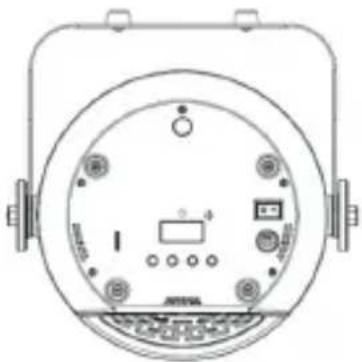

IRWIN 120
- DMX mode: 4/8 channels
- Display: 4 buttons LED display
- Operation mode: Auto, Sound Active, DMX512, Master/Slave, IR Remote
- USB Port: 5V,200mA
- Power Supply: AC100V-240V/50-60Hz
- Power Consumption: 80W
- Light source: 12pcs 10W RGBW 4 in One Ultra Bright LEDs
- Beam Angle: 25°
- Power in/out: Seetronic Powercon In/Out
- Data in/out: Seetronic 5-pin XLR socket
- IP rating: IP20
- Dimensions: L 268 x W 246 x H 137 mm
- Packing Size: L 315 x W 260 x H 200 mm
- Net Weight: 1,9 kg


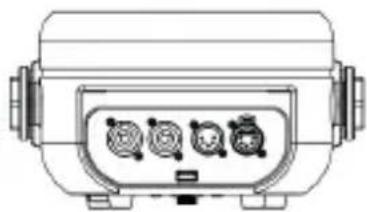
INSTALLATION
The unit should be mounted via its screw holes on the bracket. Always ensure that the unit is firmly fixed to avoid vibration and slipping while operating. Always ensure that the structure to which you are attaching the unit is secure and is able to support a weight of 10 times of the unit's weight. Also always use a safety cable that can hold 12 times of the weight of the unit when installing the fixture.
The equipment must be fixed by professionals. And it must be fixed at a place where is out of the touch of people and has no one pass by or under it.
HOW TO USE THE UNIT
Control Panel
Display(Normal)


Menu

Up

Down

Enter
Menu: To select the program functions
Up: To go forward in the selected functions
Down: To go backword in the selected functions
Enter: Enter submenu
Main Function Chart
| MENU | Addr | A001 | AS12 | DMX address | |
| CHnd | 4CH | 8CH | Channel | ||
| SLAV | Slave mode | ||||
| SOUn | Sd01 | So08 | Sound sensitivity | ||
| JUN ® | JU01 | JU15 | Jump change | ||
| JE 0 | JE 4 | Strobe speed | |||
| FAdE | Fd01 | Fd15 | Gradual change | ||
| AUo | Auto mode | ||||
| COLO | C000 | C255 | Static color | ||
| CF-0 | CF-1 | Strobe speed | |||
| NAnu | r000 | r255 | Red dimmer | This is displayed in IR dimming mode and front panel | |
| G000 | G255 | Green dimmer | |||
| b000 | b255 | Blue dimmer | |||
| U000 | U255 | White dimmer | |||
| Disp | NO | Display normal | |||
| YFS | Inversion | ||||
| CIOO | CLI4 | Is kinds of colour | This is displayed only in IR remote control | ||
| sT01 | SI04 | Strobe spoco | |||
| OFF | Turn off |
HOW TO CONTROL THE FIXTURE
(1) Black Out: Turn on /off
(2) Auto: Auto show
(3) Sound: Sound activated
(4) Strobe: Strobe mode
(5) Fade/Jump: Gradual change/Jump change mode switch
(6) Sensitivity: Sound sensitivity adjustment
(7) R: Red dimmer in the dimming mode
(8) G: Green dimmer in the dimming mode
(9) B: Blue dimmer in the dimming mode
(10) R/G/B/A/UV/W /1\~9: Monochromatic mode (CL00-CL14)
(11) W: White dimmer in the dimming mode
(12) +: Increase parameter (include strobe speed adjust, sound sensitivity adjustment, color select, adjust the brightness of R, G, B, W Gradual change speed adjust, jump change speed adjust).
(13) —: Reduce parameter(include strobe speed adjustment, sound sensitivity adjustment, color select, adjustment the brightness of R,G,B,W Gradual change speed adjustment, jump change speed adjustment).
(14) 0: Function switch (Dimming mode and monochromatic mode)

DMX512 CONNECTIONS
The DMX512 is widely used in intelligent lighting control, with a maximum of 512 channels.
![graph TD A["DM-10"] --> B["DM-OUT"] C["DM-11"] --> D["DM-OUT"] E["DM-OUT"] --> F["..."] G["DM-OUT"] --> H["DM-OUT"]](/content/2026/06/1228588/images/6f02f77dc3c0a2b1a2afe387f0148757899728c8e8b23096b3fb947f157bfc60.jpg)
First Fixture Next Fixture N...
XLR mounting-plug: XLR mounting-socket:

1: Ground
2: Signal (-)
3: Signal (+)
4: NC
5: NC

1: Ground
2: Signal (-)
3: Signal (+)
4: NC
5: NC
A DMX512 data link is required in order to control the device via DMX. The device provides 5-pin XLR connectors for DMX connection.
- Connect the output of your DMX controller to the DMX input DMX IN of the device with a DMX cable.
- Connect the DMX output DMX OUT of the light set to the DMX input of the next unit in the chain. Always connect one output to the input of the next unit until all units are connected. Not suitable as signal splitter!
- At the last unit, the DMX cable has to be terminated. Plug the terminator with a 120 Ω resistor between Signal (-) and Signal (+) in the DMX output of the last unit.
TROUBLESHOOTING
Following are a few common problems that may occur during operation. Here are some suggestions for easy troubleshooting:
A. The fixture does not work, no light
- Check the connection of power and main fuse.
- Measure the mains voltage on the main connector.
B. Not responding to DMX controller
- DMX LED should be on. If not, check DMX connectors, cables to see if link properly.
- If the DMX LED is on and no response to the channel, check the address settings and DMX polarity.
- If you have intermittent DMX signal problems, check the pins on connectors or on PCB of the fixture or the previous one.
- Try to use another DMX controller.
- Check if the DMX cables run near or run alongside to high voltage cables that may cause damage or interference to DMX interface circuit.
C. Some fixtures don't respond to the easy controller
- You may have a break in the DMX cabling. Check the LED for the response of the master/slave mode signal.
- Wrong DMX address in the fixture. Set the proper address.
D. No response to the sound
- Make sure the fixture does not receive DMX signal.
- Check microphone to see if it is good by tapping the microphone.
FIXTURE CLEANING
The cleaning of internal must be carried out periodically to optimize light output. Cleaning frequency depends on the environment in which the fixture operates: damp, smoky or particularly dirty surrounding can cause greater accumulation of dirt on the fixture's optics.
- Clean with soft cloth using normal glass cleaning fluid.
- Always dry the parts carefully.
- Clean the external optics at least every 20 days. Clean the internal optics at least every 30/60 days.
DISPOSAL
Packaging:

- The packaging can be recycled using standard disposal methods and reintroduced into the reusable material cycle.
- Please follow the laws and regulations regarding disposal and recycling of packaging in your country.
Device:

-
This device is subject to the Waste Electrical and Electronic Equipment (WEEE) Directive of the European Union. Used appliances should not be disposed of with household waste. Used device must be disposed of through an approved disposal company or a municipal disposal facility. Please comply with the applicable regulations in your country.
-
Please follow all the disposal laws and regulations in your country.
-
As a customer, you can obtain information on environmentally-friendly disposal options from the product seller or the appropriate regional authorities.
BIENVENIDO A AUDIBAX

IRWIN 120

INSTALACIÓN
1: Tierra
2: Señal (-)
3: Señal (+)
4: NC
5: NC
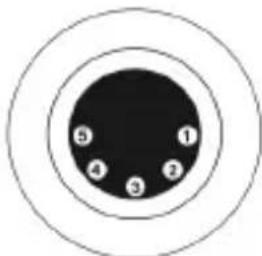
1: Tierra
2: Señal (-)
3: Señal (+)
4: NC
5: NC
- IRWIN 60 / IRWIN 120
- INDEX / ÍNDICE
- ENGLISH
- ESPAÑOL
- SAFETY INSTRUCTIONS
- GENERAL INFORMATION
- FOR DEVICES DESIGNED TO BE CONNECTED TO THE MAIN POWER SUPPLY
- IMPORTANT INFORMATION
- WARNING! IMPORTANT INFORMATION REGARDING LIGHTING PRODUCTS
- PACKAGE CONTENT
- TECHNICAL SPECIFICATIONS
- IRWIN 60
- IRWIN 120
- INSTALLATION
- HOW TO USE THE UNIT
- CONTROL PANEL
- MAIN FUNCTION CHART
- HOW TO CONTROL THE FIXTURE
- DMX512 CONNECTIONS
- TROUBLESHOOTING
- THE FIXTURE DOES NOT WORK, NO LIGHT
- NOT RESPONDING TO DMX CONTROLLER
- SOME FIXTURES DON'T RESPOND TO THE EASY CONTROLLER
- NO RESPONSE TO THE SOUND
- FIXTURE CLEANING
- DISPOSAL
- PACKAGING
- DEVICE
- BIENVENIDO A AUDIBAX
- INSTALACIÓN
Brand : Audibax
Model : Irwin 60
Category : Headphones