
IR-SPP - Photo accessory Vello - Free user manual and instructions
Find the device manual for free IR-SPP Vello in PDF.


| Product Type | Wireless Infrared Remote Shutter Control |
| Model | IR-SPP (for Pentax cameras) |
| Brand | Vello |
| Dimensions (H x W x D) | 11 x 31 x 61 mm (0.42 x 1.22 x 2.4 inches) |
| Weight | ~20 g (estimated) |
| Battery Type | 3V lithium coin cell (CR2032) |
| Battery Life | Up to 3 years or 20,000 exposures |
| Operating Range | 15 ft (4.6 m) |
| Operating Temperature | 5°C to 40°C (41°F to 104°F) |
| Compatible Cameras | Pentax cameras with infrared sensor (see vellogear.com for list) |
| Shooting Functions | Single shot, bulb mode, 2-second delay timer, video recording, zoom control (T/W), function button |
| Communication | Infrared, line-of-sight required |
| Material | Plastic |
| Color | Black (typical) |
| Warranty | 1-year limited warranty |
| Safety Notes | Keep out of reach of children; remove battery if not used for long periods; do not disassemble; avoid extreme temperatures and humidity |
Frequently Asked Questions - IR-SPP Vello
User questions about IR-SPP Vello
0 question about this device. Answer the ones you know or ask your own.
Ask a new question about this device
Download the instructions for your Photo accessory in PDF format for free! Find your manual IR-SPP - Vello and take your electronic device back in hand. On this page are published all the documents necessary for the use of your device. IR-SPP by Vello.
USER MANUAL IR-SPP Vello
that may cause undesired
including interference
any interference received,
- This device must accept
interference.
not cause harmful
- This device may
following two conditions:
Operation is subject to the
Part 15 of the FCC Rules.
This device complies with
COMPLAANCE
FCC
IR SELFIE
TRIGGER
PLUS
INFRARED REMOTE
SHUTTER CONTROL
IR-SPC, IR-SPP,
IR-SPS, IR-SPM
USER MANUAL
THANK YOU FOR CHOOSING VELLO
The Vello Selfie Trigger Plus is a wireless infrared remote that lets you trigger your camera and utilize various functions from a distance of up to 16ft. This makes it Ideal for taking selfies and group pictures. When shooting macro or long-exposure photography, the remote will minimize camera shake, providing you with sharper images. Additional features include shooting photos with a two second delay timer, start and stop video recording, and the ability to control your zoom. The Vello Selfie Trigger Plus is sleek, lightweight, and easily fits in your pocket.
Note: Functions vary depending on camera make and model.
PRECAUTIONS
- Please read and follow these instructions, and keep this manual in a safe place.
- There are no user-serviceable parts inside the devices. Do not attempt to disassemble or perform any unauthorized modification.
- Do not operate in the presence of flammable gas, vapors or water.
- Keep out of reach of children. This device contains small parts which may pose a shock hazard.
- Batteries are prone to leakage when fully discharged. To avoid damage to the product, be sure to remove the battery when leaving the product unattended for prolonged periods or when no charge remains.
- Do not use or leave the device in conditions of extreme heat, severe cold, or high humidity.
OVERVIEW
IR-SPC, IR-SPP, IR-SPS
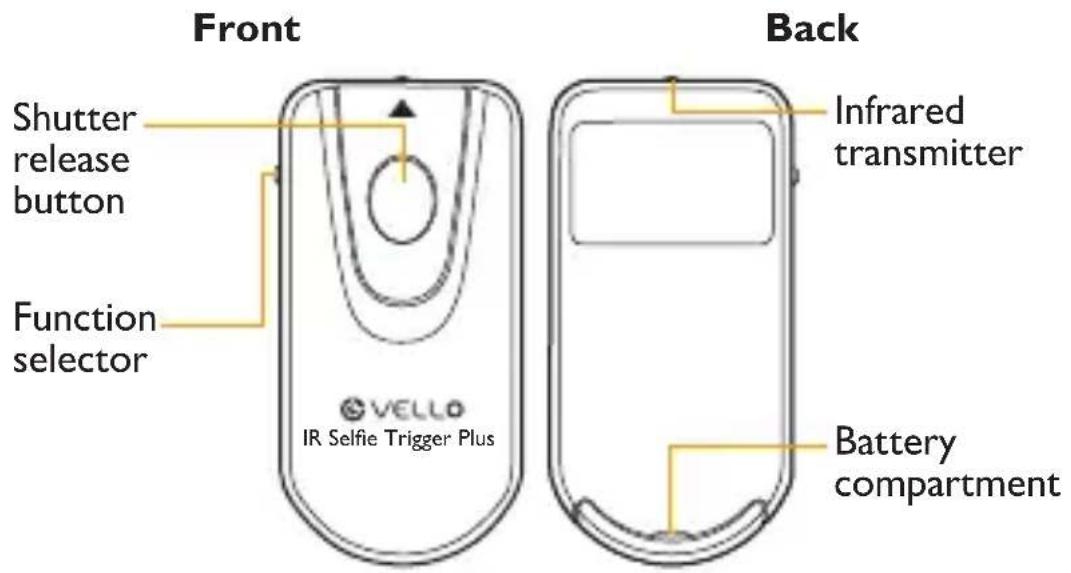
IR-SPM

GETTING STARTED
The Vello Selfie Trigger Plus is compatible with most cameras that have infrared sensors. Check www.vellogear.com for a list of compatible cameras.
Remove the plastic separator from the battery before use by pulling the tab.
Important Note: Infrared technology requires line-of-sight communication between the two devices. Make sure there are no obstructions between the remote and your camera's sensor.
REMOTE FUNCTIONS
IR-SPC – For Canon
| Function Selector Description | |
 | Single Shot - Press the shutter release button to trigger the camera for a single picture.Bulb Mode - For long exposures, press the shutter release button once to begin exposure. Press again to stop. |
| [CDAT] / [T832] | Delay Timer - Delays the shutter release by two seconds. Use for selfies or candid shots.Video - Press the shutter release once to start recording video. Press again to stop. (Camera must be in video mode) |
IR-SPS – For Sony
| Function Selector Description | |
| [AYCT] | Single Shot - Press the shutter release button to trigger the camera for a single picture.Bulb Mode - For long exposures, Press the shutter release button once to begin exposure. Press again to stop. |
 | Delay Timer - Delays the shutter from exposing the picture by two seconds.Use for selfies or candid shots. |
| [HT22] | Video - Press the remote shutter release once to start recording video. Press again to stop. |
| ☐ | Single Shot - Press the shutter release button to trigger the camera for a single picture.Bulb Mode - For long exposures, Press the shutter release button once to begin exposure. Press again to stop. |
| TIW | Telescoping / Wide angle – This allows you to zoom the lens in and out. (For select Pentax point-and-shoot cameras) |
| Fn | Function – This defaults to video recording but can be set to other functions via the camera’s settings. Press the remote shutter release once to start recording video. Press again to stop. |
IR-SPM – For Multiple Cameras
The IR-SPM provides control of Nikon, Canon, Pentax, and Sony cameras, all in one remote. The table below indicates the switch positions used for each function. For descriptions of this remote's, functions please refer to the previous tables: IR-SPC, IR-SPP, IR-SPS.
Note: The IR-SPM adds the functionality of single-shot triggering of Nikon cameras.
| Nikon Canon Sony Pentax | |||
| ☐ 1A 2A | 1B 1☐ | ☐ | ☐ |
| 3A 2B 2C ☑ | ☐ | T/W | |
| 3A 3B 3C ☐ | ☐ | Fn | |
REMOTE TRIGGERING
To use your IR-SPC, IR-SPP, IR-SPS, IR-SPM as a remote trigger, turn your camera on and follow these steps:
- Set your camera for remote triggering. For more information about the remote triggering feature, consult your camera's manual.
- Compose your shot and make sure your subject is in focus.
- Set your Selfie Trigger Plus remote and camera to the desired settings.
- Aim the remote at the camera's infrared sensor and press the shutter release button.
TROUBLESHOOTING
The camera will not trigger.
- Make sure the plastic separator is removed from the battery.
- Make sure the battery is installed with the correct polarity.
- Set your camera for remote triggering.
- Make sure there is nothing blocking the line of sight between the Selfie Trigger and your camera's IR sensor.
- Make sure you are within the remote's range of 16 feet.
REPLACING THE BATTERY
To replace the battery, follow these steps:
- Turn the remote upside down.
- In the slot provided, use your fingernail to open and pull the battery tray out of the remote.
- Remove the old battery and replace it with a new one, making sure the battery's polarity matches the diagram on the compartment.
- Slide the battery tray back into the remote until it locks in place.

SPECIFICATIONS
| Dimensions (H × W × D) | 0.42" × 1.22" × 2.4"(11 × 31 × 61 mm) |
| Weight | |
| Operating distance | 15' (4.6 m) |
| Operating temperature | °F–104°F (5°C–40°C) |
| Battery type | |
| Typical battery life | Up to 3 years or20,000 exposures |
ONE-YEAR LIMITED WARRANTY
This VELLO product is warranted to the original purchaser to be free from defects in materials and workmanship under normal consumer use for a period of one (1) year from the original purchase date or thirty (30) days after replacement, whichever occurs later. The warranty provider's responsibility with respect to this limited warranty shall be limited solely to repair or replacement, at the provider's discretion, of any product that fails during normal use of this product in its intended manner and in its intended environment. Inoperability of the product or part(s) shall be determined by the warranty provider. If the product has been discontinued, the warranty provider reserves the right to replace it with a model of equivalent quality and function.
This warranty does not cover damage or defect caused by misuse, neglect, accident, alteration, abuse, improper installation or maintenance. EXCEPT AS PROVIDED HEREIN, THE WARRANTY PROVIDER MAKES NEITHER ANY EXPRESS WARRANTIES NOR ANY IMPLIED WARRANTIES, INCLUDING BUT NOT LIMITED TO ANY IMPLIED WARRANTY OF MERCHANTABILITY OR FITNESS FOR A PARTICULAR PURPOSE. This warranty provides you with specific legal rights, and you may also have additional rights that vary from state to state.
To obtain warranty coverage, contact the Vello Customer Service Department to obtain a return merchandise authorization (“RMA”) number, and return the defective product to Vello along with the RMA number and proof of purchase. Shipment of the defective product is at the purchaser’s own risk and expense.
For more information or to arrange service, visit www.vellogear.com or call Customer Service at 212-594-2353.

VELLO™ A Gradus Group Brand
Product warranty provided by the Gradus Group.
www.gradusgroup.com
VELLO is a registered trademark of the Gradus Group.
© 2015 Gradus Group LLC. All Rights Reserved.


Brand : Vello
Model : IR-SPP
Category : Photo accessory