
BG-C20 - Photo accessory Vello - Free user manual and instructions
Find the device manual for free BG-C20 Vello in PDF.


| Product Type | Battery Grip for Mirrorless Cameras |
| Compatible Cameras | Canon EOS R5, R5 C, R6, R6 II |
| Power Source | Up to two Canon LP-E6NH/LP-E6N rechargeable Li-ion batteries or Canon AC Adapter AC-E6N + DR-E6 DC Coupler |
| Battery Charging | In-grip charging via camera USB power source; LED indicators glow green when charging and turn off when fully charged |
| Controls (Vertical Orientation) | Shutter release button, main dial, rear dial, AF-ON, AE lock/FE lock, AF point selection, joystick/select dial, magnify/reduce, multi-function button |
| Control Lock Switch | Disables all grip controls to prevent accidental operation |
| Dimensions (H x W x D) | 1.9 x 5.6 x 3.2 in. (4.8 x 14.3 x 8.1 cm) |
| Weight | 9.5 oz (270 g) without batteries |
| Operating Temperature | 32°F to 104°F (0°C to 40°C) |
| Mounting | Tripod socket, hand-strap mount |
| Battery Compartments | Two slots with individual lock releases |
| Battery Door Storage | Integrated holder for camera battery chamber door |
| Materials | Nonslip grip, durable plastic/metal construction |
| Warranty | One-year limited warranty |
| Safety Precautions | Use only recommended batteries; discontinue if smoke, noise, or odor; remove batteries when not in use; keep away from water and children |
Frequently Asked Questions - BG-C20 Vello
User questions about BG-C20 Vello
0 question about this device. Answer the ones you know or ask your own.
Ask a new question about this device
Download the instructions for your Photo accessory in PDF format for free! Find your manual BG-C20 - Vello and take your electronic device back in hand. On this page are published all the documents necessary for the use of your device. BG-C20 by Vello.
USER MANUAL BG-C20 Vello
BG-C20
BATTERY GRIP
Designed for the
Canon EOS R5, R5 C, R6, and R6 II
Mirrorless Cameras

VELLO®
Thank you for choosing Vello
The Vello BG-C20 battery grip extends the shooting time and grip comfort when using your Canon EOS R5, R5 C, R6 or R6 II mirrorless camera in a vertical (portrait) orientation. This grip accepts up to two Canon LP-E6NH/E6N rechargeable batteries, and you can charge the batteries in the grip without removing them. The grip provides an alternate shutter release button, main and rear dials, AF Start, and autofocus and autoexposure selection buttons, making the grip ideal for shooting portrait photography. The control-lock switch disables all the grip's controls to prevent unwanted triggering.

natural_image
Close-up of a DSLR camera's front face showing control buttons and settings (no readable text or symbols beyond labels)Please read through this entire manual before using the BG-C20 battery grip.
Precautions
- The BG-C20 should be used only with the compatible devices specified in this manual.
- Use only with the batteries and battery holders recommended in this manual.
- If you notice smoke, noise, or an unusual smell from the battery pack, discontinue use immediately. Remove the batteries, and take the device to a Vello authorized reseller.
-
The battery level may not display properly if batteries are installed before mounting the grip.
-
Remove batteries from the grip when not in use.
- Do not attempt to disassemble.
- Avoid exposing this product to water or extreme humidity, and keep it in a cool, dry place.
- Keep out of reach of children.
- All images are for illustrative purposes only.
Overview

① Shutter release button
② Multi-function button
③ Main dial
④ Camera battery door holder
⑤ Control lock switch
⑥ Hand-strap mount
⑦ Tripod socket
⑧ Nonslip grip
⑨ Mounting screw
10 Battery compartment
11 Battery compartment lock
12 DC coupler cord hole
13 Thumbwheel
14 Charge indicator LEDs
15 Joystick / select dial
16 Magnify / reduce button
17 AF point selection button
18 Rear dial
19 [*] AE lock / FE lock button
20 [AF-ON] AF start button
21 Power contacts
22 Power contact cap
23 Contacts
24 Contact cap
25 Slot 1 lock release
26 Battery slot 1
27 Slot 2 lock release
Battery slot 2
Attaching the Battery Grip

natural_image
Diagram of a car interior showing a handle and seat with orange arrows indicating direction (no text or symbols)- Ensure that the camera is turned off, and remove the camera's battery chamber door. Press the door's latch release and pull gently until the door detaches.

natural_image
Diagram showing two mechanical components with an arrow indicating rotation or movement (no text or symbols present)- Slide the chamber door into the BG-C20's camera battery door holder until it clicks.
natural_image
Technical diagram of a mechanical assembly with directional arrows indicating motion or force (no text or symbols present)- Remove the grip's two contact caps.

natural_image
Mechanical assembly diagram showing a highlighted component with an orange arrow (no text or symbols)- Insert the battery grip's power contacts into the camera's battery chamber and attach the grip to the camera.

- Rotate the thumbwheel in the direction of the arrow until the grip is secured to the camera.
Inserting the Batteries

natural_image
Technical line drawing of a mechanical component with no visible text or symbols- Turn off the camera's power, and make sure the grip's control lock switch is in the Off position.

natural_image
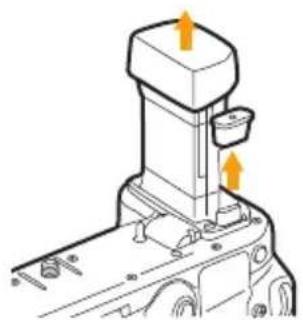
Diagram of a mechanical component with an orange arrow indicating direction (no text or symbols present)- Twist the battery tray's lock and remove the battery tray from the grip.
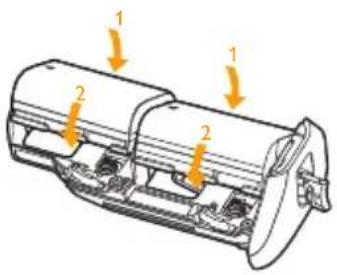
- Canon LP-E6NH or E6N Batteries: Insert the first battery into slot 1 as shown and push down to lock the battery in place. Repeat for slot 2.

natural_image
Mechanical assembly diagram showing a piston and crank mechanism with no visible text or symbolsHousehold Power Outlet:
The Canon ACK-E6 AC Power Adapter Kit (sold separately) can be connected to the grip. Place the DC coupler through the DC Coupler cord hole, and ensure the battery holder doesn't pinch the cord.

natural_image
Diagram of a mechanical component with an orange arrow pointing to a specific part (no text or symbols present)- Insert and lock the battery tray inside the battery grip.
natural_image
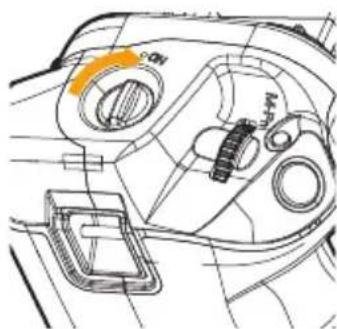
Technical line drawing of a mechanical component with no visible text or symbols- Turn on the camera power, and switch the grip's control lock to the On position.
Removing the Batteries
natural_image
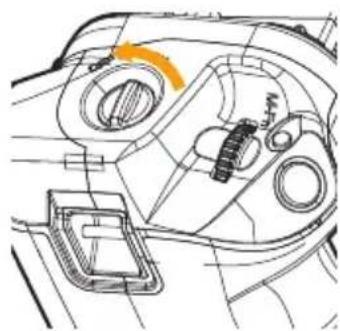
Technical line drawing of a mechanical component with no visible text or symbols- Turn off the camera's power, and make sure the grip's control lock switch is in the Off position.
natural_image
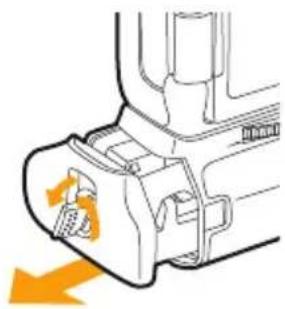
Diagram of a mechanical component with an orange arrow indicating direction (no text or symbols present)- Twist the battery tray's lock and remove the battery tray from the grip.
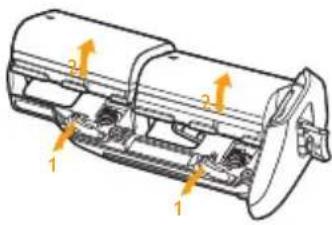
- Pull the lock release for battery slot 1 or 2 until the battery comes loose, and remove.
In-Grip Battery Charging
You can charge the batteries inside the grip via the camera's USB power source. Make sure you turn off the camera to begin charging. For instructions, see your camera's manual.
The charging indicator LEDs will glow green when charging, and turn off when fully charged. If there are two batteries in the grip, slot 1 will charge first.
Note: LP-E6 batteries cannot be charged inside the grip and will prevent other batteries from charging.
Specifications
| Power source Up to two Canon LP-E6NH/LP-E6N type rechargeable Li-ion batteriesCanon AC Adapter AC-E6N and DR-E6 DC Coupler |
| Operating temperature32°F to 104°F (0°C to 40°C) |
| Dimensions (H × W × D)1.9 × 5.6 × 3.2 in. (4.8 × 14.3 × 8.1 cm) |
| Weight 9.5 oz. (270 g) without batteries |
Specifications and design are subject to change without notice.
ONE-YEAR LIMITED WARRANTY
This VELLO product is warranted to the original purchaser to be free from defects in materials and workmanship under normal consumer use for a period of one (1) year from the original purchase date or thirty (30) days after replacement, whichever occurs later. The warranty provider's responsibility with respect to this limited warranty shall be limited solely to repair or replacement, at the provider's discretion, of any product that fails during normal use of this product in its intended manner and in its intended environment. Inoperability of the product or part(s) shall be determined by the warranty provider. If the product has been discontinued, the warranty provider reserves the right to replace it with a model of equivalent quality and function.
This warranty does not cover damage or defect caused by misuse, neglect, accident, alteration, abuse, improper installation or maintenance. EXCEPT AS PROVIDED HEREIN, THE WARRANTY PROVIDER MAKES NEITHER ANY EXPRESS WARRANTIES NOR ANY IMPLIED WARRANTIES, INCLUDING BUT NOT LIMITED TO ANY IMPLIED WARRANTY OF MERCHANTABILITY OR FITNESS FOR A PARTICULAR PURPOSE. This warranty provides you with specific legal rights, and you may also have additional rights that vary from state to state.
To obtain warranty coverage, contact the Vello Customer Service Department to obtain a return merchandise authorization (“RMA”) number, and return the defective product to Vello along with the RMA number and proof of purchase. Shipment of the defective product is at the purchaser’s own risk and expense.
For more information or to arrange service, visit www.vellogear.com or call Customer Service at 212-594-2353.
Product warranty provided by the Gradus Group.
www.gradusgroup.com
VELLO is a registered trademark of the Gradus Group. © 2023 Gradus Group LLC. All Rights Reserved.

VELLO*
A Gradus Group Brand
www.vellogear.com
All other trademarks are the property of their respective owners.
GG2


Brand : Vello
Model : BG-C20
Category : Photo accessory