
BG-C10-2 - Photo accessory Vello - Free user manual and instructions
Find the device manual for free BG-C10-2 Vello in PDF.


| Product Type | Battery Grip |
| Brand | Vello |
| Model | BG-C10-2 |
| Compatibility | Canon EOS 70D, 80D, 90D DSLR Cameras |
| Power Source | Up to two Canon LP-E6/E6N(H) Li-ion batteries or six AA batteries |
| Battery Types Supported | LP-E6/E6N(H) rechargeable Li-ion; AA/LR6 alkaline, Ni-MH, Lithium, Nickel-Manganese |
| Operating Temperature | 32°F to 104°F (0°C to 40°C) |
| Dimensions (H × W × D) | 4.5 × 5.7 × 3.3 in. (11.4 × 14.5 × 8.5 cm) |
| Weight (without batteries) | 9 oz. (254 g) |
| Shutter Release Button | Yes, for vertical portrait orientation |
| Main Dial | Yes, for vertical use |
| AF-ON Button | Yes, with AF-ON selection and magnify function |
| AE/FE Lock Button | Yes, with index/reduce function |
| Control Lock Switch | Yes, disables all grip controls to prevent accidental triggering |
| Tripod Socket | Yes, built-in |
| Hand-Strap Mount | Yes |
| Nonslip Grip | Yes, for comfortable and secure handling |
| Battery Trays Included | One for LP-E6 batteries (2 slots), one for 6 AA batteries |
| Mounting Screw | Yes, integrated thumbwheel |
| Warranty | One-year limited warranty |
| Construction Materials | High-quality plastic and metal contacts |
| Color | Black |
| Special Features | Vertical portrait orientation controls, camera battery door holder, contact cap |
Frequently Asked Questions - BG-C10-2 Vello
User questions about BG-C10-2 Vello
0 question about this device. Answer the ones you know or ask your own.
Ask a new question about this device
Download the instructions for your Photo accessory in PDF format for free! Find your manual BG-C10-2 - Vello and take your electronic device back in hand. On this page are published all the documents necessary for the use of your device. BG-C10-2 by Vello.
USER MANUAL BG-C10-2 Vello
BG-C10-2
BATTERY GRIP
Designed for the Canon
EOS 70D, 80D, and 90D
DSLR Cameras

VELLO®
Thank you for choosing Vello
The Vello BG-C10-2 battery grip offers extended shooting time and comfort when shooting in a vertical (portrait) orientation. The grip is compatible with the Canon 90D, 80D, and 70D DSLR Cameras and accepts up to two Canon LP-E6/E6N(H) rechargeable batteries. It offers an alternate shutter release button, main dial, and access to AF-ON and autofocus and autoexposure selection buttons, making the grip ideal for shooting portrait photography. The control-lock switch disables all the grip's controls to prevent unwanted triggering.
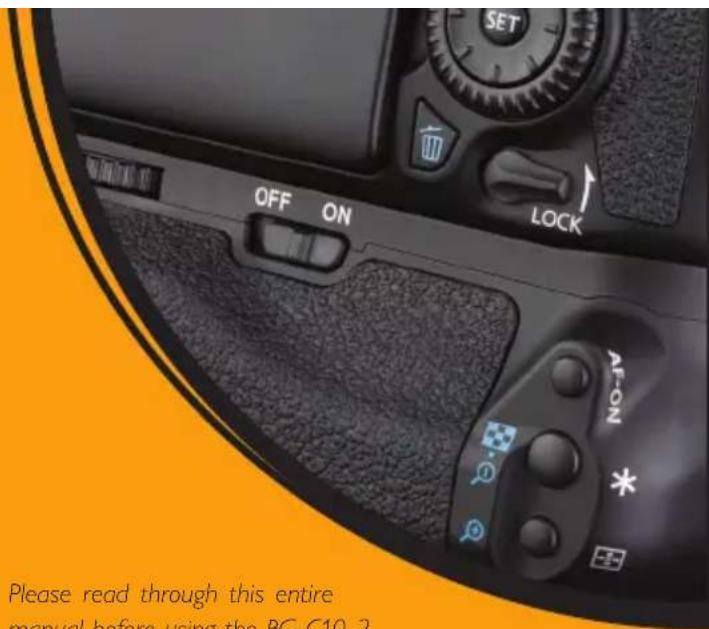
Please read through this entire manual before using the BG-C10-2 battery grip.
Precautions
- The BG-C10-2 should be used only with the compatible devices specified in this manual.
- Use only with the batteries and battery holders recommended in this manual.
- If you notice smoke, noise, or an unusual smell from the battery pack, discontinue use immediately. Remove the batteries, and take the device to a Vello authorized reseller.
-
The battery level may not display properly if batteries are installed before mounting the grip.
-
Remove batteries from the grip when not in use.
- Do not attempt to disassemble.
- Avoid exposing this product to water or extreme humidity, and keep it in a cool, dry place.
- Keep out of reach of children.
- All images are for illustrative purposes only.
Overview

① Shutter release button
② Camera battery door holder
③ AF area/AF method
④ Main dial
⑤ Hand-strap mount
⑥ Tripod socket
⑦ Nonslip grip
⑧ Battery compartment
⑨ Battery compartment lock
10 Thumbwheel
⑪ Mounting screw
12 AF-ON selection and magnify button
13 AE/FE lock and Index/reduce button
14 AF-ON button
15 Control lock switch
16 Power contacts
⑰ Contact cap
18 Battery slot 1
19 Slot 1 contacts
20 Slot 2 contacts
21 Battery slot 2
② 6-bay AA battery tray
Attaching the Battery Grip
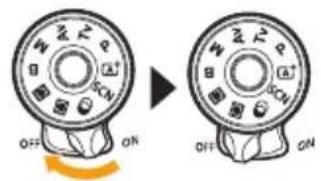
- Ensure that the camera is turned off.

- Remove the camera's battery chamber door. Pull gently at a 45° angle until the door detaches.

natural_image
Diagram showing two steps of a mechanical component with highlighted areas and rotation arrows (no text or symbols)- Slide the chamber door into the BG-C10-2's camera battery door holder for safekeeping.

natural_image
Mechanical assembly diagram showing a valve or connector with an orange arrow indicating direction (no text or symbols present)- Insert the battery grip's power contacts into the camera's battery chamber and attach the grip to the camera.
natural_image
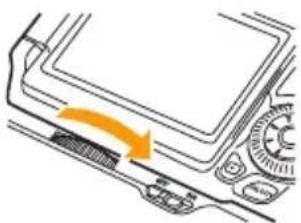
Diagram of a mechanical component with an orange arrow indicating direction (no text or symbols)- Rotate the thumbwheel counterclockwise until the grip is secured to the camera.
Inserting Batteries

- Turn off the camera's power, and make sure the grip's control lock switch is in the Off position.

- Twist the battery tray's lock, and remove the battery tray from the grip.

- Canon LP-E6 / E6N(H) batteries: Insert the first battery into slot 1 as shown, and push down to lock the battery in place. Repeat for slot 2.
natural_image
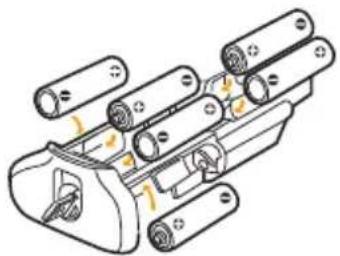
Technical line drawing of a mechanical assembly with multiple cylindrical components and mounting holes (no text or symbols)- AA Batteries: Place six identical AA batteries into the AA battery tray as indicated.

natural_image
Technical illustration of a mechanical component with two views showing internal components and directional arrows (no text or symbols)- Insert and lock the battery tray inside the battery grip.

- Turn on the camera power, and switch the grip's control lock to the On position.
Note: When removing the grip, turn off the camera's power, switch the grip's control lock to off, and then remove the batteries.
Specifications
| Power source 1. Up to two Canon LP | E6/E6N(H) type rechargeable Li-ion batteries2. Six AA/LR6 Alkaline, Ni-MH, Lithium or Nickel-Manganese batteries |
| Operating temperature 32°F to 104°F | (0°C to 40°C) |
| Dimensions (H × W × D) 4.5 × 5.7 × 3.3 in. (11.4 × 14.5 × 8.5 cm) | |
| Weight 9 oz. (254 g) without batteries | |
Specifications and design are subject to change without notice.
When using the AA battery tray, the battery indicator will work with only NiMH batteries.
Please note: It's not recommended to use Duracell® brand alkaline batteries.
ONE-YEAR LIMITED WARRANTY
This VELLO product is warranted to the original purchaser to be free from defects in materials and workmanship under normal consumer use for a period of one (1) year from the original purchase date or thirty (30) days after replacement, whichever occurs later. The warranty provider's responsibility with respect to this limited warranty shall be limited solely to repair or replacement, at the provider's discretion, of any product that fails during normal use of this product in its intended manner and in its intended environment. Inoperability of the product or part(s) shall be determined by the warranty provider. If the product has been discontinued, the warranty provider reserves the right to replace it with a model of equivalent quality and function.
This warranty does not cover damage or defect caused by misuse, neglect, accident, alteration, abuse, improper installation or maintenance. EXCEPT AS PROVIDED HEREIN, THE WARRANTY PROVIDER MAKES NEITHER ANY EXPRESS WARRANTIES NOR ANY IMPLIED WARRANTIES, INCLUDING BUT NOT LIMITED TO ANY IMPLIED WARRANTY OF MERCHANTABILITY OR FITNESS FOR A PARTICULAR PURPOSE. This warranty provides you with specific legal rights, and you may also have additional rights that vary from state to state.
To obtain warranty coverage, contact the Vello Customer Service Department to obtain a return merchandise authorization (“RMA”) number, and return the defective product to Vello along with the RMA number and proof of purchase. Shipment of the defective product is at the purchaser’s own risk and expense.
For more information or to arrange service, visit www.vellogear.com or call Customer Service at 212-594-2353.
Product warranty provided by the Gradus Group.
www.gradusgroup.com
VELLO is a registered trademark of the Gradus Group. © 2021 Gradus Group LLC. All Rights Reserved.

VELLO®
www.vellogear.com

VELLO*
A Gradus Group Brand
All other trademarks are the property of their respective owners.
GG2


Brand : Vello
Model : BG-C10-2
Category : Photo accessory