
TP-AG 18/100 CE Li - Angle Grinder EINHELL - Free user manual and instructions
Find the device manual for free TP-AG 18/100 CE Li EINHELL in PDF.


| Product Type | Cordless Angle Grinder |
| Brand | Einhell |
| Model | TP-AG 18/100 CE Li |
| Power Supply | 18 V DC (Li-ion battery, not included) |
| Rated Speed (no load) | 3,000 - 10,500 min⁻¹ (variable via 5 speed settings) |
| Max. Wheel Diameter | 100 mm |
| Arbor Hole Diameter | 16 mm or 20 mm (turnable clamping flange) |
| Mounting Spindle Thread | M10 |
| Weight | 1.8 kg |
| Sound Pressure Level (Lₚₐ) | 85.86 dB(A) (K=3 dB) |
| Sound Power Level (Lₙₐ) | 93.86 dB(A) (K=3 dB) |
| Vibration Emission (handle) | aₕ, AG = 8.612 m/s² (K=1.5 m/s²) |
| Safety Guard | Adjustable guard for grinding/sanding (included); cutting guard optional |
| Additional Handle | Yes, two positions (left/right) |
| Spindle Lock | Yes, for quick wheel changes |
| Speed Controller | Electronic dial with 5 settings; constant electronics maintain speed under load |
| Overload Display | LED flashes when motor exceeds current or temperature limits |
| Battery Capacity Indicator | 3-LED display on battery pack |
| Standby Mode | Automatic after 10 minutes of non-use to save battery |
| Removable Dust Guard | Yes (Item 17) – protects motor from dust |
| Motor Ventilation | Air vents must be kept clean |
| Charging Time (4.0 Ah recommended) | Varies; see charger LED indicators |
| Storage Temperature | +10°C to +40°C for batteries; ideally 10-40°C for tool |
| Scope of Delivery | Angle grinder, additional handle, flange nut wrench, operating instructions, safety instructions (battery and charger not included) |
Frequently Asked Questions - TP-AG 18/100 CE Li EINHELL
User questions about TP-AG 18/100 CE Li EINHELL
0 question about this device. Answer the ones you know or ask your own.
Ask a new question about this device
Download the instructions for your Angle Grinder in PDF format for free! Find your manual TP-AG 18/100 CE Li - EINHELL and take your electronic device back in hand. On this page are published all the documents necessary for the use of your device. TP-AG 18/100 CE Li by EINHELL.
USER MANUAL TP-AG 18/100 CE Li EINHELL
EN Original operating instructions Cordless Angle Grinder
7


natural_image
Close-up of a mechanical device with labeled parts (no readable text or symbols)



natural_image
Technical line drawing of a mechanical assembly with no visible text or symbols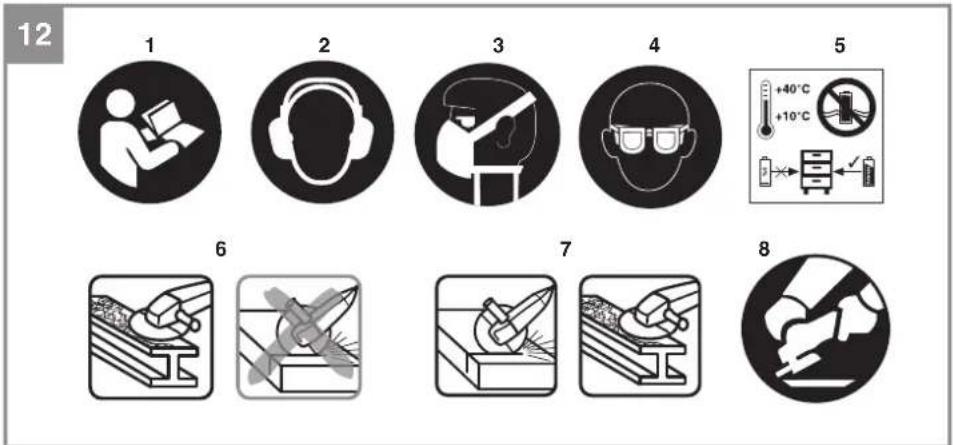
natural_image
Close-up of a hand holding a device with a curved arrow pointing to a component labeled '17' (no text or symbols on the device itself)
natural_image
Close-up of a gloved hand holding a small black plastic clip, with a thin wire above it (no text or symbols visible)
TH
คำเตือน!
When using the equipment, a few safety precautions must be observed to avoid injuries and damage. Please read the complete operating instructions and safety regulations with due care. Keep this manual in a safe place, so that the information is available at all times. If you give the equipment to any other person, hand over these operating instructions and safety regulations as well. We cannot accept any liability for damage or accidents which arise due to a failure to follow these instructions and the safety instructions.
Explanation of the symbols used (see Fig. 12)
- Danger! - Read the operating instructions to reduce the risk of injury.
- Caution! Wear ear-muffs. The impact of noise can cause damage to hearing.
- Caution! Wear a breathing mask. Dust which is injurious to health can be generated when working on wood and other materials. Never use the device to work on any materials containing asbestos!
- Caution! Wear safety goggles. Sparks generated during working or splinters, chips and dust emitted by the device can cause loss of sight.
- Store the batteries only in dry rooms with an ambient temperature of +10°C to +40°C. Place only fully charged batteries in storage (charged at least 40%).
- This safety guard is designed for sanding/grinding.
- This safety guard is designed for cutting and grinding/sanding. (not included in delivery).
- Always operate with two hands.
1. Safety regulations
The corresponding safety information can be found in the enclosed booklet.
Warning!
Read all the safety information, instructions, illustrations and technical data provided on or with this power tool. Failure to adhere to the following instructions may result in electric shock, fi re and/or serious injury.
Keep all the safety information and instructions in a safe place for future use.
2. Layout and items supplied
2.1 Layout (Fig. 1)
- Spindle lock
- ON/OFF switch
- Additional handle
- Guard
- Flange nut wrench
- Battery (not included in delivery)
- Charger (not included in delivery)
- Pushlock button
- Battery capacity indicator
- Battery capacity indicator switch
- Guard screw
- Turnable clamping fl ange (for inner disc diameter 16mm & 20mm)
- Flange nut
- Speed controller
- LED speed display
- Overload display
- Removable dust guard
2.2 Items supplied
Please check that the article is complete as specified in the scope of delivery. If parts are missing, please contact our service center or the sales outlet where you made your purchase at the latest within 5 working days after purchasing the product and upon presentation of a valid bill of purchase. Also, refer to the warranty table in the service information at the end of the operating instructions.
- Open the packaging and take out the equipment with care.
- Remove the packaging material and any packaging and/or transportation braces (if available).
- Check to see if all items are supplied.
- Inspect the equipment and accessories for transport damage.
- If possible, please keep the packaging until the end of the guarantee period.
Danger!
The equipment and packaging material are not toys. Do not let children play with plastic bags, foils or small parts. There is a danger of swallowing or suffocating!
Angle grinder
• Additional handle
- Flange nut wrench
• Original operating instructions
• Safetyinstructions
EN
3. Proper use
The angle grinder is designed for grinding metal and stone when using the appropriate grinding wheel and guard.
Warning! To cut metal and stone the grinder/sander may only be used when the guard (available as an accessory) is mounted.
The equipment is to be used only for its prescribed purpose. Any other use is deemed to be a case of misuse. The user / operator and not the manufacturer will be liable for any damage or injuries of any kind caused as a result of this.
4. Technical data
Motor power supply: 18 V DC
Rated speed: 3000-10500 min ^-1
Max. cutting wheel outer diameter: ..... 100 mm
Arbor hole diameter: 16mm or 20mm
Mounting spindle thread: M10
Weight: 1.8 kg
Danger!
Sound and vibration
Sound and vibration values were measured in accordance with EN 62841.
L_nA sound pressure level ..... 85,86 dB(A)
K_nA uncertainty 3 dB
L_WA sound power level ..... 93,86 dB(A)
K_WA uncertainty 3 dB
Wear ear-muff s.
The impact of noise can cause damage to hearing.
Total vibration values (vector sum of three directions) determined in accordance with EN 62841.
Handle
Vibration emission value a_hAG = 8.612 m/s^2
K uncertainty = 1.5 m/s²
The stated vibration emission levels and stated noise emission values were measured in accordance with a set of standardized criteria and can be used to compare one power tool with another.
The stated vibration emission levels and stated noise emission values can also be used to make an initial assessment of exposure.
Warning:
The vibration and noise emission levels may vary from the level specified during actual use, depending on the way in which the power tool is used, especially the type of workpiece it is used for.
Keep the noise emissions and vibrations to a minimum.
- Only use appliances which are in perfect working order.
• Service and clean the appliance regularly.
• Adapt your working style to suit the appliance.
• Do not overload the appliance. - Have the appliance serviced whenever necessary.
• Switch the appliance off when it is not in use.
Caution!
Residual risks
Even if you use this electric power tool in accordance with instructions, certain residual risks cannot be rules out. The following hazards may arise in connection with the equipment's construction and layout:
- Lung damage if no suitable protective dust mask is used.
- Damage to hearing if no suitable ear protection is used.
- Health damage caused by hand-arm vibrations if the equipment is used over a prolonged period or is not properly guided and maintained.
5. Before starting the equipment
Warning!
Always remove the battery pack before making adjustments to the equipment.
5.1 Fitting the additional handle (Fig. 2)
- The angle grinder must not be used without the additional handle (3).
- The additional handle can be secured in any of two positions (A, B).
EN
| Tool side Suitable for | |
| Left (position A / as shown) | Right-handedusers |
| Right(positionB)Left-handedusers | |
5.2 Replacing and adjusting the guard (Fig. 3)
Replacing:
- Remove the flange nut (13) and the clamping flange (12) underneath.
• Undo the screw (11) on the guard (4). - Turn the guard (4) through 180° in clockwise direction so that the guard points upwards.
- Remove the guard (4).
To mount, proceed in the reverse order.
Adjusting:
- Adjust the guard (4) to protect your hands so that the material being ground is directed away from your body.
- The position of the guard (4) can be adjusted to any specific working conditions. Undo the screw (11) and turn the cover (4) into the required position.
- Ensure that the guard (4) correctly covers the gear wheel casing.
• Retighten the screw (11). - Ensure that the guard (4) is secure.
Warning!
Make sure that the guard is perfectly secure.
Warning!
Never use the angle grinder without the guard.
5.3 Test run for new grinding Wheels
Allow the right-angle grinder to run in idle for at least 1 minute with the grinding or cutting wheel fitted in place. Vibrating wheels are to be replaced immediately.
6. Operation
6.1 Charging the Li battery pack (Fig. 1a-1b)
- Remove the battery pack (6) from the handle, pressing the pushlock button (8) downwards to do so.
- Check that your mains voltage is the same as that marked on the rating plate of the battery charger. Insert the power plug of the charger (7) into the mains socket outlet. The green LED will then begin to fl ash.
- Push the battery pack onto the battery charger.
In section 10 (Charger indicator) you will find a table with an explanation of the LED indicator on the charger.
If the battery pack fails to charge, check for the following:
• voltage at the power socket
- whether there is good contact at the charging contacts of the charging unit
If the battery pack still fails to charge, send
• the charger and charging adapter
• and the battery pack
to our customer service center.
To ensure that items are properly packaged and delivered when you send them to us, please contact our customer service or the point of sale at which the equipment was purchased.
When shipping or disposing of batteries and cordless tools, always ensure that they are packed individually in plastic bags to prevent short circuits and fi res.
To ensure that the battery pack provides long service, you should take care to recharge it promptly. You must recharge the battery pack when you notice that the performance of the device drops. Never allow the battery pack to become fully discharged. This will cause it to develop a defect.
6.2 Switching on (Fig. 4)
To start the equipment, push the On/Off switch (2) forwards and press it down. To switch off the angle grinder, depress the On/Off switch (2) at the back. The On/Off switch (2) will jump back into its starting position.
EN
Important!
The equipment switches to "Standby Mode" after 10 minutes of non-use.
To reactivate: Switch on the equipment twice or press the battery capacity indicator.
"Standby Mode" protects the battery.
Important!
Following a stoppage (due to overloading), the cordless equipment starts up again automatically.
Important!
Wait until the machine has reached its top speed. You can then position the angle grinder on the workpiece and machine it.
6.3 Speed controller (Fig. 1c/Item 14)
You can preselect the speed by turning the speed controller (14).
The most suitable speed depends on the type of application and the maximum rated speed of the grinding/sanding tool. Use the speed controller (14) to select a speed in the range from 3,000 to 10,500 min ^-1 .
You can choose from 5 speed settings.
These are indicated by the LEDs on the speed display (15):
| 1 LED: 3000 min | -1 |
| 2 LEDs: 4500 min | -1 |
| 3 LEDs: 6500 min | -1 |
| 4 LEDs: 8,500 min | -1 |
| 5 LEDs: 10,500 min |
Plus direction: Higher speed Minus direction: Lower speed
Wait until the tool has reached its top speed. You can then position the angle grinder on the workpiece and machine it.
Constant electronics
This tool is equipped with constant electronics. Constant electronics keeps the set speed constant even when the tool is working under load.
6.4 Overload display (Fig. 1c/Item 16)
The constant electronics function keeps the speed constant even when the load increases. If the load rises too high for the tool, this will be signaled by flashing of the overload display (16).
The following cases will be signaled by the overload display (16):
- Exceeding the maximum power current permitted for the motor. The overload display (16) will go off again when the load is reduced or it will flash for a short time after the tool has been switched off in order to protect the motor from the overload.
- Exceeding the maximum temperature permitted for the motor. The overload display (16) will flash for a short time and will then go off again. Allow the tool to cool down before you continue to use it.
6.5 Battery capacity indicator (Fig. 1c/Item 9)
Press the battery capacity indicator switch (10). The battery capacity indicator (9) shows the charge status of the battery using 3 LEDs.
All 3 LEDs are lit:
The battery is fully charged.
2 or 1 LED(s) are lit:
The battery has an adequate remaining charge.
1 LED fl ashes:
The battery is empty, recharge the battery.
All LEDs blink:
The battery temperature is too low. Remove the battery from the equipment, keep it at room temperature for one day. If the fault reoccurs, this means that the rechargeable battery has undergone exhaustive discharge and is defective. Remove the battery from the equipment. Never use or charge a defective battery.
6.6 Changing the grinding wheels (Fig. 5)
Warning!
• Simple wheel change by spindle lock:
- Press the spindle lock (1) and allow the grinding wheel to latch in place.
- Open the flange nut (13) with the face spanner. (Fig. 5)
- Change the grinding or cutting wheel and tighten the flange nut (13) with the face spanner.
Notice!
Only ever press the spindle lock when the motor and grinding spindle are at a standstill! You must keep the spindle lock pressed while you change the wheel!
EN
6.6.1 Turnable clamping fl ange (Figs. 6.1 & 6.2)
Warning!
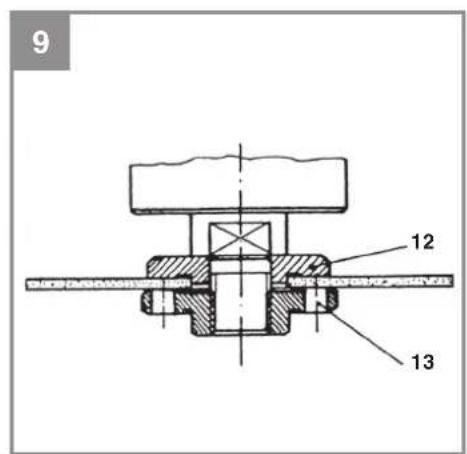
Before using the angle grinder, check that the grinding wheel sits tight and gap free on the clamping fl ange (12).
Ensure that the correct side of the clamping fl an- ge (12) is mounted to match the arbor hole of the used grinding wheel!
Never turn on the angle grinder if there is any gap between the arbor hole and the clamping fl ange (12), this could lead to serious injuries.
The angle grinder is equipped with a turnable clamping fl ange (12) which can be turned to allow both grinding wheels with a 16 mm arbor hole and grinding wheels with a 20 mm arbor hole to be fitted.
• To mount a 16 mm grinding wheel, fit the turnable flange (12) as shown in figure 6.1.
- To mount a 20 mm grinding wheel, fit the turnable flange (12) as shown in figure 6.2.
For grinding or cutting wheels up to approx. 3 mm thick, screw on the flange nut with the flat side facing the grinding or cutting wheel.
6.7 Flange arrangements when using grinding wheels and cutting wheels (Fig. 6-9)
- Flange arrangement when using a depressed-centre or straight grinding wheel (Fig. 7) Clamping flange (12) Flange nut (13)
- Flange arrangement when using a depressed-centre cutting wheel (Fig. 8) Clamping flange (12) Flange nut (13)
- Flange arrangement when using a straight cutting wheel (Fig. 9) Clamping flange (12) Flange nut (13)
6.8 Motor
It is vital for the motor to be well ventilated during operation. Be sure, therefore, to keep the ventilation holes clean at all times.
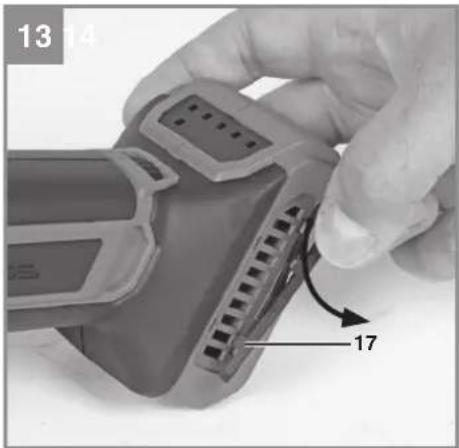
6.9 Removable dust guard (Fig. 13-15/Item 17)
The cordless angle grinder is equipped with a removable dust guard in order to protect the motor from too high a dust load. For cleaning purposes, take off the removable dust guard (17) as shown in Fig. 13, clean it with compressed air, and refi t it on the tool as shown in Fig. 15.
6.10 Grinding Wheels
- Never use a grinding or cutting wheel bigger than the specified diameter.
- Before using a grinding or cutting wheel, check its rated speed.
- The maximum speed of the grinding or cutting wheel used must be higher than the idle speed of the angle grinder.
- Use only grinding and cutting wheels that are approved for a minimum speed of 10,500 rpm and a peripheral speed of 69 m/sec.
- Check the direction of rotation when you use diamond cutting wheels. The directional arrow on the diamond cutting wheel must point in the direction in which the tool rotates.
Take special care that the grinding/sanding wheels are properly stored and transported. Ensure that the grinding/sanding wheels are never exposed to shock, jolts or sharp edges (for example during transport or storage in a toolbox). This could cause damage (such as cracks) to the grinding/sanding wheels and place the user in serious danger.
Warning!
6.11 Operating Modes
6.11.1 Rough grinding (Fig. 10)
⚠ Caution: Use the safety device for sanding/grinding (included in items supplied). For the best rough grinding results, hold the grinding wheel at an angle of between 30° and 40° to the workpiece surface and guide back and forth over the workpiece in steady movements.
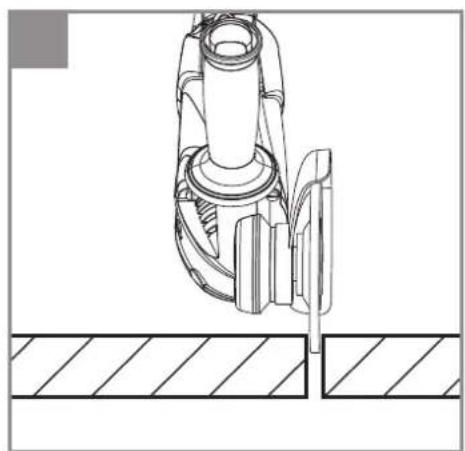
6.11.2 Cutting (Fig. 11)
⚠ Caution: Use the safety device for abrasive cutting (available as accessory, see 7.3) When you use the right-angle grinder for cutting purposes, avoid tilting it in the cutting plane. The cutting wheel must have a clean cutting edge. A diamond cutting wheel is best used to cut hard stone.
EN
⚠ It is prohibited to use the machine on asbestos materials!
⚠️ Never use a cutting wheel for rough grinding.
Note:
To increase the power and running time of the cordless equipment, we recommend using our 4.0 Ah Power-X-Change.
7. Cleaning, maintenance and ordering of spare parts
Danger!
Always pull out the battery pack before starting any cleaning work.
7.1 Cleaning
- Keep all safety devices, air vents and the motor housing free of dirt and dust as far as possible. Wipe the equipment with a clean cloth or blow it with compressed air at low pressure.
- We recommend that you clean the device immediately each time you have finished using it.
- Clean the equipment regularly with a moist cloth and some soft soap. Do not use cleaning agents or solvents; these could attack the plastic parts of the equipment. Ensure that no water can seep into the device. The ingress of water into an electric tool increases the risk of an electric shock.
7.2 Maintenance
There are no parts inside the equipment which require additional maintenance.
7.3 Ordering spare parts and accessories
Please contact the dealer that near home or contact through company www.zinsano.com

LINE : @zinsano or scan this QR Code
8. Disposal and recycling
The equipment is supplied in packaging to prevent it from being damaged in transit. The raw materials in this packaging can be reused or recycled. The equipment and its accessories are made of various types of material, such as metal and plastic. Never place defective equipment in your household refuse. The equipment should be taken to a suitable collection center for proper disposal. If you do not know the whereabouts of such a collection point, you should ask in your local council offices.
9. Storage
Store the equipment and accessories in a dark and dry place at above freezing temperature. The ideal storage temperature is between 10 and 40 °C. Store the electric tool in its original packaging.
The reprinting or reproduction by any other means, in whole or in part, of documentation and papers accompanying products is permitted only with the express consent of the Einhell Germany AG.
Subject to technical changes.
EN
10. Charger indicator
| Indicator status | Explanations and actions | |
| Red LED Green LED | ||
| Off | Flashing | Ready for useThe charger is connected to the mains and is ready for use; there is no battery pack in the charger |
| On Off Charging | The charger is charging the battery pack in quick charge mode. The charging times are shown directly on the charger.Important! The actual charging times may vary slightly from the stated charging times depending on the existing battery charge. | |
| Off | On | The battery is charged and ready for use. (READY TO GO)The unit then changes over to gentle charging mode until the battery is fully charged.To do this, leave the rechargeable battery on the charger for approx. 15 minutes longer.Action:Take the battery pack out of the charger. Disconnect the charger from the mains supply. |
| Flashing Off | Adapted charging | The charger is in gentle charging mode.For safety reasons the charging is performed less quickly and takes more time. The reasons can be:- The rechargeable battery has not been used for a very long time.- The battery temperature is outside the ideal range.Action:Wait for the charging to be completed; you can still continue to charge the battery pack. |
| Flashing Flashing Fault | Charging is no longer possible. The battery pack is defective.Action:Never charge a defective battery pack.Take the battery pack out of the charger. | |
| On On Temperature fault | The battery pack is too hot (e.g. due to direct sunshine) or too cold (below 0^ C).Action:Remove the battery pack and keep it at room temperature (approx. 20^ C) for one day . | |
EN
Service information
We have competent service partners in all countries named on the guarantee certificate whose contact details can also be found on the guarantee certificate. These partners will help you with all service requests such as repairs, spare and wearing part orders or the purchase of consumables.
Please note that the following parts of this product are subject to normal or natural wear and that the following parts are therefore also required for use as consumables.
| Category Example | |
| Wear parts* Carbon brushes, Battery | |
| Consumables* Cutting wheels, grinding wheels | |
| Missing parts |
* Not necessarily included in the scope of delivery!
Please register the product warranty of Einhell brand products. Customers must scan the QR Code of the Serial number in the product or QR code on the box, to additional 6 months warranty for the whole battery and battery charger
(Note: Promotion is change without prior notice. Please contact with the company and dealers nearby. home) at https://www.zinsano.com/
Please scan the QR Code of the Serial number in the product or QR code on the box

Scan the QR Code for online product warranty
For ask about how to use the tool, Please scan the QR Code, add Line, add friends to report product problems via LINE.

Ask information, report product, recommend How to use the product and other services Please contact the service center.



EH 01/2024 (01)


- TH
- คำเตือน!
- Explanation of the symbols used (see Fig. 12)
- Safety regulations
- Warning!
- Layout and items supplied
- Layout (Fig. 1)
- Items supplied
- Danger!
- EN
- Proper use
- Technical data
- Sound and vibration
- Wear ear-muff s.
- Handle
- Warning:
- Keep the noise emissions and vibrations to a minimum.
- Caution!
- Residual risks
- Before starting the equipment
- Fitting the additional handle (Fig. 2)
- Replacing and adjusting the guard (Fig. 3)
- Replacing:
- Adjusting:
- Test run for new grinding Wheels
- Operation
- Charging the Li battery pack (Fig. 1a-1b)
- To ensure that items are properly packaged and delivered when you send them to us, please contact our customer service or the point of sale at which the equipment was purchased.
- Switching on (Fig. 4)
- Important!
- Speed controller (Fig. 1c/Item 14)
- Constant electronics
- Overload display (Fig. 1c/Item 16)
- Battery capacity indicator (Fig. 1c/Item 9)
- All 3 LEDs are lit:
- or 1 LED(s) are lit:
- LED fl ashes:
- All LEDs blink:
- Changing the grinding wheels (Fig. 5)
- Notice!
- Turnable clamping fl ange (Figs. 6.1 & 6.2)
- Never turn on the angle grinder if there is any gap between the arbor hole and the clamping fl ange (12), this could lead to serious injuries.
- Flange arrangements when using grinding wheels and cutting wheels (Fig. 6-9)
- Motor
- Removable dust guard (Fig. 13-15/Item 17)
- Grinding Wheels
- Operating Modes
- Rough grinding (Fig. 10)
- Cutting (Fig. 11)
- Note:
- Cleaning, maintenance and ordering of spare parts
- Cleaning
- Maintenance
- Ordering spare parts and accessories
- Disposal and recycling
- Storage
- Charger indicator
- Service information
Brand : EINHELL
Model : TP-AG 18/100 CE Li
Category : Angle Grinder