
GHCF20WH - Heated blanket GEMINI - Free user manual and instructions
Find the device manual for free GHCF20WH GEMINI in PDF.


| Product Type | Heated Blanket |
| Brand | Gemini |
| Model | GHCF20WH |
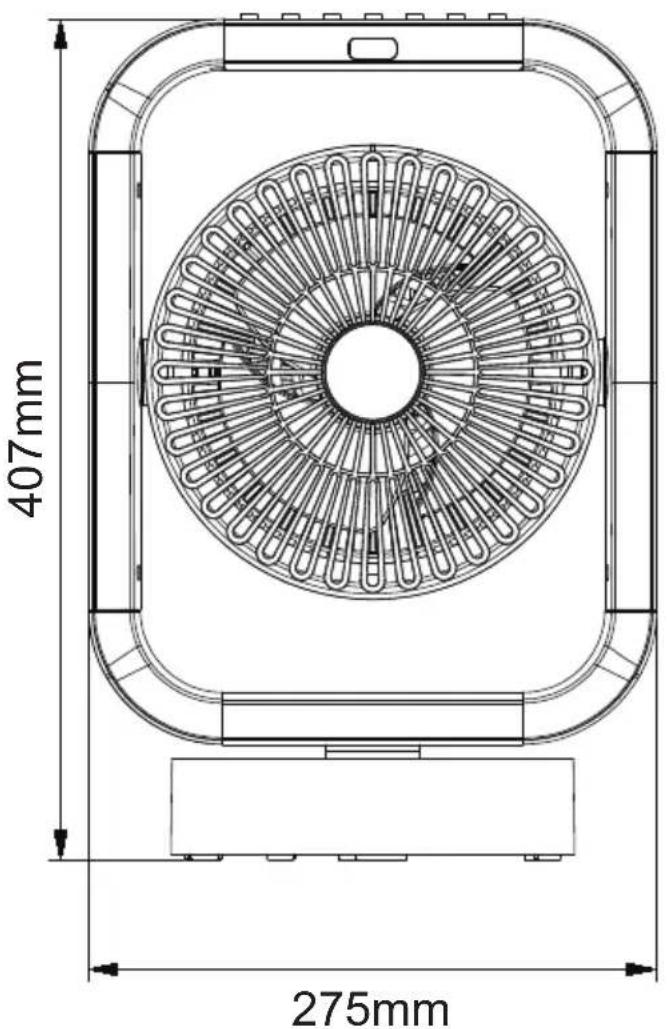
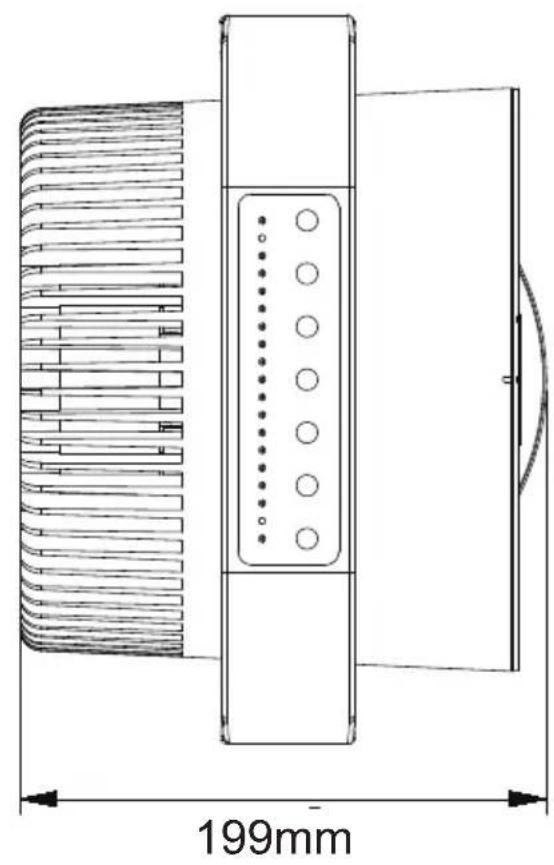
| Dimensions (H x W x D) | 407 mm x 275 mm x 199 mm |
| Weight | Approx. 2.5 kg |
| Input Voltage | 220-240 V~ |
| Rated Frequency | 50-60 Hz |
| Rated Power | 2000 W |
| Heat Settings | Low / High |
| Target Temperature Modes | 18°C / 23°C / 28°C (reference only) |
| Timer | 1-7 hours |
| Control | Control panel and remote control |
| Remote Control Range | Up to 5 meters, 30° angle |
| Child Lock | Yes (press and hold 3 seconds) |
| Display Light | Can be turned off; auto dims after 30s |
| Cleaning Method | Vacuum brush for air inlet; soft cloth for body |
| Storage | In original box, cool dry place |
| Safety Features | Auto shut-off after timer; overheat protection; child lock |
| Warranty | Register online at www.dchtoolbox.com |
| Country of Origin | China (assumed) |
Frequently Asked Questions - GHCF20WH GEMINI
User questions about GHCF20WH GEMINI
0 question about this device. Answer the ones you know or ask your own.
Ask a new question about this device
Download the instructions for your Heated blanket in PDF format for free! Find your manual GHCF20WH - GEMINI and take your electronic device back in hand. On this page are published all the documents necessary for the use of your device. GHCF20WH by GEMINI.
USER MANUAL GHCF20WH GEMINI
Thank you for purchasing this fan. This product has passed through extensive quality assurance process. Every care has been taken to ensure that it reaches you in perfect condition.
Attention! When using electric tools, basic safety precautions should be followed to reduce the risk of fire, electric shock and personal injury, including the following,
Read all these instructions before operating this product and keep these instructions for easy reference.
- Check the voltage indicated on the rating plate. This fan is designed for a 220-240V\~50-60Hz electric supply.
- Do not use electrical extension cord with this fan.
- Do not introduce your fingers through the front housing. Do not let children put any objects into the front housing.
- Do not let hair, curtains, tablecloth, clothes or other objects next to the air outlet of the fan. They could be sucked into the fan, causing damage or injuries.
- Do not use the fan having a cord or a plug damage, operation failure the fan is fallen or have been damage by any method.
- Periodically check the electric cable of this fan. If the electric cable is damaged, it must be replaced by the After-sales Service Center or by a similar qualified person in order to avoid a danger.
- Do not use this fan outdoor.
- Do not use this fan in a damp area such as bathroom.
- Do not use this fan on a window.
- Do not use this fan with any semi-conductors speed control.
- The fan should not be operated without a base nor used laying on its side.
- Do not cover the electrical cord by any objects. Do not overlay the cord with little covers or such element. Place the cord in an area where there are not any risk to stumble over it.
- The fan must be unplugged when not in-use. To unplug the fan, all the switches must be on the position "OFF", and then the plug could be disconnected.
- Do not operate the fan in an area where gasoline painting or such flammable liquids is used or stocked.
- Use this fan only as it is describe in this manual.
- Do not try to disassemble this fan and fix it by user, If you need maintenance, please send back the fan to our After-sales Service Center.
- All components of this fan must not be replaced by the user.
- If the supply cord is damaged, it must be replaced by the After-sales Service Center or a similarly qualified person in order to avoid a hazard.
- The safety standard of this fan is without earth connection.
- Keep this fan out of reach from Children or infirm persons and do not let them use the fan without supervision.
WARNING:
- This appliance can be used by children aged from 8 years and above and persons with reduced physical, sensory or mental capabilities or lack of experience and knowledge if they have been given supervision or instruction concerning use of the appliance in a safe way and understand the hazards involved.
- Children shall not play with the appliance. Cleaning and user maintenance shall not be made by children without supervised.
NOTE:
There are no serviceable parts in this unit. Do not attempt to disassemble.
WARNING: Never use this fan with any solid-state speed control device. Doing so will create fire and/or shock hazards.
MAIN PARTS


PRODUCT SIZE

natural_image
Technical line drawing of a mechanical component with dimension标注 (199mm), showing internal structure and mounting features (no text or symbols beyond measurement)OPERATION GUIDE
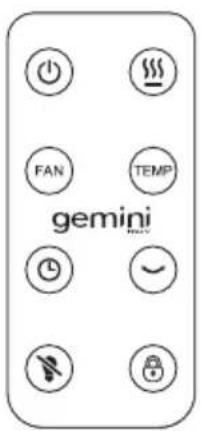
- Press ⏻ turn ON and OFF.
- Turn the product ON, then press Ⓗ to select fan speeds: Low / Medium / High.
- Turn the product ON, then Press HEAT to select heat settings: Low / High.
Note: after the product is turned OFF under HEAT FUNCTIONS, the fan will work for another 30 seconds to cool down the product.
- Under HEATING FUNCTIONS press ☐ to select the target temperature at 18^ C / 23^ C / 28^ C.
Note: The temperature is for reference only.
- Turn the product ON, then press LIGHT/LOCK to select child safety lock and display light On / Off.
*Light mode: Press once - the LED light on the control panel will switch off.
*While the appliance is switched on and the control panel buttons are not pressed within 30s, the brightness of the light indicators lowers down to 50% .
*Lock mode:Press and hold for 3S,the control panel will be locked.
-
Press ⬇ to turn ON and OFF oscillation function: 60^ left & right automatically.
-
Press Ⓤ to set the countdown timer (1-7 hours)
-
The remote control angle is about 30 degrees and the distance is less than 5 meters.
MAINTENANCE
WARNING: ALWAYS UNPLUG THE POWER CORD BEFORE MOVING OR SERVICING.
DO NOT IMMERSE THE HEATER IN WATER!
CLEANING: Clean the Air Inlet with the vacuum brush attachment on your vacuum cleaner. Clean the body of the Machine with a soft cloth.
CAUTION: Do NOT use gasoline, benzene, thinner, harsh cleaners, etc., as they will damage the Machine. NEVER use ALCOHOL or any other SOLVENTS.
STORAGE: Store the Machine with these instructions in the original box in a cool and dry place.
PRODUCT PARAMETERS
| Model | GHCF20WH |
| Input voltage | 220-240V~ |
| Rated Frequency | 50-60Hz |
| Rated power | 2000W |
| Product size | 407(H)x275(W)x199(D) mm |
*The final product specification may be varied according to a different lot of material and actual input voltage power of the usage area.
MALFUNCTION PRECLUDE
| Malfunction description Possible reason Measures | ||
| Can not turn on the machine | The adapter is not properly plugged into the power source. | Re-plug the adapter |
| Don not turn on the Power On/Off button of the remote control / control panel. | Turn on the Power On/Off button of the remote control / control panel. | |
| Mismatched adapter used | Use the adapter configured with the machine | |
| Damaged power cord | Contact Designated Maintenance center | |
| The circuit board is damaged | Contact Designated Maintenance center | |
| The product has abnormal sound | Foreign objects entering the fan | Contact Designated Maintenance center |
| Damaged fan blades or casing | Contact Designated Maintenance center | |
| Oscillation structure damage | Contact Designated Maintenance center | |
| Damaged motor | Contact Designated Maintenance center | |
| Remote control is not sensitive | The remote control battery is low | Replace with new remote control batteries |
| The remote control is too far away | Use close to the fan | |
| Remote control battery installed incorrectly | Check whether the positive and negative poles of the battery are correct | |
| Internal damage to the remote control | Contact Designated Maintenance center | |
| The machine do not oscillation / or stuck when oscillation | Oscillation structure damage | Contact Designated Maintenance center |
| Damaged oscillation motor | Contact Designated Maintenance center | |
| A foreign object is stuck on the turntable | Check and remove the foreign objects | |
重要安全事項

產品尺寸

操作說明
購買日期 Date of Purchase:
單據編號 Invoice No.:
The product specifications may be changed without prior notice.
Please contact customer service for details if necessary.
說明書內容以英文版本為準
If there is any inconsistency or ambiguity
between the English version and the Chinese version, the English version shall prevail.
保養登記
Warranty Registration

於網上登記新產品保養
Register your product online
www.dchtoolbox.com
小電維修服務 - 自攜點
Repair Service - Collection Points


Gilman
since 1841

DCHToolBox
大昌行電器維修中心
4/F, DCH Building, 20 Kai Cheung Road, Kowloon Bay, Hong Kong
客戶服務熱線 Customer Service Hotline: (852) 8210 8210

Brand : GEMINI
Model : GHCF20WH
Category : Heated blanket