
MG-3 - Rear Camera CRUX - Free user manual and instructions
Find the device manual for free MG-3 CRUX in PDF.


| Product Type | Rear View Camera Interface |
| Brand | CRUX |
| Model | MG-3 |
| Compatible Vehicles | Chrysler (200, Sebring, 300/300C, Town & Country, Aspen), Dodge (Avenger, Dakota, Caliber, Durango, Caravan, Journey, Challenger, Nitro, Charger), Jeep (Commander, Liberty, Compass, Patriot, Grand Cherokee, Wrangler), Ram (2009-2012), Volkswagen (Routan 2009-2013) |
| Radio Compatibility | MYGIG Radio |
| Power Supply | 12V DC (vehicle battery) |
| Included Parts | CAN Interface, MG-3 Harness |
| Reverse Trigger Output | +12V on white wire (not supplied for manual transmission) |
| Video In Motion | Selectable via DIP switch or external toggle switch (green wire) |
| DIP Switch Settings | 1: Video in Motion ON/OFF; 2: Rear-view camera ON/OFF; 3-4: Not used; 5-6: CAN-Termination (default OFF) |
| Connector Type | 22-pin, 8-pin Molex |
| Installation Method | T-harness connection between factory radio and vehicle harness |
| Automatic Camera Activation | Yes, when reverse gear is engaged |
| Compatibility Notes | Not compatible with factory RSE or factory rear-view camera |
| Dimensions (approx.) | 20 x 15 x 5 cm (interface module) |
| Weight (approx.) | 200 g |
Frequently Asked Questions - MG-3 CRUX
User questions about MG-3 CRUX
0 question about this device. Answer the ones you know or ask your own.
Ask a new question about this device
Download the instructions for your Rear Camera in PDF format for free! Find your manual MG-3 - CRUX and take your electronic device back in hand. On this page are published all the documents necessary for the use of your device. MG-3 by CRUX.
USER MANUAL MG-3 CRUX
Vehicle Applications
CHRYSLER
| 2011 - 2014 | 200 | 2007 - 2011 | Sebring |
| 2008 - 2010 | 300/300C | 2008 - 2017 | Town & Country |
| 2008 - 2010 | Aspen |
DODGE
| 2007 - 2015 | Avenger | 2008 - 2012 | Dakota |
| 2010 - 2012 | Caliber | 2008 - 2013 | Durango |
| 2008 - 2017 | Caravan | 2009 - 2010 | Journey |
| 2009 - 2014 | Challenger | 2007 - 2012 | Nitro |
| 2008 - 2010 | Charger |
JEEP
| 2008 - 2010 | Commander | 2008 - 2015 | Liberty |
| 2008 - 2016 | Compass | 2009 - 2017 | Patriot |
| 2008 - 2013 | Grand Cherokee | 2007 - 2017 | Wrangler |
RAM
2009 - 2012 Ram
VOLKSWAGEN
2009 - 2013 Routan
Navigation / Radio Compatibility
- MYGIG Radio
Notes
- Not compatible if Factory RSE is installed.
- Not compatible if Factory Rear-View Camera is installed.
- Does not supply Reverse Trigger on Manual Transmissions. Camera power must be tapped to reverse light wire.
Parts Included

MG-3
CAN Interface

natural_image
Coiled black cables with various colored connectors, no visible text or symbolsMG-3 Harness
Wiring Diagram

flowchart
graph TD
    A["CAMERA INPUT"] --> B["22 pin (Male Plug)"]
    C["A/V OUTPUT"] --> D["22 pin (Female Plug)"]
    E["A/V INPUT"] --> F["22 pin (Male Plug)"]
    G["TO FACTORY MyGig RADIO"] --> H["22 pin (Female Plug)"]
    I["8 pin Molex"] --> J["CAN BUS INTERFACE"]
    K["WHITE WIRE / +12V REVERSE OUTPUT"] --> L["22 pin (Female Plug)"]
    M["GREEN WIRE / VIDEO IN MOTION SELECTIVE (SEE PAGE PAGE 4)"] --> N["22 pin (Female Plug)"]
    O["FACTORY RADIO HARNESS"] --> P["Factory Radio Harness"]
    Q["FACTORY RADIO HARNESS"] --> R["Factory Radio Harness"]
NOTE: Does not supply Reverse Trigger on Manual Transmissions. Camera power must be connected to the factory +12V reverse light wire instead.
DIP Switch Setting
| DIP | Function | |
| 1 | ON | Activate Video in Motion |
| 2 | ON | Activate rear-view camera |
| 3 | OFF | Not Used |
| 4 | OFF | Not Uses |
| 5 & 6 | OFF | CAN-Termination (Default to OFF) |
Installation Instructions
Installation Example on a Chrysler 300C
- Remove the front panel from the center console, which is attached by multiple clips.

natural_image
Person using a digital device to clean or install electronic components (no visible text or symbols)- Remove the 4 TORX screws and pull the headunit out of the dashboard.
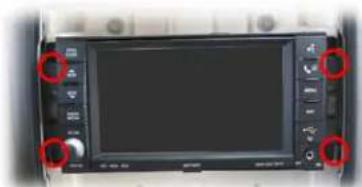
natural_image
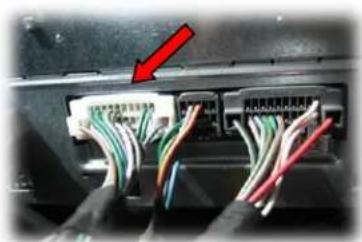
Front view of a black LCD screen with control buttons and red circular annotations (no readable text or symbols)- Remove the gray 22-pin male connector from the back of the headunit and plug it to gray 22-pin female connector on the MG-3 T-harness. Connect the gray 22-pin male connector of the MG-3 T-harness to the factory radio harness.

natural_image
Close-up of a cable connector with colored wires and a red arrow pointing to a component (no visible text or symbols)- Remove the white 22-pin male connector from the back of the headunit and plug it to white 22-pin female connector on the MG-3 T-harness. Connect the white 22-pin male connector of the MG-3 T-harness to the factory radio harness.
SWITCHING SOURCE INPUTS
- Press RADIO/MEDIA button;
- Tap VES on the screen;
- Tap AUX IN 1 to select the interface as current AV-source.


NOTE: The VES button is only active after the interface is installed.
Note: The interface switches automatically to an installed rear-view camera when reverse gear is engaged.
Activation of rear-view camera
The rear-view camera activate automatically whenever the reverse gear is engaged.
Activation of the video-in-motion function
The video-in-motion can be activated and deactivated by DIP 1 or alternatively by the included loose green cable in connection with a toggle switch (not included).
Video-in-motion permanent
Set DIP 1 to ON for the video-in-motion function to be activated permanently without disrupting the navigation performance.
Video-in-motion selective
Set DIP# 1 to OFF and use the green wire to activate the video-in-motion function.
Connect a toggle switch between a +12V ACC source and the green wire.
• +12V = Video in Motion is activated
- 0V = Video in Motion is not activated


- Vehicle Applications
- RAM
- VOLKSWAGEN
- Navigation / Radio Compatibility
- Notes
- Parts Included
- Wiring Diagram
- Installation Instructions
- Installation Example on a Chrysler 300C
- SWITCHING SOURCE INPUTS
- Activation of rear-view camera
- Activation of the video-in-motion function
- Video-in-motion permanent
- Video-in-motion selective
Brand : CRUX
Model : MG-3
Category : Rear Camera