
W319USTI - Ultra short throw projector OPTOMA - Free user manual and instructions
Find the device manual for free W319USTI OPTOMA in PDF.


| Product Type | Ultra Short Throw Projector |
| Brand | OPTOMA |
| Model | W319USTI |
| Technology | DLP |
| Native Resolution | 1920 x 1080 (Full HD) |
| Brightness | 3600 ANSI lumens (estimated) |
| Contrast Ratio | 20,000:1 |
| Lamp Life | Up to 15,000 hours (Eco+ mode) |
| Inputs | 2x HDMI, 2x VGA, 1x Composite, 1x Audio (mini-jack), 1x Audio (RCA), 1x Microphone, 1x RS232, 1x RJ45, 1x USB (remote mouse), 1x 3D Sync, 1x 12V Trigger |
| Outputs | 1x VGA out, 1x Audio out (mini-jack) |
| Built-in Speaker | 10 W |
| Power Supply | 100-240 V AC, 50-60 Hz |
| Power Consumption | 300 W (Bright mode) |
| Weight | 5.5 kg (estimated) |
| Dimensions (W x D x H) | 343 x 260 x 103 mm (estimated) |
| 3D Function | Yes (DLP Link, VESA, HDMI 1.4a) |
| Keystone Correction | Vertical ±15° (XGA/WXGA), ±5° (1080p) |
| Digital Zoom | Yes (digital zoom) |
| Focus | Manual |
| Lamp Modes | Bright, Eco, Dynamic, Eco+ |
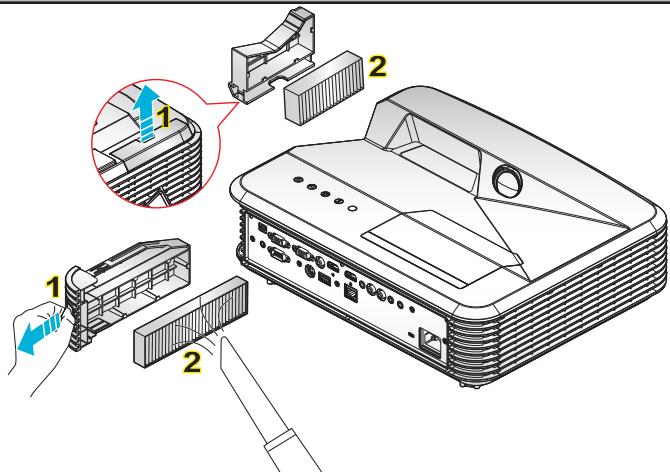
| Filter Cleaning | Every 500 hours of use |
| Spare Parts Available | Lamp, dust filter |
| Security | Kensington lock, password, security clock |
| Repairability | User-replaceable lamp |
Frequently Asked Questions - W319USTI OPTOMA
User questions about W319USTI OPTOMA
0 question about this device. Answer the ones you know or ask your own.
Ask a new question about this device
Download the instructions for your Ultra short throw projector in PDF format for free! Find your manual W319USTI - OPTOMA and take your electronic device back in hand. On this page are published all the documents necessary for the use of your device. W319USTI by OPTOMA.
USER MANUAL W319USTI OPTOMA
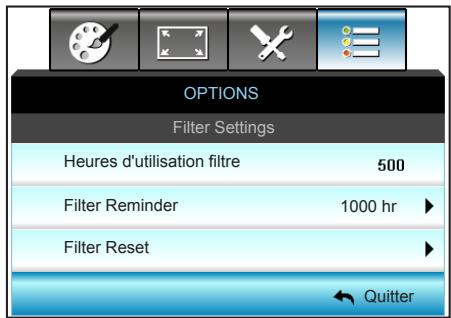
OPTIONS | Filter Settings...... 84
Appendices......85
natural_image
Isometric line drawing of a projector device (no text or symbols)Projecteur
natural_image
Line drawing of a cord with two connectors and a separate plug, tied with a strap (no text or symbols)natural_image
Line drawing of a rectangular electronic component with mounting holes and a base (no text or symbols)natural_image
Coiled cable with two connectors (no text or symbols visible)Câble HDMI
natural_image
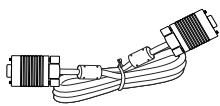
Pure electrical circuit lines without any symbolsCâble VGA
3D TV (ex. SKY 3D, DirecTV)
natural_image
Technical line drawing of a mechanical assembly with layered components and a blue arrow indicating direction (no text or symbols)
Télécommande
Installer les piles
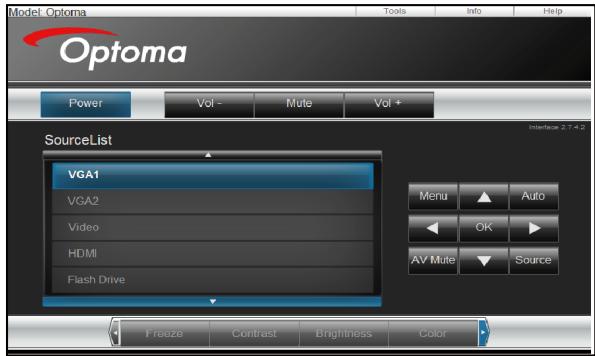
Page principale
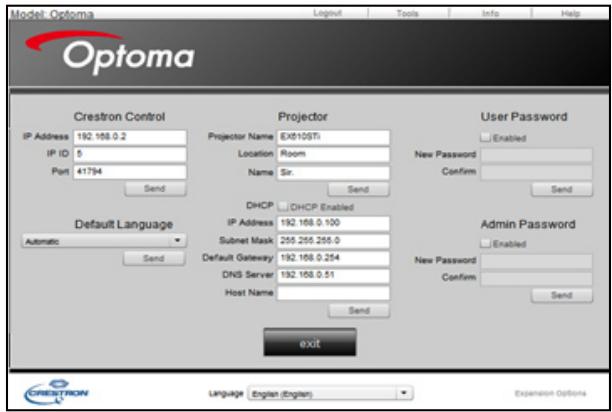
Page d'outils
Contacter le support informatique
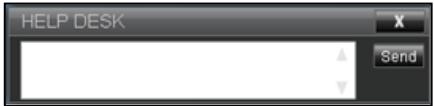
Fonction RS232 via Telnet
OPTIONS | Filter Settings

The usage time of the dust filter is reched.
Please clean the dust filters for better performance.
| SEND from projector automatically | ||||
| 232 ASCII Code | HEX Code | Function | Projector Return | Description |
| when Standby/Cooling/Out of Range/Lamp fail/Fan Lock/Over Temperature/Lamp Hours Running Out/Cover Open | INFOn | n : 0/1/2/3/4/6/7/8/9 = Standby/Cooling/Out of Range/Lamp fail/FanLock/Over Temperature/LampHours Running Out/Cover Open | ||
READ from projector
| 232 ASCII Code | HEX Code | Function | Projector Return | Description |
| ~XX121 1 | 7E 30 30 31 32 31 20 31 0D | Input Source Commands | Oka | a = 0 Nonea = 2 VGA-1a = 3 VGA-2a = 5 Videoa = 7 HDMI1a = 8 HDMI2 |
| ~XX122 1 | 7E 30 30 31 32 32 20 31 0D | Software Version | OKdddd | dddd: FW version |
| ~XX123 1 | 7E 30 30 31 32 33 20 31 0D | Display Mode | Oka | a = 0 Nonea = 1 Presentationa = 2 Bright/a = 3 Moviea = 4 sRGBa = 5 Usera= 7 Blackboarda = 9 3Da = 12 DICOM SIM. |
| ~XX124 1 | 7E 30 30 31 32 34 20 31 0D | Power State | OKn | n : 0/1 = Off/On |
| ~XX125 1 | 7E 30 30 31 32 35 20 31 0D | Brightness | OKn | |
| ~XX126 1 | 7E 30 30 31 32 37 20 31 0D | Contrast | OKn | |
| ~XX127 1 | 7E 30 30 31 32 37 20 31 0D | Format | OKn | n: 1/2/3/5/6/7 =4:3/16:9/16:10/LBX/Native/Auto |
| *16:9 or 16:10 depend on Screen Type setting | ||||
| ~XX128 1 | 7E 30 30 31 32 38 20 31 0D | Color Temperature | Oka | a=0 Standarda=1 Coola=2 Cold |
| ~XX129 1 | 7E 30 30 31 32 39 20 31 0D | Projection Mode | OKn | n : 0/1/2/3 = Front-Desktop/ Rear-Desktop/ Front-Ceiling/ Rear-Ceiling |
| ~XX150 1 | 7E 30 30 31 35 30 20 31 1D | Information | Okabbbbbccddddee | a = Power Statusa=0 Power Offa=1 Power Onb = Lamp Hour (LED Hours)bbbb Lamp Hour (LED Hours)c = Input Sourcecc=00 Nonecc=02 VGA1cc=03 VGA2cc=05 Videocc=07 HDMI1cc=08 HDMI2d = Firmware Versiondddd Firmware Versione = Display modeee=00 Noneee=01 Presentationee=02 Brightee=03 Movieee=04 sRGBee=05 Useree=07 Blackboardee=09 3Dee=12 DICOM SIM. |
| ~XX151 1 | 7E 30 30 31 35 31 20 31 0D | Model name | OKn | n:1/2/3=XGA/WGA/1080p |
| ~XX108 1 | 7E 30 30 31 30 38 20 31 0D | Lamp Hours | OKbbbb | bbbb: LampHour |
| ~XX108 2 | 7E 30 30 31 30 38 20 32 0D | Cumulative Lamp Hours | OKbbbb | bbbb: (5 digits) Total Lamp Hours |
| ~XX87 1 | 7E 30 30 38 37 20 31 0D | Network Status | Okn | n=0/1 Disconnected/Connected |
Appendices
| ~XX351 0 | 7E 30 30 33 35 31 20 30 0D | Fan1 speed(blower) | Oka | a=0000~9999 |
| ~XX352 1 | 7E 30 30 33 35 32 20 31 0D | System temperature | Oka | a=000~999 |
| ~XX353 1 | 7E 30 30 33 35 33 20 31 0D | Serial number | Okaaaaaaaaaaa aaaaaaaa | a=serial number string |
| ~XX354 1 | 7E 30 30 33 35 34 20 31 0D | Closed Captioning | Oka | a: 0/1/2 = off/cc1/cc2 |
| ~XX355 1 | 7E 30 30 33 35 35 20 31 0D | AV Mute | Oka | a : 0/1 = Off/On |
| ~XX356 1 | 7E 30 30 33 35 36 20 31 0D | Mute | Oka | a : 0/1 = Off/On |
| ~XX357 1 | 7E 30 30 33 35 37 20 31 0D | LAN FW version | Okeeeee | eeee = Software Version |
| ~XX358 1 | 7E 30 30 33 35 38 20 31 0D | Current Lamp Watt | Okaaaa | aaaa=0000~9999 |
42 Caxton Way, The Watford Business Park
Watford, Hertfordshire,
WD18 8QZ, UK
www.optoma.eu
service@tsc-europe.com
Benelux BV
Randstad 22-123
1316 BW Almere
Les Pays-Bas
www.optoma.nl
+31 (0) 36 820 0252
+31 (0) 36 548 9052
France
Bâtiment E
81-83 avenue Edouard Vaillant
92100 Boulogne Billancourt, France
+33 1 41 46 12 20
+33 1 41 46 94 35
savoptoma@optoma.fr
Espagne
C/ José Hierro,36 Of. 1C
28522 Rivas VaciaMadrid,
Spain
+34 91 499 06 06
+34 91 670 08 32
Allemagne
Wiesenstrasse 21 W D40549 Düsseldorf, Allemagne
+49 (0) 211 506 6670
+49 (0) 211 506 66799
info@optoma.de
Scandinavie
Lerpeveien 25 3040 Drammen Norvège
+47 32 98 89 90
+47 32 98 89 99
info@optoma.no
info@os-worldwide.com
www.os-worldwide.com
Taiwan
12F., No.213, Sec. 3, Beixin Rd., Xindian Dist., New Taipei City 231, Taiwan, R.O.C. www.optoma.com.tw
+886-2-8911-8600
+886-2-8911-6550
services@optoma.com.tw
asia.optoma.com
Hong Kong
Unit A, 27/F Dragon Centre, 79 Wing Hong Street, Cheung Sha Wan, Kowloon, Hong Kong
+852-2396-8968
+852-2370-1222
www.optoma.com.hk
Chine
5F, No. 1205, Kaixuan Rd., Changning District Shanghai, 200052, Chine
+86-21-62947376
+86-21-62947375
www.optoma.com.cn
This Class B digital apparatus complies with Canadian ICES-003.
natural_image
Symbol of a trash bin crossed with no text or numbers, representing waste sorting or disposal (no text present)Brand : OPTOMA
Model : W319USTI
Category : Ultra short throw projector