
NAECCCBK000 - Air conditioner NewAir - Free user manual and instructions
Find the device manual for free NAECCCBK000 NewAir in PDF.


| Product Type | Portable Electric Cooler |
| Model | NPR080GA00 |
| Dimensions (W x D x H) | 37.5\" x 21\" x 18.5\" |
| Weight | 59 lbs |
| Power Consumption | 80 W |
| Voltage (DC) | 12/24V |
| Voltage (AC) | 100-240V (with adapter) |
| Storage Capacity | 80 quarts |
| Temperature Range | -4°F to 68°F |
| Refrigerant | R600a (1.41 Oz) |
| Noise Emission | <45 dB |
| Cooling Technology | Durable DC compressor |
| Fast Cooling | Cools to -4°F in ambient 77°F |
| Battery Protection | 3-stage (Low, Medium, High) |
| Dual Zone | Yes (cooling and freezing) |
| Display | LCD for temperature setting |
| USB Charging Port | +5V DC/1A |
| Bottle Opener | Side-mounted |
| Handle and Wheels | Robust wheels and stretchable handle |
| Door Reversible | Yes |
| Cleaning | Wet cloth, do not soak in water |
| Warranty | 1 year limited manufacturer warranty |
| CFC Free | Yes |
Frequently Asked Questions - NAECCCBK000 NewAir
User questions about NAECCCBK000 NewAir
0 question about this device. Answer the ones you know or ask your own.
Ask a new question about this device
Download the instructions for your Air conditioner in PDF format for free! Find your manual NAECCCBK000 - NewAir and take your electronic device back in hand. On this page are published all the documents necessary for the use of your device. NAECCCBK000 by NewAir.
USER MANUAL NAECCCBK000 NewAir
Portable 80 Quart 12V Electric Cooler

natural_image
Line drawing of a portable tool case with handlebars and wheels (no text or symbols)OWNERS MANUAL
Read and save these instructions.
READ AND SAVE THESE INSTRUCTIONS
TABLE OF CONTENTS
Register Your Product Online ....3
Safety Information & Warnings 4
Parts List 5
Electrical Circuit Diagram 7
Operating Instructions....7
Cleaning & Storage....10
Troubleshooting....11
Limited Manufacturer's Warranty 13
SPECIFICATIONS
| MODEL NO. | NPR080GA00 |
| VOLTAGE: | (DC) 12/24V or (AC) 100/240V |
| POWER CONSUMPTION: | 80 W |
| STORAGE CAPACITY: | 80 quarts |
| TEMPERATURE RANGE: | -4°F - 68°F |
| REFRIGERANT: | R600a (1.41 Oz) |
| NOISE EMISSION: | <45dB |
| DIMENSIONS: | 37.5” W x 21” D x 18.5” H |
| WEIGHT: | 59lbs |
REGISTER YOUR PRODUCT ONLINE
Register Your Newair Product Online Today!
Take advantage of all the benefits product registration has to offer:

Service and Support
Diagnose troubleshooting and service issues faster and more accurately

Recall Notifications
Stay up to date for safety, system updates and recall notifications

Special Promotions
Opt-in for Newair promotions and offers
Registering your product information online is safe & secure and takes less than 2 minutes to complete:
newair.com/register
Alternatively, we recommend you attach a copy of your sales receipt below and record the following information, located on the manufacturer's nameplate on the rear of the unit. You will need this information if it becomes necessary to contact the manufacturer for service inquiries.
Date of Purchase: ____
Serial Number: ____
Model Number: ____
SAFETY INFORMATION & WARNINGS

To prevent damage to your product or injury to yourself or to others, read the following safety precautions in their entirety before using this electric cooler.
- Do not put any electrical devices inside the electric cooler as they could damage the electric cooler.
- Do not soak the electric cooler in water.
- Do not turn upside down to drain.
- Do not allow children to play with or inside the electric cooler.
- Do not use the electric cooler if malfunctions such as smoke, overheating, leakage or similar occur.
- Do not attempt to repair or replace any part of your cooler unless it is specifically recommended in this manual. All other servicing should only be performed by a qualified technician.
- Use a wet cloth to clean your electric cooler before use.
- Make sure the voltage is within the proper range for the socket and cable being used.
- Contact customer service if you have any issues with your appliance.
PARTS LIST
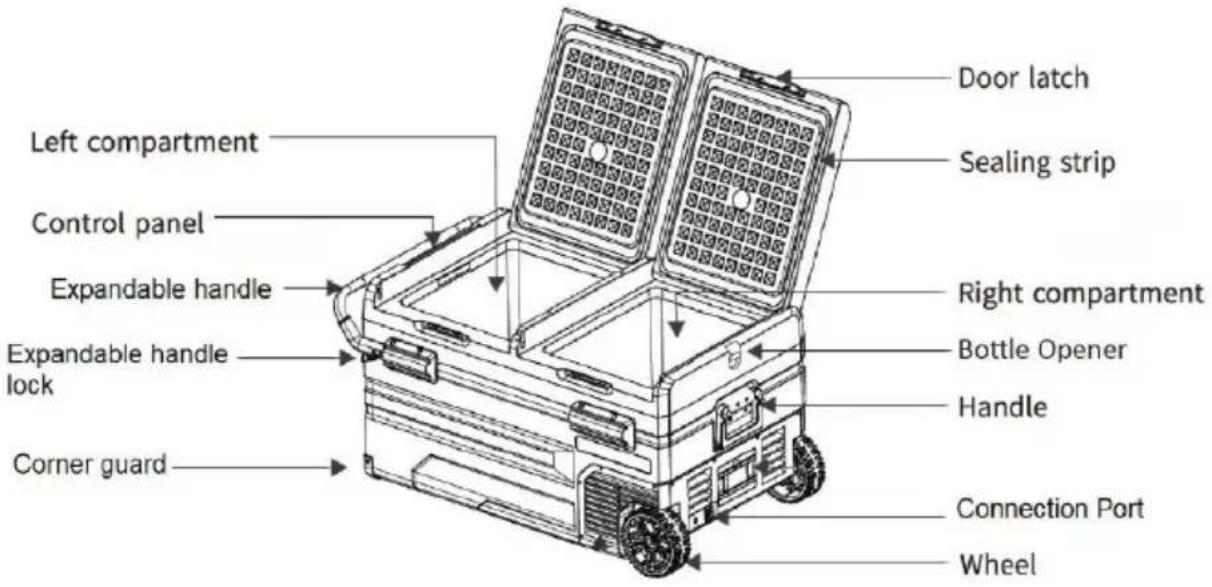
PRODUCT FEATURES
- Durable DC compressor and compressor module.
- Fast cooling to -4^ (-20°C) when ambient room temperature is 77°F (25°C).
• 3-stage low voltage battery protection.
• CFC free and low energy consumption.
• (DC) 12/24V or (AC) 100/240V with adapter power supply. - Robust wheels and stretchable handle.
- Dual zone for cooling and freezing.
- LCD display for temperature setting.
- Bottle opener on the side
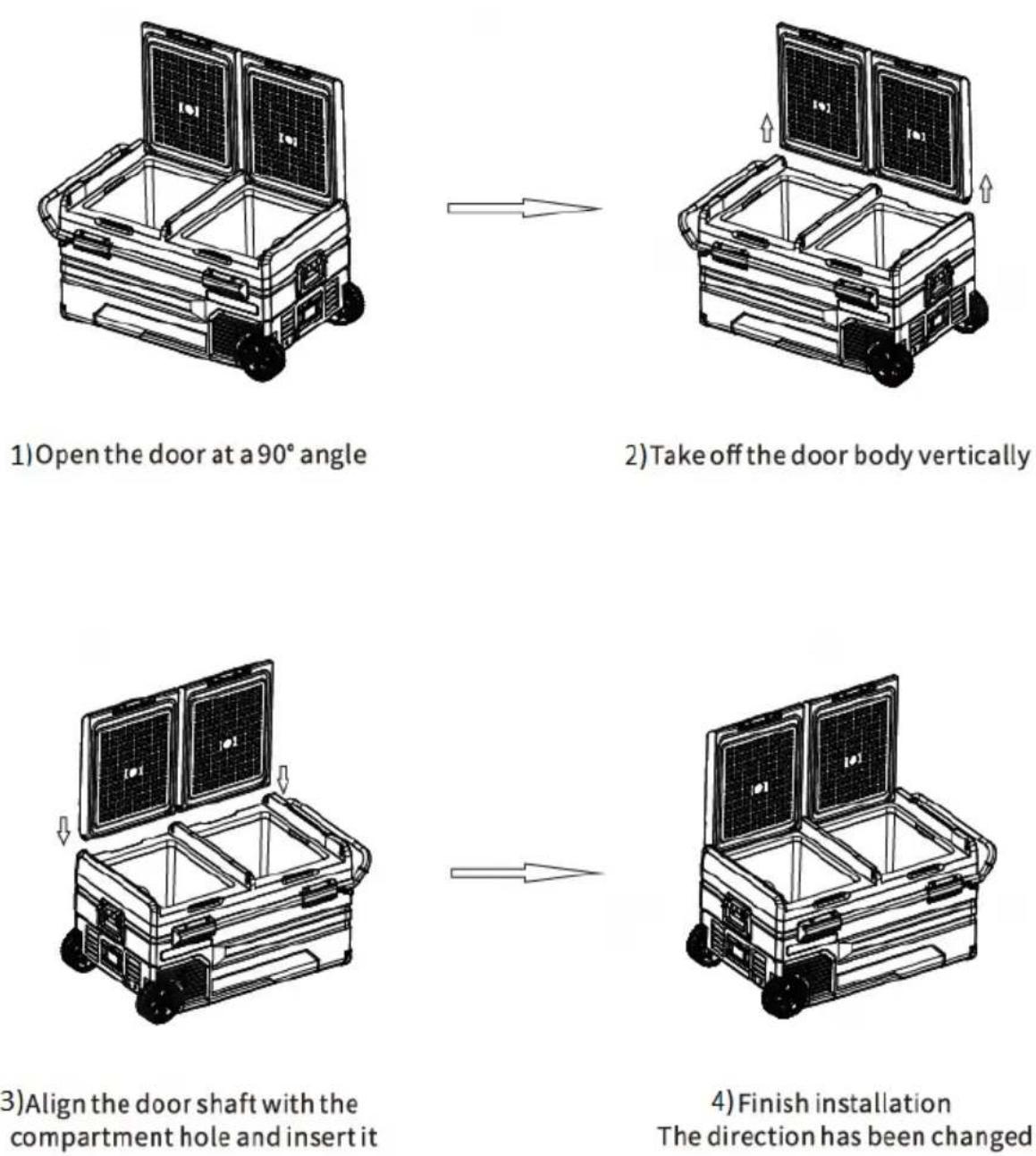
REVERSING DOOR INSTRUCTIONS
ELECTRICAL CIRCUIT DIAGRAM
Electric Circuit Drawing And Data Sheet

flowchart
graph TD
    A["Display Unit"] --> B["Control Unit"]
    C["NTC1"] --> B
    D["NTC2"] --> B
    E["LED1 Hall Switch"] --> B
    F["LED2 Hall Switch"] --> B
    B --> G["Valve"]
    G --> H["Condenser FAN"]
    H --> I["DC12V/24V"]
    H --> J["Fuse"]
    H --> K["M"]
    H --> L["D"]
    H --> M["C"]
    H --> N["P"]
    H --> O["T"]
OPERATING INSTRUCTIONS
CONTROL PANEL SETTINGS
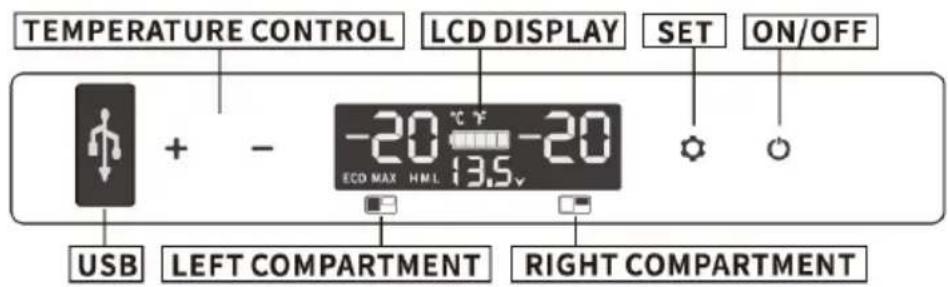
Plugging it in: Connect the (DC) 12/24V or (AC) 100/240V with a power adapter. The unit will buzz/beep and the display screen will light up for 2 seconds, entering regular operation mode.
USB charging port: +5V DC/1A, suitable for small devices like mobile phones or tablets.
Turning it on: Press ⚙ for 3 seconds to turn the electric cooler on/off.
Adjusting the temperature: Press the button "+" or "-" until the figure on the screen begins flashing, then you can adjust the temperature by "+" or "-" If you stop holding the button for 4 seconds, the temperature will set.
Left zone: Press "+" or "-" to adjust temperature.
Right zone: Press"—" followed by ⚙. Then press "+" or "-" to adjust temperature.
Note: the displayed temperature is the current temperature of the dual zones. If the set temperatures are much higher or lower than the original temperature, the display screen will not present the set temperature immediately and will only do so once the dual zones reach the set temperature.
Cooling Mode: press to switch the cooling mode between MAX (fast cooling) and ECO (Economical).

ECO mode: the compressor will cool down at a slower rate to save energy.
MAX mode: the compressor will cool down at a faster rate consuming more energy.
Battery Protection Setting: hold over 3 seconds until screen flashes, then press again to select battery protection setting from L (Low), M (Medium), H (High).

(High)

(Medium)

(Low)
- The default setting is H (High) mode.
- When the electric cooler is powered by the car battery, it is recommended to set H mode.
Temperature Unit Setting: Press to turn off the electric cooler, then press over 3 seconds until E1 shows on the screen. Press until screen shows E5. When the screen flashes, press "+" or "-" to change the unit between Celsius (°C) and Fahrenheit (°F).

( Celsius )

(Fahrenheit)
Note: the default temperature setting is Celsius.
Reset Setting: Power off the electric cooler by holding the setting button until E1 is displayed on the screen. Hold the button "+" and "-" until the screen lights up as follow:

CLEANING & STORAGE
CLEANING INSTRUCTIONS
- Unplug your cooler to avoid electric shock.
- Remove the cover from the drain hole.
- Use a wet cloth to clean the electric cooler and then use a dry cloth to dry it.

WARNING: Do not soak the electric cooler in water to clean it. This could damage the unit.
LONG-TERM STORAGE INSTRUCTIONS
Follow these instructions if you plan on storing the cooler for long periods of time:
- Turn off the power and unplug the unit from the power source.
- Remove the items stored in the refrigerator.
- Remove all remaining water in electric cooler with a dry cloth.
- Place the electric cooler in a cool and dry place.
TROUBLESHOOTING
Try the troubleshooting tips below should you experience any problems or call a NewAir support representative (1-855-963-9247) for more help or guidance.
| Problem | Possible Causes and Solution |
| The electric cooler is not working. | The plug and socket are not connected properly.The fuse has been burnt.The compressor protection mode may be on. Wait 3mins before turning the electric cooler on. |
| Cooler compartments are too warm. | The door is opened frequently.A large amount of warm or hot food has been stored recently. The cooler will eventually reach the desired temperature.The cooler has been disconnected for a period of time; it will reach the desired temperature eventually. |
| Food freezes inside. | The set temperature is too low. |
| The electric cooler produces water-like noises. | This is regular operation noise caused by the refrigerant's flow. |
| The electric cooler is noisy when starting. | Humming like noises are common and caused by the working compressor. The noise will be reduced after running for a few minutes. |
| There is water drops around the refrigerator casing or door gap. | It is naturally condensed water that drops when moisture in the air meets the lower temperature of the inner zones. |
| Code F1 is on the display panel | This is the protection mode for a low voltage car. Unplugging the adaptor from the car and connecting to another power source is recommended if F1 shows up, then set the battery protection mode from H to M or from M to L. |
| Code F2 is on the display panel | This is the protection mode for an overloaded fan. Turn the electric cooler off and restart it after 30mins. |
| Code F3 is on the display panel | This is the protection mode for a frequently restarted compressor. Turn the electric cooler off and restart it after 30 minutes. |
| Code F4 is on the display panel | This is the protection mode for and overloaded compressor that is working at a low speed. Please turn it off and restart it after 30 minutes. |
| Code F5 is on the display panel | This is warning code for an overheated compressor module. Move the electric cooler to a ventilated area, turn it off and restart it after 30mins. |
| Code F6 is on the display panel | This warning code means no parameter can be detected by the controller. Restart the electric cooler. If this code shows again, please contact after-sale department. |
| Code F7&F8 are on the display panel | This is the error code for temperature sensor. Please contact customer service for more details. |
LIMITED MANUFACTURER'S WARRANTY
This appliance is covered by a limited manufacturer's warranty. For one year from the original date of purchase, the manufacturer will repair or replace any parts of this appliance that prove to be defective in materials and workmanship, provided the appliance has been used under normal operating conditions as intended by the manufacturer.
Warranty Terms:
During the first year, any components of this appliance found to be defective due to materials or workmanship will be repaired or replaced, at the manufacturer's discretion, at no charge to the original purchaser. The purchaser will be responsible for any removal or transportation costs.
Warranty Exclusions:
The warranty will not apply if damage is caused by any of the following:
- Power failure
- Damage in transit or when moving the appliance
- Improper power supply such as low voltage, defective household wiring or inadequate fuses
- Accident, alteration, misuse or abuse of the appliance such as using non-approved accessories, inadequate air circulation in the room or abnormal operating conditions (extreme temperatures)
- Use in commercial or industrial applications
- Fire, water damage, theft, war, riot, hostility or acts of God such as hurricanes, floods, etc.
- Use of force or damage caused by external influences
- Partially or completely dismantled appliances
- Excess wear and tear by the user
Obtaining Service:
When making a warranty claim, please have the original bill of purchase with purchase date available. Once confirmed that your appliance is eligible for warranty service, all repairs will be performed by a Newair™ authorized repair facility. The purchaser will be responsible for any removal or transportation costs. Replacement parts and/or units will be new, re-manufactured or refurbished and is subject to the manufacturer's discretion. For technical support and warranty service, please email support@newairusa.com.


- Portable 80 Quart 12V Electric Cooler
- OWNERS MANUAL
- READ AND SAVE THESE INSTRUCTIONS
- TABLE OF CONTENTS
- SPECIFICATIONS
- REGISTER YOUR PRODUCT ONLINE
- Register Your Newair Product Online Today!
- Service and Support
- Recall Notifications
- Special Promotions
- SAFETY INFORMATION & WARNINGS
- PARTS LIST
- PRODUCT FEATURES
- REVERSING DOOR INSTRUCTIONS
- OPERATING INSTRUCTIONS
- CONTROL PANEL SETTINGS
- CLEANING & STORAGE
- CLEANING INSTRUCTIONS
- LONG-TERM STORAGE INSTRUCTIONS
- Follow these instructions if you plan on storing the cooler for long periods of time:
- TROUBLESHOOTING
- LIMITED MANUFACTURER'S WARRANTY
- Warranty Terms:
- Warranty Exclusions:
- Obtaining Service:
Brand : NewAir
Model : NAECCCBK000
Category : Air conditioner