Pro2A - Haijaainishwa Ocean Way Audio - Free user manual and instructions
Find the device manual for free Pro2A Ocean Way Audio in PDF.


User questions about Pro2A Ocean Way Audio
0 question about this device. Answer the ones you know or ask your own.
Ask a new question about this device
Download the instructions for your Haijaainishwa in PDF format for free! Find your manual Pro2A - Ocean Way Audio and take your electronic device back in hand. On this page are published all the documents necessary for the use of your device. Pro2A by Ocean Way Audio.
USER MANUAL Pro2A Ocean Way Audio
Manual of Operations Ocean Way Audio – Pro2A Professional Sound System

natural_image
Exterior view of a modern audio amplifier with two speakers and a speaker grille (no visible text or symbols)
Contents
1) Pro2A Description
2) Safety Instructions and Warnings! (please read carefully)
3) Inputs and Controls
4) Input selectors & Legends
5) S10A & S12A Sub-Bass options
6) Specifications
7) Warranty
8) Maintenance
1) Pro2A
Pro2A is the latest addition to the OWA speaker line achieving efficient distortion-free dynamic range in an aesthetically appealing trapezoidal profile. Its cabinet features a sleek design with attention to time alignment, reduce baffle reflections and materials designed to minimize low frequency resonance. Its port is optimized to increase the woofer's low frequency extension and sound pressure level capacity.
Pro2A's HF driver is a high definition silk fabric dome design with excellent mechanical linearity. The LF driver is geometrically reinforced aluminum cone with a vented cast aluminum chassis yielding optimum strength and "high-power linearity". Combined with the cabinet, the system offers minimal reflection, high resolution and low listening fatigue over the entire audio spectrum.
Our two-way, self-powered design delivers outstanding performance allowing for flexibility of placement in the room with a uniform frequency response of 35Hz to 25kHz, and 110 dB maximum SPL between channels. Its overload protection circuitry ensure that drivers and amplifiers are protected, providing long term system reliability. The speaker allows the professional to hear great detail with a natural, open and accurately image. The Pro2A stands well above competitive monitor speakers in its price range.
2) Safety Instructions and Warnings
Read the information for use
Please keep this user manual in a safe place during the lifetime of the product.
Heed all warnings.
Follow all instructions.
Do not use this product near water (for example, in damp rooms or near a swimming pool).
Clean only with dry cloth.
Do not cover the heat sink. Install in accordance with the user manual.
Do not install near any heat sources such as radiators, heat registers, stoves, or other apparatus that produce heat.
Protect the power cord from being walked on, pinched or damaged in any other way. Pay particular attention to plugs and the point where they exit from the Amplifier Unit.
The Amplifier Unit can only be disconnected from the power supply by removing the plug, which must be freely accessible at all times. Unplug this Amplifier Unit during lightning storms or when unused for long periods of time.
Refer all servicing to qualified service personnel.
Servicing
Do not attempt to service this product yourself. As opening or removing covers may expose you to dangerous voltage or other hazards, the amplifier may only be opened by qualified personnel. Please refer to your dealer/distributor.
Servicing and Replacement Parts
All service and repair work must be carried out by an authorized dealer/distributor. When replacement parts are required, please ensure that the dealer/distributor only uses replacement parts specified by the manufacturer. The use of unauthorized replacement parts may result in injury and/or damage through fire or electric shock or other electricity -related hazards.
Ventilation and heat sink
The heat sink is provided to ensure reliable operation of the Amplifier Unit and to protect it from overheating. The heat sink must not be blocked or covered. This product should not be installed unless proper ventilation is provided or manufacturer's instructions have been adhered to.
Water and Moisture
Do not use this product near water (for example, in damp rooms or near a swimming pool).
Cleaning
Unplug the Amplifier Unit from the wall outlet before cleaning. Do not use liquid or aerosol cleaners.
Power -Cord Protection
Power supply cords should be routed so that they are not likely to be walked on or pinched by items placed upon them or against them, paying particular attention to cords and plugs, and the point where they exit from the Amplifier Unit.
Lightning
For added protection of the product during lightning storms, or when it is left unattended and unused for long periods of time, unplug it from the wall outlet. This will prevent damage to the product due to lightning and power-line surges. Disconnection from the mains power supply can only be achieved by removing the plug from the mains socket and by external disconnection of all poles from the mains.
Accessories
Do not place this product on an unstable cart, stand, tripod, bracket, or table. The product may fall, causing serious injury, and serious damage to the product.
Connecting
When you connect this speaker to other equipment, turn off the power and unplug all of the equipment from the supply source. Failure to do so may cause an electric shock and serious personal injury. Read the user's manual of the other equipment carefully and follow the instructions when making the connections.
Sound Volume
Reduce the system volume to minimum before you turn on the amplifier to prevent sudden high levels of sound which may cause hearing or speaker damage.
Precautions when connecting to MAINS IN
When mounting or connecting the product always disconnect it from mains. Only connect the product to an appropriate AC circuit and outlet, according to the requirements indicated on the rating plate. If a power cut occurs while the amplifier is switched on, it will restart automatically once the power supply has been restored. All settings prior to the loss of power will be maintained. IMPORTANT: Always connect the Product to mains through the MAINS IN connector on the Amplifier Unit.
DO NOT REMOVE MAINS CONNECTOR GROUND, IT IS ILLEGAL AND DANGEROUS.
AC power 115/230v switch
Make sure to correctly configure with the correct voltage for your country.


text_image
115V setting SELECT CORRECT VOLTAGE (115 or 200VAC)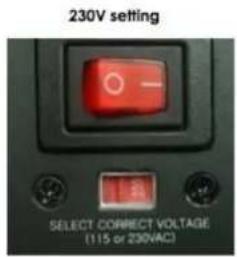
text_image
230V setting SELECT CORRECT VOLTAGE (115 or 230VAC)
3) Inputs and Controls Pro2A
Master Volume
The Master Volume allows trimming the speaker input gain when desired.

text_image
XLR PIN OUT Pin1 = Shield Pin2 = Hot Pin3 = Cold Analog IN Digital IN (AES-EBU) Digital OUT (AES-EBU) 1 2 3 4 LED Selector FACTORY SERVICE ONLY LED 1: Analog LED 2: Digital LED 3/LED 4: OFF / OFF = Two Way OFF / ON = Three Way ON / OFF = Digital Left ON / ON = Digital Right Max Min Master Volume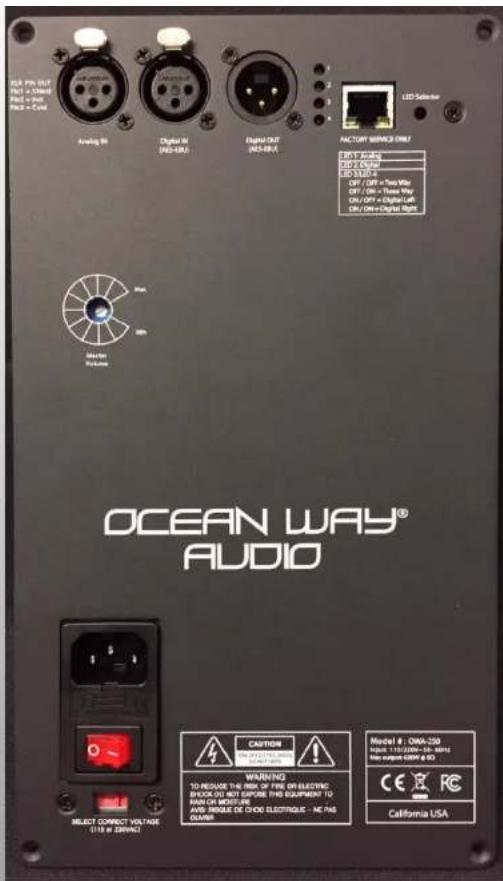
text_image
OCEAN WAY® AUDIO SELECT CONNECT VOLTAGE 10 GB 8 ZEBRUANCE ANCYIN WARNING TO REQUIRE THE LINE OF FINE ON ELECTRIC SHOCK DO NOT EXPOSE THIS EQUIPMENT TO MOUNT MORE FOR AWD MODULE DE CHOO ELECTRIQUE - NC PAS OWNER CAUTION WARNING Model #: OWA-250 HOLD 113/2006-10-MMA MAX. RAVEL GOMA # 80 CE USA California USA4) Input Selection and Legends
Pro2A
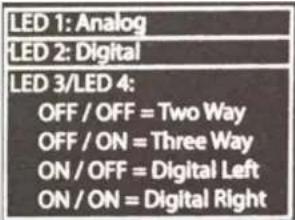
LED 1 – when illuminated indicates preset selected requires an analog signal LED2 – when illuminated indicates preset selected requires an AES-EBU digital signal LEDS 3 & 4 - will be illuminated or dark in combinations specified in the legend above To indicate which of the 4 presets is currently active.

text_image
USB NETS R21.000 1000 R21.000 1000 R21.000 1000 R21.000 1000 R21.000 1000 R21.000 1000 R21.000 1000 R21.000 1000 R21.000 R21.000 R21.000 R21.000 R21.000 R21.000 R21.000 R21.000 R21.000 R21.000 R21.000 R21.000 R21.000Preset 1 – default preset the speaker is shipped with. It is an analog input 2-way (full range) configuration. Use Analog In XLR. (LED 1 on, LED 3 & 4 off).
Preset 2- Is an analog 3-way (85Hz 4 ^th order L-R high pass filter) for use with a sub-woofer. Use Analog In XLR (LED 1 on, LED 3 off / LED 4 on).
Preset 3 – Is an AES-EBU digital left input with 2-way response. Use Digital In XLR (LED 2 on, LED 3 on / LED 4 off).
Preset 4 – Is an AES-EBU digital right input with 2-way response. Use Digital In XLR

Selecting Digital or Analog Inputs
text_image
LED 1: Analog LED 2: Digital LED 3/LED 4: OFF / OFF = Two Way OFF / ON = Three Way ON / OFF = Digital Left ON / ON = Digital RightUsing a small diameter blunt tool (i.e. plain end of a cotton swab), depress the LED Selector pushbutton for a short (1/2 second or less) duration. Each press will toggle the LEDs into different flashing sequences that will match the legend above. When the desired sequence is flashing, depress the switch for a full second. This will load that program and the LEDs will change from flashing to full illumination.
N.B. A long push (1 sec or more) without first being preceded by a short push will toggle the input from its alternate state (analog to digital or visa-versa). You'll see LED 1 or LED 2 change to their opposite state to indicate this. Avoid doing this unintentionally. Begin with short pushes to toggle through the 4 preset options and use the long push to select the desired preset.

Signal Flow 2-Way & 3-Way
The Pro2A is configured as a 2-way system with no programmed roll-off in the low end response. There is a factory preset installed that will allow the speaker's low frequency response to be extended by adding a sub-bass cabinet. Ocean Way Audio offers the S10A and the S12A subwoofer which has been added to create a balanced system response.
Select Preset 2 - (LED 1 on, LED 3 off / LED 4 on).

text_image
OCEAN WAY® AUDIO USB OFF/AUTOON STANDS BY ENABLED GAIN MAX LP ADJUST OUT CROSSOVER 60 Hz 120Hz/OUT DELAY 20ms 12V TRIGGER OUT LEFT IN LEFT OUT RIGHT IN RIGHT OUT 100-240 VAC 50/60HZ OCEAN WAY RLOD Model: 312A MAX Signal: 519 20210093 CAUTION AVIS Exo-VS.15) S10A & S12A Description
The Power Switch (toggle) has three positions.
1.) In the left most position the unit is powered OFF.
2.) In the center position the unit is in Auto mode. It can be powered on uniting the 12V trigger inputs or by feeding audio into the input XLR. In the absence of either it will enter STANDBY mode with the red LED illuminating.
When the trigger is activated or audio is supplied it will power up and the green LED will illuminate.
3.) The right most position is will power up to ON with the green LED illuminating. It will remain ON in this position.
The Voltage auto selects between 100v and 240v-115W 50/60HZ


text_image
USB OFF/AUTO/ON STANDBY ENABLED GAIN MIN MAX LP ADJUST 100Hz/Hz power CUT BOOST CROSSOVER 100Hz/Hz power 60 Hz 120Hz/ OUT DELAY 0ms 28ms 12V TRIGGER IN OUT LEFT IN Connect Left Audio Source Here LEFT OUT Connect to Left HRS Analog Input Select Preset 2 RIGHT IN Connect Right Audio Source Here RIGHT OUT Connect to Right HRS Analog Input Select Preset 2 350 Rev/D V1.5S10A & S12A Description
GAIN is the volume control. A suggested starting position is 12 o'clock when matched with HR5 speakers. Adjust up
or down to suit positioning in your room. (Closer to a wall or a corner on the floor will increase the low frequency response.
LF Adjust incorporated a LF shelf @ 45 Hz +/- 5 db in 1 db increments
Crossover switch selects frequencies from 60 / 65 / 70 / 75 / 80 / 85 / 90 / 95 / 100 / 110 / 120hz
Delay adjusts from 0 to 20 ms.
12V trigger (AC or DC) will turn the unit on and off when power switch is in center (Auto) position. The jacks are paralleled to daisy chain to other auto powered products. With switch in center position and no trigger utilized, the unit will power ON when audio is sent to the input XLRs.
Balanced XLR IN & OUT jacks are paralleled and a direct feed through. Signal does not go through any electronics.

6) Specifications
| Tech Specs Pro2A | |
| Powered YES, Accepts analog/digital inputs 24 bit / 192 kHz | |
| Driver Configuration 2-way | |
| HF Driver Size 1" | |
| LF Driver Size 8" | |
| LF Driver Power Amp 125watts | |
| HF Driver Power Amp 125watts | |
| AES3 Digital Inputs Yes | |
| Frequency Range 35Hz > 25 kHz | |
| Maximum Peak SPL 110db | |
| Enclosure Type ported | |
| Height 16" | |
| Width | 11.5" |
| Depth | 13.5" |
| Weight | 45 lbs |
7) Warranty
Ocean Way Audio speakers are under limited warranty as described in the following conditions.
- Warranty period starts as of date of purchase from the authorized dealer.
- OWA reserves the right to request original purchase receipt as proof of the date of purchase.
- Electronic components and cabinetry are warranted for a period of two (2) years against manufacturing defect, covering parts and labor for necessary repairs.
- Speaker driver components are warranted for a period of one (1) year against manufacturing defect.
- The manufacturer's warranties are limited to physical defects in the materials, parts and workmanship used in making the product.
- Misuse, incorrect installation, handling, repairs or modifications performed by unauthorized persons, abnormal conditions, damage due to accidents such as power surges, water, fire, or any other are excluded from any warranty claims.
- OWA warrants all service repairs and replacements for 180 days from the date of return to the customer/owner.
Technical Support and Service
For warranty service and assistance, contact the original authorized dealer/distributor to arrange for return and/or repair of the product. OWA will strive to satisfy all service requests in the fastest manner possible. Under the warranty, OWA will repair, or at its discretion, replace the product at no charge, provided it is returned (postage paid) to an authorized OWA service center. Any shipping or duties incurred are the customer's responsibility. Products should be returned suitably packaged to protect from shipping damage, or in their original packaging. OWA shall be the sole and final authority to determine the validity of all warranty issues. All non-warranty repairs for current products will be charged according to the service repair pricing schedule. Repair prices will either be based on a flat fee for repair or replacement, or will be estimated depending on the repair deemed necessary.
8) Maintenance
Exterior surfaces of this product may be cleaned using a non-abrasive lint-free cloth lightly damped with water. Disconnect the mains power cable when cleaning to avoid risk of electric shock.
Do not use alcohol or ammonia based cleaners.
Driver active surfaces will not require cleaning as they are deep-set inside horn expansions

text_image
Ocean Way Audio HistoryAbout Ocean Way
It all started with speakers. Ocean Way Recording began in 1968, as a showcase for Allen's custom monitors.
Allen needed impressive sounding material for his speakers so he began to record music that sounded dramatic! The studio business boomed and he met the demand with many rooms in several locations. At the peak of the studio business, Allen designed and owned four recording studio complexes.
Five time Grammy® Award winning Allen Sides has personally recorded over 1,000 albums, many of which have become audiophile classics. He has worked with the finest and most famous artists of the last four decades. Albums recorded in Allen's studios have sold over a billion copies. Allen's hearing capabilities enables our engineers to translate every sonic nuance, bringing a new dimension and understanding to what is possible in high-end speaker design. His ears are our final design tool.
Ocean Way Hollywood
Ocean Way Nashville
Ocean Way Record One
Ocean Way St. Barts
natural_image
Interior view of a vintage audio workstation with multiple control panels, consoles, and speakers (no visible text or labels)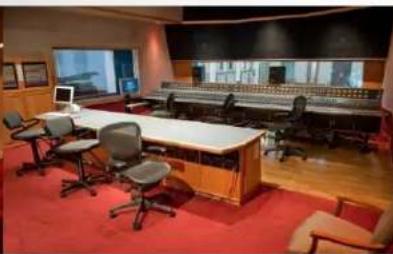
natural_image
Interior view of a large audio control room with multiple speakers, keyboards, and audio equipment (no visible text or labels)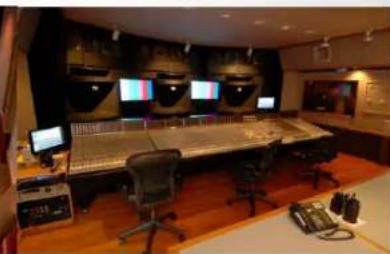
natural_image
Interior view of a video studio with audio workstation, multiple monitors, and control panels (no visible text or symbols)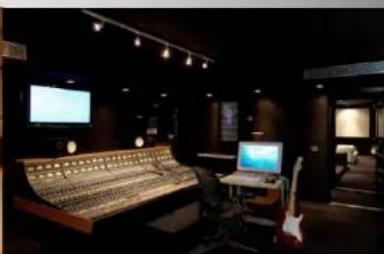
natural_image
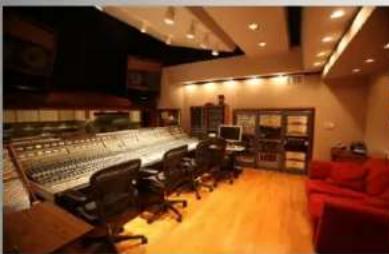
Interior of a dimly lit audio studio with a vinyl record, keyboard, and monitor (no visible text or symbols)Through-out the history of Ocean Way Studios, we built the monitor systems for all the control rooms and private studios for selected elite cliental.
These many accomplishments, paved the way for
Ocean Way Audio
The HR Series delivers "the" sound of Ocean Way Studios in a free standing design.
Engineering speaker systems for professionals; incorporating over 45 years of award winning experience