
SE-205E - NAS Sven - Free user manual and instructions
Find the device manual for free SE-205E Sven in PDF.


| Product Type | External HDD Enclosure (NAS) |
| Brand | Sven |
| Model | SE-205E |
| Form Factor | 2.5 inch |
| Internal Interface | SATA |
| External Interface | USB 2.0 / eSATA |
| Supported Operating Systems | Windows XP/Vista/7/8 |
| USB Cable Length | 0.8 m |
| eSATA Cable Length | 1.0 m |
| Dimensions | 135 x 78 x 18 mm |
| Weight (without HDD) | 91 g |
| Material | Aluminium |
| Cooling | Aluminium case for heat removal |
| LED Indicators | Red (power but inactive), Green (reading/writing) |
| Installation Tools Included | Screwdriver and screws |
| Included Accessories | Aluminium case, screws & screwdriver, USB cable (USB to mini USB), USB power cable, eSATA cable, bag, user manual, warranty card |
| Power Source | USB bus powered |
| Safety Features | Disconnect during thunderstorm; protect from humidity, dust, and heat |
| Cleaning Instructions | Clean with dry soft cloth; do not use gasoline, alcohol, or solvents |
| Technical Support | www.sven.fi |
| Manufacturer | SVEN PTE. LTD., Singapore |
| Country of Origin | China |
Frequently Asked Questions - SE-205E Sven
User questions about SE-205E Sven
0 question about this device. Answer the ones you know or ask your own.
Ask a new question about this device
Download the instructions for your NAS in PDF format for free! Find your manual SE-205E - Sven and take your electronic device back in hand. On this page are published all the documents necessary for the use of your device. SE-205E by Sven.
USER MANUAL SE-205E Sven
Congratulations on your purchase of the Sven external HDD enclosure!
Please read this User's Manual before using the unit and retain this User's Manual in a safe place for future reference.
COPYRIGHT
© 2014. SVEN PTE. LTD. Version 1.0 (V 1.0).
This Manual and information contained in it are copyrighted. All rights reserved.
TRADEMARKS
All trademarks are the property of their legal holders.
NOTICE OF RESPONSIBILITY RESTRICTION
Despite the exerted efforts to make this Manual more exact, some discrepancies may occur. The information of this Manual is given on “as is” terms. The author and the publisher do not bear any liability to a person or an organization for loss or damage which has arisen from the information contained in this Manual.
UNPACKING
Unpack the device carefully. Make sure there are no accessories left in the box. Check up the device for damage; if the product was damaged during transportation, address the firm which carried out the delivery; if the product functions incorrectly, address the dealer at once.
SAFETY PRECAUTIONS
- Do not put foreign objects inside the holes of the device.
- Protect the device from humidity, dust and heating.
- Do not use gasoline, alcohol or other solvents when cleaning, since they may damage the surface. Clean the device with dry soft cloth only.
- For extra protection during a thunderstorm, disconnect the device from a USB port and switch off your computer.
PACKAGE CONTENTS
- Aluminium case – 1 pc
- Screws & screwdriver - 1 set
- Set of cables: USB cable (USB to mini USB), USB power cable, eSATA cable – 1 pc
- Bag - 1 pc
- User's Manual – 1 pc
- Warranty card – 1 pc
SPECIAL FEATURES
• Installation tools included
• ESATA high-speed interface
- Alluminium case for shock protection and heat removal
• Power and HDD activity LEDs
- Easy disk insertion, additional disk fixation
- «Leather» case and USB cables included
SYSTEM REQUIREMENTS
• PC/laptop with a USB port
• OS Windows XP/Vista/7/8
INSTALLATION AND OPERATION GUIDE
Hardware Installation
- Open the case cover. Insert the disk tightly and close the cover using the screwdriver and screws (included) (Fig.1).
- When connecting via USB 2.0 interface, use the included USB cable (USB to mini USB). Insert the USB cable into a USB port on your computer (Fig. 2, a).
- When connecting via eSATA interface, use the included USB cable (Fig. 2, b). The installation is complete.
User's Manual
SE-205E
Software Installation
- Software installation is not required for Windows XP/Vista/7/8 OS. During the first connection to a USB 2.0 or eSATA port, the system will detect the device and install the necessary drivers automatically. After the HDD is detected, a Safely Remove Device icon will appear on the taskbar in the bottom right corner of your screen.
Windows XP/Vista/7/8 Partitioning and Formatting
- To partition and format your HDD, please refer to relative documents. We strongly recommend that this should be done by qualified experts.
- If you still decide to do it yourself, connect your external HDD to your PC. Right click on the My Computer icon, select Manage, then Disc Management, and select your external HDD for partitioning and formatting.
Attention! Please be careful in selecting the disk to be partitioned and formatted!
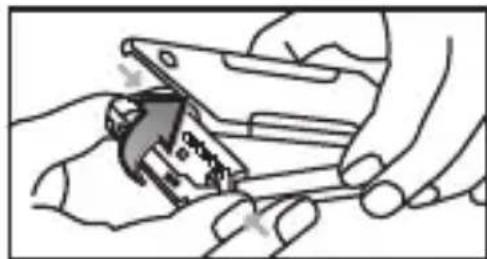
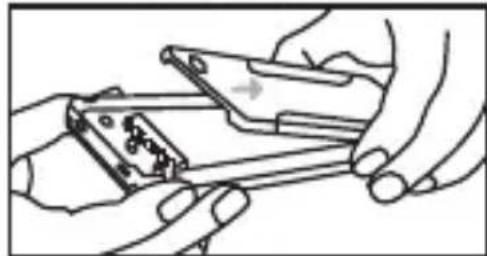
Fig. 1. Hardware installation diagram
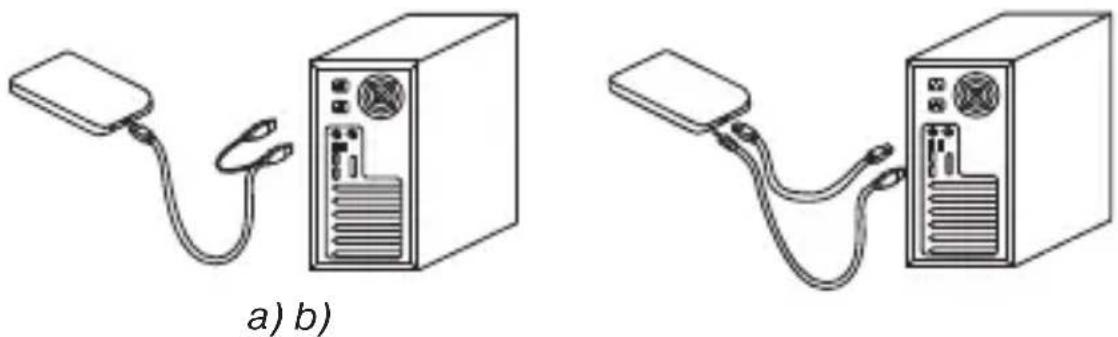
Fig. 2. Connection diagrams: a) via USB 2.0; b) via eSATA
LED light
| LED Light | Color | Status |
| Red Light | Powered, but | inactive |
| Green Light | Reading or | writing data |
TROUBLESHOOTING
In case of malfunction, make sure that your HDD is properly inserted into the external HDD enclosure, that the USB cable is connected to a PC or laptop USB port and the PC or laptop is on.
TECHNICAL SPECIFICATIONS
| Parameter, measurement unit | Value |
| Form factor, inch | 2.5 |
| Interface | external – USB 2.0/eSATA, internal – SATA |
| OS required | Windows XP/Vista/7/8 |
| USB cable length, m | 0.8 |
| eSATA cable length, m | 1.0 |
| Dimensions, mm | 135 × 78 × 18 |
| Weight (without HDD), g | 91 |
Notes:
- Technical specifications given in this table are supplemental information and cannot give occasion to claims.
- Technical specifications are subject to change without notice due to improvement of SVEN production.
Technical support is on www.sven.fi
External HDD Enclosure
SVEN®
YOU WANT - WE CAN
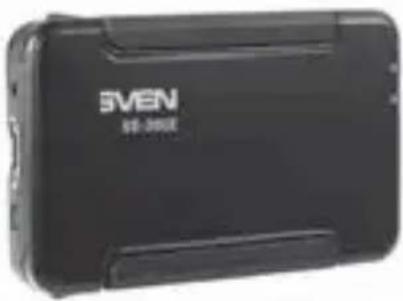
Модель: 3E-205E
Manufacturer: SVEN PTE. LTD, 176 Joo Chiat Road, N° 02-02, Singapore, 427447. Produced under the control of Oy Sven Scandinavia Ltd. 15, Kotolahdentie, Kotka, Finland, 48310. Made in China.
® Registered Trademark of Oy SVEN Scandinavia Ltd. Finland.
SE-205E
- CONGRATULATIONS ON YOUR PURCHASE OF THE SVEN EXTERNAL HDD ENCLOSURE
- COPYRIGHT
- TRADEMARKS
- NOTICE OF RESPONSIBILITY RESTRICTION
- UNPACKING
- SAFETY PRECAUTIONS
- PACKAGE CONTENTS
- SPECIAL FEATURES
- SYSTEM REQUIREMENTS
- INSTALLATION AND OPERATION GUIDE
- HARDWARE INSTALLATION
- USER'S MANUAL
- SE-205E
- SOFTWARE INSTALLATION
- WINDOWS XP/VISTA/7/8 PARTITIONING AND FORMATTING
- TROUBLESHOOTING
- NOTES
- EXTERNAL HDD ENCLOSURE
- SVEN®
- YOU WANT - WE CAN
- МОДЕЛЬ: 3E-205E
Brand : Sven
Model : SE-205E
Category : NAS