nXe3.04 - Amplifier Ashly - Free user manual and instructions
Find the device manual for free nXe3.04 Ashly in PDF.


User questions about nXe3.04 Ashly
0 question about this device. Answer the ones you know or ask your own.
Ask a new question about this device
Download the instructions for your Amplifier in PDF format for free! Find your manual nXe3.04 - Ashly and take your electronic device back in hand. On this page are published all the documents necessary for the use of your device. nXe3.04 by Ashly.
USER MANUAL nXe3.04 Ashly
natural_image
Logo featuring stylized 'n' and 'X' letters inside an oval frame (no text or symbols beyond the graphic design)Power Amplifiers
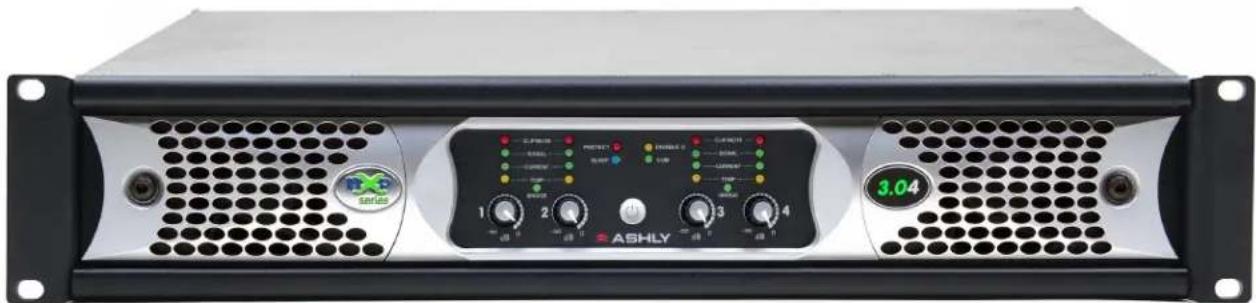
natural_image
Front view of an ASHLY audio amplifier drive with control knobs and buttons (no readable text beyond branding)Start-Up Guide\*
nX, nXe, nXp Series
Models 4002, 4004, 8002, 8004, 1.52, 1.54, 3.02, 3.04
*The complete operating manual for this product, including details of Proteane software, DSP, network audio, AES3 digital audio, and remote control functions, is included in software or available for download on the Ashly website.
ASHLY AUDIO INC.
847 Holt Road Webster, NY 14580-9103 Phone: (585) 872-0010
Toll-Free: (800) 828-6308 Fax: (585) 872-0739 ashly.com
All Trademarks referred to herein are the property of their respective owners.
© 2015 by Ashly Audio Corporation. All rights reserved worldwide.
The lightning flash with arrowhead symbol, within an equilateral triangle, is intended to alert the user to the presence of uninsulated "dangerous voltage" within the product's enclosure that may be of sufficient magnitude to constitute a risk of electric shock to persons. The exclamation point within an equilateral triangle is intended to alert the user to the presence of important operating and maintenance instructions in the literature accompanying the device.
- Read these instructions.
- Keep these instructions.
- Heed all warnings.
- Follow all instructions.
- To reduce the risk of fire or electric shock, do not expose this apparatus to rain or moisture.
- Do not use this apparatus near water.
- Clean only with dry cloth.
- Do not block any ventilation openings. Install in accordance with the manufacturer's instructions.
-
Do not install near any heat sources such as radiators, heat registers, stoves, or other apparatus.
-
Do not defeat the safety purpose of the polarized or grounding-type plug. A polarized plug has two blades with one wider than the other. A grounding type plug has two blades and a third grounding prong. The wide blade or the third prong are provided for your safety. If the provided plug does not fit into your outlet, consult an electrician for replacement of the obsolete outlet.
-
Protect the power cord from being walked on or pinched particularly at plugs, convenience receptacles, and the point where they exit from the apparatus.
-
Only use attachments/accessories specified by the manufacturer.
-
Use only with the cart, stand, tripod, bracket, or table specified by the manufacturer, or sold with the apparatus. When a cart is used, use caution when moving the cart/apparatus combination to avoid injury from tip-over.
-
Unplug this apparatus during lightning storms or when unused for long periods of time.
-
Refer all servicing to qualified service personnel. Servicing is required when the apparatus has been damaged in any way, such as power-supply cord or plug is damaged, liquid has been spilled or objects have fallen into the apparatus, the apparatus has been exposed to rain or moisture, does not operate normally, or has been dropped.
This device complies with part 15 of the FCC Rules. Operation is subject to the following two conditions:
- This device may not cause harmful interference
- This device must accept any interference received, including interference that may cause undesired operation
Note: This equipment has been tested and found to comply with the limits for a Class B digital device, pursuant to part 15 of the FCC Rules. These limits are designed to provide reasonable protection against harmful interference in both a commercial and residential installation. This equipment generates, uses and can radiate radio frequency energy and, if not installed and used in accordance with the instructions, may cause harmful interference to radio communications. However, there is no guarantee that interference will not occur in a particular installation. If this equipment does cause harmful interference to radio or television reception, which can be determined by turning the equipment off and on, the user is encouraged to try to correct the interference by one or more of the following measures:
- Reorient or relocate the receiving antenna.
- Increase the separation between the equipment and receiver.
- Connect the equipment into an outlet on a circuit different from that to which the receiver is connected.
- Consult the dealer or an experienced radio/TV technician for help..
Warning:
This device is capable of producing output which can create very high sound pressure levels (SPL) from loudspeakers, which over time can lead to hearing loss.
The US Occupational Safety and Health Administration (OSHA) has published guidelines for protection against the effects of occupational noise exposure.
Please refer to the following OSHA table for safe noise exposure limits, and always take precautions to avoid excessive exposure to loud environments.
| Sound level (dBA, slow response) | Maximum Duration (Hours per day) |
| 90 | 8 |
| 92 6 | |
| 95 | 4 |
| 97 3 | |
| 100 2 | |
| 102 1 1/2 | |
| 105 1 | |
| 110 1/2 | |
| 115 1/4 or less | |
Unpacking
As a part of our system of quality control, every Ashly product is carefully inspected before leaving the factory to ensure flawless appearance. After unpacking, please inspect for any physical damage. Save the shipping carton and all packing materials, as they were carefully designed to reduce to a minimum the possibility of transportation damage should the unit again require packing and shipping. In the event that damage has occurred, immediately notify your dealer so that a written claim to cover the damages can be initiated.
The right to any claim against a public carrier can be forfeited if the carrier is not notified promptly and if the shipping carton and packing materials are not available for inspection by the carrier. Save all packing materials until the claim has been settled.
About Ashly
Ashly Audio was founded in 1974 by a group of recording engineers, concert sound professionals, and electronics designers. The first products were elaborate custom consoles for friends and associates, but business quickly spread to new clients and the business grew. The philosophy we established from the very beginning holds true today: to offer only the highest quality audio tools at an affordable cost to the professional user – ensuring reliability and long life. Many years later, Ashly remains committed to these principles.
Ashly's exclusive Five Year, Worry-Free Warranty remains one of the most generous policies available on any commercial-grade product. The warranty covers every product with the Ashly brand name, and is offered at no extra cost to you.
Please read this entire manual to fully understand the features and capabilities of this product.
□ 1) INTRODUCTION
Thank you for your purchase of this Ashly nX, nXe, or nXp power amplifier. This product uses state of the art, light weight, high power, high efficiency switching technology developed through years of design and field testing. nX amplifiers are available in the following three series, designed to meet the most demanding live sound and fixed installation sound systems in stadiums, arenas, performance venues, worship spaces and convention centers.
| Series | 400W @ 2 Ohm2 and 4 channel | 800W @ 2 Ohm2 and 4 channel | 1,500W @ 2 Ohm2 and 4 channel | 3,000W @ 2 Ohm2 and 4 channel |
| nX - Base Series | nX4002 & nX4004 | nX8002 & nX8004 | nX1.52 & nX1.54 | nX3.02 & nX3.04 |
| nXe - Networkable | nXe4002 & nXe4004 | nXe8002 & nXe8004 | nXe1.52 & nXe1.54 | nXe3.02 & nXe3.04 |
| nXp - Network + DSP | nXp4002 & nXp4004 | nXp8002 & nXp8004 | nXp1.52 & nXp1.54 | nXp3.02 & nXp3.04 |
• nX Base Series Standard Features
- Two or four channel high power, lightweight amplifier design
- Individually configurable speaker outputs for Low-Z (to 2 Ohm), or High-Z (70V or 100V) via rear panel dip switches
- Front panel power switch and level controls, defeatable
- Front panel LEDs for temperature, current, signal, clip, mute, bridge mode, protect, sleep, and disable
- Combo XLR - 1/4" jack and Euroblock connectors on all inputs
- SpeakON ^ twist locking loudspeaker connectors for security, safety, and reliability
- Back panel DIP switches per-channel for selection of hipass filter, limiter, input gain, and speaker output configuration
- Remote DC level control per channel
- PowerCON ^ detachable AC mains connector with automatic 120V/240V select
- Power-saving automatic sleep mode, less than 1W, defeatable
• Continuously variable cooling fan(s) - Extensive protection circuitry
- Independent amplifier and power supply circuitry
- Five year warranty
• nXe Network Series Additional Features
- Ethernet control and monitoring of amplifier functions, with front panel COM activity LED
- iPad ^® "Ashly Remote" application available for custom design of end user wireless control interface
- Serial data port for Ashly serial remote control devices such as the WR-5 or RD-8C
- Optional RS-232 data converter for third party controllers such as Crestron
- Software defeatable power switch and level controls
- Standby mode, 30% reduction from idle, triggered on or off by contact closure, software control, or event scheduler
- Programmable power-on delay for Off-to-On or Sleep-to-On transitions
- Preset recall via contact closure, software control, remote control, or event scheduler
- Aux preamp outputs
- Fault condition logic outputs
- Optional Cobranet ^ or Dante ^TM network audio and AES3 digital audio input with zero-latency pass-through
• nXp Network + DSP Series Additional Features
• Protea DSP including dynamics, gain, EQ, feedback suppression, FIR filters, matrix and auto-mixer, crossover, delay, and more
- Impedance monitoring of individual amplifier outputs for quick and easy diagnosis of potential speaker problems
- iPad control of select DSP functions including gain, mute, matrix, A/B source select, PEQ filter level, and meters
• Networkable remote gain and zone control using Ashly neWR-5 and FR-8/16
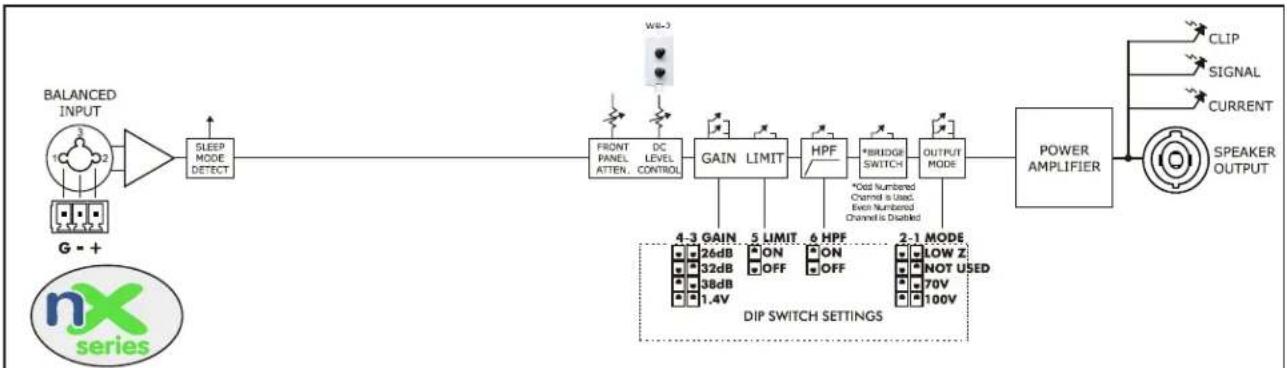
nX, nXe, and nXp Block Diagrams
flowchart
graph LR
    A["BALANCED INPUT"] --> B["SLEEP MODE DETECT"]
    B --> C["FRONT PANEL ATTEN. DC LEVEL CONTROL"]
    C --> D["GAIN LIMIT"]
    D --> E["HPF"]
    E --> F["*BRIDGE SWITCH"]
    F --> G["OUTPUT MODE"]
    G --> H["POWER AMPLIFIER"]
    H --> I["CLIP SIGNAL CURRENT SPEAKER OUTPUT"]
    J["G = +"] --> B
    K["nx series"] --> L["DIP SWITCH SETTINGS"]
    L --> M["4-3 GAIN 26dB ON OFF 32dB 38dB 1.4V"]
    L --> N["5 LIMIT ON OFF 6 HPF"]
    N --> O["*Cost Numbered Channel is Used, Even Numbered Channel is Disabled"]
    O --> P["2-1 MODE LOW Z NOT USED 70V 100V"]
- nX Series has programmable output modes, automatic sensing 120VAC-240VAC switch mode power supply, remote DC level control, defeatable sleep mode and front panel disable, plus switchable gain, limiter, high-pass filter, and bridge mode.
- nX Series has no Ethernet control, DSP, AES3 or network audio options, or aux outputs.
flowchart
graph TD
    A["BALANCED INPUT"] --> B["SLEEP MODE DETECT"]
    B --> C["D/A CONVERTERS ARE INSTALLED WITH OPTIONAL AES3 OR NETWORK AUDIO"]
    C --> D["FRONT PANEL ATTEN. DC LEVEL CONTROL"]
    D --> E["GAIN LIMIT"]
    E --> F["HPF"]
    F --> G["*BRIDGE SWITCH"]
    G --> H["OUTPUT MODE"]
    H --> I["POWER AMPLIFIER"]
    I --> J["CLIP"]
    I --> K["SIGNAL"]
    I --> L["CURRENT"]
    I --> M["SPEAKER OUTPUT"]
    N["Network or serial data remote control is limited to preset recall and mute functions"] --> C
    O["Aux Outputs Always Use the Same Signals As Sent to Power Amplifier Channels"] --> I
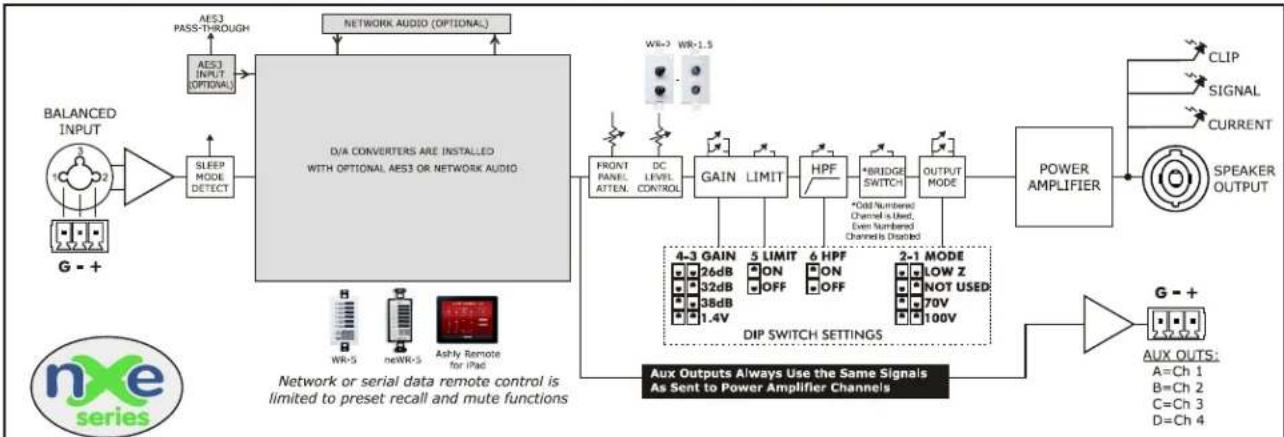
• nXe Series adds Ethernet control, limited network and serial data remote control, aux outputs, optional AES3 or network audio inputs.
- nXe also adds input source select with failover to analog, remote power standby, remote preset recall, real time event scheduler, passworded security, fault logic output, and preset management.
flowchart
graph TD
    A["BALANCED INPUT"] --> B["10 2"]
    B --> C["SLEEP MODE DETECT"]
    C --> D["A/D Converter"]
    D --> E["Protea™ Software DSP Processing Attenuation Matrix Routing Preset Management Event Scheduling"]
    E --> F["D/SIP Input Meters"]
    E --> G["D/SIP Output Meters"]
    F --> H["Network AUDIO (OPTIONAL)"]
    G --> H
    H --> I["WR-2 WR-1.5"]
    I --> J["FRONT PANEL ATTEN. DC LEVEL CONTROL"]
    J --> K["GAIN LIMIT"]
    K --> L["HPF"]
    L --> M["*BRIDGE SWITCH"]
    M --> N["OUTPUT MODE"]
    N --> O["POWER AMPLIFIER"]
    O --> P["SPEAKER LOAD ANALYSIS"]
    P --> Q["CLIP SIGNAL CURRENT SPEAKER OUTPUT"]
    Q --> R["4-3 GAIN 26dB 32dB 38dB 1.4V"]
    R --> S["DIP SWITCH SETTINGS"]
    S --> T["G-+ AUX OUTS:**<br>A=Ch 1 B=Ch 2 C=Ch 3 D=Ch 4"]
    T --> U["G-+ AUX OUTS:†<br>A=Assigned B=Assigned"]
    U --> V["**Four channel amp Aux outs are always the same signals as sent to the amplifier"]
    V --> W["Two channel amp Aux outs can be assigned the same signals sent to the power amplifier, or assigned different signal using the DSP matrix"]
    W --> X["**Four channel amp Aux outs are always the same signals as sent to the amplifier"]
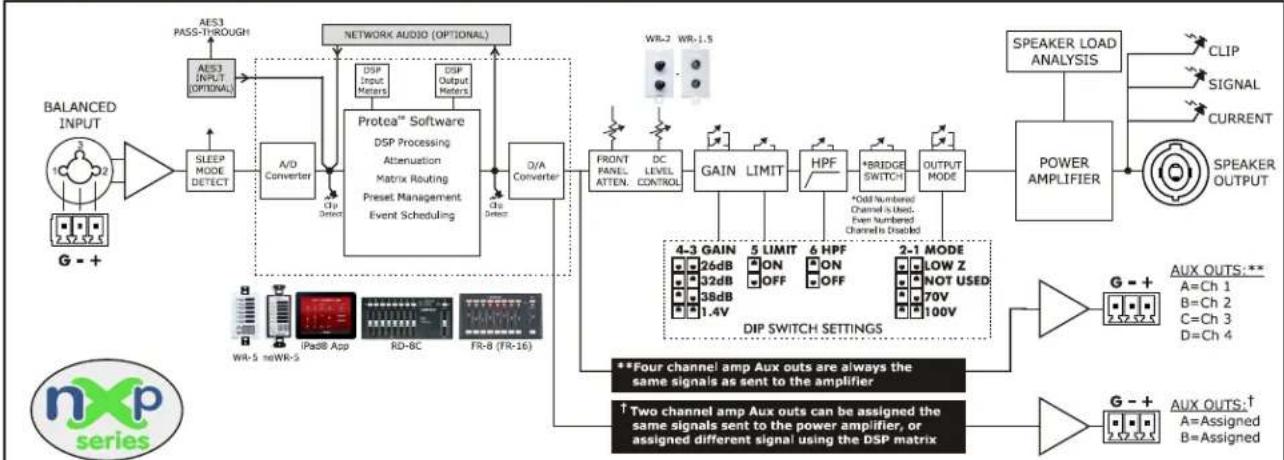
• nXP Series adds comprehensive Protea DSP with matrix routing, swept speaker load impedance analysis, and assignable aux outputs†.
- nXP also offers in depth remote control using the Ashly WR-5, neWR-5, Ashly Remote app for iPad®, RD-8C, and FR-8/16.
☐ 2) nX INSTALLATION REQUIREMENTS
Before connecting to AC mains power, make sure that the mechanical installation, cooling requirements, wiring, controls, and software are all set to the configuration needed for your particular application. Failure to do so could result in damage to the unit or to other components in the system.
2.1 AC Mains Voltage, Power, and Current Requirements
This amplifier will auto-detect mains voltage at either 120VAC or 240VAC. At nominal 120VAC mains, the allowed operating range is 70VAC to 135VAC to allow for brownouts or power surges, and for 240VAC the operating range is 140VAC to 270VAC. Use only the provided AC cord or equivalent to connect to AC mains. Programmable Power-On Delay is available on nXe and nXp series amplifiers. All nX models have a fixed, non-defeatable warm-up delay of about three seconds to protect against excessive in-rush current when first powered up or when waking from sleep. The model number and power consumption are indicated on the back panel label placed above the AC inlet. To reduce the risk of ground loop hum, all sound system ground references should originate at the same AC power distribution point. Do not lift or remove the amplifier power cord ground pin.
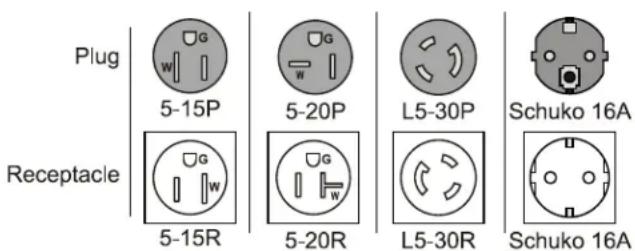
AC Mains Connector Types - The following table shows the AC mains plug type supplied with each nX amplifier model, as well as the required receptacle. A detachable 20A Neutrik PowerCON ^ mains chassis connector is installed on all models except for nX 3.04, which uses a 30A PowerCON ^ .
| nX4002 nX4004 nX8002 nX8004 | ||||
| 120V Plug/Receptacle | Nema 5-15 Nema 5 | -15 Nema 5-15 Nema 5-15 | ||
| 240V Plug/Receptacle | Schuko 16A | Schuko 16A | Schuko 16A | Schuko 16A |
| nX1.52 | nX1.54 | nX3.02 | nX3.04 | |
| 120V Plug/Receptacle | Nema 5-15 | Nema 5-20 | Nema 5-20 | Nema L5-30 (locking) |
| 240V Plug/Receptacle | Schuko 16A | Schuko 16A | Schuko 16A | Schuko 16A |
text_image
Plug Receptacle 5-15P 5-20P L5-30P Schuko 16A 5-15R 5-20R L5-30R Schuko 16ATotal Mains Power Draw and Maximum Current Draw - Total AC power consumption and maximum 120VAC current draw are shown below, measured at 1/8th maximum output power under typical amplifier status and load conditions, all channels driven using typical audio signal. For 240V current, divide 120V values in half.
| Total Power Draw(Maximum Current@120V) | nX4002 | nX4004 | nX8002 | nX8004 | nX1.52 | nX1.54 | nX3.02 | nX3.04 |
| Sleep | <1W(100mA) | <1W(100mA) | <1W(100mA) | <1W(100mA) | <1W(100mA) | <1W(100mA) | <1W (100mA) | <1W (100mA) |
| Standby | 25W(0.38A) | 40W(0.70A) | 25W(0.38A) | 40W(0.70A) | 40W(0.70A) | 70W(1.30A) | 40W (0.70A) | 70W (1.30A) |
| Idle (no input signal) | 40W(0.70A) | 70W(1.30A) | 40W(0.70A) | 70W(1.30A) | 55W(1.0A) | 100W(1.85A) | 55W (1.0A) | 100W (1.85A) |
| 1/8th Max Power @70V | 190W(2.6A) | 375W(5.0A) | 345W(4.6A) | 685W(8.8A) | 625W(8.0A) | 1250W(16.0A) | 940W (12.1A) | 1880W (24.1A) |
| 1/8th Max Power @100V | 190W(2.6A) | 375W(5.0A) | 345W(4.6A) | 685W(8.8A) | 520W(6.7A) | 1040W(13.4A) | 520W (6.7A) | 1040W (13.4A) |
| 1/8th Max Power @8 Ohm | 190W(2.6A) | 375W(5.0A) | 345W(4.6A) | 685W(8.8A) | 520W(6.7A) | 1040W(13.4A) | 520W (6.7A) | 1040W (13.4A) |
| 1/8th MAX Power @4 Ohm | 190W(2.6A) | 375W(5.0A) | 345W(4.6A) | 685W(8.8A) | 625W(8.0A) | 1250W(16.0A) | 770W (9.9A) | 1540W (19.7A) |
| 1/8th MAX Power @2 Ohm | 190W(2.6A) | 375W(5.0A) | 345W(4.6A) | 685W(8.8A) | 625W(8.0A) | 1250W(16.0A) | 1150W (14.7A) | 2300W (29.5A) |
2.2 Input Signal Wire
Use shielded wiring for balanced or unbalanced audio signals. Shielding which is properly grounded will protect the signal from outside electrical interference such as RF, fluorescent lighting, and computer/display emissions. Unbalanced or single-ended (tip-sleeve) lines of less than 10 feet are generally ok, but for greater distance or noisy field environments, always use balanced signal.
Each channel's Euroblock, 1/4" phone jack, and XLR inputs are wired in parallel, with XLR pin 2 (+) and pin 3 (-). When using an unbalanced input, wire the hot signal to the input (+) euroblock pin, phone jack tip, or XLR pin 2, and also be sure to wire the input (-) pin, phone jack ring, or XLR pin 3 to ground. Do not leave the (-) input unconnected. Avoid running low level signal wires in close proximity or parallel to long speaker cables, AC power cables, or power transformers, as they can induce hum or oscillation.
2.3 Output Speaker Wire
Note: The sound system installer is responsible for using loudspeaker wiring that is in compliance with local electrical code. The following recommendations for speaker wiring are based on UL 60065 section 5.2-d and the US National Electrical Code Article 725. These are only guidelines, consult your local code for specific up to date requirements.
Class 2 wiring is typically used when the maximum measured open-circuit speaker output voltage is less than 120V r.m.s. Class 3 wiring is typically used if the measured open circuit output voltage exceeds 120V r.m.s, such as when 70V, 100V, or low-Z amplifiers are used in bridged mode.
Output Speaker Connectors: nX amplifier speaker outputs use Neutrik SpeakON connectors because they are safe, secure, reliable, and fully enclose any hazardous voltage.
Wire guage: nX amplifiers are capable of delivering high levels of output current, so the wire gauge used for speaker outputs is important. Inadequate wire gauge, especially over long distance, adds significant resistance to the speaker's own impedance, reducing the power which is actually delivered to the speaker. It could also result in a decreased damping factor and potential fire hazard. Since power at the speaker load is of primary concern in system design, refer to the table below to best determine appropriate wire gauge for your application. The following table lists the resistance per 100 feet of common copper wire gauges, and also lists the percentage of the speaker load power which would be lost as heat in an arbitrary 100 ft run of different gauges of 2-conductor copper speaker wire.
Wire gauge resistance/power loss for 100ft speaker cable
Wire Gauge Ohms/100ft 8 Ohm load 4 Ohm load 2 Ohm load
8 0.0605 Ohms 0.8% 1.5% 3%
10 0.1018 Ohms 1.3% 2.5% 5%
12 0.1619 Ohms 2.0% 4.0% 8%
14 0.2575 Ohms 3.2% 6.4% 12.8%
16 0.4094 Ohms 5.1% 10.2% 20.4%
18 0.6510 Ohms 8.1% 16.3% 32.6%
This table expresses the power loss as a percentage of the load's power rather than the total amplifier output power in order to accurately determine power loss at other cable lengths. For example, if you plan to deliver 150 watts to an 8 Ohm load through 50 ft of 14 ga. cable, the power loss in the cable would be half that of a 100 ft run of #14 wire as shown in the table, or 1.6% of 150W, which is an insignificant 2.4 watts. However, if you were to run 200 ft of 18 ga. cable to a 2 Ohm load, the loss would be twice that of the 100 ft run shown in the table, or 65.2% of 250W, which is 163 watts lost as heat. Always be sure to use adequate gauge speaker wire.
2.4 Remote Control Wire
Remote DC level control (all models) - Unshielded bell or telephone wire is sufficient for DC level control, as is CAT5 cable. The V+ and GND pins from one amplifier channel can be shared with other remote DC level controls wired to the same amplifier, however do not connect this ground to any external grounds.
Remote Standby (nXe and nXp only) - This is a logic level signal, use unshielded low gauge wire.
Fault (nXe and nXp only) - This is also a logic level signal, unshielded low gauge wire is adequate.
Preset (nXe and nXp only) - This is also a logic level signal, unshielded low gauge wire is adequate.
Data (nXe and nXp only) - Four conductor telephone wire is suitable, as well as CAT5, but if shielded wiring is used be sure to ground the source end of the shield. Under no circumstances should shielding be left unconnected to ground, as the added line capacitance will degrade the data signal. Maximum data cable distance is 1,000 ft (305m).
2.5 Aux Output Wire (nXe and nXp only)
The aux outputs are pseudo-balanced, meaning they use single ended signal (+) but with balanced impedance, and can be wired balanced or unbalanced. Always use shielded cable for audio signals.
2.6 Mechanical
Each amplifier model is 2RU, and is designed to fit in a standard 19-inch equipment rack. Use four screws when mounting the amplifier to the front rack rails. Rear support is recommended for mobile or touring use (see mechanical drawing below). In some installations where the sound system is exposed to a high level of RF noise or system-induced oscillation, it may be necessary to ground the amplifier's chassis to the rack enclosure. This is accomplished using star type lockwashers on the four rack mounting screws, placed between the amplifier chassis and the rack rails. These star washers will penetrate through the amplifier and rack rail finish to adequately ground the chassis to the rack.

text_image
16.84" (428mm) 17.40" (442mm) 3.47" (88.1mm) 19.00" (483mm) 16.35" (415mm) 1.50" (38.1mm) -1.50" (38.1mm)2.6 nX Dimensional Drawing
2.7 Cooling
Air vents on the amplifier front and side panels must have access to free flowing room temperature air. Cool air is drawn in through the sides and blown out the front. It is not necessary to leave empty rack spaces above or below the amplifier. See the BTU/hr chart below for amplifier thermal output characteristics.
Maximum Thermal Output in BTU/hr
| Maximum BTU/hour(Maximum Current@120V) | nX4002 | nX4004 | nX8002 | nX8004 | nX1.52 | nX1.54 | nX3.02 | nX3.04 | |
| Sleep | <3.4 | <3.4 | <3.4 | <3.4 | <3.4 | <3.4 | |||
| Standby | 85 136 | 85 136 | 136 238 | 136 | 238 | ||||
| Idle (no input signal) | 136 238 | 136 238 | 187 340 | 187 | 340 | ||||
| 1/8th Max Power @70V | 305 595 | 495 970 | 850 | 1 | 700 | 1110 2220 | |||
| 1/8th Max Power @100V | 305 595 | 495 970 | 710 | 1 | 420 710 | 1420 | |||
| 1/8th Max Power @8 Ohm | 305 595 | 495 970 | 710 | 1 | 420 710 | 1420 | |||
| 1/8th Max Power @4 Ohm | 305 595 | 495 970 | 850 | 1 | 700 905 | 1810 | |||
| 1/8th Max Power @2 Ohm | 305 595 | 495 970 | 850 | 1 | 700 | 1360 2720 |
☐ 3) nX AMPLIFIER PROTECTION
Power-On Delay - All models have a fixed and undefeatable warm-up delay of three seconds when first powered on or awakened from sleep. This is necessary to prevent excessive in-rush current during start-up. Additionally, nXc and nXp amplifiers have programmable Power-On Delay ranging from zero to 25 seconds in 100ms increments.
Thermal Protection -Cooling fans are continuously variable, increasing in speed as the amp heats up. The fans are at their maximum speed when an amplifier channel reaches 80% of its safe operating temperature, and the Temp LED also turns on. At 90%, the Protect LED turns on to indicate that countermeasures are being applied to attenuate the input signal to the overheating channel. A Temp LED turns on dim at first, then increases in brightness as the amp channel approaches maximum safe temperature. 100% critical temperature will shut down the amplifier.
Overpower Protection - To protect internal components against overpower conditions, a protection scheme in each output stage reduces audio output power until the fault condition is no longer present.
Output DC and Rail Fault Protection – Output DC on any channel will trigger the Protect LED and mute that channel. Voltage rail irregularities such as power supply pumping are also detected and compensated for in real time as the amp runs.
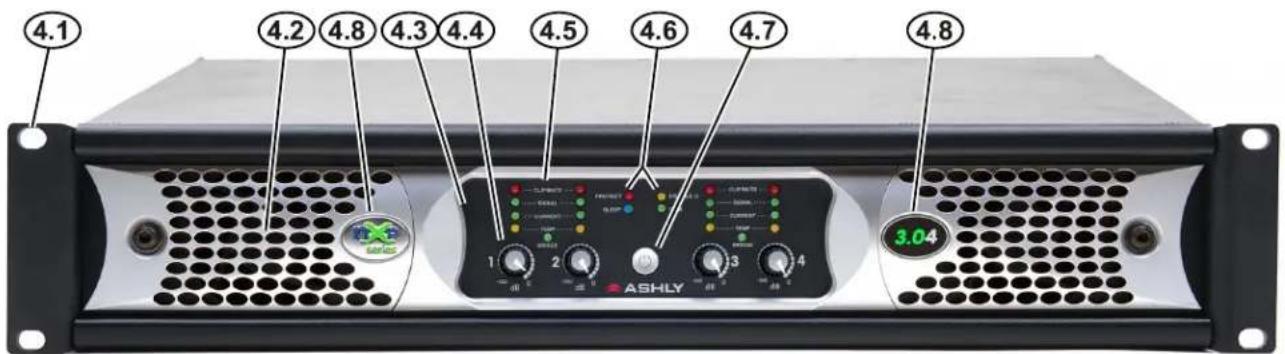
☐ 4) nX FRONT PANEL FEATURES (all models, nXp 3.04 shown)
text_image
4.1 4.2 4.8 4.3 4.4 4.5 4.6 4.7 4.8 1 2 3 4 ASHLY 3.044.1 Mounting Holes – For mounting to a 19" equipment rack.
4.2 Air Vents - Cool air enters in through the amplifier sides and is vented out the front.
4.3 Factory Reset/Sleep Mode/Disable Switch – This recessed switch is used to perform a factory reset. It is also used to set sleep mode and front panel disable status (see below). To perform a factory reset and return all amplifier settings to their original factory defaults (without erasing presets) use a pencil point or equivalent to press and hold the switch during power up until all channel LEDs sequence from bottom to top. Releasing the switch before the LED sequence is complete will cancel the process. Upon completion, all LEDs turn off and the amplifier resumes normal operation.
Setting Sleep and Front Panel Disable Mode - The factory reset switch is also used to select one of four sleep and front-panel-control-disable modes as illustrated to the right. The default status is Sleep and Disable OFF (Mode 1). To advance to the next mode, press and hold this switch when the amplifier is fully on, and the four mode combinations will cycle and repeat. To select a mode, simply release the switch when the desired mode is displayed.
The Disable LED is lit any time the front panel controls are disabled, either by selecting disable mode from this switch or using software control.
The sleep LED turns on during the mode-select cycle whenever sleep mode is enabled, but turns back off as soon as the switch is released, remaining off unless the amp actually goes to sleep. The current sleep mode status can be displayed when the amp is fully on by quickly pressing and releasing the reset switch. If the sleep LED lights, sleep mode is active.
| Mode | Amp Status LEDs | |
| 1Disable - OFFSleep - OFF | PROTECT ○ | ○ DISABLE |
| SLEEP ○ | ○ COM | |
| 2Disable - OFFSleep - ON | PROTECT ○ | ○ DISABLE |
| SLEEP ● | ○ COM | |
| 3Disable - ONSleep - ON | PROTECT ○ | ○ DISABLE |
| SLEEP ● | ○ COM | |
| 4Disable - ONSleep - OFF | PROTECT ○ | ○ DISABLE |
| SLEEP ○ | ○ COM | |
4.3 - Factory Reset Switch Sleep/Disable Modes
4.4 Channel Attenuators - These control the input signal level to the amplifier, and work in conjunction with the remote DC fader level controls and the software control surface fader controls (if the amp is networked). When an input attenuator is turned fully off, it's red Clip/Mute LED turns on and stays on to indicate mute status for that channel. The front panel attenuators can be disabled, along with the power switch, using the factory reset switch or using software.
4.5 Channel LED Indicators
BRIDGE - This green LED indicates when the channel pair is configured to BRIDGE mode from the back panel switch. Only the odd numbered input and level control for that channel pair is used.
TEMP - This yellow LED turns on when an amplifier channel has reached an operating temperature that is 80% of it's maximum safe range, and the cooling fan(s) are at their maximum speed. The LED lights dimly at first and will glow brighter if the temperature increases.
CURRENT - This green LED lights proportionately with the output current delivered to the speaker load.
SIGNAL - This green LED lights when the output voltage reaches -18dB from full output.
CLIP/MUTE - CLIPPING: The red LED indicates clipping when speaker output is 1dB below rated output, or when the input preamp signal is clipped. MUTE: The LED indicates mute when the channel is muted or when it's level control is fully attenuated. Additionally, the Clip/Mute LED is used along with the Protect LED to indicate an output DC fault.
4.6 Amplifier Status LEDs
PROTECT - The red Protect LED initially turns on to indicate that real-time countermeasures are being applied to overpower, overtemperature, or rail voltage fault conditions while the amp is still running. If those countermeasures are unsuccessful, the Protect LED indicates an amplifier shut-down, and the power must be cycled before resuming normal operation.
SLEEP - This blue LED indicates that the amplifier is asleep. Sleep mode can be enabled as a power saving feature that shuts down most amplifier circuits after a period of audio inactivity, reducing the amplifier's power consumption to less than 1 Watt. An amplifier is awakened when there is audio signal present again, or when the power switch is pressed. Because the real-time-clock is also shut down during sleep mode, the amplifier cannot be awakened by any software function, including the event scheduler.
Sleep mode is normally disabled, therefore must be enabled by the user. On nX series, the sleep clock timer is fixed at 30 minutes, and is enabled by toggling through the four mode conditions of the factory reset switch. On networked nXe and nXp series, the sleep clock timer also defaults to 30 minutes, but is programmable under [Device Options] with a range of 1-120 minutes. In all models, the presence of input signal above -24dBu (0.05Vrms) or pressing the power switch will return the amplifier to normal operation. On all models, a fixed amplifier turn-on delay of three seconds is necessary to manage in-rush current during power-up or waking from sleep. Sleep mode has priority over standby mode.
DISABLE - This yellow LED lights when the front panel power switch and level controls have been disabled. All front panel controls are disabled together using the factory reset switch, or in software using the amplifier's main control surface.
COM - For nXe and nXp models only, this green LED lights whenever network communication occurs. Secondly, the COM LED flashes for two seconds when the
4.7 Power Switch/LED - This switch is used for powering the amplifier on or off or waking the amplifier from sleep. The white switch LED lights solid when the amplifier is on, and flashes when in standby mode (nXe and nXp only). The power switch can be disabled using the factory reset switch, or disabled from software (nXe and nXp only). The three possible power switch LED conditions are:
1) Fully lit: The amplifier is powered up, even if the power switch has been disabled, in which case the disable LED will be on.
2) Flashing: The amplifier is in standby mode, or is in flash reprogram mode when the COM LED is also lit.
3) Fully off: The amplifier is either completely off, or it is in sleep mode, in which case the blue sleep LED will be on.
4.8 Series and Model Labels - The label on the left indicates the amplifier series, nX, nXe, or nXp. The label on the right shows the amplifier model name.
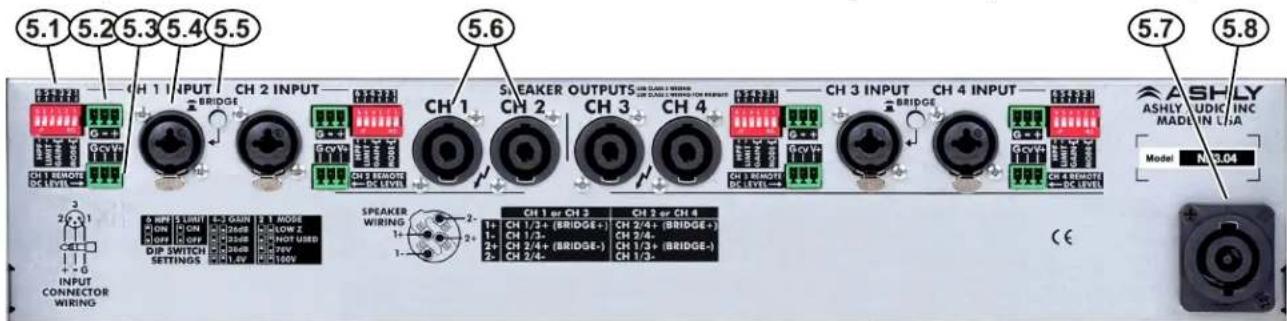
☐ 5) nX SERIES REAR PANEL FEATURES (all models, nX 3.04 shown)
text_image
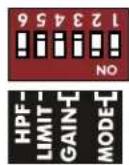
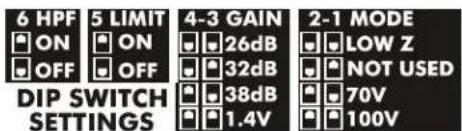
5.1 5.2 5.3 5.4 5.5 5.6 5.7 5.8 CH 1 INPUT CH 2 INPUT CH 1 SAEKER OUTPUTS CH 3 CH 4 CH 3 INPUT CH 4 INPUT ASHLY ASHLY AUDIO INC MADELY IN LHA Model N:3.04 SPEAKER WIRING 1+ CH 1 or CH 3 CH 2 or CH 4 1- CH 1/3+ (BRIDGE+) CH 2/4+ (BRIDGE+) 1+ CH 1/3- CH 2/4- 2+ CH 2/4+ (BRIDGE-) CH 1/3+ (BRIDGE-) 2- CH 2/4- CH 1/3- SPEAKER WIRING 1+ CH 1 or CH 3 CH 2 or CH 4 1- CH 1/3+ (BRIDGE+) CH 2/4+ (BRIDGE+) 1+ CH 1/3- CH 2/4- 2+ CH 2/4+ (BRIDGE-) CH 1/3+ (BRIDGE-) 2- CH 2/4- CH 1/3- C E5.1 Channel Configuration DIP Switch - The DIP switches configure each channel's 80Hz 2nd Order Hipass Filter, Clip Limiter, Amplifier Gain, and Output Mode. In the example to the right, the DIP switch is set as follows: 6: 80Hz High Pass Filter is Off; 5: Clip Limiter is On; 4&3: Gain is 1.4V; 2&1: Output Mode is Low Z.
text_image
6 HPF 5 LIMIT 4-3 GAIN 2-1 MODE ON ON 26dB LOW Z OFF OFF 32dB NOT USED DIP SWITCH SETTINGS 38dB 70V 1.4V 100VNote: The Gain setting of 1.4V means that a 1.4V input will drive the amp to full output in any output mode. The other three Gain settings will apply their respective amplifier gain regardless of output mode, so the actual input voltage required to fully drive the amp will vary based on the selected output mode.
5.1 Channel Configuration DIP Switch
5.2 Euroblock Input Jack - Used for wiring a balanced input. If using an unbalanced signal, wire the input signal to the (+) pin, the shield to (G), and wire the (-) input pin to ground. Euroblock pins are wired in parallel to the 1/4" TRS and XLR combo jack.
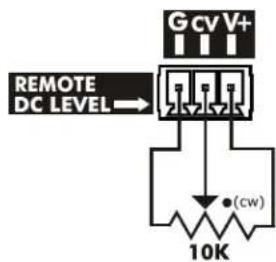
5.3 Remote DC Level Control - Each channel has a potentiometer circuit available for remote DC Level Control. The example to the right illustrates a typical DC level control application. There is no limit to wire length, but do not use any other ground source. If multiple remote DC level controls are used for different channels, the same ground and V+ sources can be shared.
5.4 Combo Input Jack - The combination 1/4" TRS and XLR jack (pin 2 hot) is wired in parallel to the euroblock input. Do not float the TRS ring or XLR pin 3, connect it to (-) signal or to ground (if unbalanced).
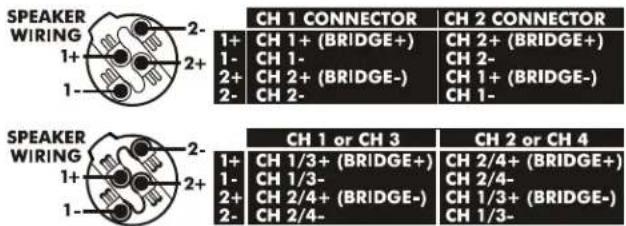
5.5 Bridge Mode Switch - This switch places an adjacent channel pair into bridge mode, combining two amplifier outputs for more power to a single speaker load. Bridge mode uses only the odd numbered input channel and level control, disabling the even numbered input. Speaker outputs for bridge mode must be wired according to the chart shown to the right. The bridge mode switch button can be removed for added security by pulling it straight off.
5.6 SpeakON® Output Jacks - SpeakON output jacks provide safe, secure, and reliable loudspeaker connections,
while preventing outside contact with potential hazardous voltage. See the speaker wiring diagrams to the right (also on the back panel) for nX amplifier SpeakON pin and channel assignment.
5.7 PowerCON® AC Mains Connector -Always use the AC cord provided by Ashly for connecting to mains power. The amplifier auto-detects mains voltage from 120VAC to 240VAC. WARNING: Do not remove or lift the mains connector ground.
5.8 Serial Number Sticker - This sticker identifies the product model number, serial number, MAC address (if networkable), and AC mains current/power rating.
text_image
Gcv V+ REMOTE DC LEVEL → (cw) 10K5.3 Remote DC Level Control
text_image
SPEAKER WIRING 1+ 2- 1- SPEAKER WIRING 1+ 2- 1- SPEAKER WIRING 1+ 2- 1- CH 1 CONNECTOR CH 2 CONNECTOR 1+ CH 1+ (BRIDGE+) CH 2+ (BRIDGE+) 1- CH 1- CH 2- 2+ CH 2+ (BRIDGE-) CH 1+ (BRIDGE-) 2- CH 2- CH 1- CH 1 or CH 3 CH 2 or CH 4 1+ CH 1/3+ (BRIDGE+) CH 2/4+ (BRIDGE+) 1- CH 1/3- CH 2/4- 2+ CH 2/4+ (BRIDGE-) CH 1/3+ 2- CH 2/4- CH 1/3-5.6 Speakon ^® Output Jack Wiring:
Two channel and four channel amplifiers
6) nXe SERIES REAR PANEL FEATURES (all models, nXe 3.04 shown)
text_image
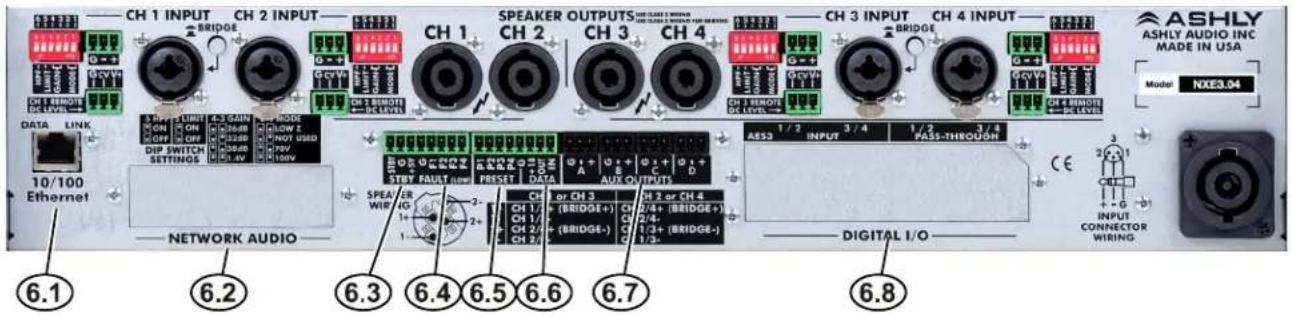
CH 1 INPUT CH 2 INPUT CH 1 CH 2 SPEAKER OUTPUTS CH 3 CH 4 CH 3 INPUT CH 4 INPUT ASHLY ASHLY AUDIO INC MADE IN USA Model: NXES3.04 DATA LINK 5.5 PFS LIME ON OFF DIP SWITCH SETTINGS 10/100 Ethernet NETWORK AUDIO 6.1 6.2 6.3 6.4 6.5 6.6 6.7 6.8 SPEAV WIR STBY FAULT LOW PRESET DATA AUX OUTPUTS CH 1/- CH 1/- CH 2/- CH 2/- CH 1/- CH 2/- CH 1/- CH 2/- CH 1/- CH 2/- CH 1/- CH 2/- CH 1/- CH 2/- CH 1/- CH 2/- CH 1/- CH 2/- CH 1/- CH 2/- CH 1/- CH 2/- CH 1/- CH 2/- CH 2/- CH 1/- CH 2/- CH 1/- CH 2/- CH 1/- CH 2/- CH 1/- CH 2/- CH 1/- CH 2/- CH 1/- CH 2/- CH 1/- CH 2/- CH 1/- CH 2/- CH 2/- CH 1/- CH 1/- CH 2/- CH 1/- CH 2/- CH 1/- CH 2/- CH 1/- CH 2/- CH 1/- CH 2/- CH 1/- CH 2/- CH 1/- CH 2/- CH 1/- CH 2/- CH 1/- CH 2/- CH 1/- CH 3 CH 2 or CH 3 CH 2 or CH 4 CH 2 (BRIDGE+) CH 2 (BRIDGE-) CH 2 (BRIDGE+) CH 2 (BRIDGE-) CH 2 (BRIDGE+) CH 2 (BRIDGE-) CH 2 (BRIDGE+) CH 2 (BRIDGE-) CH 2 (BRIDGE+) CH 2 (BRIDGE-) CH 2 (BRIDGE+) CH 2 (BRIDGE-) CH 2 (BRIDGE+) CH 2 (BRIDGE-) CH 2(BRIDGE+) CH 2 (BRIDGE-) CH 2 (BRIDGE+) CH 2 (BRIDGE-) CH 2 (BRIDGE+) CH 2 (BRIDGE-) CH 2 (BRIDGE+) CH 2 (BRIDGE-) CH 2 (BRIDGE+) CH 2 (BRIDGE-) CH 2 (BRIDGE+) CH 2 (BRIDGE-) CH 2 (BRIDGE+)The following nXe features are in addition to standard features found in nX series amplifiers:
6.1 Ethernet Port - This RJ-45 connector offers Ethernet control and monitoring of the amplifier using Protea ^ne software.
6.2 Network Audio - This is for an optional factory installed CobraNet or Dante network audio module on nXe and nXp models.
text_image
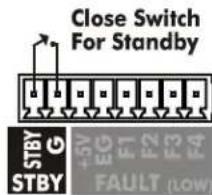
Close Switch For Standby STBY G +5V EG F1 F2 F3 F4 FAULT (LOW)6.3 Standby Switch
6.3 Standby - The STBY pin, when connected to the ground pin (G) as shown, will remotely place the amp into standby mode. When the connection is opened, the amplifier returns to normal operation. The front panel power switch will flash when the amplifier is in standby.
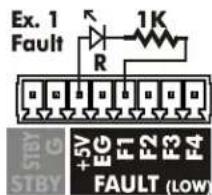
6.4 Fault - Four Fault pins are used with adjacent ground (EG) and +5V pins for 5V logic outputs, and are assigned in software
conditions are overtemperature, rail voltage, and average power, the same conditions that could place the amplifier into protect mode. Logic low (0V) indicates fault condi-
tion. In the first example to the right, a remote red LED is wired to F1 and +5V and turns on when a user-assigned fault condition exists. F1 is normally high (+5V) but goes low (0V) on fault. The second example uses a green LED wired to F2 and EG to indicate no-fault, so the LED remains on unless there is a fault.
In the third example, a relay circuit is driven by the F1 pin in order to switch on a room or rack exhaust fan if the amplifier becomes severely overheated. Maximum fault pin source current is 20mA per pin. Maximum fault pin sink current is 200mA. Use an external +5V supply as shown if sink current exceeds 200mA.
6.5 Preset - Each pin (P1 through P4) can be connected to the adjacent ground pin (G) via Ashly's WR-2 remote or other contact closure to recall a stored preset or
sub preset from the amplifier. Preset pins 1-4 correspond directly to amplifier presets 01 - 04.
6.6 Serial Data Connector - These four pins (G, +18, OUT, IN) are for connecting a serial data remote control such as an Ashly WR-5 or RD-8C. Ashly also offers an in-line converter called the INA-1 which allows the data port to be used with third party RS-232 controllers. A technical RS-232 protocol document is available on the Ashly website for third party developers.
6.7 AUX Outputs - These Euroblock connectors provide preamp signals for driving other amplifiers. AUX outputs are pseudo-balanced, meaning they use single ended signal with balanced impedance, and can be wire balanced or unbalanced.
6.8 AES3 Digital Audio I/O Option - This is used for Ashly's two or four channel AES3 input and pass-through module, available as a factory installed option on nXc and nXp models.
text_image
Ex. 1 Fault R 1K +5V EG F1 F2 F3 F4 STBY FAULT (LOW)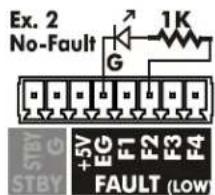
text_image
Ex. 2 No-Fault G 1K +5V EG F1 F2 F3 F4 FAULT (LOW)
text_image
5V Relay 120VAC Fan +5V EG F1 F2 F3 F4 FAULT (LOW)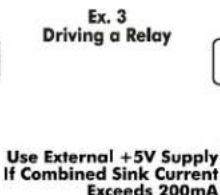
text_image
Ex. 3 Driving a Relay Use External +5V Supply If Combined Sink Current Exceeds 200mA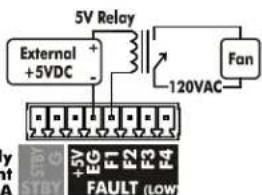
text_image
5V Relay External +5VDC + - 120VAC Fan +5V EG F1 F2 F3 F4 FAULT (LOW)6.4 Fault Logic Application Examples
7) nXp REAR PANEL FEATURES (all models, nXp 3.04 shown)
text_image
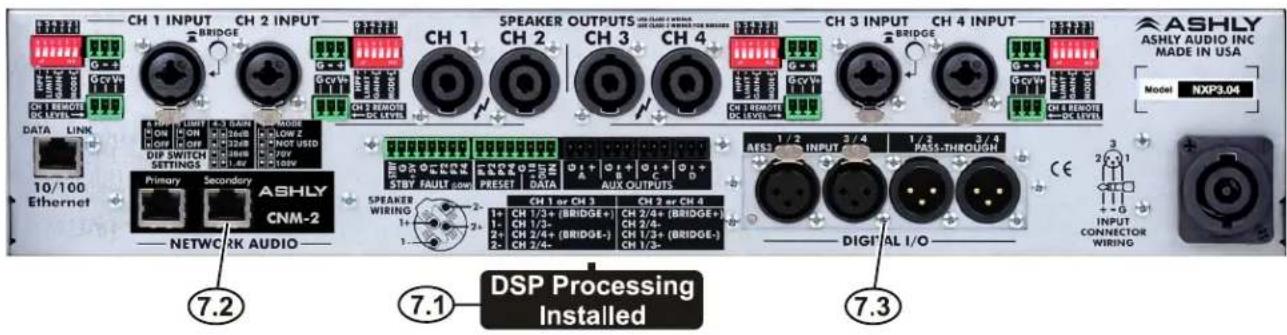
CH 1 INPUT CH 2 INPUT BRIDGE GcvVx CH 1 REMOTE DC LEVEL DATA LINK ON ON DIP SWITCH SETTINGS Primary Secondary ASHLY CNM-2 NETWORK AUDIO 7.2 7.1 DSP Processing Installed SPEAKER OUTPUTS CH 1 SWEETER CH 2 CH 3 CH 4 CH 3 REMOTE DC LEVEL CH 4 INPUT CH 3 INPUT BRIDGE CH 5 REMOTE DC LEVEL ASHLY ASHLY AUDIO INC MADE IN USA Model NXP3.04 CES 1/2 3/4 1/2 3/4 AES1 INPUT PASS-THROUGH CH 1 or CH 3 CH 2 or CH 4 1+ CH 1/3+ (BRIDGE+) CH 2/4+ (BRIDGE+) 1- CH 1/2- 2+ CH 2/4+ (BRIDGE-) CH 1/3+ (BRIDGE-) 2- CH 2/4- DIGITAL I/O INPUT CONNECTOR WIRING OUTPUTS CH 1 SWEETER CH 2 REMOTE DC LEVEL RESET DATA AUX OUTPUTS STBY FAULT ROR SPEAKER WIRING 1+ CH 1/3+ (BRIDGE+) CH 2/4+ (BRIDGE+) 1- CH 1/2- 2+ CH 2/4+ (BRIDGE-) CH 1/3+ (BRIDGE-) 2- CH 2/4- DIGITAL I/O 7.3*The following nXp features are in addition to all the features found in nX and nXe series amplifiers:
7.1 Installed DSP - Factory installed DSP allows for comprehensive signal processing and matrix routing of amplifier signals, plus loudspeaker swept load impedance analysis.
7.2 Network Audio - CobraNet or Dante network audio modules can be factory installed in nXe or nXp models.
7.3 AES3 Digital Audio I/O - AES3 digital audio module can be factory installed in nXe or nXp models.
☐ 8) ETHERNET COMMUNICATIONS (nXe and nXp models only)
Ethernet communication is made by connecting the amplifier directly to a PC running Protéasoftware or connecting through a network router, switch, hub, or patch panel using Cat-5, Cat-5e, or Cat-6 wiring. Maximum Ethernet cable distance is 100 meters (328 ft). Ashly nXe and nXp amplifiers will adapt to either a straight through pin to pin or crossover Ethernet cable. For wireless iPad control using a custom "Ashly Remote" user interface, the iPad must be connected to a wireless access point that is connected to the same network (subnet) as the amplifier.
8.1 IP Address - There is no need to assign an IP address to nXe amplifiers. The router or Link Local Addressing will assign IP addresses to each device automatically.
When a router is not available, each amplifier will acquire it's own IP address based on Link Local Addressing. This allows the device to operate without the need to set up static IP address. If the only option is to use an Ethernet switch instead of a router, and communications problems remain which cannot be solved with the use of the link local standard, each device can have a static IP address assigned from within Protea ^™ software. This is done by selecting “Manual Configuration” in the Network Properties tab of each device, where the system/network administrator must assign each product its own unique static IP address, each with the appropriate sub net if applicable.
8.2 Firewalls - If Protea ^ac software does not detect the amplifier or show real time changes, the firewall in the host PC may need to have Protea ^ac software added to its firewall exceptions, since firewalls may block the amplifier response to the PC. The current PC firewall status is found by clicking on the Windows Start button, then Control Panel, then double clicking on the security shield where firewall exceptions are configured.
8.3 Wi-Fi and LAN - For the initial device auto-configuration process, any secondary Wi-Fi connection should be disabled on the PC, and the LAN (Local Area Network) connection must be enabled on the PC. Secondary network connections may confuse the auto device discovery process. Go to the Windows Control Panel, then Network Connections, to disable any secondary network connections. Once communications with the device is established, secondary network connections can be enabled again.
8.4 Connecting Device(s) - Connect the Ethernet cable from the PC or network to the amplifier. If a successful Ethernet connection has been made, a solid green LED (Link) lights up on the amplifier's RJ-45 Ethernet port. If there is no green LED showing, there is either a problem with the cable or the network source which must be addressed before proceeding further. All RJ-45 Ethernet ports flash green when active, so backtrack through any other cables, routers, or switches to find the problem. The flashing yellow LED (Data) indicates that data is flowing to or from the amplifier.
☐ 9) TROUBLESHOOTING TIPS
No AC Power
1) Is the detachable AC power cord properly installed? Is it plugged into a known live outlet?
2) Has the power switch been disabled?
3) Is the Power-On Delay time set high?
4) Is the amp asleep?
No Amplifier Output
1) Is the amplifier in Standby Mode?
2) Is there signal getting to the amplifier?
3) Is the input signal properly wired?
4) Are output connectors properly wired
5) Are front panel, remote control, or software attenuators turned down?
6) Is the amp channel muted from within the control surface, DSP section, remote control, output mixer, or event scheduler?
7) Are dynamics or gain tool settings in the DSP section allowing signal to pass properly?
8) Is the signal properly routed to the desired output in the DSP Matrix Router?
9) Is the fader level set properly in the DSP Matrix Mixer?
10) If using a DSP crossover on the outputs, are the filter frequency settings correct?
11) Did the event scheduler mute an output, change a preset or output channel source?
12) Is the Amplifier in Protect Mode?
Protect LED is On
1) Does the amp still function, (fans still running)? If so, this means that one or more channels of the amplifier are applying live countermeasures to compensate for an overheated, overpowered, or rail fault condition, and the amp will continue to operate in a reduced capacity until the fault condition is no longer present. Countermeasures include automatic attenuation of overheated or overpowered channels, and power supply treatments for rail fault irregularities.
2) Has the amp shut down (fans stopped) with Protect, Sleep, and Power Switch LEDs all on? If so, this indicates a critical situation where a failsafe fault condition has been tripped, latching the amplifier into its shut-down state until power is cycled. These conditions may be due to internal component failure, so before cycling the amplifier power, first disconnect all speaker loads. The three failsafe fault conditions are indicated as follows:
A) High Rail Fault - If Protect, Sleep, and Power LED are on and one or more channel's Clip/Mute LED is on, there is a power supply overvoltage condition on the indicated channel(s).
B) DC Output Fault - If Protect, Sleep, and Power LED are on and one or more channel's Clip/Mute LED and Signal LED is on, there is a DC Output Fault on the indicated channel(s).
C) High Temperature Fault - If Protect, Sleep, and Power LED are on and one or more channel's Clip/Mute LED and Temp LED is on, there is a high temperature fault on the indicated channels that could not be compensated for using countermeasures.
In all cases, if the Protect, Sleep, and Power Switch LED remain on after cycling power, the amp requires servicing.
Clip/Mute LED Stays On
1) Is the front panel level control, Remote DC Level, or software control surface fader fully off?
2) Is the amplifier muted from software, a remote control devices, or an event scheduler action?
Attenuators Don't Work
1) Are the front panel or remote attenuators disabled?
Amplifier Not Recognized in Protea ^ne Software
1) Is the PC successfully communicating with the network?
2) Is the amplifier successfully communicating with the network?
3) Does the amplifier name appear as green text in the Ashly Network device tree?
4) Is the amplifier device icon placed on the software project canvas a virtual device instead of a live amp? Any virtual device MAC address will always read FF-FF-FF-FF-FF-FF.
5) Was the amplifier IP address auto-detected (recommended) or manually assigned?
6) Is firewall software blocking initial communication from the device?
Unable to Access Software Functions
1) Is the desired level of access granted to the current user in the security tab?
Unable to Load Enough DSP Tools
1) Is the sample rate set to 96kHz?
2) Graphic Equalizers have a much greater DSP "cost" than Parametric Filters. The Feedback Suppressor uses even more DSP than the Graphic EQ. Use only as much EQ as is needed.
3) Speaker Delay uses less resources than Delay
Can't Use Any DSP Tools On Input or Output Channels
1) Has Input, Mixer, or Output channel DSP been disabled under Device Options?
Event Scheduler Action Does Not Work
1) Does the amplifier's date/time match that of the PC running software?
2) Did you click the [Update Event] button after editing events?
Remote Control Troubleshooting
WR-5 or RD-8C Doesn't Work Properly
1) Is the remote wired correctly to the amplifier Data connector?
2) If the WR-5 is the last one in series, even if it is the only one used, is the two pin jumper properly placed on the circuit board header as shown?
3) Is the remote assigned its own unique device ID from within its device window?
4) If using WR-5 for gain control, is there a (ne)WR-5 Remote Gain function in a DSP gain block on the channel to be controlled?
5) The remote and it's data signal can be negatively affected by static discharge when touched. Refer to the remote owner's manual for proper earth grounding.
neWR-5 or FR-8/16 Doesn't Work Properly
1) Is the remote successfully communicating with the network?
2) Is the remote connected to a switch, hub, router, or power injector providing sufficient Power Over Ethernet (PoE), or using an external power supply?
3) Is the remote assigned within its device window to control the desired amplifier?
4) Is the hardware lockout switch being used, disabling all buttons?
5) If using neWR-5 for gain control, be sure to install a (ne)WR-5 Remote Gain function in a DSP gain block on the channel to be controlled.
6) The remote and it's data signal can be negatively affected by static discharge when touched. Refer to the remote owner's manual for proper earth grounding.
SPECIFICATIONS
General Power Amplifier Specifications (0dBu = 0.775V rms)
| nX Amplifier Model | nX3.04 | nX3.02 | nX1.54 | nX1.52 | nX8004 | nX8002 | nX4004 | nX4002 |
| Maximum Output Power | ||||||||
| CEA-2006/490A, 20ms 1kHz 1%THD+N, 480ms 1kHz -20dB, 120VAC, all channels driven at rated load | ||||||||
| Low Z output, per channel | ||||||||
| 2 Ohm | 3000W | 3000W | 1500W | 1500W | 800W | 800W | 400W | 400W |
| 4 Ohm | 2000W | 2000W | 1500W | 1500W | 800W | 800W | 400W | 400W |
| 8 Ohm | 1250W | 1250W | 1250W | 1250W | 800W | 800W | 400W | 400W |
| Low Z output, per bridged channel pair* | ||||||||
| 4 Ohm | 6000W* | 6000W* | 3000W* | 3000W* | 1600W* | 1600W* | 800W | 800W |
| 8 Ohm | 4000W* | 4000W* | 3000W* | 3000W* | 1600W* | 1600W* | 800W | 800W |
| 70V, 100V output, per channel | ||||||||
| 70V | 2450W | 2450W | 1500W | 1500W | 800W | 800W | 400W | 400W |
| 100V | 1250W | 1250W | 1250W | 1250W | 800W | 800W | 400W | 400W |
| 70V, 100V output, per bridged channel pair* | ||||||||
| 140V | 4900W* | 4900W* | 3000W* | 3000W* | 1600W* | 1600W* | 800W* | 800W* |
| 200V | 2500W* | 2500W* | 2500W* | 2500W* | 1600W* | 1600W* | 800W* | 800W* |
| *May require Class 3 speaker wiring, all others use Class 2 wiring. | ||||||||
| Total AC Mains Power Draw - Typical input, all channels driven, 120VAC | ||||||||
| Sleep | <1W | <1W | <1W | <1W | <1W | <1W | <1W | <1W |
| Standby | 70W | 40W | 70W | 40W | 40W | 25W | 40W | 25W |
| Idle (no signal) | 100W | 55W | 100W | 55W | 70W | 40W | 70W | 40W |
| 1/8 max power, 70V | 1880W | 940W | 1250W | 625W | 685W | 345 | 375 | 190 |
| 1/8 max power, 100V | 1040W | 520W | 1040W | 520W | 685W | 345 | 375 | 190 |
| 1/8 max power, 8 Ohm. | 1040W | 520W | 1040W | 520W | 685W | 345 | 375 | 190 |
| 1/8 max power, 4 Ohm. | 1540W | 770W | 1250W | 625W | 685W | 345 | 375 | 190 |
| 1/8 max power, 2 Ohm. | 2300W | 1150W | 1250W | 625W | 685W | 345 | 375 | 190 |
| AC Mains Current Draw - Typical input, all channels driven, 120VAC (divide in half for 240V) | ||||||||
| Sleep mode | 100mA | 100mA | 100mA | 100mA | 100mA | 100mA | 100mA | 100mA |
| Standby mode | 1.30A | 0.70A | 1.30A | 0.70A | 0.70A | 0.38A | 0.70A | 0.38A |
| Idle (no signal) | 1.85A | 1.00A | 1.85A | 1.00A | 1.30A | 0.70A | 1.30A | 0.70A |
| 1/8 max power, 70V | 24.1A | 12.1A | 16.0A | 8.0A | 8.8A | 4.6A | 5.0A | 2.6A |
| 1/8 max power, 100V | 13.4A | 6.7A | 13.4A | 6.7A | 8.8A | 4.6A | 5.0A | 2.6A |
| 1/8 max power, 8 Ohm. | 13.4A | 6.7A | 13.4A | 6.7A | 8.8A | 4.6A | 5.0A | 2.6A |
| 1/8 max power, 4 Ohm. | 19.7A | 9.9A | 16.0A | 8.0A | 8.8A | 4.6A | 5.0A | 2.6A |
| 1/8 max power, 2 Ohm. | 29.5A | 14.7A | 16.0A | 8.0A | 8.8A | 4.6A | 5.0A | 2.6A |
| Thermal Dissipation in BTU/hour with typical input, all channels driven, 120VAC | ||||||||
| Sleep mode | 3.4 | 3.4 | 3.4 | 3.4 | 3.4 | 3.4 | 3.4 | 3.4 |
| Standby mode | 238 | 136 | 238 | 136 | 136 | 85 | 136 | 85 |
| Idle (no signal) | 340 | 187 | 340 | 187 | 238 | 136 | 238 | 136 |
| 1/8 max power, 70V | 2220 | 1110 | 1700 | 850 | 970 | 495 | 595 | 305 |
| 1/8 max power, 100V | 1420 | 710 | 1420 | 710 | 970 | 495 | 595 | 305 |
| 1/8 max power, 8 Ohm. | 1420 | 710 | 1420 | 710 | 970 | 495 | 595 | 305 |
| 1/8 max power, 4 Ohm. | 1810 | 905 | 1700 | 850 | 970 | 495 | 595 | 305 |
| 1/8 max power, 2 Ohm. | 2720 | 1360 | 1700 | 850 | 970 | 495 | 595 | 305 |
Input Sensitivity - in Volts and dBu, per back panel DIP Switch gain and Output Mode settings, per model, 0dBu = 0.775V rms
| Low Z (3.0x) | Low Z (1.5x) | Low Z (800x) | Low Z (400x) | 70V (all) | 100V (all) | |
| @26dB gain...3.9V (+14dBu) | 2.7V (+11dBu) | 2.0V(+8.2dBu) | 1.4V(+5.1dBu) | 3.5V (+13dBu) | 5.0V (+16dBu) | |
| @32dB gain...1.9V (+7.8dBu) | 1.4V (+5.1dBu) | 1.0V(+2.2dBu) | 0.71V(-0.8dBu) | 1.8V (+7.3dBu) | 2.5V (+10dBu) | |
| @38dB gain...0.97V (+2dBu) | 0.68V (-1.1dBu) | 0.5V(-3.8dBu) | 0.35V(-6.9dBu) | 0.88V (+1.1dBu) | 1.3V (+4.5dBu) | |
| @1.4V gain...1.4V (+5.1dBu) | 1.4V (+5.1dBu) | 1.4V (+5.1dBu) | 1.4V (+5.1dBu) | 1.4V (-5.1dBu) | 1.4V (+5.1dBu) | |
Distortion (SMPTE, typical) ....<0.5%
Distortion (THD-N, typical)
(8 Ohm, 10dB below rated power, 20Hz-20kHz) ....<0.5%
Signal to Noise (26dB input sensitivity, 20Hz-20kHz, unweighted) ...>114dB (3.0x models), >111dB (1.5x models)
108dB (800x models), >105dB (400x models)
Frequency Response 20Hz-20kHz, +/-0.05dB
Channel Separation (dB from full output, 1kHz). . . . . . . . . . . . . . -75dB
Damping Factor (8 Ohm load, <1kHz) ....>250
Balanced Input Connector (per channel)....Euroblock (3.5mm), 1/4" TRS and XLR Combo jack
Input Impedance....10k Ohm
Maximum Input Level....+21dBu
Bridge Mode Switch (per channel pair). In for bridged mode, Out for stereo
Remote DC Level Control (G, CV, V+ per channel). . . . . . . . . . Euroblock (3.5mm), V+ is fully on, G is fully attenuated
DIP Switch settings (per channel)
Switches 1-2: Output Mode....Low Z, 70V, 100V output
Switches 3-4: Input Gain....26dB, 32dB, 38dB, 1.4V
Switch 5: Input Clip Limiter ..... On, Off
Switch 6: Input High Pass Filter .....80Hz 2nd order HPF - On, Off
Speaker Output Connector (per channel). . . . . . . . . . . . . . . . . . . . . . . . . . . . . . . . . . Neutrik SpeakON ^® NL4MD-H-2
nXe and nXp Models Only:
Control Network RJ-45 connector, 100MB Ethernet
Remote Standby Contact Closure . . . . . . . . . . . . . . . . . . . . . . . . . . . . . . . . . . . . . . . . . Euroblock (3.5mm) - close contact pin to G for standby mode
Fault Logic Outputs 1-4....Euroblock (3.5mm) - fault indicated by logic low (0V)
Software Assignable Fault Conditions (per pin) . . . . . . . . . . . . . . . . . . . . . . . . . . . . . . . . . . . . . . . . . . . . . . . . . . . . . . . . . . . . . . . . . . . . . . . . . . . . . . . . . . . . . . . . . . . . . . . . . . Overtemperature, rail voltage fault, average power fault
(+5V and G pins available for logic sink and source)
Maximum Fault Pin Source Current....20mA
Maximum Fault Pin Sink Current....200mA
Preset Recall Contact Closure . . . . . . . . . . . . . . . . . . . . . . . . . . . . . . . . . . . . . . . . . . . . . . . . . Euroblock (3.5mm) - close contact to GND for preset 1-4 recall
Data Connection. Euroblock (3.5mm) - Gnd, +18V, Data Out, Data In
AUX Output Connector. Balanced Euroblock (3.5mm)
AUX Output on two channel models....AUX A & B use amp ch 1-2 signal, or use matrix mixer if DSP installed
AUX Outputs on four channel models....AUX A, B, C, D use amp ch 1-4 signal, post DSP if installed
AUX Output Maximum Level....+21dBu
Network Audio Option. . . . . . . . . . . . . . . . . . . . . . . . . . . . . . . . . . . . . . . . . . . . . . . . . . . . . . . . . . . Dante, Cobranet
Digital I/O Option ....AES3, two or four channel with zero-latency pass-through
Front Panel Indicators
Power Switch LED (white) ...... On, Off, Standby (flashing)
Clip/Mute LED(red) Per Channel - Clip @ 1dB below full output, Mute
Signal LED (green) Per Channel --18dB below rated output
Current LED (green) Per Channel - Brightness is proportional to output current
Temp LED (yellow) Per Channel - On dim at 90% of maximum operating temperature
On full bright at 100% maximum operating temp, + protect
Bridge LED (green) Per Channel Pair - On, Off
Protect LED (red). . . . . . . . . . . . . . . . . . . . . . . . . . . . . . . . . . . . . . . . . . . . . . . . . . . . . . . . . . . . . . . . . . . . . . . . . . . . . . . . . . . On for fault condition countermeasures or shut-down, Off
Sleep LED (blue) . . . . . . . . . . . . . . . . . . . . . . . . . . . . . . . . . . . . . . . . . . . . . . . . . . . . . . . . . . . . . . . . . . . . . . . . . . . . . . . . . . . . . . . . . . . . On when amp is asleep, on briefly when sleep mode is enabled
Disable LED (yellow) . . . . . . . . . . . . . . . . . . . . . . . . . . . . . . . . . . . . . . . . . . . . . . . . . . . . . . . . . . . . . . . . . . . . . . . . . . . . . . . . . . . . . . . . . . . . . On when front panel controls are disabled, Off
Com LED (green) ...... On for Ethernet activity or displaying Device ID
Attenuators....Per channel: front panel, software,
offset link group, and remote control. Fully off = Mute
Amplifier Protection. In-rush current limitation, temperature monitoring,
output over-power protection, mains fuses
Cooling....Continuously variable temperature controlled axial fan(s)
Power Cable Connector 20A powerCON® (32A powerCON® on 3.04 model only)
Operating Voltage Range (85V, 170V minimum startup) .....70V-135V (120VAC), 140V-270V (240VAC)
Environmental 32°F-120°F, (0°C-49°C) noncondensing
Unit Dimensions (all models) 19"W x 3.5"H x 16.84"D (483 x 89 x 428mm)
Unit Weight by nX Model . . . . . . . . . . . . . . . . . . . . . . . . . . . . . . . . . . . . . . . . . . . . . . . . . . . . . . . . 4002/8002 21.5lbs (9.75kg), 1.52/3.02 22.0lbs (10kg)
4004/8004 25.2lbs (11.4kg), 1.54/3.04 28.0lbs (12.7kg)
Shipping Dimensions (all models)....24.5" x 22" x 5.25" (622mm x 559mm x 133mm)
Shipping Weight by nX Model 4002/8002 27.6lbs (12.5kg), 1.52/3.02 28.01lbs (12.8kg)
4004/8004 31.3lbs (14.2kg), 1.54/3.04 34.1lbs (15.5kg)
Protea DSP Specifications (nXp models only)
Input Source Selection
Input Source Select Options ..... Analog, Auto (net, AES3, analog)
Dynamics
Brick Wall Limiter
Threshold ....-20dBu to +20dBu
Ratio infinite
Attack 0.2ms/dB to 50 ms/dB
Release 5ms/dB to 1000ms/dB
Compressor
Threshold ....-20dBu to +20dBu
Ratio 1.2:1 to infinite
Attack 0.2ms/dB to 50ms/dB
Release 5ms/dB to 1000ms/dB
Detector.... Peak/Average
Attenuation Bus.... 2 available
Metering .... In, Out, Attenuation, superimpose on graph
Autoleveler
Target Level -40dBu to +20dBu
Action .... gentle, normal, aggressive, user defined
Maximum Gain.... 0dB to +22dB
Metering.... Input, Gain, Attenuation
Advanced Autoleveler Controls
Ratio 1.2:1 to 10:1
Threshold Below Target ..... -30dB to 0dB
Gain Increase Rate 5ms/dB to 1000ms/dB
Gain Decrease Rate. 5ms/dB to 1000ms/dB
Hold Time 0-6s
Ambient Noise Compensation (Output Only)
Max Gain -20dB to +20dB
Min/Base Gain -40dB to +20dB
Gain Change Rate.... 0.2s/dB to 20s/dB
Link Group 16 available
ANC Input Channel.... 1-2 or 1-4
Noise Threshold .... -40dBu to +20dBu
Program/Ambient Gain Ratio . . . 0.3:1 to 3:1
Metering .... Input level, Attenuation, Average noise
Ducker
Ducking Type .... high/low priority, trigger, filibuster, ducked program
Trigger Threshold . . . . . . . . . . . -80dBu to +20dBu
Ducking Release....5ms/dB to 1000ms/dB
Ducking Depth 0dB to -30dB, -∞
Enable Ducking at Matrix Mixer. Yes
Metering.... Input
Gate
Threshold ....-80dBu to +20dBu
Range ..... off, 100dB to 0dB
Attack 0.2ms/dB to 50ms/dB
Release 5ms/dB to 1000ms/dB
Metering . . . . . . . . . . . . . . . . . . . . . . . . . . . . . . . . . . . . . . . . . . . . . . . . . . . . . . . . . . . . . . . . . . . . . . . . . . . . . . . . . superimpose on graph
Advanced Gate Controls
Key Engage Enable..... Yes
Key Frequency 20Hz to 20kHz
Key Bandwidth.... 0.016 to 3.995 octave
Gain
Gain . . . . . . . . . . . . . . . . -50dB to +12dB, off, polarity invert
Gain w/VCA....-50dB to +12dB, off, polarity invert
Digital VCA Groups ..... 4 available
Remote Gain
(Remote RD8C Level Control). . . Enable, Disable
Metering .... RD8C Active LED
WR-5 (neWR-5) Remote Gain ... 0 to -50dB, Mute
Equalization
31 Band Graphic
Filter Type . . . . . . . . . . . . . constant or proportional Q
Bandwidth 0.499 to 0.25 octave
2, 4, 6, or 10 Band Parametric Equalizers
Filter Types:
Parametric:
Frequency..... 20Hz-20kHz
Level -30dB to +15dB
Q Value. 92.436 to 0.267
Hi/Low Shelf 6/12 dB/oct
Frequency..... 20Hz-20kHz
Level -15dB to +15dB
All Pass
Frequency..... 20Hz-20kHz
Variable Q HP/LP
Frequency..... 20Hz-20kHz
Q Value. 3.047 to 0.267
Notch/Bandpass
Frequency.... 20Hz-20kHz
Q Value. 92.436 to 0.267
Feedback Suppressor (FBS) Input only, 48kHz only
(Output FIR filter is disabled on channel using input FBS)
Filters 12
In/Out per filter .... yes
Lock per filter and global lock...yes
Filter Modes.... Float, Restricted, Manual
Filter Type .... Notch, Parametric
Filter Frequency Range ..... 20Hz to 20kHz
Filter Level
Notch Filter .... -∞
Parametric Filter. . . . . . . . . . -30dB to +15dB
Filter Bandwidth 0.016 to 3.995 octave
Detector Sensitivity ..... five levels
Float Time 5 minutes to 24 hours
FIR Filter (FIR) Output only, 48kHz only, 2-384 taps (input FBS is disabled on channel using output FIR)
File types ....*.csv, *.fir
Crossover
2 Way, 3 Way, 4 Way Crossover
High Pass/Low Pass Filters
Filter Types:
Bessel 12, 18, 24, 48dB/octave
Butterworth....12,18,24,48dB/octave
Linkwitz-Riley 12, 24, 48dB/octave
Frequency.... off, 20Hz-20kHz
Delay
Adjustment Parameters .... time (ms), distance (ft, m)
Temperature Adjust . . . . . . . . . -22°F to +122°F
(-30^ to +50^)
Maximum Time and Distance @ 48kHz Sample Rate, 72°F:
Speaker Delay 0-21ms (24ft, 7.3m)
Delay 0-682ms (771ft, 235m)
Maximum Time and Distance @ 96kHz Sample Rate, 72°F:
Speaker Delay 0-10.6ms (11.8ft, 3.6m)
Delay 0-341ms (378ft, 115m)
Tools
Audio Meter
Range: -60dBu to +20dBu
Increments:.... 1dB
Peak Hold Indicator: .... yes
Signal Generator: ....pink noise, white noise, sine wave
Signal Level: .... off, -50dBu to +20dBu
Sine Wave Frequency: 20Hz-12kHz
Matrix Mixer
Gain: .... Off., -50 to +12dB,
in 0.5dB increments
Mute per channel
Auto-mixer Enabled .... per channel
Global Auto-mixer Response .... 0.01s to 2s
Enable Ducking at Mixer ..... yes
Ducking LED .... per channel if enabled
Metering .... level, auto-mixer level
Linking
All DSP functions can be linked to 1 of 16 link groups
Processors
Input A/D: 24 bit
Output D/A: 24 bit
DSP Processors: 32-bit floating point
Sample Rates: 48kHz, 96kHz
Propagation Delay @ 48kHz: . . . . 1.42ms
Propagation Delay @ 96kHz: ... 0.71ms
Other Software Specifications (nXe and nXp models)
Security
Passworded User Names..... 5 ID slots available
Security Access Levels .... 8 levels available from
full access to view only
Event Scheduler
Maximum Number of Events .... 100
Maximum Event Calendar ..... 1 week
Event Time Resolution ..... 1 minute
Event Time Reference..... User defined, Set to PC
Event Types..... Preset Recall
Power Change
Channel Mute
Output Source Select
WR-5 Level Change
☐ LIMITED WARRANTY (USA ONLY)
(Other countries please contact your respective distributor or dealer.)
For units purchased in the USA, warranty service for this unit shall be provided by ASHLY AUDIO, INC. in accordance with the following warranty statement.
ASHLY AUDIO, INC. warrants to the owner of this product that it will be free from defects in workmanship and materials for a period of FIVE years from the original-date-of-purchase. ASHLY AUDIO INC. will without charge, repair or replace at its discretion, any defective product or component parts upon prepaid delivery of the product to the ASHLY AUDIO, INC. factory service department, accompanied with a proof of original-date-of-purchase in the form of a valid sales receipt. This warranty gives you specific legal rights, and you may also have other rights, which vary from state to state.
EXCLUSIONS: This warranty does not apply in the event of misuse, neglect, or as a result of unauthorized alterations or repairs made to the product. This warranty is void if the serial number is altered, defaced, or removed. ASHLY AUDIO, INC. reserves the right to make changes in design, or make additions to, or improvements upon, this product without any obligation to install the same on products previously manufactured.
Any implied warranties, which may arise under the operation of state law, shall be effective only for FIVE years from the original-date-of-purchase of the product. ASHLY AUDIO, INC. shall be obligated to only correct defects in the product itself. ASHLY AUDIO, INC. is not liable for any damage or injury, which may result from, or be incidental to, or a consequence of, such defects. Some states do not allow limitations on how long an implied warranty lasts, or the exclusion, or limitation of incidental or consequential damages, so the above limitations or exclusions may not apply to you.
OBTAINING WARRANTY SERVICE:
For warranty service in the United States, please follow this procedure:
1) Return the product to ASHLY AUDIO, INC. freight prepaid, with a written statement describing the defect and application that the product is used in. ASHLY AUDIO, INC. will examine the product and perform any necessary service, including replacement of defective parts, at no further cost to you.
2) Ship your product to:
ASHLY AUDIO, INC.
Attention: Service Department
847 Holt Road
Webster, NY 14580-9103
ASHLY
ASHLY AUDIO INC. 847 Holt Road Webster, NY 14580-9103, USA
Phone: (585) 872-0010 Fax: (585) 872-0739
Toll Free (800) 828-6308 www.ashly.com
© 2015 by Ashly Audio Corporation. All rights reserved worldwide.
Ashly Audio is a division of Jam Industries, Ltd.
All features, specifications, and graphical representations are subject to change or improvement without notice.