MWBPT - Speaker Atlas Sound - Free user manual and instructions
Find the device manual for free MWBPT Atlas Sound in PDF.


User questions about MWBPT Atlas Sound
0 question about this device. Answer the ones you know or ask your own.
Ask a new question about this device
Download the instructions for your Speaker in PDF format for free! Find your manual MWBPT - Atlas Sound and take your electronic device back in hand. On this page are published all the documents necessary for the use of your device. MWBPT by Atlas Sound.
USER MANUAL MWBPT Atlas Sound
text_image
Atlas IEDMWBPT UHF 100 Frequency Wireless Belt Pack Transmitter

natural_image
Black Audi remote device with antenna and control panel (no visible text or symbols)MWBPT
Owner's Manual
Introduction
The AtlasIED MWBPT wireless belt pack transmitter is the ideal choice for a variety of applications ranging from classrooms and conference rooms to lecture halls and live presentations. The MWBPT works with either the MWOEM headset microphone or MWLM lavalier microphone. High and low impedance gain adjustments are included to ensure optimal pickup for a variety of applications. The unit is powered by either standard AA batteries or with NiMH rechargeable batteries (sold separately) allowing for up to 16 hours of usage. The unit operates on the UHF band and syncs to the wireless receiver, AtlasIED model MWRCVR, for connection to local amplification. The integrated LCD displays critical information regarding channel, frequency, and battery level.
Key Features
- Multi-function LCD display for channel / frequency, sensitivity, battery status indicator, Alkaline / NiMH battery selection
- Patented technology for 2-way data transfer between transmitter and receiver
• 100 frequencies available through the 25MHz signal band
• 35 mW maximum transmission power - Supports multiple microphone types as well as 1/4 cable connection
- Power-On LED
- Requires 2 AA batteries to operate
- Low current consumption
- Up to 16 hours operating time
• Standard 4-pin mini XLR connector
• 14 wave whip antenna
• High and low impedance gain controls - Detachable belt-clip
- Matching battery charger: MWCHGR
Applications
- Classrooms
- Conference Rooms
- Lecture Halls
• Live Presentation
MWBPT
Owner's Manual
Parts and Functions

text_image
CH:00 1 ① ② ③ ④ ⑤ ⑥ MENU SET ⑦ ⑧ ⑨ ⑩ ⑪ ⑫ ⑬ ⑭ ⑮ ⑯ ⑰ ⑱- Antenna
- LCD Display
- Cover Release Button
- Synchronizing Button
- Menu Button
- Setting Button
- High-impedance Gain Control (GT)
- Low-impedance Gain Control (MT)
- Battery Compartment
- Power Switch
- Power LED
- Sensor Area
- Audio Input Connector
- Charging Contacts
MWBPT
Owner's Manual
Battery Indicator & Installation
The MWBPT belt pack transmitter requires two (2) AA batteries to operate. Open the battery cover using the cover release buttons and insert the batteries into the battery compartment.
Note: Batteries contain a corrosive acid that may leak and damage the belt-pack when stored for a long period. Batteries should be removed from the belt-pack before storing for more than four weeks.
When the transmitter is switched ON, the power LED (red) will blink once to denote the batteries installed are in good condition. If the LED remains illuminated the batteries require replacement.
GAIN Setting (GT / MT)
Gain control enables the user to set different output levels.
When using the MWBPT with an instrument with high impedance, like a guitar, set the Gain control to GT8. When using the MWBPT for voice amplification, low impedance, set the Gain control to MT9.

natural_image
Line drawing of a car interior with a tool inserted, showing no text or symbolsFigure 2
MWBPT
Owner's Manual
Synchronizing Channels on the Receiver and Transmitter
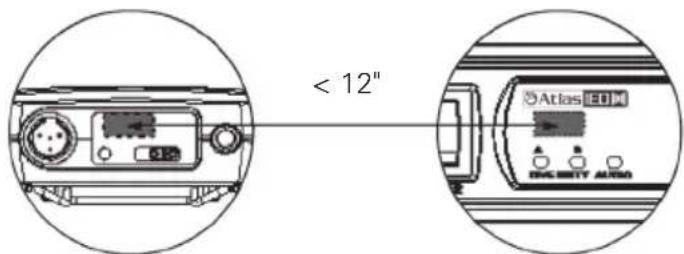
Align infrared areas of the receiver and transmitter within 12" (30cm).
text_image
< 12"Figure 3
A. Changing the receiver's channel
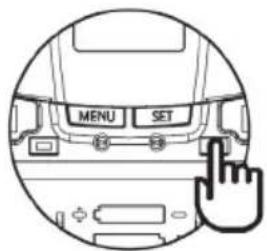
- Press the synchronizing button on the belt pack (Fig 4).
- The belt pack's LED will illuminate, indicating the frequency is being transmitted to the receiver and that the receiver is synchronizing channels with the belt pack (Fig 5).
text_image
MENU SET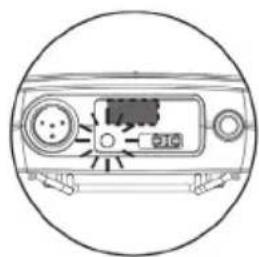
natural_image
Diagram of a device rear panel with buttons and a central indicator (no text or symbols)Figure 4 Figure 5
B. Changing the belt pack's channel
- Press the synchronizing button on the receiver (Fig 6).
- The receiver's LED will illuminate, indicating the frequency is being transmitted to the belt pack and that the belt pack is synchronizing channels with the receiver (Fig 7).

text_image
SYNC
natural_image
Diagram of a device rear panel with indicator lights and ports (no text or symbols)Figure 6 Figure 7
If this does not synchronize the channels, ensure the IR sensor panels are properly aligned and are located within 12" (30cm) of each other and try synchronizing again.
MWBPT
Owner's Manual
Channel Setting
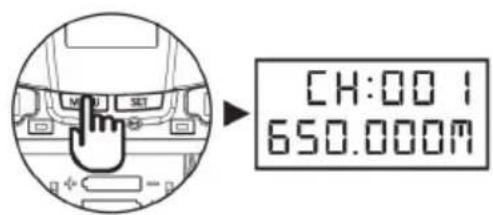
- Use MENU button to go to the CHANNEL | FREQUENCY page (Fig 8).
- Press and hold the SET button for 3 seconds, then the upper-right channel number will flash to allow changes to be made (Fig 9).
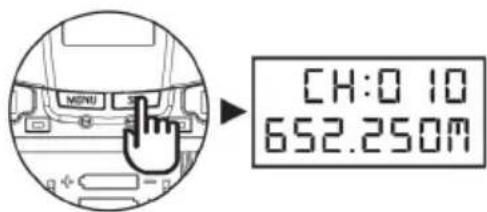
- Press SET / MENU buttons to change the channel number. The frequency will change accordingly (Fig 10).
- After 3 seconds of selecting a channel, it will be automatically saved (Fig 11).
text_image
CH:00 I 650.000MFigure 8

text_image
MENU CH:00:1 650.000AFigure 9
text_image
CH:0 10 652.250MFigure 10
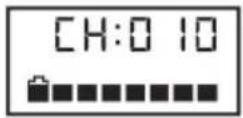
Figure 11
MWBPT
Owner's Manual
Battery Type Setting
- Use MENU button to go to the BATTERY TYPE page (Fig 12).
- Press and hold the SET button for 3 seconds, then the arrow cursor will flash to allow changes to be made (Fig 13).
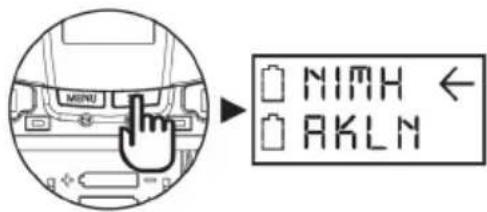
- Press SET button to select either NiMH (rechargeable battery) or AKLN (alkaline battery) (Fig 14).
- After 3 seconds of selecting a battery type, it will be automatically saved (Fig 15).

text_image
Diagram showing a hand pressing on the left of a computer interface with battery icons and directional arrowsFigure 12

text_image
MENU N1H AKLNFigure 13
text_image
MENU N13H AKLNFigure 14
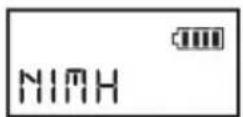
Figure 15
Important: Use only NiMH rechargeable batteries when using non-alkaline type batteries. Lithium Ion or other rechargeable batteries are not compatible with the MWBPT. NiMH must be selected when using rechargeable batteries. Never select AKLN (alkaline) when using rechargeable batteries. Incorrect battery selection will cause inaccurate battery information to be displayed.
MWBPT
Owner's Manual
| System | |
| Frequency Range UHF 470 - 608MHz | |
| Switching Bandwidth 25MHz | |
| Switchable Frequency 100 | |
| 2-way Synchronization Yes | |
| RF Power Output < 35mW | |
| Spurious Emission > 60 dB Below Carrier | |
| Dynamic Range > 110 dB | |
| Display Screen LCD | |
| T.H.D. < 0.5% | |
| Peak Deviation ±40KHz | |
| Antenna | ^1/_4 Wave, Whip Antenna |
| Battery Type AA, Qty 2 | |
| Operating Life (Alkaline) | 16 Hours |
| Charging Function | Yes |
| Battery Charger MWCHGR | |
| Connector | 4-pin Mini-XLR Type |
| Microphone Input | Lavalier / Headset Microphone |
| Mechanical | |
| Product Dimensions (HxWxD) | 3.31" x 2.52" x 0.91" (84mm x 64mm x 23mm) |
| Shipping Dimensions (HxWxD) | 9.0" x 4.5" x 2.0" (229mm x 114mm x 51mm) |
| Net Weight | 0.17 lbs (0.076kg) |
| Shipping Weight | 0.45 lbs (0.20kg) |
| Warranty Coverage | |
| Warranty Period | 1 Year |
FCC Caution: To assure continued compliance, any changes or modifications not expressly approved by the party responsible for compliance could void the user's authority to operate this equipment. (Example - use only shielded interface cables when connecting to computer or peripheral devices).
FCC Radiation Exposure Statement: This device complied with FCC radiation exposure limits as set forth for an uncontrolled environment. This device should be installed and operated so that its antenna(s) are not co-located or operating in conjunction with any other antenna or transmitter.
This device complies with Part 15 of the FCC Rules. Operation is subject to the following two conditions: (1) This device may not cause harmful interference, and (2) This device must accept any interference received, including interference that may cause undesired operation.
MWBPT
Owner's Manual
Notes
MWBPT
Owner's Manual
Notes
MWBPT
Owner's Manual
Limited Warranty
All products manufactured by AtlasIED are warranted to the original dealer / installer, industrial or commercial purchaser to be free from defects in material and workmanship and to be in compliance with our published specifications, if any. This warranty shall extend from the date of purchase for a period of three years on all AtlasIED products, including SOUNDOLIER brand, and ATLAS SOUND brand products except as follows: one year on electronics and control systems; one year on replacement parts; and one year on Musician Series stands and related accessories. Additionally, fuses and lamps carry no warranty. AtlasIED will solely at its discretion, replace at no charge or repair free of charge defective parts or products when the product has been applied and used in accordance with our published operation and installation instructions. We will not be responsible for defects caused by improper storage, misuse (including failure to provide reasonable and necessary maintenance), accident, abnormal atmospheres, water immersion, lightning discharge, or malfunctions when products have been modified or operated in excess of rated power, altered, serviced or installed in other than a workman like manner. The original sales invoice should be retained as evidence of purchase under the terms of this warranty. All warranty returns must comply with our returns policy set forth below. When products returned to AtlasIED do not qualify for repair or replacement under our warranty, repairs may be performed at prevailing costs for material and labor unless there is included with the returned product(s) a written request for an estimate of repair costs before any nonwarranty work is performed. In the event of replacement or upon completion of repairs, return shipment will be made with the transportation charges collect.
EXCEPT TO THE EXTENT THAT APPLICABLE LAW PREVENTS THE LIMITATION OF CONSEQUENTIAL DAMAGES FOR PERSONAL INJURY, ATLASIED SHALL NOT BE LIABLE IN TORT OR CONTRACT FOR ANY DIRECT, CONSEQUENTIAL OR INCIDENTAL LOSS OR DAMAGE ARISING OUT OF THE INSTALLATION, USE OR INABILITY TO USE THE PRODUCTS. THE ABOVE WARRANTY IS IN LIEU OF ALL OTHER WARRANTIES INCLUDING BUT NOT LIMITED TO WARRANTIES OF MERCHANTABILITY AND FITNESS FOR A PARTICULAR PURPOSE.
AtlasIED does not assume, or does it authorize any other person to assume or extend on its behalf, any other warranty, obligation, or liability. This warranty gives you specific legal rights and you may have other rights which vary from state to state.
MWBPT
Owner's Manual
Service
Should your MWBPT require service, please contact the AtlasIED warranty department through the online warranty claim process.
Online Warranty Claim Processes
- Warranty submissions are accepted at: https://www.atlasied.com/warranty_statement where the type of return Warranty or Stock return can be selected.
-
Once selected, you will be prompted to enter your login credentials. If you do not have a login, register on the site. If already logged-in, navigate to this page by selecting "Support" and then "Warranty & Returns" from the top menu.
-
In order to file a Warranty Claim, you will need:
A. A copy of the invoice / receipt of the purchased item
B. Date of Purchase
C. The product name or SKU
D. The serial number for the item (if no serial number exists, enter N/A)
E. A brief description of the fault for the claim
-
Once all required fields are completed, select the "Submit Button". You will receive 2 emails:
-
One with a confirmation of the submission
- One with a case# for your reference should you need to contact us.
Please allow 2-3 business days for a response with a Return Authorization (RA) number and further instructions.
AtlasIED Tech Support can be reached at 1-800-876-3333 or atlasied.com/support.
Visit our website at www.AtlasIED.com to see other AtlasIED products.
©2023 Atlas Sound L.P. The Atlas "Circle A", Soundolier, and Atlas Sound are trademarks of Atlas Sound L.P. IED is a registered trademark of Innovative Electronic Designs LLC. All Rights Reserved. All other trademarks are the property of their respective owners. All specs are subject to change without notice. ATS005697 RevD 5/23