MA40F - Blender Cloud - Free user manual and instructions
Find the device manual for free MA40F Cloud in PDF.


User questions about MA40F Cloud
0 question about this device. Answer the ones you know or ask your own.
Ask a new question about this device
Download the instructions for your Blender in PDF format for free! Find your manual MA40F - Cloud and take your electronic device back in hand. On this page are published all the documents necessary for the use of your device. MA40F by Cloud.
USER MANUAL MA40F Cloud
Installation and User Guide
WARNING:
To reduce the risk of fire or electric shock, do not expose this appliance to rain or moisture.
 | WARNING: SHOCK HAZARD – DO NOT OPENAVIS: RISQUE DE CHOC ELECTRIQUE – NE PAS OUVRIR |
 | The lightning flash with the arrowhead symbol within an equilateral triangle, is intended to alert you to the presence of uninsulated dangerous voltages within the product's enclosure that may be of sufficient magnitude to constitute a risk of electric shock. |
 | The exclamation point within an equilateral triangle is intended to alert the user to the presence of important operating and maintenance (servicing) instructions in the literature accompanying the appliance. |
IMPORTANT SAFETY INSTRUCTIONS
I. Read these Instructions.
2. Keep these Instructions.
3. Heed all Warnings.
4. Follow all Instructions.
-
Do not use this apparatus near water.
-
Clean only with a dry cloth.
-
Do not block any ventilation openings. Install in accordance with the manufacturer's instructions.
-
Do not install near any heat sources such as radiators, heat registers, stoves or other apparatus (including amplifiers) that produce heat.
-
Do not defeat the safety purpose of the polarized or grounding - type plug. A polarized plug has two blades with one wider than the other. A grounding type plug has two blades and a third grounding prong. The wide blade or the third prong are provided for your safety. When the provided plug does not fit into your outlet, consult an electrician for replacement of the obsolete outlet.
-
Protect the power cord from being walked on or pinched particularly at plugs, convenience receptacles, and the point where they exit from the apparatus.
II. Only use attachments/accessories specified by the manufacturer.
- Use only with the cart, stand, tripod, bracket or table specified by

the manufacturer or sold with the apparatus, when a cart is used, use caution when moving the cart/apparatus combination to avoid injury from tip-over.
-
Unplug this apparatus during lightning storms or when unused for long periods of time.
-
Refer all servicing to qualified service personnel. Servicing is required when the apparatus has been damaged in any way, such as power-supply cord or plug is damaged, liquid has been spilled or objects have fallen into the apparatus, the apparatus has been exposed to rain or moisture, does not operate normally, or has been dropped.

Do not expose the apparatus to dripping or splashing, and ensure that no objects filled with water, such as vases, are placed on the apparatus.
The mains plug is used as the disconnect device and it should remain readily accessible during intended use. In order to isolate the apparatus from the mains, the mains plug should be completely removed from the mains outlet socket.
Terminals marked with the symbol may use Class 2 Wiring, but voltages at these terminals may be of sufficient magnitude to constitute a risk of electric shock. The external wiring connected to these terminals requires installation by an instructed person or the use of pre-made leads or cords.
Contents
IMPORTANT SAFETY INSTRUCTIONS ....3
SAFETY INFORMATION ....7
Safety Notes regarding Installation....7
Conformities 7
RoSH and WEEE declaration 8
Safety Considerations and Information....9
Mains Fuse 9
Servicing 9
OVERVIEW 10
Introduction....10
Applicable Models....10
MA40F/MA40T main features....II
What's in the Box 12
BLOCK DIAGRAM ....13
FRONT PANEL DESCRIPTION ....14
REAR PANEL DESCRIPTION ....15
INSTALLATION ....17
Mechanical 17
Ventilation 18
Connections and adjustments....19
Line inputs....19
Sensitivity & Gain Control....20
Music Level and EQ control....20
Line I Priority....20
Mic inputs....21
Balanced input 21
70/100V line input 22
Mic gain adjustment....23
Microphone level control....23
Paging control and mic priority 23
Output 25
Lo-Z output (MA40F only) 25
Connecting to 100/70/25 V line systems (MA40T only) 25
Facility Port 26
Connecting an LM-2 or BT-1 28
Connecting an RL or RSL Series remote control plate 30
Using the Facility Port as an auxiliary input.... 31
Control of music source and level via external DC 31
Music Mute Input....33
Auto Power Down 34
Loudspeaker EQ cards....34
Installation Instructions 35
APPENDIX 36
PCB layout diagram....36
Table of internal jumpers and default settings 37
Summary of rear panel DIP switch functions 38
EMC considerations 40
Earthing....40
Technical specifications 41
SAFETY INFORMATION
Safety Notes regarding Installation
- Do not expose the unit to water or moisture.
- Do not expose the unit to naked flames.
- Do not block or restrict any air vent.
• Do not operate the unit in ambient temperatures above 35^ C.
- Do not touch any part or terminal carrying the hazardous live symbol while power is supplied to the unit.
- Do not perform any internal adjustments unless you are qualified to do so and fully understand the hazards associated with mains-operated equipment.
- The unit has no user-serviceable parts. Refer servicing to qualified service personnel.
- If the moulded plug is cut off the AC power lead for any reason, the discarded plug is a potential hazard and should be disposed of in a responsible manner.
Conformities
This product conforms to the following European EMC Standards:
BS EN 55103-1:2009
BS EN 55103-2:2009
CE
This product has been tested for use in commercial and light industrial environments. If the unit is used in controlled EMC environments, the urban outdoors, heavy industrial environments or close to railways, transmitters, overhead power lines, etc., the performance of the unit may be degraded.
The product conforms to the following European electrical safety standards:
BS EN 60065:2002 (+A2:2010)
UL60065
This product is compliant with the relevant provisions of:
Energy Star® Eligibility Criteria Ver 3.0 for Audio-Video products.
RoSH and WEEE declaration
Cloud Electronics Limited manages its business and collaborates with its suppliers to comply with the European Union restriction of the use of certain hazardous substances in electrical and electronic equipment, RoSH Directive (2002/95/EC), that came into force on 1st July 2006, and similar restrictions in other jurisdictions.

The “crossed out wheelie bin” symbol on the product and represented above is there to remind users of the obligation of selective collection of waste. This label is applied to various products to indicate that the product is not to be thrown away as unsorted municipal waste. At the end of life, dispose of this product by returning it to the point of sale or to your local municipal collection point for recycling of electric and electronic devices.
Customer participation is important to minimize the potential effects on the environment and human health that can result from hazardous substances that may be contained in this product.
Please dispose of this product and its packaging in accordance with local and national disposal regulations, including those governing the recovery and recycling of waste electrical and electronic equipment. Contact your local waste administration, waste collection company or dealer.
Safety Considerations and Information
The MA40F and MA40T are powered by an external DC supply. A separate Power Supply Unit (PSU) is supplied with the amplifier. The PSU must be earthed. Ensure that the mains power supply provides an effective earth connection using a three-wire termination.
Mains Fuse
The PSU is a sealed unit and contains no user-replaceable fuses. Mains over-current protection is provided by the fuse in the AC mains plug, which should be rated at 5 A.
Servicing
The unit contains no user serviceable parts. Refer servicing to qualified service personnel. Do not perform servicing unless you are qualified to do so. Disconnect the power cable from the unit before removing the top panel and do not make any internal adjustments with the unit switched on. Only reassemble the unit using either the original bolts/screws, or ones identical to the original parts
OVERVIEW
Introduction
The MA40F and MA40T are very compact mono amplifiers designed for integration into audio and AV systems where de-centralised installation is advantageous. They are intended as “install-and-forget” components, and are small enough to be fitted into wall or ceiling voids or in any convenient location adjacent to projectors, flat screen displays or loudspeakers. A simple set of controls and configuration options makes them easy to integrate into any audio system. They are highly suitable for use with in-store digital signage, gallery and museum exhibits and fixed or mobile tour guide systems.
The MA40F can deliver 40 W (mono) into a 4 ohm load, while the physically larger MA40T includes an output transformer, enabling it to drive 100 V, 70 V or 25 V line loudspeaker systems. In all other respects, the two models are identical. There are two unbalanced inputs for line level signals (typically music sources) and a balanced mic input for paging/announcement use. An alternative mic input allows the amplifier to be fed with paging/announcements from a 70/100 V line loudspeaker system. Front panel preset-type controls are provided for music level, microphone levels and music EQ. There are also various preset adjustments and configuration DIP switches on the rear panel, and jumpers mounted internally on the main PCB. A remote input module or remote level control can be wired to the amplifier's Facility Port, which can also be used as an additional line input.
Applicable Models
This Installation Guide describes the installation and operation of the following models:
• Cloud MA40F 40 W mono amplifier for 4 ohm loudspeakers
• Cloud MA40T 40 W mono amplifier for 100/70/25 V line loudspeaker systems
The two models differ in physical size, the MA40T being larger in order to accommodate the internal line output transformer. Apart from the inclusion of this transformer, the two models are essentially identical for the practical purposes of installation and operation. Unless specifically stated otherwise, the information in this Guide may be taken to apply to either model.
NOTE: Amplifier models MA40 and MA40E are NOT covered by this Guide, and when installing either of these models, reference should only be made to the Guides specific to them.
MA40F/MA40T main features
- Two unbalanced stereo line inputs with individual sensitivity trims
• Electronically-balanced mic input with separate gain control
• 12 V phantom power selectable by internal jumper - Front panel control of music level and mic levels
• HF & LF EQ adjustments for music sources - MIC input configurable for direct connection to 100/70 V line system: allows MA40F/T to receive announcements from main building PA/VA system
- MIC input can be used with paging mics
- Paging configurable as automatic voice-over-music (VOX mode) or contact closure via access port
- Selectable LINE 1-over-LINE 2 priority
• Facility port for connection of LM-2 remote mic/line input module via screened Cat 5 cable; also allows remote control of music level
• 40 W power amplifier - Two versions available: MA40F with low-impedance output, MA40T with internal transformer for driving 100/70/25 V line systems
• Music Mute control input (N/O or N/C) for interfacing to an emergency system - Selectable 65 Hz high-pass filter for use with 100/70/25 V line systems
- Optional EQ cards available to suit various popular installation loudspeakers
• Automatic power-down function (user-selectable)
• Less than I W power consumption in sleep mode - Convection cooled – silent in operation.
• PSU meets US DoE Level VI energy requirements
• Power requirements:
• MA40F: 12 to 24 V DC, 60 W
• MA40T: 24 V DC, 60 W
• Universal AC adaptor included (both models), operates from 100 to 240 V AC
Available Options:
- RL Series remote control plates for music volume
• RSL Series remote control plates for Line I/Line 2 selection and music volume - LM-2 remote mic/line input module with music volume control
• BT-I Bluetooth wireless audio input module
• EQ cards to match various popular installed-sound loudspeakers
What's in the Box
Please check the shipping carton for damage before opening. If there is damage, please contact your Cloud agent and the shippers.
The packing carton should contain the following items:
• MA40F or MA40T amplifier
• External PSU (AC mains adaptor)
- IEC mains lead (AC cord) with moulded plug appropriate to the territory
- Set of mating plug-in screw-terminal connectors
- Set of four self-adhesive polyurethane feet
- This manual
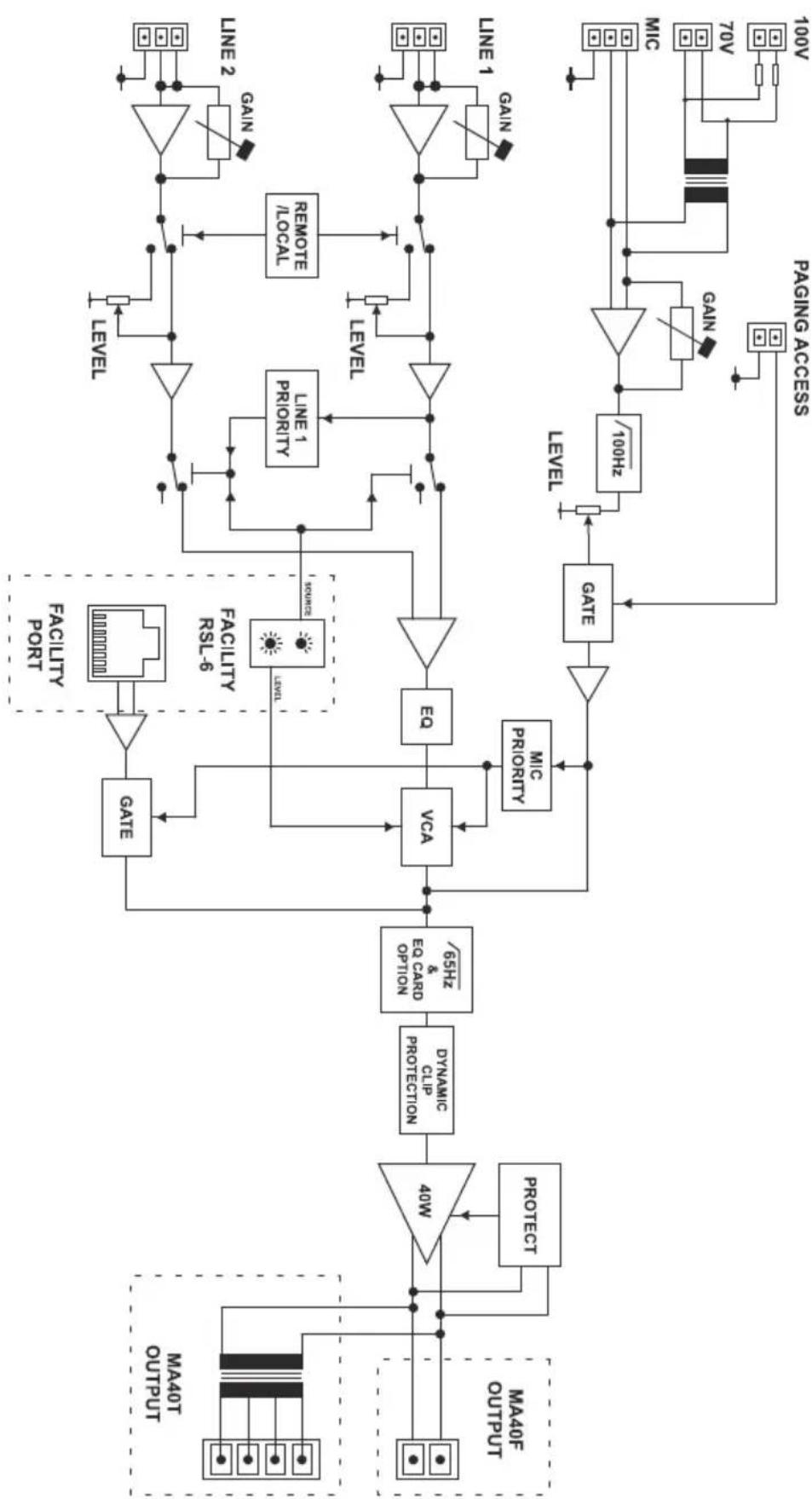
BLOCK DIAGRAM
flowchart
graph TD
    A["40W"] --> B["Dynamic CLIP PROTECTION"]
    B --> C["65HZ EA CARO OPTION"]
    C --> D["VCA"]
    D --> E["EA"]
    E --> F["Gate"]
    F --> G["/100HZ"]
    G --> H["Level"]
    H --> I["100V"]

    subgraph Inputs
        J["MA40T OUTPUT"] --> K["PROTECT"]
        L["MA40F OUTPUT"] --> M["MA40F"]
    end

    N["FACULTY PORT"] --> O["LEVEL"]
    P["FACULTY RSL-6"] --> Q["SAMPLE"]
    R["LINE 1"] --> S["Level"]
    T["LINE 2"] --> U["Level"]
    V["LINE 1"] --> W["Level"]
    X["LINE 2"] --> Y["Level"]
    Z["GAIN"] --> AA["Level"]
    AB["70V"] --> AC["Level"]
    AD["MIC"] --> AE["Level"]
    AF["MIC"] --> AG["Level"]
    AH["MIC"] --> AI["Level"]
    AJ["MIC"] --> AK["Level"]
    AL["MIC"] --> AM["Level"]
    AN["MIC"] --> AO["Level"]
    AP["MIC"] --> AQ["Level"]
    AR["MIC"] --> AS["Level"]
    AT["MIC"] --> AU["Level"]
    AV["MIC"] --> AW["Level"]
    AX["MIC"] --> AY["Level"]
    AZ["MIC"] --> BA["Level"]
    BB["MIC"] --> BC["Level"]
    BD["MIC"] --> BE["Level"]
    BF["MIC"] --> BG["Level"]
    BH["MIC"] --> BI["Level"]
    BJ["MIC"] --> BK["Level"]
    BL["MIC"] --> BLA["Level"]
    BM["MIC"] --> BN["Level"]
    BO["MIC"] --> BP["Level"]
    BQ["MIC"] --> BR["Level"]
    BS["MIC"] --> BT["Level"]
    BU["MIC"] --> BV["Level"]
    BW["MIC"] --> BX["Level"]
    BY["MIC"] --> BZ["Level"]
FRONT PANEL DESCRIPTION

text_image
Cloud MA40F 45W MIXER AMPLIFIER POWER MUTE PEAK OFF 18 OFF 10 OFF 18 -16 dB +18 -18 dB +10 MIC LINE 1 LINE 2 LF HF LEVEL I- MUSIC EQ
text_image
Cloud MA40T 40W MΩER AMPLIFIER POWER MOUT PEAK OFF 16 OFF 16 OFF 16 -10 am +10 -10 am +10 LINE 1 LINE 2 LF HF LATEL 16 8 7 4 3 MΩRDC EQLEVEL controls:
I. MIC – sets volume of signal at the PAGE/MIC input
2. LINE I – sets volume of signal at the LINE I input
3. LINE 2 – sets volume of signal at the LINE 2 input
EQ controls:
-
LF - LF EQ adjustment of music channel: +/-10 dB @ 100 Hz
-
HF – HF EQ adjustment of music channel: +/-10 dB @ 5 kHz
INDICATORS:
-
POWER - red LED flashing: illuminates under fault condition. Requires power cycling to reset POWER - bi-colour LED: illuminates green when the amplifier is active and red when the amplifier is in Automatic Power Down mode
-
MUTE – red LED: illuminates when the MUSIC MUTE function is active
-
PEAK – red LED: illuminates if the amplifier's dynamic clip protection becomes active
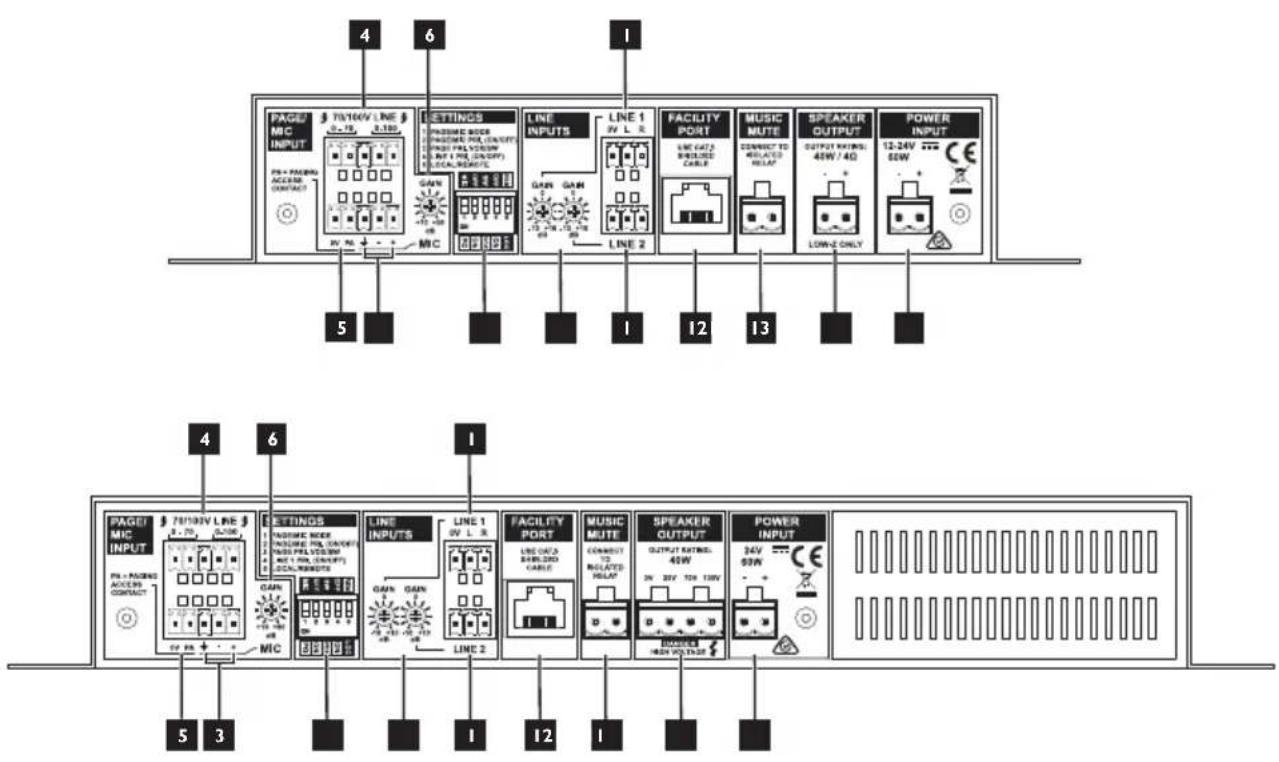
REAR PANEL DESCRIPTION
flowchart
graph TD
    A["4 PAGE/MIC INPUT"] --> B["5"]
    C["6 SETTINGS"] --> D["1"]
    E["LINE INPUTS"] --> F["12"]
    G["FACILITY PORT"] --> H["13"]
    I["MUSIC MUTE"] --> J["13"]
    K["SPEAKER OUTPUT"] --> L["13"]
    M["POWER INPUT"] --> N["13"]

    O["5 PAGE/MIC INPUT"] --> P["4"]
    Q["6 SETTINGS"] --> R["6"]
    S["LINE INPUTS"] --> T["1"]
    U["FACILITY PORT"] --> V["12"]
    W["MUSIC MUTE"] --> X["13"]
    Y["SPEAKER OUTPUT"] --> Z["13"]
    AA["POWER INPUT"] --> AB["13"]
I. LINE I and LINE 2 – stereo line inputs for music sources (unbalanced)
2. GAIN - two preset level trim controls (+/-10 dB) for each line input
3. MIC – balanced mic input
4. 70/100V LINE – alternative high-voltage input, for connection to 70/100V line speaker systems
5. PA/0V – external paging access contacts input for Mic input
6. GAIN – preset gain control for mic input; range +10 to +50 dB
7. FACILITY PORT - RJ45 socket for connection of remote input/control modules such as the LM-2 and BT-1; it is also possible to connect an RL-1 or RSL-6 remote control plate to this port
8. SPEAKER OUTPUT (MA40F only) – speaker output for low-impedance circuits
9. SPEAKER OUTPUT (MA40T only) – for connection to 100/70/25 V line loudspeaker system
- MUSIC MUTE – connect to external N/O or N/C contacts for remote muting of music sources
II. SETTINGS – five-pole DIP switch for setting various amplifier configurations:
| SWITCH FUNCTION | |
| 1 MIC mode – configures MIC input for paging use | |
| 2 Enables mic-over-music priority | |
| 3 Selects paging priority mode – VOX or SW (SW = contact closure) | |
| 4 Enables LINE 1-over-LINE 2 priority | |
| 5 | Enables remote control functions of Facility Port and disables front panel LINE level controls |
See also “Summary of rear panel DIP switch functions” on page 38 in the Appendix section for full details.
- POWER INPUT – connect external DC power here: the MA40F requires 12 to 24 V at 2.5 A; the MA40T requires 24 V at 2.5 A.
INSTALLATION
Mechanical
The compact size and light weight of the MA40F and MA40T combined with their high energy efficiency allows them to be installed in almost any location. They can be easily placed in ceiling or wall voids, or fitted to the rear of display screens or loudspeaker cabinets.
Both models of amplifier have mounting flanges with keyhole slots to permit them to be secured on a horizontal or vertical flat surface.

text_image
10 mm 0.4" 200 mm 7.9" CLOUD 40W MIXER AMPLIFIER CLOUD ELECTRONICS LIMITED SHEFFIELD S9 3HF ENGLAND MADE IN UK 73.5 mm 2.9" 10 mm 0.4" 144.3 mm 5.7" 25.4 mmMA40F

text_image
10 mm 0.4" 283 mm 11.14" 10 mm 0.4" 73.5 mm 2.9" 25.4 mm 1" CLOUD 40W MIXER AMPLIFIER CLOUD ELECTRONICS LIMITED SHEFFIELD S9 3HF ENGLAND MADE IN UK — S® MADE IN SHEFFIELD MADE IN BRITAIN 144.3 mm 5.7"MA40T
If using the MA40F/MA40T in a free-standing situation, the self-adhesive feet (supplied with each amplifier) should be fitted. The amplifier should always be stood on a flat surface. Care should be exercised in selecting a location for a free-standing unit, which should allow ventilation but be clear of any liquid or similar hazard.
Ventilation
The amplifiers use natural convection cooling, and care should be taken to locate them where airflow is unrestricted (e.g., not under ceiling insulation material). Consideration should also be given to ease of access, should the operational configuration or audio levels need adjustment after installation.
In free-standing installations, always fit the polyurethane feet supplied, and do not stand any other items on top of the unit.
Connections and adjustments
Line inputs
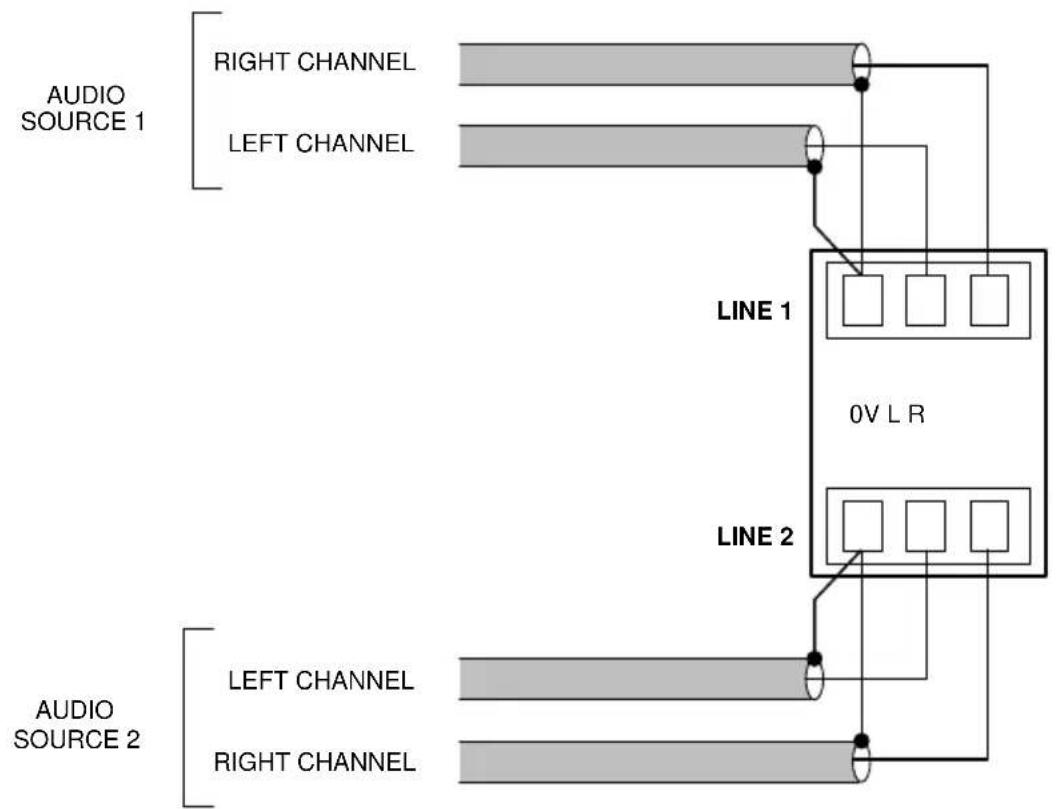
The unit has two stereo line inputs 1, each of which is mixed internally to mono; these inputs are suitable for most music sources such as CD/DVD players, satellite receivers and computer line outputs.
Both inputs are unbalanced and use 3-pin 3.5 mm-pitch screw terminal connectors. The connectors should be wired as follows:
flowchart
graph TD
    A["AUDIO SOURCE 1"] --> B["RIGHT CHANNEL"]
    A --> C["LEFT CHANNEL"]
    D["AUDIO SOURCE 2"] --> E["LEFT CHANNEL"]
    D --> F["RIGHT CHANNEL"]
    B --> G["0V L R"]
    C --> G
    F --> G
    G --> H["LINE 1"]
    G --> I["LINE 2"]
Unless a Cloud remote control plate or module such as the RSL-6 or LM-2 is in use, the two line inputs are summed together internally, though Line input I can be configured to have priority over Line input 2, see “Line I Priority” on page 20.
Sensitivity & Gain Control
Each of the stereo line inputs has an input impedance of 10 kohms and a preset type gain control on the rear panel adjacent to the input sockets 2. The gain controls have a range of 20 dB allowing the input sensitivity to be varied from -12 dBu to +8 dBu (0 dBu = 0.775 Vrms). The gain controls should be set so that the input sources in use do not distort, and the front panel level controls 2 and 3 have a useful range.
Music Level and EQ control
The front panel LINE 1 and LINE 2 controls ② and ③ should be adjusted during installation to set the volume of the audio sources. The line inputs are summed post the level controls; equalisation can be applied using the front panel LF and HF controls ④ and ⑤, which can apply a cut or boost of up to 10 dB at 50 Hz and 10 kHz respectively. Adjust the EQ controls to suit the audio programme material being used, the speaker characteristics and the room acoustics. If the programme material includes speech, the EQ should be adjusted for best intelligibility.
If the line input levels are set too high, the amplifier's dynamic protection will activate to prevent clipping and the front panel PEAK LED ^8 will illuminate to indicate this. Note that this LED also indicates an excessive mic signal level.
Line I Priority
When both line inputs are in use, one audio source can be given automatic priority over the other by connecting it to Line I input and setting rear panel SETTINGS DIP switch 4 (LINE I PRI) to ON. This is a useful facility when a Digital Sound Store, emergency announcement system or similar source forms part of the audio system.
When Line I Priority is enabled, the amplifier will route the input signal at Line 2 normally until a signal is detected at Line I's input. When this happens, it switches its music source automatically to Line I. Once the signal at Line I stops (e.g., when an announcement finishes), Line 2's source will smoothly restore to its former level over approx. 3 seconds.
Mic inputs
The MA40F and MA40T have a single microphone channel, enabling them to be used for paging or announcements. By default, the mic channel is independent and is simply mixed with the summed line inputs. The mic channel can be reconfigured so that it operates as a standard Cloud-type paging input, with selectable mic-over-line priority and triggering by either contact closure or automatic signal detection. It is then compatible with paging microphones using zone selection by contact-closure such as the Cloud PM range, including the PMI single-zone microphone. See page 23 for more details.
The mic channel has two separate physical inputs: a standard balanced input and a high-level transformer-isolated input for connection to 70/100 V line systems. Both inputs, and the connections for paging access, are on the 2 x 5-pin 3.5 mm-pitch screw terminal connector PAGE/MIC INPUT.
The microphone signal path includes a fixed high-pass filter. This attenuates the response below 120 Hz, which helps to reduce the effects of microphone handling noise.
Balanced input
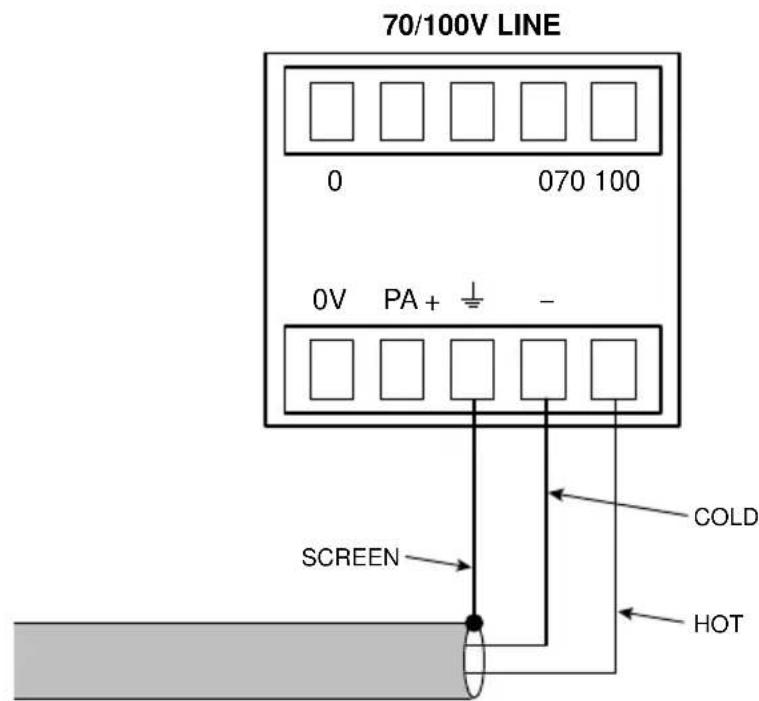
The MA40F/MA40T's microphone pre-amplifier is an electronically balanced, transformer-less design configured for optimum low noise performance. The input impedance is greater than 2 kohms and is suitable for microphones in the 200 ohm to 600 ohm range. The connector uses three pins of the lower 5-pin 3.5 mm-pitch screw terminal type on the rear panel 3. Use the wiring shown below.
text_image
70/100V LINE 0 070 100 0V PA+ - SCREEN COLD HOT12 V phantom power is available at the mic input, and is activated by setting internal jumper J6 to the ON position. See page 36 and page 37 for further information regarding the internal jumpers. Care should be taken to ensure that phantom power is activated only when the microphone connected to the input requires it – i.e., a capacitor or electret type; other types of microphones (such as dynamic) may be damaged if a DC voltage is applied to them.
70/100V line input
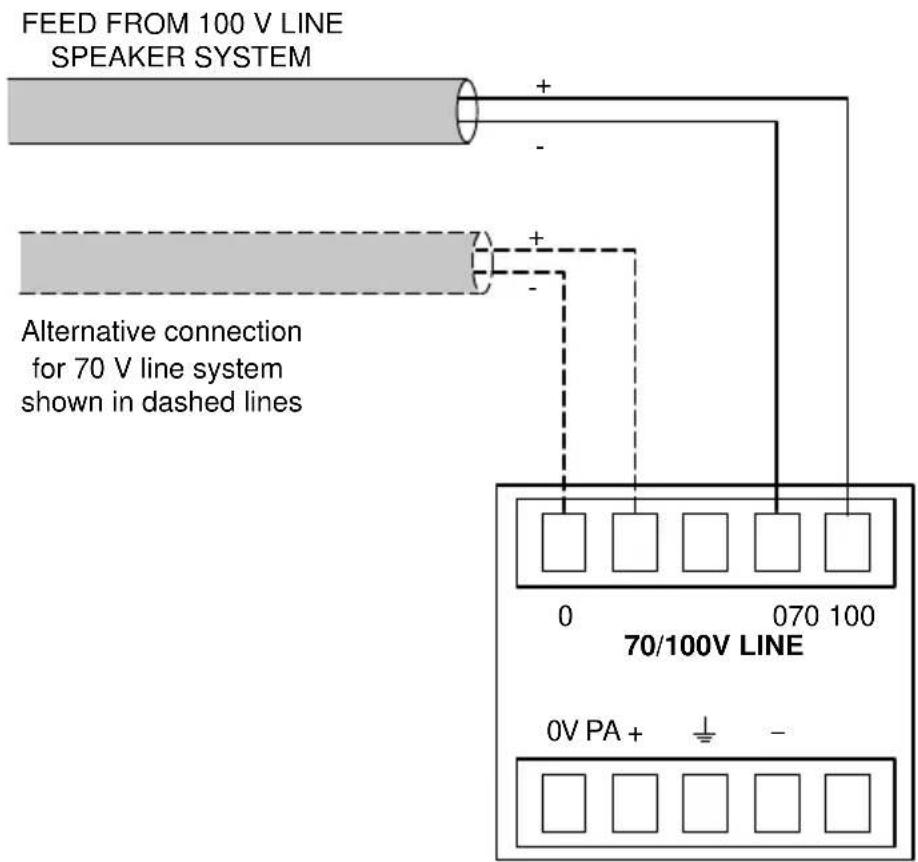
The MA40F and MA40T are provided with an second, alternative input to the mic channel, in the form of a transformer-isolated input which can be connected directly to a 70 V line or 100 V line loudspeaker system. This input can be used to route paging announcements from a building-wide PA or PA/VA system into the area covered by the MA40F/T.
To use the high-voltage input, simply connect the loudspeaker system feed to either the 70 V line or 100 V line input, which use four pins of the upper 5-pin section of the connector, as shown below:
text_image
FEED FROM 100 V LINE SPEAKER SYSTEM Alternative connection for 70 V line system shown in dashed lines 0 070 100 70/100V LINE 0V PA + + -Do not make any connections to the unused high-voltage input (70V or 100V).
Cloud recommend that no attempt is made to use both the balanced and high-voltage inputs.
Mic gain adjustment
The mic input has a preset gain control 6 adjacent to the input connector. This is effective whichever of the two mic inputs is in use. The gain can be adjusted over a range of 40 dB, from 10 dB to 50 dB.
Microphone level control
A front panel level control 1 is provided for the mic channel and this provides the user with a means of adjusting the volume of the microphone, or the announcements from a PA/VA system if the 70/100 V line inputs are in use. The rear panel gain control 6 should be set at a level where distortion does not occur even when the front panel level control is fully clockwise. If the mic level is set too high, the front-panel PEAK LED 8 will illuminate. Note that this LED also indicates excessive music level.
Paging control and mic priority
The microphone channel can be reconfigured to operate as a paging input with SETTINGS DIP switches 1, 2 and 3.
For normal (non-paging) operation, all three switches should be OFF. The priority functions operate as described below whichever of the two mic inputs is in use (balanced or hi-voltage).
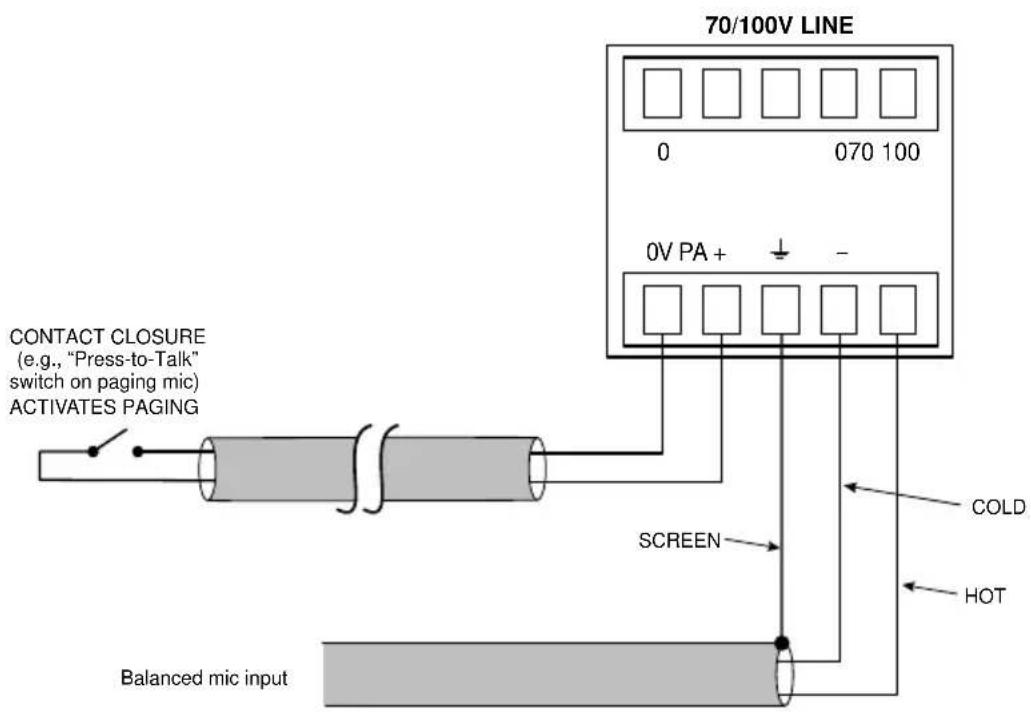
- Switch I - PAGE/MIC MODE: in the OFF position ('MIC'), the mic input operates as a standard microphone input. In this mode, DIP switch 3 (SW/VOX) is disabled. In the ON position ('PAGE'), the mic input operates as a typical Cloud paging input and DIP switch 3 is enabled. In PAGE mode, the Paging Access contacts will need to be shorted in order for the mic input to become active.
- Switch 2 – PAGE/MIC PRI. (ON/OFF): set to ON to enable Mic-over-Line priority. This can be selected in both MIC and PAGE modes, i.e., regardless of the setting of DIP switch 1. The priority function will mute both LINE and FACILITY inputs. In MIC mode the priority trigger is always VOX; in PAGE mode the priority can be either SW or VOX type selected by DIP switch 3.
- Switch 3 – SW/VOX: this switch is only enabled when DIP switch I is set to ON. When DIP switch 3 is OFF, SW priority triggering is selected: a short circuit at the Paging Access connector 5 will trigger priority (see below for wiring details), muting any line input signals and enabling the mic input. When set to ON, VOX mode is selected: a signal at the mic input will trigger priority. In order for VOX mode to operate when DIP switch I is ON ('PAGE'), the two pins of the Paging Access connector must be shorted together.
The Paging Access control input is on two pins (PA and 0V) of the lower section of the PAGE/MIC connector ^5 . The Access input provides compatibility with “contact-closure” paging microphones. In PAGE mode, the microphone input is muted as long as the pins of the access connector are open-circuit. When the pins are connected together, the mic input becomes active.
text_image
70/100V LINE 0 070 100 0V PA + CONTACT CLOSURE (e.g., "Press-to-Talk" switch on paging mic) ACTIVATES PAGING SCREEN COLD HOT Balanced mic inputIn either VOX or SW mode, the music signal is faded back up after the announcement is complete over a period of approx. 3 seconds.
Output
The power amplifier stage is fully protected against DC offset, over-current, over-and under-voltage and is also thermally protected. Activation of the protection circuitry shuts the power amplifier stage down until the fault condition clears. All protection conditions will automatically self-clear if the amplifier is power-cycled. A switch-on delay function mutes the output during power-up and power-down to protect loudspeakers.
Lo-Z output (MA40F only)
The MA40F will deliver its rated power of 40 W into a 4 ohm load when powered by the external PSU supplied with the amplifier. The maximum output power will be reduced with lower supply voltages (please refer to MA40F/T datasheet for power de-rating curve).
When using multiple low-impedance loudspeakers (generally 8 ohms) with a single amplifier, series and parallel wiring should be employed to produce a total load impedance of not less than 4 ohms.
The low impedance output is available at the 2-pin 5 mm-pitch screw terminal SPEAKER OUTPUT connector on the rear panel 8.
Connecting to 100/70/25 V line systems (MA40T only)
The MA40T is fitted with an internal transformer enabling it to directly drive 100 V, 70 V or 25 V line loudspeaker systems. The power amplifier stage will deliver its rated power of 40 W when powered by the PSU supplied with the amplifier. The output voltage – and hence the maximum power available - will be reduced with lower DC supply voltages: with a supply voltage of 12 V, the maximum output voltage will be 58 V. Please refer to the MA40F/T datasheet for power de-rating information.
When driving 100/70/25 V line loudspeaker systems there is a risk of transformer core saturation at high levels and low frequencies, which can produce distortion. To prevent this, the MA40F/MA40T's output stage is provided with a switchable 65 Hz high-pass filter. We recommend that the filter is always enabled when the amplifier is used with 100/75/25 V line systems; note that Model MA40T is shipped with the filter already enabled, but Model MA40F is shipped with the filter disabled. If Model MA40F is used in conjunction with an external line transformer, the filter should be enabled.
The filter is enabled/disabled by moving internal PCB jumper J3. See “PCB layout diagram” on page 36 for locations of PCB jumpers.
Facility Port
MA40F and MA40T amplifiers are provided with a FACILITY PORT in the form of a rear panel RJ45 connector 7. The primary use of the Facility Port is for the connection of an LM-2 or BT-1 remote active module, but it may also be used to connect RL-1 and RSL-6 Series remote control plates, or as a general-purpose auxiliary balanced input (see “Using the Facility Port as an auxiliary input” on page 31 for more information on this application).
The active modules operate from DC power supplied by the MA40F/T. The current consumed by each module is minimal and in the vast majority of installations there will be no power supply issues.
IMPORTANT: In order for the remote control functions on an LM-2 module or an RL/RSL Series plate to operate, SETTINGS DIP switch 5 (LOCAL/REMOTE) must be set OFF ('REMOTE'). This will disable the front panel LINE I and LINE 2 controls, and control of line level and/or LINE I/LINE 2 selection will be available from the remote module or plate. DIP switch 5 should be left set to LOCAL when a BT-I is connected to the Facility Port.
The pinout of the Facility Port connector is given in the table on the following page.
| PIN USE Cat | 5 CORE* | |
| 1 Audio | ‘cold’ phase (-) White + Orange | |
| 2 Audio | ‘hot’ phase (+) Orange | |
| 3 Priority | VCA control White + Green | |
| 4 + 15 V | Blue | |
| 5 0V | White + Blue | |
| 6 -15 V | Green | |
| 7 Music | level control (0 to 10 V) White + Brown | |
| 8 Music | source select control (0 to 10 V) Brown | |
| GND GND | ref for system music controls Connector shell |
* Standard wiring for pre-made cables
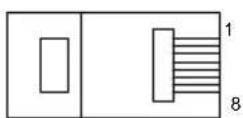
RJ-45 PLUG (PIN SIDE)
Connecting an LM-2 or BT-I

text_image
MIC LEVEL MUSIC LEVEL MIC PRIORITY MIC INPUT LINE INPUT LM-2LM-2
text_image
STATUS PUSH-TO-PAIR 2s 5s BT-1BT-1
The LM-2 is an active input module which allows a microphone and a stereo line input in a remote location to be connected to the MA40F or MA40T. The module also includes the functions of a Cloud RSL-6 Remote Control Plate, which allows remote control of the MA40F/MA40T's music level and selection of Line I or Line 2 as the music source.
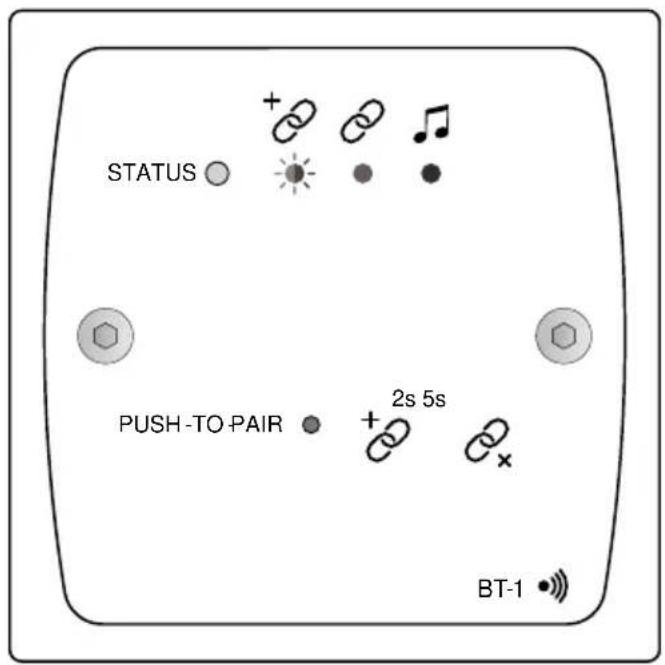
The BT-I is a Bluetooth remote audio input module which enables compatible portable devices such as laptops, tablets and smartphones to stream audio wirelessly to the module, and thus into the audio system of the area where the module is installed.
NOTE: The MA40F and MA40T are only compatible with the BT-IF variant of the BT-I: do not attempt to connect variant BT-IE.
The LM-2 or BT-I should be connected to the MA40F/MA40T's FACILITY PORT using screened Cat 5 cable. (Note that as the cable carries analogue audio, only screened Cat 5 should be used.) The LM-2 includes controls for local music level and source selection, the wiring for these functions being catered for on the Facility Port. The maximum total Cat 5 cable length should not exceed 100 ~m .
LM-2: The LM-2's upper PCB is fitted with an RJ45 connector labelled OUTPUT. Connect this to the FACILITY PORT using screened Cat 5 cable with screened RJ45s at each end. Follow the colour coding shown in the table opposite. The metal screening of the connectors should be bonded to the screen of the cable. Full details can be found in the LM-2 Installation Guide.
Before the LM-2's music source and level controls will operate, set SETTINGS DIP switch 5 to REMOTE (i.e., OFF. In this setting, the front panel LINE I and LINE 2 controls become inoperative. Positions 3 to 6 on the LM-2's Music Source switch have no function on the MA40F/MA40T; selecting these positions will effectively mute both line inputs.
BT-I: The BT-I has two PCBs “piggy-backed” onto the rear of the faceplate. The RJ45 output connector (SKI) is located on the upper PCB. This should be connected to the MA40F/MA40T’s FACILITY PORT with screened Cat 5 cable and shielded RJ45 plugs. Full details can be found in the BT-I Installation Guide.
Connecting an RL or RSL Series remote control plate
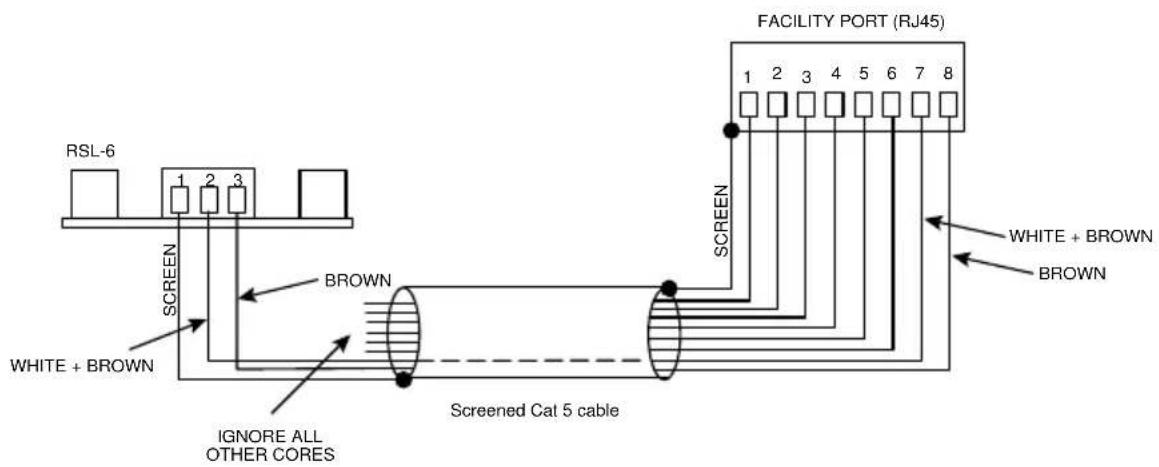
MA40F and MA40T amplifiers are also compatible with standard Cloud remote control plates of the RSL Series (music source select and level), and RL Series (level only). The MA40F and MA40T differ from most other Cloud products in that they do not have a dedicated 3-pin “Remote Control” port: RL and RSL Series plates must instead be connected to the Facility Port 7. This is most easily accomplished by using screened Cat 5 cable between the MA40F/MA40T and the remote control plate, but only connecting the one (or two) cores concerned with the remote control functions (see page 27), plus the screen, to the plate.
RL-1 REMOTE LEVEL CONTROL WIRING

text_image
RL-1 1 2 3 SCREEN WHITE+ BROWN FACILITY PORT (RJ45) 1 2 3 4 5 6 7 8 SCREEN WHITE + BROWN IGNORE ALL OTHER CORES Screened Cat 5 cableRSL-6 REMOTE SOURCE & LEVEL CONTROL WIRING
flowchart
graph TD
    A["RSL-6"] --> B["1"]
    B --> C["2"]
    C --> D["3"]
    D --> E["BROWN"]
    E --> F["Screened Cat 5 cable"]
    F --> G["FACILITY PORT (RJ45)"]
    G --> H["1"]
    H --> I["2"]
    I --> J["3"]
    J --> K["4"]
    K --> L["5"]
    L --> M["6"]
    M --> N["7"]
    N --> O["8"]
    P["WHITE + BROWN"] --> Q["BROWN"]
    Q --> R["Screened Cat 5 cable"]
    S["IGNORE ALL OTHER CORES"] --> T["BROWN"]
    T --> U["Screened Cat 5 cable"]
Using the Facility Port as an auxiliary input
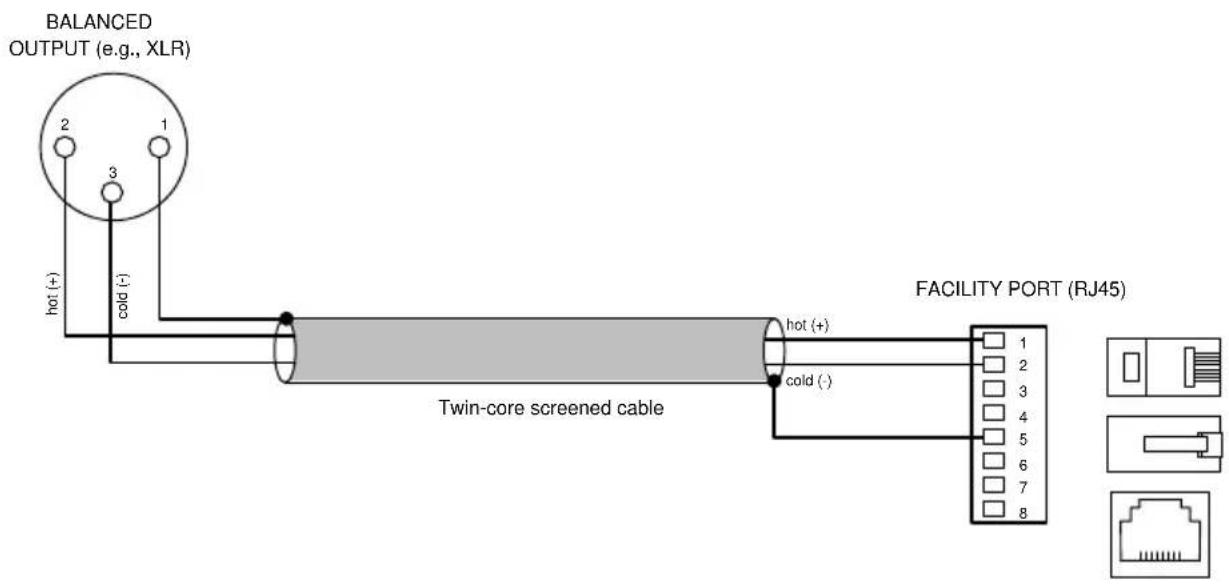
The Facility Port provides a balanced audio input. If a port is not connected to a remote input module or remote control plate, it may be used as an additional, balanced line input. The signal applied at the Facility Port is mixed with the other inputs (Line 1, LINE 2 and MIC), but has no independent level control on the amplifier; the signal level must be adjusted at the source. If Mic-over-Line priority is enabled (see “Paging control and mic priority” on page 23), a line input at the Facility Port will be muted in the same way as LINE 1 and LINE 2.
Connect an external balanced source to the Facility Port as shown below:
text_image
BALANCED OUTPUT (e.g., XLR) hot (+) cold (-) Twin-core screened cable hot (+) cold (-) FACILITY PORT (RJ45) 1 2 3 4 5 6 7 8An unbalanced source may also be connected; the use of balancing transformers is recommended.
Control of music source and level via external DC
It may be necessary in some installations to adjust the music level and select music source from an external control system (e.g., Crestron, AMX, etc.). If the Facility Port is not required for a remote input module or control plate, it may be used to receive DC voltages from the external system to effect these adjustments.
Both music source selection and level can be controlled with a DC voltage of 0 to +10 V. Refer to the Facility Port pinout at page 27: music source selection (restricted to LINE I/LINE 2 selection in the case of the MA40F/MA40T) is controlled by applying a DC voltage to pin 8, and music level by a DC voltage at pin 7. The 0 V reference for both controls is via the screen of the shielded RJ45 connector.

flowchart
graph TD
    A["CONTROL SYSTEM"] --> B["LEVEL CONTROL SOURCE CONTROL 0 V REF"]
    B --> C["FACILITY PORT"]
    C --> D["MA40F/MA40T"]
    D --> E["MUSIC SOURCE SELECT LINE 1"]
    D --> F["MUSIC VCA"]
    E --> G["+12 V"]
    F --> H["0 V"]
    G --> I["CONECTOR SHELL"]
    H --> J["4k7 10k"]
Music level
Music level may be varied over its full range by applying a DC voltage of between 0 and +10 V to pin 7 of the RJ45, with the 0 V reference connected to the RJ45 shield. 0 V on pin 7 corresponds to maximum level and +10 V will produce 60 dB of attenuation. The rate of attenuation is approximately 165 mV/dB.
Note that there is an internal 4k7 “pull-up” resistor between pin 7 and the internal +12 V rail. If pin 7 is left “floating”, this pull-up will result in full attenuation. The output impedance of the control voltage source should be low enough to overcome the effect of this resistor.
Music source
LINE 1/LINE 2 selection may be controlled by applying different DC voltages to pin 8, the 0 V reference being connected to the RJ45 shield. The table below summarises the effect of various DC voltages at pin 8:
| VOLTAGE (PIN 8) | LINE SELECTION |
| < +4.3 V | Both Line 1 and Line 2 are deselected; this can be used as an external mute function |
| +4.8 V Line 2 | selected |
| +6.0 V Line 1 | selected |
| > +8.5 V Both | Line 1 and Line 2 are selected and summed together |
Note that there is an internal 10k “pull-up” resistor between pin 8 and the internal +12 V rail. If pin 8 is left “floating”, this pull-up will cause ‘OFF’ to be selected. The output impedance of the control voltage source should be low enough to overcome the effect of this resistor.
Music Mute Input
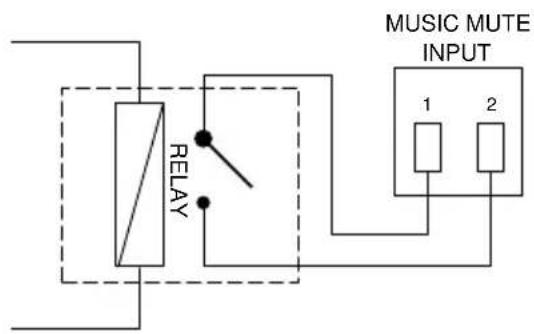
External muting of music may be commanded through the MUSIC MUTE connector. National or Local Authority regulations governing installed audio systems may require that normal programme material (i.e., music) should be muted in an emergency, to ensure that any evacuation messages are clearly audible. When active, it mutes all line inputs (including that at the Facility Port), leaving the microphone inputs active.
The Music Mute input is on a 2-pin 5 mm-pitch screw-terminal connector. It should be connected to the appropriate alarm output on whichever building management system registers the alarm (typically the Fire System). The alarm output must be volt-free; if no such output is available, an intermediate relay or other isolation device must be installed between the alarm output and the Music Mute input.
The Music Mute input can be set to operate on either normally open (N/O) or normally closed (N/C) contacts via internal jumper J1 (see “PCB layout diagram” on page 36). The factory default setting is N/O, thus requiring a short-circuit to be applied across the two pins of the connector for muting to occur.
REMOTE MUSIC MUTE TERMINATIONS
text_image
RELAY MUSIC MUTE INPUT 1 2NORMALLY OPEN (NO) CONNECTION

text_image
RELAY MUSIC MUTE INPUT 1 2NORMALLY CLOSED (NC) CONNECTION
Auto Power Down
The MA40F and MA40T are extremely energy-efficient amplifiers, but can be made even more so by enabling the Auto Power-Down feature. When active, the signal level is constantly monitored and if no input signals are measured for 15 minutes the amplifier enters a “Sleep” mode, minimising power consumption. If a signal is detected while the channel is in this mode, the amplifier “wakes up” in less than 100 ms.
MA40F and MA40T amplifiers are shipped with the Auto Power Down function disabled. It may be enabled by moving internal PCB jumper J5. See “PCB layout diagram” on page 36 for details of jumper locations.
Loudspeaker EQ cards
The MA40F and MA40T are compatible with single channel loudspeaker equalisation modules. EQ modules are available from Cloud Electronics to suit several popular ranges of installed sound loudspeakers; please check current module availability at www.cloud.co.uk/accessories.
Installation Instructions
Refer to the PCB layout diagram (see “PCB layout diagram” on page 36) for the location of the EQ module connector and its associated bypass jumper J2.
To install an EQ module, proceed as follows:
I. Isolate the amplifier from its DC power source.
2. Remove the screws securing the top cover: there are two on the top and two on each side. Remove the cover.
3. Remove jumper J2. We recommend "stowing" it on one of the header pins in case it ever needs to be replaced.
4. Plug the loudspeaker equalisation module into its 12-pin connector CONI; note that the connector has two notches on one side which engage with lugs on the module's mating connector to ensure correct orientation.
5. Replace the top cover.
APPENDIX
PCB layout diagram
To access the internal PCB, disconnect the amplifier from its DC power source and remove the six screws securing the top cover; remove the cover.

flowchart
graph TD
    EQCardSocket["EQ CARD SOCKET"] -->|ON OFF| Con1["CON1"]
    EQCardSocket -->|OFF ON| J6["J6"]
    Con1 -->|ON| J2["J2"]
    Con1 -->|ON| J3["J3"]
    Con1 -->|ON| J5["J5"]
    Con1 -->|ON| J4["J4"]
    Con1 -->|ON| J1["J1"]
    J1 -->|NO NC| J4
    J1 -->|NO NC| J5
    J1 -->|NO NC| J6
    note["NOT TO SCALE. ONLY PRIMARY COMPONENTS SHOWN"] --> REAROFUNIT["REAR OF UNIT"]
    note["DO NOT FIT A JUMPER HERE!"]
Table of internal jumpers and default settings
| JUMPER PURPOSE OPTIONS DEFAULT | |||
| J1 Music Mute N/O or N/C N/O | |||
| J2 EQ card bypass Present/absent Present | |||
| J3 65 Hz hi-pass filter ON/OFF | MA40F: OFF / MA40T: ON | ||
| J4 | For factory use only – do not fit a jumper here | Absent | |
| J5 Auto Power Down Present/absent Present | |||
| J6 | +12 V Mic phantom power | ON/OFF OFF | |
Summary of rear panel DIP switch functions
| JUMPER POSITION FUNCTION | |||
| 1 | PAGE/MIC MODE | OFF = MIC MODE | Both PAGE/MIC inputs function as a standard microphone input, including GAIN and LEVEL controls. DIP switch 3 is disabled. |
| ON = PAGE MODE | Both PAGE/MIC inputs function as a typical Cloud paging input. DIP switch 3 is enabled. | ||
| 2 | PAGE/MIC PRIORITY | OFF = PRIORITY OFF | The mic signal is mixed with the line inputs according to the front panel LEVEL controls. |
| ON = PRIORITY ON | The mic signal will take priority over the line inputs (including the Facility Port), which will be muted while the mic is in use. Priority triggering will be determined by the settings of DIP switches 1 and 3: with switch 1 in PAGE mode, priority triggering is set by DIP switch 3. | ||
| 3 SW/VOX | OFF = SW | The PA and 0V pins of the PAGE/MIC connector must be shorted together to enable the mic input and mute the line inputs. | |
| ON = VOX | A signal at the PAGE/MIC input will trigger mic-over-line priority and mute the line inputs. The PA and 0V pins of the PAGE/MIC connector must be permanently shorted together for VOX operation in PAGE mode (disabled in MIC mode). | ||
| 4 | LINE I PRIORITY | OFF = PRIORITY OFF | In LOCAL mode (ref SW5), the signals at LINE 1 and LINE 2 are mixed together. In REMOTE mode, LINE 1 or LINE 2 is selected by the MUSIC SOURCE switch on an RSL plate or LM-2 module connected to the Facility Port. |
| ON = PRIORITY ON | A signal at LINE 1 input has priority over that at LINE 2: LINE 2 is automatically muted. | ||
| 5 | LOCAL/REMOTE | OFF = REMOTE | The two front panel LEVEL controls (LINE 1 and LINE 2) are disabled. The summed line input level is controlled by the level control on the remote plate or module connected at the Facility Port. If an RSL Series plate or LM-2 module is in use, the Music Source control can select either LINE 1 and LINE 2. |
| ON = LOCAL | The levels of LINE 1 and LINE 2 input signals are controlled by the two front panel LEVEL controls. The two inputs are mixed together. | ||
Note: default settings are in BOLD text.
EMC considerations
MA40F and MA40T amplifiers fully conform to the relevant electromagnetic compatibility (EMC) standards and are technically well behaved. You should experience no problems interfacing units to other items of equipment and under normal circumstances, no special precautions need to be taken. If the unit is to be used in close proximity to potential sources of HF disturbance such as high power communication transmitters, radar stations and the like, it is suggested that input signal leads be kept as short as possible. Always use balanced interconnections wherever possible. We recommend that the MA40F/MA40T amplifier is not located in close proximity to a high-power amplifier or similar item of equipment, which may radiate a strong magnetic field from its power transformer.
Earthing
When several mains powered units are connected together via their signal cables, there is a risk of one or more earth loops which may cause an audible hum on the system even with the gain controls set to minimum. The 0 V rail of an MA40F/MA40T amplifier is directly coupled to the chassis ground. No interconnection problems should be encountered, but if there is any hum or other extraneous noise when source equipment is connected, the situation can generally be remedied by observing the following guidelines:
I. Always connect sources using balanced connections wherever possible. Note that, for EMC reasons, the cable screen should be connected at both ends.
2. Use audio isolating transformers (readily available from trade suppliers) at the inputs if necessary. These will ensure that the amplifier is electrically isolated from the source equipment.
3. The signal source units should be located as close as practical to the amplifier. The metal housings of the various units should not be electrically connected. Try to ensure that all interconnected units, including power amplifiers, are connected to a common power source to ensure a common ground is provided.
Technical specifications
| LINE INPUTS | |
| Frequency Response ±1 dB, 20 Hz to 20 kHz | |
| Distortion <0.1 % | |
| Sensitivity 0.2 V (-12 dBu) | to 1.95 V (+8 dBu) |
| Input Gain Control 20 dB | range |
| Input Impedance 10 kohms (unbalanced) | |
| Headroom >12 dB | |
| Noise <-90 dB | |
| Equalisation LF: ±10 dB @ 50 Hz, HF: ±10 dB @ 10 kHz | |
| FACILITY INPUT | |
| Input Impedance 10 kohms (balanced) | |
| Sensitivity 0.775 V (0 dBu) | |
| MICROPHONE INPUT | |
| Frequency Response -3dB | @ 120 Hz (filter) to 20 kHz ±1 dB |
| Distortion <0.1% | |
| Gain 10 dB to 50 dB | |
| Input Impedance >2 kohms (balanced) | |
| Headroom >12 dB | |
| Noise <-90 dB | |
| Phantom Power +12 V (internal jumper) | |
| OUTPUT | |
| Output Power (1 kHz continuous sine wave) | 40 W, DC input >18 V |
| GENERAL | |||
| Power Input MA40F: 12 to | 24 V DC; MA40T: 24 V DC | ||
| Power Consumption 60 W | |||
| External AC PSU adaptor | Universal type, 100 V to 240 V, 47 to 63 Hz | ||
| Amplifier Protection | Fixed level signal limiterProtection against DC, PSU overcurrent, amplifier overcurrent, over-temperature, supply voltage under/over-voltageResettable internal breaker (no fuses) | ||
| Dimensions (w x h x d) | MA40F | Net | 220 mm x 41 mm x 144.5 mm8.7" x 1.6" x 5.7" |
| Shipping | 290 mm x 160 mm x 210 mm11.4" x 6.3" x 8.3" | ||
| MA40T | Net | 303 mm x 41 mm x 144.5 mm11.9" x 1.6" x 5.7" | |
| Shipping | 290 mm 160 mm x 380 mm11.4" x 6.3" x 15" | ||
| Weight | MA40F | Net 750 g | |
| Shipping 1.0 kg | |||
| MA40T | Net 1.65 kg | ||
| Shipping 1.8 kg | |||
www.cloud.co.uk
Cloud
www.cloudusa.pro