BY9014000M - Oven AEG - Free user manual and instructions
Find the device manual for free BY9014000M AEG in PDF.


User questions about BY9014000M AEG
0 question about this device. Answer the ones you know or ask your own.
Ask a new question about this device
Download the instructions for your Oven in PDF format for free! Find your manual BY9014000M - AEG and take your electronic device back in hand. On this page are published all the documents necessary for the use of your device. BY9014000M by AEG.
USER MANUAL BY9014000M AEG
Thank you for choosing this AEG product. We have created it to give you impeccable performance for many years, with innovative technologies that help make life simpler – features you might not find on ordinary appliances. Please spend a few minutes reading to get the very best from it.
ACCESSORIES AND CONSUMABLES
In the AEG webshop, you'll find everything you need to keep all your AEG appliances looking spotless and working perfectly. Along with a wide range of accessories designed and built to the high quality standards you would expect, from specialist cookware to cutlery baskets, from bottle holders to delicate laundry bags...


Visit the webshop at: www.aeg.com/shop
CONTENTS
4 Safety information
7 Product description
9 Before first use
10 Control panel
12 Daily use
14 Clock Functions
15 Automatic Programmes
16 Using the accessories
20 Additional functions
21 Helpful hints and tips
33 Care and cleaning
37 What to do if...
38 Installation
39 Environment concerns
40 Warranty
The following symbols are used in this user manual:
!
Important information concerning your personal safety and information on how to avoid damaging the appliance.
i
General information and tips
[Non-Text]
Environmental information
Subject to change without notice
![AEG BY9014000M - [Non-Text] - 1](/content/2026/06/1225303/images/99c0685235df9e182a03bb9ecbd816049e655df9fdfc11786f38a9f436fbda7c.jpg)
SAFETY INFORMATION
Before the installation and use, read this manual carefully:
- For your personal safety and the safety of your property
- For the respect of the environment
- For the correct operation of the appliance.
Always keep these instructions with the appliance also if you move or sell it.
The manufacturer is not responsible if incorrect installation or use results in damage.
Children and vulnerable people safety
- This appliance can be used by children aged from 8 years and above and persons with reduced physical, sensory or mental capabilities or lack of experience and knowledge if they have been given supervision or instruction concerning use of the appliance in safe way and understand the hazards involved. Children shall not play with the appliance.
- Keep all packaging away from children. There is the risk of suffocation or physical injury.
- WARNING: Keep children and animals away from the appliance when the door is open or the appliance is in the operation, because it becomes hot. There is the risk of injury or other permanent disability.
- If the appliance has Child Lock or Key Lock (Control Lock) function, use it. It prevents children and animals from accidental operation of the appliance.
General safety
- Do not change the specifications of this appliance. There is the risk of injury and damage to the appliance.
- Do not let the appliance stay unattended during operation.
- Switch off the appliance after each use.
Installation
- Only an approved electrician can install and connect the appliance. Contact an approved service centre. This is to prevent the risks of structural damage or physical injury.
- Make sure that the appliance is not damaged because of transport. Do not connect a damaged appliance. If necessary, contact the supplier.
- Remove all packaging, stickers and layers from the appliance before first use. Do not remove the rating plate. It can invalidate the guarantee.
- Make sure that the appliance is disconnected from the power supply during the installation.
- Be careful when you move the appliance. The appliance is heavy. Always use safety gloves. Do not lift the appliance by the handle.
- The electrical installation must have an isolation device which lets you disconnect the appliance from the mains at all poles. The isolation device must have a contact opening width of minimum 3 mm.
-
You must have correct isolation devices: line protecting cut-outs, fuses (screw type fuses removed from the holder), earth leakage trips and contactors.
-
Before the installation, make sure that the kitchen cabinet has the recess dimensions applicable.
- Make sure that the appliance is installed below and adjacent safe structures.
- Keep the minimum distances to the other appliances and units.
- The appliance cannot be positioned on a base.
- Built in ovens and built in cooking surfaces are attached with special connection system. To prevent damage to the appliance, only use an appliance with the appliances from the same manufacturer.
Electrical connection
- The appliance must be earthed.
- Make sure that the electrical data on the rating plate agree with your domestic power supply.
• Information on the voltage is on the rating plate. - Always use a correctly installed shockproof socket.
- Do not use multi-way plugs, connectors and extension cables. There is the risk of fire.
- Do not replace or change the mains cable. Contact the service centre.
- Make sure not to squash or cause damage to the mains plug (if applicable) and cable behind the appliance.
- Do not pull the mains cable to disconnect the appliance. Always pull the mains plug – if applicable.
Use
- The appliance is only for domestic use. Do not use the appliance for commercial and industrial use.
- Only use the appliance for domestic cooking tasks. This is to prevent physical injury to persons or prevent damage to property.
- Do not use the appliance as a work surface or storage surface.
- The interior of the appliance becomes hot during use. There is the risk of burns. Do not touch the heating elements in the appliance. Use gloves when you insert or remove the accessories or pots.
- Be careful when you remove or install the accessories to prevent damage to the oven enamel.
- Always stay away from the appliance when you open the door while the appliance is in operation. Hot steam can release. There is the risk of skin burns.
- To prevent damage or discoloration to the enamel:
- Do not put any objects directly on the appliance floor and do not cover it with aluminium foil.
- Do not put water directly into the hot appliance.
- Do not keep moist dishes and food in the appliance after you finish the cooking.
- Discoloration of the enamel has no effect on the performance of the appliance so it is not a defect in the sense of the warranty law.
- Do not apply pressure on the open door.
- Always close the appliance door when you cook, even while grilling.
Care and cleaning
- Before maintenance, switch off the appliance and disconnect the appliance from the power supply.
- Before maintenance, make sure that the appliance is cold. There is the risk of burns. There is the risk that the glass panels can break.
- Keep the appliance clean at all times. A build-up of fats or other foodstuff can result in a fire.
- Regular cleaning prevents the surface material from deteriorating
- Use a deep baking tray for very moist cakes to prevent that fruit juices cause stains that can be permanent.
- For your personal safety and the safety of your property, only clean the appliance with water and a soap. Do not use flammable products or products that can cause corrosion.
- Do not clean the appliance with steam cleaners, high-pressure cleaners, sharp objects, abrasive cleaning agents, abrasive sponges and stain removers
- If you use an oven spray, follow the instructions from the manufacturer.
- Do not clean the glass door with abrasive cleaning agents or metal scraper. Heat resistant surface of the inner glass can break and shatter.
- When the door glass panels are damaged they become weak and can break. You must replace them. Contact the service centre.
- Be careful when you remove the door from the appliance. The door is heavy!
- Do not clean catalytic enamel (if applicable).
Risk of fire
- Open the door carefully. The use of ingredients with alcohol can cause a mixture of alcohol and air. There is the risk of fire.
- Do not let sparks or open flames come near the appliance when you open the door.
- Do not put flammable products or items that are wet with flammable products, and/or fusible objects (made of plastic or aluminium) in, near or on the appliance.
Pyrolytic cleaning
- Do not leave the appliance unattended during Pyrolytic cleaning.
- Do not try to open the door and do not cut the power supply during Pyrolytic cleaning.
- Keep children away during pyrolytic cleaning. The appliance becomes very hot. There is the risk of burns.
- During pyrolytic cleaning, stubborn dirt can cause discoloration to the enamel. Discoloration to the enamel has no effect on the performance of the appliance
Oven lamp
- The type of light bulb or halogen lamp used for this appliance is only for household appliances. Do not use it for house lighting.
- If it becomes necessary to replace the lamp, use one of the same power and specifically designed for household appliances only.
- Disconnect the appliance from the power supply before the replacement of the oven lamp. There is the risk of electrical shock.
Service centre
- Only an approved engineer can repair or work on the appliance. Contact an approved service centre.
- Use only original spare parts.
Disposal of the appliance
• To prevent the risk of physical injury or damage
- Disconnect the appliance from the power supply.
- Cut off the mains cable and discard it.
- Discard the door catch. This prevents children or small animals from being closed inside of the appliance. There is the risk of suffocation.
PRODUCT DESCRIPTION

text_image
1 2 3 4 5 6 7 8 9 10 1 2 3 4 5 6 7 8 101 Electronic programmer
2 Smell filter
3 Heating element
4 Oven lamp
5 Meat probe socket
6 Turnspit hole
7 Fan and rear wall heating element
8 Bottom heat
9 Oven shelf runners, removable
10 Shelf positions
Oven accessories
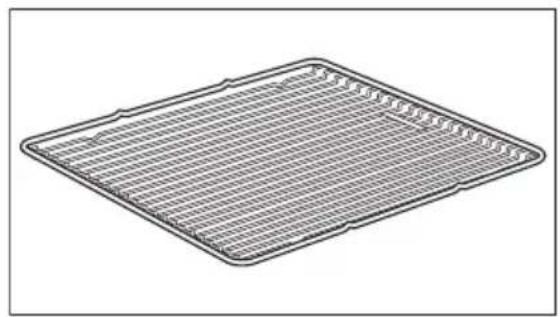
• Nonstick wire shelf For cookware, cake tins, roasts.
natural_image
Line drawing of a rectangular grating or tray with grid lines, no text or symbols present• Nonstick baking tray For cakes and biscuits.

natural_image
Isometric line drawing of a square frame with internal diagonal lines (no text or symbols)• Nonstick grill / roasting pan To bake and roast or as pan to collect fat.

natural_image
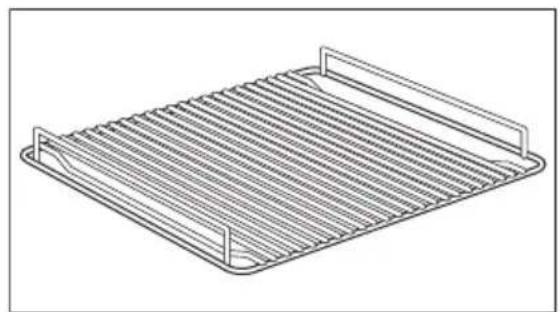
Isometric line drawing of a rectangular tray with internal diagonal lines (no text or symbols)• Nonstick trivet For roasting and grilling.

Use the trivet only with the grill/roasting pan.
natural_image
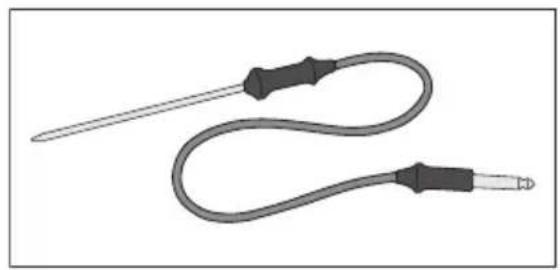
Line drawing of a rectangular metal tray with horizontal slats and two side handles (no text or symbols)- Meat probe
To measure how far the meat is cooked.
natural_image
Illustration of a medical or laboratory probe with a curved tube and two metallic probes (no text or symbols)- Turnspit (spit roast)
For roasting larger joints of meat and poultry.

natural_image
Technical line drawing of a mechanical tool or bracket assembly (no text or symbols)- Telescopic runners
For shelves and trays.

natural_image
Two identical mechanical components with flanged ends and mounting holes, shown in isometric view (no text or symbols)BEFORE FIRST USE

WARNING!
Refer to "Safety information" chapter.
Initial Cleaning
- Remove all parts from the appliance.
- Clean the appliance before first use.

Refer to chapter "Care and Cleaning".
First Connection
When you connect the appliance to the mains or after the power cut you have to set the language, display contrast, display brightness and time of the day. Use shuttle to set the value. Press OK to confirm.
Calibration
For optimal results with Auto Cooking you must calibrate the appliance. The calibration time is 4 hours.

If you use manual cooking only, you can ignore this procedure.
Conditions:
- The temperature in the kitchen must be below 35^ .
• Install the appliance in its permanent location. - Connect the appliance to the mains supply and do not disconnect it again.
- If you change the appliance location or electrical connection you must do the steps again.
Calibration:
- Activate the appliance.
- Select Basic Settings and press OK.
- Select Calibration and press OK.

If you calibrate for the first time, you can set the category from the control panel or Auto Cooking from the main menu to start the procedure.

CAUTION!
Make sure the appliance cools down before you use it.
CONTROL PANEL
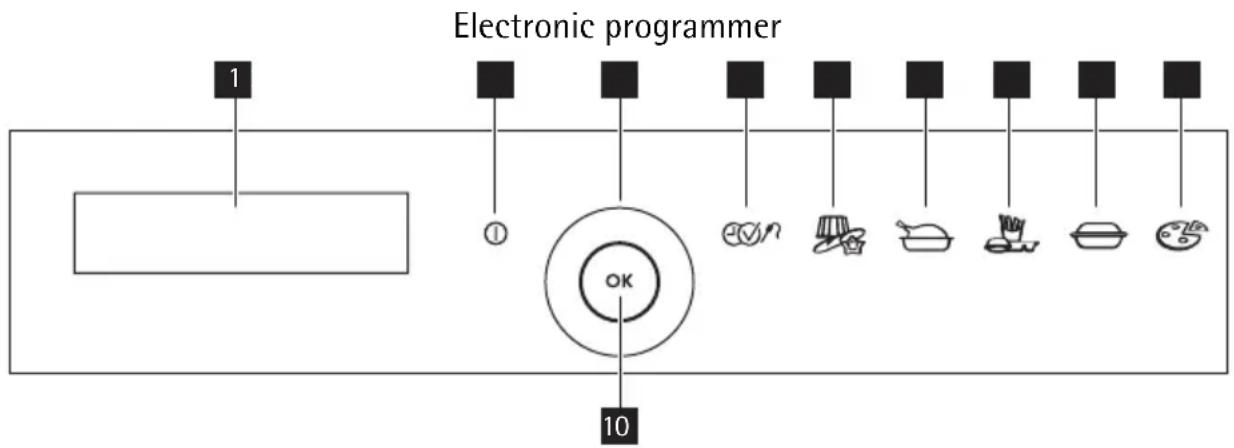
Control Panel
text_image
Electronic programmer 1 ① ok 10Use the sensor fields to operate the appliance
| Number | Sensor field | Function Comment | |
| 1 | - | Display Shows the current settings of the appliance. | |
| 2 | 1 | On / Off To activate and deactivate the appli-ance. Press and hold. | |
| 3 | - | Shuttle For selection. | |
| 4 | Time and additional functions. To set different functions when the oven function operates: Minute Minder, Key Lock, Duration / End Time, Meatprobe. | ||
| 5 | Baking Recipes Category for automatic programmes. | ||
| 6 | Roasting Recipes Category for automatic programmes. | ||
| 7 | Convenience Category for automatic programmes. | ||
| 8 | Oven Dishes Special Category for automatic programmes. | ||
| 9 | Pizza Category for automatic programmes. | ||
| 10 | OK | Ok To confirm. | |
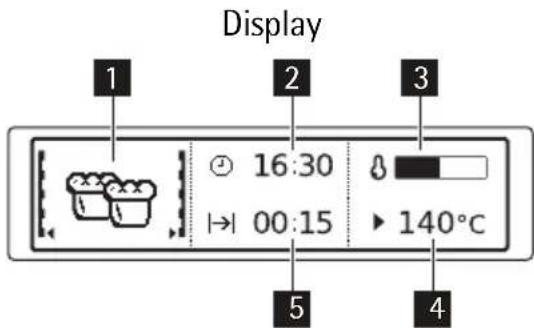
text_image
Display 1 2 3 16:30 00:15 140°C 5 41 Oven function
2 Shows the time when function ends
3 Heat up indicator
4 Temperature
5 Shows duration time of a function
Other indicators of display
| Symbol Function | ||
 | Minute Minder The function is active. | |
| [BH2H] | Time of day The display shows the current time. | |
| [C2X3] | Duration | Shows the time required for the cooking cycle. |
 | End Time | Shows when the cooking cycle ends. |
 | Start Time | Shows the time of the heating function start. |
 | Oven Temperature | Shows oven temperature. |
| [06CA] | Calculation | Calculates the time of cooking. |
 | Heat up Indicator | Indicates temperature level in the cavity. Display shows it also after you deactivate the appliance and the cavity is still warm. |
Symbol Function

Rapid Heat Up Indica- tor
Rapid heat-up is active. It decreases the heat up time.
DAILY USE

WARNING!
Refer to "Safety information" chapter.
The menus in overview
Main menu
| Menu item Application | |
| Auto Cooking | You activate the cooking programme when you press a category symbol on the control panel. |
| Heating Functions Contains a list of oven heating functions. | |
| Cleaning Menu Appliance cleaning functions. | |
| Basic Settings You can use it to set other oven settings. | |
| Specials Additional heating functions. | |
Submenu for: Heating Functions
| Heating Functions Application | |
| Fan Cooking For baking on up to three levels simultaneously. Set the oven temperatures 20 - 40° lower than for Conventional Cooking . | |
| Conventional Cooking For baking and roasting on one level. | |
| Pizza Setting For baking on one level for dishes that require intensive browning and a crispy base. Set the oven temperatures 20 - 40° lower than for Conventional Cooking . | |
| Turbo Grill For roasting larger pieces of meat or poultry on one level. Also suitable for gratins and browning. | |
| Turbo Grill + Spit Roast Especially for poultry, temperature setting 190-210°C. | |
| Economy Grill For grilling flat foods which are placed in the middle of the rack and for toasting. | |
| Economy Grill + Spit Roast For grilling a chicken or small rolled roasts. | |
| Dual Grill For grilling flat foods in large quantities and for toasting. | |
| Dual Grill + Spit Roast | For grilling two chickens or one rolled roast. |
| Bottom Heat For baking cakes with crispy or crusty bases. | |
Heating Functions Application
| Slow Cook For preparing particularly tender, succulent roasts |
Submenus for: Cleaning Menu
| Function Application | |
| Pyrolytic To clean the oven using pyrolytic cleaning. | |
| Cleaning Assistant Reminds you of various points that should be noted prior to pyrolytic cleaning. Can be switched on or off. | |
| Cleaning Reminder Recognises when pyrolytic cleaning is required and alerts the user to this fact. Can be switched on or off. | |
Submenus for: Specials
| Function Application | |
| Defrost To defrost frozen food. | |
| Drying For drying of sliced fruits like apples, plums,peaches and vegetables as tomatoes, zucchini or mushrooms. | |
| Keep Warm To keep the food warm. | |
| Preserving To preserve vegetables e.g. mixed prickels in glasses and liquid. | |
| Plate Warming To warm the empty plates before serving. | |
Submenus for: Basic Settings
| Option Application | |
| Set time of day Sets current time on the clock. | |
| Display Contrast Adjusts the display. | |
| Display Brightness Adjusts the display. | |
| Set Language Changes the language. | |
| Buzzer Volume Changes the sound volume. | |
| Key Tones Switches key tones on or off. | |
| Alarm/Error Tones | Switches alarm/error tones on or off . |
| Smell Filter | Activate or deactivate. |
| Calibration | Adapts oven to the kitchen environment, e.g. after moving house. |
| Service | Indicates the version of the software, the configuration and the period of operation. |
| Factory Settings | Resets all basic settings to the original factory settings. |
To operate the appliance you can use:
- manual mode -to set an oven function, the temperature and the cooking time manually.
- automatic programmes -to prepare a dish when you do not have a knowledge or experience in cooking.
Navigating the menus
Operation of the menus:
- Activate the appliance.
- Use the shuttle clockwise or counter clockwise to select the menu option.
- Press OK to move to sub menu or accept setting.
Activating a heating function
- Activate the appliance.
- Select Heating Functions menu. Press OK to confirm.
- Select the heating function. Press OK to confirm.
- Set the temperature. Press OK to confirm.
After you set the function: If you want to change a heating function turn the shuttle to the left and press OK. If you want to change the temperature turn the shuttle to the right and press OK.
Heat-up indicator
When you activate an oven function, the bar on the display comes on. The bar shows that the temperature increases.
Residual heat indicator
When you deactivate the appliance, the display shows the residual heat. You can use the heat to keep the food warm.
CLOCK FUNCTIONS
Clock functions
| Symbol Function Description | ||
| Minute Minder | To set a countdown (max 2 hours 30 minutes). This function has no effect on the operation of the appliance. You can also activate it in off state. Use shuttle to set the minutes and OK to start. | |
| |→| | Duration | To set how long the appliance has to be in operation (max. 23 h 59 min). |
| →| | End Time | To set the switch-off time for an oven function (max. 23 h 59 min). |

You can use Duration and End Time at the same time, if you want to automatically activate and deactivate the appliance on a given time later.
If you set the time for a clock function, the time starts to count down after 5 seconds.

If you use the clock functions Duration and End Time, the appliance deactivates the heating elements after 90% of the set time. The appliance uses the residual heat to continue the cooking process until the time ends (3-20 minutes).
Setting the clock functions
- Set an oven function and temperature (necessary for Duration and End).
- Press ☑ again and again until the display shows the necessary clock function and the related symbol.
- Use shuttle to set the necessary time. PressOK to confirm.
After 90 % of the set time, an acoustic signal sounds. The appliance deactivates. The display shows a message. - Press a sensor field or open the door to stop the signal.

With Duration and End Time the appliance deactivates automatically.

When you use Meat Probe, Duration and End Time do not work.
Extra Time
The Extra Time makes the oven function continue after the set time ends.
- Applicable for all oven functions with Duration or Weight Automatic.
- Not applicable for oven functions with Meat Probe.
Activating the function:
- When the cooking time ends, an acoustic signal sounds. Press any sensor field.
- The display shows the message for Extra Time for five minutes.
- Press ☐√/n to activate.
- Set Extra Time period. Press OK to confirm.
AUTOMATIC PROGRAMMES
Auto cooking
This appliance has an automatic programmes for cooking. You choose categories from the control panel. Refer to separate booklet (included) for match between cooking categories and exemplary dishes – use it as a cooking aid. Automatic programmes use preset temperature, oven function and time.

To use automatic programmes you must calibrate the appliance.

Use the accessories we recommend. Refer to the tables in the tips chapter.
Auto Cooking categories
| Symbol Category | |
 | Baking Recipes |
 | Roasting Recipes |
 | Convenience |
| [AKBH] | Oven Dishes Special |
 | Pizza |
Auto cooking:
- Activate the appliance
- Use separate booklet to find the dish and category.
- Press the category on the control panel. Use shuttle to choose the sub category.
- Follow information in the display.
USING THE ACCESSORIES
Meat Probe
Meat probe measures the core temperature of the food. When the meat reaches set temperature the oven switches off automatically.

Use only original parts. It ensures the best cooking result.

WARNING!
Meat probe is hot! There is the risk of burns! Be careful when you remove the tip and plug.
To use it you must set::
• The temperature in the appliance.
• The core temperature of the food
Using the meat probe:
- Put the tip of the meat probe into the centre of the meat.
- Activate the appliance.
- Put the plug of the meat probe into the socket (refer to appliance overview).
- Use shuttle in less than 5 seconds to set the core temperature. The probe temperature range starts at 30^ C.
- Set the oven function and, if necessary, the oven temperature.

natural_image
Diagram of a robotic arm inside an oven with a magnified inset showing internal components (no text or symbols)The appliance calculates an approximate
end time. An end time is different for the different quantities of the food, the set oven temperatures (minimum 120°C) and the operating modes. The appliance calculates the end time in approximately 30 minutes The core temperature is displayed from 30°C.

Meat probe must stay in the meat and in the socket during the cooking process.
- When the meat reaches set core temperature, an acoustic signal sounds. The appliance switches off automatically.
Use any key to stop the signal.
- Remove the meat probe plug from the socket and remove the meat from the oven.

To change the core temperature press again and again until the meat probe temperature appears. Use the shuttle to change the temperature and OK to confirm.
Installing the Oven Accessories

The deep pan and the wire shelf have side edges. These edges and the shape of the guide-bars causes the anti-tilt safety for the oven accessories.
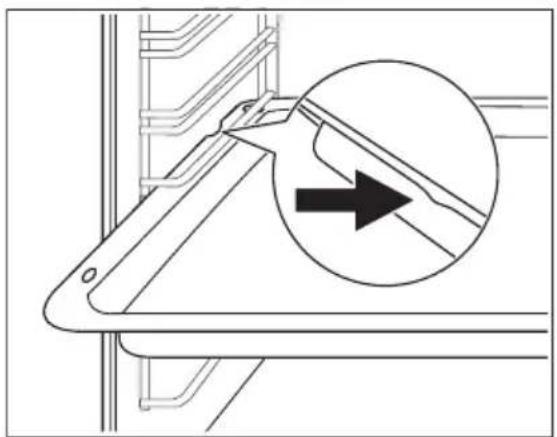
natural_image
Technical line drawing of a mechanical bracket with an arrow indicating direction (no text or symbols)Installing the wire shelf and the deep pan together
Put the wire shelf on the deep pan. Push the deep pan between the guide-bars of one of the oven levels.

natural_image
Technical line drawing of a structural component with two circular insets showing internal details (no text or symbols)Telescopic runners - Inserting the Oven Accessories
Put the baking tray or the deep pan on the telescopic runners.
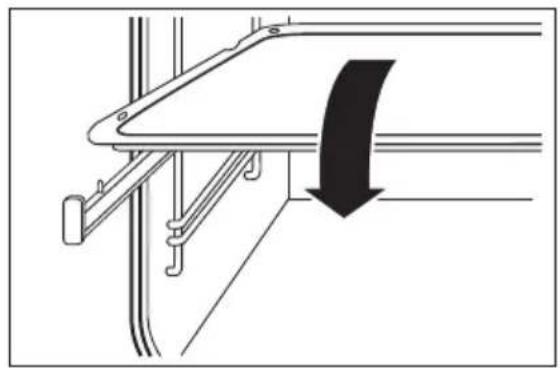
natural_image
Pure mechanical assembly diagram showing a bracket with a curved arrow indicating direction (no text or symbols)
Put the wire shelf on the telescopic runners so that the feet point downwards.
The high rim around the wire shelf is an additional device to prevent cookware from slipping.
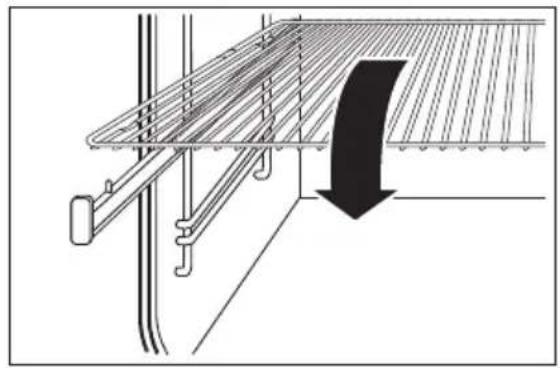
natural_image
Technical diagram of a structural support frame with a downward arrow indicating compression or clearance (no text or symbols present)Inserting the wire shelf and the deep pan together
Put the wire shelf on the deep pan. Put the wire shelf and the deep pan on the telescopic runners.

natural_image
Technical diagram of a structural frame with a curved panel and directional arrow (no text or symbols)Trivet and grill/roasting pan

WARNING!
Risk of burns when removing the accessories from a hot oven.
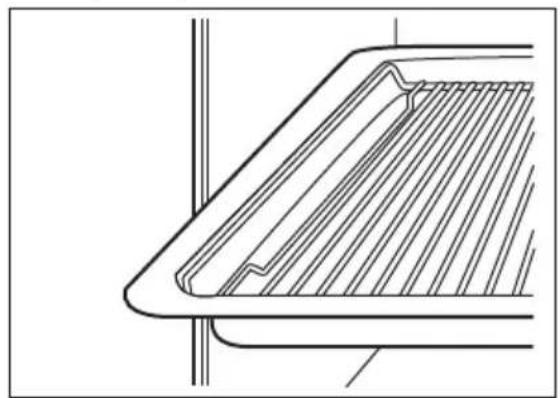
You can use the trivet to roast larger pieces of meat or poultry on one level:
- Put the trivet inside the deep pan so that the supports of the oven shelf point up.
- Put the deep pan in the oven at the necessary level.
natural_image
Technical line drawing of a structural component with diagonal bracing and vertical supports (no text or symbols)You can use the trivet to grill flat dishes in large quantities and to toast:
- Put the trivet inside the deep pan so that the supports of the oven shelf point downwards.
- Put the deep pan in the oven at the necessary level.

natural_image
Technical line drawing of a structural component with diagonal bracing and vertical supports (no text or symbols)Turn spit
Inserting the food into the turn spit:
- Place a fork on the turn spit.
- Then position the food and a second fork.

Make sure that the food is in the middle of the turn spit.
- Use the screws to tighten the forks.
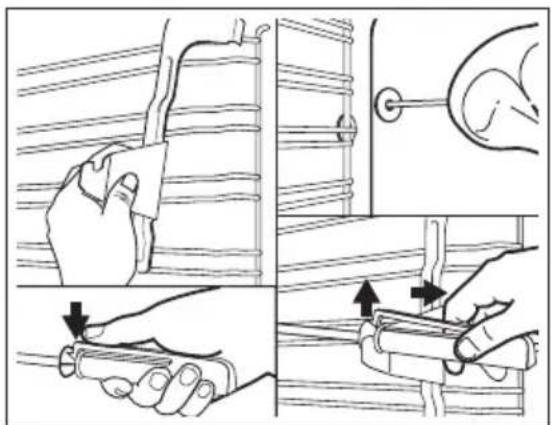
Inserting the turn spit:
- Place the baking tray in the first shelf position from the bottom.
- Insert the turn spit support at the front on the right-hand side in shelf position five from the bottom.

natural_image
Three-step diagram showing a hand holding a tool above a biological specimen, with arrows indicating motion or force direction (no text or symbols)
The clip must be kept down to keep the handle secure on the turn spit.
- Push the tip of the spit into the turnspit hole on the left-hand side of the back wall of the oven until it locks into place.
- Place the groove in front of the handle on the notch provided on the turn spit support.
- Remove the handle.
- Choose the Turn spit oven function.
text_image
Illustration showing four steps of a hand holding a tool, with arrows indicating movement and alignment.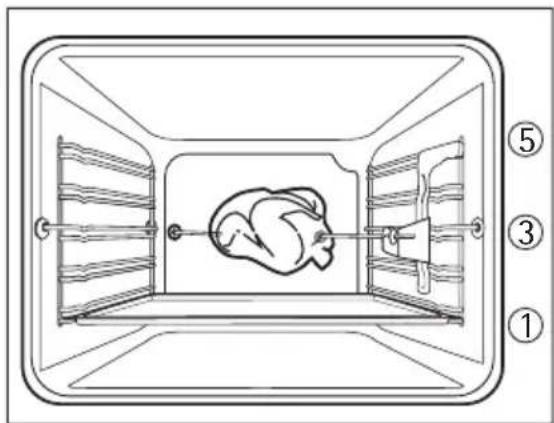
text_image
Diagram of a chicken inside a rectangular enclosure with numbered labels indicating parts of the structure.ADDITIONAL FUNCTIONS
Key Lock
The Key Lock prevents an accidental change of the oven settings.
Activating the Key Lock
-
Activate the appliance.
-
Set the oven function.
-
Press 📄√/n again and again until the display shows Key Lock
-
PressOK to confirm.
The Key Lock is active.
Deactivating the Key Lock
-
Press ☐√√.
-
PressOK to confirm.
The Key Lock is not active.

If you deactivate the appliance, the Key Lock deactivates.
Child Lock
The Child Lock prevents an accidental operation of the appliance.
Activating the Child Lock
-
Activate the appliance. Do not set any oven function or setting.
-
Touch and at the same time at the same time until the display shows a message.
Deactivating the Child Lock
- Do the above steps again.
Smell Filter
You can activate the Smell Filter in the Basic Settings menu. It operates during baking and roasting.

Smell Filter uses additional energy to operate.

Smell Filter: It cleans automatically every 100 hours. Even when you deactivate it in the menu.
It is always active during pyrolytic cleaning.
Automatic switch-off

If the oven is not switched off after a certain time, or if the heat setting is not modified, the oven switches off automatically.
The oven switches off at an oven temperature of:
30 - 120°C after 12.5 hours
120 - 200°C after 8.5 hours
200 - 250°C after 5.5 hours
250 - max °C after 3 hours
Switching on again after safety switch-off
Press OK.
Cooling fan
When the appliance operates, the cooling fan switches on automatically to keep the surfaces of the appliance cool. If you switch off the appliance, the cooling fan continues to operate until the appliance cools down.
HELPFUL HINTS AND TIPS
Auto Cooking
Baking Recipes
| Food to be baked | Ovenware | Accessories | Notes |
| Sponge Cake | Spring form | Shelf | Butter with no or very little fat content |
| Sponge Cake : Flat sponges, Swiss roll | --Conventional | ||
| Yeast Plait -Tray 1 piece | |||
| Cake Tray | - | Tray | Tray completely filled, no roasting tray |
| Cake Tin | Cake tin | Shelf | Various types of cake which are baked in tins |
| Cake Tin : Shortcrust bases | --Conventional | ||
| Tarte Tart tin | Spring form | Shelf Cakes with minimal topping, e.g. jam | |
| Pie/Quiche Quiche tin | Spring form Tart tin | Shelf - | |
| Strudel | - | Tray | 1 piece |
| Fruit Cake | Square tin Spring form | Shelf With dried fruit | |
| Pastry Sweet / Salty | -tray | Multiple pieces | |
| Bread : Tin | Bread tin | Shelf | 1 tin |
| Bread : Tray | - | Tray | 1 tin |
| Flat Bread | - | Tray | 1 or 2 pieces (e.g. baguettes) |
| Rolls : Savoury | - | Tray | Multiple small pieces |
| Food to be baked Ovenware Accessories Notes | |||
| Rolls : Sweet | - | Tray | Multiple small pieces, e.g. sweet yeast rolls |
| Cake Special : Victoria Sponge Cake | --English speciality | ||

Bake cookies and biscuits the traditional way!
Roasting Recipes
Beef/Lamb/Game
| Type Ovenware | Accessories Notes | ||
| Top Side Beef Roasting tin | Meat probe, Deep | roasting pan | Set the necessary intensity of cooking (Rare, Medium or Well-done) |
| Scandinavian Beef Roasting tin | Meat probe, Deep | roasting pan | Set the necessary intensity of cooking (Rare, Medium or Well-done) |
| Roast Beef | Roasting tin | Deep roasting pan | Set the weight, put a lid on the dish |
| Lamb Joint, medium Roasting tin | Meat probe, Deep | roasting pan | - |
| Roast Lamb | Roasting tin | Deep roasting pan | Set the weight |
| Loin of game Roasting tin | Meat probe, Deep | roasting pan | - |
| Roast Game | Roasting tin | Deep roasting pan | Set the weight, put a lid on the dish |
Poultry/Fish
| Type Ovenware | Accessories Notes | ||
| Boned Poultry | Roasting tin | Meat probe, Deep roasting pan | - |
| Chicken, whole | Roasting tin | Deep roasting pan | Set the weight |
| Turkey, whole | Roasting tin | Deep roasting pan | Set the weight |
| Duck, whole | Roasting tin | Deep roasting pan | Set the weight |
| Goose, whole | Roasting tin | Deep roasting pan | Set the weight |
| Whole Fish | Roasting tin | Meat probe, Deep roasting pan | - |
Pork/Veal
| Type Ovenware | Accessories Notes | ||
| Loin of pork Roasting tin | Meat probe, Deep | roasting pan | - |
| Roast Pork | Roasting tin | Deep roasting pan | Set the weight |
| Back of Veal Roasting tin | Meat probe, Deep | roasting pan | - |
| Roast Veal | Roasting tin | Deep roasting pan | Set the weight, put a lid on the dish |
Convenience
| Type Ovenware | Accessories Notes | ||
| Frozen Potato Types | - | Tray | Various potato convenience foods, chips, wedges, croquettes... |
| Frozen Pastry Sweet / Salty | -Tray Multiple small pieces | ||
| Fresh Pastry Sweet / Salty | -Tray Multiple small pieces | ||
| Rolls/Baguette Frozen | - | Tray | Multiple small pieces |
| Rolls/Baguette Not frozen | -Tray - | ||
| Frozen Fish/Meat : Fish au Gratin | Heat-resistant dish | Shelf | - |
| Frozen Fish/Meat : Breaded Fish/Meat | -Tray Multiple small pieces, | e.g. fish fingers, cor-don bleu | |
| Frozen Pie/Quiche | -Tray - | ||
| Potato Dishes Frozen / Fresh | Heat-resistant dish | Shelf | - |
| Pasta Dishes Frozen / Fresh | Heat-resistant dish | Shelf | - |
| Rice Dishes Frozen / Fresh | Heat-resistant dish | Shelf | Pre-cooked rice |
| Vegetable Dishes Fro-zen / Fresh | Heat-resistant dish | Shelf | - |
| Frozen Strudel | - | Tray | 1 or 2 pieces |
| Snack | - | Tray | Multiple small pieces |
Oven Dishes Special, home-made
| Type Ovenware | Accessories Notes | ||
| Meat/Fish Casserole : High Casserole | Heat-resistant dish | Shelf | >4 cm |
| Meat/Fish Casserole Flat Casserole | Heat-resistant dish | Shelf | < 4 cm |
| Potato Dishes | Heat-resistant dish | Shelf | - |
| Pasta Dishes | Heat-resistant dish | Shelf | Sprinkle with Parmesan cheese towards the end of the baking time |
| Vegetable Dishes | Heat-resistant dish | Shelf | - |
| Rice Dishes | Heat-resistant dish | Shelf | Pre-cooked rice |
| Sweet Dishes | Heat-resistant dish | Shelf | - |
| Soufflé : One large tin | Heat-resistant dish | Shelf | - |
| Soufflé : Small Tins | In small tins | Shelf | Multiple tins |
| Au Gratin | Heat-resistant dish | Shelf | Sprinkle with Parmesan cheese towards the end of the baking time |
Pizza
| Type Accessories | Notes | |
| Fresh Pizza Thick | Tray | Thick crust, lots of topping (American style) |
| Fresh Pizza Thin | Tray | Thin crust, little topping (Italian style) |
| Fresh Pizza Calzone | Tray | - |
| Frozen Pizza Parbaked | Tray | Pizza base, partially baked, without additional topping |
| Frozen Pizza Not parbaked | Tray | Without extra topping |
| Frozen Pizza Calzone Tray | - | |
| Fresh Pizza parbaked | Tray | - |
| Pizza Snack | Tray | - |

The temperature and baking times in the tables are guidelines only. They depend on the recipes, quality and quantity of the ingredients used.
Baking
General instructions
- Your new oven may bake or roast differently to the appliance you had before. Adapt your usual settings (temperature, cooking times) and shelf levels to the values in the tables.
- With longer baking times, the oven can be switched off about 10 minutes before the end of baking time, to use the residual heat.
When you use frozen food, the trays in the oven can twist during baking. When the trays get cold again, the distortion will be gone.
How to use the Baking Tables
- We recommend to use the lower temperature the first time.
- If you cannot find the settings for a special recipe, look for the one that is almost the same.
- Baking time can be extended by 10–15 minutes, if you bake cakes on more than one level.
- Cakes and pastries at different heights do not always brown equally at first. If this occurs, do not change the temperature setting. The differences equalize during the baking procedure.
Tips on baking
| Baking results Possible cause Remedy | ||
| The cake is not browned sufficiently below | Incorrect oven level Put the cake on a lower oven level | |
| The cake sinks (becomes soggy, lumpy, streaky) | Oven temperature too high Use a lower setting | |
| The cake sinks (becomes soggy, lumpy, streaky) | Baking time is too short Set a longer baking timeDo not set higher temperatures to decrease baking times | |
| The cake sinks (becomes soggy, lumpy, streaky) | Too much liquid in the mix-ture | Use less liquid. Look at the mixing times, specially when you use mixing machines |
| Cake is too dry | Oven temperature too low | Set a higher oven temperature |
| Cake is too dry | Baking time too long | Set a shorter baking time |
| Cake does not brown equally | Oven temperature too high and baking time too short | Set a lower oven temperature and a longer baking time |
| Cake does not brown equally | No equal mixture Put the mixture equally on the baking tray | |
| Cake does not cook in the baking time set | Temperature too low Use a slightly higher oven temperature setting | |
Baking
Oven levels
- Baking with Conventional Cooking is only possible on one level.
- When baking with Fan Cooking, one to three baking trays can be put into the oven at the same time.
Baking Tables
Baking in tins (on one level)
| Type of baking Heating | Function | Level Temperature (°C) Time (h:min) | ||
| Ring Cake or Brioche | Fan Cooking | 1 | 150 - 160 | 0:50 - 1:10 |
| Madeira Cake/Fruit Cake | Fan Cooking | 1 | 140 - 160 | 1:10 - 1:30 |
| Sponge Cake | Fan Cooking | 1 | 140 | 0:25 - 0:40 |
| Sponge Cake Conventional | Cooking | 1 160 0:25 - 0:40 | ||
| Flan base - shortcrust pastry 1) | Fan Cooking | 3 | 170 - 180 | 0:10 - 0:25 |
| Flan base - sponge mixture | Fan Cooking | 3 | 150 - 170 | 0:20 - 0:25 |
| Apple tart (covered) Conventional Cooking | 1 | 170 - 190 | 0:50 - 1:00 | |
| Apple Pie (2 tins, ∅ 20 cm, placed diagonally) | Fan Cooking | 1 | 160 | 1:10 - 1:30 |
| Apple Pie (2 tins, ∅ 20 cm, placed diagonally) | Conventional Cooking | 1 180 1:10 - 1:30 | ||
| Savoury Flans (e.g. Quiche) | Fan Cooking | 1 | 160 - 180 | 0:30 - 1:10 |
| Cheesecake | Conventional Cooking | 1 | 170 - 190 | 1:00 - 1:30 |
1) Pre-heat oven
Cakes/pastries/breads on baking tray (one level)
| Type of baking Heating | Function | Level Temperature (°C) Time (h:min) | |
| Yeast Plait/Yeast Crown | Conventional Cooking | 3 | 170 - 190 0:30 - 0:40 |
| Christmas Stollen ^1) | Conventional Cooking | 3 | 160 - 180 0:40 -1:00 |
| Bread (rye bread)^1) -first of all-then | Conventional Cooking | 1 -230160 - 180 | -0:250:30 - 1:00 |
| Cream puffs/éclairs ^1) | Conventional Cooking | 3 | 160 - 170 0:15 - 0:30 |
| Swiss roll ^1) | Conventional Cooking | 3 | 180 - 200 0:10 - 0:20 |
| Streusel Cake, dry | Fan Cooking | 3 | 150 - 160 0:20 - 0:40 |
| Type of baking Heating | Function | Level Temperature (°C) Time (h:min) | ||
| Buttered Almond Cake/Sugar Cakes 1) | Conventional Cooking | 3 | 190 - 210 | 0:15 - 0:30 |
| Fruit Cake with Yeast Mixture/ Sponge Mixture2) | Fan Cooking | 3 | 150 | 0:35 - 0:50 |
| Fruit Cake with Yeast Mixture/ Sponge Mixture 2) | Conventional Cooking | 3 170 0:35 - 0:50 | ||
| Fruit Cake with Shortcrust Pastry | Fan Cooking | 3 | 160 - 170 | 0:40 - 1:20 |
| Yeast Cake with delicate top-pings (e.g. quark, cream, cus-tard) 1) | Conventional Cooking | 3 | 160 - 180 | 0:40 - 1:20 |
| Pizza (with a lot of topping) 1)2) | Fan Cooking | 1 | 180 - 200 | 0:30 - 1:00 |
| Pizza (thin crust) 1) | Fan Cooking | 1 | 200 - 220 | 0:10 - 0:25 |
| Unleavened bread | Fan Cooking | 1 | 200 - 220 | 0:08 - 0:15 |
| Swiss Flaky Pastry Tarts | Fan Cooking | 1 | 180 - 200 | 0:35 - 0:50 |
1) Pre-heat oven
2) Use deep roasting pan
Biscuits (one level)
| Type of baking Heating | Function | Level Temperature (°C) Time (h:min) | ||
| Biscuits | Fan Cooking | 3 | 150 - 160 | 0:06 - 0:20 |
| Viennese whirls | Fan Cooking | 3 | 140 | 0:20 - 0:30 |
| Viennese whirls 1) | Conventional Cooking | 3 | 160 | 0:20 - 0:30 |
| Biscuits made with sponge mixture | Fan Cooking | 3 | 150 - 160 | 0:15 - 0:20 |
| Pastries made with egg white,meringues | Fan Cooking | 3 | 80 - 100 | 2:00 - 2:30 |
| Macaroons | Fan Cooking | 3 | 100 - 120 | 0:30 - 0:60 |
| Biscuits made with yeast dough | Fan Cooking | 3 | 150 - 160 | 0:20 - 0:40 |
| Puff pastries 1) | Fan Cooking | 3 | 170 - 180 | 0:20 - 0:30 |
| Bread rolls 1) | Fan Cooking | 3 | 160 | 0:20 - 0:35 |
| Bread rolls 1) | Conventional Cooking | 3 | 180 | 0:20 - 0:35 |
| Small Cakes (20 per tray) 1) | Fan Cooking | 3 | 140 | 0:20 - 0:30 |
| Type of baking Heating | Function | Level Temperature (°C) | Time (h:min) |
| Small Cakes (20 per tray)1) | Conventional Cooking | 3 | 170 |
1) Pre-heat oven
Baking on multiple oven levels with Fan Cooking (Cakes/pastries/breads)
| Type of baking | 2 Levels | 3 Levels | Temperature (°C) | Time (h:min) |
| Cream puffs/éclairs 1) | 1 / 4 | --- | 160 - 180 | 0:35 - 0:60 |
| Streusel Cake, dry | 1 / 3 | --- | 140 - 160 | 0:30 - 0:60 |
| Short pastry biscuits | 1 / 3 | 1 / 3 / 5 | 150 - 160 | 0:15 - 0:35 |
| Viennese whirls | 1 / 3 | 1 / 3 / 5 | 140 | 0:20 - 0:60 |
| Biscuits made with sponge mixture | 1 / 3 | --- | 160 - 170 | 0:25 - 0:40 |
| Pastries made with egg white,meringues | 1 / 3 | --- | 80 - 100 | 2:10 - 2:50 |
| Macaroons | 1 / 3 | --- | 100 - 120 | 0:40 - 1:20 |
| Biscuits made with yeast dough | 1 / 3 | --- | 160 - 170 | 0:30 - 0:60 |
| Puff pastries | 1 / 3 | --- | 170 - 180 | 0:30 - 0:50 |
| Bread rolls | 1 / 4 | --- | 160 | 0:30 - 0:45 |
| Small Cakes (20 per tray) 1) | 1 / 4 | --- | 140 | 0:25 - 0:40 |
1) Pre-heat oven
Roasting
Roasting dishes
- Use heat-resistant ovenware to roast (please read the instructions of the manufacturer).
- Large roasting joints can be roasted directly in the deep roasting pan or on the oven shelf above the deep roasting pan (selected models only).
- Roast lean meats in a roasting tin with a lid. This well keep the meat more succulent.
- All types of meat, that can be browned or have crackling, can be roasted in the roasting tin without the lid.

The data in the table is for guidance only.
Tips on using the roasting table.
- Roast meat and fish that weighs more than 1 kg.
- Put some water in the roasting tray to prevent meat juices or fat from burning to the pan.
- Turn the meat if it is necessary (after 1/2 - 2/3 of the cooking time).
- For better results, baste large pieces of meat and poultry with the cooking juices several times during the cooking time.
- Stop the oven approximately 10 minutes before the end of roasting time to use the residual heat.
Roasting Tables
Beef
| Type of meat Quantity | Heating Function | Level Temperature (°C) | Time (h:min) |
| Pot roast 1 - 1.5 | kg | 1 | 200 - 250 |
| Topside beef or fillet per cm of thickness | thickness | ||
| - rare ^1) | per cm of thickness | Turbo Grill | 190 - 200 |
| - medium per cm | of thickness | Turbo Grill | 180 - 190 |
| - well done per cm | of thickness | Turbo Grill | 170 - 180 |
1) Pre-heat oven
Pork
| Type of meat Quantity | Heating | Function | Level Temperature (°C) | Time (h:min) |
| Shoulder, neck, ham 1 - 1.5 | kg | Turbo Grill | 1 | 160 - 180 |
| Pork chop 1 - 1.5 | kg | Turbo Grill | 1 | 170 - 180 |
| Meatloaf 750 g - | 1 kg | Turbo Grill | 1 | 160 - 170 |
| Knuckle of pork (pre-cooked) | 750 g - 1 kg | Turbo Grill | 1 | 150 - 170 |
Veal
| Type of meat Quantity | Heating Function | Level Temperature (°C) | Time (h:min) |
| Roast veal | 1 kg | Turbo Grill | 160 - 180 |
| Knuckle of veal | 1.5 - 2 kg | Turbo Grill | 160 - 180 |
Lamb
| Type of meat Quantity | Heating Function | Level Temperature (°C) | Time (h:min) |
| Roast lamb, leg of lamb 1 - 1.5 kg | Turbo Grill | 1 | 1:15 - 2:00 |
| Saddle of lamb 1 - 1.5 kg | Turbo Grill | 1 | 1:00 - 1:30 |
Game
| Type of meat Quantity | Heating Function | Level Temperature (°C) | Time (h:min) |
| Saddle of hare, leg of hare^1) | Up to 1 kg | 3 | 220 - 250 |
| Loin of Game | 1.5-2 kg | 1 | 210 - 220 |
| Leg of Game 1.5 - 2 | kg | 1 | 200 - 210 |
1) pre-heat oven
Poultry
| Type of meat Quantity | Heating | Function | Level Temperature (°C) | Time (h:min) |
| Poultry pieces per | 200-250 g | Turbo Grill | 1 | 200 - 220 |
| Half chicken per | 400-500 g | Turbo Grill | 1 | 190 - 210 |
| Poultry 1 - 1.5 | kg | Turbo Grill | 1 | 190 - 210 |
| Duck 1.5 - 2 | kg | Turbo Grill | 1 | 180 - 200 |
| Goose | 3.5 - 5 kg | Turbo Grill | 1 | 160 - 180 |
| Turkey | 2.5 - 3.5 kg | Turbo Grill | 1 | 160 - 180 |
| Turkey | 4 - 6 kg | Turbo Grill | 1 | 140 - 160 |
Fish - steamed
| Type of meat Quantity | Heating Function | Level Temperature (°C) | Time (h:min) |
| Fish, whole | 1 - 1.5 kg | 1 | 210 - 220 |
Tables for Meatprobe
Beef
| Food to be cooked Core temperature | |
| Top Side Beef | |
| - rare 45 - 50 °C | |
| - medium 60 - 65 °C | |
| - well done 75 - 80 °C | |
Pork
| Food to be cooked Core temperature | |
| Shoulder of pork, ham joint, neck | 80 - 82 °C |
| Chop (loin) 75 - 80 °C | |
| Meatloaf 75 - 80 °C | |
Veal
| Food to be cooked Core temperature | |
| Roast veal 75 - 80 °C | |
| Knuckle of veal 85 - 90 °C | |
Mutton/Lamb
| Food to be cooked Core temperature | |
| Leg of mutton 80 - 85 °C | |
| Saddle of mutton 80 - 85 °C | |
| Roast lamb, leg of lamb | 75 - 80 °C |
Game
| Food to be cooked Core temperature | |
| Saddle of hare 70 - 75 °C | |
| Leg of hare 70 - 75 °C | |
| Whole hare 70 - 75 °C | |
| Saddle of venison | 70 - 75 °C |
| Haunch of venison | 70 - 75 °C |
Grilling
Always use the grilling function with maximum temperature setting

Always grill with the oven door closed

Always pre-heat the empty oven with the grill functions for 5 minutes.
- Set the shelf in the shelf level as recommended in the grilling table.
- Always set the pan to collect the fat into the first shelf level.
- Grill only flat pieces of meat or fish.
Grilling Table
| Food to be grilled Level | Grilling time | ||
| 1st side 2nd side | |||
| Rissoles | 4 | 8 - 10 mins. | 6 - 8 mins. |
| Pork fillet | 4 | 10 - 12 mins. | 6 - 10 mins. |
| Sausages | 4 | 8 - 10 mins. | 6 - 8 mins. |
| Fillet steaks, veal steaks | 4 | 6 - 7 mins. | 5 - 6 mins. |
| Fillet of beef, roast beef (ap-prox. 1 kg) | 3 | 10 - 12 mins. | 10 - 12 mins. |
| Toast 1) | 3 | 4 - 6 mins. | 3 - 5 mins. |
| Toast with topping | 3 | 6 - 8 mins. | --- |
1) without pre-heating
Spit Roast
| Dish | Quantity kg | Function | Temperature °C | Grilling time h:min |
| 1 Chicken approx. 1 kg | Economy Grill + | Spit Roast | 240 1:00 - 1:10 | |
| 2 Chicken per 1 kg | Dual Grill + Spit | Roast | 240 1:15 - 1:20 | |
| 1 Duck | 1.5 - 2 kg | Economy Grill + Spit Roast | 240 1:20 - 1:40 | |
| Rolled Pork Roast | 1 | Economy Grill + Spit Roast | 240 1:45 - 2:15 | |
| Pork Knuckle (pre-cooked for 1/2 hour) | 1 - 1.3 kg | Economy Grill + Spit Roast | 240 2:00 - 2:30 |
Slow Cook
Use the function to prepare lean, tender pieces of meat and fish.
The oven gets the pre-set temperature and a signal operates. Then, the oven automatically sets to a lower temperature to continue cooking.

Always cook without a lid when you use the Slow Cook function.
- Sear the meat in a pan in a very high heat.
-
Put the meat in a roasting dish or directly on the oven shelf. Put the tray below the shelf to catch the fat.
-
Set the oven function Slow Cook, change the temperature, if necessary, and cook until done (see table).

You cannot use Slow Cook together with the clock functions: Duration and End.
Table Slow Cook
| Food to be cooked Quantity (g) | Setting Level | Total time | (minutes) |
| Topside beef | 1000 - 1500 | 150 °C | 190 - 110 |
| Fillet of beef, lamb shank | 1000 - 1500 | 150 °C | 390 - 110 |
| Roast veal | 1000 - 1500 | 150 °C | 1100 - 120 |
| Steaks | 200 - 300 | 120 °C | 320 - 30 |
Information on acrylamides
Important! According to the newest scientific knowledge, if you brown food (specially the one which contains starch), acrylamides can pose a health risk. Thus, we recommend that you cook at the lowest temperatures and do not brown food too much.
CARE AND CLEANING

WARNING!
Refer to "Safety information" chapter.
- Clean the front of the appliance with a soft cloth with warm water and cleaning agent.
- To clean metal surfaces use a usual cleaning agent
- Clean the oven interior after each use. Thus you can remove dirt more easily and it does not burn on.
- Clean stubborn dirt with a special oven cleaner.
- Clean all oven accessories (with a soft cloth with warm water and cleaning agent) after each use and let them dry.
- If you have nonstick accessories, do not clean them using an aggressive agents, sharp edged objects or dishwasher. It can destroy nonstick coating!
Pyrolytic cleaning

Remove all accessories from the oven.
The pyrolytic cleaning procedure cannot start:
- If you do not remove the shelf support runners or telescopic shelf runners (if present).
- If you do not close the oven door correctly.
- If you do not unplug the core temperature sensor.

When the pyrolytic cleaning starts the appliance door is locked. After the function finishes the door is locked for cool down phase. Some of the appliance functions are not available during cool down phase.

WARNING!
When the pyrolytic cleaning finishes the appliance is very hot. Let it cool down. Risk of burns
Pyrolytic cleaning:
- Remove the worst of the residual dirt manually.
- Activate the Pyrolytic function in main menu.
-
Set the length for the procedure:
-
Light - 1h for a low degree of dirt,
- Normal - 1h 30min for a usual degree of dirt,
-
Intense - 2h 30min for a high degree of dirt.
-
Press OK to confirm.
Cleaning Assistant
Gives helpful information and guidelines before cleaning starts. Refer to menu overview.
Cleaning Reminder
Reminds you when to do the cleaning. Shows the message on the display after some hours of appliance use.
Oven door and glass panels
To clean the oven door remove it.

CAUTION!
Be careful when you remove the door from the appliance. The door is heavy!
Removing the oven door
- Open the oven door as far as it goes.
- Lift up clamping levers (A) on the two door hinges fully.
- Close the oven door until the first position (angle approximately 45^ ).
- Hold of the oven door with one hand on each side and pull it away from the oven at an upwards angle.
- Now you can remove the inner glass panels and clean them.

To install the door follow the procedure in reverse.

The number of glass panels depends on the model.

text_image
A A
CAUTION!
Put the oven door with the outer side down on a soft and level surface to prevent scratches
Removing and cleaning the door glass panels
- Remove the oven door.
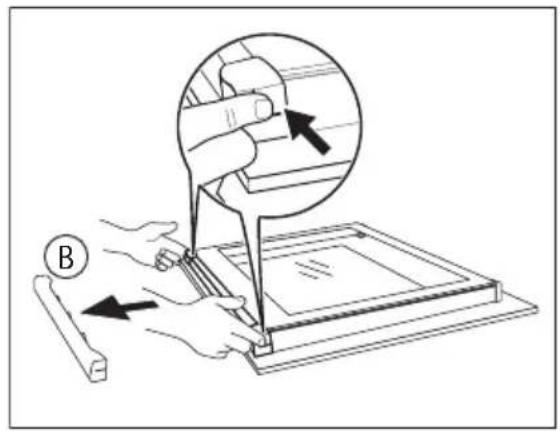
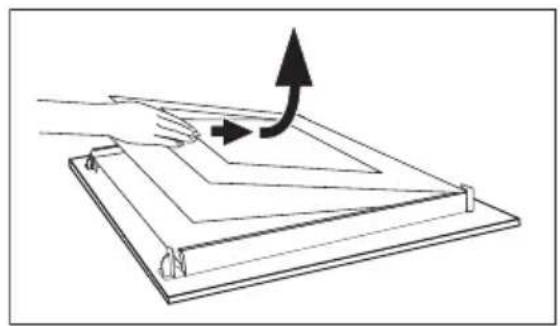
- Hold the door trim (B) on the top edge of the door at the two sides and push inwards to release the clip seal.
- Pull the door trim to the front to remove it.
text_image
Diagram illustrating a hand operating a tool with an inset showing the blade being inserted, labeled with 'B' and directional arrows.- Hold the door glass panels on their top edge one by one and pull them up out of the guide
- Clean the door glass panels.
natural_image
Diagram of a hand pressing down on a folded sheet with an arrow indicating upward motion (no text or symbols)
To install panels follow the procedure in reverse. Install the smaller panel first, then the larger.
Shelf support
You can remove the shelf support to clean the side walls.
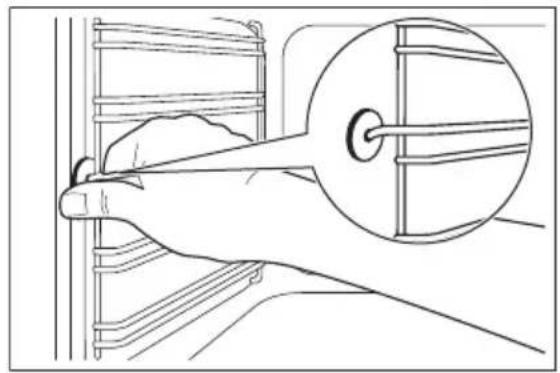
Removing the shelf support
- Pull the front of the shelf support away from the side wall.
natural_image
Line drawing of a hand using a tool to adjust or install a component, with no visible text or symbols.- Pull the shelf support from the back of the side wall to remove it.

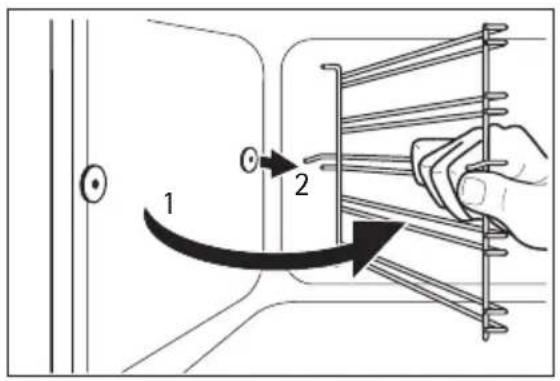
To install the shelf support follow the procedure in reverse.

Valid with telescopic runners: The retaining pins on the telescopic shelf runners must point to the front!
text_image
Diagram showing a hand holding a spring scale with labeled parts and directional arrows indicating motion or movement.Oven lamp

WARNING!
There is a danger of electrical shock!
Before you change the oven lamp:
- Switch off the oven.
- Remove the fuses in the fuse box or switch off the circuit breaker.

Put a cloth on the bottom of the oven for protection of the oven light and glass cover.
Replacing the oven lamp
- You can find the lamp glass cover at the back of the cavity. Turn the lamp glass cover counterclockwise to remove it.
- Clean the glass cover.
- Replace the oven lamp with applicable 300^ C heat-resistant oven lamp.

Use the same oven lamp type.
- Install the glass cover.
Replacing the oven lamp:
-
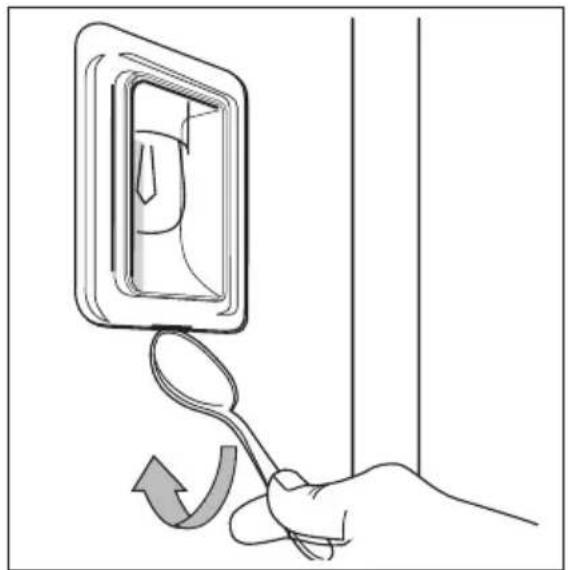
You can find the lamp glass cover at the left side of the cavity. Remove the left shelf rail.
-
Use a narrow, blunt object (for example a teaspoon) to remove the glass cover. Clean the glass cover.
- If necessary, replace the oven lamp with applicable 300^ C heat-resistant oven lamp.

Use the same oven lamp type.
- Install the glass cover.
- Install the left shelf rail.
natural_image
Hand holding a spoon with an arrow indicating rotation or change, next to a wall-mounted device (no text or symbols)WHAT TO DO IF...

WARNING!
Refer to "Safety information" chapter.
| Problem Possible cause Remedy | ||
| The oven does not heat up | The oven is switched off Activate the oven | |
| The oven does not heat up | The necessary settings are not set Check the settings | |
| The oven does not heat up | The fuse in the fuse box is released Check the fuse. If the fuse is released more than one time, contact a qualified electrician | |
| The display shows F11 The meat probe plug is not correctly installed into the meat probe socket | Install the meat probe plug as far as possible | |
| The oven lamp does not operate | The oven lamp is defective Refer to "Replacing the oven lamp" | |
| The turn spit does not rotate | The turn spit is not correctly installed into the turnspit hole | Refer to "Turn spit" |
| The display shows an error code that is not in this list | There is an electronic fault • Switch off the appliance with the house fuse or the safety switch in the fuse box and switch it on again • If the display shows the error code again, refer to the Customer Care Department | |
If you cannot find a solution to the problem yourself, contact your dealer or the service centre.
The necessary data for the service centre is on the rating plate. The rating plate is on the front frame of the oven cavity.
We recommend that you write the data here:
Model (MOD.) ____
Product number (PNC) ....
Serial number (S.N.) ....
INSTALLATION
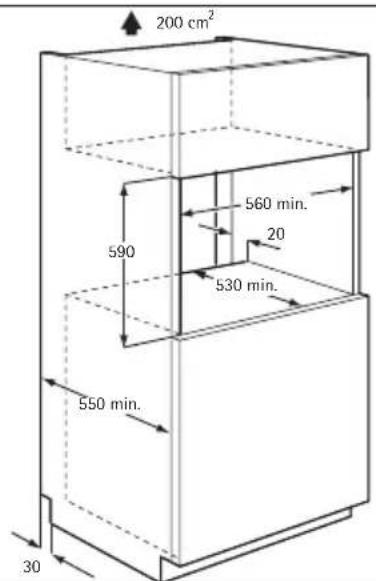
text_image
200 cm² 560 min. 590 20 530 min. 550 min. 30
text_image
541 546 114 584 10 594 10 567 21 594
text_image
max. R1200 mm 140 130
text_image
alternativ 100 H05VV-F H05RR-F min. 1600 mm
text_image
Technical diagram showing two mechanical components with warning symbols and angular measurement of 90°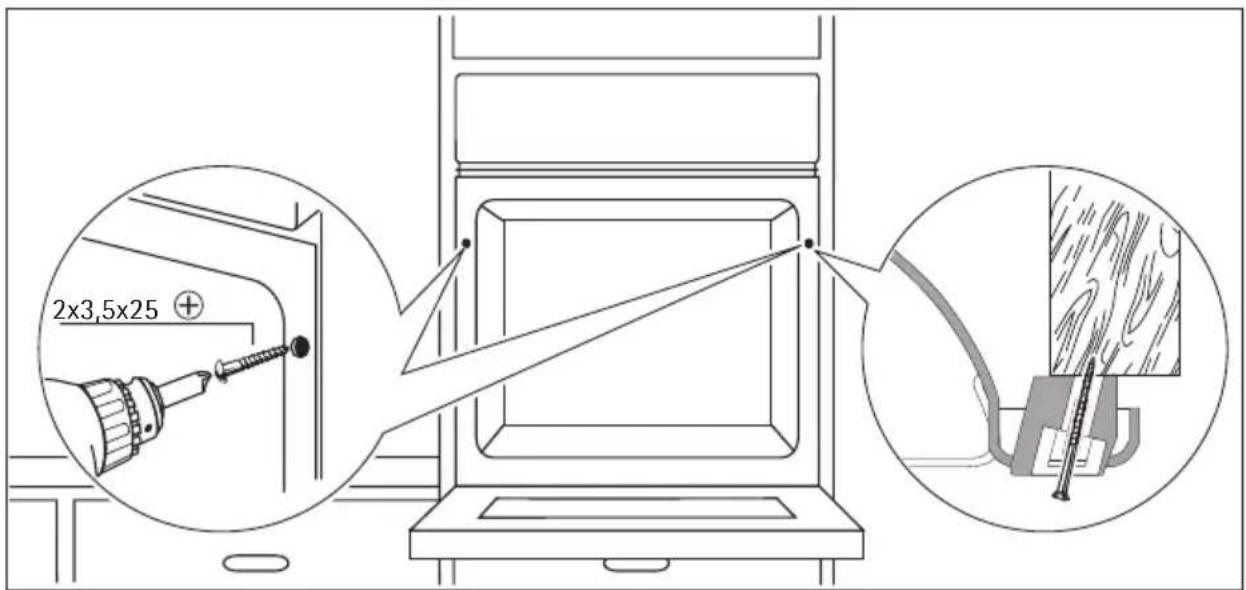
text_image
2x3,5x25 ⊕ENVIRONMENT CONCERNS
The symbol ☑ on the product or on its packaging indicates that this product may not be treated as household waste. Instead it should be taken to the appropriate collection point for the recycling of electrical and electronic equipment. By ensuring this product is
disposed of correctly, you will help prevent potential negative consequences for the environment and human health, which could otherwise be caused by inappropriate waste handling of this product. For more detailed information about recycling of this product, please contact your local council, your household waste disposal service or the shop where you purchased the product.

Packaging material
The packaging material is environmentally-friendly and recyclable. Plastic parts are marked with international abbreviations such as PE, PS, etc. Dispose of the packaging material in the containers provided for this purpose at your local waste management facility.
AEG Warranty
FOR SALES IN AUSTRALIA AND NEW ZEALAND
ALL AEG BRANDED APPLIANCES
This document sets out the terms and conditions of the product warranties for AEG Appliances. It is an important document. Please keep it with your proof of purchase documents in a safe place for future reference should there be a manufacturing defect in your Appliance. This warranty is in addition to other rights you may have under the Australian Consumer Law.
1. In this warranty:
(a) 'ACL' or 'Australian Consumer Law' means Schedule 2 to the Competition and Consumer Act 2010;
(b) 'Appliance' means any Electrolux product purchased by you and accompanied by this document;
(c) 'ASC' means Electrolux's authorised serviced centres;
(d) 'AEG' is the brand controlled by Electrolux Home Products Pty Ltd of 163 O'Riordan Street, Mascot NSW 2020, ABN 51 004 762 341 in respect of Appliances purchased in Australia and Electrolux (NZ) Limited (collectively "Electrolux") of 3-5 Niall Burgess Road, Mount Wellington, in respect of Appliances purchased in New Zealand;
(e) "Warranty Period" means the period specified in clause 3 of this warranty;
(f) 'you' means the purchaser of the Appliance not having purchased the Appliance for re-sale, and 'your' has a corresponding meaning.
- Application: This warranty only applies to new Appliances, purchased and used in Australia or New Zealand and is in addition to (and does not exclude, restrict, or modify in any way) other rights and remedies under a law to which the Appliances or services relate, including any non-excludable statutory guarantees in Australia and New Zealand.
3.WarrantyPeriod: Subject to these terms and conditions, this warranty continues for in Australia for a period of 60 months and in New Zealand for a period of 60 months, following the date of original purchase of the Appliance.
-
Repair or replace warranty: During the Warranty Period, Electrolux or its ASC will, at no extra charge if your Appliance is readily accessible for service, without special equipment and subject to these terms and conditions, repair or replace any parts which it considers to be defective. Electrolux may, in its absolute discretion, choose whether the remedy offered for a valid warranty claim is repair or replacement. Electrolux or its ASC may use refurbished parts to repair your Appliance. You agree that any replaced Appliances or parts become the property of Electrolux.
-
Travel and transportation costs: Subject to clause 7, Electrolux will bear the reasonable cost of transportation, travel and delivery of the Appliance to and from Electrolux or its ASC. Travel and transportation will be arranged by Electrolux as part of any valid warranty claim.
-
Proof of purchase is required before you can make a claim under this warranty.
-
Exclusions: You may not make a claim under this warranty unless the defect claimed is due to faulty or defective parts or workmanship. This warranty does not cover:
(a) light globes, batteries, filters or similar perishable parts;
(b) parts and Appliances not supplied by Electrolux;
(c) cosmetic damage which does not affect the operation of the Appliance;
(d) damage to the Appliance caused by:
(i) negligence or accident;
(ii) misuse or abuse, including failure to properly maintain or service;
(iii) improper, negligent or faulty servicing or repair works done by anyone other than an Electrolux authorised repairer or ASC;
(iv) normal wear and tear;
(v) power surges, electrical storm damage or incorrect power supply;
(vi) incomplete or improper installation;
(vii) incorrect, improper or inappropriate operation;
(viii) insect or vermin infestation;
(ix) failure to comply with any additional instructions supplied with the Appliance;
In addition, Electrolux is not liable under this warranty if:
(a) the Appliance has been, or Electrolux reasonably believes that the Appliance has been, used for purposes other than those for which the Appliance was intended, including where the Appliance has been used for any non-domestic purpose;
(b) the Appliance is modified without authority from Electrolux in writing;
(c) the Appliance's serial number or warranty seal has been removed or defaced.
- How to claim under this warranty: To enquire about claiming under this warranty, please follow these steps:
(a) carefully check the operating instructions, user manual and the terms of this warranty;
(b) have the model and serial number of the Appliance available;
(c) have the proof of purchase (e.g. an invoice) available;
(d) telephone the numbers shown below.
-
Australia: For Appliances and services provided by Electrolux in Australia: Electrolux goods come with guarantees that cannot be excluded under the Australian Consumer Law. You are entitled to a replacement or refund for a major failure and for compensation for any other reasonably foreseeable loss or damage. You are also entitled to have the Appliance repaired or replaced if the Appliance fails to be of acceptable quality and the failure does not amount to a major failure. 'Acceptable quality' and 'major failure' have the same meaning as referred to in the ACL.
-
New Zealand: For Appliances and services provided by Electrolux in New Zealand, the Appliances come with a guarantee by Electrolux pursuant to the provisions of the Consumer Guarantees Act, the Sale of Goods Act and the Fair Trading Act. Where the Appliance was purchased in New Zealand for commercial purposes the Consumer Guarantee Act does not apply.
-
Confidentiality: You accept that if you make a warranty claim, Electrolux and its agents including ASC may exchange information in relation to you to enable Electrolux to meet its obligations under this warranty.
Important Notice
Before calling for service, please ensure that the steps listed in clause 8 above have been followed.
| FOR SERVICEor to find the address of your nearest authorised service centre in AustraliaPLEASE CALL 1300 363 664OR EMAILcustomercare@aegaustralia.com.auFor the cost of a local call (Australia only) | SERVICE AUSTRALIAAEGAeg.com/au | FOR SPARE PARTSor to find the address of your nearest spare parts centre in AustraliaPLEASE CALL 13 13 50OR EMAILcustomercare@aegaustralia.com.auFor the cost of a local call (Australia only) |
| FOR SERVICEor to find the address of your nearest authorised service centre in New ZealandPLEASE CALL 0800 234 234OR EMAILcustomercare@electrolux.co.nz(New Zealand only) | SERVICE NEW ZEALANDAEGAegnewzealand.co.nz | FOR SPARE PARTSor to find the address of your nearest spare parts centre in New ZealandPLEASE CALL 0800 10 66 20OR EMAILcustomercare@electrolux.co.nz(New Zealand only) |