Medieval Phrases: Fiddle and Nyckelharpa - Audio software STEINBERG - Free user manual and instructions
Find the device manual for free Medieval Phrases: Fiddle and Nyckelharpa STEINBERG in PDF.


User questions about Medieval Phrases: Fiddle and Nyckelharpa STEINBERG
0 question about this device. Answer the ones you know or ask your own.
Ask a new question about this device
Download the instructions for your Audio software in PDF format for free! Find your manual Medieval Phrases: Fiddle and Nyckelharpa - STEINBERG and take your electronic device back in hand. On this page are published all the documents necessary for the use of your device. Medieval Phrases: Fiddle and Nyckelharpa by STEINBERG.
USER MANUAL Medieval Phrases: Fiddle and Nyckelharpa STEINBERG
- For the latest system requirements, please visit www.steinberg.net, www.sonuscore.com or your trusted dealer's website.
SONUSCORE
TABLE OF CONTENTS
- INTRODUCTION 4 ....
- DOWNLOAD & INSTALLATION 4 ....
- MEDIEVAL PHRASES FIDDLE & NYCKELHARPA 5 ......
3.1 THEME SELECTION BAR 6 ....
3.2 PHRASE SYSTEM 6
3.3 KEYSWITCHES....7
3.4 PHRASE PROGRESS BAR....7
3.5 PAGE SELECTION....7
3.6 SYNC MODE & FREE MODE 8
3.7 FX PAGE 9
3.7.1 EQ....9
3.7.2 DELAY 10
3.7.3 REVERB....10
- MEDIEVAL FIDDLE......11
4.1 DYNAMICS....11
4.2 REVERB 12
4.3 EQ....12
4.4 DELAY....12
4.5 KEYSWITCHES....13
- MEDIEVAL NYCKELHARPA 14
5.1 DYNAMICS....14
5.2 REVERB 14
5.3 EQ 15
5.4 DELAY....15
5.5 KEYSWITCHES....16
- CREDITS......17
SONUSCORE
1. INTRODUCTION
Welcome to SONUSCORE MEDIEVAL PHRASES FIDDLE & NYCKELHARPA. This HALion instrument enables you to integrate expressive Fiddle & Nyckelharpa phrases into your compositions.
2. DOWNLOAD & INSTALLATION
For the latest download and installation instructions, please check: https://helpcenter.steinberg.de/hc/en-us.
SONUSCORE
3. MEDIEVAL PHRASES FIDDLE & NYCKELHARPA
text_image
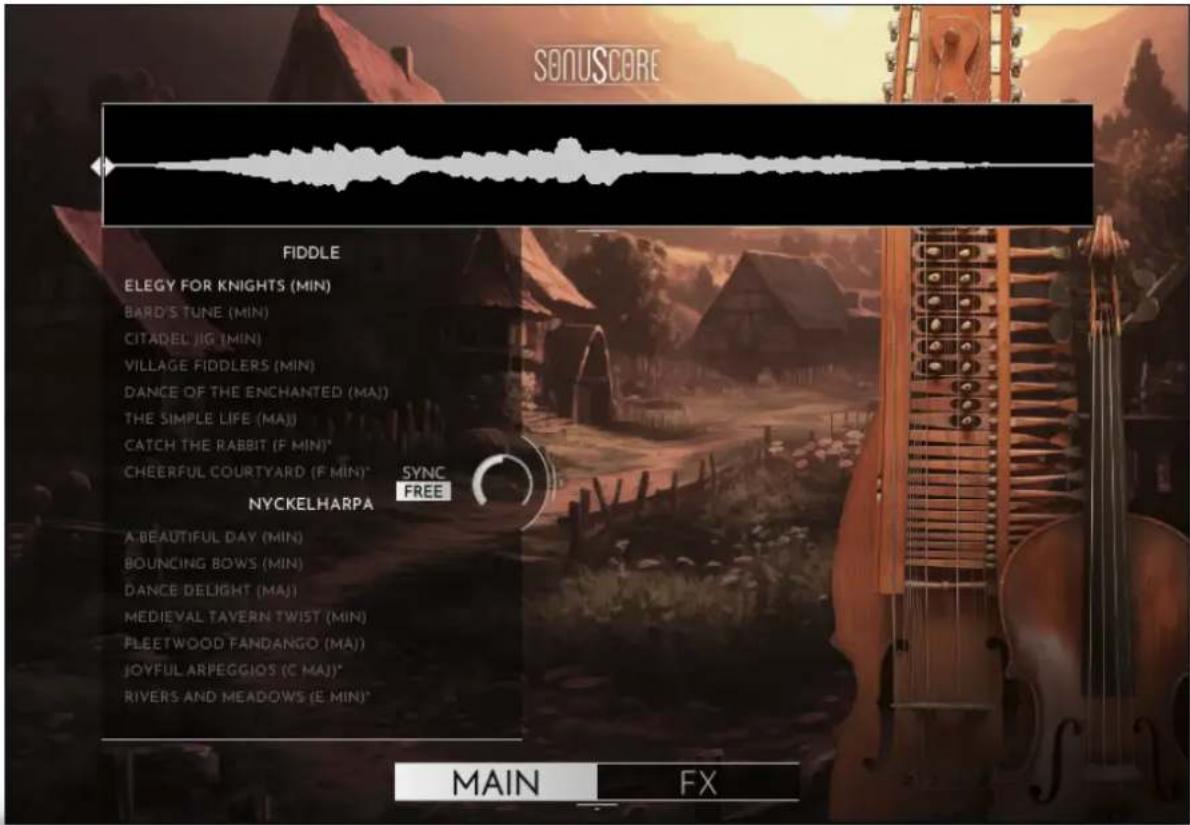
SONUSCORE FIDDLE ELEGY FOR KNIGHTS (MIN) BARD'S TUNE (MIN) CITADEL JIG (MIN) VILLAGE FIDDLERS (MIN) DANCE OF THE ENCHANTED (MAI) THE SIMPLE LIFE (MAI) CATCH THE RABBIT (F MIN)* CHEERFUL COURTYARD (F MIN)* SYNC FREE NYCKELHARPA A BEAUTIFUL DAY (MIN) BOUNING BOWS (MIN) DANCE DELIGHT (MAI) MEDIEVAL TAVERN TWIST (MIN) PLEETWOOD FANDANGO (MAI) JOYFUL ARPEGGIOS (C MAI)* RIVERS AND MEADOWS (E MIN)* MAIN FXOn the main page, you can select a theme and access all the basic functions you need to get started.
SONUSCORE
3.1 THEME SELECTION BAR

text_image
FIDDLE ELEGY FOR KNIGHTS (MIN) BARD'S TUNE (MIN) CITADEL JIG (MIN) VILLAGE FIDDLERS (MIN) DANCE OF THE ENCHANTED (MAJ) THE SIMPLE LIFE (MAJ) CATCH THE RABBIT (F MIN)* CHEERFUL COURTYARD (F MIN)* SYNC FREE NYCKELHARPA A BEAUTIFUL DAY (MIN) BOUNING BOWS (MIN) DANCE DELIGHT (MAJ) MEDIEVAL TAVERN TWIST (MIN) FLEETWOOD FANDANGO (MAJ) JOYFUL ARPEGGIOS (C MAJ)* RIVERS AND MEADOWS (E MIN)*On the left side of the main page, are 8 Fiddle themes and 7 Nyckelharpa themes that you can choose from. When you choose one of the bonus themes marked with *, the root key range is changed to the available keys. Your theme selection is reflected on the keyboard in the octave above C5.
3.2 PHRASE SYSTEM
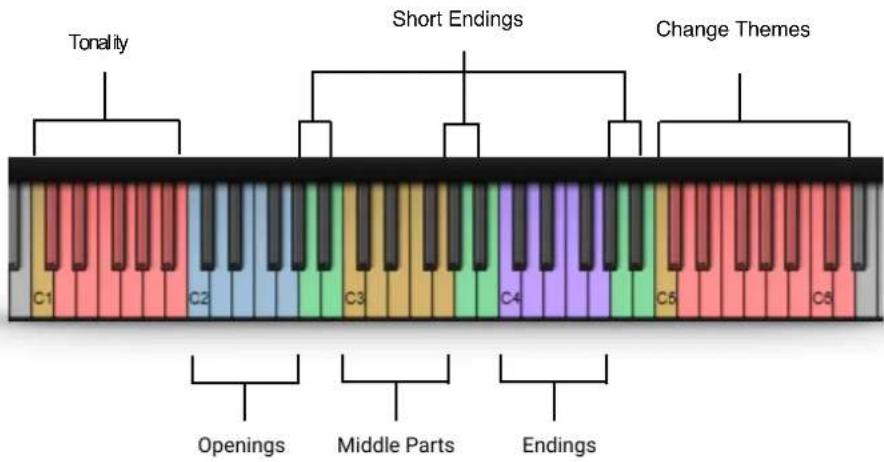
Each theme consists of five complete phrases. You can play the opening, middle and endings of each phrase and combine them freely to create new phrases.
As an addition, we created short endings that will take you back to the root at any time.
SONUSCORE
3.3 KEYSWITCHES
text_image
Tonality Short Endings Change Themes C1 C2 C3 C4 C5 C6 Openings Middle Parts EndingsYou can use the highlighted keys to play the phrases and combine them freely.
3.4 PHRASE PROGRESS BAR

natural_image
Abstract white waveform pattern on black background, no text or symbols presentThe Phrase Progress Bar shows the waveform of the current phrase and the playback position the phrase is in.
NOTE: You can drag the left start icon to adjust the playback start of the current phrase.
3.5 PAGE SELECTION

text_image
MAIN FXAt the bottom of the main page, you can find the Main and FX page buttons. Use those to navigate between the two pages.
SONUSCORE
3.6 SYNC MODE & FREE MODE

text_image
SYNC FREEIn Free Mode, the phrases are not synced to the DAW. Choose this mode if you want the natural feel of the phrases as the musician intended them. The speed knob allows you to change the playback speed of the phrases to fit your track.
It dials from a minimum of 50% up to 150% of the original speed.

text_image
SYNC FREE 1x 2xIn Sync Mode, the timing of the phrases automatically sync to the host tempo of your DAW.
1x means normal play back speed.
2x will double the play back speed.
When Sync Mode is activated, the original tempo of the phrase is shown in the upper right hand corner of the phrase progress bar. That way, you can easily determine if a phrase will work well at a specific tempo, as heavy time shifting can introduce unwanted artifacts.
SONUSCORE
3.7 FX PAGE

text_image
SONUSCORE EQ LOW LOW / MID HIGH / MID HIGH DELAY SYNC TIME FEDBACK MIX REVERB Namaarie PREDELAY MIX MAIN FXOn the FX page, you can access the advanced functions of the EQ, DELAY and REVERB settings.
3.7.1 EQ

text_image
EQ LOW LOW / MID HIGH / MID HIGHEQ ON/OFF: Toggles the equalizer on and off.
LOW: Adjusts the gain of the low frequency band of the equalizer.
LOW/MID: Adjusts the gain of the low-mid frequency band of the equalizer.
HIGH/MID: Adjusts the gain of the high-mid frequency band of the equalizer.
HIGH: Adjusts the gain of the high frequency band of the equalizer.
SONUSCORE
3.7.2 DELAY

text_image
DELAY SYNC TIME FEEDBACK MIXDELAY ON/OFF: Toggles the delay on and off.
SYNC: Sync to host tempo on/off.
TIME: If SYNC is turned off, you can select the delay time in ms. If SYNC is turned on, you can select the delay time in note values.
FEEDBACK: Adjusts the FEEDBACK amount of the DELAY effect. Basically, this parameter controls how many times a note will be audible via the DELAY.
MIX: Adjusts the MIX level of the DELAY effect.
3.7.3 REVERB

text_image
REVERB Namaarie PREDELAY MIXREVERB ON/OFF: Toggles the reverb on and off.
IR MENU: Offers seven different impulse responses.
PREDELAY: Adjusts the PREDELAY of the REVERB effect in ms. This parameter is helpful for simulating distance.
MIX: Adjusts the mix level of the REVERB.
SONUSCORE
4. MEDIEVAL FIDDLE
text_image
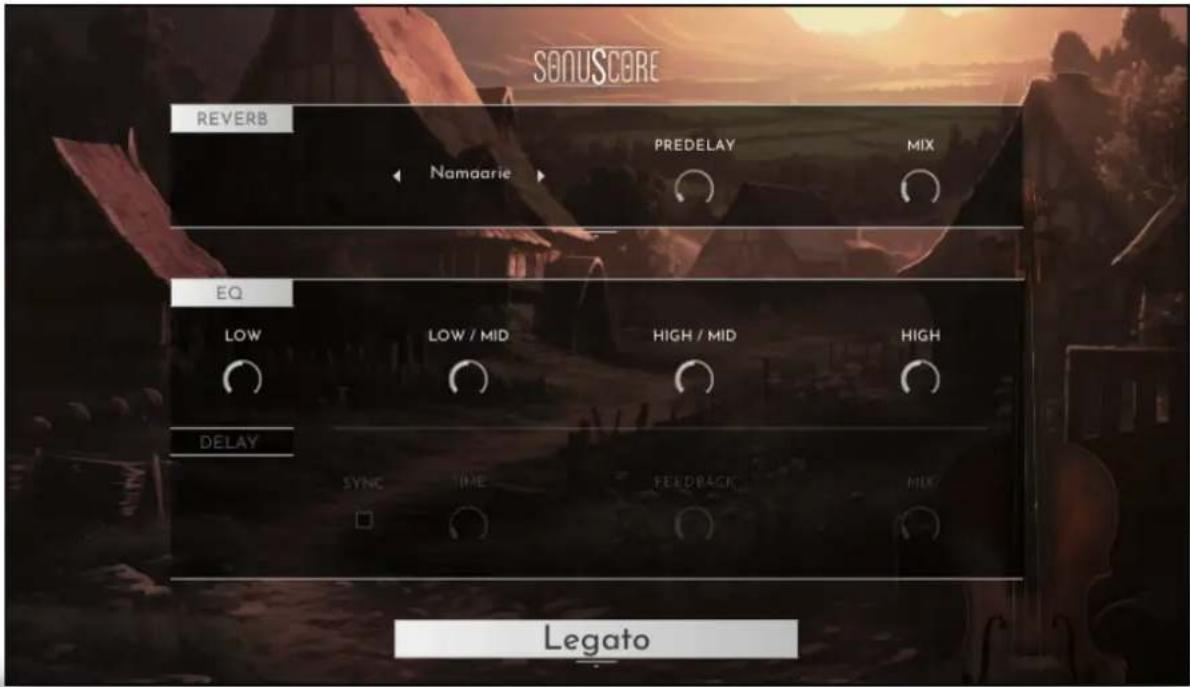
SONUSCORE REVERB PREDELAY MIX Namaarie EQ LOW / MID HIGH / MID HIGH DELAY SYNC TIME FEEDBACK MIK LegatoWhen opening the „Medieval Fiddle“ instrument, you have all the controls you need right there.
4.1 DYNAMICS
CC1 (mod wheel): Controls the dynamic of the sustained articulations.
The note velocity controls the dynamics of all other articulations.
CC11 (expression): Controls the volume for all articulations.
SONUSCORE
4.2 REVERB

text_image
REVERB Namaarie PREDELAY MIXREVERB ON/OFF: Toggles the REVERB on and off.
IR MENU: Offers seven different impulse responses.
PREDELAY: Adjusts the PREDELAY setting for the REVERB.
MIX: Adjusts the mix level of the REVERB.
4.3 EQ

text_image
EQ LOW LOW / MID HIGH / MID HIGHEQ ON/OFF: Toggles the equalizer on and off.
LOW: Adjusts the gain of the low frequency band of the equalizer.
LOW/MID: Adjusts the gain of the low-mid frequency band of the equalizer.
HIGH/MID: Adjusts the gain of the high-mid frequency band of the equalizer.
HIGH: Adjusts the gain of the high frequency band of the equalizer.
4.4 DELAY

text_image
DELAY SYNC TIME FEEDBACK MIXDELAY ON/OFF: Toggles the delay on and off.
SYNC: Sync to host tempo on/off.
TIME: If SYNC is turned off, you can select the delay time in ms. If SYNC is turned on, you can select the delay time in note values.
SONUSCORE
FEEDBACK: Adjusts the FEEDBACK amount of the DELAY effect. Basically, this parameter controls how many times a note will be audible via the DELAY.
MIX: Adjusts the MIX level of the DELAY effect.
4.5 KEYSWITCHES

text_image
C3The playable instrument range is from D1 to G4.
Fiddle Articulations:
C0 - Sustain
D0 - Staccato
E0 - Pizzicato
F0 - Trill short - always press two notes:
- half tone interval = half tone trill
• whole tone interval = whole tone trill
G0 - Trill long - always press two notes:
- half tone interval = half tone trill
- whole tone interval = whole tone trill
A0 - Turn
The current Articulation is always displayed at the bottom.

text_image
LegatoSONUSCORE
5. MEDIEVAL NYCKELHARPA
text_image
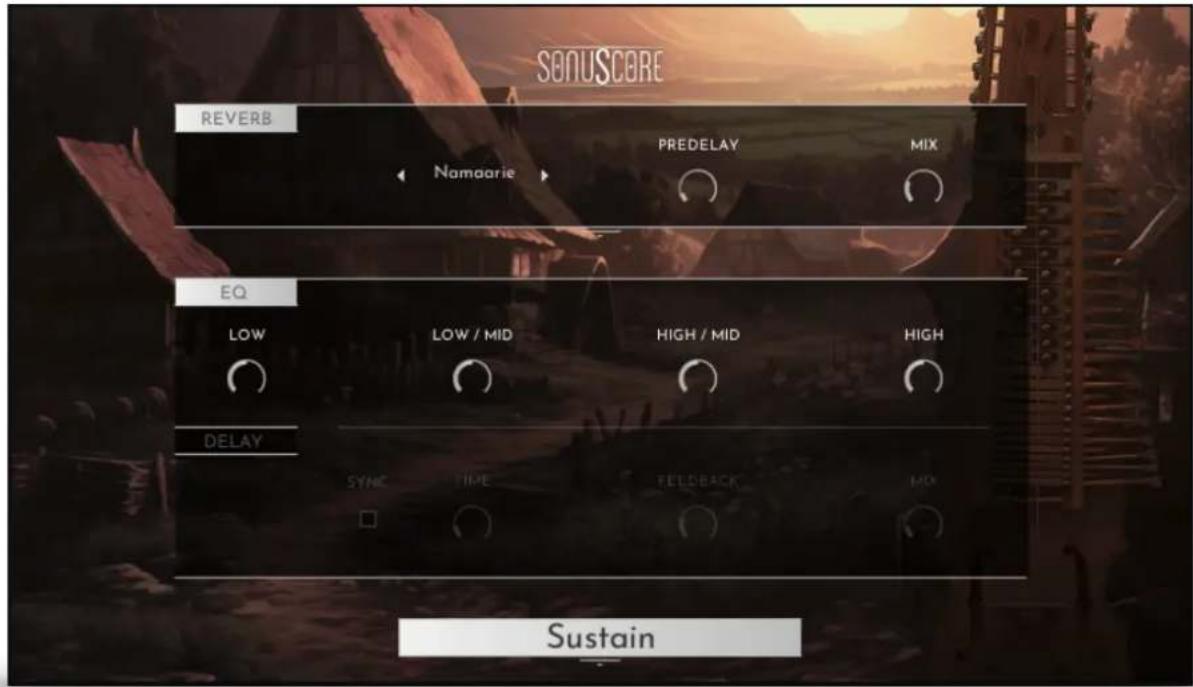
SONUSCORE REVERB PREDELAY MIX Namaarie EQ LOW LOW / MID HIGH / MID HIGH DELAY SYNC TIME FELDBACK MIX SustainWhen opening the „Medieval Nyckelharpa“ instrument, you have all the controls you need right there.
5.1 DYNAMICS
CC1 (mod wheel): Controls the dynamic of the sustained articulations.
The note velocity controls the dynamics of all other articulations.
CC11 (expression): Controls the volume for all articulations.
5.2 REVERB

text_image
REVERB Namaarie PREDELAY MIXREVERB ON/OFF: Toggles the reverb on and off.
IR MENU: Offers seven different impulse responses.
PREDELAY: Adjusts the PREDELAY setting for the REVERB.
MIX: Adjusts the mix level of the REVERB.
SONUSCORE
5.3 EQ

text_image
EQ LOW LOW / MID HIGH / MID HIGHEQ ON/OFF: Toggles the equalizer on and off.
LOW: Adjusts the gain of the low frequency band of the equalizer.
LOW/MID: Adjusts the gain of the low-mid frequency band of the equalizer.
HIGH/MID: Adjusts the gain of the high-mid frequency band of the equalizer.
HIGH: Adjusts the gain of the high frequency band of the equalizer.
5.4 DELAY

text_image
DELAY SYNC TIME FEEDBACK MIXDELAY ON/OFF: Toggles the delay on and off.
SYNC: Sync to host tempo on/off.
TIME: If SYNC is turned off, you can select the delay time in ms. If SYNC is turned on, you can select the delay time in note values.
FEEDBACK: Adjusts the FEEDBACK amount of the DELAY effect. Basically, this parameter controls how many times a note will be audible via the DELAY.
MIX: Adjusts the MIX level of the DELAY effect.
SONUSCORE
5.5 KEYSWITCHES

text_image
C3The playable instrument range is from G0 to E4.
Nyckelharpa Articulations:
C0 - Legato
D0 - Sustain
E0 - Staccato
F0 - Trill - always press two notes:
• half tone interval = half tone trill
• whole tone interval = whole tone trill
GO - Turn
The current Articulation is always displayed at the bottom.

text_image
SustainSONUSCORE
6. CREDITS
Product Concept and Design: SONUSCORE: Tilman Sillescu, Pierre Langer, Axel Rohrbach, Christian Wirtz, Stefan Kemler, Jonas Meyer
Project Lead: Jonas Meyer, Simon Schrenk, Tilman Sillescu
Phrases performed by: Izsak Farkas, Thomas Roth
Recording: Matthias Meeh, Marvin Losch, TomTom Studios (Session Engeineer: Kurina Tamas)
HALion Scripting: Jonas Meyer
Sample Editing: Jonas Hausotter, Steffen Lütke, Olajide Paris, Jonas Meyer, Luka Swoboda, Jonas Schüsselin
User Interface Design: Jannic Böhme, Jonas Meyer, Felix Möbius, Benedikt Huster
Quality Assurance: Simon Schrenk, Tilman Sillescu
Artwork: Nadja Demmler, Benedikt Huster
Videos: Nadja Demmler, Benedikt Huster
Marketing: Benedikt Huster, Florian Tauchert, Felix Möbius, Tobias Kunz, Louisa Wolf, Shawn Basey, Nadja Demmler