Pad Motion Layers - Audio software STEINBERG - Free user manual and instructions
Find the device manual for free Pad Motion Layers STEINBERG in PDF.


User questions about Pad Motion Layers STEINBERG
0 question about this device. Answer the ones you know or ask your own.
Ask a new question about this device
Download the instructions for your Audio software in PDF format for free! Find your manual Pad Motion Layers - STEINBERG and take your electronic device back in hand. On this page are published all the documents necessary for the use of your device. Pad Motion Layers by STEINBERG.
USER MANUAL Pad Motion Layers STEINBERG
This PDF provides improved access for vision-impaired users. Please note that due to the complexity and number of images in this document, it is not possible to include text descriptions of images.
The information in this document is subject to change without notice and does not represent a commitment on the part of Sample Fuel, LLC or Steinberg Media Technologies GmbH. The software described by this document is subject to a License Agreement and may not be copied to other media except as specifically allowed in the License Agreement. No part of this publication may be copied, reproduced, or otherwise transmitted or recorded, for any purpose, without prior written permission by Sample Fuel, LLC. Registered licensees of the product described herein may print one copy of this document for their personal use.
All product and company names are ^TM or ^ trademarks of their respective holders.
Release Date: March 23, 2021
© Sample Fuel, LLC, 2021.
© Steinberg Media Technologies GmbH, 2021.
All rights reserved.

Table of Contents
4 ... Introduction
4 ... Loading the VST Sound Instrument Set
4 ... Loading and Saving Presets
5 ... Plug-in Controls
5 ... Performance Control Section
5 ... Quick Controls
5 ... Sphere
7 ... Macro Page Parameters
7 ... Automating Parameters
8 ... SIMPLE/ADVANCED
8 ... Simple Page
10 ... Advanced Pages
11 ... The Master Section
13 ... The Synth Section
17 ... The FX Section
18 ... The Modulation Section
19 ... The Arpeggiator Section
20 ... The Midi Player Section
21 ... The XY Section
22 ... The About Section
23 ... Factory Presets
23 ... Naming Scheme
23 ... The Browser Tab
24 ... Additional Resources

Introduction
PAD MOTION LAYERS is a very unique instrument that utilizes 4 Sample and Granular layers in one engine powered by Steinberg's FREE HALion Sonic SE platform. Furthermore, you can load the instrument set as a program in HALion, HALion Sonic, and HALion Sonic SE. For further instructions on how to use HALion Sonic SE, HALion Sonic and HALion, follow the links below to their respective manuals:
- HALion Sonic SE
- HALion Sonic
HALion
PAD MOTION LAYERS is a 4 layered sample/granular engine that cycles through all layers and is powered by the PAD MOTION LAYERS Engine. Presets can load patches in up to 16 slots that can be used multi-timbral or layered by assigning patches to the same midi channel. The main concept behind its design is to provide you with a "SIMPLE Page" that provides all the functionality you would reach for during composing or performing. There is an incredible amount of functionality and sound design capabilities contained in the additional pages we provide all with the same concept of being simple and intuitive.
Loading the VST Sound Instrument Set
To load the instrument set in HALion, HALion Sonic, or HALion Sonic SE, load any of the presets that come with PAD MOTION LAYERS library.
Loading and Saving Presets
When you are working with a Steinberg DAW, the Load and Save dialogs contain
MediaBay functionality, allowing you to make use of tags, for example.
- To load a preset, click the name field in the plug-in functions section and select the preset in the dialog.
- When a preset is loaded, you can step through the available presets using the left and right arrow buttons to the left of the preset name field.
- To save a preset, click the floppy disk icon to the right of the preset name and enter a name for the preset.
- In a non-Steinberg DAW, you can only save presets in the predefined folder or a subfolder of this folder. If you save presets using the preset manager of the DAW that you are using, these presets are only accessible within this DAW and not in other host applications.

Plug-In Controls
Performance Control Section
The performance control section in the lower part of the plug-in panel contains additional elements that can quickly modify the instrument playback: Quick Controls and Sphere.
Quick Controls

text_image
ATTACK RELEASE FILTER SHAPE CYCLE MOTION DELAY REVERBThe eight potentiometer controls at the bottom are called quick controls. They allow you to remote-control the most important sound parameters for the preset. The quick control assignments cannot be modified in the VST Sound Instrument Set. You can modify the assignments in HALion or HALion Sonic.
In PAD MOTION LAYERS, these 8 pre-assigned controls are assigned to both layers allowing you to control for example the cutoff filter offset for both layers at the same time with one knob.
The Motion knob can control all the motion and pulsing of a patch. It defaults to full motion but can dial the motion all the way down to no movement at all. A very creative way to control many LFO's, Step Filters, and User Envelopes all with one simple knob.
* PAN LFO, Wavetable LFOs and the ARP is excluded from the Motion Quick control knob.
Sphere
The sphere is the ball on the bottom right of the HALion products. It is a two-dimensional control, which allows you to adjust two quick controls simultaneously by dragging the mouse horizontally and vertically within the sphere. The Sphere assignments cannot be modified in the VST Sound Instrument Set. You can modify the assignments in HALion or HALion Sonic.
In PAD MOTION LAYERS, the Sphere controls are pre-assigned to Hi Pass Filter Cutoff and Resonance for both layers.
The small triangles for indicating the horizontal and the vertical axis are only available if parameters are assigned to Sphere H and V.
Center Horizontal/Center Vertical
You can set up the sphere to stay where you move it to or return to the center automatically. This can be defined for each axis separately.
To do so, right click the Sphere and activate or deactivate the "Center Horizontal" or "Center Vertical" options on the context menu for the sphere.

Macro Page Parameters
The Macro pages for the PAD MOTION LAYERS VST Sound Instrument set is divided into 8 pages.
- SIMPLE/ADVANCED
○ SIMPLE
○ ADVANCED
■ MASTER SECTION
SYNTH
FX
■ XY
ABOUT
Automating Parameters
All of the Macro page parameters can be automated, except for the Polyphonic parameters in the Master section and the Step, Level, and Snap parameters in the Stepmod section on the Motion Page.
SIMPLE/ADVANCED
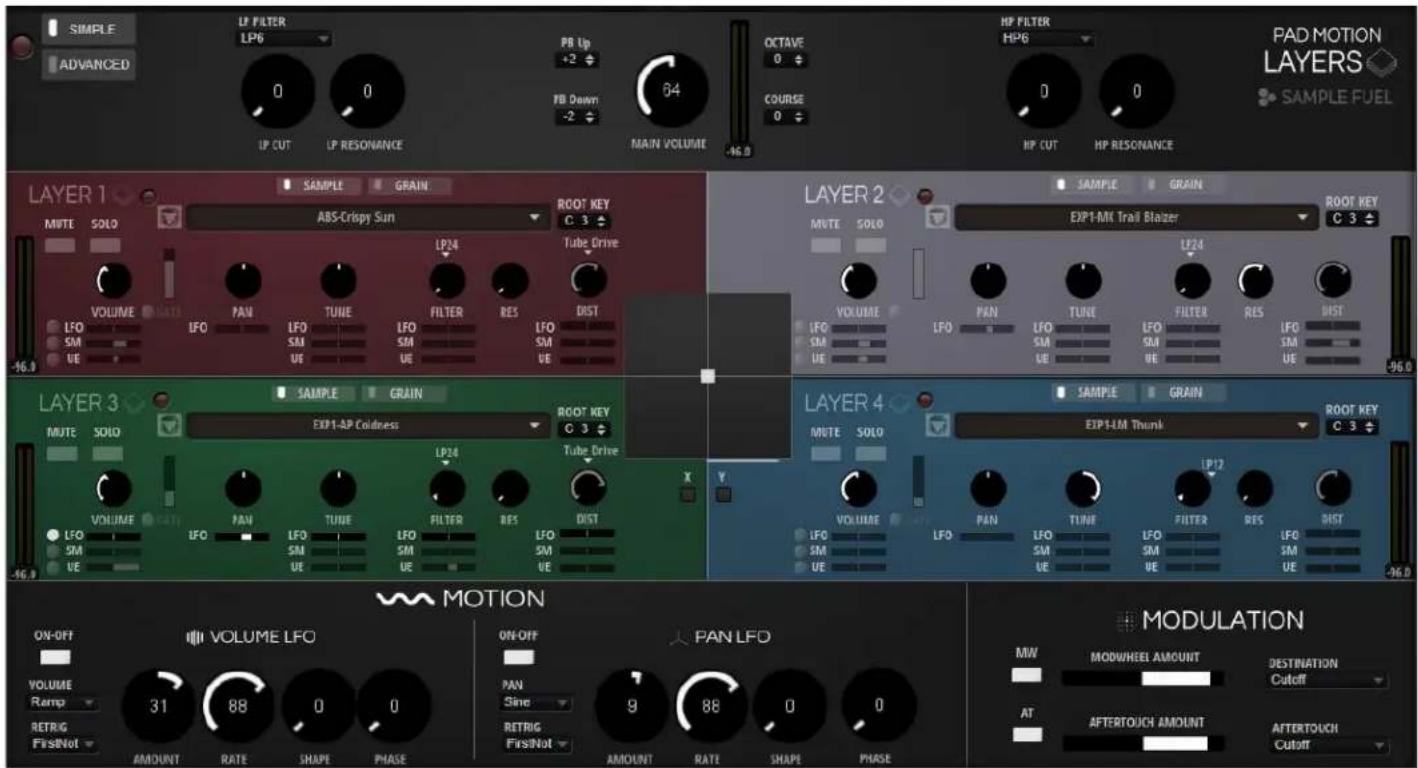
THE SIMPLE PAGE
text_image
SIMPLE ADVANCED LP FILTER LP6 0 0 PB Up +2 PB Down -2 64 OCTAVE 0 COURSE 0 HP FILTER HP6 0 0 HP CUT HP RESONANCE PAD MOTION LAYERS ◆ SAMPLE FUEL LAYER 1 ◆ SAMPLE GRAIN MUTE SOLO ABS-Crispy Sun ROOT KEY C 3 VOLUME LIATO LP24 Tube Drive LFO IFO PAN TUNE IFO FILTER RES DIST SM UE SM UE SM UE LFO SM UE LFO SM UE LFO SM UE LFO SM UE LFO SM UE LFO SM UE LFO SM UE LFO SM UE LFO SM UE LFO SM UE LFO SM UE LFO SM UE LFO SM UE LFO SM UE LFO SM UE LFO SM UE LFO SM UE LFO SM UE LFO SM UE LFO SM UE LVO MATHI ABS-Crispy Sun ROOT KEY C 3 VOLUME LIATO LP24 Tube Drive LFO IFO PAN TUNE IFO FILTER RES DIST SM UE SM UE SM UE LFO SM UE LFO Filter RES DIST SM UE SM UE LFO Filter RES DIST LFO SM UE LFO Filter RES DIST SM UE LFO LFO Filter RES DIST SM UE LFO LFO Filter RES DIST LFO SM UE LFO Filter RES DIST SM UE LFO LFO Filter RES DIST SM UE LFO LFO Filter RES DIST LFO SM UE LFO Filter RES DIST SM UE LFO LFO Filter RES DIST SM UE LFO LFO Filter RES DIST LFO SM UE LFO Filter RES DIST SM UE LFO LFO Filter RES DIST SM UE LFO LFO Filter RES DIST LFO SM US ETLE ETLE ETLE ETLE ETLE ETLE ETLE ETLE ETLE ETLE ETLE ETLE ETLE ETLE ETLE ETLE ETLE ETLE ETLE ETLE ETLE ETLE ETLE ETLE ETLE ETLE ETLE ETLE ETLE ETLE ETLE ETLE ETLE ETLE ETLE ETLE ETLE ETLE ETLE ETLE ETLE ETLE ETLE ETLE ETLE ETLE ETLE ETLE ETLE ETLE ETILE ETILE ETILE ETILE ETILE ETILE ETILE ETILE ETILE ETILE ETILE ETILE ETILE ETILE ETILE ETILE ETILE ETILE ETILE ETILE ETILE ETILE ETILE ETILE ETILE ETILE ETILE ETILE ETILE ETILE ETILE ETILE ETILE ETILE ETILE ETILE ETILE ETILE ETILE ETILE ETILE ETILE ETILE ETILE ETILE ETILE ETILE ETILE ETILE ETILE ETILLETLETLETLETLETLETLETLETLETLETLETLETLETLETLETLETLETLETLETLETLETLETLETLETLETLETLETLETLETLETLETLETLETLETLETLETLETLETLETLETLETLETLETLETLETLETLETLETLETLETLETLETLETLETLETLETLETLETLETLETLETLETLETLETLETLETLETLETLETLETLETLETLETLETLETLETLETLETLETLETLETLETLETLETLETLETLETLETLETLETLETLETLETLETLETLETLETLETLETLETETLETLETLETLETLETLETLETLETLETLETLETLETLETLETLETLETLETLETLETLETLETLETLETLETLETLETLETLETLETLETLETLETLETLETLETLETLETLETLETLETLETLETLETLETLETLETLETLETLETLETLETLETLETLETLETLETLETLETLETLETLETLETLETLETLETLETLETLETLETLETLETLETLETLETLETLETLETLETLETLETLETLETLETLETLETLETLETLETLETLETLETLETLETLETLETLETLETLETLETRET LET LET LET LET LET LET LET LET LET LET LET LET LET LET LET LET LET LET LET LET LET LET LET LET LET LET LET LET LET LET LET LET LET LET LET LET LET LET LET LET LET LET LET LET LET LET LET LET LET LET LET LET LET LET LET LET LET LET LET LET LET LET LET LET LET LET LET LET LET LET LET LET LET LET LET LET LET LET LET LET LET LET LET LET LET LET LET LET LET LET LET LET LET LET LET LET LET LET LET LET LATETETETETETETETETETETETETETETETETETETETETETETETETETETETETETETETETETETETETETETETETETETETETETETETETETETETETETETETETETETETETETETETETETETETETETETETETETETETETETETETETETETETETETETETETETETETETETETETETETETETETTERTTERTTERTTERTTERTTERTTERTTERTTERTTERTTERTTERTTERTTERTTERTTERTTERTTERTTERTTERTTERTTERTTERTTERTTERTTERTTERTTERTTERTTERTTERTTERTTERTTERTTERTTERTTERTTERTTERTTERTTERTTERTTERTTERTTERTTERTTERTTERTTERTTERTTACT TURRT TURRT TURRT TURRT TURRT TURRT TURRT TURRT TURRT TURRT TURRT TURRT TURRT TURRT TURRT TURRT TURRT TURRT TURRT TURRT TURRT TURRT TURRT TURRT TURRT TURRT TURRT TURRT TURRT TURRT TURRT TURRT TURRT TURRT SINE SINE 9 88 0 0 ON/OFF VOLUME LFO ON/OFF PAN LFO MW MODWHEEL AMOUNT DESTINATION Cutoff AT AFTERTOUCH AMOUNT AFTERTOUCH CUTOITThe SIMPLE Page allows the user to make quick tweaks to the instrument without being overwhelmed by too many parameters. This page is split into 4 different sections.
• Upper Section contains:
o SIMPLE/ADVANCED Switches: These switch between the SIMPLE or ADVANCED views
○ Layer Bypass: This will Bypass the currently viewed layer.
○ Layer Lo Pass Cutoff and Resonance
○ Layer Main Volume
○ Layer Course Tune and Octave Control
○ Layer Hi Pass Cutoff and Resonance
• Upper Middle Section:
○ Sample Engine Layer controls:
- Bypass: switches the sample layer state on or off
- Mute: Mutes the sample layer
-
Solo: Solos the sample layer
• Sample/Grain Switch: Switch between sample and grain synthesis -
Sample Preset Selector: Selects between 900 different sample sources for the sample layer
• Volume: Controls the level of the sample layer
• Pan: Controls the location of the sample layer in the stereo field - Tune: Fine tune control of the sample layer
- Filter Type: Drop down menu that allows the user to choose between 24 different filter types
• Filter Cutoff: Controls the filter cutoff amount
• Filter Resonance: Controls the filter resonance amount
• Distortion Amount: Adjust the amount of distortion
• Distortion Type: Switch the distortion type or turn off (Classic) - Modulation Faders: Controls the amount of modulation of the corresponding control. Modulation types are LFO, User Envelope, Step Modulator and GATE (specifically for the Volume)
- Lower Section
- Motion Contains two preassigned LFO's. On assigned to Volume and the other to Pan. For each LFO, the parameters are as listed:
■ Bypass: Enable-disable LFO
■ Waveform: Type of waveform
■ Retrigger: Set the retrigger mode
■ Sync: Enable-disable tempo sync
■ Rate: Specify the rate of the LFO
■ Shape: Specify the shape of the waveform
■ Phase: Tweak the phase of the LFO waveform
○ Modulation Contains: Modwheel and Aftertouch modulation parameters such as:
■ Bypass
- Amount
- Destination
To learn more specifics about any of these parameters you can consult the HALion Operation manual. Link found on the Additional Resources Page.
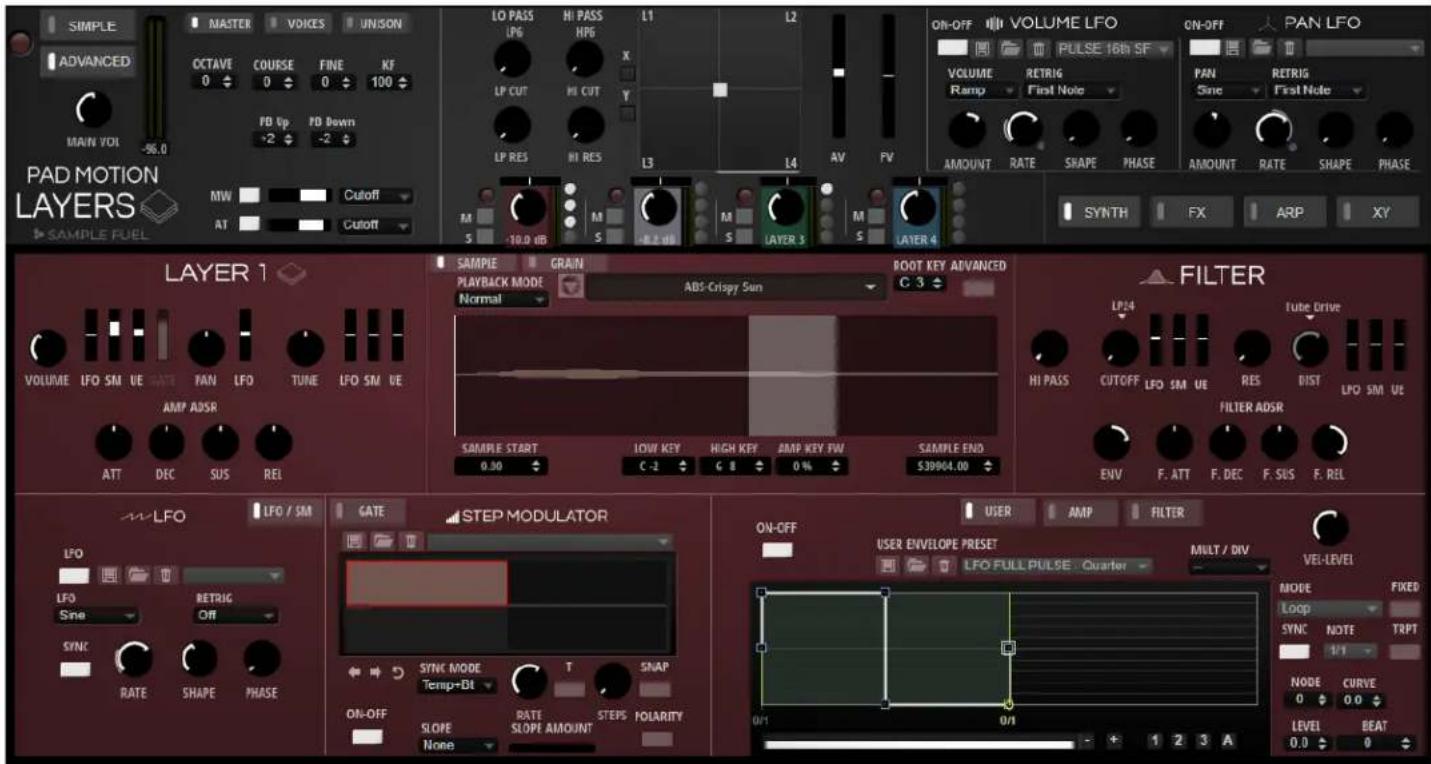
ADVANCED PAGE
text_image
SIMPLE MASTERS VOICES UN/SON ADVANCED OCTAVE COURSE FINE KF 0 0 0 100 MAIN VDI -96.0 FD Up FD Down -2 -2 PAD MOTION LAYERS MW Cutoff AT Cutoff SAMPLE FUEL LO PASS LP6 HI PASS HP6 L1 L2 X LP CUT HI CUT Y L3 L4 AV FV ON-OFF VOLUME LFO PULSE 16th SF ON-OFF PAN LFO VOLUME RAMP RETRIG First Note PAN Sine RETRIG First Note AMOUNT RATE SHAPE PHASE AMOUNT RATE SHAPE PHASE SYNTH FX ARP XY LAYER 1 VOLUME LFO SM UE FATI PAN LFO TUNE LFO SM UE AMP ADSR ATT DEC SUS REL SAMPLE GRAIN PLAYBACK MODE Normal ABS-Crispy Sun ROOT KEY ADVANCED G 3 SAMPLE START 0.00 LOW KEY C-2 HIGH KEY G 8 AMP KEY FW 0% SAMPLE END S39904.00 FILTER LP24 TUBE DRIVE HI PASS CUTOFF LFO SM UE RES DIST LFO SM UE FILTER ADSR ENV F. ATT F. DEC F. SUS F. REL W-LFO LFO / SM GATE STEP MODULATOR ON-OFF USER AMP FILTER USER ENVELOPE PRESET MULT / DIV VEI-LEVEL LFO RETRIG ON LFO FULL PULSE Quarter Loop SYNC NOTE TRPT 1/1 NODE CURVE 0 0.0 LEVEL BEAT 0.0 $ 0 LFO Sine RATE SHAPE PHASE SYNC MODE Temp+DT T SNAP ON-OFF RATE SLOPE AMOUNT STEPS POLARITY None 0/1 0/1 1 2 3 A 1 2 3 AThe ADVANCED Page offers more complex controls and parameters to the user.
When switching to the ADVANCED Page, the Upper section remains fixed and is referred to as the Master Section. This section all about having instant access to all the parameters that you will use most of the time without the need to jump to other screens.
The Lower section is where you will find more in-depth parameters for the Oscillators, Motion Controls, FX, and filter controls via XY Pads.
MASTER SECTION

text_image
SIMPLE MASTERS SECTION OCTAVE 0 COURSE 0 FINE 0 RF 100 VOICES MONO GLIDE FUNG SPINIC -96.0 VOLICE UNISON LO PASS LPG HI PASS HPG L1 L2 TIME LP CUT HI CUT LP RES HI RES L3 L4 AV FV ON-OFF VOLUME LFO PULSE 16th SF ON-OFF PAN LFO VOLUME RERIG RAMP First Note FAN Sine RETRIG AMOUNT RATE SHAPE PHASE AMOUNT RATE SHAPE PHASE SYNTH FX XY PAD MOTION LAYERS SAMPLE FUELThe MASTER Section is all about having instant access to all the parameters that you will use most of the time without the need to jump to other screens. The master section consists of:
• SIMPLE/ADVANCED switches
• Master/Voice/Unison Switches
- Layer Bypass
- Main Volume
- Level Meter
- Master
○ Octave
- Course Tune
○ Fine Tune
○ Key Follow
- Pitchbend parameters.
- Voice
○ Mono/Poly Switch
○ Polyphonic Voice Count
o Trigger Mode
○ Glide On/Off
○ Glide Fingered
○ Glide Sync
○ Glide Time
- Unison:
○ Unison On/Off
o Voices
o Detune
○ Pan
○ Delay
○ Distribution
• Hi Pass Cutoff, Filter Type and Resonance
- Lo Pass Cutoff, Filter Type and Resonance
• Amplitude and Filter Velocity
- Mod Wheel Bypass, Amount and Destination
• AfterTouch Bypass, Amaount and Destination
- 4 Layer XY: Balance the levels of all 4 layers. (Can be automated by right-clicking the X-button or Y-button to the left of the XY to learn)
- Layer Controls:
○ Layer Bypass
○ Layer Mute
○ Layer Solo
○ Layer Pan
○ Layer Volume
Layer Switch: Switch between layers by clicking the layer name ( ex: Click where it shows "Layer 1")
○ LFO Bypass
- Step Modulator Bypass
○ User Envelope Bypass
○ Gate Bypass
Towards the right are the two Volume and Pan LFOs, identical to the ones found on the Simple Page. Underneath the LFOs are the section switches for the Synth Section, FX Section, Motion Section, XY Section, and the About Section.
THE SYNTH SECTION

text_image
LAYER 2 VOLUME IFO SM UE PAN LFO TUNE LFO SM UE AMP ADSR ATT DEC SUS REL SAMPLE GRAIN PLAYBACK MODE EXP1-MX Trail Blazer ROOT KEY ADVANCED C 3 Sample START 0.00 FI FO CROSSFADE LOW KEY HIGH KEY AMP KEY FW 0.0 0.0 0 GRAIN SHAPE HANNING LEVEL POSITION DURATION PITCH KEY FW LENGTH LOOP MODE LOOP START LOOP END CROSSFADE CURVE Continuous 347859.00 438267.00 77777.00 100.0 FILTER IP24 CUTOFF LFO SM UE RES DIST LFO SM UE PIPE DRIVE FILTER ADSR ENV F. ATT F. DEC F. SUS F. REL LFO LFO / SM GATE STEP MODULATOR LFO RETRIG Sine Off SYNC RATE SHAPE PHASE ON-OFF USER ENVELOPE PRESET MULT / INV VEL-LEVEL SYNC MODE Temp+Bit T STEPS SNAP ON-OFF RATE SLOPE AMOUNT POLARITY NONE 1 2 3 A MODE LOOP SYNC NOTE TRPT 0/1 0/1 0.0 0.0 0.0 0.0 0.0The PAD MOTION LAYERS SYNTH section has 4 main sample/granular engines each with identical parameters and functions. The user can switch between them by clicking on the name of the layer above the Synth Setcion (ex. Layer 1, Layer 2, Layer 3, Layer 4).
You can choose between 900 different samples for each layer. The 4 sample layers will play simultaneously and sound as a pad.
Sample Layer Parameters:
- Bypass: switches the sample layer state on or off
- Mute: Mutes the sample layer
• Solo: Solos the sample layer - Sample Waveform Display: Displays the current sample waveform of the sample player
- A sample browser/loader that allows you to switch between any of the available 682 possible sample/multi-sample choices that can be used for sound design patch creation.
- Playback mode
Normal: Sample is played back from the dictated Sample Start to Sample End (respecting the loop settings if there are any)
Reverse: Sample is played back from the Sample End to the Sample Start (this function will ignore loop settings).
○ One Shot: Sample playback ignores loop settings and plays back from the Sample Start to the Sample End
Reverse One Shot: Sample playback ignores loop settings and plays back from Sample End to Sample Start
• Sample Start: Dictates the position of the sample start maker
• Sample end Dictates the position of the sample end maker
- Fixed Pitch: If enabled, the root key of the note played is ignored and the sample plays back at the recorded pitch
- Release Start: Dictates the position of the cursor when you release the key
- Release Offset: Enables the user to tweak the release start of every sample
• Crossfade: Enables the user to set the crossfade
• Crossfade Curve: Enables the user to set the curve of the crossfade - Fade In: Enables the user to the set Fade In length
- Fade In Curve: Enables the user to the set Fade In curve
- Fade Out: Enables the user to the set Fade Out length
- Fade Out Curve: Enables the user to the set Fade Out curve
-
Loop
-
No Loop: No loop is set, sample is played back without a loop
Continuous: Loop is set and sample is played back until amplitude envelope release
Alternate: Loop is set and sample playback alternates directions when the cursor reaches the loop markers
○ Once: loop is repeated only once -
Until Release: Loop is set but only loops for as long as the key is pressed. Upon release, the sample no longer loops
Alt until Release: Loop is set and sample playback alternates directions until the key is released. -
Loop Start: Dictates the start position of the loop sustain marker
- Loop End: Dictates the end position of the loop sustain marker
• Crossfade: Enables the user to define the crossfade length of the loop
• Crossfade Curve: Enables the user to define the crossfade curve amount of the loop.
• Crossfade Tuning: Dictates the tuning of the loop.
• Volume: Controls the level of the sample layer
• Pan: Controls the location of the sample layer in the stereo field - Tune: Fine tune control of the sample layer
- Attack: This is an amplitude attack offset for the sample layer.
- Decay: This is an amplitude decay offset for the sample layer.
- Sustain: This is an amplitude sustain offset for the sample layer.
- Release: This is an amplitude release offset for the sample layer.
• Hi Pass: This adjust a layer specific Hi Pass cutoff. - Filter Attack: This is a filter attack offset for the sample layer.
- Filter Decay: This is a filter decay offset for the sample layer.
- Filter Sustain: This is a filter sustain offset for the sample layer.
- Filter Release: This is a filter release offset for the sample layer.
- Filter Type: Drop down menu that allows the user to choose between 24 different filter types
• Filter Cutoff: Controls the filter cutoff amount
• Filter Resonance: Controls the filter resonance amount - Filter Envelope Amount: Knob that adjusts the degree to which the filter envelope affects the filter
- Filter Distortion Type: Drop down menu that allows the user to choose between 7 different distortion types or they can choose no distortion type (Classic/None).
- Filter Distortion: Knob that adjusts the amount of distortion. (No applicable if Classic/None, HALion 3 or Waldorf is chosen in the Filter Distortion Type Drop Down)
- Filter Fatness: Knob that adjust the amount of fatness (Only applicable if HALion 3 or Waldorf is chosen in the Filter Distortion Type Drop Down)
•
Grain Layer Parameters:
- A sample browser/loader that allows you to switch between any of the available 682 possible sample/multi-sample choices that can be used for sound design patch creation.
- Playback mode
Normal: Sample is played back from the dictated Sample Start to Sample End (respecting the loop settings if there are any)
Reverse: Sample is played back from the Sample End to the Sample Start (this function will ignore loop settings).
One Shot: Sample playback ignores loop settings and plays back from the Sample Start to the Sample End
Reverse One Shot: Sample playback ignores loop settings and plays back from Sample End to Sample Start
• Sample Start: Dictates the position of the sample start maker
• Sample end Dictates the position of the sample end maker
• Crossfade: Enables the user to set the crossfade
- Fade Out: Enables the user to the set Fade Out length
- Loop
- No Loop: No loop is set, sample is played back without a loop
- Continuous: Loop is set, and sample is played back until amplitude envelope release
Alternate: Loop is set an1d sample playback alternates directions when the cursor reaches the loop markers
○ Once: loop is repeated only once - Until Release: Loop is set but only loops for as long as the key is pressed. Upon release, the sample no longer loops
Alt until Release: Loop is set and sample playback alternates directions until the key is released.
- Loop Start: Dictates the start position of the loop sustain marker
- Loop End: Dictates the end position of the loop sustain marker
• Crossfade: Enables the user to define the crossfade length of the loop
• Crossfade Curve: Enables the user to define the crossfade curve amount of the loop.
• Crossfade Tuning: Dictates the tuning of the loop.
- Grain: Dictates the number of grains per channel of the sample
- Grain Shape: Dictates the shape of the grain
• Speed: Dictates the speed of playback of the grains in the sample
- Direction: Dictates the speed of the playback at finer amounts and dictates the direction of the grains
• Level: Determines the level of the oscillator
- Rnd Level (Random Level): Randomizes the level for each new grain
- Width: Narrows or widens the stereo width of the oscillator
• Auto G: Automatically adjust the level of the grains using quieter sample parts
• Position: Set the playback position of the grains - Rnd Pos (Random Position): Sets the range of the random playback position.
- Spread (Position Spread): Spreads the playback positions of the grains
- Offset (Position Offset): Offsets the position of the grains for each channel
• Duration: Increases or decreases the grain duration - Rnd Dur (Random Duration): Applied separately to each channel, this parameter can help widen the panorama of the playback
- Spread (Duration Spread): Sets each grain to a different duration
- Offset (Duration Offset): This parameter can also help widen the panorama of the sound. Positive value creates longer durations for the left channels and shorter durations for the right channels and vice versa
- Pitch: User can transpose the pitch of the grains
- Rnd Pitch (Random Pitch): Applied separately for each channel, randomizes the pitch range.
- Spread (Pitch Spread): Detunes the pitch of each grain within the specified range
- Offset (Pitch Offset): Pitch is offset across the channels. Positive values detune the pitch by increasing the right channels and decreasing the left and vice versa.
- Key Follow: Depending on the notes played, the grain duration changes by whatever value is specified with this parameter
• Center Key: Resets the center key by what is specified - Follow (Zone Pitch): When enabled, duration is affected by the register of the note played.
• Length: Shortens or lengthens the length of the grainl (independent of grain duration) - Rnd Length (Random Length): Randomizes the grain length
- Spread (Length Spread): Sets each grain to a different length
- Offset (Length Offset): Positive settings shorten right channel grains and lengthens left channel grains and vice versa.
To learn more specifics about any of the parameters, you can consult the HALion Operation manual. Link found on the Additional Resources Page.
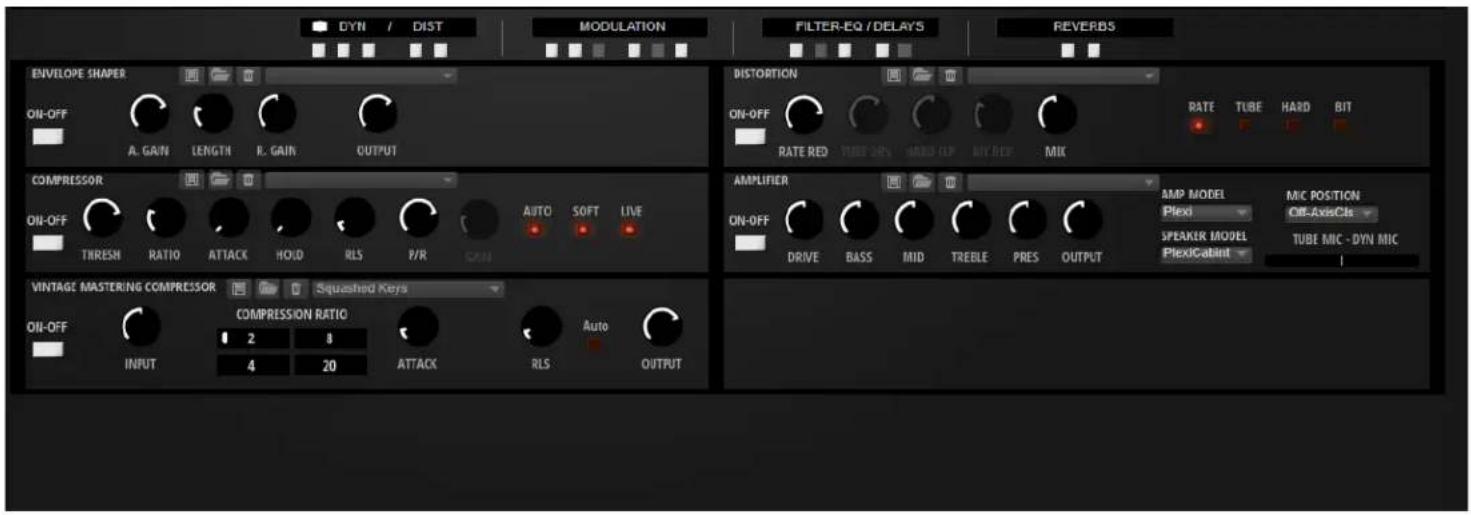
The FX SECTION
text_image
DYN / DIST MODULATION FILTER-EQ / DELAYS REVERDS ENVELOPE SHAPER ON-OFF A. GAIN LENGTH R. GAIN OUTPUT DISTORTION ON-OFF RATE RED TUBE ON/OFF HARD-OP BIT RED MIX RATE TUBE HARD BIT COMPRESSOR ON-OFF TIRESH RATIO ATTACK HOLD RLS P/R AUTO SOFT LIVE AMPLIFIER ON-OFF DRIVE BASS MID TREBLE PRES OUTPUT AMP MODEL MIC POSITION Plexi Off-AxisCfs SPEAKER MODEL MIC POSITION PlexiCabinet TUBE MIC - DYN MIC VINTAGE MASTERING COMPRESSOR SQUASHED KEYS ON-OFF COMPRESSION RATIO Auto INPUT 2 8 4 20 ATTACK RLS OUTPUTThe FX section provides you with 18 different insert effects to enable or disable. The different effects are:
- Compressor
- Envelope Shaper
- Vintage Compressor which is at the end of the signal chain before the reverb to act like a "Mastering Compressor".
• Distortion module with 4 distortion effect types. - Guitar Amplifier modeling effect. Control over amp heads and cabinets as well as microphone position.
- Chorus
- Phaser
- Flanger
- Ring Mod FX
- Stereo Widener
- Vintage Ensemble
• Main Synth Filter with VCF section that has 24 filter shapes and five distortion modes.
• 4 Band Fully Parametric EQ - Morph Filter with 2 filter shapes that can be controlled via the automatable XY controller right on the Morph Filter FX module.
• 2 independent stereo Delays with 3 modes.
• Efficient Algorithmic Reverb with many parameters to tailor its sound. - Convolution Reverb with many impulse choices.
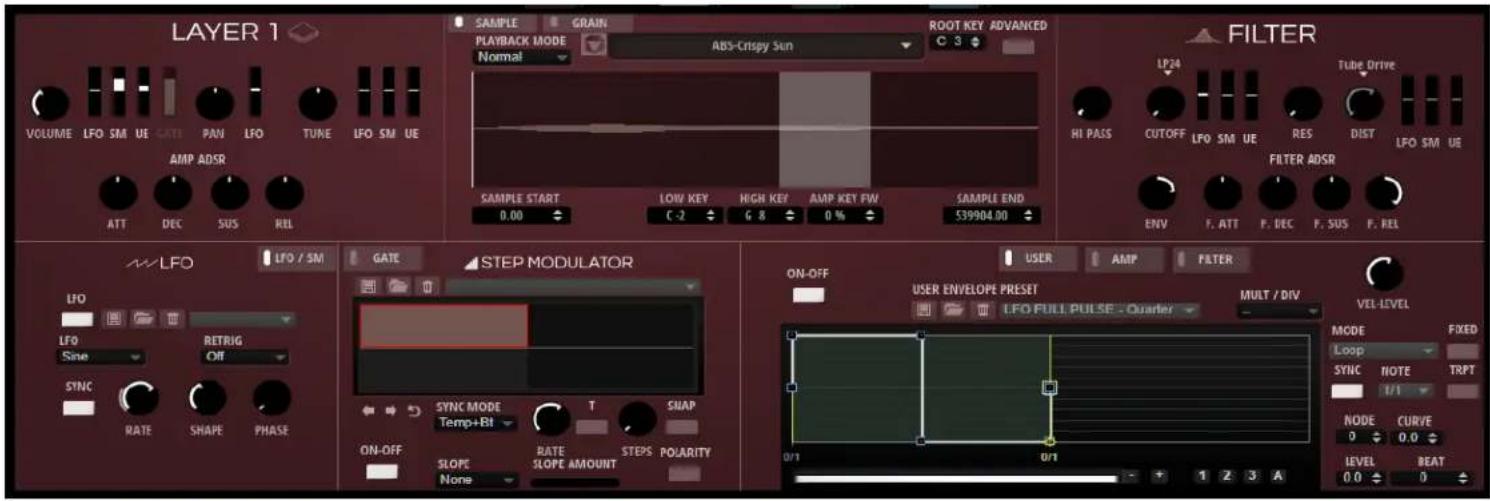
MODULATION SECTION
text_image
LAYER 1 VOLUME LFO SM UE CATT PAN LFO TUNE LFO SM UE AMP ADSR ATT DEC SUS RIL SAMPLE GRAIN PLAYBACK MODE ABS-Crispy Sun ROOT KEY ADVANCED Normal C 3 FILTER LP24 Tube Drive HI PASS CUTOFF LFO SM UE RES DIST LFO SM UE FILTER ADSR ENV F. ATT P. DEC F. SUS F. REL SAMPLE START LOW KEY HIGH KEY AMP KEY FW SAMPLE END 0.00 C-2 G 8 0 % 539904.00 MW LFO LFO / SM GATE STEP MODULATOR LFO RETRIG Sine Off SYNC SYNC MODE T SNAP RATE SHAPE PHASE ON-OFF RATE STEPS POARITY SLOPE None SLOPE AMOUNT ON-OFF USER AMP FILTER USER ENVELOPE PRESET MULT / DIV LFO FULL PULSE - Quarter VEL-LEVEL MODE FIXED Loop SYNC NOTE TRPT I/1 NODE CURVE 0 0.0 LEVEL BEAT 0.0 0The Modulation section provides an LFO, a Step Modulator, a User Envelope and a Gate (specific to the Volume). The user can adjust the amounts of modulation by adjusting the respective slider next to the destination.
The user can switch between the LFO/Step Modulator page and the Gate page.
The user can bypass the LFO by clicking the LFO switch. The LFO has a frequency rate or when set to sync will automatically lock to the tempo and also has amount, note division, shape and phase controls. The LFO can modulate the Cutoff, Distortion, Volume, Pan and Tune.
Next to the LFO is the Step Modulator. The Step Modulator can be bypassed by clicking the Step Modulator switch. The Step Modulator comes equipped with a Step parameter, Triplet toggle switch, Frequency Rate, Grid Snap, Sync Mode, Slope Mode and Slope Amount, Sync Mode, Polarity Switch, Reset, Step Forward and Step Backward buttons and Step Modulator Presets.
Switching to the Gate page, the Gate modulation will show and can be bypassed by clicking the Gate switch. The Gate modulation features all the same parameters as the Step Modulator. It is preassigned to the Volume Parameter. It also includes an amount knob to adjust the amount of modulation. This knob is the same as the slider next to the Volume.
To the right, the user will find the User Envelope, Amp Envelope and Filter Envelope. The Amp and Filter Envelope are alternatives to using the respective knobs. The User Envelope can be used to modulate the Volume, Tune, Cutoff and Distortion parameters. The User Envelope can be bypassed by clicking the User Envelope switch. The user can draw the shape of the envelope they wish to use and add nodes by double clicking. Double clicking on a node can also delete the node.
ARPEGGIATOR SECTION

text_image
ARP VER C1 C2 C2 USER 1 2 3 4 5 6 7 8 ON PHRASE KS OFF REC Alternate 1 LOOP HOLD TIGGER MODE RESTART MODE RSTVAR KEY MODE VEL MODE Off Immediately Off Sort Original SYNC TEMPO SWING GATE SCALE VEL SCALE OCTAVES LOW KEY HIGH KEY 120.0 MUTE TEMP SCALE 1/16 0 100.0 100.0 0 LOW VEL HIGH VEL 0 100.0 100.0 0 0 127This is an advanced 32-step Arpeggiator based on Yamaha's legendary Motif Technology with extensive programming and modulation features. The Arpeggiator offers many parameters for programming phrases and altering tempo, groove and swing. Three additional controller lanes are available for quick and easy step modulation for oscillator and filter parameters.
The phrases of the arpeggiator can be recorded internally and exported to the DAW via drag and drop to make them accessible as editable MIDI events. Additionally, you can store and trigger 8 different phrases on the fly in real time without ever losing sync.
The entire Arpeggiator settings can be locked to keep phrases even when browsing the available presets.
*The default HALion CC's for the C1, C2, & C3 bypass are CC110, CC11, & CC112. You will want to avoid those when assigning custom CCs to controls.
To learn more specifics about any of the parameters, you can consult the HALion Operation manual. Link found on the Additional Resources Page.
THE MIDI PLAYER SECTION

text_image
MIDI PLAYER ON MIDI FILE LOOP HOLD TIGGER MODE RESTART MODE START LENGTH TRANSP C KEY Off Immediately Off 1 4 Off Off C 2 SYNC TEMPO SWING GATE SCALE VEL SCALE AMOUNT LOW KEY HIGH KEY 120.0 QUANT 1/16 C -2 G 8 TEMP SCALE 0 100.0 100.0 0 LOW VEL HIGH VEL 1/16 0 100.0 100.0 0 0 127This is a simple midi file phrase player that you can drag and drop midi files to and from your DAW. Additionally, you can store and trigger 8 different phrases on the fly in real time without ever losing sync.
To learn more specifics about any of the parameters, you can consult the HALion Operation manual. Link found on the Additional Resources Page.
THE XY SECTION

other
| Condition | IP CUTOFF (X-VALUE) | HP RESONANCE (Y-VALUE) | |---|---|---| | MAIN LO PASS | 89 | 75 | | MAIN HI PASS | 1640 | 16 |The XY section is a simple layout with 2 XY controller boxes. The first XY box controls the fixed Lo Pass Filter. The second XY box is tied to the fixed Hi Pass Filter that is found on the Main Section. This is a very fun and creative way to automate these filters.
THE ABOUT SECTION
text_image
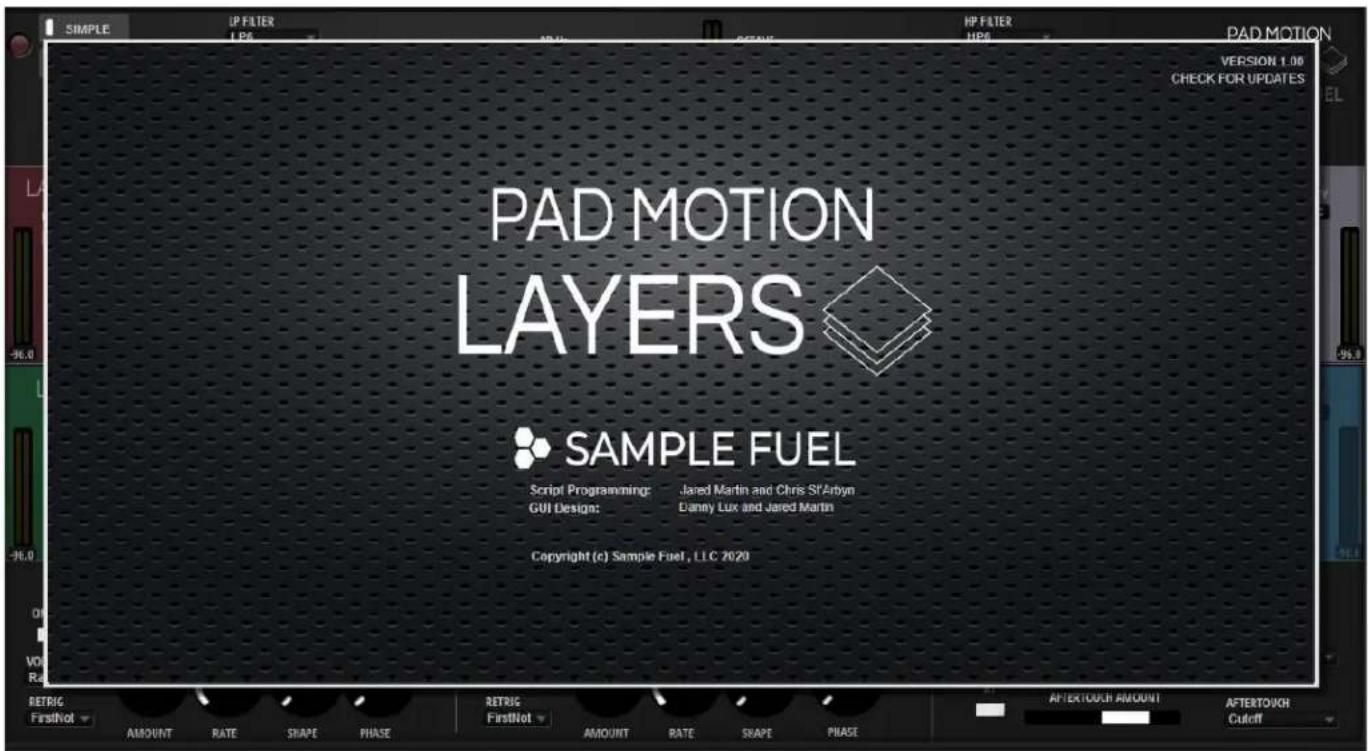
SIMPLE UP FILTER LPG HP FILTER HPG PAD MOTION VERSION 1.00 CHECK FOR UPDATES PAD MOTION LAYERS SAMPLE FUEL Script Programming: Jared Martin and Chris St'Arbyn GUI Design: Danny Lux and Jared Martin Copyright (c) Sample Fuel, LLC 2020 RETRIC FirstNot AMOUNT RATE SHAPE PHASE RETRIC FirstNot AMOUNT RATE SHAPE PHASE AFTERTOUCH AMOUNT AFTERTOUGH CutoffThis section includes links to the websites of Sample Fuel and Steinberg.
If you click on the SAMPLE FUEL logo in the middle of the page, you'll have the option to visit our page at, www.samplefuel.com.
If you click on the Steinberg logo on the bottom right, it will take you to Steinberg's home page, www.steinberg.net/home

Factory Presets
PAD MOTION LAYERS includes hundreds of factory presets to get you started!
Naming Scheme
Suffix:
Null- Motion knob turned to the left, resulting in no motion
Slimmer – A low cut has been used to thin out the sound
The Browser Tab
text_image
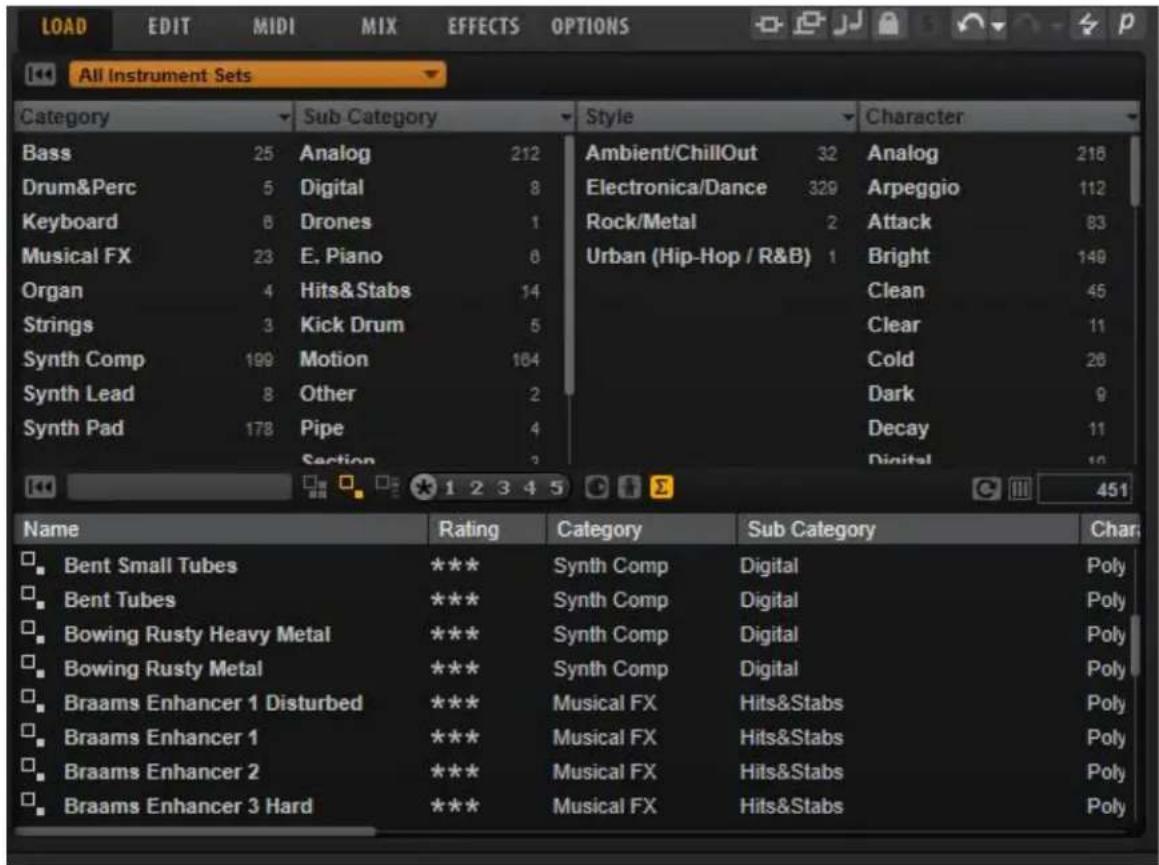
All Instrument Sets Category Sub Category Style Character Bass 25 Analog 212 Ambient/ChillOut 32 Analog 216 Drum&Perc 5 Digital 8 Electronica/Dance 329 Arpeggio 112 Keyboard 6 Drones 1 Rock/Metal 2 Attack 83 Musical FX 23 E. Piano 0 Urban (Hip-Hop / R&B) 1 Bright 148 Organ 4 Hits&Stabs 14 Clean 45 Strings 3 Kick Drum 5 Clear 11 Synth Comp 199 Motion 184 Cold 26 Synth Lead 8 Other 2 Dark 9 Synth Pad 178 Pipe 4 Decay 11 Section 3 Digital 10 Name Rating人類 Category Sub Category Char Bent Small Tubes *** Synth Comp Digital Poly Bent Tubes *** Synth Comp Digital Poly Bowing Rusty Heavy Metal *** Synth Comp Digital Poly Bowing Rusty Metal *** Synth Comp Digital Poly Braams Enhancer 1 Disturbed *** Musical FX Hits&Stabs Poly Braams Enhancer 1 *** Musical FX Hits&Stabs Poly Braams Enhancer 2 *** Musical FX Hits&Stabs Poly Braams Enhancer 3 Hard *** Musical FX Hits&Stabs PolyBrowse through the patch library with ease and find what you need quickly thanks to the detailed tagging system and large viewing window that is part of the MediaBay sound management system.
The browser can also open "undocked" and be resized up to full screen size.

Additional Resources
Videos:
- Installation
- Pad Motion Layers Simple Page
- Pad Motion Layers Advanced Page
• Pad Motion & Pad Motion Layers Side By Side
• FX Section (demonstrated using POLY 2.0)
• Motion Knob (demonstrated using POLY 2.0) - Arp Page (from 1.5)
• Midi Player Page (from 1.5) - Browser Page
More Videos on YouTube Channel
Manuals:
• HALion Sonic SE 3 Manual
• HALion Sonic Manual
- HALion 6 Manual