PSW770 - Speaker Pyle - Free user manual and instructions
Find the device manual for free PSW770 Pyle in PDF.


User questions about PSW770 Pyle
0 question about this device. Answer the ones you know or ask your own.
Ask a new question about this device
Download the instructions for your Speaker in PDF format for free! Find your manual PSW770 - Pyle and take your electronic device back in hand. On this page are published all the documents necessary for the use of your device. PSW770 by Pyle.
USER MANUAL PSW770 Pyle
Part 5-Adjusting display and using cord management
Route cords along articulating arms using cord management (7). Articulating arms can be adjusted to position display into desired location. Use wrench to tighten and loosen the tension screw. Do not overtighten and do not loosen to the point the screws come out.

text_image
Technical diagram of a mechanical assembly with numbered components labeled 7, 8, and 9Thank you for choosing our product
Pyle Audio
1600 63rd st, Brooklyn, NY, 11204 (718)236-8000
Warning
This product contains small items that could be a choking hazard if swallowed. Keep these items away from young children.
1. Make sure these instructions are read and completely understood before attempting installation. If you are unsure of any part of this installation, contact a professional installer for assistance.
2. The wall or mounting surface must be capable of supporting the combined weight of the mount and the display; otherwise the structure must be reinforced
3. Safety gear and proper tools must be used. A minimum of two people are required for this installation. Failure to use safety gear can result in property damage, serious injury or death.

INSTALLATION GUIDE
Item No.:PSW770Item No.:PSW770

natural_image
Technical line drawing of a mechanical assembly with mounting brackets and mounting holes (no text or symbols)• TV size range: 23"42 "
• Maximum weight capacity: 35 kg /77lbs
- Adjustable angle: 0°1-2
www pyleaudio com.
MADE IN CHINA
CAUTION
This product was designed to be installed on wood stud walls and solid concrete walls. Before installing make sure the supporting surface will support the combined load of the equipment and hardware. Never exceed the Maximum Load Capacity. This product is intended for indoor use only. Use at this product outdoors could lead to product failure or personal injury.
Hardware Kit:

text_image
dware Kit: 7 8 9 1 2 3 4 5 6 A-H I J K L M| ID | Description | |
| 1 | 1 | Wall plate |
| 2 | 1 | Cantilever Arm |
| 3 | 1 | Left Bracket |
| 4 | 1 | Right Bracket |
| 5 | 1 | TV plate |
| 6 | 2 | Safety bolt |
| 7 | 3 | Cord management wrap |
| 8 | 1 | 6x6 Wrench |
| 9 | 1 | 5x5 Wrench |
| A | 4 | M4 mm×12 bolt |
| B | 4 | M4 mm×16 bolt |
| ID | Qty | Description |
| C | 4 | M5×mm16 bolt |
| D | 4 | M6×mm16 bolt |
| E | 4 | M8×16mm bolt |
| F | 4 | M×36mm5 bolt |
| G | 4 | M6×36mm bolt |
| H | 4 | M×36mm8 bolt |
| I | 4 | Square washer |
| J | 4 | Long bolt |
| K | 4 | Wall anchor |
| L | 4 | Long bolt washer |
| M | 4 | Spacer |
Part 3- Hanging display
Firstly lift the bracket mounted display over the mount. And then hook the brackets over the top of the mount. Rotate the display let the bottom of the brackets hook over the bottom of mount. Then put safety bolts into the bottom of the brackets and lock it.
Warning: Some TV require two people to lift, as we are not responsible for any personal injury or product damage due to mishandling.

text_image
2,3Part 2b-Attaching brackets to screen with recessed back
Center brackets vertically on back of screen. Select the medium(F or G) or large(H) screws. Attach brackets to screen using four selected screws. four square washers(I) and four spacers(M) at the top and bottom of each bracket. Tighten screws firmly. Do not overtighten.

text_image
Square washer(I) Large hole for M8 screws Medium hole for M3 and M6 screws M I F HPart IIa-Wood Stud Mounting
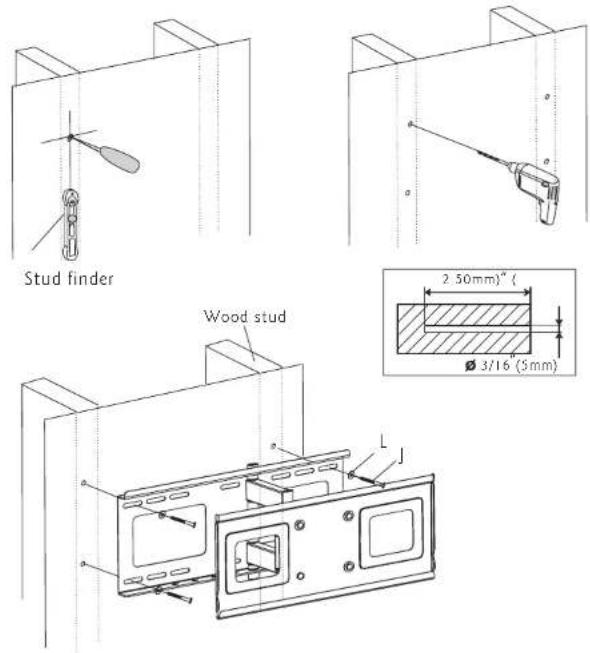
Use wall plate(1) as template, makes sureitis four, and mark mou holes along the center lines of the wood studs. Drill four 3/1(6mm) dia. holes 2" (50mm) deep. Level wall plate(1) and attach to wall with four long bolts(j) and four washers(L). Tighten screws firmly Do not overtighten
text_image
Stud finder Wood stud 2.50mm" 3/16 (3mm)Part IIb-Concrete Wall-Mounting
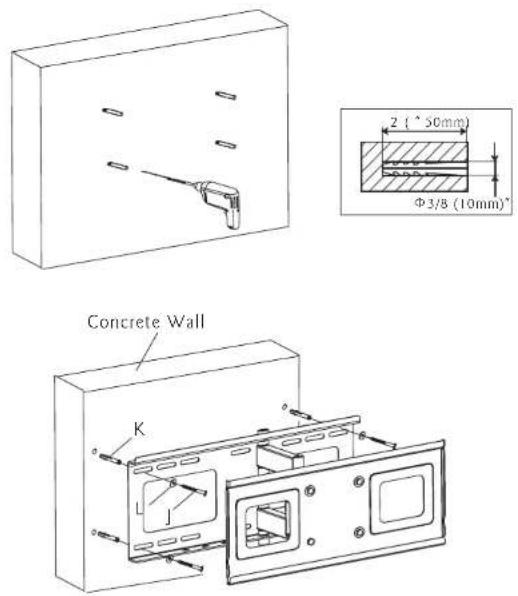
Level wall plate and use wall as a template to mark four holes. Drill four 3/8" (10mm) dia. holes 2" (50mm) deep. Insert four anchors(K) into holes and secure wall plate with four long bolts(J) and four washers(L). Tighten bolts firmly. Do not overtighten
Part 2a-Attaching Brackets To Screen With Flat Back
Center brackets vertically on back of screen. Select the small(A or B), medium(C or D) or large(E) screws. Attach brackets to screen using four selected screws and four square washers(I) at the top and bottom of each bracket. Tighten screws firmly. Do not overtighten
