1T-CT-452 - Émetteur AV TV One - Free user manual and instructions
Find the device manual for free 1T-CT-452 TV One in PDF.


User questions about 1T-CT-452 TV One
0 question about this device. Answer the ones you know or ask your own.
Ask a new question about this device
Download the instructions for your Émetteur AV in PDF format for free! Find your manual 1T-CT-452 - TV One and take your electronic device back in hand. On this page are published all the documents necessary for the use of your device. 1T-CT-452 by TV One.
USER MANUAL 1T-CT-452 TV One
natural_image
Exterior view of a black electronic device with ports and connectors (no visible text or symbols)
natural_image
Exterior view of a black wireless network device with ports and connectors (no visible text or symbols)Instruction Manual
1T-CT-400 Series
Cat.5 Extenders
Table of Contents
1.0 Introduction 2
2.0 Specifications 3
3.0 Checking Package Contents 6
4.0 Connecting The Hardware 6
5.0 Operating The Unit 9
6.0 Troubleshooting 10
7.0 Limited Warranty 11
8.0 Regulatory Compliance 11
9.0 Contact Information 12
1.0 INTRODUCTION
Thanks for purchasing this Cat.5 Extender Product from TV One. This Product line is designed to transport VGA and YPbPr signals over great distances using CAT.5/5E or CAT.6 premium grade network cables. Our professional video conversion products have been serving the industry for over twenty years. TV One offers a full line of high quality Seamless Switchers, Video Scalers, Up/Down/Cross Converters, Analog-Digital Converters (SD/HD-SDI, HDMI, DVI), Format Converters, Standards Converters, TBC/Frame Synchronizers, Matrix Routing Switchers, Signal Distribution Amplifiers and Cat.5 Transmission Systems.
1.1 Liability Statement
Every effort has been made to ensure that this product is free of errors. TV One cannot be held liable for the use of this hardware or any direct or indirect consequential damages arising from its use. It is the responsibility of the user of the hardware to check that it is suitable for his/her requirements and that it is installed correctly. All rights reserved. No parts of this manual may be reproduced or transmitted by any form or means electronic or mechanical, including photocopying, recording or by any information storage or retrieval system without the written consent of the publisher.
TV One reserves the right to revise any of its hardware and software following its policy to modify and/or improve its products where necessary or desirable. This statement does not affect the legal rights of the user in any way.
All third party trademarks and copyrights are recognized. The TV One logo, TV One-task and CORIO are the registered Trademarks of TV One. All other trademarks are the property of their respective holders.
1.2 Features
The CAT.5 VGA Extender product line has many features that enable it to perform in a superior manner. Among those features you will find:
- Transmit PC or Component Video content via Cat.5/5E or 6 Cable
• Resolutions to 1920x1200, 1080p @ 60Hz - Range up to 300 meters (1000')
- Gain and equalization adjustments at each receiver
- Some models with built-in Skew Correction adjustment
- Some models with Analog Stereo and S/PDIF Digital Audio
- One receiver model featuring built-in UTP Repeater
1.2 Transmitter Features and Compatibility Chart
| Transmitter Model | Signal Type | Stereo Audio | Maximum Distance | Cat.5 Out | Compatible Receivers |
| 1T-CT-441 RGBHV | None 300M (1000') 1 442 | 444 | |||
| 1T-CT-443 RGBHV | Yes (1) 300M (1000') 1 442, 444, 452, 456 | ||||
| 1T-CT-453 YPbPr | Yes (1) 300M (1000') 1 464 | ||||
| 1T-CT-467 RGBHV | Yes 300M (1000') 8 442, 444, 452, 456 | ||||
| C2-1250/1250 (2) | RGBHV/YPbPr | No 300M (1000') 1 442, 444, 464 | |||
| Notes: (1) These models have both Analog Stereo and S/PDIF Digital Inputs.(2) Models C2-1200 and C2-1250 are covered in a separate manual. | |||||
1.3 Receiver Features and Compatibility Chart
| Receiver Model | Signal Type | Stereo Audio | Maximum Distance | Built-in Skew Comp | Compatible Transmitters |
| 1T-CT-442 | RGBHV | None | 150M (500') | No | 441, 443, 467, C2-1200/1250 |
| 1T-CT-444 | RGBHV | None | 300M (1000') | Yes | 441, 443, 467, C2-1200/1250 |
| 1T-CT-452 | RGBHV | Yes (1) | 150M (500') | No | 443, 467 |
| 1T-CT-456 (2) | RGBHV | Yes (1) | 300M (1000') | Yes | 443, 467 |
| 1T-CT-464 | YPbPr | Yes (1) | 300M (1000') | No | 453, C2-1200/1250 |
| Notes: (1) These models have both Analog Stereo and S/PDIF Digital Audio Outputs.(2) This model has a built-in UTP Repeater to drive another Receiver at up to 1000'. | |||||
2.0 SPECIFICATIONS
2.1 General
| Environmental | |
| Operating Temperature | 0° to +70°C (+32° to +158°F) |
| Operating Humidity | 10% to 90%, Non-condensing |
| Storage Temperature | -40° to +70°C (-40° to +158°F) |
| Storage Humidity | 10% to 90%, Non-condensing |
| Warranty | |
| Limited Warranty | 3 Years Parts and Labor |
| Regulatory Approvals | |
| Encoder/Decoder Unit | FCC, CE, RoHS |
| Power Supply | UL, CUL, CE, PSE, GS, RoHS |
| Cable Requirements | |
| CAT.5/5E or CAT 6 | Network Grade, Premium Cables |
| Power Requirement | |
| All models except 1T-CT-467 | External Power Supply +5 VDC@2A, Locking DC |
| 1T-CT-467 | Internal Power Supply 100-240VAC@ 50-60Hz |
| Accessories Included | |
| 1x Power Adapter | US, UK or Euro (except 1T-CT-467) |
| 1x User Manual | CAT.5 Extender Series |
2.2 Transmitters
Video Inputs
1T-CT-441, 443, 467 1x RGBHV via HD-15
1T-CT-453 1x YPbPr via 3x RCA
Video Outputs
1T-CT-441, 443, 467 1x RGBHV via HD-15
Audio Inputs
1T-CT-441 None
1T-CT-467 1x Analog Stereo via 3.5mm
1T-CT-443, 453 1x Analog Stereo via 3.5mm, 1x S/PDIF via Toslink
Audio Outputs
1T-CT-441 None
1T-CT-443, 453, 467 1x Analog Stereo via 3.5mm Mini Stereo
UTP Outputs
1T-CT-441, 443, 453 1x via RJ-45 Connector
Video Performance
Maximum Resolutions Up to 1920x1200, 1080p / 60Hz
Video Bandwidth 350MHz
Input Signal Levels Video 0.75mV, Sync 5V TTL
Horizontal Freq Range 15-70KHz
Vertical Freq Range 30-170Hz
Audio Performance
Input Sampling Rates 32, 44.1, 48, 96KHz
Maximum Range
All Models Up to 300M (1000'), depending upon Receiver selected
Mechanical (H-W-D)
1T-CT-441, 443, 453 88x141x32mm (1.26"x5.5"x3.5")
1T-CT-467 44x213x134mm (1.75x8.4x5.3")
Weight
1T-CT-441, 443, 453 240g (0.53 lbs)
1T-CT-467 860g (1.9 lbs)
Model Numbers
1T-CT-441 Transmitter for RGBHV
1T-CT-443 Transmitter for RGBHV and Stereo
1T-CT-453 Transmitter for YPbPr and Stereo
1T-CT-467 Transmitter for RGBHV with 8x UTP Outputs
Optional Accessories
RM-370T Rackmount 3 units - 1T-CT-441, 443, 453
RM-360S Rackmount 1 unit - 1T-T-467
Notes
(1) TV One Model C2-1200 and C2-1250 Video Switcher/Scalers have built in UTP transmitters capable of sending RGBHV or YPbPr format signals up to 1000'. Check the Spec Sheets for those products for full details. These units are compatible with UTP Receiver models 1T-CT-442, 444, 464.
2.2 Receivers
UTP Inputs
All Receiver Models 1x via RJ-45 Connector
UTP Outputs
1T-CT-456 1x via RJ-45 Connector for Cat.5 Repeater function
Video Outputs
1T-CT-442, 444, 452, 456 1x RGBHV via HD-15
1T-CT-464 1x YPbPr via 3x RCA
Audio Outputs
1T-CT-442, 444 None
1T-CT-452, 456, 464 1x SPDIF via Toslink and 1x Analog via 3.5mm Mini St.
Video Performance
Maximum Resolutions Up to 1920x1200, 1080p / 60Hz
Video Bandwidth 350MHz
Output Signal Levels Video 0.75mV, Sync 5V TTL
Horizontal Freq Range 15-70KHz
Vertical Freq Range 30-170Hz
Audio Performance
Output Sampling Rate 32KHz
Maximum Range
1T-CT-442, 452 150M (500') for RGBHV Output
1T-CT-444, 456 300M (1000') for RGBHV Output
1T-CT-464 300M (1000') for YPbPr Output
Signal Adjustments
All Receiver Models Equalization and Gain
1T-CT-444, 456 R-G-B Skew Compensation in 32 steps per color
Mechanical (H-W-D)
All models 89x141x32mm (1.26"x5.5"x3.5")
Weight
All Models 240g (0.53 lbs)
Model Numbers
1T-CT-442 Receiver for RGBHV to150M
1T-CT-444 Receiver for RGBHV to 300M
1T-CT-452 Receiver for RGBHV to 150M with Stereo
1T-CT-456 Receiver for RGBHV to 300M with Stereo, UTP Repeater
1T-CT-464 Receiver for YPbPr to 300M with Stereo
Optional Accessories
RM-370T Rackmount 3 units – All Receiver Models
3.0 CHECKING PACKAGE CONTENTS
Before attempting to use this unit, please check the packaging and make certain the following items are contained in the shipping carton:
• 1x Transmitter or Receiver unit
• 1x Power Adapter (except 1T-CT-467)
• 1x AC Power Cord (1T-CT-467 only)
• 1x Operations Manual
Note: Please retain the original packing material should the need ever arise to return the unit. If you find any items are missing, contact your reseller or TV One immediately. Have the Model and Serial Number and Invoice available for reference when you call.
4.0 CONNECTING THE HARDWARE
Please study the panel drawings below and become familiar with the signal input, outputs, power requirements/inputs plus any controls present. Note: Each product has somewhat different capabilities and therefore different cable connections are present. Locate the drawing for the item(s) you have purchased and become familiar with the connectors used in that product. The resolution capability of the remotely located display devices must be capable of displaying the output of the source device. Before connecting the CAT.5 extender system, verify that the display device on the receiving end can support the output resolution and signal format by connecting it directly to the source device.
4.1 Cat.5/5E/6 Cable Notes
Pins and pairing. Make sure the CAT5/5E/6 cable pin assignments are standard. The correct pairing is straight through pin-to-pin, with pairing as follows.

text_image
12345670 PINS TWIST DENSITY PINS 1 HIGH 1 2 2 3 LOW 3 6 6 4 LOW 4 5 5 7 HIGH 7 8 8 A B C DTwist density. UTP cable pairs have different twist densities (twist pitches). There are two pairs with high density twist and two pairs with low density. Colors vary by manufacturer. Twist densities can be seen by stripping off about 10 cm (4') of insulation and visually inspecting. Pairs 1-2 and 7-8 should be assigned to high density twists. Failure to assign correct twist densities can result in image jitter. The ABCD picture shows typical UTP cable, with pairs A and C showing a high pitch twist (assign (assign to pin pairs 1-2 & 7-8), and B and D with low pitch twist (assign to pin pairs 3-6 & 4-5)).
4.2 1T-CT-400 Series Transmitters

text_image
ONETASK™ IT-CT-441 VIDEO TRANSMITTER Long Range SWDC UTF OUT VIDEO OUT ONETASK™ IT-CT-443 VIDEO TRANSMITTER with Digital Audio Long Range SWDC STEREO OUT UTF OUT VIDEO OUT ONETASK™ IT-CT-453 COMPONENT VIDEO TRANSMITTER with Digital Audio Long Range SWDC STEREO OUT UTF OUT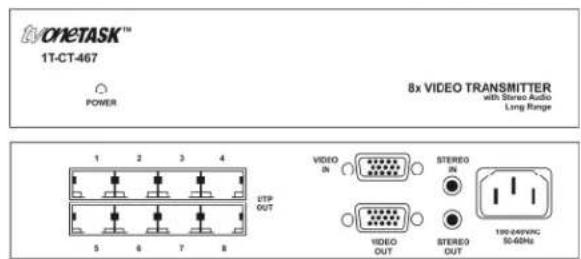
text_image
EVONETASK™ 1T-CT-467 POWER 8x VIDEO TRANSMITTER with Stereo Audio Long Range 1 2 3 4 5 6 7 8 ETP OUT VIDEO IN STEREO IN VIDEO OUT STEREO OUT 190-249VNC 50-60Hz- Connect the source device's video output to the VIDEO IN connector of the Transmitter, using the appropriate cable. All models except the 1T-CT-453 have a VIDEO OUT connector that can provide a loop-thru signal to a local monitor.
- All Transmitter models, except the 1T-CT-441, have audio capability. Connect either the source device's analog stereo or S/PDIF audio output to the either the STEREO IN connector or the S/PDIF IN connector of the Transmitter (1T-CT-467 does not have S/PDIF in). Do not connect both as this will result in interference between the two. The system is designed to support either audio format, but not both at the same time. The audio output of the Transmitter can provide an analog stereo signal for local monitor. If a S/PDIF input is used, this will be converted to analog stereo for this purpose.
- Connect a Cat.5/5E or Cat.6 cable to the UTP OUT connector of the Transmitter. Model 1T-CT-467 has 8 UTP Outputs. All Transmitter models support up to 300 meters (1,000') of CAT.5/5E or CAT.6 premium grade network cables as described in 4.1 above. Model 1T-CT-467 has 8 UTP Outputs. The Receiver model determines the maximum distance of either 150 meters (500') or 300 meters (1,000') of the cable as cam be determined by checking section 4.3 below.
Note – In addition to these three Transmitter models mentioned about, TV One Models C2-1200 and C2-1250 Video Switcher/Scalers have built-in UTP transmitters capable of sending either RGBHV or YPbPr format signals (without audio) up to 1000 feet. Consult the manual for those units when they are being used.
4.2 1T-CT-400 Series Receivers

text_image
VOCETASK™ 1T-CT-442 VIDEO RECEIVER VOC SG GAS LTD 0500A UTP 39
text_image
JNO 0388n OPETASK™ 1T-CT-444 VIDEO RECEIVER Long Range INOC E2 SAN ROS S44W UTP ANLST IN
text_image
1V0 2V0 3V0 4V0 5V0 6V0 7V0 8V0 9V0 10V0 11V0 12V0 13V0 14V0 15V0 16V0 17V0 18V0 19V0 20V0 21V0 22V0 23V0 24V0 25V0 26V0 27V0 28V0 29V0 30V0 31V0 32V0 33V0 34V0 35V0 36V0 37V0 38V0 39V0 40V0 41V0 42V0 43V0 44V0 45V0 46V0 47V0 48V0 49V0 50V0 51V0 52V0 53V0 54V0 55V0 56V0 57V0 58V0 59V0 60V0 61V0 62V0 63V0 64V0 65V0 66V0 67V0 68V0 69V0 70V0 71V0 72V0 73V0 74V0 75V0 76V0 77V0 78V0 79V0 80V0 81V0 82V0 83V0 84V0 85V0 86V0 87V0 88V0 89V0 90V0 91V0 92V0 93V0 94V0 95V0 96V0 97V0 98V0 99V0 100V0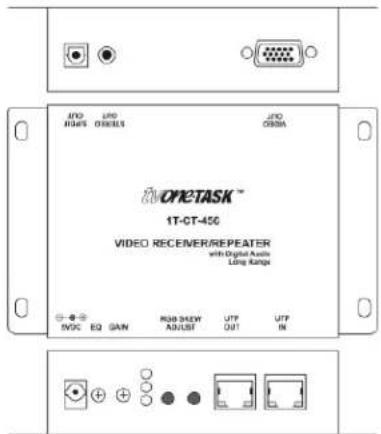
text_image
LTD H34S LTD D80001 LTD C800M NOMETASK™ 1T-CT-456 VIDEO RECENER/REPEATER with Digital Audio Ling Range INOC EQ SAN PSB SHOW ADJUST UTF OUT UTF IN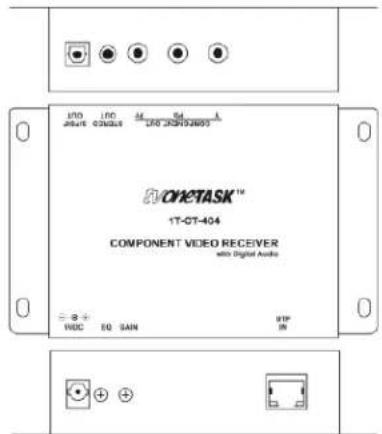
text_image
CHETASK™ 1T-CT-404 COMPONENT VIDEO RECEIVER with Digital Audio VDC EQ SAIN VIP IN- At the remote location, connect the other end of the Cat.5/5E or Cat.6 cable to the UTP IN connector of the Receiver.
- Connect the VIDEO OUT connector of the Receiver to the video input of the remote display or other device, using the appropriate cable.
- If the Transmitter and Receiver models chosen have audio capability, connect the Receiver's STEREO OUT and/or S/PDIF OUT connectors to remote display or other audio device. Both audio outputs may be used simultaneously, regardless of the audio signal format chosen at the transmitter.
- Connect the supplied AC adapters first to the respective Transmitter and Receiver and then to the AC sockets.
- Lastly, turn on the source device and remote display. The source signal should now appear on the remotely located display. If not, consult the Troubleshooting section of this manual.
Once the connections have been made and power applied, there is little in the way of operational adjustments required. All Receivers have Equalization and Gain adjustments. Additionally, the 1T-CT-444 and 1T-CT-456 have Skew Compensation adjustments.
5.1 Equalization and Gain Adjustments
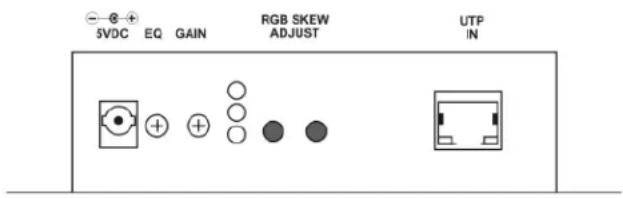
On all Receiver models, locate the EQ (Equalization) and GAIN adjustments on the side of the Receiver.
text_image
SVDC EQ GAIN RGB SKEW ADJUST UTP IN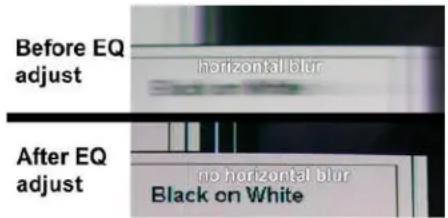
text_image
Before EQ adjust horizontal blur After EQ adjust no horizontal blur Black on WhiteOn long cable runs, the high frequency detail can be lost resulting in a “soft” looking picture. This will first show up in text where the characters will lose their sharp edges. Adjust the EQ can sharpen the image. While viewing an image on a display connected to the Receiver, insert a small screwdriver into the EQ adjustment on the side panel of the Receiver. Rotate gently until the best EQ setting, as determined by image clarity, is achieved.
Then insert the screwdriver into the GAIN adjustment, and rotate gently until the best Gain setting, as determined by the brightness of the image is achieved. You may notice an increase in video noise (sometimes called “snow”) in the picture at higher gain settings so a compromise will have to be found if the cable run is at or near the maximum length. EQ and GAIN settings are retained by the Receiver.
5.2 RGB Skew Compensation Adjustment
RGB images transmitted over long Cat.5/5E or Cat.6 cable paths can sometimes arrive at the destination with the individual RGB pictures no longer in registration. Models 1T-CT-444 and 1T-CT-456 have built in Skew Compensation adjustments to correct this. This adjustment should be made after the EQ and Gain adjustments described above. A good test pattern for RGB Skew adjustment is pictured below and is available for download at the TV One Technical Support website http://tvone.crmdesk.com. After saving the test pattern on the source PC, display and view it while making adjustments on the remote display.

text_image
5VDC EQ GAIN RGB SKEW ADJUST UTP INLocate the RGB Skew Adjust buttons on the side of the Receiver. While watching the remote display, press and HOLD either RGB skew adjust button. After three seconds, the RGB adjust indicator LED starts blinking; Receiver is now in RGB Skew Adjust Mode. The color of the blinking LED indicates the color being adjusted. Colors cycle if you hold the button down steadily.

text_image
Before RGB skew adjust red red blue green green blue SKEW After RGB skew adjust red red blue green green blue SKEWIf you want to nudge the blue image to the left, make sure the blue LED is blinking, then hold the nudge button in and wait until the blue LED is blinking. Then tap the Nudge Left button repeatedly. Each tap will result in a tiny incremental move to the left. There are 32 increments in this adjustment. To shift the blue image to the right, make sure the blue LED is still blinking and tap the Nudge Right button repeatedly. To adjust the Red and Green images, repeat the process, making sure the color you want to adjust is blinking. Adjust the Skew controls until the Red, Blue and Green images are vertically aligned and the white vertical lines show no prismatic halos. When complete, release the adjustment buttons and in 30 seconds the LED will stop blinking and the Receiver reverts to normal operation and the Skew adjustment settings are retained in memory.
6.0 TROUBLESHOOTING
Other than faulty cables or attempting to use the product over too great of distances, there are seldom problems with these Video Extender products.
If there is no image present at the remote location, connect the display device directly to the source to make certain that the problem is not in the display. If an image is present under those circumstances, make certain the transmitter and receiver(s) are receiving power. Next make certain your Cat.5/5E/6 cable is defect free and the RJ-45 connectors are securely attached to the cable at both ends.
After trying the above suggestions should the problem still persist, contact your dealer for additional suggestions before contacting TV One. Should the dealer's technical personnel be unable to assist you, contact TV One via our support website:
http://tvone.crmdesk.com. Create a technical support request on the site and our support team will respond within a short period of time.
7.0 LIMITED WARRANTY
TV One warrants the original purchaser that the equipment it manufactures or sells will be free from defects in materials and workmanship for a fixed term from the date of purchase. The warranty term for specific product lines is defined below.
- TV One branded products based on TV One's CORIO technology are warranted for a period of five years from the date of purchase. This includes products with the model number prefix of C2, 1T-C2, CX, A2 or S2.
- TV One-task branded products, other than those based on TV One's CORIO technology mentioned above, are warranted for a period of three years from the date of purchase. This includes products with the model number prefix of 1T, with the exception of 1T-C2.
- LCD Monitors are warranted for a period of three years from the date of purchase, with the exception of the LCD panels integrated into the monitors that are supplied by third parties. LCD panels are limited to the term and conditions of the warranty offered by the respective LCD panel manufacturer. Such specific LCD panel warranties are available upon request to TV One.
Should a product, in TV One's opinion, prove defective within this warranty period, TV One, at its option, will repair or replace this product without charge. Any defective parts replaced become the property of TV One. This warranty does not apply to those products which have been damaged due to accident, unauthorized alterations, improper repair, modifications, inadequate maintenance and care, or use in any manner for which the product was not originally intended.
If repairs are necessary under this warranty policy, the original purchaser must obtain a Return Authorization Number from TV One and return the product to a location designated by TV One, freight prepaid. After repairs are complete, the product will be returned, freight prepaid.
LIMITATIONS - All products sold are "as is" and the above Limited Warranty is in lieu of all other warranties for this product, expressed or implied, and is strictly limited to two years from the date of purchase. TV One assumes no liability to distributors, resellers or end-users or any third parties for any loss of use, revenue or profit.
TV One makes no other representation of warranty as to fitness for the purpose or merchantability or otherwise in respect of any of the products sold. The liability of TV One with respect to any defective products will be limited to the repair or replacement of such products. In no event shall TV One be responsible or liable for any damage arising from the use of such defective products whether such damages be direct, indirect, consequential or otherwise, and whether such damages are incurred by the reseller, end-user or any third party.
8.0 REGULATORY COMPLIANCE
The 1T-CT-400 Series has been tested for compliance with appropriate FCC and CE rules and regulations. The Power Adaptor/Supplies have been tested for compliance with appropriate UL, CUL, CE, PSE, GS Rules, Regulations and/or Guidelines. These Products and Power Adapters are RoHS Compliant.
9.0 CONTACT INFORMATION
Should you have questions or require assistance with this product in areas not covered by this manual, please contact TV One at the appropriate location.
TV One USA
2791 Circleport Drive
Erlanger, KY 41018
USA
Tel 859-282-7303
Fax 859-282-8225
sales@tvone.com
www.tvone.com
TV One Europe
Continental Approach
Westwood Industrial Estate
Margate, Kent CT9 4JG, UK
Tel +44 (0)1843 873311
Fax +44 (0)1843 873312
sales.europe@tvone.com
www.tvone.eu
TV One Latin America
6991 NW 82 Avenue #8
Miami, FL 33166
USA
Tel 305-396-6275
Fax 305-418-9306
sales.latinoamerica@tvone.com
www.tvonela.com
TV One Mercosur
Av. Diaz Velez 3965 #PB
(1200) Capital Federal
Buenos Aires, Argentina
Tel +54 11 5917-2525
Fax +54 11 4032-0281
sales.mercosur@tvone.com
www.tvonela.com
TV One Asia
16F-4, NO.75, Sec. 1
Hsin Tai Wu Road, Hsichih
Taipei Hsien 22101
Taiwan R.O.C.
Tel +886 2 2698-2296
Fax +886 2 2698-2297
sales.asia@tvone.com
www.tvoneasia.com
TV One China
Rm. 1007, Golden Peach Bldg.
No. 1900 Shangcheng Road
Pudong, Shanghai
China 200120
Tel +86 21 5830-2960
Fax +86 21 5851-7949
Email: sales.china@tvone.com
www.tvonechina.com
End of Manual