EB-193B - Speaker DAP-Audio - Free user manual and instructions
Find the device manual for free EB-193B DAP-Audio in PDF.


User questions about EB-193B DAP-Audio
0 question about this device. Answer the ones you know or ask your own.
Ask a new question about this device
Download the instructions for your Speaker in PDF format for free! Find your manual EB-193B - DAP-Audio and take your electronic device back in hand. On this page are published all the documents necessary for the use of your device. EB-193B by DAP-Audio.
USER MANUAL EB-193B DAP-Audio
natural_image
Black OAP audio recording device with antenna and control panel (no visible text or symbols)Highlite International B.V.
Vestastroat 2
6468 EX Kerkrode
The Netherlands
Congratulations!
You have bought a great, innovative product from DAP Audio.
The DAP Audio EB-193B brings excitement to any venue. Whether you want simple plug-&-play action or a sophisticated show, this product provides the effect you need.
You can rely on DAP Audio, for more excellent audio products.
We design and manufacture professional audio equipment for the entertainment industry.
New products are being launched regularly. We work hard to keep you, our customer, satisfied.
For more information: iwant@dap-audio.info
You can get some of the best quality, best priced products on the market from DAP Audio.
So next time, turn to DAP Audio for more great audio equipment.
Always get the best -- with DAP Audio !
Thank you!

text_image
DAP® AUDIODAP Audio EB-193B™ Product Guide
Warning 3
Unpacking Instructions....3
Safety instructions....3
Operating determinations 4
Return Procedure 4
Claims 4
Description of the device 5
Set Up and Operation....6
Placing the batteries 6
Changing the frequency of the transmitter 6
Locking the EB-193B....6
Unlocking the EB-193B 7
Gain adjustment 7
Approval 8
CE Certificate 9
Maintenance....11
Troubleshooting ....11
Product Specification....12
Warning
FOR YOUR OWN SAFETY, PLEASE READ THIS USER MANUAL CAREFULLY BEFORE YOUR INITIAL START-UP!
Unpacking Instructions
Immediately upon receiving this product, carefully unpack the carton and check the contents to ensure that all parts are present, and have been received in good condition. Notify the dealer immediately and retain packing material for inspection if any parts appear damaged from shipping or the carton itself shows signs of mishandling. Save the carton and all packing materials. In the event that a fixture must be returned to the factory, it is important that the fixture be returned in the original factory box and packing.
Your shipment includes:
• DAP EB-193B
- Storage case
- Screwdriver
- User manual

CAUTION! Keep this device away from rain and moisture!

FOR YOUR OWN SAFETY, PLEASE READ THIS USER MANUAL CAREFULLY BEFORE YOUR INITIAL START-UP!
Safety instructions
Every person involved with the installation, operation and maintenance of this device has to:
- be qualified
- follow the instructions of this manual

CAUTION! Be careful with your operations. With a dangerous voltage you can suffer a dangerous electric shock when touching the wires!

Before your initial start-up, please make sure that there is no damage caused by transportation. Should there be any, consult your dealer and do not use the device.
To maintain perfect condition and to ensure a safe operation, it is absolutely necessary for the user to follow the safety instructions and warning notes written in this manual.
Please consider that damages caused by manual modifications to the device are not subject to warranty.
This device contains no user-serviceable parts. Refer servicing to qualified technicians only.
IMPORTANT:
The manufacturer will not accept liability for any resulting damages caused by the non-observance of this manual or any unauthorized modification to the device.
- Never remove warning or informative labels from the unit.
- Never leave any cables lying around.
- Do not open the device and do not modify the device.
- Do not switch the system on and off in short intervals, as this would reduce the system's life.
- Do not drive the inputs with a signal level bigger, than required to drive the equipment to full output.
-
Only use device indoor, avoid contact with water or other liquids.
-
Avoid flames and do not put close to flammable liquids or gases.
• Make sure you don't use the wrong kind of cables or defective cables. - Please turn off the power switch, when changing the power cord or signal cable, or select the input mode switch.
- If the system has been exposed to drastic temperature fluctuation (e.g. after transportation), do not switch it on immediately. The arising condensation water might damage your system. Leave the system switched off until it has reached room temperature.
- If your Dap Audio device fails to work properly, discontinue use immediately. Pack the unit securely (preferably in the original packing material), and return it to your Dap Audio dealer for service.
• Repairs, servicing and electric connection must be carried out by a qualified technician.
Operating determinations
If this device is operated in any other way, than the one described in this manual, the product may suffer damages and the warranty becomes void.
Improper installation can cause serious damage to people and property!
⚠️ Return Procedure ⚠️
Returned merchandise must be sent prepaid and in the original packing, call tags will not be issued. Package must be clearly labeled with a Return Authorization Number (RMA number). Products returned without an RMA number will be refused. Highlite will not accept the returned goods or any responsibility. Call Highlite 0031-455667723 or mail aftersales@highlite.nl and request an RMA prior to shipping the fixture. Be prepared to provide the model number, serial number and a brief description of the cause for the return. Be sure to properly pack fixture, any shipping damage resulting from inadequate packaging is the customer's responsibility. Highlite reserves the right to use its own discretion to repair or replace product(s). As a suggestion, proper UPS packing or double-boxing is always a safe method to use.
Note: If you are given an RMA number, please include the following information on a piece of paper inside the box:
1) Your name
2) Your address
3) Your phone number
4) A brief description of the symptoms
Claims
The client has the obligation to check the delivered goods immediately upon delivery for any shortcomings and/or visible defects, or perform this check after our announcement that the goods are at their disposal. Damage incurred in shipping is the responsibility of the shipper; therefore the damage must be reported to the carrier upon receipt of merchandise.
It is the customer's responsibility to notify and submit claims with the shipper in the event that a fixture is damaged due to shipping. Transportation damage has to be reported to us within one day after receipt of the delivery.
Any return shipment has to be made post-paid at all times. Return shipments must be accompanied with a letter defining the reason for return shipment. Non-prepaid return shipments will be refused, unless otherwise agreed in writing.
Complaints against us must be made known in writing or by fax within 10 working days after receipt of the invoice. After this period complaints will not be handled anymore.
Complaints will only then be considered if the client has so far complied with all parts of the agreement, regardless of the agreement of which the obligation is resulting.
Description of the device
Features
The EB-193B is a professional wireless microphone from Dap Audio. There are two ranges available:
D145273B, frequency range 740 - 764Mhz
D145282B, frequency range 822 - 846Mhz
• 193 switchable frequencies.
- Powered by AA batteries.
• Equipped with 4P mini XLR connector.
• True diversity, minimum dropouts.
Overview
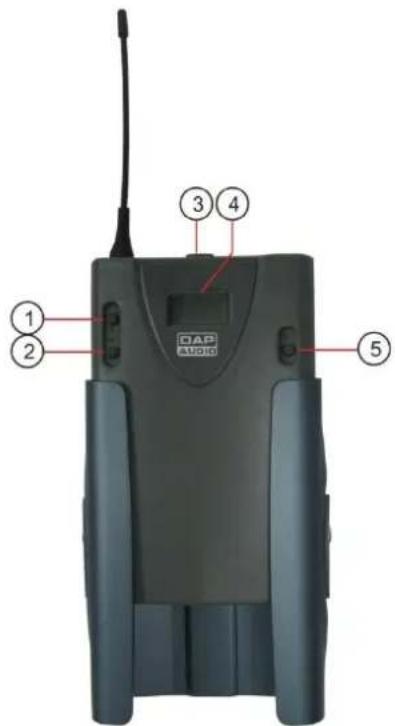
text_image
DAP AUDIO ① ② ③ ④ ⑤Fig. 1
- Up Button
- Down Button
- On/Off Button
- Display
- Set Button
Installation
Remove all packing materials from the EB-193B. Check that all foam and plastic padding is removed. Always disconnect from electric mains power supply before cleaning or servicing. Damages caused by non-observance are not subject to warranty.
The DAP EB-193B is a beltpack transmitter which can be used with the optional DAP EH-1 stage headset microphone (D1416), the optional EL-1 Lavalier microphone (D1415), the optional EH-2 Head microphone (D1420), the optional EL-2 miniature Lavalier microphone (D1419) or the optional GC-1 Guitar cable (D1417). A suitable (optional) receiver is the DAP ER-1193(B) (D145073(B) or D145082(B)).
Set Up and Operation
Before turning the EB-193B on, always make share that the frequency range is allowed in your country.
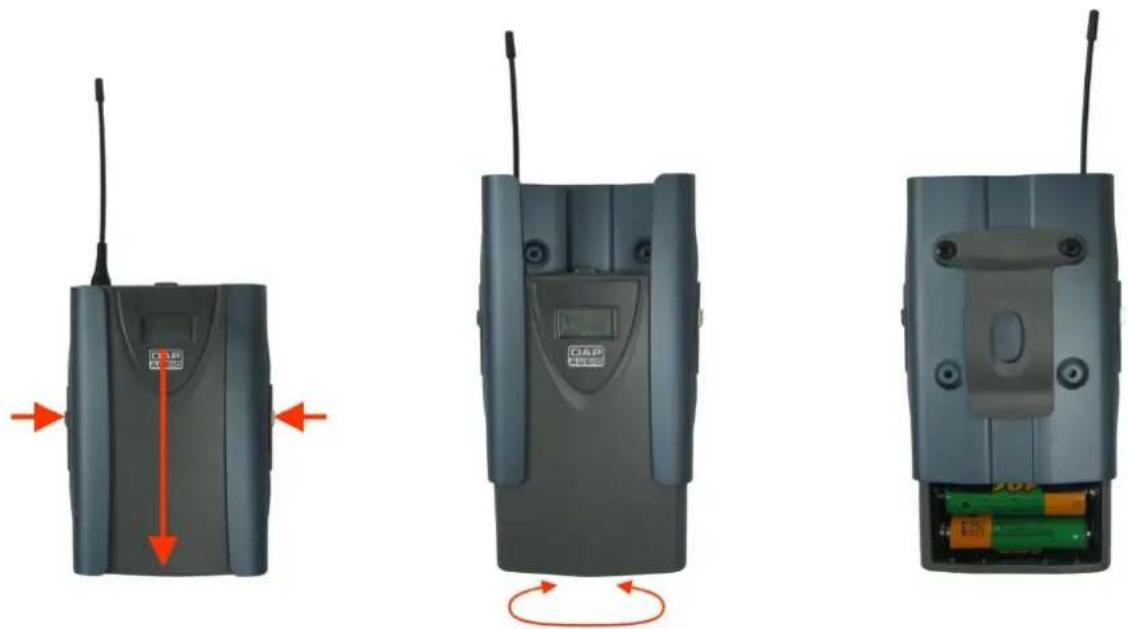
Placing the batteries
natural_image
Three views of a CD4003 wireless device showing external, internal, and external wiring (no text or symbols visible)1) Open the battery compartment.
2) Put 2 batteries (2x Battery UM3, AA1.5V) in the holder. Pay attention to the polarity of the batteries and put them in correctly. Now close the battery compartment again.

text_image
INPUT ON OFF3) Set the switch on top in the ON position.
Changing the frequency of the transmitter
1) Press and hold the set(5) button for 3 seconds. The display shows FREQUE. After a second, the display shows the actual frequency while the MHz symbol blinks.
2) Use the up(1) and down(2) buttons to select the desired frequency.
3) Press the set(5) button again to store the setting. The display will briefly show STORE. Now the setting is stored in memory.
Locking the EB-193B
The EB-193B has a locking function. When activated, the locking function blocks all keys so you can't accidentally switch the EB-193B off or change the frequency while performing.
1) Press and hold the set(5) button for 3 seconds. The display shows FREQUE.
2) Tap the set(5) button again, the display will show LOC OFF.
3) Press the up(1) buttonto turn the lock function on.
4) Press the set(5) button again. The display will briefly show STORE. Now the setting is stored in memory.
Unlocking the EB-193B
1) Press and hold the set(5) button for 3 seconds. The display shows FREQUE.
2) Tap the set(5) button again, the display will show LOC ON.
3) Press the down(2) buttonto turn the lock function on.
4) Press the set(5) button again. The display will briefly show STORE. Now the setting is stored in memory.
Gain adjustment
1) Uncover the gain trimpot.

natural_image
Three views of a DAP radio device showing antenna, ear, and keypad components with red directional arrows indicating motion (no text or symbols)2) Turn the trimpot using the supplied screwdriver.
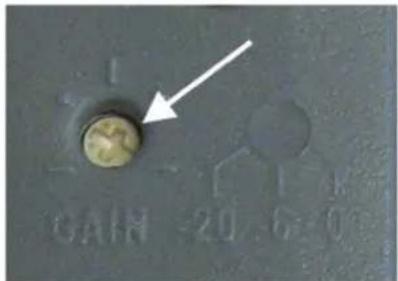
text_image
CAIN -20.6-0Tips for achieving maximum performance.
• Make sure you can always see a receiver antenna from the transmitter position.
- Keep the distance from transmitter to receiver antenna as short as possible.
- Point the receiver antennas away from each other at 45 degrees angle from vertical position.
- Avoid placing the receiver antennas near metal surfaces and obstructions.
- Replace battery as soon as the low battery indicator in the appears on the display.
- If stacking or rack mounting receivers in a multiple system setup. Do not allow antennas to cross.
- Perform a walk-through before performance or presentation. If dead spots are found, adjust the location of the receiver. If dead spots remain, mark the dead spots and avoid them.
Approval
The DAP D145273B and the D145282B are Class II wireless devices.
D145273B: 740-764 MHz for use in: Austria, Belgium, Denmark, France, Luxembourg, Netherlands, Poland, Sweden, Switzerland, Turkey.
D145282B: 822–846 MHz for use in: Germany, France, Luxemburg, Poland, Turkey.
Exclusion of liability
The frequency tables in this publication are made according to national laws and regulations. The frequencies are checked on a regular basis. We don't take any responsibility for eventual discrepancies between our listed frequencies and the frequencies actually approved in a given country. We strongly suggest you to inform in your own country or region for any changes or adaptations regarding the allowed frequencies.
Be aware that in some countries, you are only allowed to partly use the frequency range of the device. If your country is not listed above it is still possible that there are exceptions. Therefore, we strongly advice you to consult your local authority as listed below:
Telecoms & Postal Regulatory Authorities in Europe
Belgium: Belgian Institute of postal services and telecommunications (BIPT) www.bipt.be
Czech Republic: Czech Telecommunication Office www.ctu.cz
Denmark: National Telecom Agency www.tst.dk
Finnland: Finnish Communications Regulatory Authority (FICORA) www.ficora.fi
Iceland: Post and Telecom Administration (PTA) www.pta.is
Ireland: Commission for Communications Regulation (ComReg) www.comreg.ie
Italy: Italian Communications Authority (AGC) www.agcom.it
Latvia: Telecommunication State Inspection www.vei.lv
Liechtenstein: Office for Communications (AK) www.ak.li
Lithuania: Radio Administration www.rrt.lt
Luxembourg: Institut Luxembourgeois des Télécommunications (ILT) www.etat.lu/ILT
Norway: Norwegian Post and Telecommunications Authority (NPT) www.npt.no
Applicable Standards Details
R&TTE Directives: 1999/5/EC
Applied Specifications / Standards
Safety EN 60065: 2002+A1: 2006+A11: 2008
EN 50371:2002
EMC EN 301 489-1 V 1.8.1
EN 301 489-9 V 1.4.1
RF Spectrum EN 300 422-2V 1.2.2
The product shall be marked with the CE conformity marking
and our Notified Body number as shown on the right.
CE1856!
Supplementary Information
The conformity to above standards is verified by TÜV Rheinland (Nofitted Body).
Declaration
I hereby declare under our sole responsibility that the product mentioned above to which this declaration relates complies with the above mentioned standards and Directives
Highlite International BV.
Signature of representative
Supplier Details
Name
Highlite International BV
Address
Vestastraat 2
6468EX Kerkrade
The Netherlands
Product Details
Product Name
EB-193B Wireless PLL 822-846MHz Black
Ordercode
D145282B
Trade Name
DAP AUDIO
Applicable Standards Details
R&TTE Directives: 1999/5/EC
Applied Specifications / Standards
Safety EN 60065: 2002+A1: 2006+A11: 2008
EN 50371:2002
EMC EN 301 489-1 V 1.8.1
EN 301 489-9 V 1.4.1
RF Spectrum EN 300 422-2V 1.2.2
The product shall be marked with the CE conformity marking
and our Notified Body number as shown on the right.
CE1856!
Supplementary Information
The conformity to above standards is verified by TÜV Rheinland (Nofitied Body).
Declaration
I hereby declare under our sole responsibility that the product mentioned above to which this declaration relates complies with the above mentioned standards and Directives
Highlite International BV.
Signature of representative
Maintenance
The DAP Audio EB-193B requires almost no maintenance. However, you should keep the unit clean. Disconnect the mains power supply, and then wipe the cover with a damp cloth. Do not immerse in liquid. Do not use alcohol or solvents.
Keep connections clean. Disconnect electric power, and then wipe the DMX and audio connections with a damp cloth. Make sure connections are thoroughly dry before linking equipment or supplying electric power.
Troubleshooting
DAP Audio EB-193B
This troubleshooting guide is meant to help solve simple problems. If a problem occurs, carry out the steps below in sequence until a solution is found. Once the unit operates properly, do not carry out following steps.
- If the device does not operate properly, set the switch on the beltpack in OFF position.
- Check the batteries, etc.
- If all of the above appears to be O.K., Set the switch in ON position.
- If you are unable to determine the cause of the problem, do not open the beltpack, as this may damage the unit and the warranty will become void.
- Return the beltpack to your DAP Audio dealer.
Product Specification
Model: DAP Audio EB-193B
Power: Battery 2x UM2, AA1,5V
Dimensions: 105 x 72 x 30 mm (LxWxH)
Weight: 1,08 Kg
Frequency Preparation: Crystal
Carrier Frequency Range D145273(B): 740-764MHz
D145282(B): 822-846MHz
RF Output: 10 mW
Stability: ±0.005%
Frequency Deviation: ±48 kHz
Controls: Power On/Off, AF gain, Frequency Up/Down, Lock-on mode
Spurious Rejection: < -60 dBC
Audio Freq. Response: 50Hz - 16kHz
Phantom Power: 5Vdc (pin 2)
Battery: UM3, AA 1,5V x 2
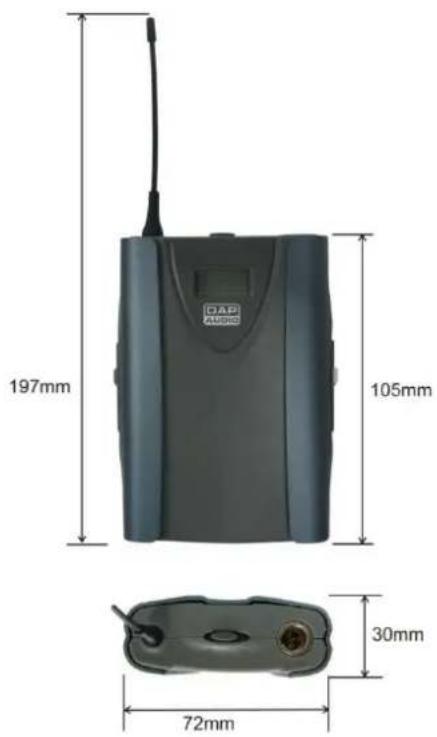
text_image
197mm 105mm 30mm 72mm OAP AUDIODesign and product specifications are subject to change without prior notice.
CE
Website: www.Highlite.nl
Email: service@highlite.nl

text_image
DAP® AUDIO© 2012 DapAudio.