MIS50 - Air-conditioner MIDEA - Free user manual and instructions
Find the device manual for free MIS50 MIDEA in PDF.


User questions about MIS50 MIDEA
0 question about this device. Answer the ones you know or ask your own.
Ask a new question about this device
Download the instructions for your Air-conditioner in PDF format for free! Find your manual MIS50 - MIDEA and take your electronic device back in hand. On this page are published all the documents necessary for the use of your device. MIS50 by MIDEA.
USER MANUAL MIS50 MIDEA
OWNER'S MANUAL FOR MODELS
MIS26, MIS35, MIS50, MIS→0 & MIS80
PROU→LY →ISTRIBUTE→BY


text_image
CASTELMI→EA CUSTOMER & TECH SUPPORT
PH: 1300 726 002
PLEASE READ THIS MANUAL

Inside you will find many helpful hints on how to use and maintain your air conditioner properly5 Just a little preventative care on your part can save you a great deal of time and money over the life of your air conditioner5 You'll find many answers to common problems in the chart of troubleshooting tips5 If you review the chart of Troubleshooting Tips first, you may never need to call for service5
CONTENTS
Safety Precautions & Warning 3
Caution 4
NAMES OF PARTS
Indoor unit 4
Outdoor unit 4
→isplay window 5
OPERATING INSTRUCTIONS
Operating temperatures 5
Manual operation 6
Airflow directional control 6
How the air conditioner works 7
Special functions 8
CARE & MAINTAINENCE
Care & Maintenance 9
Cleaning the unit 9
Cleaning the air filter and air freshening filter 9
Preparation for extended non-operation 9
Pre-season inspection 9
TROUBLESHOOTING TIPS
Troubleshooting tips 10
Troubleshooting guide 11
REMOTE CONTROLLER FUNCTIONS
Operation of Remote Control Buttons 12-14
Indicators on Remote LC→ screen 15
Auto operation 16
Cooling/Heating/Fan & →ehumidifier operation 16
Timer operation 17-19
Remote Controller Handling 20
CONGRATULATIONS ON THE PURCHASE OF YOUR MI→EA MISSION SERIES INVERTER AIR CON→ITIONER.....THANK YOU.
→ISPOSAL: Do not dispose of this product as unsorted municipal waste. Collection of such waste separately for special treatment is necessary.
It is prohibited to dispose of this appliance in domestic household waste. For disposal, there are several possibilities:
A) The municipality has established collection systems, where electronic waste can be disposed of by the user.
B) When buying a new product, the installer will dispose of the old product.
C) As old products contain valuable resources, they can be sold to scrap metal dealers.
Unrestricted disposal of waste into forests and natural landscapes endangers peoples health when hazardous substances leak into the ground-water and find their way into the food chain.
It is suggested that this appliance can be used by children aged from 8 years and above and persons with reduced physical, sensory or mental capabilities, or lack of experience and knowledge if they have been given supervision or instruction concerning use of the appliance in a safe way and understand the hazards involved. Children should not play with the appliance. Cleaning and user maintenance should not be done by children without supervision.


text_image
Warning sign depicting a flame symbol in yellow and black on white backgroundR32 REFRIGERANT
CAUTION
Ensure all installation or Service work is only carried out by licensed personnel.



SAFETY PRECAUTIONS
To prevent injury to the user or other people and also property damage, the following instructions must be followed. Incorrect operation due to ignoring of instructions may cause harm or damage.
The seriousness is classified by the following indications.
| WARNING | This symbol indicates the possibility of death or serious injury. |
| CAUTION | This symbol indicates the possibility of injury or damage to property. |
■ Meanings of symbols used in this manual are as shown below.
| Strictly prohibited. | |
| Be sure to follow the instructions. |
WARNING
- Do not expose your body directly to the cool air for a prolonged period.
- Never poke fingers or other objects in the air inlet and outlet vents.
- Never attempt to repair0 relocate0 and modify the air conditioner yourself. Always contact your service provider if required.
- Do not operate your air conditioner in a wet room such as a bathroom or laundry room.
- In the event of any abnormalities such as a burning smell0 immediately switch off the device and contact your service provider.
• Always switch off the device before you start to clean it. - Contact an authorized installer for installation of this unit5
-
Contact an authorized service technician for repair or maintenance of this unit5
-
Never activate any switches with wet hands as it may cause an electric shock.
- Never use the device for any other purpose than the intended use. Never place objects on the unit.
- Do not expose plants or animals directly to the air flow.
- Never use combustible cleaning agents as these could cause a fire or deformation of the unit.
- Never place any burning objects close to the device if they could be directly affected by the emitted air. 1Candles etc)
- Never step onto the outdoor unit and never place anything on it.
- Never use an unsteady or rusty base for the outdoor unit mounting.
- Never install the air conditioner in places where combustible gas can be emitted as emitted gas may collect and cause an explosion.
- Never allow the air conditioner to run for too long with the doors or windows open.
- If the air conditioner is to be used in conjunction with other heating appliances0 the air in the room should be refreshed periodically0
- Always switch the unit off at the Mains switch if the unit is not going to be used for any lengthy period of time.
- Always switch off the air conditioner during an electrical storm otherwise0 electrical parts may get damaged.
- Check that the condensate drainage line is correctly connected. If not0 water will escape onto furnishings in the room
- For electrical safety purposes it is recommended that unit is installed with an earth leakage circuit%breaker.

text_image
Air inlet ① ② ③ ④ ⑤ ⑥ ⑦ Air outlet ⑧ Air inlet(side) Air inlet(rear) ⑨ ⑩ Air outletNAME OF PARTS
IN→OOR UNIT:
- Front panel
- Air inlet
- Air filter
- Air outlet
- Horizontal air flow grille
- Vertical air flow louver (inside)
- →isplay window
OUT→OOR UNIT:
- Connecting pipe (Installer to supply)
- Connecting cable (Installer to supply)
- Stop valve
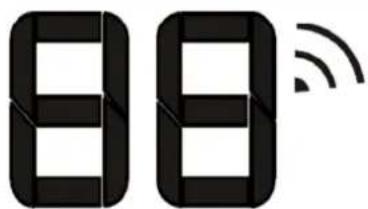
Display window
text_image
88
WIFI control display(optional):
Displays when the WIFI control feature is activated. (Not available when the unit does not have this optional kit installed)
DISPLAY WINDOW
Digital display:
- Displays the temperature settings when the air conditioner is operational.
- Displays the room temperature in FAN mode.
• Displays the self-diagnostic codes.
- Displays ON for three seconds when Timer ON or when Swing, Turbo or Silence feature is activated.
- Displays OF for three seconds when Timer OFF is set.
- Displays OF for three seconds when Swing, Turbo or Silence feature is cancelled.
- Displays df under defrosting operation.
- Displays cf when anti-cold air feature is activated under heating mode.
- Displays SC during self clean operation (if applicable).
- When ECO function is activated, the 88 in the display window illuminates gradually one by one as E C O Set temperature E ... in one second intervals
| TEMPERATURE\MODE | Cooling Operation | Heating Operation | Drying Operation |
| Room Temperature | 17^ 32^ | 0^ 30^ | 10^ 32^ |
| Outdoor Temperature | 0^ 50^ | -15^ 30^ | 0^ 50^ |
NOTE:
-
Optimum performance will be achieved within these operating temperatures however capacities reduce as Outdoor ambient approaches the limits. If air conditioner is used outside of the above conditions, certain safety protection features might come into operation and cause the unit to function abnormally.
-
If the air conditioner runs for a long time in cooling mode and the humidity is high (over 80%), condensed water may drip from the unit. In this instance please set the vertical air flow louver to its maximum angle (vertically to the floor) and set HIGH fan mode.
text_image
AUTO/COOL Manual switchAirflow directional control

text_image
Range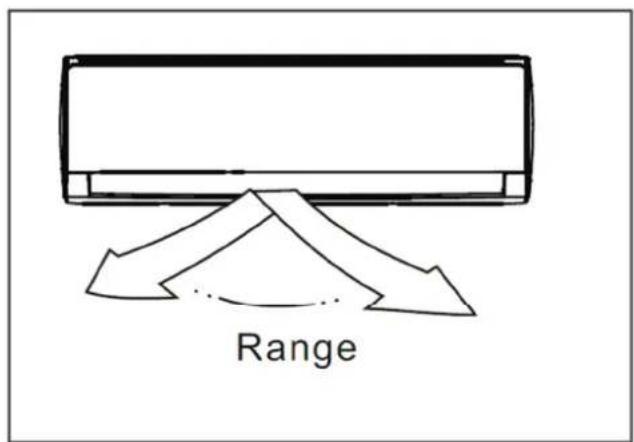
text_image
RangeManual Operation
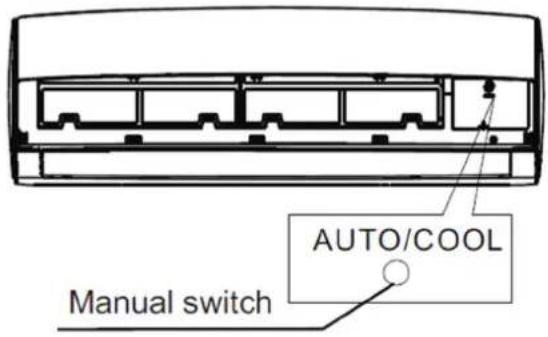
Units are equipped with a switch to run an emergency operation mode. It can be accessed by opening the front panel. This switch is used for manual operation in case the remote controller fails to work or maintenance is necessary.
NOTE:
The unit must be turned off before operating the manual control button. If the unit is operational, continue pressing the manual control button until the unit is off.
Manual Operation (Continued)
1) Open and lift the front panel up to an angle until it remains fixed with a clicking sound.
2) One press of the manual control switch will lead to the forced AUTO operation. If pressed twice within five seconds, the unit will operate under forced COOL operation.
3) Close the panel firmly to its original position.
CAUTION:
This switch is normally used for testing purposes only. Please do not use it unless necessary. To restore the remote controller operation, use the remote controller directly.
- Adjust the air flow direction properly, otherwise it might cause discomfort or cause uneven room temperatures.
- Adjust the horizontal louver using the remote controller.
Adjusting vertical air flow (Up--→own)
Perform this function while the unit is in operation. Use the remote controller to adjust the vertical air flow direction by pressing the

Swing button The horizontal louver will start non-stop up/down swing. The indoor unit displays "on" for a second then reverts back to the Temperature display. If you press the button again, horizontal louver stops at the angle it as of that moment and unit displays "of" for a second.
Adjusting horizontal air flow (left - right)
Again, press this button for 2 seconds to start/stop vertical louver movement (Left to right). Pressing again for 2 seconds will stop left to right movement at angle when button was pressed.
IMPORTANT: Do not put your fingers into the air vents as the high-speed fan inside may cause injury.

CAUTION
Do not operate the air conditioner for long periods with the air flow direction set downward in cooling or dehumidifying mode otherwise condensation may form on the surface of the horizontal louver causing moisture to drop on to the floor or on furnishings. After a quick restart, the horizontal louver may remain static for approximately 10 seconds. Open angle of the horizontal louver should not be set too small, as COOLING or HEATING performance may be reduced due to too restricted air flow area. Do not move the horizontal louver manually, otherwise the horizontal louver will be out of sync. If this happens, please cease operating, disconnect power for a few seconds and then restart the air conditioner.
How the Air Conditioner Works.
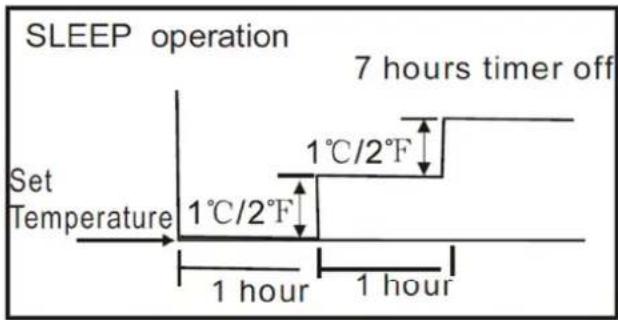
text_image
SLEEP operation 7 hours timer off Set Temperature 1°C/2°F 1°C/2°F 1 hour 1 hourCooling

flowchart
graph TD
    A["Set Temperature"] --> B["1 hour"]
    B --> C["1 hour"]
    D["SLEEP operation"] --> E["7 hours timer off"]
    style A fill:#f9f,stroke:#333
    style B fill:#ccf,stroke:#333
    style C fill:#cfc,stroke:#333
    style D fill:#fcc,stroke:#333
    note right of A: 'Set Temperature'
    note right of D: '1°C/2°F'
Heating
Basic operation modes:
AUTO/COOL/→RY/HEAT
When you set the air conditioner in AUTO mode, it will automatically select cooling, heating or fan only operation depending on your required SET temperature and the current room temperature.
The air conditioner will control room temperature automatically to the temperature point you set.
If you feel uncomfortable in the AUTO mode, you can set your desired temperature.
SLEEP OPERATION
When selected, the set temperature will increase (cooling) or decrease (heating) by 1^ C per hour for the first 2 hours. Thereafter it keeps this new temperature for 5 hours before switching off.
This operation saves energy and improves night time comfort by synchronising with the body's metabolism.
→RYING OPERATION
The temperature is regulated while dehumidifying by The unit repeating turning on and off the cooling operation or fan only. The fan speed is set to LOW.
HEATING OPERATION
This air conditioner operates on the heat-pump principle, absorbing heat from air outdoors and transferring that heat to the indoor unit. As a result, the operating performance is reduced as outdoor air temperature drops.
OPTIMAL OPERATION
To achieve optimal performance, please note the following:
Adjust the air flow direction correctly so that it is not forwards people.
Adjust the temperature to achieve moderate comfort levels. Excessively low or high temperature waste energy.
Improve performance by keeping windows and doors closed.
Limit energy usage (run time) by using the TIMER function.
Do not put any object near air inlet or air outlet, as the efficiency of the air conditioner may be reduced and may cause the air conditioner to stop running.
Inspect the air filters periodically, and clean them when needed.
Special functions
Louver Angle Memory Function:
Within the scope of louver angle safety, the horizontal louver angle is memorised and will return to the position last selected by the user.
If last angle exceeds the believed safe angle, it will memorise as close as possible to last position selected. This will not happen when Turbo or manual control buttons are pressed or after a power interruption.
We strongly suggest that the open angle of the horizontal louver should not be set too small, in case condensed water forms and drips from the horizontal louver.
SELF CLEAN function
Airborne bacteria use the moisture on the indoor heat exchanger (Evaporator) to grow. Regular drying of the exchanger (Evaporator) prevents this growth.
By simply choosing the SELF CLEAN function, the system will automatically manage the process. This cleaning action may be done as frequently as desired. The unit will operate in the following sequence:
FAN mode at Low fan speed—Heating operation with LOW fan speed ---FAN operation--Stop Operation---Turn off.
Note:
- This function is only activated in COOLING or DRY mode.
- Before activation it is recommended the air conditioner has been running for 30 minutes under cooling operation.
- Pressing the SELF CLEAN or ON/OFF button again during the cleaning cycle will cancel the operation and turn the unit off.
Anti-mildew function
When unit is turned off in COOL, DRY,AUTO (Cool) mode, the air conditioner will continue operating for about 10 minutes with very low airflow. This will help to dry up the condensed water inside the evaporator, and help prevent mildew growth. Under Anti-mildew operation, do not restart the air conditioner until the unit is completely off.
Anto-restart function
After a power interruption such as a blackout, the air conditioner stops but it restarts automatically and performs previous operation when the power supply returns.
WIFI Control Function (optional)
If optional WIFI Kit has been installed, the unit can be controlled either by the supplied remote controller or by Smart phone.
(Instructions are supplied with optional WIFI kit)
Air Filter Reminding Function
Cleaning filter reminding function:
After 240 hours of operation, the indoor unit display window will display and flash CL. This is a reminder to clean the Air Filters for more efficient operation. After 15 seconds, the system will revert back to the previous display again. When the CL indicator appears and flashes, please press button on remote controller for 4 times or press the Manual control button for 3 or more times to clear the registered hours, otherwise the CL indicator will display and flash again for another 15 seconds the next time the unit is started
Replacing filter reminding function:
After 2880 hours of operation, the indoor display window will display and flash nF. This feature is a reminder to replace the Air Filter for more efficient operation. After 15 seconds, the system will revert back to the previous display again. When the nF indicator appears and flashes, please press the button on remote controller for 4
times or press the Manual control button for 3 or more times to clear the registered hours, otherwise the nF indicator will display and flash again for another 15 seconds the next time the unit is started
Mute operation
→O NOT →ISTURB BUTTON
Press this button on the remote to turn off the indoor screen display and also to turn off the Air conditioner Buzzer. The fan speed shifts to low which creates a comfortable and quiet environment.
Pressing the button again cancels this function.
Care & Maintenance.
natural_image
Diagram of a mechanical device with hands holding a sheet, showing internal components and directional arrows (no text or symbols)
text_image
Filter Tab
natural_image
Line drawing of a hand pressing down on a car air vent with a downward arrow (no text or symbols)
text_image
Air freshening filter
natural_image
Two hand-drawn illustrations of a grid-based computer keyboard, one with a finger pointing at the top and the other with a mouse (no text or symbols)Before any maintenance, please ensure unit is switched off:
WARNING:
Servicing shall only be performed as recommended by the equipment manufacturer.
Basic maintenance can be done by the consumer however any Repairs to this equipment requires skilled personnel competent in the use of flammable refrigerants.
Please Contact MI→EA CUSTOMER & TECH SUPPORT on 1300 726 002 for further advice.

CAUTION
Do not use any chemically treated cloth or duster to clean the unit.
Do not use benzine, thinners, polishing powder or similar solvents for cleaning. These may cause the plastic surface to crack or deform.
Never use water hotter than 40^ C to clean the front panel (or air filters) as it could cause deformation or discoloration.
Cleaning the air filter and air freshening filter
A clogged air filter reduces the cooling efficiency of this unit. It is recommended to clean the filter once every 2 weeks.
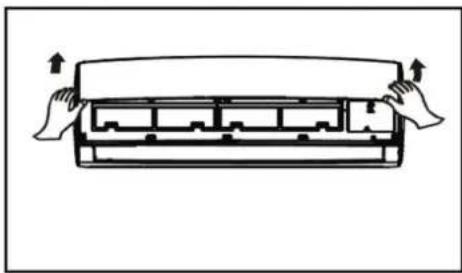
- Open the front panel by carefully lifting both ends at the same time. At a certain angle, a clicking sound is heard and it becomes self-supporting. For some models please use the suspension bars to prop up the panel.
- Use the tab provided to move the filter first up a little, then slightly towards you. Now extract the filter by gently drawing downwards.
- Unclip the small air freshening filter from the large air filter. Clean it with vacuum, and replace it occasionally.
- Clean the large air filter with soapy water. Rinse with fresh water. Shake off excess water and dry it in a cool place. (May shrink if put into sunny position)
Preparation for extended non-operation
1) Clean the indoor unit and filters and operate the fan for about half a day to dry the inside of the unit.
2) Stop the air conditioner and disconnect power.
3) Remove the batteries from the remote controller.
Pre-season inspection
If the unit has been idle for a long time, please check and clean the indoor unit and its filters.
The outdoor unit requires periodic maintenance and cleaning. It is suggested you contact your dealer or service provider who will inspect for damaged or disconnected wires, check for water or oil leaks and check if the air outlets or inlets have been blocked while unit has been idle.
Troubleshooting Tips
The following events may occur during normal operation, and may not indicate malfunction.
| SYMPTOM | Possible Cause |
| Operation is delayed after restart | To prevent fuses blowing, the compressor will not operate while the protection circuit is working for about 3 minutes after sudden OFF—ON operation of the power supply |
| Fan speed changes to off, very slow and then normal | This automatically happens in heating mode:-- prevents cold air blowing onto occupants when the heating operation is first started.-- during automatic defrosting operation,-- during low temperature heating operation |
| Heating operation stops suddenly and defrost-light blinks on indoor unit | In HEAT mode, the indoor unit may temporarily stop for maximum of 10 minutes to perform the automatic defrosting operation |
| Mist coming out of the indoor unit | In COOL mode, a mist generated by condensation formed by sudden cooling process may be emitted. |
| Mist may also be seen due to moisture generated from defrosting process when the air conditioner restarts in HEAT mode operation after defrosting. | |
| Low volume sounds are emitted by the air conditioner | Hissing sound-- during operation or immediately after stopping the air conditioner a refrigerant flowing sound may be heard |
| Squeaking sound-- normal expansion and contraction of plastic and metal parts caused by temperature change during operation. | |
| Rushing air-- when louver resets its position. | |
| →ust discharges from indoor unit | May occur when air conditioner is used for the first time or has not been used for a long time. |
| Emits a peculiar odour | Various smells generated from interior textiles, furniture, or cigarette smoke absorbed into the air conditioner may be emitted.Any burning smell must be reported immediately. |
| Changes to fan speed only while cooling or heating mode | Room temperature has reached the temperature setting of the remote control.If not the case call the contact TECH support.. |
| Operation is erratic, unpredictable or unresponsive | Interference from cell phone towers and remote boosters may cause the unit to malfunction. Flourescent lighting can also interfere with signal transmission from Remote. |
| Disconnect the power and then re-connect. | |
| Press the ON/OFF button on the remote controller to restart operation. |
NOTE: If any problems are not resolved, please contact either your dealer or a local dealer or
MI→EA CUSTOMER & TECH SUPPORT on 1300 726 002 for further advice. Be sure to inform them details of the malfunctions and unit model number..
Troubleshooting Guide
Before you call for or request servicing, troubleshoot a problem by performing following checks:
| SYMPTOM | →iagnostic |
| Unit will not operate | -- Is there a power failure? |
| -- Has a switch been turned off, a circuit breaker tripped or a fuse blown? | |
| -- Is the timer operating? | |
| -- Are the batteries used in the remote controller exhausted? | |
| -- Are the batteries used in the remote controller loaded properly? | |
| Poor cooling or heating performance | -- Are the air filters dirty? |
| -- Is air flow unrestricted in & out of indoor & outdoor units? | |
| -- Are the temperature and mode settings correct? | |
| -- Have the windows or doors been left opened? | |
| -- Is fan speed on high and louvers allowing maximum flow? | |
| -- Is direct or strong sunlight shining into the room in cooling operation? | |
| -- Are there other heating devices or computers operating, or too many people in the room in cooling operation? | |
| -- Is the SILENCE function is activated? Under SILENCE operation, noise reduction is prioritized and the air-conditioning performance may become lower. | |
| Indicator lamps continue flashing | -- The unit may stop operation or continue to run in a safety condition (depending on models). Waiting for about 10 minutes, the fault may be recovered automatically. if not, disconnect the power and then connect it again. If the problem still exists, disconnect the power and contact the customer service center. |
| Error code appears on the indoor unit such as: E0,E1,E2.... P1,P2,P3.....or F1, F2,F3 |
If the problem persists after you have performed these checks or diagnostics, immediately stop operation and contact the authorized service center. Be sure to inform them details malfunctions and unit model number.

CAUTION
In the case of ANY of the following, turn off the unit immediately!
-- Power cord is damaged or abnormally warm.
-- Burning odous are smelled.
-- Loud or abnormal sounds are heard.
-- Power fuse keeps blowing or a circuit breaker trips frequently.
-- Water or other objects fall into or out of the unit.

→O NOT ATTEMPT TO CORRECT THESE ITEMS YOURSELF! CONTACT THE AUTHORIZE→SERVICE PROVI→ER!
Operation of Remote Control Buttons.

text_image
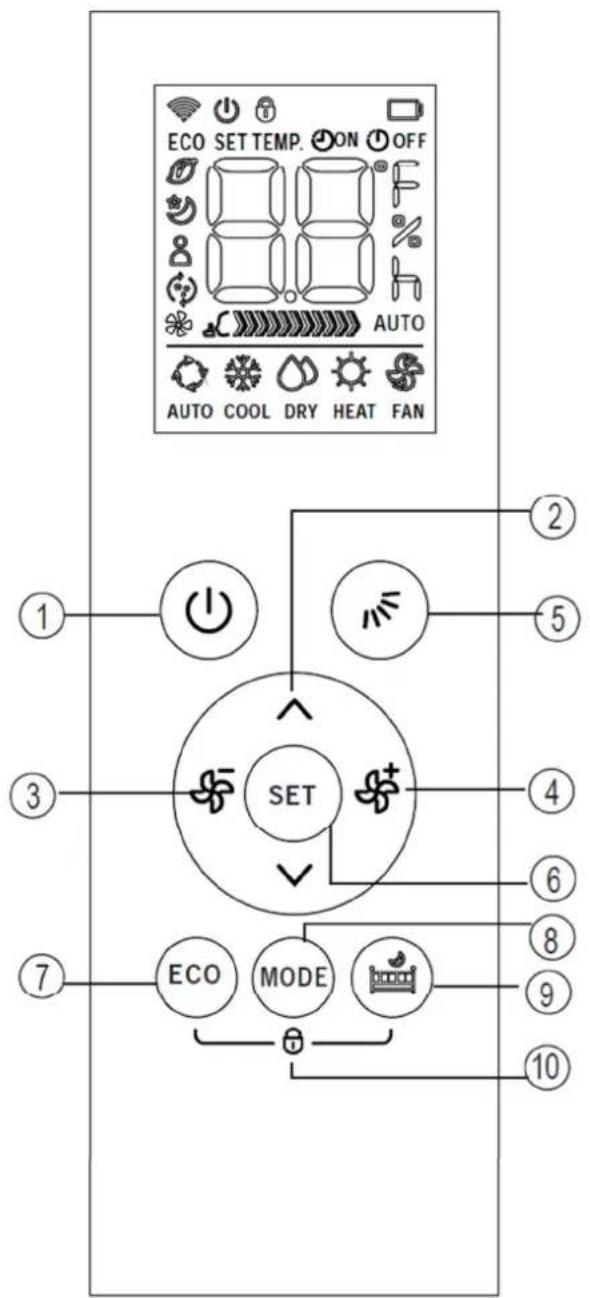
ECO SET TEMP. ON OFF AUTO AUTO COOL DRY HEAT FAN ① ② ③ ④ ⑤ ⑥ ⑦ ⑧ ⑨ ⑩ ECO MODEq

1. ON/OFF BUTTON.
This button turns the Air Conditioner ON or OFF

2. UP BUTTON
Press this button to increase the desired SET temperature of the Air Conditioner or to increase the Timer setting hours.

→OWN BUTTON
Press this button to decrease the desired SET temperature of the Air Conditioner or to decrease the Timer setting hours.

3. FAN BUTTON
Used to select the fan speed in four steps:
HIGH→MED→LOW→AUTO
NOTE:
- Hold down this button for at least 2 seconds to activate or cancel Silent mode. Due to low frequency operation of the compressor, Silent mode may result in insufficient cooling and heating performance.
- Pressing the Fan butto n

MO→E button, ON/OFF button
or ECO button ECO will cancel the Silent mode.
4. FAN BUTTON

Used to select the fan speed in four steps:
AUTO→LOW→MED→HIGH Fan speeds cannot be altered when unit is running in AUTO or DRY mode.
NOTE:
- Hold down this button for at least 2 seconds to activate or cancel Turbo mode. Turbo function enables the unit to reach the pre-set temperature in cooling or heating operation in the shortest time.
5. SWING BUTTON

Used to stop or start horizontal louver movement (Up & Down). Pressing alternates either continuous swing up & down or at angle when button is pressed. Hold down this button for 2 seconds to start/stop vertical louver movement (Left to right). Pressing again for 2 seconds will stop left to right movement at angle when button was pressed.

text_image
ECO SET TEMP. ON OFF AUTO AUTO COOL DRY HEAT FAN ① ② ③ ④ ⑤ ⑥ ⑦ ⑧ ⑨ ⑩ ECO MODE6. SET BUTTON

Used to initiate the following functions in the sequences below when used in conjunction

Timer on → Timer off → Self clean → Fresh → Sleep → Follow me
Press the SET button to select the desired function, the selected symbol will flash on the remote's display area and then press the
∧ ∨ or buttons to confirm.

SLEEP function
This function maintains the most comfortable temperature while sleeping and saves energy as well. This function is available in COOL, HEAT and AUTO modes only.
When selected, the set temperature will increase (in cooling mode) or decrease (in heating mode) by 1^ C per hour for the first 2 hours. Thereafter it keeps this new temperature for 5 hours before switching off.
This operation saves energy and improves night time comfort by synchronising with the body's metabolism.
FRESH function models)

(not enabled for Australian

SELF CLEAN function
Under SELF CLEAN mode, the air conditioner will automatically clean and dry the Evaporator and keep it fresh for the next operation period.
Airborne bacteria use the moisture on the indoor Evaporator to grow. Regular drying of the Evaporator prevents this growth.
By simply selecting the SELF CLEAN function, the system will automatically manage the process. This cleaning action may be done as frequently as desired.
For Australian Reverse Cycle models the unit will operate in the following sequence:
FAN mode at Low fan speed—Heating operation with LOW fan speed ---FAN operation--Stop Operation---Turn off.
Note:
This function is only activated in COOLING or DRY modes.
It is recommended to run the air conditioner under cooling operation for at least 30 minutes before this function is activated.
Selecting SELF CLEAN or pressing the ON/OFF button again during the cleaning cycle will cancel the operation and turn the unit off.
FOLLOW ME

When the Follow Me function is activated, the remote display is actual temperature at the remotes location.
The remote control will send this signal to the air conditioner at 3 minute intervals until Follow Me is turned off.
flowchart
graph TD
    A["ECO SET TEMP. ON OFF"] --> B["SET"]
    C["AUTO"] --> B
    D["AUTO COOL DRY HEAT FAN"] --> B
    E["①"] --> F["Power Icon"]
    G["②"] --> H["Light Bulb Icon"]
    I["③"] --> J["Motor Icon"]
    K["④"] --> L["Light Bulb Icon"]
    M["⑤"] --> N["Light Bulb Icon"]
    O["⑥"] --> P["Light Bulb Icon"]
    Q["⑦"] --> R["Eco"]
    S["⑧"] --> T["MODE"]
    U["⑨"] --> V["Light Bulb Icon"]
    W["⑩"] --> X["Light Bulb Icon"]

7. ECO BUTTON
Used to enter the energy efficient mode.
When in cooling mode and after pressing this button the remote controller will adjust the temperature automatically to 24^ C and a fan speed of Auto to save energy (but only if the previous set temperature was less than 24^ C)
If the user selected set temperature is between 24^ C and 30^ C, after the ECO button is pressed, the fan speed will change to Auto but the set temperature will remain unchanged.
NOTE:
Pressing the ON/OFF button, changing the mode or adjusting the set temperature to less than 24^ C will stop ECO operation.
Under ECO operation, the set temperature should be 24^ C or more. If you feel uncomfortable due to insufficient cooling in this mode then just press the ECO button again to stop it.

8. MODE BUTTON
Press this button to modify the air conditioner mode in a sequence of following:
AUTO → COOL → DRY → HEAT → FAN

9. DO NOT DISTURB BUTTON
Press this button to turn off the indoor screen Display and also to turn off the Air conditioner Buzzer. The fan speed shifts to low which creates a comfortable and quiet environment.
Pressing the button again cancels this function.
Under DO NOT DISTURB mode, the display will illuminate for 10 seconds while adjusting the mode, set temperature or fan speed, etc.
10. LOCK FUNCTION
Locking and unlocking the remote is done by

DO NOT DISTURB buttons together at the same time.

A symbol appears in the remote control display window.
→isplayed when data is transmitted.
→isplayed when remote controller is ON.

Battery display (low battery detection)

Indicates LOCK feature is activated

→isplayed when in ECO mode operation
q

ON
→isplayed when TIMER ON time is set.

OFF
→isplayed when TIMER OFF time is set.

Shows set temperature or room temperature. Also shows time under TIMER setting.
Indicates that the air conditioner is operating in Follow me mode

→isplayed when in Fresh operation (not enabled for Australian models)

→isplayed when in Self clean operation.

→isplayed when Silent feature is activated

→isplayed in Sleep Mode operation
FAN SPEE→IN→ICATIONS


LOW


ME→IUM

HIGH

AUTO
Note:
All indicators shown in the figure are for the purpose of clear presentation. →uring actual operation only the relative functional signs are shown on the display window.
q

flowchart
graph TD
    A["SET TEMP."] --> B["COOL"]
    B --> C["②"]
    C --> D["③"]
    D --> E["④"]
    E --> F["③"]
    F --> G["①"]
    G --> H["ECO"]
    G --> I["MODE"]
    G --> J["Refrigerator"]
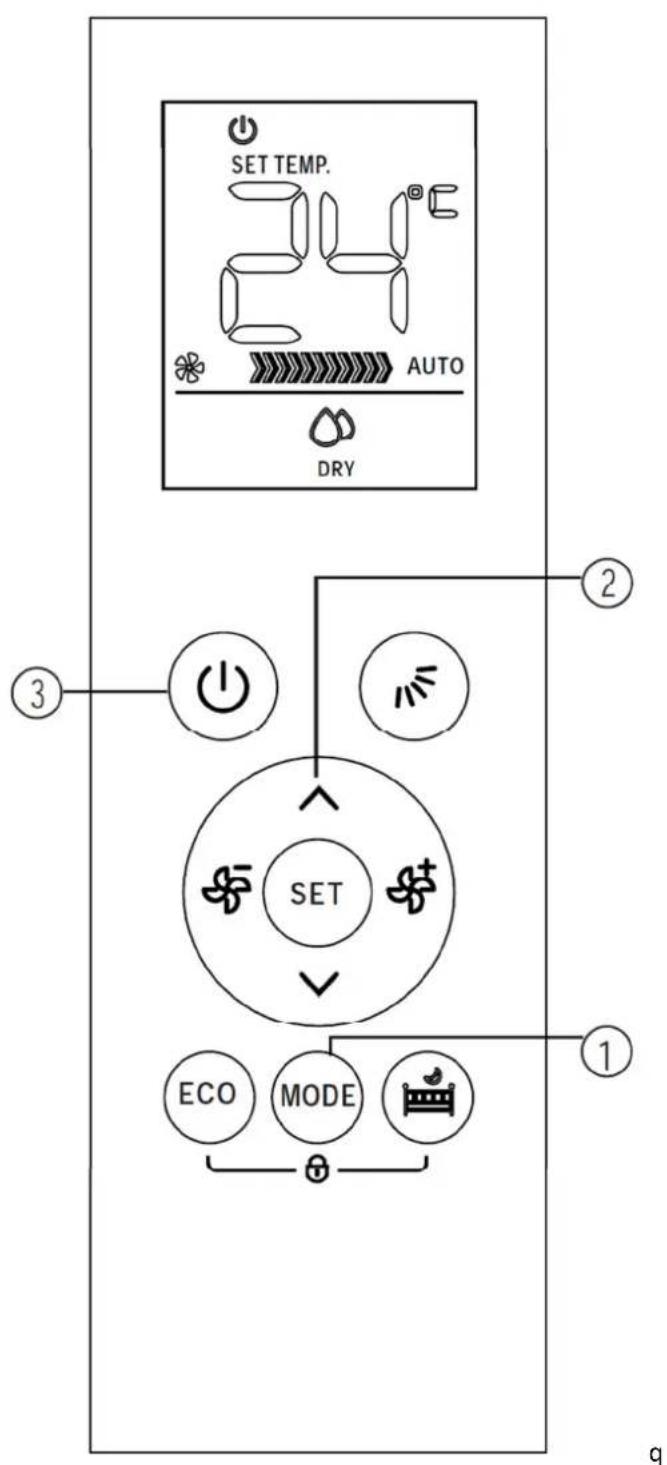
Auto operation
When unit is first installed and connected to power the OPERATION indicator on the display panel of the indoor unit starts flashing.
- Press the ON/OFF button to start the air conditioner.
- Press the MO→E button to select Auto.
- Press the UP or DOWN button to set the desired temperature. The temperature can be set within a range of 1 ^ 30^ in 1^ increments.

NOTE:
- When AUTO mode is selected, the air conditioner chooses the appropriate mode of either Cooling, Fan, or Heating modes by sensing the difference between the actual ambient room temperature and the setting temperature on the remote controller.
- When In the Auto mode, you cannot change fan speeds as they are set automatically.
- If the Auto mode is not comfortable for you, the desired mode can be selected manually.
Cooling /Heating/Fan or →ehumidifying operation
-
As above, pressing the MO→E button allows you to select COOL, HEAT, Fan or Dehumidify modes.
-
Press the UP or DOWN buttons to set the desired temperature. The temperature can be set within a range of 1 ^ 30^ in 1^ increments.
-
Press the FAN button to select fan speed in four steps - Auto, Low, Med, or High.
NOTE: In the →ehumidifying mode, you cannot change the fan speeds as they are set automatically.
In the FAN mode, the setting temperature is not displayed on the remote control and you are not able to control the room temperature either
flowchart
graph TD
    A["SET TEMP."] --> B["AUTO"]
    B --> C["DRY"]
    D["ECO"] --> E["MODE"]
    F["MODE"] --> G["Switch"]
    H["SET"] --> I["Switch"]
    J["2"] --> K["Control Button"]
    L["3"] --> M["Power Induction"]
    N["1"] --> O["Switch"]
    P["2"] --> Q["Control Button"]
Timer operation
To Set the Auto - On Time
Pressing the SET button is used to set the auto-on/off time of the unit.
SET
- Press the SET button, the Timer on

indicator "displays and flashes, the last Auto-on setting time and the signal "h" will be shown on the LCD display area. Now it is ready to reset the Auto-on time to START the operation.
-
Press the or button to your desired Auto-on time. Each time you press the button, the time increases/decreases by half hour increments between 0 and 10 hours and by one hour increments between 10 and 24 hours.
-
Once your desired time on is reached there will be a three second delay before the remote controller transmits the signal to the air conditioner. Then the signal "h" will disappear, the Timer on indicator will remain on and the Set temperature will re-appear on the LCD display window.
To Set the Auto - Off Time
SET
- Press the SET button until the Timer on
indicator" displays and flashes, the last Auto-off setting time and the signal "h" will be shown on the LCD display area. Now it is ready to reset the Auto-off time to STOP the operation.
-
Press the or button to set desired Auto-off time. Each time you press the button, the time increases/decreases by half hour increments between 0 and 10 hours and by one hour increments between 10 and 24 hours.
-
Once your desired time off is reached there will be a three second delay before the remote controller transmits the signal to the air conditioner. Then the signal "h" will disappear, the Timer off indicator will remain on and the Set temperature will re-appear on the LCD display window.
q
NOTE:
When you select the timer operation, the remote controller automatically transmits the timer signal to the indoor unit for the specified time. Therefore, keep the remote controller in a location where it can transmit the signal to the indoor unit properly. q
Example of timer setting
text_image
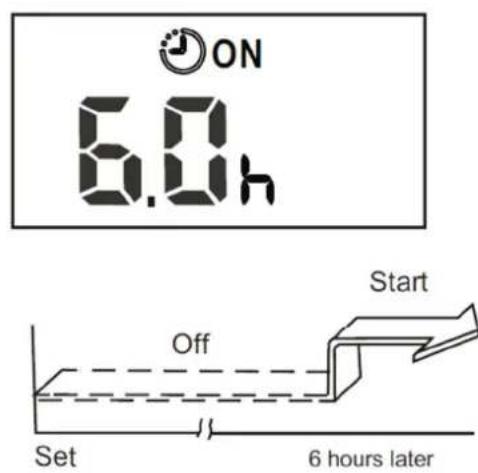
ON 6.0h Start Off Set 6 hours laterTIMER ON (Auto on operation)
The TIMER ON feature is useful when you want the unit to turn on automatically before you return home. The air conditioner will automatically start operating at the set time.
Example:
To start the air conditioner in 6 hours.
-
Press the SET button to select TIMER ON, the last setting of starting operation time and the signal "h" will show on the display area.
-
Press the or button to display "6.0h" on the TIMER ON display of the remote controller.
-
Wait for three seconds and the digital display area will show the temperature again.
The " indicator remains on and this function is activated.
text_image
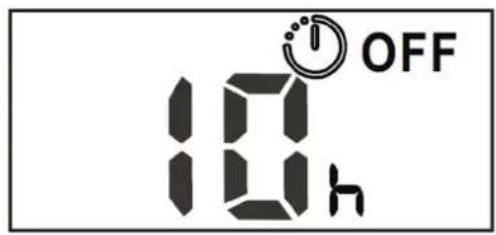
10h OFF
text_image
On Set 10 hours later Stopq TIMER OFF (Auto off operation)
The TIMER OFF feature is useful when you want the unit to turn off automatically, maybe after you go to bed. The air conditioner will automatically stop operating at the set time.
Example:
To stop the air conditioner in 10 hours.
SET
- Press the SET button to select TIMER OFF, the last setting of stopping operation time and the signal "h" will show on the display area.
^V
-
Press the or button to display "10.0h" on the TIMER OFF display of the remote controller.
-
Wait for three seconds and the digital display area will show the temperature again.
OFF The " Indicator remains on and this function is activated.

text_image
ON OFF 10 h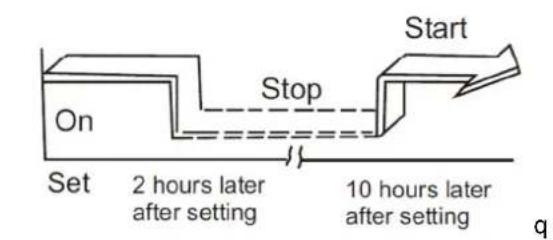
text_image
Start Stop On Set 2 hours later after setting 10 hours later after setting qq COMBINED TIMER (Setting both ON and OFF timers simultaneously)
TIMER OFF → TIMER ON (On→ Stop→ Start operation)
This feature is useful when you want to stop the air conditioner after you go to bed and start it again in the morning when you wake up or when you return home.
Example:
To stop the air conditioner 2 hours after setting and start it again 10 hours after setting.
-
Press the SET button to select TIMER OFF.
-
Press the or button to display 2.0h on the TIMER OFF display.
-
Press the SET button to select TIMER ON.
-
Press the or button to display 10h on the TIMER ON display
-
Wait for three seconds and the digital display area will show the temperature again.
ON OFF The " & " indicators
remain on and this function is activated.

text_image
ON OFF 5.0h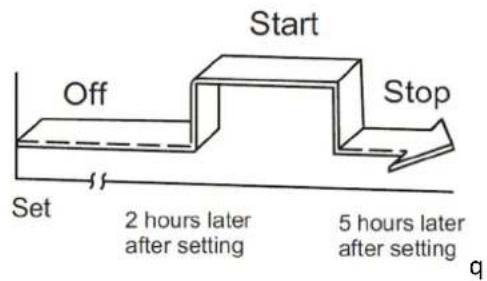
flowchart
graph TD
    A["Start"] --> B["Off"]
    B --> C["Set"]
    C --> D["Stop"]
    D --> E["End"]
    style A fill:#f9f,stroke:#333
    style B fill:#ccf,stroke:#333
    style C fill:#cfc,stroke:#333
    style D fill:#fcc,stroke:#333
    note1["2 hours later after setting"] -.-> A
    note2["5 hours later after setting"] -.-> D
TIMER ON → TIMER OFF (Off→ Start→ Stop operation)
This feature is useful when you want to start the air conditioner before you wake up and stop it after you leave the house.
Example:
To start the air conditioner 2 hours after setting and stop it again 5 hours after setting.
- Press the SET button to select TIMER ON.
- Press the or button to display 2.0h on the TIMER ON display.
-
Press the SET button to select TIMER OFF.
-
Press the or button to display 5h on the TIMER Off display
-
Wait for three seconds and the digital display area will show the temperature again.
ON OFF The " & " indicators remain on and this function is activated.
q
text_image
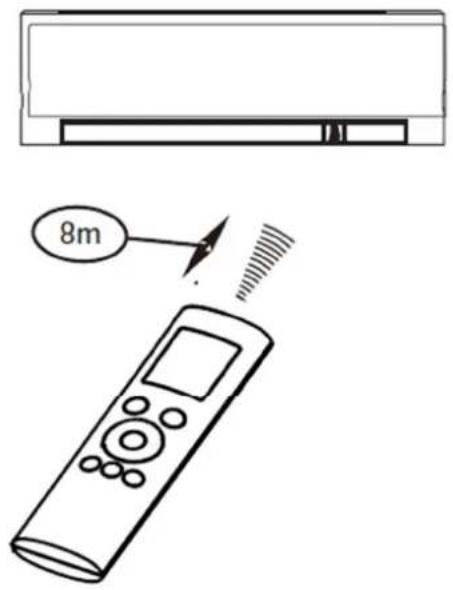
8mMake sure the remote controller is always used within a distance of 8 meters from the air conditioner indoor unit, pointing it towards the receiver. Reception is confirmed by a beep.
CAUTION:
The air conditioner will not operate if curtains, doors or other materials block the signals from the remote controller to the indoor unit. Prevent any liquid from entering into the remote controller. Do not expose the remote controller to direct sunlight or heat. If the infrared signal receiver on the indoor unit is exposed to direct sunlight, the air conditioner may not function properly. Use curtains to prevent the sunlight from falling on the receiver.
If other electrical appliances interfere with the remote controller, either move these appliances or consult your local dealer. Be careful not drop the remote controller, place heavy objects on it or step on it. Handle with care.
REPLACING THE BATTERIES:
The following situations signify exhausted batteries. Always replace old batteries with new ones.
Receiving beep is not emitted when a signal is transmitted or the screen on the controller fades. The remote controller is powered by two dry cell batteries (AAA) housed in the back rear part and protected by a cover.

natural_image
Diagram of a device's internal components and battery assembly, showing battery casing, battery pack, and battery casing with no visible text or symbols.1) Remove the cover at the rear of the remote controller.
2) Remove the old batteries and insert the new batteries, placing the (+) and (-) ends correctly.
3) Re-Install the cover back on.
NOTE: When the batteries are removed, the remote controller erases all programming5 After inserting new batteries, the remote controller must be reprogrammed5