 ManualGo.com
MX-2615N - Multifunction Printer SHARP - Free user manual and instructions
Find the device manual for free MX-2615N SHARP in PDF.


Download the instructions for your Multifunction Printer in PDF format for free! Find your manual MX-2615N - SHARP and take your electronic device back in hand. On this page are published all the documents necessary for the use of your device. MX-2615N by SHARP.
USER MANUAL MX-2615N SHARP
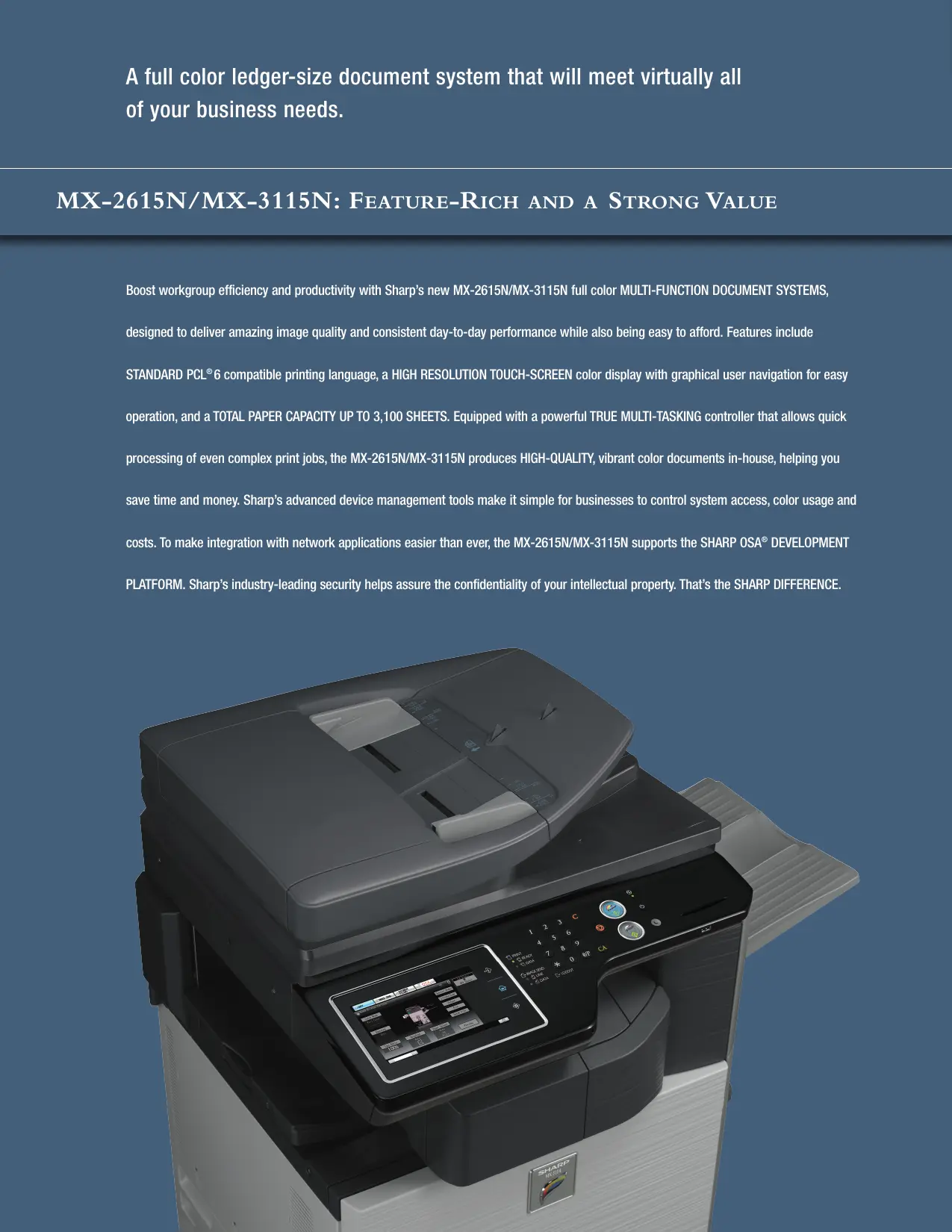
A full color ledger-size document system that will meet virtually all of your business needs. MX-2615N/MX-3115N: FEATURE-RICH AND A STRONG VALUE Boost workgroup efficiency and productivity with Sharp's new MX-2615N/MX-3115N full color MULTI-FUNCTION DOCUMENT SYSTEMS, designed to deliver amazing image quality and consistent day-to-day performance while also being easy to afford. Features include STANDARD PCL®6 compatible printing language, a HIGH RESOLUTION TOUCH-SCREEN color display with graphical user navigation for easy operation, and a TOTAL PAPER CAPACITY UP TO 3,100 SHEETS. Equipped with a powerful TRUE MULTI-TASKING controller that allows quick processing of even complex print jobs, the MX-2615N/MX-3115N produces HIGH-QUALITY, vibrant color documents in-house, helping you save time and money. Sharp's advanced device management tools make it simple for businesses to control system access, color usage and costs. To make integration with network applications easier than ever, the MX-2615N/MX-3115N supports the SHARP OSA® DEVELOPMENT PLATFORM. Sharp's industry-leading security helps assure the confidentiality of your intellectual property. That's the SHARP DIFFERENCE.
VERSATILE MULTI-FUNCTION POWERFUL MuULTI- TASKING INTUITIVE *Some features require optional equipment and/or software. Advanced features plus multi-function capabilities allow you to meet tomorrow’s document needs today. = Powerful true, 600 MHz multi-tasking full color document system = High-resolution 7" (diagonal) touch-screen color display with graphical navigation = Standard PCL®6 compatible printing system with available PostScript®3 compatible and XPS options* = 600 x 600 dpi printing provides clear, crisp image output m Advanced ImageSEND"" function scans documents to USB devices, network folders, E-mail and more = ImageSEND function scans documents at up to 50 images per minute in both black and color = Convenient Document Filing System with thumbnail view and image preview features = Available 500 + 2,000 sheet tandem paper drawer, for an online capacity of 3,100 sheets = Supports the Sharp OSA development platform, enabling businesses to streamline document workflow and help enhance productivity with speed and efficiency* = Flexible paper handling system feeds up to 110 Ib index through paper trays and up to 140 Ib. index through the bypass tray # Optional pull-out AWERTY keyboard for enhanced ease-of-use = Super G3 fax option with intelligent inbound routing = Supports Sharp's award-winning security platform with standard 256-bit data encryption and up to 7 times data overwrite protection = Convenient end-of-lease feature overwrites all job data, user data and network information at trade-in time = Remote front panel feature allows users and administrators to view and control machine operations from a PC workstation = Environmentally-friendly design offers low power consumption, fast warm up, compact design and long-life parts and supplies
INTUITIVE FEATURES HELP BUSINESSES SOAR TO NEW HEIGHT Sharp's MX-2615N/MX-3115N will help elevate workgroup performance and meet on-the-go business demands. The Flexibility and Performance You Need With a high-resolution touch screen color display and a powerful 600 MHz multi-tasking controller, the MX-2615N/MX-3115N color workgroup document system can help elevate your office productivity to the next level. The intuitive menu navigation system with razor sharp graphics makes operating the MX-2615N/MX-3115N simple and easy. With Sharp's true multi-tasking controller, complex color print jobs can be processed quickly, even while documents are being scanned. But that's just the beginning — with a standard 100-sheet reversing document feeder, automatic duplexing, electronic sorting and integrated offset stacking, you'll complete even large jobs in a snap. High-resolution touch screen with Stylus pen for easy point-and-touch operation High-Quality Output You Can Rely On The MX-2615N/MX-3115N color workgroup document system combines enhanced second- generation micro-fine toner technology with 600 x 600 dpi print resolution to produce documents with crisp, clear images and dazzling high-quality colors. Sharp’s Image Stabilization System helps ensure uniform density and color balance for beautiful output page after page. Available paper capacity stores up to a maximum of 3,100 sheets with options Professional Performance Your Business Can Depend On Sharp's MX-2615N/MX-3115N color workgroup document system delivers professional performance and optimal productivity to satisfy your daily production needs. Copy/print speeds up to 31 ppm (in both color or B&W) help you to meet project deadlines with time to spare. The flexible paper handling system can feed up to 110 Ib index stock through the paper trays and up to 140 Ib index through the bypass tray. With available on-line paper capacity of up to 3,100 sheets, the MX-2615N/MX-3115N is ready when you are. Innovative Document Filing For Easy Access Sharp's easy-to-use Document Filing System can store frequentiy used files like forms and templates. Plus, with Sharp's thumbnail preview mode, stored jobs can be located and retrieved quickly. An advanced backup system and PIN-access security helps ensure that your files are safe. Sharp's easy-to-use Document Filing System with thumbnail preview Advanced Finishing Adds The Final Touch The MX-2615N/MX-3115N also offers a compact, high-performance finisher with 3-position stapling and an available 3-hole punch that can give your documents a professional look and feel. In addition, an optional long paper feeding tray adds the availability of banner printing within the compact footprint of the MX-2615N/MX-3115N.
= SHARP MC SH PCLS Properties D os ré son [re ma | | CE 2 a) Ca) Sharp's easy-to-use print drivers make accessing all of the MX-2615N/MX-3115N color features simple and easy. USB 2.0 port is located on the front panel for easy access* Impressive workflow efficiency with leading edge features that help deliver optimum results. Exceptional Print Quality with Professional Finishing With the MX-2615N/MX-3115N, your business can produce brilliant, high-quality color documents, as well as crisp B&W documents. With standard PCL6 compatible printing language, available PostScript3 compatible and XPS options, documents are printed with superb performance and efficiency. Plus, with 600 x 600 dpi resolution, all of your documents will look great! Powerful finishing features include 3-position stapling for up to 50 sheets and 3-hole punching.* A True Multi-Tasking Document System The MX-2615N/MX-3115N features a high-performance, multi-tasking controller that delivers copy, scan, fax and print jobs continuously for optimum efficiency. Some controllers only perform one operation at a time, but the MX-2615N/MX-3115N continually processes incoming jobs even while existing jobs are output. The result? À workflow that virtually never slows down — even at crunch time. Direct USB Printing Adds Convenience and Portability With Direct USB printing, users can print color or B&W image files in a variety of popular formats directly from USB memory devices such as a ThumbDrive!V or ClipDrive ".* Need to print PDF brochures in a hurry for a big meeting? It's easy with the MX-2615N/MX-3115N. Just plug in your portable USB memory device, select the file, and your job prints immediately.
*Some features require optional equipment and/or software. Integrated Network Scanning With Sharp's powerful ImageSend'M technology, you get one-touch distribution features that centralize document workflow, help reduce mail costs and save time. With up to seven destinations — E-mail, Desktop, FTP, Network Folders (SMB), USB, Fax and Internet Fax — getting your document where it needs to go is as easy as pushing a button. For increased efficiency, Send to Group mode allows you to mix group broadcast to E-mail, Fax, and Internet Fax.* Convenient E-mail Distribution With Lightweight Directory Access Protocol (LDAP), there's no need to manually enter a recipient's complete E-mail address. Simply enter the first few characters and the MX-2615N/MX-3115N automatically searches and displays a list of matching names. Unique File Naming allows users to enter specific file names with custom subject fields, for easy recall of stored files. With Sharpdesk® personal document management software, users can organize scanned documents and integrate them into everyday workflow. Integrated Super G3 Fax and Internet Fax Add powerful facsimile capability with the optional Super G3 fax module, which features automatic stapled/copied receptions, and Inbound Fax Routing to E-mail. Sharp's innovative PC fax driver enables users to send fax documents right from their desktop. For Internet fax operation, add the optional B&W Internet Fax expansion kit. Versatile Application Integration To help streamline document workflow and enhance productivity, the MX-2615N/MX-3115N supports the Sharp OSA development platform. This third generation technology allows users to interact with network applications faster than ever before — and right from the machine LCD panel! Sharp OSA technology uses industry-standard network protocols, such as XML and SOAP, allowing the MX-2615N/MX-3115N to communicate with many different applications. The Sharp OSA development platform is also scalable, so as your workflow needs change, Sharp's application integration can change as well.
Separate print buttons for B&W and Color allow users to selectively manage use of color nocsnsn | TopPage Sharp Remote Device Management *Not available at time of launch. Da]
The MX-2615N/MX-3115N implements versatile device management capabilities through user-friendly software to achieve ultimate efficiency. Sharp Remote Device Management (SRDM)* Make management of your MX-2615N/MX-3115N simple and straight forward with Sharp Remote Device Management (SRDM). This easy-to-use software allows you to take control of the versatile system features and simplifies installation and management. = With Printer Status Monitor, network users can view printer conditions, check paper levels, toner, and more, all through an easy-to-use interface. = With advanced Sharp Remote Device Manager“, administrators can easily manage the setup, configuration, device settings, cloning and more! Advanced features such as Remote Front Panel allow administrators and support personnel to view and control the LCD panel of the machine remotely from virtually any PC on the network! Plus, with event-driven, real-time service alerts, administrators and supervisors can achieve higher productivity. Now, it is easier than ever to view service logs, click counts, history reports and more. = Experience the convenience of an Embedded Web Page right from your desktop! This advanced web-based management tool allows users to create and manage their own network scanning destinations, profiles and web-links. Administrators can access device settings, color control, account information and security settings. Take Charge of Color Usage and Costs With Sharp's device management system, administrators and supervisors can define user groups on the MX-2615N/MX-3115N to manage and restrict features, such as color copying, scanning or printing. Easily set up a custom user group to manage page counts (copy, print, scan or fax operations) for both color and B&W. This helps to simplify cost management of color imaging. The MX-2615N/MX-3115N can store profiles for up to 1000 users. 24/7 Online Training with My Sharp" Managing all of the advanced features of your Sharp product is simple and easy. Ask your Authorized Sharp Dealer about the My Sharp website. This dedicated customer training website is customized to your MX-2615N/MX-3115N (RAA " hu and allows you to locate resources and find information specific to your configuration, truly helping you maximize your investment.
To help protect your data, the MX-2615N/MX-3115N offers several layers of security, making Sharp the optimum choice to help protect employees privacy and intellectual property.* As a leader in office equipment security, Sharp makes it easy for virtually any business or government entity to safely deploy digital copying, printing, scanning and faxing. fñà Authority Groups Advanced account management enables administrators to set authority groups for access to features of the MX-2615N/MX-3115N. Administrators can control which department, for instance, has full access to copying, printing, scanning and/or fax. Walk-up users enter a Code, Local Name and Password, or LDAP User Authentication to access the features assigned to their group. ñ Data Overwrite and Encryption To help protect your data, the MX-2615N/MX-3115N can encrypt document data using AES (Advanced Encryption Standard) 256-bit encryption. The MX-2615N/MX-3115N can also erase the temporary memory on the hard drive by overwriting the encrypted data up to seven times, offering an unprecedented level of assurance. À convenient End-of-Lease feature overwrites all data, including document filing, user data, job status, date and address book. ñ Network Scanning Access Control To help protect your network from unauthorized e-mail communications, the MX-2615N/MX-3115N supports User Authentication, requiring users to login before performing any network scanning operations. ñ Control Device Access Over the Network To help restrict access to the device over the network, the MX-2615N/MX-3115N offers IPsec, SMB and extended support for SSL Encryption (Secure Sockets Layer), IP/MAC address filtering, IEEE 802.1x authentication, protocol enable/disable and port management for maximum security. *Some features require optional equipment and/or software ENVIRONMENTAL COMMITMENT ñ Documents Remain Confidential The MX-2615N/MX-3115N offers Confidential Printing, which when used, requires users to enter a PIN code in order to print a queued document. To help protect your direct-print documents from unauthorized viewing, the MX-2615N/MX-3115N offers encrypted PDF printing and scanning. Additionally, Secure Fax Release ensures received fax documents are held in memory until an authorized user enters a PIN code, so that compliance with healthcare regulations such as HIPAA is easier. ñ Tracking and Auditing Information Legislation and industry policies require companies to be more aware of information flow from their offices. Sharp offers both built-in and additional hardware/software which allows users to control, access and track usage of each device on the network. ñ Data Security Kit (Optional) For maximum protection, the optional data security kit offers additional features, such as Data Overwrite at Power Up, Document Filing access control and Restricted Status Display. These scalable security offerings aim to protect your intellectual property, preserve confidential information and help your business to meet regulatory requirements, such as the Health Insurance Portability and Accountability Act (HIPAA), and the Gramm-Leach-Bliley Act (GLB). For additional information visit: www.sharpusa.com/security. À SmartWa Transport Partner’ Getting There With Cleaner Air An Environmentally Responsible Approach to Product Design The MX-2615N/MX-3115N utilizes Sharp's advanced micro-fine toner technology, which offers a lower consumption rate and produces less waste than conventional toners, resulting in longer replacement intervals. Sharp supplies are packaged using fully recyclable materials. Long-life consumable parts help minimize service intervals and down time, resulting in lower operating costs. With two different energy saving modes, power can be reduced or shut off at set intervals. Al Sharp document systems are ENERGY STAR® certified and RoHS compliant to restrict the use of hazardous substances. Toner Recycling Program As part of our commitment to helping preserve the environment, Sharp offers our customers zero waste land fill recycling for all Sharp consumables, including cartridges, bottles, toner collection containers and drum units. Sharp encourages customers to recycle their used Sharp toner cartridges in bulk by providing a pre-paid Recycling Kit for their return to our facility. Environmental Leadership As a testament to our commitment to the environment, Sharp is a three-time winner of the ENERGY STAR annual Excellence in Energy Proficiency Product Design. Sharp is also a four-time winner of the SmartWay® Excellence Award, which recognizes companies for conserving energy and lowering greenhouse gas emissions in logistics and transportation. Sharp was also a previous recipient of the Excellence in Partnership Green Contractor Award and the Evergreen Award from the General Services Administration (GSA) and the Coalition for Government Procurement. These awards recognize environmentally responsible businesses and their efforts on recycling, waste reduction and affirmative procurement practices. Global Initiatives Sharp is committed to environmental sustainability and corporate responsibility including planning, design, manufacturing, distribution and product end-of-life management. For more information about Sharp's environmental leadership including information about energy efficient products, electronics or toner cartridge recycling, please visit www.sharpusa.com/environment.
Sharp Plaza, Mahwah, NJ 07495-1163 1-800-BE-SHARP + www.sharpusa.com Design and specifcations subject to change without notice. Sharp, Sharp OSA, Sharpdesk, My Sharp, and al related trademarks are trademarks or registered trademarks of Sharp Corporation and/or its affliated companies. Windows, Windows Server and Windows Vista are trademarks or registered trademarks of Microsoft Corporation. AIl other trademarks are the property of their respective owners. SHARP © 2012 Sharp Electronics Corporation. AI rights reserved. Printed in U.S.A. 09/12 + CPD-3870