3740DCP - Measurement Daytronic - Free user manual and instructions
Find the device manual for free 3740DCP Daytronic in PDF.


User questions about 3740DCP Daytronic
0 question about this device. Answer the ones you know or ask your own.
Ask a new question about this device
Download the instructions for your Measurement in PDF format for free! Find your manual 3740DCP - Daytronic and take your electronic device back in hand. On this page are published all the documents necessary for the use of your device. 3740DCP by Daytronic.
USER MANUAL 3740DCP Daytronic
Death, serious injury, or fire hazard could result from improper connection of this instrument. Read and understand this manual before connecting this instrument. Follow all installation and operating instructions while using this instrument.
Connection of this instrument must be performed in compliance with the National Electrical Code (ANSI/NFPA 70-2014) of USA and any additional safety requirements applicable to your installation.
Installation, operation, and maintenance of this instrument must be performed by qualified personnel only. The National Electrical Code defines a qualified person as “one who has demonstrated the skills and knowledge related to the construction and operation of the electrical equipment and installations, and who has received safety training on the hazards involved.”
Qualified personnel who work on or near exposed energized electrical conductors must follow applicable safety related work practices and procedures including appropriate personal protective equipment in compliance with the Standard for Electrical Safety Requirements for Employee Workplaces (ANSI/NFPA 70E-2012) of USA and any additional workplace safety requirements applicable to your installation.
ADVERTENCIA
The following safety precautions must be followed whenever any type of voltage or current connection is being made to the instrument.
Before connecting to electric circuits or pulse initiating equipment, open their related breakers or disconnects. It is recommended NOT TO install any connection of the instrument on live power lines. Only Qualified Service personnel that have demonstrated the abilities and received the proper safety training are capable of connecting to live circuits.
- Connections must be made to the instrument first, then connect to the circuit to be monitored.
- Wear proper personal protective equipment, including safety glasses and insulated gloves when making connections to power circuits.
- Hands, shoes and floor must be dry when making any connection to a power line.
Before each use, inspect all cables for breaks or cracks in the insulation. Replace immediately if defective.
If the equipment is used in a manner not specified in this user's guide, the protection provided by the equipment may be impaired.
Standard Accessories
Standard accessories
The following table lists the 3700 standard accessories.
| Description Part Number | |
| 3740 Manual | 92361.00 |
| 3740 Quick Reference Guide | 92366.00 |
| 5 Pin connector, analog signals | 25657-LF |
| 8 Pin connector, transducer | 25658-LF |
| 10 Pin connector, logic | 25606.00 |
| *US Power Cord | USSTDCORD (900744) |
| *European Power Cord | EUROSTDCORD (115369-G1) |
| *United Kingdom Power Cord | UKSTDCORD (115368-G2) |
| *Australian Power Cord | AUSTDCORD (901347) |
| Desk top feet (4ea.) | 35058.00 |
| *User specified, one standard only. | |
1 GENERAL DESCRIPTION AND SPECIFICATIONS
The Model 3740 is a single-channel panel instrument which accepts any AC or Unipolar pulse input, irrespective of waveform for amplification and conditioning of frequency signals generated by turbine flow metes, magnetic pick-ups, or similar pulse generating transducers. The frequency source can be grounded or floating with pulse magnitudes ranging from as low as 50 mV up to 250 V. For applications which may contain unwanted high frequency noise or a DC offset on the measured signal, the 3740 terminal connections contain input suppression capacitors for HF and DC coupling, used typically when a magnetic pickup is involved. The 3740 will supply excitation, conditioning and provide a calibrated Engineering Unit's display and analog output signal for the measurement of speed, flow and other parameters associated with frequency based sensors. The 3740 features user selectable range, input voltage sensitivity levels, amplified signal conditioned filters and selectable analog output of voltage and current. Display is user configured for engineering unit scaling up to +199950.
The Model 3740 is calibrated by the “two-point” process involving known zero & span standards or via the 3740’s integrated reference using the front panel (or rear connection) "RCAL" controls.
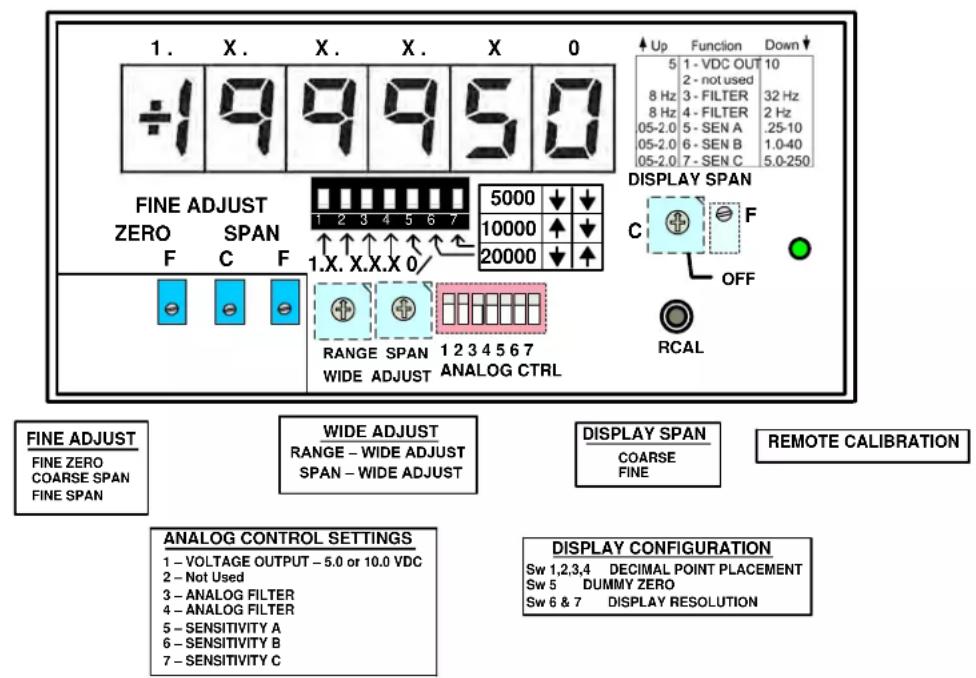
FRONT PANEL VIEW OF 3740 CONTROLS (Front Display Cover Removed)
text_image
1. X. X. X. X 0 +1 9 9 9 5 0 FINE ADJUST ZERO SPAN F C F 5000 ↓ 1 2 3 4 5 6 7 10000 ↑ 20000 ↓ RANGE SPAN 1 2 3 4 5 6 7 WIDE ADJUST ANALOG CTRL UP Function Down 5 1 - VDC OUT 10 8 Hz 2 - not used 8 Hz 3 - FILTER 32 Hz 8 Hz 4 - FILTER 2 Hz 05-2.0 5 - SEN A .25-10 05-2.0 6 - SEN B 1.0-40 05-2.0 7 - SEN C .5.0-250 DISPLAY SPAN C F OFF RCAL FINE ADJUST FINE ZERO COARSE SPAN FINE SPAN WIDE ADJUST RANGE - WIDE ADJUST SPAN - WIDE ADJUST DISPLAY SPAN COARSE FINE REMOTE CALIBRATION ANALOG CONTROL SETTINGS 1 - VOLTAGE OUTPUT - 5.0 or 10.0 VDC 2 - Not Used 3 - ANALOG FILTER 4 - ANALOG FILTER 5 - SENSITIVITY A 6 - SENSITIVITY B 7 - SENSITIVITY C DISPLAY CONFIGURATION Sw 1,2,3,4 DECIMAL POINT PLACEMENT Sw 5 DUMMY ZERO Sw 6 & 7 DISPLAY RESOLUTION3740 SPECIFICATIONS
Selected Measurement Ranges: Adjustable 250 Hz to 128 kHz; nominal full-scale
Transducer Types: An AC or Unipolar pulse signal, grounded or floating regardless of waveform
Excitation: ±12 VDC @ 50 mA; + 12 V only @ 100mA
Power Supply: Voltage 90 - 250 VAC, 47 -63 Hz
Consumption 10 Watts
Physical Parameters: 5.68" W x 2.84" H x 7.06" D; weight - 3.25 Lbs.
Analog Output: selectable; ±5, ±10 VDC, 4-20 mA or 4-12-20 mA (20% over-range on voltage outputs only)
Operating Temperature: 0 to +55 Degrees C, 5 to 95% relative humidity, non-condensing
Altitude: 2000m (6560 ft) maximum
Installation Category: Installation Category II, Pollution Degree 2
Amplifier:
Normal-Mode Range: 250 Vrms operating; 290 V without instrument damage
Common - Mode Range: ± 125 V
Input Impedance: Greater than 200 kOhms on all ranges
Offset: vs. Temperature: ±30 ppm μV/°C; vs. Time: ±10 ppm/month
Gain Accuracy: ± 0.02% full scale, typical, limited only by calibration accuracy Gain
Stability: vs. Temperature: ±30 ppm/°C; vs. Time: ±10 ppm/month
Linearity: better than ± 0.03% of full scale
Filter: 9-pole modified Butterworth; 3 dB down at 2 Hz, 8 Hz or 32 Hz; selectable Fast output always enabled, 125Hz response (J3 Pin 3).
Step-Response Settling Times for the 3740 (in milliseconds)
| 3db Frequency | To within 1% | within .1% | within .02% | |
| Fast Output | 125 Hz | 4 | 8 | 10 |
| Selectable Output | 32 Hz | 23 | 31 | 35 |
| 8 Hz | 93 | 125 | 140 | |
| 2 Hz | 370 | 500 | 560 |
1.a PANEL MOUNTING
You can easily mount the instrument in your own precut panel. Cutout dimensions for a panel-mounted unit are standard DIN; panel thickness should not exceed 6 mm (0.24 in). Simply unscrew the two rear-panel CLAMP SCREWS and slide the CLAMP SLIDES rearwards out of their grooves (THE FRONT BEZEL NEED NOT BE REMOVED). Insert the unit through the panel cutout, from the front of the panel (if the unit has rubber feet, these will have to be removed). Then reinstall the CLAMP SLIDES, and tighten the CLAMP SCREWS until the instrument is securely mounted.

text_image
68 ± 0.7 mm (2.68 ± 0.03 in) 138 ± 1.0 mm (5.43 ± 0.04 in) CLAMP SLIDE CLAMP SCREW Panel MountingThe Model 3740 I/O CONNECTIONS are via removable screw terminals which will accept wire sizes from AWG 12 to 26. NOTE: The recommended transducer cabling would be individually shielded, twisted pair or Coax cable - wired as indicated (Fig. 6) Table 1 denotes screw terminal assignments.
Rear Panel Connection

text_image
3740 N/C N/C HOLD TARE TARE ENABLE LOGIC COM R CAL N/C N/C N/C + EXCITATION - EXCITATION 0.1 uF HF 10.0 uF DC + SIGNAL - SIGNAL EXC COMMON SHIELD VDC COM V OUT SEL V OUT FAST 4-20 mA COM 4-20 mA OUTTable 1
| Connector Number | Screw Terminal | Label | Function |
| J1 | 1 | N/C | No connection |
| J1 2 N/C No connection | |||
| J1 | 3 | HOLD | Input Analog Hold command |
| J1 | 4 | TARE | Input Analog TARE command |
| J1 | 5 | TARE ENABLE | External TARE Enable |
| J1 | 6 | LOGIC COM | Logic Common |
| J1 | 7 | R CAL | Remote Calibration command |
| J1 8 N/C No connection | |||
| J1 9 N/C No connection | |||
| J1 10 N/C No connection | |||
| J2 | 1 | + EXC | + Excitation Power |
| J2 | 2 | - EXC | - Excitation Power |
| J2 | 3 | 0.1 uf | High Frequency Noise suppression capacitor |
| J2 | 4 | 10.0 uf | DC Offset capacitor |
| J2 | 5 | + SIGNAL | Positive signal input from sensor |
| J2 | 6 | - SIGNAL | Negative signal input from sensor |
| J2 | 7 | EXC COMMON | Excitation Common reference |
| J2 | 8 | SHIELD | Case Shield for cable termination |
| J3 1 VDC COM | - Signal Output Voltage Common | ||
| J3 2 V OUT SEL | + Signal Output Voltage – Filter Select | ||
| J3 3 V OUT FAST | + Signal Output Voltage – 125Hz | ||
| J3 4 4-20 mA COM | Filter Current Output Common | ||
| J3 | 5 | 4-20 mA OUT | Current Output Signal |
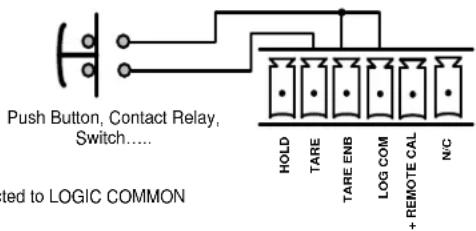
J1 – HOLD, TARE & REMOTE + RCAL Connections. These connections are used when external control of the "HOLD", "TARE" or "+RCAL" features of the unit are enabled or controlled by an external switch, PLC or relay. The input Command signals are activated when connected to LOGIC COMMON and will affect the display and analog output signals present on J3.
Fig. 5
J1 Logic Controls
text_image
Push Button, Contact Relay, Switch.... ted to LOGIC COMMON HOLD TARE TARE ENB LOG COM + REMOTE CAL N/CHOLD * Activates Analog HOLD when connected to LOGIC COMMON
TARE * Activates Analog TARE when connected to LOGIC COMMON TARE
ENABLE * Enables remote TARE when connected to LOGIC COMMON LOGIC
COMMON Connection to enable rear panel features
REMOTE CAL Activates the Fixed Frequency Calibration when connected to LOGIC COMMON
*NOTE: TARE & HOLD are general 3700 Instrument feature, For the Model 3740 it has limited use due to the frequency content within the FAST analog signal that is used in the TARE & HOLD circuit and maybe unrepeatable in its use - It is recommended not to be utilized.
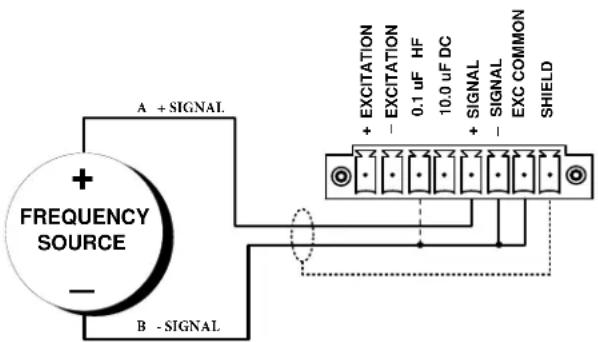
Model 3740 Transducer Cabling - Typical Magnetic Pickup
text_image
A + SIGNAL + FREQUENCY SOURCE - B - SIGNAL + EXCITATION - EXCITATION 0.1 uF HF 10.0 uF DC + SIGNAL - SIGNAL EXC COMMON SHIELDTypical Wiring Hookup for a standard Magnetic Pickup for Speed / Flow Measurements
SUPPRESSION OF HIGH-FREQUENCY NOISE IN LOW-FREQUENCY INPUT (0.1-μF)
False triggering can sometimes occur, especially at the low-frequency input range, because of stray pickup of frequencies outside the common-mode range. Capacitive coupling of the frequency input to ground can in such cases serve to suppress unwanted signal noise. This noise suppression is always recommended when using a two wire MAGNETIC PICKUP as the frequency source. Thus, if you find your frequency reading to be unacceptably unstable or "noisy," it is recommended to tie the 0.1- F pin to EXC COM & -SIGNAL; maintaining the normal +SIGNAL connection.
text_image
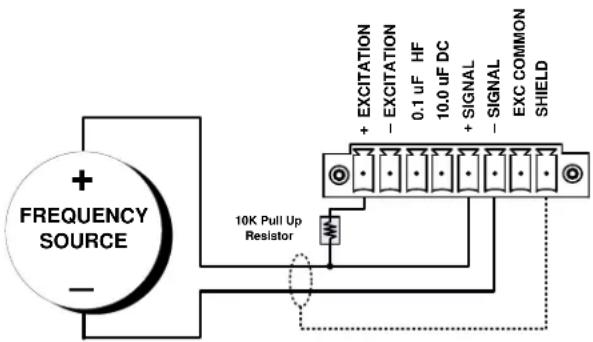
+ FREQUENCY SOURCE - 10K Pull Up Resistor + EXCITATION - EXCITATION 0.1 uF HF 10.0 uF DC + SIGNAL - SIGNAL EXC COMMON SHIELDUngrounded Frequency Source
PULL-UP RESISTOR
When used with an open-collector type sensor, the 3740 requires a pull-up resistor (typically 10 kOhm) between the +SIGNAL and the + EXCITATION terminals.
Zero-Velocity Sensor
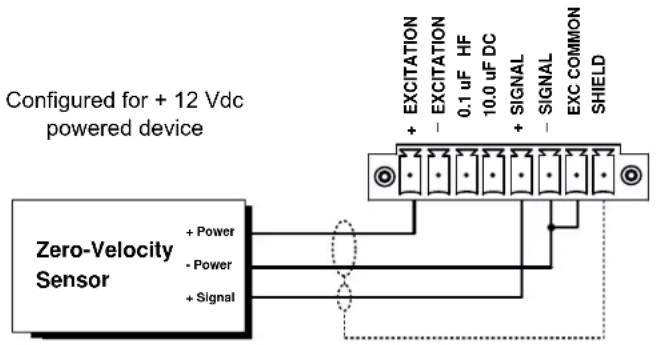
text_image
Configured for + 12 Vdc powered device Zero-Velocity Sensor + Power - Power + Signal EXCITATION + - 0.1 uF HF 10.0 uF DC SIGNAL + - SIGNAL EXC COMMON SHIELD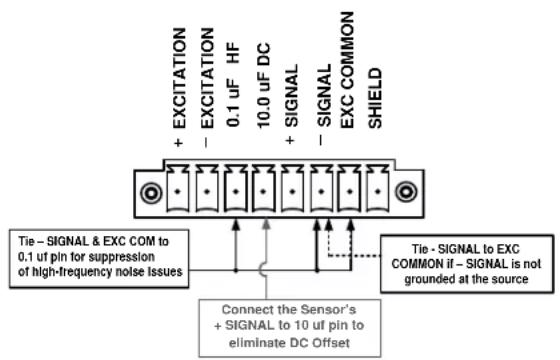
text_image
EXCITATION + - EXCITATION 0.1 uF HF 10.0 uF DC + - SIGNAL - SIGNAL EXC COMMON SHIELD Tie - SIGNAL & EXC COM to 0.1 uF pin for suppression of high-frequency noise Issues Connect the Sensor's + SIGNAL to 10 uF pin to eliminate DC Offset Tie - SIGNAL to EXC COMMON if - SIGNAL is not grounded at the sourceWiring Options for DC Offset and High Frequency Noise issues
ELIMINATION OF DC OFFSET (10-μF)
The 3740 is supplied with two capacitive-coupled terminal inputs, 0.1- and 10-microFarad capacitance. These special inputs would not normally be used with zero-velocity sensors requiring 10-12 Vdc excitation. The larger (10- F) capacitive coupling can be used to eliminate any positive or negative DC offset that exists for a 3740 input frequency signal. Simply connect the +SIGNAL line from the frequency source to the 10- F terminal instead of to the normal +SIGNAL terminal. The capacitor is then in series with the +SIGNAL input and allows only AC to pass. Note: Only for configurations of 10V logic levels or less.
WARNING
Qualified personnel who work on or near exposed energized electrical conductors must follow applicable safety related work practices and procedures including appropriate personal protective equipment in compliance with the Standard for Electrical Safety Requirements for Employee Workplaces (ANSI/NFPA 70E-2012) of USA and any additional workplace safety requirements applicable to your installation.
2 CONNECTIONS
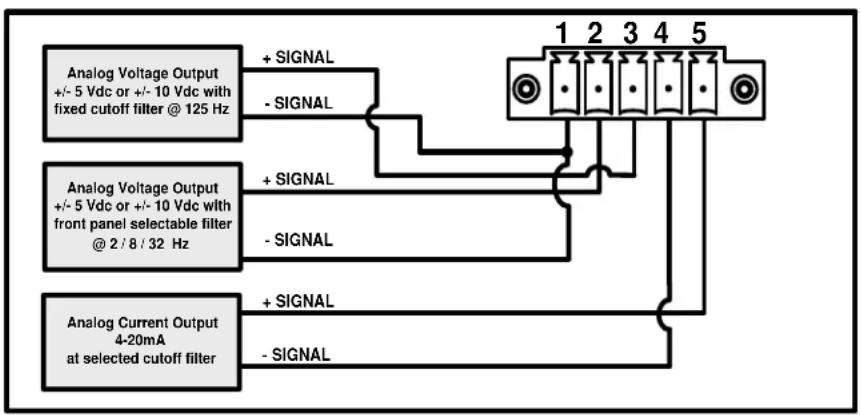
J3 - Analog Connections. Connections are used to provide analog outputs from the meter's signal conditioning area in the form of +/- 5VDC or +/- 10 VDC (selectable via the front panel controls) and 4-20 mA.
flowchart
graph TD
    A["Analog Voltage Output +/- 5 Vdc or +/- 10 Vdc with fixed cutoff filter @ 125 Hz"] -->|+ SIGNAL| B["Terminal Block 1"]
    A -->|- SIGNAL| C["Terminal Block 2"]
    D["Analog Voltage Output +/- 5 Vdc or +/- 10 Vdc with front panel selectable filter @ 2 / 8 / 32 Hz"] -->|+ SIGNAL| E["Terminal Block 3"]
    D -->|- SIGNAL| F["Terminal Block 4"]
    G["Analog Current Output 4-20mA at selected cutoff filter"] -->|+ SIGNAL| H["Terminal Block 5"]
    G -->|- SIGNAL| I["Terminal Block 6"]
Analog Output Connections
VDC COM - Pin 1 Voltage Common (- Signal out); Negative reference for Pin 2 and Pin 3 Voltage Output.
V OUT SEL - Pin 2 Voltage Output Selected (+Signal out) reference to Pin 1. The Full Scale Voltage is determined by the position of switch 1 - VDC on the Conditioner Controls. Voltage Filter output response of this signal is determined by the position of switch 3 - FIL and 4 - FIL on the Analog Controls.
V OUT FAST - Pin 3 Voltage Output Fixed. (+ Signal out) reference to Pin 1. Full Scale Voltage is determined by the position of switch 1 - VDC of the Conditioner Controls. Filter response is fixed at the highest analog signal response of 125 Hz.
4-20mA COM - Pin 4 4 - 20 mA Current Output Common (- Signal) reference for Pin 5 Current output.
4-20mA OUT - Pin 5 4 - 20 mA Current Output (+Signal) reference to Pin 4 Current Output Common. Mode of the Current Output.
Digital Display Range and Decimal Point Selection
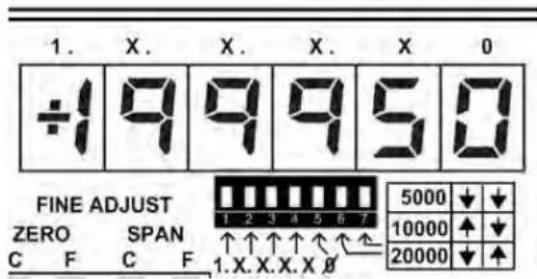
Configures the Engineering Unit's Digital Display Range. Three selections are available to set the display operation for 1 count in 5000, 2 counts in 10000 or 5 counts in 20000. These full scale ranges correspond to the analog output full scale value of ± 5 VDC or ± 10 VDC as selected when the Display Span control is set to the "OFF" position (see below).
text_image
1. X. X. X. X 0 ÷1 9 9 9 5 0 FINE ADJUST ZERO SPAN C F C F 1. X. X. X. X 0 5000 ↓ ↓ 1 2 3 4 5 6 7 10000 ↑ ↓ 20000 ↓ ↑Switch 1 - selects decimal point for position X.XXXXX Switch 2 - selects decimal point for position XX.XXXX Switch 3 - selects decimal point for position XXX.XXX Switch 4 - selects decimal point for position XXXX.XX Switch 5 - enables dummy zero display digitXXXXX0 Switch 6 & 7 - selects Display Full Scale Range.
Display Span Adjustments
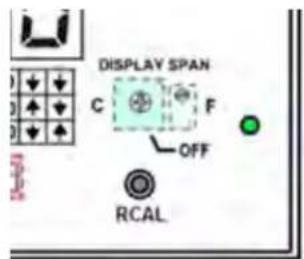
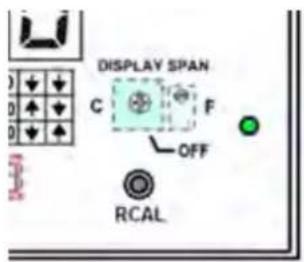
Used to adjust the digital readout of the 3740 meter independently of the analog signal when not in the "OFF" position. After setting the analog FS output signal level, the user rotates the Display SPAN Coarse controls and adjust the Display "F" control for proper engineering units display. Example: if the unit is connected to a 2.500 GPM flow transducer – adjust the analog output for maximum full scale analog output. Once achieved, rotate the Display "C" control from "OFF" to approximately 2.500 on the display. Use the Display SPAN "F" control for fine adjustment of the readout.
text_image
DISPLAY SPAN C F OFF RCALDisplay Coarse Span - 16 position switch to adjust wide zero authority Display Fine Span - 25 Turn potentiometer for fine span control of analog signal Display “OFF” – switch position “F” – “OFF” which disables the Display Span feature
3 CONTROLS (cont.)
Analog Control Settings
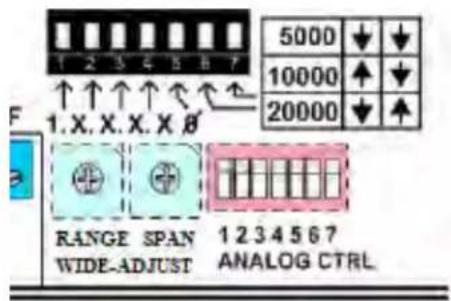
Analog Control - 7 position switch configures the main parameters of the AC Signal conditioner for required output voltage level, low pass filter characteristics and input signal sensitivity level.
text_image
5000 10000 20000 RANGE SPAN 1 2 3 4 5 6 7 WIDE-ADJUST ANALOG CTRL1 - 5 VDC Output - UP sets the analog output FS to 5 VDC, DOWN is 10 VDC
2 - Not Used
3 - 8/32 Hz - UP selects 8 Hz filter. DOWN selects 32 Hz filter
4 - 8/2 Hz - UP selects 8 Hz filter. DOWN selects 2 Hz filter
5 - SENSITIVITY A - UP selects 0.25 - 10.0 V, DOWN selects 0.05 - 2.0 V
6 - SENSITIVITY B - UP selects 0.25 - 10.0 V, DOWN selects 1.0 - 40.0 V
7 - SENSITIVITY C - UP selects 0.25 - 10.0 V, DOWN selects 5.0 - 250.0 V
With all of the switches in the up position, the unit will have the following settings:
• The full scale analog output will be 5.000 VDC
- The selected analog output - low pass filter will be set for 8 Hz
- Input voltage sensitivity detect (least positive value of wave shape) is 0.25 to 10V .
Analog Control Settings for Conditioner Configuration
| ↑ | Function | Down ↓ |
| 5 | 1 - VDC OUT | 10 |
| 2 - not used | ||
| 8 Hz | 3 - FILTER | 32 Hz |
| 8 Hz | 4 - FILTER | 2 Hz |
| .25-10 | 5 - SEN A | .05-2.0 |
| .25-10 | 6 - SEN B | 1.0-40 |
| .25-10 | 7 - SEN C | 5.0-250 |
Analog Control Settings (red switch)
The 7 position front panel analog control switch will configure the signal conditioning section of the meter. The position of the switches will depend on the type of sensor, it's parameters and the expected analog output signal Full Scale level - along with the output signal's 3db roll-off response characteristics.
CONTROLS (cont.)
Input Frequency Range & Span Wide-Adjust Controls
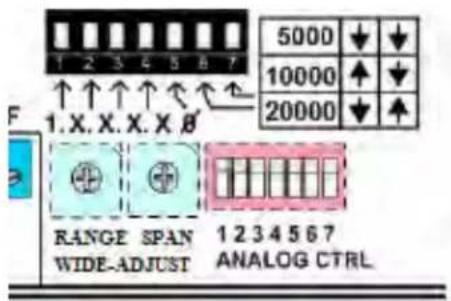
Two rotary control switches are used to set the nominal input frequency range of the input signal. Ranges are 250 Hz to 128 KHz. Full Scale which corresponds to the of the analog output signal of the 3740 meter - which in turn affects the digital readout for engineering unit's adjustments.
text_image
5000 10000 20000 1.X.X.X.X.B RANGE SPAN 1234567 WIDE-ADJUST ANALOG CTRLRange Wide-Adjust - 10 position switch to adjust input range full scale - 250 Hz .... 128 KHz
Span Wide-Adjust - 16 position switch to adjust range authority between the selected ranges
Due to multiple amplifier stages within the 3740 instrument, attention to the proper gain setting and understanding of the sensor inputs should be reviewed to produce a linear-amplified analog output signal and display reading.
The Range & Span Wide-Adjust– gain control (as shown in the front panel diagram) amplify the incoming conditioned signal by incremental steps. Each step is positioned so the front panel accessible Coarse and Fine Span potentiometer controls overlap each step to provide a continuous linear gain of the signal from 250 Hz to 128 KHz full scale. Below is a table of each wide gain steps, indicating the nominal low and high input signal range per position – full scale in HERTZ to the meter.
| Range Wide-Adjust Switch Position | Recommended Display Setting for Hz Reading | SPAN-Low Hz | SPAN-High Hz |
| 0 – 250 | 5000 | 165 | 340 |
| 1 – 500 | 5000 | 325 | 680 |
| 2 – 1K | 10000 | 650 | 1360 |
| 3 – 2K | 20000 | 1300 | 2700 |
| 4 – 4K | 5000 | 2600 | 5400 |
| 5 – 8K | 10000 | 5200 | 10800 |
| 6 – 16K | 20000 | 10400 | 21700 |
| 7 – 32K | 5000 * | 20800 | 43500 |
| 8 – 64K | 10000 * | 41600 | 87000 |
| 9 – 128K | 20000 * | 83200 | 174000 |

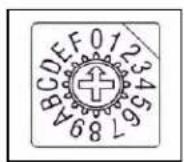
Range Wide-Adjust - 10 Position switch for adjustment of the full scale frequency input range. Also sets the 80% value for the RCAL switch. X2 gain per step
Span Wide-Adjust - 16 Position switch for adjustment of the frequency input between the Range Wide-Adjust switch position. Approx. X 4.8% gain change per step.
Note: Recommended display setting is for Engineering Units readout in Hertz. To maximize the analog signal amplitude, independent display adjustment can be used. Range Wide-Adjust switch setting may change to achieve maximum analog signal amplitude.
* dummy zero digit can be enabled to provide full display representation.
3 CONTROLS (cont.)
Fine Zero, Coarse Span and Fine Span Adjustments
Front panel potentiometer controls for the fine adjustment of the zero and gain setting of the analog output signal of the 3740 meter. The controls are present when the front panel is re-installed for user fine tuning adjustment as needed to maintain calibration of the measurement once the unit has been configured via the analog controls.

text_image
FINE ADJUST ZERO SPAN C F C F 1 2 ↑ ↑ 1.X. ZER WIDEFine Zero - 25 Turn potentiometer for fine balance control of analog signal
Coarse Span - 22 Turn potentiometer adjustment for analog control of gain
Fine Span - 25 Turn potentiometer adjustment for analog control of gain
Remote Calibration
text_image
DISPLAY SPAN C F OFF RCALR CAL Remo te / Reference Calibration - Momentary switch - when depressed connects an internal clock reference to the SPAN circuit as a reference to set or check calibration of the 3740 unit. R CAL can also be activated via the rear panel connection when Remote CAL is connected to logic common. R CAL frequency is determined by the setting of the Wide Range control switch and will represent 80% of the setting.
4. CALIBRATI ON - 2 Point - with known input
This section contains the instructions for calibrating the 3740. Reference the description of the instrument front-panel and Analog Controls for initial setup. To perform calibration, proceed as follows.
(a) Connect Power, Sensor and Analog terminals as required. Apply power. The front-panel digital display should light indicating the application of the AC input power. Allow 10 minutes of warm up for stabilization of the instrument and sensor. Remove the front panel cover of the 3740 unit which is held in place by the two small Phillips screws.
(b) Position the front panel switches to the desired settings for the application. Refer to Section 3 for details.
(c) Center the Fine Zero and Span potentiometers as needed by rotating the potentiometers fully CW (Coarse is 22 turns, Fine is 25 turns), then reverse direction - CCW (Coarse 11 turns and Fine 13 turns) to obtain mid-authority of the controls. Typically this is done on initial calibration. When recalibrating for minor adjustments this may not be required.
(d) With a known Zero (or ± Signal input shorted together) Adjust Fine Zero for the Zero position reading on the display or the desired analog output signal. Note: Display can be adjusted independently to the analog signal when the Coarse Display control is not in the “OFF” position.
(e) Apply a known frequency or sensor input to the ± signal inputs, typically at full scale or nominal measurement range of the sensor input. Adjust the 10 position rotary Range Wide-Adjust Control switch (left switch) to bring the readout of the instrument near your measurement point. Use the Span Wide-Adjust – 16 position rotary switch (right switch) to bring the reading closer to your final value. Use the Coarse and Fine SPAN potentiometer controls to set the reading to your calibrated value.
(f) Return the input signal to the Zero position in step (d) and re-adjust the Zero controls as needed to obtain the proper reading (or analog signal) for the application's zero position.
(g) Apply the known full scale frequency from the sensor. Re-Adjust the Coarse Span and Fine Span controls, as needed, for precise engineering units reading on the display as well as the analog output desired.
(h) Repeat Steps (f) and (g) to obtain proper measurement readings since the Gain - Span controls will affect the Zero amplification of the input signal.
(i) Re-install the front panel. Fine Span and Zero controls are accessible with front panel installed.
(j) Use the RCAL button to activate the internal clock frequency for future reference as a means of verification of the calibration. Input signal should be in the zero position when performing RCAL calibration activation.
Absolute Calibration
In step (e) instead of using a “known frequency input” the 3740 unit can generate an internal clock frequency when the RCAL (remote calibration) button, is pressed or activated via the rear panel. This reference clock will switch in a fixed frequency to the front end stage of the conditioner which will represent 80% of the full scale value of the position set by the Range Wide-Adjust switch. This value can be fine adjusted using the potentiometer controls as needed to set a specific value. For frequency positions, refer to the Range Adjust switch position reference in section 3.
Tech Tip for the Frequency Conditioner
The 3740 Frequency Panel meter and conditioner has selectable low pass filter settings which are configured via the Analog Control Switch located behind the front panel of the instrument. The proper filter setting will depend on the application and the dynamic response needed for the analog output signal. Use the following table as a guide in determining the most appropriate Range and Filter setting. The table is referenced by the expected stability / AC content “bleed through” from the input signal when at low frequency levels. Utilizing a 9 pole filter enhances the analog tracking of the incoming frequency signal to very low levels compared to traditional F/V converters. Note the FAST signal output is always present on J3-3.
Filter Setting effect per Input Range for low end stability of the analog output signal Input Level - 50 mV P-P Sine Wave: Output - +/ 5 mV signal content level (0.1% FS) (x = unusable)

Filter Setting
| 2 Hz | 8 Hz | 32 Hz | Fast | |
| 0 250 | 10 | 40 | 175 | x |
| 1 500 | 10 | 36 | 160 | x |
| 2 1000 | 10 | 34 | 150 | x |
| 3 2000 | 10 30 | 136 | 810 | |
| 4 4000 | 10 | 26 | 125 | 680 |
| 5 8000 | 10 | 22 | 115 | 600 |
| 6 16000 | 10 | 22 | 100 530 | |
| 7 32000 | 10 | 22 | 90 | 480 |
| 8 64000 | 10 | 22 | 175 | 950 |
| 9 128000 | 10 | 22 | 340 1900 |
Range Fullscale in Hertz
Low End Input in Hertz
Calculating the electrical / engineering units output of the FREQUENCY sensor:
Typically this is a straight forward representation of Input Frequency in HERTZ to the value to be displayed in engineering units. Some difficulty will arise when calculating RPM when using a gear other than 60 Tooth gear since this type of gear is directly associated with HERTZ to RPM. The formula to establish this value is:
$$ \mathrm{RPM} \times \text { Number of Gear Teeth in one Revolution } \div 6 0 = \text { HERTZ } $$
Example: 8000 RPM x 60 Tooth Gear ÷ 60 = 8000 Hertz
$$ 8 0 0 0 \mathrm{RPM} \times 3 0 \text { Tooth Gear } \div 6 0 = 4 0 0 0 \text { Hertz } $$
The HERTZ value is then compared to the Wide Range Chart in the Section 3 for proper “Range” selection for the input as well as the RCAL value as a reference for proper calibration of the meter.
5. FUSE REPLACEMENT
Should you suspect a blown fuse proceed as follows.
WARNING
Installation, operation and maintenance of this instrument must be performed by qualified personnel only. The National Electrical Code defines a qualified person as “one who has the skills and knowledge related to the construction and operation of the electrical equipment and installations, and who has received safety training on the hazards involved.”
a) Disconnect all power sources and cables connected to the instrument before servicing the instrument.
b) On the rear panel remove the (2) clamp slide retaining screws and remove the clamp slides from both sides of the instrument. Next remove the (4) corner screws that retain the rear panel to gain access to the instrument.
c) Open the rear panel and replace the fuse(s) as required, replace only with same type T Slow Blow, 1A, 250V (Littelfuse 218001.HXP, 1 A). The fuseholder wire conductors are appropriately labeled "L" for Line and "N" for Neutral on both halves of each of the fuseholder wires. When reassembling the fuseholder(s) make sure "L" and "L" are connected together and "N" and "N" labeled wires are connected together properly.
d) Mate the rear panel to the enclosure and replace the clamp slides back in position and secure the clamp slides with the (2) screws previously removed from the instrument. Next, replace the (4) corner screws to secure the rear panel and ensure that all screws have been adequately tightened.
e) Power ON the instrument with the appropriate power cord and verify the instrument is functioning properly before reconnecting the instrument to your installation.
WARNING
For continued protection against risk of fire or shock replace only with the same type and rating of fuse.
ADVERTENCIA
Do not replace fuse again if failure is repeated. Repeated failure indicates a defective condition that will not clear with replacement of the fuse. Refer condition to a qualified technician.
ADVERTENOA
Product Warranty and Repair
Daytronic Corporation warrants its products to be free from defects in material and workmanship, under normal and proper use in accordance with our instructions, for the period of one year for date of shipment. Our liability under such warranty or in connection with any other claim relating to the products shall be limited to, at our option, the repair or replacement of any products or parts or components thereof which are returned to us freight prepaid and which are defective in material or workmanship or the refund of the purchase price to the Buyer.
ANY PRODUCT FOUND TO BE DAMAGED THROUGH CUSTOMER NEGLIGENCE OR MISUSE MAY BE EXCLUDED FROM ANY AND ALL POLICIES CONTAINED IN THIS DOCUMENT.
ALL EQUIPMENT TO BE REPAIRED OR REPLACED UNDER WARRANTY MUST BE RETURNED TO THE FACTORY. Before returning a product or products for any reason, the customer must call Daytronic Customer Support Services at (937) 866-3300 to request a RETURN MATERIAL AUTHORIZATION (RMA). Once the customer has provided the
necessary information and has been assigned a specific RMA, the product(s) in question may be returned to Daytronic by shipping it
Daytronic Corp., 1000 New Durham Road, Edison, New Jersey 08818 Daytronic Customer Service: 1-800-668-4745 service@daytronic.com

DAYTRONIC
Daytronic Corporation Dayton OH USA
www.Daytronic.com
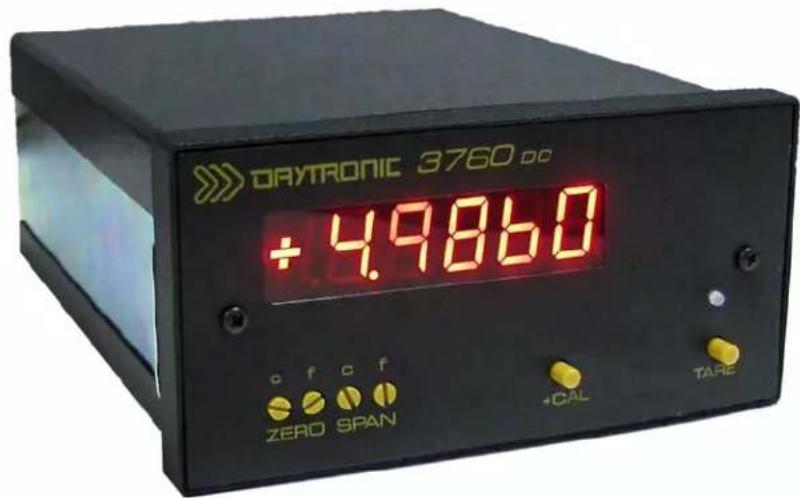
3700 SERIES
"P" Option
ANALOG PEAK CAPTURE
INSTRUCTION MANUAL
text_image
OXYTRONIC 3760 DC +4.9860 c f c f ZERO SPAN +CAL TARE3700
Instrument Series
3700 SERIES
"P" Option
ANALOG PEAK CAPTURE
INSTRUCTION MANUAL
1. General Description
The "P" option of the 3700 Series Meter is an added function card which provides the ability of the meter to capture and hold + Peak, -Peak, Max-Min or TIR value that originates from the base 3700 instrument. Any 3700 (except Horsepower 3741) can accommodate the "P" option. Peak Mode signals are captured in real-time analog capacitive memory and are available for display and analog output monitoring. Only one of the following four separate modes can be configured for the Peak Capture operation.
PEAK MODE
Description
| + PEAK | Captures and holds the most positive measurement signal in the positive quadrant |
| - PEAK | Captures and holds the most negative measurement signal in the negative quadrant |
| MAX + MIN | Captures and holds the sum of the MAXIMUM and MINIMUM signal values |
| TIR | Captures and holds the difference in the Positive and Negative Peak values only in the positive signal quadrant of the measurement |
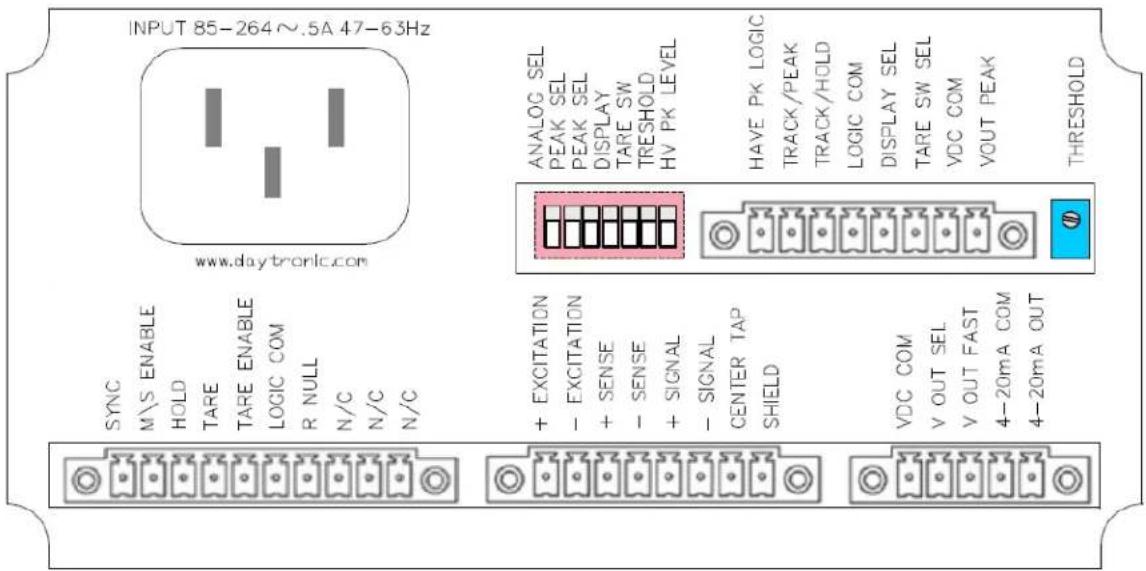
Peak functions are configured using the rear panel dip switches and connector terminals as illustrated in figure 1. Dip switch configuration enables various features - front panel TARE push button function, Peak Mode selection, Analog signal source of either the Fast or Select signal from the main 3700 unit, and Threshold detection levels for Have Peak Capture and logic triggering.
Rear panel connector terminals are used for remote control using logic switches or PLC type I/O control to activate / reset meter functions. Logic I/O signals for Peak Arming and Clearing (tracking) of the Peak capture value, switching the display from Live to Peak, Have Peak output and front panel enabling of the TARE switch for Peak/Reset of the captured value. The resultant analog captured signal is available via the "PEAK" connector terminal as noted in section 3 - Connections.
Fig. 1 3700P Peak Capture Option - Rear Panel Layout
text_image
INPUT 85-264~.5A 47-63Hz www.daytronic.com SYNC M/S ENABLE HOLD TARE TARE ENABLE LOGIC COM R NULL N/C N/C N/C ANALOG SEL PEAK SEL PEAK SEL DISPLAY TARE SW TRESHOLD HV PK LEVEL HAVE PK LOGIC TRACK/PEAK TRACK/HOLD LOGIC COM DISPLAY SEL TARE SW SEL VDC COM VOUT PEAK THRESHOLD + EXCITATION - EXCITATION + SENSE - SENSE + SIGNAL - SIGNAL CENTER TAP SHIELD VDC COM V OUT SEL V OUT FAST 4-20mA COM 4-20mA OUTThreshold adjustment potentiometer located to the right of the Peak I/O connection is used for level adjustment of the "Have Peak" detection around the input signal's Zero level. This adjustment is used to prevent low-level signal content from triggering an inadvertent "Peak Hold". Adjustment level is viewable from the front panel (SW 6 Down) and is adjustable from 1 to 8% of full scale.
2. DIP Switch Configuration
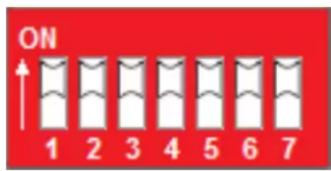
Located on the rear panel above the main board connections, the 7 position dip switch configures the PEAK functions of the meter. The Default position of the switch is in the UP (ON) position as noted in the table below.
text_image
ON 1 2 3 4 5 6 7Viewed from the rear. Switch "Rocker" in the UP position, is ON and considered the Default function as described below.
Default Position - Switches are all "ON" (UP)
| Analog Signal Source | FAST analog signal response from main 3700 |
| PEAK Mode | + PEAK Mode of operation, see Fig 4 |
| Display Reading | LIVE measurement signal is displayed |
| Front Panel TARE | Normal TARE switch operation |
| Peak Capture | 1% of Full Scale between Live and Peak level detection |
Switch #
Function
| 1 | ANALOG SIGNAL SOURCESelects FAST or SELECTED analog signal source from the main 3700 unit. |
| 2 | PEAK MODEUsed with switch 3 for PEAK Mode function - +PEAK, -PEAK, MAX+MIN, TIR |
| 3 | PEAK MODEUsed with switch 2 for PEAK Mode function - +PEAK, -PEAK, MAX+MIN, TIR |
| 4 | DISPLAYSelects LIVE Reading or PEAK Reading for the front panel display |
| 5 | FRONT PANEL TARE SWITCHSelects the front panel TARE switch for TARE or PEAK/RESET function |
| 6 | PEAK THRESHOLD DISPLAY ADJUSTSwitches the front panel display to adjust the level for HAVE PEAK THRESH |
| 7 | HAVE PEAK DETECTAnalog delta detection level for PEAK capture detection - (Backout level 1% o |
Switch # Default - UP (ON)
DOWN (OFF)
| 1 | FAST Analog Signal | SELECT Analog Signal (low pass filtered selected) per main analog controls of the 3700 base unit. | |||
| 2 | + PEAK - UP |  | 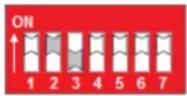 | * see note | |
| - PEAK - DOWN | |||||
| MAX + MIN - UP | |||||
| TIR - DOWN | + PEAK | MAX + MIN | |||
| 3 | + PEAK - UP | 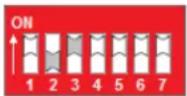 |  | * see note | |
| - PEAK - UP | |||||
| MAX + MIN - DOWN | |||||
| TIR - DOWN | - PEAK | TIR | |||
| 4 | LIVE display | PEAK Display | |||
| 5 | Front Panel TARE - normal operation | Front Panel TARE used for PEAK / RESET | |||
| 6 | Standard Run-Time Operation | Selects THRESHOLD display adjustment | |||
| 7 | 1% Full Scale Peak "Backout" Detect | 0.1% Full Scale Peak "Backout" Detect | |||
* Note: When in the Max-Min or TIR mode, the signal may over-range due to the sum of the +/- Peak captured signals being greater than full scale. Nominal capture level should be in the area of 50% full scale or less.
Functional Block Diagram of the PEAK switch settings

flowchart
graph TD
    A["3700 Main Unit's Signal conditioned Analog Signal (0 - ±5 or ±10 Vdc)"] --> B["FAST"]
    B --> C["Switch #1"]
    C --> D["MODE Selection Switch #2 & 3"]
    D --> E["PEAK Option"]
    E --> F["TARE Switch"]
    F --> G["BACKOUT Level for Peak Detect"]
    G --> H["Threshold Potentiometer"]
    H --> I["LIVE Value"]
    I --> J["Switch #4"]
    J --> K["Switch #6"]
    K --> L["3700 Display"]
    M["Front Panel TARE Switch Push - Push"] --> N["NORMAL"]
    N --> O["Switch #5"]
    O --> P["PEAK-TRACK"]
    P --> Q["Switch #7"]
    Q --> R["1% Backout Level for Peak Detect"]
    R --> S[".1%"]
    S --> T["Threshold Potentiometer"]
    T --> U["PEAK Value"]
    U --> V["NEAR"]
    V --> W["Analog Amplitude Level"]
    X["PEAK Analog Output (0 - ±5 or ±10 Vdc)"] --> Y["NEAR"]
3. PEAK Interface I/O Connections
Pin assignments for the 3700P board's 8-pin I/O connector (shown in Fig. 1) functional description
Pin Number
Function
| 1 | Output | HAVE PEAKOutput Logic Signal, indicates a Peak has been detected. |
| 2 | Input | TRACK or PEAKInput Logic Signal to Clear (Track) or to Arm for a Peak capture function |
| 3 | Input | TRACK or HOLDInput Logic Signal to HOLD the Peak reading. Must be in Track Mode to clear Peak (Pin 2 false, not grounded) |
| 4 | LOGIC COMMONCommon for Logic signal activation | |
| 5 | Input | DISPLAY - LIVE or PEAK ReadingInput Logic Signal to select Live Reading or Peak Reading for front panel display |
| 6 | Input | FRONT PANEL TARE for Display of PEAK or LIVE signalInput Logic Signal to use the front panel TARE switch for PEAK or LIVE display reading |
| 7 | ANALOG COMMONCommon for analog signal reference | |
| 8 | Output | PEAK ANALOG SIGNALAnalog Output - Holds PEAK analog value when in PEAK mode; follows analog input continuously when in TRACK mode. Full scale level is determined by the 3700 main units output selection - +/- 5V or +/- 10V. |
4. Setup conditions for the "P" option and TARE switch operation
When the "P" option is installed - the front panel "TARE" Push/Push switch can be configured to operate in three separate function modes for local operation depending on the DIP switch selection and/or logic inputs selected.
Function Mode of the TARE switch
- Standard "TARE" capability for normal operation - Will TARE the input measurement of the analog signal and the display to "Zero". LED will light GREEN when active and within normal offset TARE range. Remote TARE via the rear connector functions in a similar fashion.
- PEAK capture or Track mode - When the TARE switch is depressed, the meter will be in "track" mode following the input signal amplitude. When the TARE switch is released (outward position) the meter is armed and ready to capture the Peak as configured by Dip Switch 2 & 3.
- Used for local control of the Front Panel display -TARE button depressed will display the PEAK reading. Outward position of the switch will display the "Live" reading. Switch action will not perform a Peak reset operation, this must be done via connection terminal 2's activation for TRACK - PEAK.
Note: If the Peak option is installed in a Model 3740 Frequency conditioner, the TARE mode switch functionality is only accessible via the rear logic connector input
Function Mode Setup and configuration details
1. Standard TARE operation Default condition
- Dip Switch 4 & 5 UP, Peak Input connection Pin 5 and 6 are not used. Remote connections for remote TARE are available. Refer to the main meter manual for details.
2. Front Panel Peak Reset Function
- Dip Switch 4 & 5 DOWN or Switch 4 DOWN and Input connection Pin 5 Grounded (True). Input connection Pin 6 can not be used. Remote TARE function operates via main meter connector.
3. Local Display of Live or Peak Reading
- Dip Switch 4 & 5 UP, Input connection Pin 5 not utilized, Pin 6 is grounded (True). Remote TARE function operates via main meter connector.
4. Interface I/O Connections
Interface Connector Operation
The 8 pin rear connector provides remote access to the Peak operational parameters. All logic I/O are negative true signals - logic common when active or true.
Functional diagrams of the logic for enabling PEAK functions are shown in Fig. 3 thru 6. Typically usage of the I/O connections are for remote control of the application sequence to "handshake" with a controller for proper operation of the measurement capture and resetting process of the PEAK Mode function.
Display Source and Front Panel TARE button mode of operationl are available to provide remote control enabling of the local operation of the 3700 Peak features as configured by the 7 postion dip switch settings as described in section 2.
Analog Output of the PEAK Mode function is available. The Analog level is dependent on the configuration of the main analog controls of the 3700 unit... +/- 5 V or +/- 10 Vdc full scale level. Analog output, when in the HOLD or PEAK capture mode, is accomplished using capacitive memory and will have a "leak" rate of 1 millivolt per 10 seconds.
Fig. 2
Track/PEAK Via External Command (Switch, Open Collector Transistor, or TTL Logic)
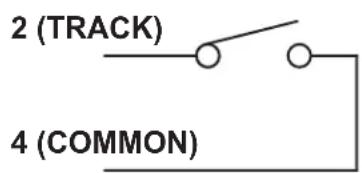
text_image
2 (TRACK) 4 (COMMON)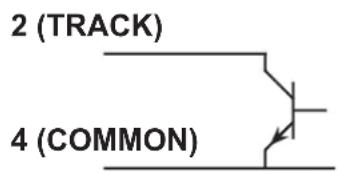
text_image
2 (TRACK) 4 (COMMON)
flowchart
graph TD
    A["2 (TRACK)"] --> B["TTL"]
    C["4 (COMMON)"] --> B["TTL"]
+ PEAK Mode - captures and holds the most positive signal amplitude of the measurement within the positive quadrant of the signal. Switch 2 UP - Switch 3 UP
Fig 3

line
| Level | Input | Output (+ PEAK) | |-------|-------|-----------------| | Zero Level | - | - | | P1 | Peak | + Peak | | P2 | Peak | + Peak | | Logic Inputs | Track / PEAK | - | | Logic Inputs | Track / HOLD | - | | Logic Outputs | Have PEAK | - |- PEAK Mode - captures and holds the most negative signal amplitude of the measurement within the negative quadrant of the signal. Switch 2 DOWN - Switch 3 UP
Fig 4

line
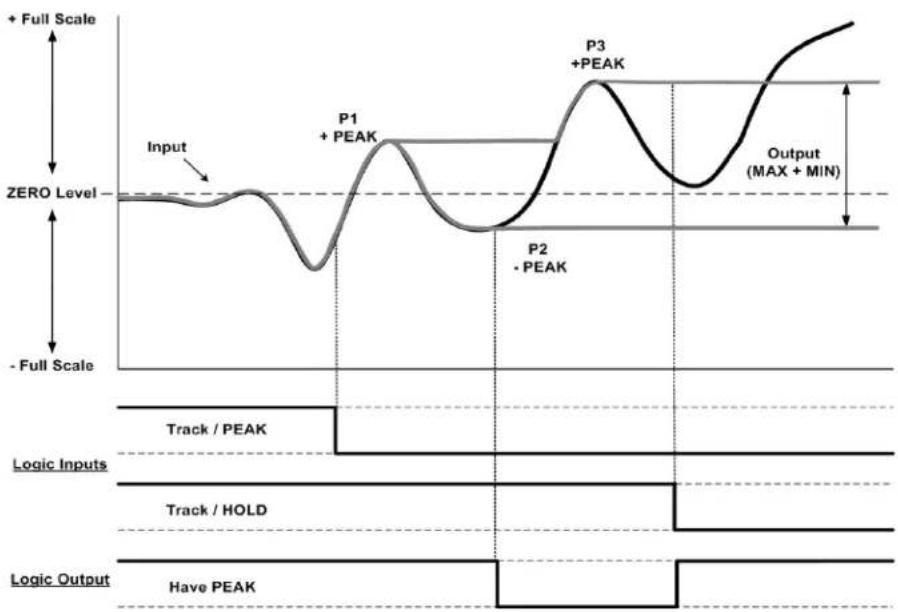
| Signal | Value | |-----------------|-------| | Input | Zero Level | | Output (-PEAK) | Peak | | P1 | Peak | | P2 | Peak | | Logic Inputs | Track / PEAK | | Logic Inputs | Track / HOLD | | Logic Output | Have PEAK |MAX + MIN Mode - captures and holds the most positive signal and the most negative signal amplitude in the positive and negative quadrants of the measurement resulting in an absolute analog output signal. Switch 2 UP - Switch 3 DOWN
Fig 5
line
| Phase | Value | |-------------|-------| | Input | Zero Level | | P1 | Peak | | P2 | Peak | | P3 | Peak | | Output | MAX + MIN |Note: When in Max-Min mode the analog signal may overrange due to the summing of the + Peak and - Peak captured signal.
TIR Mode - captures and holds the most positive signal and the most negative signal amplitude in the positive quadrant of the measurement. Switch 2 DOWN - Switch 3 DOWN
Fig 6

line
| Phase | Value | |-------------|--------| | Input | Peak | | P1 | + PEAK | | P2 | - PEAK | | P3 | + PEAK | | P4 | - PEAK | | Output (TIR)| TIR |Threshold Level Adjust and Have Peak Detection (Backout)
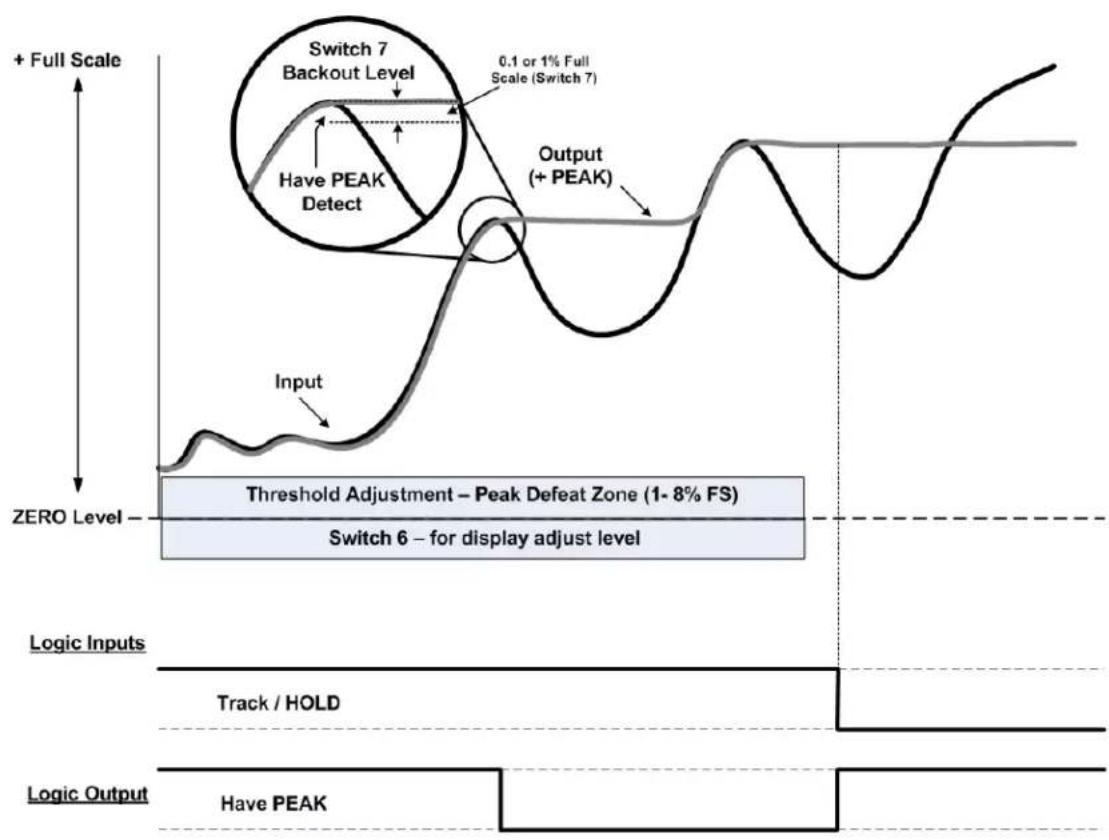
Switch 6 - PEAK THRESHOLD DISPLAY ADJUST on the rear panel dip switch: When in the DOWN position, will switch the front panel display to provide level adjustment of the Threshold Potentiometer to provide a "No Peak Zone" around the Zero level. This adjustment is used to eliminate false Peak Captures around the zero measurement level as shown in the gray area of the Fig. 7 below. Adjustment is from 1 to 8% of the full scale reading.
Switch 7 - HAVE PEAK DETECT (Backout): Selects the amplitude of the "delta" between the live signal and the detection of a Peak value which has occurred. Sometimes referred to as "Backout" as shown in the circle graphics below. This level sets the recognition level of when a PEAK has occurred. Level is 0.1% (DOWN) or 1.0% (UP) of full scale. Setting will depend on signal dynamic content and the sharpness of the peak event. Placement of Switch 1 (Analog Signal Source) will also have an affect on this setting due to the analog filtering response of the FAST or the SELECTED analog signal as determined by the response time of the FAST signal for the 3700 Model or the Select Analog Filter per the Analog Control switches located on the main 3700 unit.....switch 3 & 4.
Fig 7
flowchart
graph TD
    A["Input"] --> B["Threshold Adjustment – Peak Defeat Zone (1-8% FS)"]
    B --> C["Switch 6 – for display adjust level"]
    D["+ Full Scale"] --> E["0.1 or 1% Full Scale (Switch 7)"]
    E --> F["Have PEAK Detect"]
    F --> G["Output (+ PEAK)"]
    G --> H["Track / HOLD"]
    I["Logic Inputs"] --> J["Logic Output"]
    J --> K["Have PEAK"]
Quick Set-up operation
1. Determine the Peak Mode required
Configure switch settings 2 and 3 for the proper function.
2. Select FAST or SELECT signal source
Configure switch 1 - FAST will be the highest dynamic capture. SELECT will reflect the low pass filter selection on the main 3700 Analog Controls.
3. Select the Front Panel Operation of the TARE Switch
Configure switch 5 - Normal operation of the TARE switch to provide "zero-ing" of the analog signal or to use the TARE switch as a front panel PEAK -TRACK "push-push" operation to place the 3700 unit is PEAK capture Mode or Reset the PEAK that has been held resulting in the display and analog output signal tracking the live input. Push IN - PEAK. Push OUT - TRACK.
4. Select the Operation of the Display
Switch 4 - Meter display can be configured for LIVE display or the PEAK capture value. If the unit is a "stand-alone" meter with the local operator providing the Peak Reset, as mentioned in step 3, then Switch 4 should be DOWN for PEAK display operation. Remote control of the display can also be done via the I/O connections with an external switch or controller providing the Display control function.
5. Determine how much "threshold" level is needed for your application
Switch 6 will display the threshold value (1 to 8%) for a bi-polar "no peak detection zone" around the Zero measurement level. This adjustment is normally in the 5% area, but can be adjusted depending on the application and how much PEAK defeat / rejection is needed. When finished with the potentiometer adjustment, return Switch 6 to the UP position.
6. Determine the need for remote control of your application
Refer to the Connector I/O interface in section 3 for setup functions of the 8 positon terminal connector. Switch function 4 and 5 can be remotely controlled. All other switch settings are typically configured during initial setup of the 3700 unit and will not be changed.
Peak Capture Response
The Peak Capture of the analog signal is performed using “capacitive” memory. This technique is very repeatable and does not involve digital sampling errors. It does, however, result in a millivolt/second “leak rate” after the initial “capture” which varies depending on the Peak Capture cycle rate, amplitude of the analog signal and the wave shape of the signal being monitored. Below are the leak rate values as expressed in percent of full scale using defined parameters of a single square wave pulse input of 1, 10 and 100 milliseconds in duration at the full scale value of 5.000 V.
Square Wave Full Scale Error after Peak was captured
| Pulse Width | 10 mS | 100 mS | 1 Sec | |
| 1 mS | 0.10% | 0.15% | 0.20% | |
| 10 mS | 0.05% | 0.07% | 0.10% | |
| 100 mS | 0.02% | 0.02% | 0.06% |
Typical Leak rate graph with a 100 mS pulse example

line
| Time | Millivolt Leakage | | -------- | ----------------- | | 0 mS | 0.0 | | 10 mS | -0.5 | | 100 mS | -1.5 | | 1.0 Sec | -3.0 | | 10 Sec | -7.5 |Page left blank
Copyright © 2015, Daytronic Corporation. All rights reserved.
No part of this document may be reprinted, reproduced, or used in any form or by any electronic, mechanical, or other means, including photocopying and recording, or in any information storage and retrieval system, without permission in writing from Daytronic Corporation. All specifications are subject to change without notice.

DAYTRONIC
Daytronic Corporation