Ultimate IGS12T-PRIMED-EACH - Speaker Crestron - Free user manual and instructions
Find the device manual for free Ultimate IGS12T-PRIMED-EACH Crestron in PDF.


User questions about Ultimate IGS12T-PRIMED-EACH Crestron
0 question about this device. Answer the ones you know or ask your own.
Ask a new question about this device
Download the instructions for your Speaker in PDF format for free! Find your manual Ultimate IGS12T-PRIMED-EACH - Crestron and take your electronic device back in hand. On this page are published all the documents necessary for the use of your device. Ultimate IGS12T-PRIMED-EACH by Crestron.
USER MANUAL Ultimate IGS12T-PRIMED-EACH Crestron
Ultimate 12 in. In-Ground Subwoofer, Primed Paintable, Single
The Crestron® ULTIMATE IGS12T-PRIMED-EACH in-ground subwoofer made by Origin Acoustics provides the full impact of your music outdoors with rich and deep bass. Its compact, watertight enclosure installs beneath the ground's surface, affording a virtually hidden appearance with just the port tube and dome visible. The port tube is topped with a primed, paintable dome-shaped cap, providing a subdued appearance.

In the Box
1 ULTIMATE IGS12T-PRIMED-EACH
Additional Items
1 Dome
2 Wire Nuts

Installation
Prepare the Site
- Choose a location that will not flood and where the port tube and dome will not be affected by an in-ground sprinkler system. The installation must comply with all national and local codes.
Figure A
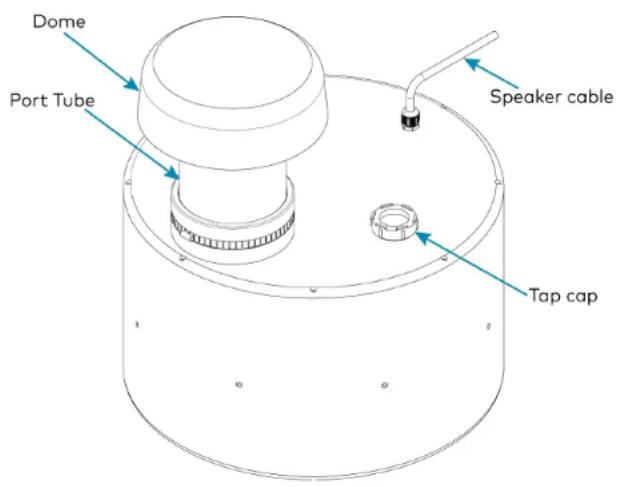
text_image
Dome Port Tube Speaker cable Tap capULTIMATE IGS12T-PRIMED-EACH
Quick Start
Ultimate 12 in. In-Ground Subwoofer, Primed Paintable, Single
- Dig a hole with minimum dimensions to bury the speaker:
. Height: 15-17 in. (381-432 mm)
. Diameter: 22 in. (559 mm)
- Prepare a flat bed for the subwoofer that is free of voids and large rocks (see Figure B).
NOTE: The hole must be deep enough to allow a 2 to 4 in. (51 to 102 mm) layer of material (sand and gravel, mix or other material approved by local codes) and position the base of the speaker 15 to 17 in. (381 to 432 mm) below ground level.

text_image
Figure B 4 in. (102 mm) 15-17 in. (381-432 mm) 2-4 in. (51-102 mm) 2 to 4 in. (51 to 102 mm) Sand and Gravel Mix per Local Code for DrainageULTIMATE IGS12T-PRIMED-EACH
Quick Start
Ultimate 12 in. In-Ground Subwoofer, Primed Paintable, Single Mount the Subwoofer Figure C
- Remove the tap cap and rotate the dial to the 70V/100V or 8 Ohm tap selection and then firmly reinstall the tap cap (see Figure A).
NOTE: Make sure the desired tap selection is done on the subwoofer before lowering it into the ground. - Place the subwoofer into the ground.
NOTE: Ensure that the bottom of the dome is about 4 in. (102 mm) above ground level – it should not be buried or set at ground level. - Dig a 5 in. (127 mm) deep trench to run the speaker cable in. Make sure trenching is done as per local codes.
Connect the Speaker Cable
- Run the speaker cable (not included) from the audio source to the wire nut, observing all appropriate local codes.
- Run the speaker cable from the speaker location to the wire nut, observing all appropriate local codes.
NOTES:
- The speaker includes a hardwired direct-burial speaker cable.
-
Make sure that the positive cable is attached to the red connection, and the negative cable is attached to the black connection.
-
Combine and twist the positive (+) cables together in a clockwise motion. Repeat this step for the negative (-) cables.
-
Secure the two cables together using the wire nuts ensuring that NO COPPER is exposed.
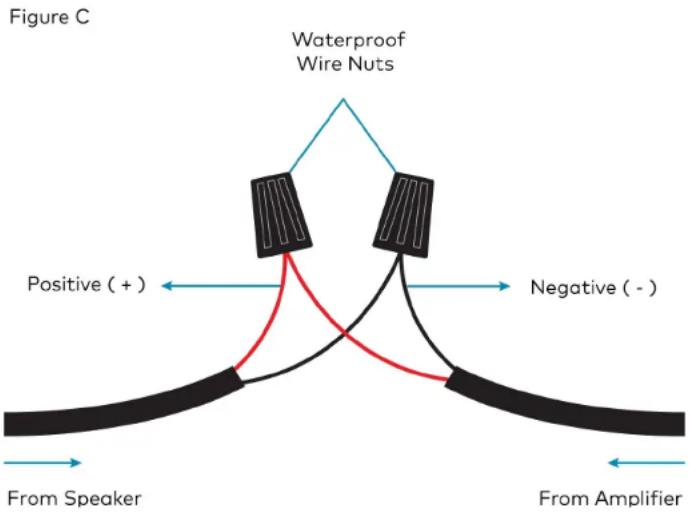
text_image
Figure C Waterproof Wire Nuts Positive (+) Negative (-) From Speaker From AmplifierULTIMATE IGS12T-PRIMED-EACH
Ultimate 12 in. In-Ground Subwoofer, Primed Paintable, Single
Quick Start

Visit the Product Page
Scan the QR code to visit the product page. ULTIMATE IGS12T-PRIMED-EACH

https://www.crestron.com/model/6511871
Additional Information
Original Instructions
The U.S. English version of this document is the original instructions. All other languages are a translation of the original instructions.
Regulatory Model: M202046012
Crestron product development software is licensed to Crestron dealers and Crestron Service Providers (CSPs) under a limited nonexclusive, nontransferable Software Development Tools License Agreement. Crestron product operating system software is licensed to Crestron dealers, CSPs, and end-users under a separate End-User License Agreement. Both of these Agreements can be found on the Crestron website at www.crestron.com/legal/software_license_agreement.
The product warranty can be found at www.crestron.com/warranty.
The specific patents that cover Crestron products are listed at www.crestron.com/legal/patents.
Certain Crestron products contain open source software. For specific information, visit www.crestron.com/opensource.
Crestron and the Crestron logo are either trademarks or registered trademarks of Crestron Electronics, Inc. in the United States and/or other countries. Origin Acoustics is either a trademark or registered trademark of Origin Acoustics, Inc. in the United States and/or other countries. Other trademarks, registered trademarks, and trade names may be used in this document to refer to either the entities claiming the marks and names of their products. Crestron disclaims any proprietary interest in the marks and names of others. Crestron is not responsible for errors in typography or photography.
©2021 Crestron Electronics, Inc.
Doc. 9041A
08/18/21